
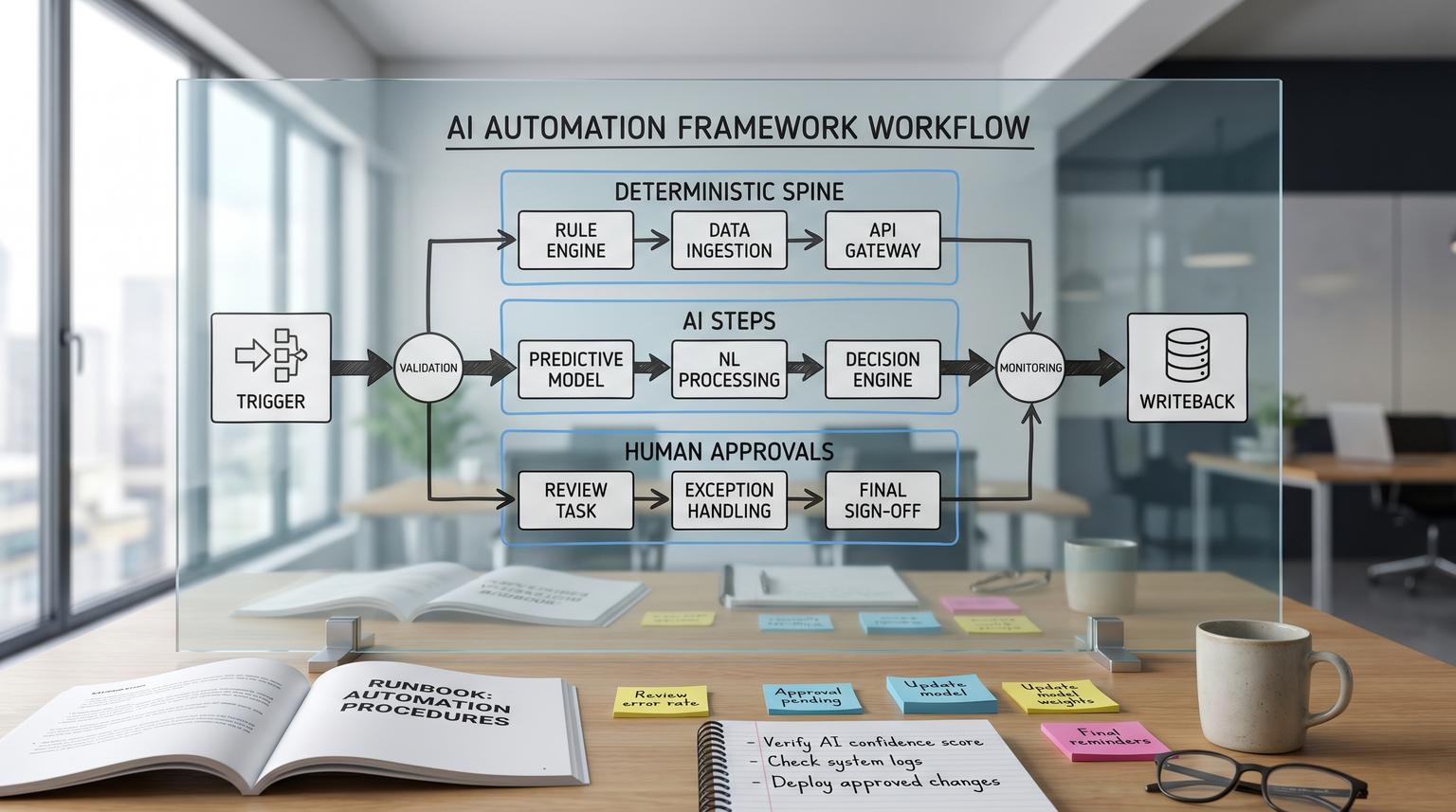
Businesses are past the point of asking whether to use AI, the real question is how to embed AI into day-to-day operations without creating unpredictable behavior, data risk, or brittle glue code. This pillar introduces an AI automation framework you can reuse to design, deploy, and govern AI steps inside real workflows, from lead-to-cash and support triage to document processing and analytics.
It is written for owners, ops leaders, RevOps and marketing teams, and technical operators who want AI to ship work reliably, with clear approval paths, measurable quality, and production-grade monitoring.
Key takeaways:
- Design AI as modular steps inside a deterministic workflow spine, not as a single chat prompt.
- Pick the right execution mode (rules, agent, or hybrid) based on constraints like verifiability, blast radius, cost, and latency.
- Standardize core AI step types (classification, extraction, summarization, routing, and tool-based action generation).
- Build governance in from day one: prompt/version control, data boundaries, tool scopes, approvals, and audit logs.
- Ship with evaluation gates (test sets + acceptance criteria) then monitor drift, cost/latency, and failure modes in production.
Quick start
- Inventory one workflow where humans currently interpret messy inputs (emails, PDFs, call notes, tickets) and then update systems like CRM, billing, or helpdesk.
- Decompose the workflow into steps and label each step as deterministic (rules/API) or probabilistic (AI) with clear inputs and outputs.
- Choose 1-2 AI step types (for example: classify intent then extract fields) and require structured outputs with schema validation.
- Add an exception queue with confidence thresholds, policy checks, and human approvals for high-blast-radius actions.
- Create an offline test set (20-100 examples) with pass/fail acceptance criteria tied to business outcomes.
- Implement versioning for prompts and workflow logic, then deploy to staging before production with a rollback plan.
- Turn on monitoring for quality drift, cost per completed task, latency, retries/timeouts, and fallback activation.
An AI Automation Operating System is a repeatable way to embed AI steps (classification, extraction, summarization, routing, and tool-driven actions) inside business workflows while keeping outputs testable, costs bounded, and risky actions governed. In practice, you build a deterministic orchestration layer that calls AI only where variability demands it, validates outputs before writebacks, routes exceptions to humans, and adds version control, evaluation gates, and monitoring so the automation remains reliable as volume and teams scale.
Table of contents
- Why most AI automations fail in production (and how to prevent it)
- The AI Automation OS in one picture: deterministic spine, AI muscles, human nerves
- How to decide: rules, agentic, or hybrid execution
- Core AI step types you can standardize across workflows
- A checklist for designing AI steps that are testable and safe
- Reference architecture: multi-stage workflows with validations and approvals
- Governance building blocks: prompts, data boundaries, tool scopes, and auditability
- Human-in-the-loop that scales: exception queues and mid-workflow approvals
- Testing and evaluation: offline gates, rubrics, and regression checks
- Monitoring and incident response: drift, cost, failure modes, and runbooks
- Common implementation patterns across teams (RevOps, support, finance, and analytics)
- When to bring in ThinkBot Agency
Why most AI automations fail in production (and how to prevent it)
Most AI workflow demos fail when they hit real operations for three reasons:
- They treat AI as a single call instead of a sequence of steps with validations, retries, and fallbacks.
- They skip the exception path, so messy inputs cause silent stalls or incorrect writebacks.
- They lack an operating model for versioning, approvals, monitoring, and incident response.
A production-ready approach assumes variability and designs for it. That means: deterministic orchestration for flow control, explicit AI steps for interpretation, deterministic validation before any system change, and human checkpoints where risk is high. This is the same hybrid posture recommended when comparing deterministic workflows and agentic reasoning loops: most real systems should compose both rather than choosing one extreme (source).
If you are already building in n8n, start by grounding the concept in your existing automation approach, then layer AI as controlled steps. For baseline patterns, see how ThinkBot frames workflow automation as an operational system, not a one-off script.
The AI Automation OS in one picture: deterministic spine, AI muscles, human nerves
Think of an AI Automation Operating System as three layers:
- Deterministic spine (orchestrator): triggers, branching, retries, timeouts, idempotency, API calls, database writes, and audit logs.
- AI muscles (probabilistic steps): classification, extraction, summarization, routing, and tool selection or action generation.
- Human nerves (control points): exception queues, approvals, edits, escalations, and feedback capture.

This layering aligns with reference architectures that recommend multi-stage workflows where AI inference is interleaved with business logic and validations, instead of brittle glue code (source). In the no-code world, tools like n8n often play the orchestrator role, while models and AI services become pluggable components.
When you build it this way, you gain three compounding benefits: step-level observability, safer changes through modular swapping, and faster debugging because failures are localized to a stage rather than hidden in a monolithic prompt.
How to decide: rules, agentic, or hybrid execution
Before you pick models, start with execution mode. The practical decision is not "AI vs automation", it is "agentic reasoning loops vs deterministic workflows" (source). Use deterministic workflows when requirements are stable and testable, use agentic loops when interpretation and adaptation dominate, and use hybrid when you need both.
Decision factors that actually matter
- Input variability: clean form submissions vs messy emails and PDFs.
- Output verifiability: can you validate correctness with deterministic checks?
- Blast radius: read-only insight vs writing to CRM, billing, or customer messages.
- Volume and cost sensitivity: high-volume tasks need tight cost control.
- Latency targets: human-facing flows often need p95 latency goals.
- Compliance and audit burden: can you show why a decision occurred?
For document-heavy operations, a common enterprise move is to use AI to normalize or prefill, then progressively codify stable cases into deterministic rules, and always validate AI outputs before downstream effects (source). Think of AI as a component whose outputs should become more constrained over time, not as a permanent free-form brain.
If you want a practical example of hybrid design in revenue workflows, ThinkBot shows how AI triage pairs with validation and CRM updates in lead-to-customer automation.
Core AI step types you can standardize across workflows
To make AI repeatable, standardize the "verbs" your workflows use. Most business automations only need a handful of AI step types, each with clear input/output contracts:
1) Classification
Use when you need a label to drive a branch: intent, sentiment, priority, spam likelihood, compliance category, ticket type. Classification is easiest to evaluate offline because correctness is often clear with a labeled set (source).
2) Extraction
Use when you need structured fields from unstructured content: invoice totals, contract dates, lead fields, call action items. Always pair extraction with schema validation and deterministic cross-checks (for example: totals add up, vendor exists, date formats match your system).
3) Summarization
Use to compress context for humans or downstream systems: call notes, ticket threads, RFP emails. Treat summaries as drafts unless you can anchor them to source context and validate required fields.
4) Routing (AI as dispatcher)
Routing is a classification variant that selects the downstream specialized workflow, tool, or sub-agent. It is useful for triaging mixed inputs and for controlling cost by deciding when to use heavier processing (source).
5) Tool-based action generation (AI selects functions)
This is where AI starts acting. The model selects a tool and generates structured arguments that a deterministic runner executes. Treat this boundary as a security and governance control point, with schema-based tool contracts and strict authorization (source).
For teams implementing these patterns in n8n, ThinkBot has hands-on examples of structured AI steps, validation gates, and approvals in structured workflows.
A checklist for designing AI steps that are testable and safe
Use this checklist when you are deciding whether an AI step belongs in a workflow and how it should be constrained. It is especially helpful before you allow any writebacks to core systems.
AI step design checklist
- Define the step outcome in one sentence, including what changes in the business system.
- Rate input variability (low, medium, high) and list the top 5 edge cases you expect.
- Decide whether correctness can be validated deterministically, and specify the validator.
- Set a maximum acceptable failure rate, and define what "failure" means for this step.
- Set latency targets (p95) and a max cost per completed task for the full workflow run.
- Classify blast radius: read-only, draft-only, internal write, external customer-facing, financial/irreversible.
- Choose execution mode: deterministic, agentic, or hybrid, and explicitly mark which substeps are AI vs rules.
- Require structured output (JSON) with a versioned schema and an "unknown" or "needs_review" state.
- Add routing rules: confidence threshold, policy checks, and a default route to a human queue.
- Define the safe failure mode: no-op, draft-only, or escalate, never silent partial writes.
This checklist is adapted from decision guidance that emphasizes constraints like cost, latency, compliance, and blast radius when choosing deterministic vs agentic approaches (source).
Reference architecture: multi-stage workflows with validations and approvals
A reliable pattern is a multi-stage workflow that separates preprocessing, inference, post-processing, routing, and writeback. This makes each AI step replaceable and independently testable while keeping error handling explicit (source).

Multi-stage workflow specification template
Workflow:
Trigger:
Stages:
1) Preprocess (deterministic)
- normalize inputs
- enrich metadata
- classify doc/type/language
- validations:
2) Extract (AI or service)
- output schema:
- validators:
3) Summarize/Decide (AI)
- required fields:
- confidence scoring:
4) Route (deterministic)
- if confidence >= X and risk <= Y -> auto
- else -> human review queue
5) Writeback (deterministic)
- idempotency key:
- audit log fields:
Fallbacks:
- timeout/retry policy per stage
- safe failure mode:
Use this spec in planning docs and tickets. It forces clarity on validators, confidence thresholds, and the safe failure mode. It also improves handoffs between ops stakeholders and implementers because every stage has an owner and observable outputs.
If your workflows regularly write to CRM or external APIs, pair this template with ThinkBot's guardrail thinking in safe writes to avoid duplicates, partial updates, and hard-to-reverse changes.
Governance building blocks: prompts, data boundaries, tool scopes, and auditability
Governance is not a policy document, it is workflow nodes, permissions, and logs. A governance-first architecture treats ownership, decision rights, and escalation paths as design requirements, especially for sensitive workloads (source).
1) Prompt and version control as a release process
Prompts behave like code. You need version pinning by environment, immutable history, and fast rollback. One practical pattern is a prompt delivery layer where applications fetch an approved prompt by name and environment so production behavior is controlled outside of ad hoc edits (source).
2) Data handling and privacy boundaries
- Define allowed data sources per workflow (CRM fields, ticket text, attachments) and block everything else.
- Minimize payloads, redact sensitive fields when not required, and define retention for prompts, inputs, and outputs.
- Log access with trace IDs so you can answer: who processed what, when, and under which version.
3) Tool scopes and least privilege
Tool calling is where "excessive agency" shows up. Enforce least privilege on tools, allowlists for actions, and strict output validation before execution. The OWASP LLM Top 10 is a useful risk taxonomy to translate into workflow controls like schema validation, tool permissions, budget caps, and blocked paths (source).
4) Approval paths and separation of duties
Design approvals as first-class nodes, not as informal Slack checks. For high-blast-radius actions (payments, customer sends, contract changes), require an explicit approval token that is logged and auditable.
Human-in-the-loop that scales: exception queues and mid-workflow approvals
Human-in-the-loop (HITL) should not mean humans redo everything. In production, it is exception-path design: humans focus on unclear, high-risk, or policy-sensitive cases while routine work flows automatically (source).
Exception queue design principles
- Define exception reasons (missing data, conflicts, policy violations, ambiguity, novel cases).
- Store full context needed to decide: inputs, AI outputs, validator results, related records.
- Offer three actions: approve, edit/correct, reject/escalate.
- Set queue SLAs (time-to-triage, time-to-close) and alert when breached.
- Capture feedback as labels to grow your evaluation set and improve routing.
Mid-workflow approvals (approve the action, not just the final text)
A powerful pattern is pausing execution before a sensitive tool call, then resuming with a human decision. Some agent graph frameworks implement this as an explicit interrupt that checkpoints state so approvals can take minutes or days without losing context (source).
In business terms: review the exact writeback payload before it hits the CRM, accounting system, or email platform. This is often safer than approving an AI-generated summary because it controls the actual side effect.
For support operations specifically, you can combine routing, structured extraction, and an exception queue. ThinkBot covers where these capabilities should live in the stack in support ops.
Testing and evaluation: offline gates, rubrics, and regression checks
Without evaluation, you cannot confidently change prompts, models, or routing logic. A practical approach combines offline and online evaluation. Offline evaluation tests against a fixed dataset before deployment, and online evaluation measures live performance after release (source).
Build a workflow test set tied to business outcomes
- Start with 20-50 real examples per route or document type.
- Include edge cases on purpose: missing fields, conflicting records, unusual formats, sarcastic replies, forwarded threads.
- Store ground truth labels for classification and expected fields for extraction.
- Define acceptance criteria per step and end-to-end (for example: correct route, schema-valid extraction, no prohibited writes).
Rubric-based evaluation for subjective outputs
For summarization and agent reasoning, build analytic rubrics with multiple criteria types (binary checks for hard requirements, ordinal ratings for quality) and keep the rubric stable across versions. Rubric-based approaches are a stronger foundation than vague "helpfulness" ratings, and they make regression testing more meaningful (source).
Regression checks before every production change
- Pin the current production prompt and model as the baseline.
- Run the test set for the proposed change, compare pass rates and failure types.
- Only ship if hard failures do not increase, and business metrics (like exception rate) are expected to improve.
- Record version identifiers in logs so you can tie outcomes to releases.
Monitoring and incident response: drift, cost, failure modes, and runbooks
Production AI needs observability for behavior, cost, and correctness. For multi-step workflows, structured logs and custom metrics are essential so you can separate model issues from orchestration or API failures (source).
What to monitor (minimum viable dashboard)
- Quality: online check pass rate, sampled human review outcomes, schema error rate.
- Drift: routing distribution shifts, rising exception reasons, new edge case clusters.
- Cost: tokens per completed task, cost per successful run, per-route spend.
- Latency: end-to-end p50/p95 and per-step latency spikes.
- Reliability: retries, timeouts, fallback activation rate, downstream API error rates.
- Safety: blocked tool calls, policy violations, approval overrides.
Incident playbook for agentic and AI-driven workflows
When something goes wrong, you need a fast path to contain harm. An agent incident runbook adapts standard SRE response with explicit detection, containment, rollback, and post-mortem tailored to systems that can take actions unattended (source).
- Detect: alert on cost spikes, schema failures, drift, elevated exception queue rate, and customer-impact signals.
- Contain: flip to safe mode (draft-only), disable write tools, force approvals, and throttle triggers.
- Roll back: revert workflow/prompt version, restore known-good routing thresholds, and undo writebacks where possible.
- Post-mortem: capture the timeline including tool calls, root cause (prompt/model/data/tool), blast radius, and corrective controls.
For day-to-day ops, this incident posture pairs well with the idea of bounded autonomy and durable records per run so operators can inspect what happened and resume safely (source).
Common implementation patterns across teams (RevOps, support, finance, and analytics)
The operating system stays the same, but the workflows differ by data sources, validators, and blast radius. Here are patterns ThinkBot implements frequently.
RevOps: lead intake -> enrichment -> routing -> CRM updates
Typical AI steps include spam detection, intent classification, and enrichment summarization. Deterministic steps include dedupe, field normalization, and idempotent upserts. This is a natural fit for hybrid automation because routing and interpretation are variable but CRM writebacks must be strict. See a full lead-to-cash blueprint in lead-to-cash.
Marketing ops: draft -> brand checks -> approvals -> platform sync
AI drafts accelerate campaigns, but you need brand and compliance checks plus an approval gate before anything goes to customers. Strong patterns include UTM enforcement, audience segmentation rules, and versioned sync into marketing platforms. ThinkBot shows how approvals and CRM sync prevent off-brand surprises in marketing ops.
Finance ops: invoice and contract processing with controlled writebacks
Extraction is the primary AI step. Deterministic validators are non-negotiable: totals, vendor match, PO rules, and required fields. High-risk actions (posting bills, scheduling payments) should require approval. ThinkBot covers governed AP automation in invoice automation and contract-to-record patterns in contract processing.
Analytics: AI enrichment -> curated tables -> dashboards and alerts
AI can tag tickets by theme, classify churn risk, or extract reasons from notes. Deterministic steps should handle incremental sync, data quality checks, and anomaly alert thresholds. A strong approach is to separate enrichment from reporting so you can re-run enrichment when prompts change without breaking dashboards. ThinkBot demonstrates this pattern in BI pipelines.
Rules vs AI vs hybrid: a practical comparison table
Use this table when stakeholders ask "why not just use AI" or "why not just use rules". The most reliable answer is usually hybrid, with AI limited to interpretation and drafts, and deterministic automation enforcing policy and data integrity (source).
| Dimension | Rules-based automation | LLM-based automation | Recommended hybrid move |
|---|---|---|---|
| Input variance | Best for stable templates and known formats | Best for messy language, changing layouts, ambiguous requests | Use AI to normalize, then rules to enforce |
| Auditability | Explicit logic, easier to explain and reproduce | Weaker unless you log prompts, versions, and validations | Add deterministic validators and strong audit logs |
| Unit cost at scale | Low and predictable | Can be high with large context and retries | Route only ambiguous cases to AI, cap budgets |
| Failure tolerance | Great when tolerance is low and correctness is clear | Best for drafting, summarizing, and first-pass triage | Gate writebacks, keep AI draft-only where needed |
When to bring in ThinkBot Agency
If you want this operating system implemented, not just documented, ThinkBot Agency builds production-grade automations with custom workflows, CRM and email integrations, API connections, and AI steps designed for governance. We are active in the n8n community and deliver systems that include validation, approvals, monitoring, and rollback from day one.
If you are planning an AI-enabled workflow that writes to customer-facing channels or core systems like a CRM, finance platform, or helpdesk, book a working session to map the stages, validators, and governance controls, then leave with a build plan you can execute. Book a consultation.
To see examples of real integrations and automation builds, you can also review our recent work.
FAQ
What is an AI Automation Operating System?
A practical operating system is a reusable way to embed AI steps inside deterministic workflows with governance. It includes standard AI step types, validators, exception queues, approvals, prompt and workflow versioning, evaluation gates, monitoring, and incident response so AI behavior stays predictable at scale.
How do I know which steps should use AI vs rules?
Use AI when interpretation and variability are high, and use rules when requirements are stable and correctness is easy to validate. Most production workflows are hybrid: AI classifies, extracts, or drafts, and deterministic logic validates, routes, and controls writebacks based on risk.
What are the safest AI steps to deploy first?
Start with low-blast-radius steps like classification for routing, summarization for internal notes, or extraction that only creates drafts. Add deterministic validators and a human approval gate before any workflow writes to customer channels, billing, or core CRM fields.
How do we test AI workflow changes without breaking production?
Create an offline evaluation set of real examples with acceptance criteria, then run regression tests for every prompt, model, or routing change. Deploy to staging first, pin versions in production, and keep a rollback path so you can revert quickly if exception rates or quality drift increases.
What should we monitor once AI is live in workflows?
Track quality signals (schema errors, human review outcomes), drift (route distribution changes), cost per completed task, latency p95, reliability (timeouts, retries), and safety signals (blocked tool calls, approval overrides). Tie metrics to workflow versions for fast root cause analysis.
Can ThinkBot implement this in n8n with our CRM and email tools?
Yes. ThinkBot builds governed n8n workflows that integrate CRMs, email platforms, helpdesks, and internal systems through APIs, with AI steps for triage and extraction, deterministic validators, approval paths, and monitoring so the automation is safe to run at scale.
