
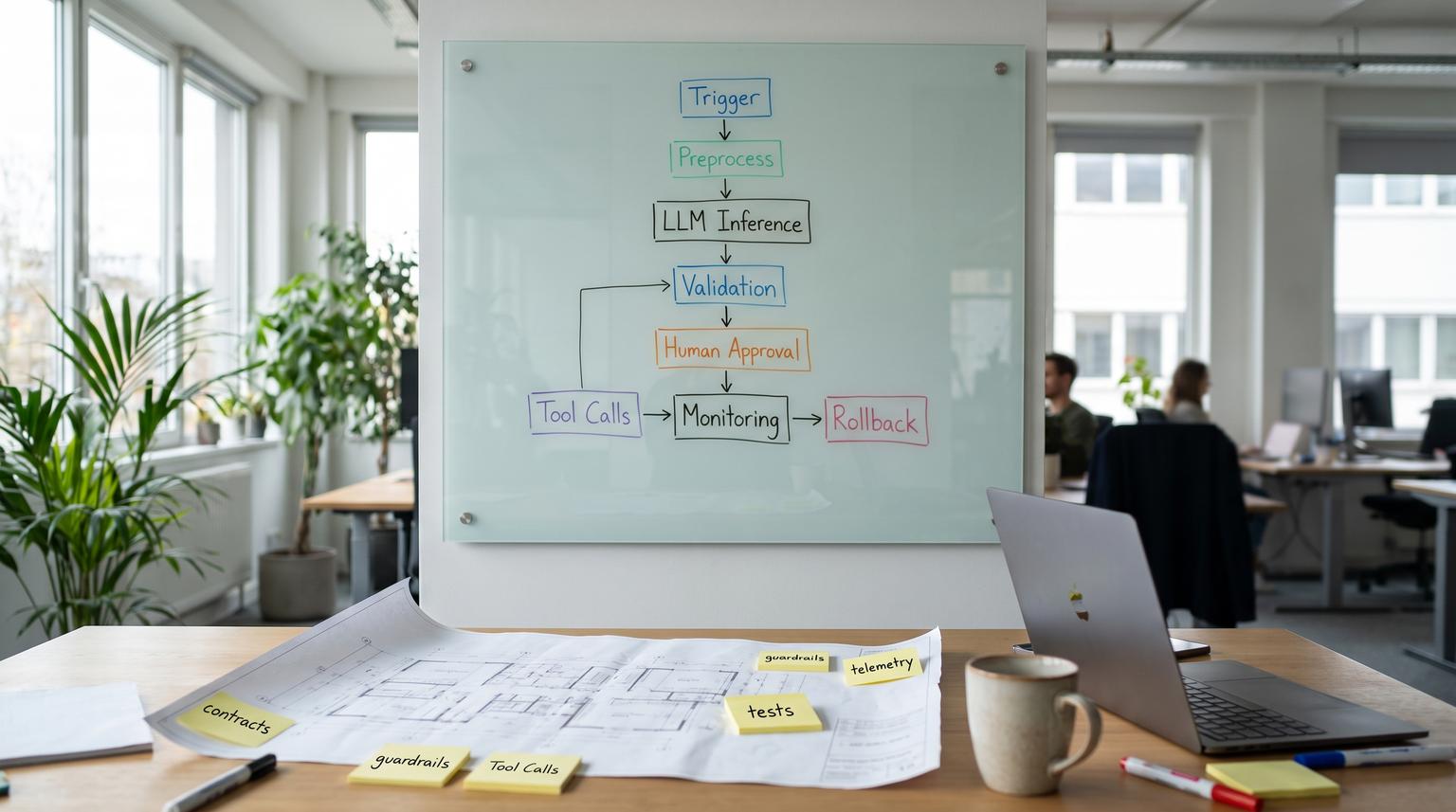
Most teams do not fail with AI because the model is weak. They fail because the workflow around the model is undefined, untested, unobservable, and hard to roll back. This pillar introduces an AI automation framework you can reuse across CRM, support, operations, and back-office processes to embed AI steps as reliable components with clear inputs, outputs, and safe failure modes. It is written for operators, RevOps leaders, marketing ops, and technical founders who need production-grade automation, not fragile experiments.
Quick summary:
- Design AI as a step inside a workflow, not a standalone chatbot, with explicit contracts and deterministic wrappers.
- Choose from a small pattern library (classify, extract, summarize, generate, route, and agentic execution) based on risk and failure cost.
- Use human-in-the-loop lanes for high-impact actions, with structured approvals and resumable state.
- Make reliability real: error taxonomy, idempotency keys, timeouts, and fallbacks for model and tool calls.
- Govern change with acceptance tests, prompt/model versioning, and fast rollback based on monitored signals.
Quick start
- Pick one workflow with measurable outcomes (for example: inbound lead triage, ticket routing, invoice capture) and map its current states and handoffs.
- Define the AI step as a contract: required inputs, output schema, confidence signals, and what happens on uncertainty or failure.
- Select the minimum AI pattern needed (classification, extraction, summarization, generation, routing, or agentic execution) and keep everything else deterministic.
- Wrap the AI call with preprocessing (validation, enrichment) and post-processing (schema checks, business rules, routing) using a consistent pipeline.
- Add human approval for any write to systems of record that is costly to undo (CRM stage changes, financial entries, customer-facing sends).
- Create a small golden set of real examples and write acceptance criteria that must pass before releasing prompt/model changes.
- Instrument monitoring: latency, cost, error classes, escalation rate, and edit distance between AI output and human final.
- Ship with version tags and rollback: pin model and prompt versions, stage rollout, and repoint to last known-good on regressions.
An AI automation operating system is a repeatable way to place AI into business workflows as governed, testable steps. You define where AI belongs (preprocess, inference, post-process), choose a pattern (classify, extract, summarize, generate, route, or agentic execute), and wrap it with guardrails: schema validation, confidence thresholds, human approvals, and error handling. You then evaluate with acceptance tests and monitor drift, cost, and quality so prompt or model updates are safe to roll back.
Table of contents
- Why AI automations break in production
- The operating system model: layers, contracts, and control flow
- A pattern library for AI steps inside workflows
- Workflow blueprint checklist for production AI
- Topology choices: chain, route, parallel, loop, hierarchy
- Human-in-the-loop lanes that keep automation controllable
- Risk and guardrails: common failure modes and mitigations
- Evaluation and release gates: acceptance tests and scorecards
- Monitoring for quality, drift, and cost
- Prompt and model versioning with rollback
- Implementation map: CRM, support, ops, and back office
- How ThinkBot Agency implements this in n8n and integrations
Why AI automations break in production
Most business workflows are deterministic at the edges and probabilistic in the middle. AI adds uncertainty in places where your business expects consistency: routing, field updates, approvals, and customer-facing messages. When teams bolt AI onto an existing process without changing the process design, they typically see four predictable problems:
- Unclear contracts: prompts accept messy inputs and return free-form text, so downstream steps guess what to do next.
- Silent failure modes: a model output looks plausible but is wrong, or a tool call partially succeeds and the workflow continues.
- No safe writes: AI writes to CRM, billing, or ticketing without idempotency, dedupe, and rollback, creating cleanup work.
- Unmanaged change: a prompt tweak or model swap causes regressions and nobody can attribute what changed.
This is why we recommend thinking in workflow primitives and reliability controls. If you want a concrete view of what breaks at system boundaries, use failure map thinking when AI touches CRMs and APIs.
The operating system model: layers, contracts, and control flow
A practical way to design AI in business workflows is to separate responsibilities into layers: preprocess, inference, and post-process/decisioning. This keeps deterministic steps (validation, enrichment, routing rules, writeback) outside the model call so the system stays debuggable and controllable. This layer model aligns with guidance on where AI belongs in architectures, including explicit preprocessing and post-processing around inference (AWS).
1) Preprocess: make inputs safe and complete
Preprocess steps are where most reliability is won: normalize text (strip email signatures), validate required fields, detect language, and enrich context (CRM lookup, customer tier, contract IDs, policy constraints). Do not pay tokens to have a model rediscover facts your systems already know. A practical pipeline skeleton is Trigger -> Preprocess -> LLM -> Tool Calls -> Postprocess -> Store/Log (DigitalOcean).
2) Inference: the AI step should be narrow
The model step should do one job that is hard to do deterministically, such as extraction from messy text, intent classification, summarization, or drafting. Keep the output structured whenever possible, with explicit fields and constraints so you can validate it.
3) Post-process and decisioning: turn outputs into safe outcomes
Post-processing validates the output schema, applies business rules, and decides the route: auto-apply, human review, ask for clarification, or fail closed. It is also where you cross-check model recommendations against authoritative sources before acting (for example, confirm inventory or customer status) (AWS).
A step contract template you can reuse
Use this spec when you add an AI step to any workflow. It forces clarity on inputs, outputs, decision rules, and what to log.
Workflow Step:
Layer: Preprocess | Inference | Post-process/Decision
Input contract:
Enrichment sources:
Model/prompt version:
Output contract:
Decision rules:
Failure modes:
Fallback:
Logging/audit:

A pattern library for AI steps inside workflows
You do not need a different strategy for every use case. Most business AI steps fall into a small set of patterns: classify, extract, summarize, generate, route, and agentic task execution. Routing is especially useful when multiple task types enter the same workflow because it avoids monolithic prompts by delegating to specialized downstream paths (AWS).
Classification (intent, priority, compliance risk)
Best for triage: spam vs real lead, billing vs technical ticket, high-risk vs low-risk request. Output should be a label plus confidence and an explanation string you can log.
Extraction (turn messy text into fields)
Best for invoices, contracts, call notes, RFP requirements, and support forms. Pair extraction with deterministic validation: required fields, allowed values, and cross-checks. This is the core of reliable AP and document workflows like invoice automation and contract extraction.
Summarization (reduce context and create handoff artifacts)
Best for meeting notes to CRM, ticket thread summaries, and daily ops digests. Summaries should be scoped, with explicit sections like decisions, risks, next steps, and open questions. For operational reporting, this pairs well with daily brief workflows like daily decision briefs.
Generation (draft content with constraints)
Best for emails, follow-ups, campaign copy, and RFP drafts. Generation is highest risk when customer-facing, so require brand voice constraints and approvals. For marketing workflows, governed generation plus approval gates prevents off-brand surprises (marketing ops).
Routing (LLM-powered switch/case)
Routing is an LLM step that interprets intent and delegates to a specialized workflow, tool, or agent. Treat routing output as a structured decision you can audit, and send low-confidence cases to a human triage queue (AWS). This pattern shows up in lead intake and support ops, including workflows like lead intake routing.
Agentic task execution (plan -> call tools -> verify -> checkpoint)
Agentic execution is appropriate when the work requires multiple tool calls and conditional logic, such as looking up records, creating tasks, updating CRM, and drafting messages. For long-running stateful processes, a graph-like orchestration approach with typed state, conditional edges, interrupts, and checkpoints improves recoverability and observability (arxiv).
Workflow blueprint checklist for production AI
Use this checklist when you want to move from a working demo to a reliable workflow that can run daily without constant babysitting. The stages align with a practical AI workflow skeleton (DigitalOcean).
- Define the trigger event and a dedupe key (email message-id, ticket id, form submission id).
- Normalize input (strip signatures, remove quoted threads, parse attachments).
- Enrich context (CRM account, lifecycle stage, customer tier, policy IDs, prior tickets).
- Select the pattern (classify, extract, summarize, generate, route, or agentic execution).
- Run the model with a structured output schema and explicit allowed values.
- Validate output: schema checks, required fields, and business rules (for example: totals match, stage transitions allowed).
- Decide route: auto-apply vs human review vs request clarification vs reject.
- Execute tool calls with idempotency keys and safe retries.
- Postprocess customer-facing text (formatting, tone constraints, required disclaimers).
- Persist results and traces (inputs, outputs, model_id, prompt_version, decision route).
- Emit metrics: latency, token/cost, error class, escalation rate, and throughput.
- Capture feedback: human edits, overrides, and downstream outcome signals.
Topology choices: chain, route, parallel, loop, hierarchy
Once you know the pattern, you must choose the workflow shape. A useful way to think about agent design patterns is on two dimensions: what kind of cognitive function you are trusting the model to do and what execution topology you are running (chain, route, parallel, loop, hierarchy) (arxiv). In business automation, topology determines coupling, debuggability, and recovery behavior.
| Topology | When to use | Reliability implication | Typical guardrail |
|---|---|---|---|
| Chain | Steps are sequential and dependent | Easier to debug, failures cascade | Per-step schema validation and checkpoints |
| Route | Many intents or task types | Misrouting risk | Confidence threshold and human triage queue |
| Parallel | Independent subtasks (extract + research) | Merges can conflict | Deterministic merge rules and per-branch timeouts |
| Loop | Repair and verify cycles | Cost blowups, infinite retries | Retry budget and stop conditions |
| Hierarchy | Manager delegates to specialists | Harder provenance across steps | Tool allowlists per role and audit trails |
Human-in-the-loop lanes that keep automation controllable
Human-in-the-loop (HITL) is not a failure of automation. It is a control system. The goal is to keep high-volume, low-risk work automated while forcing explicit decisions for actions that are expensive to undo. A proven pattern is a structured approval task that pauses the workflow, collects specific fields from an approver, then resumes based on approve/reject outcomes (Workato).
Where HITL belongs
- System of record writes: CRM lifecycle stage, opportunity amount, invoice/bill creation, refunds, subscription changes.
- Customer-facing sends: outbound emails, support replies, proposals, RFP responses.
- Policy or compliance risk: data sharing, contract clauses, pricing exceptions.
- Low-confidence decisions: routing uncertainty, extraction missing key fields, conflicting signals.
Make approval structured, not conversational
Approvals should be state transitions (pending -> approved/rejected/edited) with recorded notes and fields. This avoids free-form ambiguity and creates an audit artifact. In practice, this is how workflows like RFP automation stay safe while still moving fast.
Governance requires explicit roles
Oversight should define who owns the workflow, who approves which actions, and how monitoring and periodic review happen. This aligns with governance guidance that emphasizes defined roles, ongoing monitoring, and contingency processes for AI failures (NIST).
Risk and guardrails: common failure modes and mitigations
Designing guardrails is easier when you name failure modes and map each one to a mitigation and an escalation path. Start with an error taxonomy for AI and tool steps, then decide what is safe to retry versus what must fail closed (Inference Labs). Agent pipelines also need recovery primitives such as state, checkpoints, and safe replays to prevent duplicate actions (MightyBot).
Failure modes -> mitigations you can implement
- Misrouting (wrong label or destination) -> Add confidence threshold, send low-confidence to human triage, log routing decisions for review (AWS).
- Malformed structured output (bad JSON or missing fields) -> Schema validation, one repair attempt, then escalation to exception queue.
- Tool call duplicates (timeouts and retries cause double writes) -> Use idempotency keys per side-effecting action, pass request IDs through the stack (Inference Labs).
- Permission or policy violation (AI tries to access disallowed tools) -> Tool allowlists per route/node, enforce at orchestration layer, fail closed on violations.
- Cost runaway (loops, parallel fanout, oversized context) -> Retry budgets, stop conditions, cache common classifications, and enforce max context limits.
- Hallucinated facts in generated text -> Evidence gating (cite source records), cross-check against CRM/helpdesk, and require approval before sending.
Auditability as a guardrail
If you cannot reconstruct what happened, you cannot safely scale. An audit trail for LLM systems is a chronological ledger that links technical provenance (model, prompt, runs) to governance records (approvals, waivers) (arxiv). For business workflows, this means logging: inputs referenced, enrichment sources, model_id, prompt_version, decision route, and who approved any sensitive write.

Evaluation and release gates: acceptance tests and scorecards
Traditional testing confirms the workflow runs, not that it runs well. A production approach is to translate stakeholder goals into executable acceptance criteria, run them on a golden set, and block changes that do not meet thresholds (arxiv). In practice, teams combine offline golden datasets, automated evaluation pipelines, and production monitoring loops to catch regressions early (case study).
What to test (business-centric dimensions)
- Correctness: correct label, correct extracted fields, correct next action.
- Policy compliance: refuses disallowed actions, uses required disclaimers, no sensitive leakage.
- Completeness: required fields present, covers all questions, no missing steps.
- Tone and brand: consistent voice for outbound text, no risky phrasing.
- Operational constraints: latency, token usage, and cost per run within budget.
Release gates that match risk
Use stricter gates for higher-risk actions. For example, lead scoring may tolerate minor variance, but invoice creation cannot. This is the same mindset we apply in governed workflows like AP to QuickBooks where extraction, validation, and approvals define what is allowed to ship.
Monitoring for quality, drift, and cost
Once in production, you need signals that tell you when the system is drifting or failing. Monitoring should be tied to workflow outcomes, not just model metrics. Three practical loops:
- Quality loop: sample outputs, compare to golden set or human-reviewed results, track scorecard trends and escalation rate.
- Drift loop: watch changes in input distributions (new ticket categories, new product terms), rising uncertainty, and new failure classes.
- Cost loop: tokens per run, fanout count, loop retries, and tool call volumes.
In ops-heavy environments, monitoring should also include business KPIs: speed-to-lead, time-to-first-response, backlog aging, and rework rate. Predictive analytics workflows can feed these signals into proactive alerts, for example in delivery risk escalation systems.
Prompt and model versioning with rollback
Prompts are production artifacts. A one-line change can shift behavior as much as swapping a model, so prompts should be versioned, reviewed, and rollbackable with attributable change logs (LLMOps). A practical production method is to store prompts outside application code with immutable version IDs, pin environments (dev/staging/prod) and roll back by repointing the prod tag to a last known-good version in seconds (Arthur).
Minimum viable prompt registry
- Immutable prompt versions: prompt_name:v1, v2, v3.
- Environment labels: prod -> v3, staging -> v4.
- Telemetry: log model_id, prompt_version, policy_version for every run.
- Promotion gate: acceptance tests must pass before prod label moves.
- Rollback trigger: scorecard regression, spike in escalations, policy incident, cost spike.
Implementation map: CRM, support, ops, and back office
The same operating system applies across departments, but the integration touchpoints and approval points differ. Here are practical patterns and where to be careful.
CRM and revenue ops workflows
- Inbound lead triage: classify intent, enrich from CRM, route to owner and pipeline. Guardrails: dedupe keys, confidence thresholds, and safe writes. See practical routing and follow-up patterns in sales follow-up.
- Call and meeting notes to CRM: summarize plus extract action items, then propose field updates. Guardrails: approval before overwriting fields, track provenance. If you want a concrete blueprint, compare call-to-CRM approaches.
Support operations workflows
- Ticket routing: use routing pattern to send billing, bug, and access issues to specialized queues. Guardrails: low-confidence to triage, audit labels. Also decide where AI should live, inside the helpdesk vs an integration layer, based on control needs (support ops).
- Suggested replies: generate drafts with evidence from knowledge base and account context, then require agent approval before sending.
Operations and back-office workflows
- AP and invoicing: extraction plus validation, then approval, then accounting writeback. Guardrails: three-way match checks, idempotent writes, audit logs.
- Contracts and document processing: extract key clauses and entities, validate against allowed values, and route legal review for risky terms.
- RFP and questionnaire workflows: routing + retrieval + constrained drafting + approvals, with audit trails for what evidence was used.
How ThinkBot Agency implements this in n8n and integrations
ThinkBot Agency builds these systems as real workflows, not prototypes. We use n8n as an orchestration layer to connect CRMs, email platforms, helpdesks, data stores, and APIs, then insert AI steps only where they add leverage. The goal is repeatability: schema-first outputs, validation gates, exception queues, approvals, and telemetry so workflows are maintainable by ops teams. If you want examples of this approach in practice, our structured workflows guide shows how to turn common use cases into reliable pipelines.
If you want help designing your own operating system layer, here is the fastest path: book a consultation and we will map one workflow end-to-end, define contracts, guardrails, and an evaluation plan you can ship.
Prefer to vet execution capability first? You can also view our Upwork profile, where we are recognized as a top performer for automation and AI integration delivery.
FAQ
What is an AI automation framework in plain terms?
It is a repeatable method to add AI to workflows by defining input and output contracts, placing AI in the right layer (preprocess, inference, post-process), choosing the right pattern (classify, extract, summarize, generate, route, or agentic execution) and adding guardrails like validation, approvals, retries, and monitoring.
When should we use routing vs a single all-purpose agent?
Use routing when you have multiple task types entering one workflow. A router step classifies intent and delegates to specialized downstream flows, which reduces token waste and lowers failure risk compared to one giant prompt that tries to handle everything.
How do we keep AI from making unsafe CRM or accounting changes?
Require structured outputs, validate against business rules, and gate high-impact writes behind human approval. Use idempotency keys and dedupe rules so retries do not create duplicate records, and log every write with model and prompt version tags.
What is the minimum evaluation we need before shipping?
Create a small golden set of real examples, define acceptance criteria (accuracy, compliance, completeness, tone, latency, cost), and run it as a release gate for prompt or model changes. Then sample production traffic to detect drift and regressions early.
Can ThinkBot implement this across HubSpot, Salesforce, email, and support tools?
Yes. We build integration-first workflows that connect CRM, email platforms, helpdesks, and data sources, then add AI where it improves speed and quality. The focus is governed writeback, approvals, audit logs, and monitoring so it works reliably in production.
