
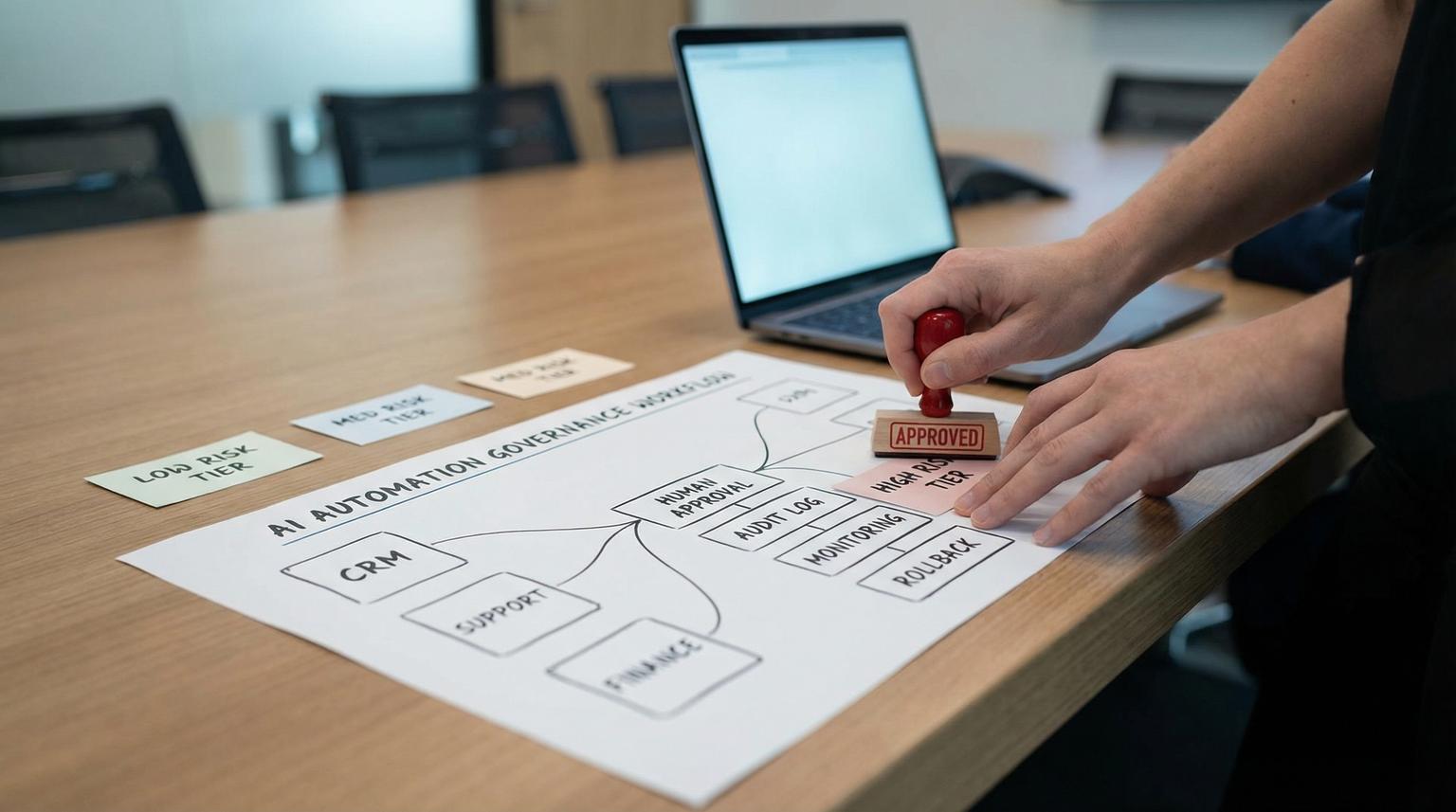
Most teams do not fail at AI because the model is not smart enough. They fail because they try to bolt AI onto messy processes without ownership, controls, or a way to keep results stable as inputs change. This playbook shows how to build AI steps into real workflows with AI automation governance from day one, so every output has a defined purpose, a review path, and a maintenance plan.
If you run ops, RevOps, support, finance, or you are a technical founder implementing automations with tools like n8n, Zapier, or Make, you will learn how to choose the right AI pattern, place it safely inside a deterministic workflow, and operate it like any other production system.
At a glance:
- Start with a workflow and a risk tier, not a model choice.
- Embed AI as bounded steps (classify, extract, summarize, generate, route, or act) inside an orchestrated process.
- Design human-in-the-loop approvals and exception queues that pause and resume cleanly.
- Use guardrails for data boundaries, least privilege tool access, and prompt injection resistance.
- Ship with acceptance tests, monitoring, and rollback so quality does not silently drift.
Quick start
- Pick one high-volume workflow where errors are tolerable with review, and define the business outcome and owner.
- Map the current process into steps with inputs, systems of record, and side effects (writes, emails, refunds, status changes).
- Add a risk tier (low/medium/high/regulatory) and decide where human approval is mandatory.
- Choose one AI pattern per step (classification, extraction, summarization, generation, routing, or agentic execution) and define an output contract.
- Implement the workflow in an orchestrator (for example n8n) so retries, idempotency, and audit logs live outside the model.
- Create a small golden dataset and run regression tests on every prompt/model change before promoting to production.
- Turn on monitoring for format adherence, cost per case, drift in inputs, and a kill switch for incidents.
A governance-first AI automation framework turns AI into a controlled component inside your business process. You start by selecting the right workflow based on volume, risk, and data readiness. Then you embed narrow AI steps (like extraction or routing) into a deterministic orchestrator, add human approval gates for high-impact actions, and enforce security boundaries around prompts, tools, and sensitive data. Finally, you keep performance stable with acceptance tests, monitoring, and clear ownership for changes and incidents.
Table of contents
- Why governance-first beats "AI-first" for business workflows
- The governance-first framework: 7 layers you can reuse
- Workflow-first architecture: orchestrators, agents, and where AI fits
- Choose the right AI pattern for each step
- Checklist: score a workflow before you automate it
- Design human-in-the-loop approvals and exception handling
- Security guardrails: privacy, access control, and prompt injection resilience
- Evaluation and regression testing: keep outputs stable as you iterate
- Monitoring and cost control in production
- Operationalize AI automations like business systems (ownership, change, rollback)
- Implementation patterns across teams (sales, support, finance, ops)
- How ThinkBot Agency helps teams ship reliable AI automations
Why governance-first beats "AI-first" for business workflows
In most companies, "AI automation" gets attempted in the most dangerous way: a chat interface or script is granted broad access, it produces plausible outputs, and it gradually becomes part of a critical process without auditability. That is how you get silent drift, inconsistent customer handling, and compliance surprises.
A governance-first approach flips the order:
- Workflow first: define the deterministic steps, data sources, and side effects.
- Controls second: define what the AI can see, what it can suggest, what it can do, and how humans intervene.
- Model last: choose the smallest capability needed to do the job and swap it later without rewriting the process.
This aligns with a lifecycle view of governance where strategy, impact assessment, implementation review, acceptance testing, operations, and continuous learning are treated as an operating discipline, not a one-time policy document, as described in this governance lifecycle model.
If you want background on why workflows and integration architecture matter as much as the AI layer, see our breakdown of an AI automation agency approach and how it changes day-to-day operations.
The governance-first framework: 7 layers you can reuse
Use this as the repeatable playbook to turn a human-driven process into an AI-assisted workflow without losing accountability.
Layer 1: Define the job to be done and the system boundary
Write one sentence for the job, and one sentence for what is out of scope. Example: "Triage inbound support tickets into the right queue and draft a reply." Out of scope: "Issue refunds." This prevents accidental scope creep into higher-risk actions.
Layer 2: Map the workflow as states and side effects
List the steps, where data enters, and where side effects happen (CRM writes, status changes, emails, approvals, payments). Side effects should be deterministic and logged.
Layer 3: Assign risk tiers and required controls
Risk tier drives everything: data handling, approval requirements, test depth, monitoring thresholds, and rollout speed. A routing mistake in marketing is not the same as a routing mistake in finance or legal.
Layer 4: Choose the AI pattern per step and define an output contract
Do not add "an agent" when the step is just classification or extraction. Pick one pattern per step and specify the output schema.
Layer 5: Human-in-the-loop design for approvals and exceptions
Define decision points, confidence thresholds, escalation queues, and SLAs. Human review is part of the workflow, not a separate email thread.

Layer 6: Evaluation gates and release discipline
Before any prompt/model change reaches production, run regression tests against a golden dataset, check format adherence, and verify cost and latency budgets, consistent with an LLM regression testing approach like this.
Layer 7: Production monitoring and ongoing maintenance
Monitor quality signals and drift, not only uptime. LLM behavior can degrade gradually while latency and error rates look fine, which is why production monitoring should include behavior metrics like format adherence and answer-length anomalies as described here.
Workflow-first architecture: orchestrators, agents, and where AI fits
Most business value comes from orchestrated workflows with embedded AI steps. The orchestrator owns determinism: retries, timeouts, idempotency, step-level audit logs, and resumable state. The model provides bounded reasoning, labeling, or candidate actions.
A practical pattern is a "workflow orchestration agent" where an agent participates in a broader explicit workflow instead of becoming the control plane, which preserves step tracking and durable state, per AWS guidance.
Two rules that keep you out of trouble
- Keep side effects out of the model. Let the AI propose, then let deterministic code or workflow steps execute writes after validation.
- Keep credentials out of prompts. Tool calls should be authorized server-side, and the workflow should enforce least privilege.
If you are building in n8n, this approach pairs well with schema-first prompting, validation gates, and approvals. For examples of structured workflows that embed AI safely, see our guide on reliable n8n AI steps.
Choose the right AI pattern for each step
Use AI where language or unstructured data makes deterministic rules too brittle. Keep everything else in normal workflow logic.
Pattern 1: Classification (labeling and intent detection)
Use classification to turn messy input into a stable label, for example "billing", "bug", "cancel", "VIP", "spam". This label becomes the routing key for downstream deterministic steps. Classification is often the safest first AI insertion because it can be reviewed and corrected easily.
Pattern 2: Extraction (structured fields from text or documents)
Extraction is ideal when the output can be validated, for example invoice number, line items, customer ID, renewal date, or requested plan. Pair extraction with schema validation and required-field checks. For a finance-specific example, see our workflow approach to invoice processing.
Pattern 3: Summarization (compression with evidence)
Summaries should be grounded in the source. Your review process should distinguish unsupported additions (hallucinations) from missing required details (omissions). That split is emphasized in a high-stakes summarization evaluation framework described here, and it generalizes well to business contexts like ticket and call summaries.
Pattern 4: Generation (drafts, replies, and content blocks)
Generation is useful when humans remain the final approver or when outputs are constrained, for example a draft reply that must follow a policy template. Use guardrails: style rules, forbidden claims, required citations, and a structured response format.
Pattern 5: Routing (choose the next step, tool, or owner)
Routing can be as simple as "if intent = X then run subflow Y" or can include choosing a specialist agent. Handoff should be policy-driven so routing never becomes privilege escalation, aligned with orchestration patterns described in this overview.
Pattern 6: Agentic task execution (tool calling to reach an outcome)
Use agentic execution only when the path is not known ahead of time and you can tolerate more variability. Constrain tool access, cap iterations, and require approvals for high-impact actions. A pragmatic warning is that tool-call loops can inflate cost and reduce predictability, which is why many teams ship faster with workflows plus bounded AI steps, as argued here.
To see how these patterns show up in end-to-end automation, our lead-to-cash blueprint is a practical reference for embedding AI into orchestrated steps with controls.
Checklist: score a workflow before you automate it
Use this checklist when deciding what to automate next. It prevents you from picking a flashy use case that collapses under data access issues or high-stakes error risk. The criteria combine pragmatic scaling guidance and a data readiness gate mindset, consistent with process selection heuristics like volume, variability, risk, and data readiness discussed here and a structured data readiness assessment approach like this.
- Volume: Are there enough cases per week to justify automation?
- Cycle time: Does the current process consume meaningful staff time?
- Variability: Are inputs messy enough that rules break often?
- Exception rate: Can you define and route edge cases?
- Risk of wrong output: What is the worst plausible harm (money, trust, compliance)?
- Data readiness: Are required inputs accessible with proper permissions?
- Measurement readiness: Can you define success and collect feedback or labels?
- Change frequency: Do policies, products, or schemas change often?
- Integration feasibility: Are APIs and webhooks available for systems of record?
- Review capacity: If you add human review, who will do it and under what SLA?
If you want to go deeper on identifying and improving process leverage before automating, our guide on process optimization with AI complements the checklist above.
Design human-in-the-loop approvals and exception handling
Human-in-the-loop (HITL) is your primary control for high-impact steps. It is also how you turn AI errors into structured feedback instead of tribal knowledge. HITL can be synchronous (pause until approved), asynchronous (execute then review), or hybrid based on risk and latency needs, as outlined in this practical oversight guide.
Where HITL belongs in the workflow
- Before irreversible actions: refunds, cancellations, compliance updates, sending external emails at scale.
- When confidence is low: ambiguous inputs, incomplete context, conflicting sources.
- When policy flags are present: PII, payment details, legal language, regulated accounts.
How to implement HITL without breaking reliability
Approvals need durable state and resumable execution. Your orchestrator should pause the workflow, persist the proposed action and evidence, then resume only after an approve/deny decision. This pause/resume mechanism is a key operational detail emphasized here.
Example approval event payload (use as a spec between workflow and review UI)
{
"invocation_id": "inv_123",
"workflow": "refund_approval",
"step": "issue_refund",
"risk_tier": "high",
"model_confidence": 0.72,
"proposed_action": {"type": "refund", "amount": 250.00, "currency": "USD"},
"evidence": {"customer_id": "c_456", "policy_refs": ["refund_v3"], "notes": "..."},
"required_approver_role": "finance_manager",
"decision": "pending"
}
For escalation design, define explicit triggers, reviewer roles, SLAs, and what evidence must be attached so humans do not have to re-investigate from scratch. This aligns with human adjudication and escalation guidance described here.
Security guardrails: privacy, access control, and prompt injection resilience
When AI becomes a step inside a workflow, you must assume untrusted content will appear in inputs: emails, website form submissions, PDFs, and ticket messages. Your job is to prevent that content from rewriting instructions or causing data exfiltration.
Set prompt and data boundaries (what is allowed to enter the model)
- Classify data fields: PII, financial, credentials, health, internal-only.
- Redact or tokenize sensitive fields before sending to the model when possible.
- Keep system instructions stable and separate from user-provided content.
Least privilege tool access (what the model is allowed to do)
- Use server-side authorization on every tool call, do not rely on the model to self-restrict.
- Segment tools by workflow and risk tier, do not give a general "CRM admin" tool.
- Require approvals for high-risk side effects.
Prompt injection defenses (especially indirect injection)
Indirect prompt injection matters whenever you summarize or retrieve untrusted documents. Attacks can try to override instructions or trick the system into exfiltrating sensitive data, including via encoded links. Defensive ideas like treating retrieved text as data not instructions and filtering suspicious outputs are discussed in this security writeup.
At an organizational level, "shadow AI" can bypass these boundaries. A Zero Trust framing that combines identity, data controls, and monitoring across layers is discussed here, and it maps well to standardizing approved tools and connectors for workflow-embedded AI.
Evaluation and regression testing: keep outputs stable as you iterate
In production, you will change prompts, add new fields, switch models, modify retrieval, and update policies. Without regression testing, you will reintroduce old failures and not notice until customers complain.
Build a golden dataset for each AI step
Start with 30 to 100 real examples per step, covering common cases and edge cases. For each example, store the input, required output format, and what counts as acceptable. Treat this as a regression suite and expand it continuously, consistent with the workflow described in this tutorial.
Use an error taxonomy so fixes are systematic
Label failures into categories so you can choose the right fix. A practical split to adopt early is: format violation, omission, hallucination (unsupported claim), misinterpretation, wrong tool/parameter, and policy violation. Taxonomy-driven evaluation helps you avoid "it was just a bad answer" handwaving, which is why structured failure mode taxonomies like this are useful for operational teams.
Acceptance gates to run before release
- Gate 1: Schema and format checks (must-pass).
- Gate 2: Policy and safety checks (must-pass).
- Gate 3: Task quality scoring (must meet threshold by risk tier).
- Gate 4: Regression comparison vs last release (no material drop).
- Gate 5: Cost and latency budget check (must meet SLO).

This is how you keep AI steps maintainable alongside the rest of your automation codebase. If you are already doing AI enrichment for reporting, you can extend the same quality discipline to analytics pipelines, like the ones in our BI workflow guide.
Monitoring and cost control in production
Monitoring for AI steps needs to answer four questions: Is it working, is it safe, is it still accurate enough, and is it still worth the cost?
What to log for every run
- Workflow run ID and step name
- Input hashes or record IDs (not raw PII unless required and permitted)
- Prompt version, model/provider version, and tool list
- Output schema validation result and any retries
- Token usage, latency, and total cost estimate per case
- Handoff decisions, approver identity, and timestamps
Behavioral quality metrics that catch gradual degradation
In addition to latency and error rate, track format adherence, refusal rate, repetition, and length anomalies. These lightweight checks from logs can signal issues before humans notice, as outlined here.
Drift monitoring that actually maps to business reality
Drift is not only model drift. It is changes in what users send you. Monitor topic and intent distributions, channel mix, language changes, and how often policy flags appear. Observability should correlate prompts, context, outputs, feedback, and spend so you can attribute changes to versions, consistent with an observability framing like this.
Fallback behavior and kill switches
- Fallback to rules-only flow when the model fails schema validation after N retries.
- Fallback to a simplified prompt or no-retrieval mode when context quality degrades.
- Kill switch to disable a risky step and route everything to manual review during an incident.
Operationalize AI automations like business systems (ownership, change, rollback)
Automation that touches customers, money, or data is a system. It needs owners, documentation, and change control. Treat each AI automation as a governed asset with lifecycle status and metadata such as owner, systems touched, data classes, provider versions, and review cadence, consistent with an operating model view like this.
Define roles (minimum viable operating model)
- Business owner: accountable for outcomes, policy rules, and acceptance criteria.
- Technical owner: accountable for workflow uptime, integrations, secrets, and deployments.
- Risk/compliance reviewer: accountable for high-risk controls and approval policies.
- Ops reviewers: accountable for HITL queues and SLA adherence.
Change management rules that prevent silent regressions
- Version prompts and output schemas like code.
- Any change triggers regression tests on the golden dataset.
- High-risk workflows require a documented go/no-go and rollback drill.
- Keep a release log that includes what changed and why.
Rollback plan (make it boring)
- Keep last known good prompt and model configuration.
- Feature-flag AI steps so you can disable them without redeploying everything.
- Define a manual fallback route and staff coverage for incident windows.
- After rollback, add the failure case to the golden dataset so it cannot recur silently.
At a program level, readiness and ongoing management should be formalized, not implied. A structured readiness and management view is described here and it maps well to periodic reviews of data readiness, risk tiers, and performance evidence.
Implementation patterns across teams (sales, support, finance, ops)
Below are common workflow patterns where AI steps create leverage, and where governance-first design avoids the usual pitfalls.
Pattern A: Lead intake -> dedupe -> enrich -> score -> route
AI is best used for intent classification, enrichment from messy text and spam detection. Deterministic steps handle dedupe, CRM upsert, and assignment rules. For a concrete blueprint, see our lead intake and routing workflow for RevOps teams.
Pattern B: Support triage -> suggested reply -> human approval for risky actions
Use classification and summarization to route tickets and compress context. Generate draft replies with strict templates and policy constraints. If the ticket implies cancellations, refunds, or legal requests, route to an approval queue and pause execution.
Pattern C: AP invoice intake -> extraction -> validation -> approval -> sync
AI extracts fields, deterministic rules validate vendor, PO match, totals, and tax. Approvals are mandatory above thresholds. This pattern is covered in our finance automation guide on AP workflows.
Pattern D: Ops reporting -> data unification -> AI enrichment -> anomaly alerts
AI is useful for tagging intent, sentiment, churn risk, and lead source, but your governance should enforce data contracts and monitor drift. This pairs with the kind of unified pipeline we describe for data-driven insights and broader data processing automation.
How ThinkBot Agency helps teams ship reliable AI automations
ThinkBot Agency builds production-grade automations that connect CRMs, email platforms, support tools, and internal APIs with a workflow-first control plane and bounded AI steps. We design output contracts, HITL approvals, and monitoring so your automations are maintainable, auditable, and cost-aware.
If you want a second set of eyes on a workflow you are about to automate, or you need help turning an experiment into a governed production system, book a consultation here: book a consultation.
If you prefer to start with examples of shipped work and patterns we implement, you can also review our portfolio.
FAQ
What does AI automation governance mean in practice?
It means every AI step has an owner, a defined purpose, an input and output contract, a risk tier, and controls for approvals, data handling, logging, and monitoring. You treat the AI component like any other production dependency with testing and change management.
When should we use an agent instead of a normal workflow with AI steps?
Use an agent when the path to completion is not known ahead of time and the system must choose tools and sub-tasks dynamically. For most business processes, a deterministic workflow with embedded classification, extraction, or routing is more predictable and easier to govern.
How do we prevent AI from making unauthorized changes in our CRM or billing system?
Do not let the model execute side effects directly. Put writes behind deterministic workflow steps that validate inputs, enforce server-side permissions, and require HITL approvals for high-risk actions. Also restrict tool access by workflow and role.
What is the minimum evaluation we should do before going live?
At minimum, define an output schema, build a small golden dataset of representative cases, and run regression tests that verify format adherence, policy constraints, and task quality before every release. Add cost and latency checks so the workflow stays within budget.
Can ThinkBot implement this in n8n with our existing tools?
Yes. ThinkBot regularly implements n8n-based orchestration across CRMs, email platforms, support tools, and internal APIs. We design the workflow, integrate systems of record, embed bounded AI steps, add approval queues, and set up monitoring and rollback.
