
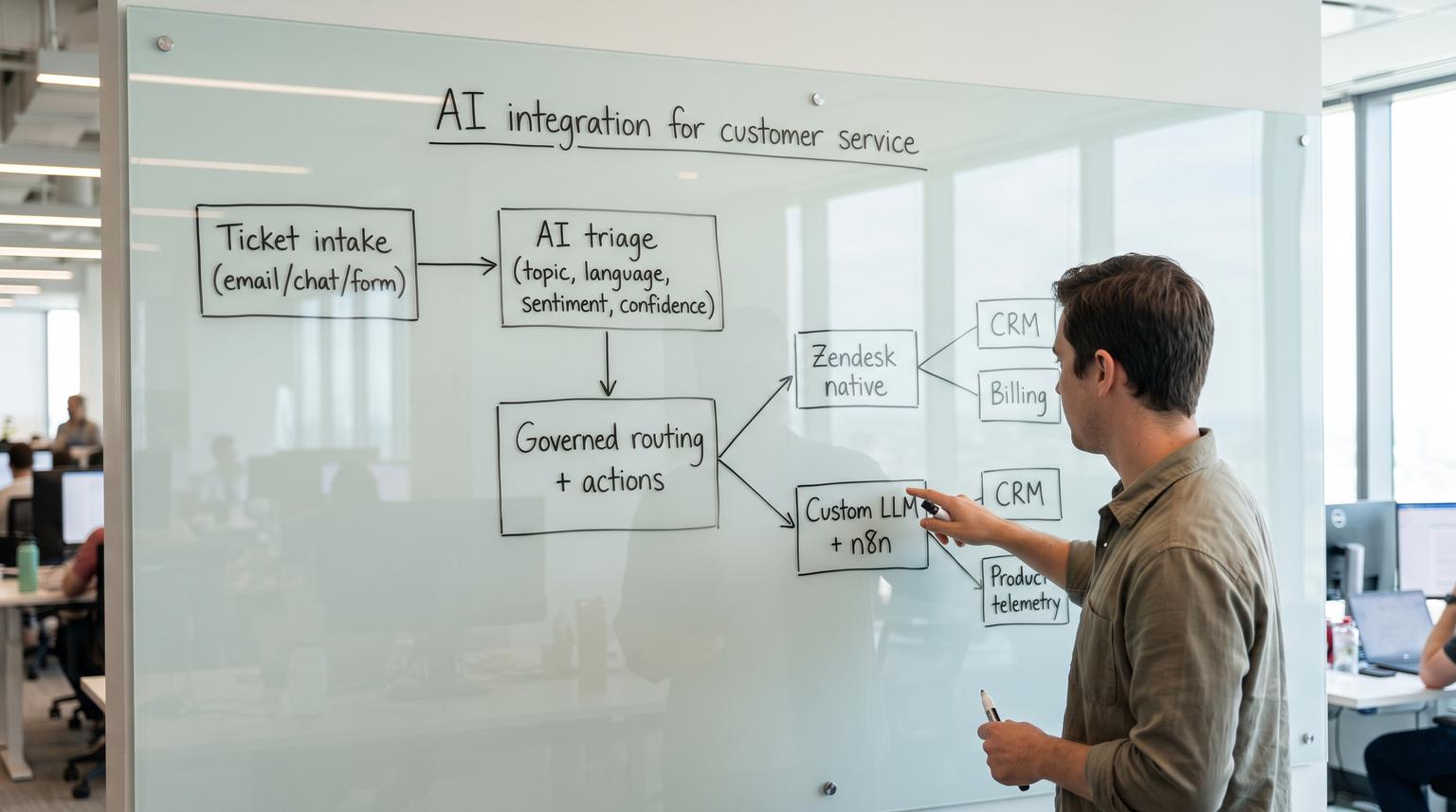
Ticket triage is the moment where messy human text becomes structured fields, priority and routing that can trigger real downstream actions. That is why the most important choice in AI integration for customer service is rarely about model quality. It is about governance, integrations and operational safety. This article helps support and ops teams choose between Zendesk native AI triage and routing or a custom LLM workflow orchestrated in n8n for categorization, priority scoring and routing across CRM, billing and product systems.
At a glance:
- Choose Zendesk native AI when you want fast time to value, fewer moving parts and routing that stays inside the helpdesk.
- Choose a custom LLM plus n8n when routing depends on external context (plan, ARR, invoices, product telemetry) or you need custom governance gates.
- Draw the system boundary at ticket text to governed structured fields to automated actions and score options on what you must prove in production.
- Plan for when it breaks: 429 rate limits, timeouts, misclassification, drift and untrusted ticket text that can manipulate prompts.
Quick start
- Write down your current triage outputs as fields: category, urgency, customer tier, product area, language and required action.
- List the downstream actions those fields trigger: group assignment, SLA policy, paging, refunds, CRM updates or billing checks.
- Mark which actions must be auditable and which require human approval before they can execute.
- Score Zendesk native AI vs custom LLM plus n8n using the decision matrix below and re-score using your highest-risk ticket types.
- Pick a safe first deployment boundary: route only, enrich only or notify-only and add fallbacks before automating actions.
If your triage and routing can stay inside Zendesk and you mainly need topic, sentiment, language and entity enrichment for assignment and prioritization, Zendesk native AI is usually the safer and faster choice. If routing requires deep integration with CRM, billing and product analytics or you need strict audit trails, replayability and approval gates before actions run, a custom LLM orchestrated with n8n is more flexible but needs stronger reliability controls and security guardrails.
Define the boundary where text becomes governed actions
The decision gets clearer when you define a single boundary: ticket text becomes structured fields then becomes automated routing or actions.
- Inputs: subject, description, attachments, requester metadata and conversation history.
- Structured fields you rely on: issue category, product, language, sentiment, priority, required team and next step.
- Actions triggered: assignment, SLA changes, escalations, notifications, CRM updates, billing lookups or refunds.
When you compare Zendesk native AI to a custom LLM plus n8n, score them on what you must be able to prove at this boundary:
- Who approved the decision when it was uncertain.
- What data left the helpdesk and why.
- What happens on failure (timeouts, 429s, bad mappings) so tickets are never dropped or misrouted silently.
- How you replay and audit decisions when an escalation happens two weeks later.

What Zendesk native AI triage and routing does well
Zendesk Intelligent Triage produces first-class ticket fields like topic, sentiment and language plus entity extraction that can populate custom fields. Those fields can then drive routing using Zendesk routing methods and native automations. Zendesk also frames the routing choice around your operating model, for example omnichannel routing vs skills-based routing vs triggers. See Zendesk routing method guidance for the native selector logic.
Where Zendesk native typically wins
- Speed and simplicity: fewer systems, fewer credentials and fewer integration points to operate.
- Consistency of the ticket model: triage outputs land directly on the ticket so views, triggers and SLAs can consume them without translation.
- Lower operational overhead: fewer retries, backfills and cross-system debugging sessions.
Common native patterns that are production-friendly
Zendesk documents practical ways to act on triage fields, not just generate them. These map to safe early wins that do not over-automate:
- Escalate: combine topic with negative sentiment to raise priority and notify a lead (example billing plus very negative sentiment).
- Language routing: use the language field to route to the right queue or apply the right macro set.
- Enrich then route: extract entities to custom fields like product and then route based on those fields.
- Forward: use triggers and webhooks to send structured details outside the helpdesk when ownership is external, such as compliance or account changes. See Intelligent triage use cases.
Where Zendesk native can hit a ceiling
- External context dependence: if priority depends on CRM tier, open invoices, usage spikes or churn signals, native triage fields are not enough on their own.
- Custom governance: if you need approval chains, replayable decisions, or multi-step enrichment with strict logging across systems, you may need an orchestration layer.
- Custom taxonomies: if your categories are deeply domain-specific and must map to multiple downstream actions across systems, you may outgrow built-in options.
What a custom LLM plus n8n triage layer enables
A custom workflow treats Zendesk as the event source then uses an LLM to classify and score tickets and uses n8n as the orchestration hub to enrich data and trigger actions across systems. A common minimal architecture looks like: Zendesk trigger, LLM classification, branching logic, then update Zendesk and notify downstream systems. If you want a practical implementation reference for this approach, see our guide on AI-driven customer service automation with n8n. A simple starter example is described in this n8n ticket routing walkthrough.
Where custom wins
- Integration depth: look up account tier in CRM, check billing status, pull product analytics and then decide routing and priority using that context.
- Governed automation: implement explicit approval gates, policy checks and audit logs before making changes outside Zendesk.
- Custom outputs: force a constrained schema that matches your internal taxonomy, for example {category, subcategory, urgency, confidence, recommended_group, needs_human_review}.
A real ops insight that changes outcomes
The difference between a demo and a system you can operate is not the prompt. It is how you handle ambiguity. In production, you will see tickets that span multiple categories, include missing details or arrive in bursts. If you do not create a policy that maps confidence to actions, teams quietly work around the automation, routing quality declines and agents lose trust. The fastest way to build trust is to start with a notify-only mode for low confidence tickets and a strict human approval gate for any action that touches billing or account state.
Scored decision matrix for native helpdesk AI vs custom LLM plus n8n
Use this matrix as a starting point and re-score it for your environment. Scores are 1 to 5 where 5 is best. The key is the definition under each criterion: what you must be able to prove in production.
| Criterion | What you must be able to prove in production | Zendesk native AI | Custom LLM + n8n |
|---|---|---|---|
| Cost | Predictable per-agent or per-ticket spend and low ongoing engineering time | 4 | 3 |
| Data and PII controls | Where ticket data flows, what is stored, retention, least privilege, safe handling of untrusted text | 4 | 3 |
| Integration depth (CRM and billing) | Ability to fetch context and write back reliably to CRM, billing and product tools | 2 | 5 |
| Auditability | Replay the decision: inputs, model version, prompt, outputs, approver, timestamp and resulting actions | 3 | 5 |
| Operational reliability (fallbacks + human-in-the-loop) | Graceful handling of rate limits, timeouts and drift plus safe fallbacks and approval gates | 4 | 3 |
| Total (out of 25) | Use as directional, not absolute | 17 | 19 |
How to interpret the totals: A slightly higher total does not mean you should pick custom. If your highest-risk actions must remain inside the helpdesk boundary, prioritize reliability and PII controls. If your biggest bottleneck is cross-system context and handoffs, prioritize integration depth and auditability.
A decision rule that holds up in practice
If the triage outcome triggers actions outside Zendesk that affect money, access or customer data, treat the workflow as a governed integration. That usually pushes you toward a custom orchestration layer with explicit approval gates. If the triage outcome only changes assignment, priority or internal notifications, native routing inside Zendesk is often the best operational fit.
Reliability and governance guardrails you should not skip
Whether you choose native or custom, you need explicit controls around confidence, fallbacks and audit trails. Custom workflows simply make those controls your responsibility.
Minimum guardrails checklist for a custom triage layer
- Constrained output schema: force the LLM to output JSON with allowed labels only and reject anything else.
- Confidence to action policy: define thresholds, for example auto-route if confidence >= 0.85, notify-only if 0.65 to 0.84 and require human approval if below 0.65.
- Retry and backoff: treat 429 and transient timeouts as retryable. n8n supports per-node retries and backoff settings. See n8n error handling.
- Dead letter path: if the workflow fails after retries, write a clear tag on the ticket and route to a human triage queue.
- Idempotency: store an execution key so a ticket is not routed twice during webhook retries.
- Audit log: persist the input text hash, model name, prompt version, output JSON and final action taken.

Example n8n retry configuration for LLM and API calls
retryOnFail: true,
maxTries: 3,
waitBetweenTries: 1000
Security reality check for untrusted ticket text
Support tickets are untrusted input. If you pass raw ticket text into an LLM that can trigger actions, you have created an attack surface for indirect prompt injection. The risk rises if the workflow can call tools that read or write sensitive systems. Mitigations include strict schema outputs, least privilege credentials and a guard step that detects suspicious instructions before action execution. For background see indirect prompt injection.
When it breaks scenarios and safe fallbacks
Most teams underestimate how workflows fail in production. Here are common breakpoints we see and what to do about them.
Scenario 1 Rate limits cause silent delays
What happens: the LLM API or Zendesk API returns HTTP 429. Without retries and a dead letter path, tickets wait untriaged and your queue becomes inconsistent.
Fallback: retry with backoff then route to a default triage group with a tag like ai_triage_failed. This makes the failure visible and recoverable.
Scenario 2 Misclassification triggers the wrong downstream action
What happens: a billing issue is classified as technical and the customer bounces between teams. The hidden cost is agent time and trust erosion.
Fallback: use notify-only for sensitive categories, require human approval for billing or account changes and track overrides as training data for taxonomy refinement. If you’re choosing between helpdesk-native vs custom orchestration for deflection and handoff, the same tradeoffs apply in Choosing chatbot integration without breaking your helpdesk or CRM.
Scenario 3 Model drift changes routing quality over time
What happens: the same category labels start behaving differently after a model update or as your product changes. Agents report it as random misroutes.
Fallback: version your prompt and taxonomy, sample and review a fixed set of tickets weekly and keep a rollback option to a prior prompt or rule-based baseline.
Scenario 4 Prompt injection attempts manipulate the workflow
What happens: a ticket contains instructions like "ignore previous rules" or tries to get the workflow to reveal internal data or reroute VIP handling.
Fallback: do not allow free-form tool calls. Validate that the output matches an allowlist of labels and route anything suspicious to a human review queue. Treat the ticket as data, not instructions.
Scenario 5 Partial integrations create data mismatch
What happens: the workflow reads CRM tier but writes routing to Zendesk without recording what tier was used. Later you cannot explain why a ticket was escalated.
Fallback: always write the key enrichment fields back to the ticket as custom fields or internal notes and store a separate audit record for replay.
Implementation boundaries that keep the rollout safe
You do not need to automate everything on day one. Choose a boundary that matches your risk tolerance and your integration needs.
Option A Zendesk-only routing and prioritization
- Use triage fields like topic, sentiment, language and entities
- Route via omnichannel routing, skills-based routing or triggers
- Use confidence thresholds to decide whether to auto-route or only notify
This is typically best when your main goal is faster assignment and consistent prioritization with minimal operational overhead.
Option B Hybrid Zendesk triage plus n8n enrichment
- Let Zendesk populate base fields
- Use n8n only to enrich with CRM tier, billing status, or usage signals
- Write enriched fields back to Zendesk then let Zendesk handle routing
This hybrid is a strong middle ground: you get deeper context without putting the routing engine itself outside the helpdesk.
Option C Full custom triage and action orchestration
- n8n triggers on ticket events
- LLM classifies into your schema
- Workflow enriches from CRM, billing and product analytics
- Actions run with approval gates, retries and audit logs
This is best when routing is inseparable from cross-system decisions, for example customer tier plus invoice status plus incident correlation. For an implementation-oriented, end-to-end blueprint that connects intake, triage, routing, SLAs, escalation, knowledge workflows, QA and human handoff, use our pillar guide: Support ticket automation playbook.
If you want help scoping the safest boundary and estimating impact on first-response time and agent workload, book a consultation with ThinkBot Agency here: schedule a call.
When this is not the best fit: if your ticket volume is low, your taxonomy is stable and your routing rules are simple, a lightweight rule-based approach inside Zendesk may outperform a custom LLM workflow on total cost and operational burden.
For examples of the kinds of governed automations we build across support, CRM and billing systems, you can also review our work: ThinkBot Agency portfolio.
FAQ
Answers to common questions support and ops teams ask when evaluating native vs custom triage and routing.
Can Zendesk native AI handle multilingual routing and macros?
Yes. Native triage can populate a language field that you can use to route tickets to language-skilled teams or apply language-specific macros and responses. It is often the quickest path to consistent multilingual handling without building external logic.
Do I need a custom LLM to route tickets to the right team?
Not always. If your categories map cleanly to Zendesk groups and you do not need external context, native triage fields plus triggers or routing rules are typically enough. Custom LLM workflows become valuable when routing depends on CRM tier, billing status, product usage or other system data.
How do we keep a custom n8n workflow reliable during outages or 429 rate limits?
Implement per-node retries with backoff for retryable errors, add a dead letter route that tags the ticket and assigns it to a human triage queue and store an idempotency key to prevent duplicate routing. Reliability needs to be designed at the node, workflow and operational levels. For a broader agent-assist approach (classification, drafts with approval, PII handling, escalation, and CRM logging), see Reduce support handle time with AI-powered customer service solutions that assist agents.
What data and PII risks should we plan for with LLM-based triage?
Plan for where ticket data is sent, what is stored, retention policies and least-privilege access. Also treat ticket text as untrusted input and defend against indirect prompt injection by validating outputs against an allowlist and routing suspicious cases to human review.
What should we log for auditability when AI influences routing or priority?
Log the ticket identifier, the input text hash, the enrichment fields used, the model and prompt version, the structured output, the confidence score, any human approver and the final action taken. This lets you replay decisions and explain outcomes during escalations.
