
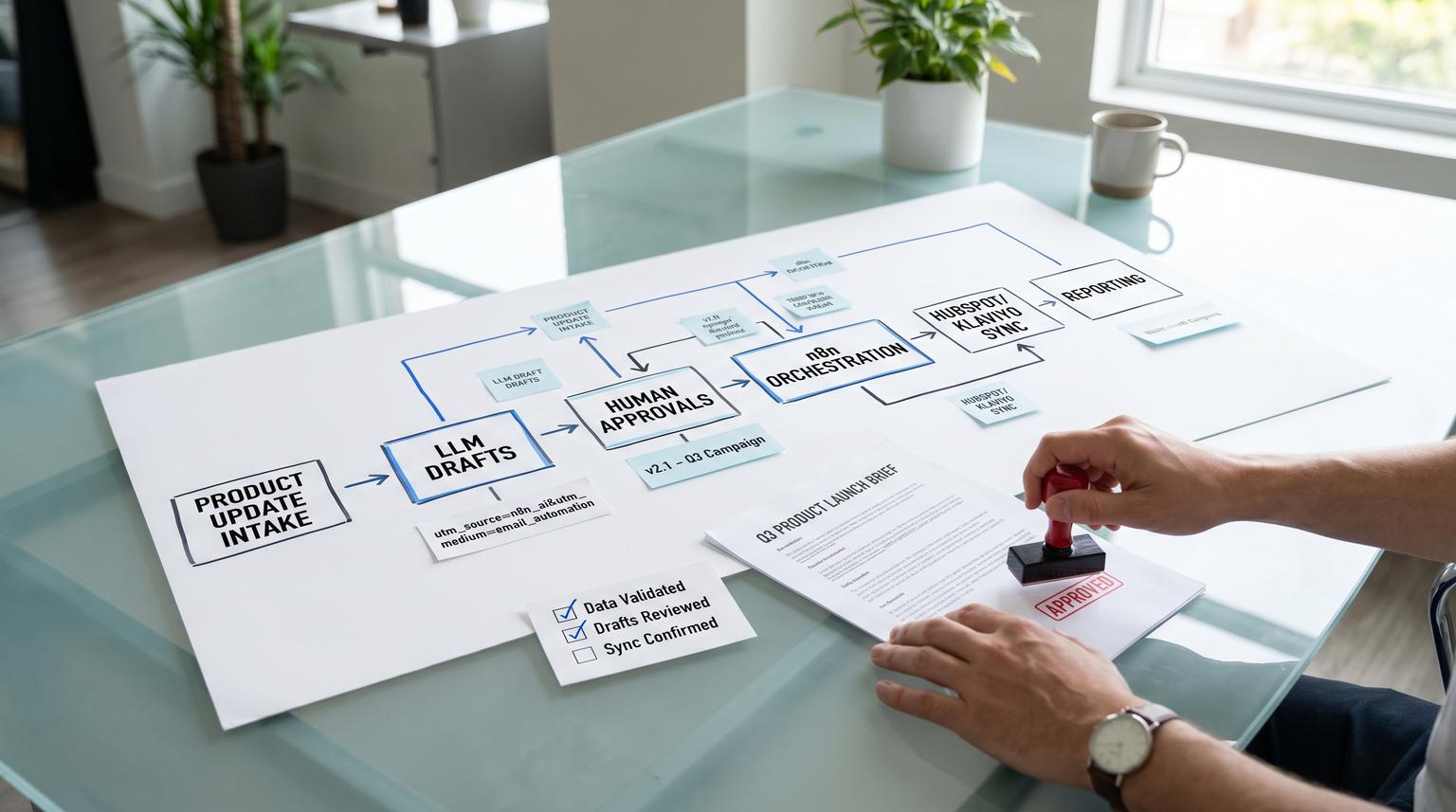
Marketing teams are not short on ideas. They are short on time, consistency and clean handoffs. This is where AI integration in marketing becomes practical: not as a chat prompt but as a controlled production line that turns one product update into approved, on-brand assets for email, LinkedIn and a landing page then syncs the final versions into HubSpot or Klaviyo with UTMs, naming standards and version history.
This article is for marketing ops, CRM owners and tech-savvy teams that want faster launches without sacrificing brand governance, compliance review or reporting hygiene.
At a glance:
- Use n8n to orchestrate generation, approvals and publishing so drafts never ship directly from an LLM.
- Standardize inputs (product update, audience, offer, disclaimers) then generate channel-specific copy with brand rules.
- Add deterministic human approval gates for copy, audience/segment and final write calls into HubSpot or Klaviyo.
- Sync only approved assets into CRM/ESP objects with consistent campaign naming, UTMs and version tracking for rollback.
Quick start
- Create a single source-of-truth product update intake (Notion, Google Doc, Jira release note or HubSpot note) with required fields.
- In n8n, build a workflow that parses the intake then calls an LLM to draft email, LinkedIn post and landing page sections.
- Insert a Slack or Teams approval step that shows the proposed tool parameters before any write or publish action.
- On approval, write drafts into a staging location (HubSpot email as draft or Klaviyo template clone) and log a version record.
- Run a second approval gate for final publish or campaign send then sync canonical UTMs and campaign IDs across channels.
To implement this well, treat the LLM as a draft generator only. n8n enforces the system boundary: humans approve, n8n writes, and every write is versioned so you can roll back quickly if a template, brand rule or CRM setting changes.
The operational problem this workflow solves
Most campaign delays are not caused by writing. They are caused by rework: copy that does not match the product update, approvals that happen in scattered threads, missing disclaimers, and tracking links that change per channel. When this happens, teams ship late or they ship fast and pay for it later in brand risk and broken reporting.
A production line approach fixes the common bottlenecks:
- Single input, many outputs: one product update becomes channel-ready assets.
- One approval path: no more guessing which version is approved.
- Tracking governance: UTMs and campaign naming are generated once then reused.
- Clean CRM data: assets land in the right HubSpot or Klaviyo objects with predictable names and metadata.
Architecture and system boundary that keeps it safe
The key design decision is the hard boundary: LLM drafts only, humans approve, n8n writes. That boundary matters because most real-world failures happen at the tool-call layer, not at the text generation layer.
In n8n you can place a human-in-the-loop step between an AI agent and any risky tool call. The reviewer sees exactly what the model is attempting including structured parameters. n8n documents this pattern for AI tool calls and the $tool variable is the practical mechanism that makes approvals auditable. See human-in-the-loop for AI tool calls.
Recommended flow
- Inputs: product update and required metadata.
- Generate drafts: LLM produces structured outputs per channel.
- Approval gate 1 (copy): approve wording, claims and CTA.
- Approval gate 2 (targeting): approve list, segment, exclusions and suppression logic.
- Approval gate 3 (write/publish): approve the exact API write parameters before n8n updates HubSpot or Klaviyo.
- Version log: store every approved asset version with IDs for rollback.

Inputs and standards to define before you build
LLMs perform best when inputs are structured. This is also where brand and compliance guardrails start. Do this first before touching prompts.
Minimum intake fields
- Product update title and one-paragraph summary
- Who it is for and who it is not for
- Primary benefit and supporting details
- Required disclaimers or prohibited claims
- Primary CTA and destination URL
- Launch date and any embargo constraints
- Brand selection (business unit) if you run multiple brands
Channel output contract (what the LLM must return)
Instead of asking for free-form copy, request a structured response with explicit fields so approvals and API mapping are deterministic. For a deeper pattern library on schema-first AI steps and safe downstream writes, use our AI workflow automation playbook.
- Email: subject, preview text, body sections, plain-text version, link list
- LinkedIn: post text, hook options, hashtag set, link
- Landing page: hero headline, subhead, bullets, FAQ draft, compliance block
- Tracking: utm_source, utm_medium, utm_campaign candidate, utm_content per channel
A practical checklist for brand and compliance guardrails
- Allowed and prohibited phrases (claims, superlatives, regulated terms)
- Required disclaimer blocks by product line
- Voice rules (tone, reading level, sentence length preferences)
- Formatting rules (no emojis, no ALL CAPS, link style)
- Accessibility basics (plain text email present, descriptive link text)
- Approval roles and timeouts (who can approve and what happens if no response)
A real-world ops insight: the fastest teams keep brand rules outside the prompt. They store them in a versioned document or database row then inject them into the prompt at runtime. That way when Legal updates a disclaimer, you update one source and the workflow changes without hand-editing prompts across multiple nodes.
Building the n8n workflow from intake to drafts
Start with an intake trigger then standardize data. Typical triggers include a Notion database item, a Google Doc updated, a Jira release note, a form submission or a Slack command. The exact trigger is less important than producing a clean JSON object that every downstream step can trust.
Core nodes and steps
- Trigger: new product update entry.
- Normalize data: map required fields and fail fast if something is missing.
- LLM draft generation: generate channel assets using a strict schema.
- Link and UTM builder: create channel URLs using the same canonical campaign identifier.
- Preflight validations: check for prohibited terms, missing disclaimer blocks and empty link targets.

Mini template: approval message that exposes tool parameters
When you reach any step that writes to HubSpot or Klaviyo, the approver should see exactly what is about to happen. n8n supports this by exposing the pending tool call. You can use a message like:
The AI wants to use {{ $tool.name }} with the following parameters:
{{ JSON.stringify($tool.parameters, null, 2) }}
Approve to continue or deny to request changes.
This approach prevents hidden decisions from slipping into production writes because the reviewer is approving the structured parameters, not only the prose.
Approval, governance and rollback before any CRM or ESP sync
This is the step that makes the workflow production-grade. It is also where many teams cut corners and later regret it.
Three approval gates and why they reduce blast radius
- Copy approval: confirms claims, tone and disclaimers are correct before you spend time wiring templates.
- Audience approval: confirms lists, segments, exclusions and suppression logic. This prevents the most expensive failure: sending correct copy to the wrong audience.
- Write and publish approval: confirms the exact API payloads and targets before any object is created, updated, published or scheduled.
Versioning and rollback mechanism
You need rollback at two layers: workflow logic and marketing assets.
- Workflow rollback: automatically export n8n workflows as JSON and store them in Git. Tag stable releases so you can revert quickly. n8n recommends treating workflows like code with dev staging prod separation and practiced rollback steps. See production best practices.
- Asset rollback: write approved content as new versions, not in-place overwrites. In Klaviyo this often means cloning a template to create a versioned release. In HubSpot you can keep the previous email draft intact and create a new one or log the previous revision metadata in your tracker. If you want a practical guardrail catalog for what breaks at the CRM/API boundary (and how to detect it), see a failure map for AI automation in business workflows that touch CRMs and APIs.
A safe rollback rule we use: any change to brand rules, templates or UTM logic must be deployable and reversible in under 5 minutes. If you cannot revert fast, you do not really have governance.
Syncing approved assets into HubSpot or Klaviyo with clean tracking
Once approved, n8n becomes the writer. Your workflow should create or update the right objects and store returned IDs in the version log so reporting and reuse are reliable.
HubSpot marketing email object boundary
HubSpot has a dedicated Marketing Emails API for marketing email objects. It is separate from transactional or one-to-one email concepts. A minimal create payload looks like:
{
"name": "ProductUpdate FeatureX v1",
"subject": "FeatureX is live",
"templatePath": "@hubspot/email/dnd/welcome.html",
"businessUnitId": 123456
}
HubSpot API details change over time and endpoints are versioned. For example folderId is deprecated in favor of folderIdV2 which is the kind of field-level change that can silently break automations if you are not validating responses. Reference: HubSpot Marketing Email API.
Klaviyo templates as a controlled sync target
Klaviyo templates are first-class objects you can create and manage by API. This makes them an excellent destination for approved AI-generated HTML and text content. You can also clone templates for versioning and rollback and enforce naming conventions that encode campaign and version. Reference: Klaviyo Templates API overview.
UTM governance that does not break attribution
If you use HubSpot campaigns, be careful with assumptions. HubSpot can auto-generate unique campaign UTM values, which means utm_campaign is not always equal to campaign name. Build a decision step:
- If you rely on HubSpot auto-generation, create or update the campaign then read back the canonical UTM value and store it in your version log.
- If you enforce a custom utm_campaign value, validate uniqueness before setting it. HubSpot blocks duplicates. Also record old values if a change happens because secondary UTMs can persist for historical attribution.
Reference: HubSpot campaign UTM management.
Measurement and maintenance so it keeps working in 2026
After the first successful run, reliability becomes the job. A few operational habits prevent this workflow from decaying as templates, lists and brand rules evolve.
What to monitor
- Execution failures: node errors, timeouts, 429 rate limits, 5xx responses
- Partial writes: email created but campaign not linked, template updated but version log not written
- Approval latency: time from draft generated to approval, time from approval to sync
- API cost and throughput: LLM usage, queue depth, run duration
Common failure pattern and how to prevent it
The most common mistake we see is letting the workflow update the same template or email draft in-place every run. It feels efficient until someone approves a revision and an hour later another run overwrites it. The fix is simple: create versioned assets, mark one as approved current and keep the previous approved version available for immediate rollback.
Decision rule and tradeoff
Choose where to enforce strictness. More validation and more approval gates reduce risk but slow down throughput. For most teams, the best balance is strict gating at the tool-call boundary (writes and publish) while allowing faster iteration in the draft stage. That keeps speed high without letting risky changes escape.
When this approach is not the best fit
If you only ship one campaign per quarter or your approval process is intentionally informal, the overhead of building a versioned multi-channel pipeline may outweigh the benefits. You will get more value first by standardizing a basic campaign brief template and UTM conventions. This workflow shines when campaign volume is high, brand risk is real or multiple people touch the same assets.
Implementation rollout and ownership
To make this stick, define ownership and a release process like you would for any production system.
Suggested roles
- Marketing ops owner: owns workflow configuration, lists, segments and CRM mappings
- Brand approver: approves copy and channel fit
- Compliance or Legal approver: approves claims and disclaimers when needed
- Automation engineer: owns n8n deployment, secrets and monitoring
Release practice
- Test prompt or template changes in staging with a canary campaign naming prefix.
- Tag workflow releases in Git and store prompt versions alongside the workflow export.
- Practice rollback quarterly so it is not a panic move during a launch.
If you want help implementing this production line in your stack, book a consultation with ThinkBot Agency. We build n8n-based automations that integrate LLMs with HubSpot, Klaviyo and internal systems while keeping approvals, versioning and reporting clean. For a related blueprint on orchestrating AI in n8n with structured workflows and human approvals, see ChatGPT for Business Productivity inside n8n.
You can also review examples of the automation work we ship in production on our portfolio.
FAQ
Answers to common implementation questions teams ask when they move from AI experiments to a governed campaign pipeline.
How do we ensure nothing ships directly from an LLM?
Make the LLM generate drafts only then require human approval before any tool call that writes or publishes. In n8n, put a human-in-the-loop step between the AI output and the HubSpot or Klaviyo API nodes so the reviewer approves the exact structured parameters that will be written.
Should we store approved assets in HubSpot, Klaviyo or somewhere else first?
Store the approved version in the system you will reuse for sending or templating (HubSpot marketing emails or Klaviyo templates) and also log a version record in a separate tracker (sheet or database) with asset IDs, campaign ID and the canonical UTMs. This makes rollback and audits straightforward.
How do we handle UTM naming when HubSpot auto-generates campaign UTMs?
Decide whether you will rely on HubSpot auto-generated UTMs or enforce custom values. If you rely on auto-generation, read back the campaign UTM value after creation and reuse it across email, LinkedIn and landing page links. If you enforce custom UTMs, validate uniqueness because HubSpot blocks duplicates.
What is the safest rollback plan if a template or brand rule change breaks the workflow?
Rollback in two steps: revert the n8n workflow to the last tagged Git version and restore the last approved marketing asset version (for example a previous Klaviyo template clone or a previous HubSpot email draft). Because each approved asset is versioned, you can switch back without reconstructing content from chat history.
