
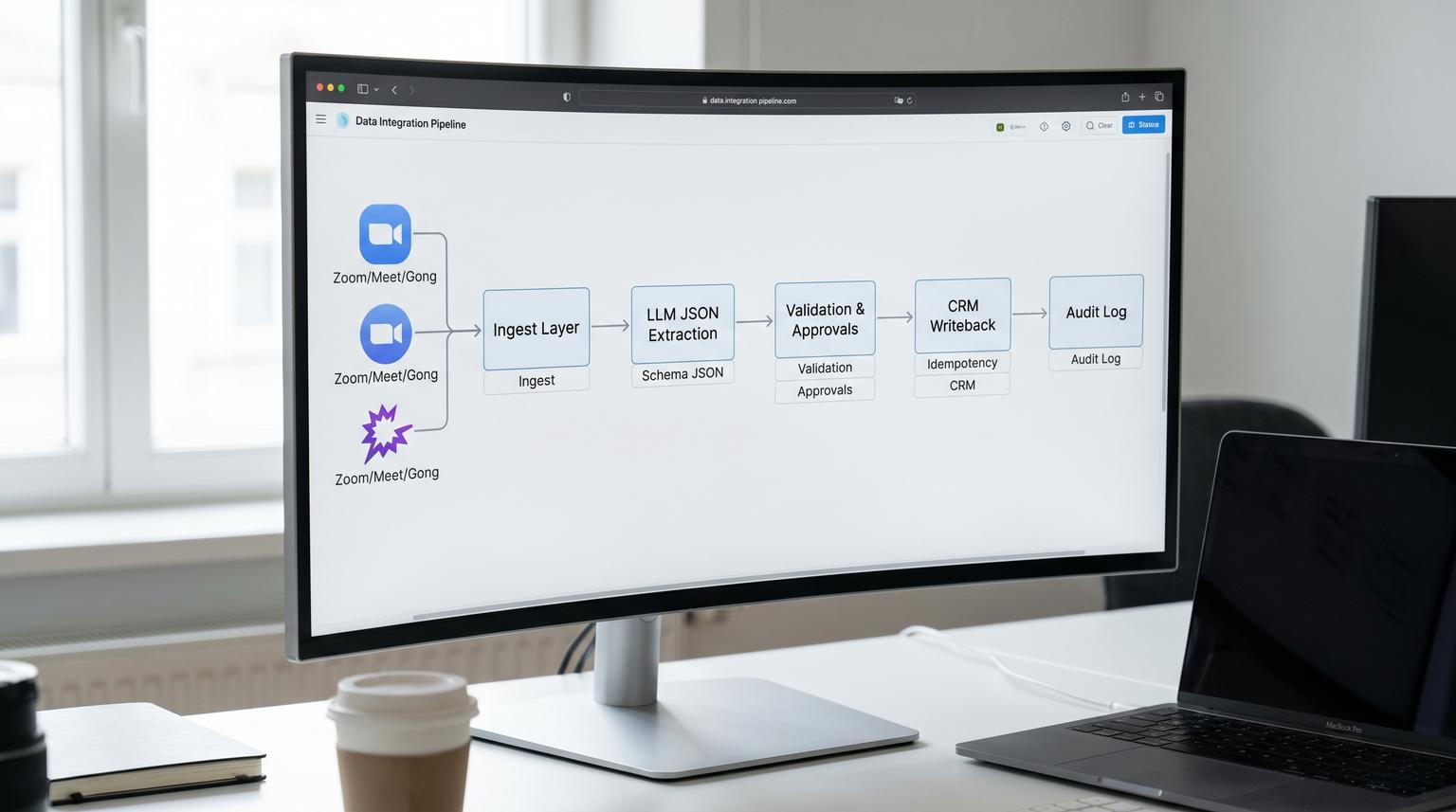
Sales teams already have the raw material for better follow-up: call recordings and transcripts. The hard part is turning that unstructured conversation into structured CRM updates without creating a mess. This is where AI integration services should focus in 2026: the meeting-to-CRM boundary where a single wrong stage change or duplicate contact can ripple through forecasting, handoffs and reporting.
This article shows a production-ready workflow that converts calls into CRM notes, fields and tasks with strict validation, human approvals where it matters and an audit log for every AI-written change.
At a glance:
- Convert recordings and transcripts into structured deal summaries, next steps, objections, stakeholders and follow-up tasks.
- Prevent CRM pollution with a write-policy matrix, field-level validation and deterministic idempotency keys.
- Use human approval only for risky mutations (stage, amount, close date, new contact creation) while auto-writing safe activity logs.
- Maintain an audit trail for every AI-proposed field and task including inputs, validation results, approvals and CRM responses.
Quick start
- Pick your meeting source: Zoom/Google Meet recordings, or a conversation platform like Gong for normalized calls and participant metadata.
- Create an ingest layer that stores raw webhook payloads plus a stable event key before you call any LLM.
- Run LLM extraction into a strict JSON schema (deal summary, next steps, tasks, stakeholders, objections) with confidence and transcript citations.
- Apply validation and dedupe rules, then split into auto-write actions vs approval-required actions.
- Write to CRM using idempotency keys and verify writes, then record per-field audit entries for propose, validate, approve, write and verify.
To turn sales call recordings into SLA-safe CRM updates, treat AI as a proposer and your workflow as the gatekeeper. Store each meeting event with a stable dedupe key, extract structured updates into a strict schema, validate fields and ownership rules, then only auto-write low-risk activity items. Require human confirmation for stage changes, new contact creation and any update that can break reporting. Log every proposed and written change with correlation IDs so you can trace and replay safely.
The meeting-to-CRM boundary is where data quality breaks
Most teams start by generating a nice call summary and pushing it into the CRM. That is the easy part. The failures usually happen later when you scale to dozens of reps and thousands of meetings:
- Duplicate notes and tasks from retried webhooks, reruns and partial failures.
- Wrong deal updates because the automation matched the wrong company, contact, or open opportunity.
- Unverifiable field changes like adding competitors or changing the next step with no transcript evidence.
- Stage drift where optimistic language triggers an “advance stage” update even though the buyer never committed.
- Ownership mistakes where tasks get assigned to the wrong rep due to missing participant mapping.
A real operational insight from deployments we see: the first month looks fine because volume is low and reps spot-check results. Problems show up when you add retries, parallel processing and multiple meeting sources. At that point, idempotency and auditability stop being engineering niceties and become the difference between trust and shutdown.
Reference architecture for transcript to CRM updates
The safest way to run this workflow is to separate ingestion, enrichment and mutation. That gives you clean checkpoints and clear rollback paths.

1) Ingest meeting events and artifacts
For Zoom-based teams use webhook-driven ingestion so you start when artifacts are actually available. Zoom cloud recordings can include multiple transcript-like files such as audio_transcript, closed captions and summary attachments. Design for asynchronous availability and multiple artifacts per meeting, not a single neat transcript. Zoom webhooks provide the event primitives you need to do this reliably: Zoom meeting and recording events.
If you use Gong, treat it as a normalized “meeting truth layer” that can provide transcripts plus participant metadata and tracked topics. Also architect for rate limits and 429 responses with backoff and queuing. Gong’s API surface overview helps you plan what to fetch and how to batch it: what the Gong API provides.
2) Normalize and store raw inputs
Store the raw payload, transcript text and key metadata in a database or data table before any LLM call. This is how you support replay, audits and later model improvements without re-fetching meeting sources.
3) Extract structured updates with an LLM
Prompt the model to output a strict JSON object with only allowed fields. Require:
- Confidence per field
- Transcript citations (speaker and snippet) for any structured claim
- Explicit “unknown” where the transcript does not support an answer
4) Validate, dedupe and route to approval or auto-write
This is the governance layer. It prevents CRM pollution and determines what can be written automatically.
5) Mutate the CRM with idempotent writes and verification
Every write should be deterministic so retries do not create duplicates. After each write, read back the CRM object ID and store it in your audit log.
Write-policy matrix for approvals and what can be auto-written
The fastest way to earn internal trust is to be strict about what the automation is allowed to change. Below is a concrete policy that works well across HubSpot, Salesforce and Pipedrive setups. You can tighten or loosen it later but start conservative. (For a broader playbook on designing and operating reliable AI steps with strict contracts and governance, see this AI workflow automation playbook.)
| CRM change type | Auto-write? | Validation required | Approval required | Why |
|---|---|---|---|---|
| Call/meeting note with summary and key quotes | Yes | Transcript present, meeting timestamp, associated deal resolved | No | Low risk, improves visibility and is easy to ignore if wrong |
| Create follow-up tasks (send recap, schedule demo, security review) | Yes, with limits | Due date rules, owner rules, dedupe check | No (unless high impact) | High ROI, risk controlled by dedupe and bounded task types |
| Update free-text fields (next step, objections, stakeholders) | Yes, append-only | Allowed vocabulary, max length, citations required | No | Appending preserves history and reduces “overwrite” risk |
| Update structured fields (amount, close date, lead source) | No | Type checks, range checks, source evidence | Yes | Directly impacts forecasting and reporting |
| Change deal stage | No (guardrailed) | Stage transition rules, required properties present | Yes | Wrong-stage changes are hard to detect and expensive to unwind |
| Create a new contact | No (default) | Email format, domain checks, dedupe by email, consent rules | Yes | Duplicate contacts and bad emails create long-term CRM cleanup |
| Associate contact to deal | Sometimes | Match confidence threshold, role clarity | Optional | Associations can be safe if identity is strong |

Decision rule we use often: if a change impacts forecasting, routing, lifecycle stages, attribution or compliance then require a human approval. Everything else should be append-only and reversible.
Validation, dedupe and idempotency rules that prevent bad data
Most “AI messed up my CRM” stories are not model failures. They are workflow failures: missing validations, nondeterministic identifiers and action retries that create duplicates. If you want a deeper look at common failure modes and guardrails at the CRM/API boundary, see our failure map for AI automation in business workflows.
Step 1: Build stable event keys at ingestion time
Meeting systems are typically at-least-once delivery. You must assume duplicates and out-of-order events. For Zoom, build an event key from meeting UUID plus recording file metadata so multiple artifacts do not create multiple CRM writes.
Example dedupe key (Zoom recording artifact)
event_key = meeting_uuid + ":" + recording.file_id + ":" + (attach_type || recording_type)
Store this event_key in your workflow datastore before calling the LLM. If you do it after enrichment, retries can generate a different key and you lose dedupe.
Step 2: Enforce a strict extraction schema
Do not accept loosely formatted summaries. Require JSON with types and constraints so validation can run deterministically. Example minimal schema shape:
{
"meeting": {
"source": "zoom",
"source_event_key": "...",
"started_at": "2026-06-18T15:00:00Z",
"participants": [{"name":"...","email":"...","role":"external"}]
},
"deal": {
"crm_deal_id": "",
"summary": "",
"next_steps": [""],
"objections": [""],
"stakeholders": [{"name":"","role":"","email":""}]
},
"tasks": [
{"type":"send_recap","owner":"","due_in_days":1,"details":""}
],
"proposed_changes": [
{"object":"deal","field":"next_step","mode":"append","value":"...","confidence":0.78,"citations":["Rep: ...","Buyer: ..."]}
]
}
Step 3: Field-level validation before any CRM mutation
Validation should fail closed for structured fields. Practical checks that catch most issues:
- Deal resolution: exactly one target deal, or route to approval queue.
- Owner assignment: map internal participant to CRM owner, never guess.
- Allowed value sets: objections and competitors from a controlled list where possible.
- Stage transition rules: only allow “forward” transitions that match your pipeline policy and only after required fields are present.
- Task limits: cap tasks per meeting (for example 3) and enforce due date bounds.
- Citations required: if the model proposes a claim without transcript support then block or downgrade it to a note only.
Step 4: Deterministic idempotency keys per CRM action
Dedupe on triggers is not enough because actions can still create duplicates depending on the CRM connector behavior. Zapier documents this clearly: triggers may dedupe based on seen IDs but actions vary by app which is why you need your own idempotency at the CRM boundary: how Zapier handles duplicate data.
Use deterministic keys that combine the source event and the target CRM object:
Idempotency key patterns
- note_key = source_event_key + ":deal:" + crm_deal_id + ":note"
- task_key = source_event_key + ":deal:" + crm_deal_id + ":task:" + task.type
- field_key = source_event_key + ":deal:" + crm_deal_id + ":field:" + field_name
Store these keys in your audit log or a dedicated dedupe table. Before creating a note or task, query by key. If it exists, skip creation and log that it was a duplicate attempt. This is what keeps retries safe.
Audit logging strategy for every AI-written field and task
If you want this workflow to survive real operations, treat audit logs as a first-class deliverable. Your sales ops team should be able to answer: What changed, who approved it, what transcript supported it and what happened when the workflow retried?
Audit spine design
We like a centralized logging workflow that other workflows call. In n8n you can implement this with Data Tables plus an Error Trigger so every execution can report audit events and failures. The n8n template is a solid starting point: log errors and audit events with n8n data tables.
Minimum audit events to record
For each proposed change record:
- propose: model version, prompt version, transcript hash, proposed value, confidence and citations
- validate: validation result per field, reasons for failure, policy version
- approve: approver identity, decision and timestamp (or auto-approved)
- write: CRM endpoint/action, request payload fingerprint, idempotency key
- verify: CRM object ID, read-back snapshot, final status
Suggested audit schema
AuditLog (minimum viable)
- ts
- correlation_id
- source_system
- source_event_key
- transcript_hash
- llm_run_id (if available)
- crm_system
- crm_object_type
- crm_object_id
- action (propose|validate|approve|write|verify|rollback)
- field_name
- old_value
- new_value
- confidence
- citations (or pointer)
- validation_status
- approval_status
- workflow_name
- workflow_id
- execution_id
- error_code
- error_message
A common mistake is logging only the final summary note. That does not help when someone asks why a deal stage changed or why two identical tasks were created. Per-field and per-task logs tied to deterministic keys do.
Error handling and replay without duplicates
Make and n8n both support patterns that work well here:
- Use retry with backoff for transient failures like 429 rate limits and timeouts.
- Route validation failures and approval-needed changes into a human review queue. In Make this can map naturally to incomplete executions which can be resumed after a fix. The platform’s error handling primitives are designed for this kind of controlled replay: overview of error handling in Make.
Key tradeoff: resuming failed executions is great for SLA but increases the chance of duplicates unless your idempotency keys were created and stored before the first attempt. Always generate keys early and always check them right before each CRM write.
Operational rollout, monitoring and rollback
This workflow touches core revenue operations. Roll it out like a production system, not a one-off automation.
Phased rollout that earns trust
- Phase 1: auto-write only notes and tasks. Everything else is proposed and sent to approval.
- Phase 2: allow append-only updates to a small set of safe deal fields like “last call summary” or “current objections”.
- Phase 3: introduce guarded stage change proposals but keep human approval required.
Owners and responsibilities
- Sales Ops: owns the write-policy matrix and stage transition rules.
- RevOps or CRM Admin: owns field mappings, required properties, and permission scopes.
- Automation owner: owns uptime, retries, dead-letter queue, and audit log storage.
- Sales leaders: define what “good” looks like for tasks and follow-up timelines.
Monitoring signals that catch problems early
- Duplicate attempt rate (how often an idempotency key already exists)
- Approval queue size and aging (bottlenecks for stage changes)
- Validation failure reasons (deal match ambiguity is usually the top one)
- CRM write error rate by endpoint (task creation, note creation, deal patch)
- Time from meeting end to CRM updated (follow-up SLA)
Rollback strategy
Most CRMs are not transactional across multiple writes. Plan compensating actions:
- For tasks: store created task IDs so you can delete or mark completed if a later step invalidates them.
- For notes: prefer append-only notes so rollback is “add a correction note” or delete the specific note by ID if allowed.
- For fields: avoid overwrite unless approved. If you must overwrite, store old_value in the audit log so you can restore it programmatically.
When this approach is not the best fit
If your CRM is highly customized with complex validation rules, multi-object dependencies and strict compliance requirements, you may be better off starting with a read-only call intelligence layer and manual CRM updates. Also if your sales process does not consistently attach meetings to deals, deal resolution ambiguity will dominate and you will spend more time approving than saving.
If you want a working implementation that matches your CRM rules, meeting sources and reporting needs, we can build and harden it end-to-end in n8n, Make, Zapier or a hybrid stack with the right governance. For a closely related implementation pattern, see AI integration for business that writes clean CRM updates. Book a consultation with ThinkBot Agency.
FAQ
Common implementation questions we hear when teams operationalize meeting-to-CRM automation safely.
Do I need call recordings or is a transcript enough?
A transcript is usually enough for structured extraction but recordings help when transcript quality is inconsistent or when you need to reprocess with improved speech-to-text. In either case store a transcript hash and source metadata so you can audit and replay.
What should be auto-written to the CRM vs approved by a human?
Auto-write low-risk, reversible items like meeting notes and bounded task templates. Require approval for stage changes, amount or close date updates, new contact creation and any overwrite of structured fields that affects reporting.
How do you prevent duplicate notes and tasks when workflows retry?
Use deterministic idempotency keys created from the meeting event key plus the target CRM object and action type. Store the keys before writing, check them right before each CRM mutation and log every attempt so reruns are safe.
How can we prove where an AI-written field came from?
Require transcript citations for each proposed change and store them in an audit log entry along with the transcript hash, model output, validation result, approval decision and CRM response IDs. This gives you a verifiable chain from source text to final CRM write.
