
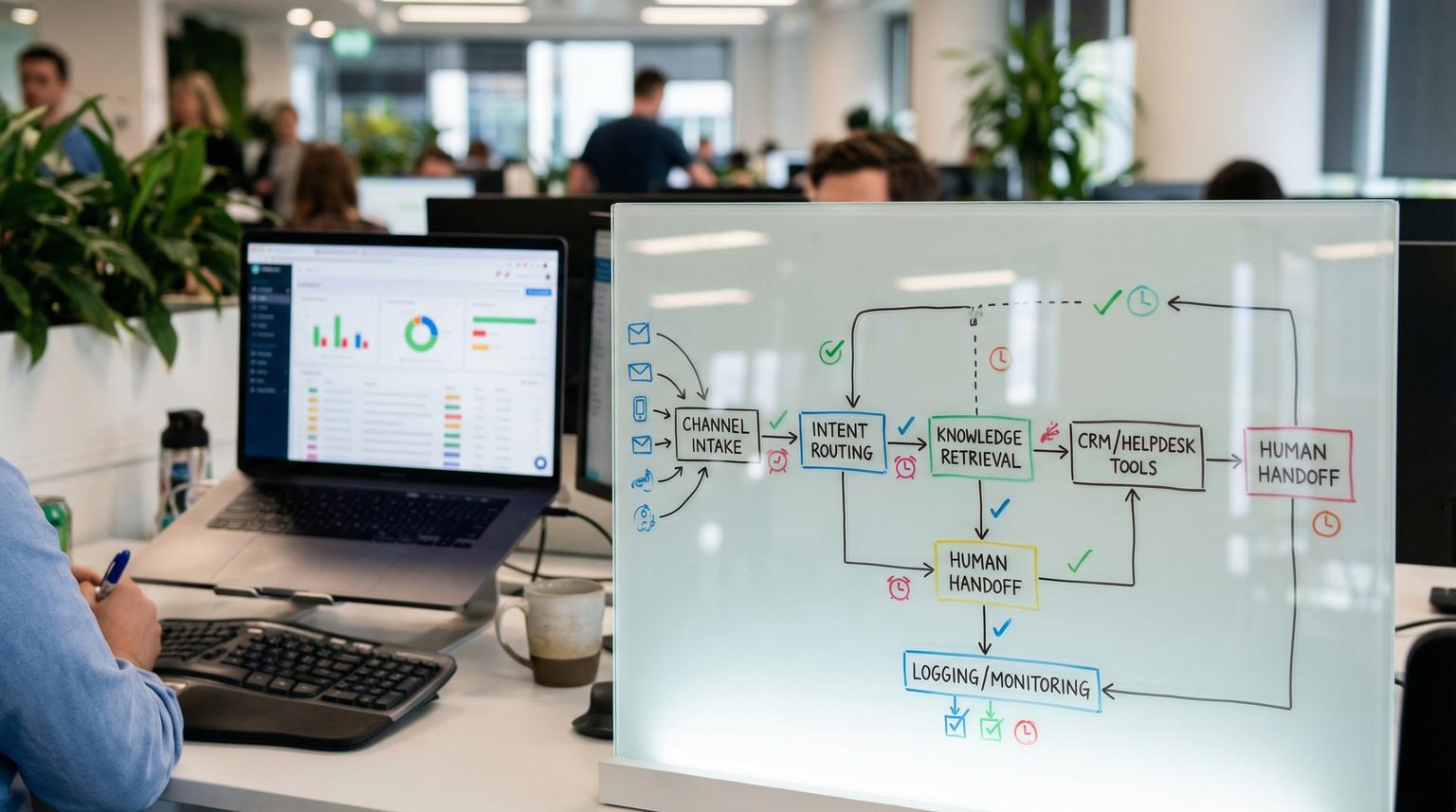
Support teams are expected to answer instantly across chat, email and helpdesks while keeping context inside the CRM. The practical way to scale is not just adding a bot, it is building an end to end workflow that can answer FAQs, look up real customer data and hand the conversation to a human with full context when needed. In this guide to AI-powered chatbot development, we show how ThinkBot Agency approaches customer support automation using n8n workflows, API connections and compliance-friendly logging.
Quick summary:
- Start with a simple chat entrypoint, intent routing and a small memory window, then add tools like CRM lookups and ticket creation.
- Design for human handoff early with a structured escalation payload, transcript logging and a clear stop signal for the bot.
- Use n8n to orchestrate channels, systems of record and alerts so your support team gets clean context and fewer repetitive tickets.
- Roll out safely with guardrails, monitoring and an improvement loop tied to real support outcomes.
Quick start
- Collect your top 30 to 100 support intents, FAQs and system actions (status lookup, refund request, address change, cancel order).
- In n8n create a Chat Trigger workflow with an AI Agent node for routing, a Chat Model node and a small Window Buffer Memory (start with 8 to 12 turns).
- Add two tools: (1) knowledge retrieval (FAQs and docs) and (2) a system action tool (CRM lookup or ticket creation) using API credentials.
- Implement a handoff flag and escalation payload, then wire it to your helpdesk queue with transcript and summary attached.
- Test with real transcripts, add confidence gates, then launch to a limited audience and monitor deflection, accuracy and handoff rate.
Build a support chatbot in n8n by combining a chat entrypoint, an LLM for intent and response generation, and tool nodes that query your CRM, helpdesk and order system. Keep answers grounded in approved knowledge sources, write back summaries to tickets for auditability and use a deterministic handoff signal so the bot stops responding and a human agent receives the full transcript and next best actions. For a broader framework beyond this quick start, see our end-to-end guide to chatbot implementation for customer support with n8n and AI.
Support automation architecture that actually works
Most bots fail because they are built as a single prompt and a single response. Real support automation needs orchestration across systems and clear operational boundaries. We recommend thinking in four layers:
1) Channel intake and identity
Where does the conversation start: website chat, in-app chat, WhatsApp, email or a helpdesk widget. The intake layer should assign a stable session key. For compliance, do not use raw PII like email or phone as the participant identity. Use a surrogate identifier and map it to contact records in your CRM later if needed.
2) Decisioning and response generation
Your LLM interprets the message, selects an intent and decides whether it can answer from knowledge, needs a tool call or must escalate. n8n is ideal for this because you can route requests through an AI Agent and keep the decision output structured. n8n provides a clear starting blueprint using a Chat Trigger, AI Agent, Chat Model and Memory nodes, see the n8n guidance step-by-step for the base wiring.

3) Tools and systems of record
Tools are deterministic actions: lookup order status, fetch subscription plan, find last invoice, create ticket, update contact, tag a lead. Treat the CRM and helpdesk as the system of record. The bot should not invent order statuses or policy exceptions.
4) Audit, monitoring and handoff
Every session should produce a consistent log: who, when, what sources were used, what actions were taken, and whether the interaction ended with resolution or human escalation. This makes improvements measurable and reduces risk.
Implementation checklist for an n8n support chatbot
Use this checklist when you are scoping the first production workflow. It is intentionally specific to support automation in n8n so you can translate it into nodes quickly.
- Write a one sentence purpose statement (example: deflect repetitive billing and order questions and create tickets for exceptions).
- List the top intents and map each to an outcome: answer, lookup, create ticket, capture lead or escalate.
- Define approved knowledge sources (FAQ page, internal SOPs, product docs) and an update owner.
- Create an n8n workflow with a Chat Trigger as the entrypoint and a session key strategy.
- Add an AI Agent node that outputs structured fields: intent, confidence, required tools, handoff flag.
- Attach a Chat Model node and set conservative generation settings (lower temperature, bounded max tokens).
- Add a Window Buffer Memory node with a small context window (start 8 to 12 turns, expand only if needed).
- Implement tool nodes for (a) knowledge retrieval and (b) one system action like CRM lookup or ticket creation.
- Persist a transcript and a short summary to the ticket or CRM record, not just to the chat platform.
- Add a fallback path for low confidence responses: clarifying question then escalation after N failures.
- Implement idempotency checks to prevent duplicate tickets or duplicate conversations for the same open issue.
- Set operational alerts for failures: API errors, ticket creation failure, handoff routing failure.
CRM, email and helpdesk integrations in n8n: patterns that scale
Once the baseline chat flow is stable the biggest ROI comes from tight integration with your CRM and support tooling. The goal is simple: reduce back and forth and ensure the human team never has to re-ask for basic context. If you are also deciding when to stay no-code vs add custom endpoints, our guide on no-code vs low-code automation with n8n and custom integrations can help you pick the right path.
Pattern 1: Lead capture and qualification
If the chat intent indicates pricing or demo requests, capture name, company, email and use case. Then create a lead in the CRM and tag the source as chatbot. Route hot leads to sales with a short summary of needs and constraints.
Pattern 2: Ticket creation with AI-enriched context
A proven approach is to treat LLM output as structured support context and write it back to the system of record as internal notes. n8n demonstrates this in an ERP context where inbound messages are summarized then stored on the record, which maps cleanly to helpdesk ticketing and CRM cases. Use the same idea: raw transcript stored separately for audit, summary stored on the ticket for agent speed. The n8n ERP chatbot example shows how to persist summaries as internal notes in practice.
Pattern 3: Order and account lookups with guardrails
For status lookups your workflow should: verify identity (link-based verification, OTP or authenticated in-app context), fetch the current state from the order system, then respond in a controlled tone. Never let the model guess. When a lookup fails, escalate and include the attempted identifier and the API error in internal logs.
Pattern 4: Email channel automation
Many teams still rely on shared inboxes. You can run the same logic on inbound email: parse intent, extract order id, summarize, create or update a ticket and send a polite confirmation email. n8n is well suited here because workflows can be reused across channels while the system actions remain consistent.
Human handoff design in n8n: signals, payloads and routing
Handoff should be a first-class outcome, not a last minute patch. The decision that escalation is needed must be separate from the execution that routes to an agent queue. A clean pattern is to have the agent output a boolean like liveAgentHandoff and an endInteraction flag. A similar concept is described in Google Agent Assist handoff documentation where the bot sets a handoff indicator and your webhook performs the actual transfer handoff.
When should the bot escalate?
- User explicitly asks for a human.
- Low confidence intent classification.
- Two or three failed attempts to resolve the issue.
- Sensitive topics: billing disputes, cancellations with penalties, legal requests, chargebacks.
- Policy exceptions or anything requiring manager approval.
Mini spec: handoff control fields
Use a structured payload so n8n can act deterministically. This also makes the handoff auditable.

{
"endInteraction": true,
"liveAgentHandoff": true,
"handoff": {
"reason_code": "request_human",
"reason_text": "User asked to speak with an agent",
"intent": "human_handoff",
"summary_for_agent": "Summary of the issue and what the bot already tried",
"customer_context": {
"surrogate_user_id": "u_12345",
"email_if_verified": "",
"order_id": ""
}
}
}
Practical routing steps inside n8n
- Branch: if liveAgentHandoff=true -> stop bot replies and execute escalation actions.
- Create or update a helpdesk ticket, attach transcript and summary_for_agent.
- Set routing attributes: reason_code, intent, priority and sentiment if you track it.
- Notify the right team in your internal channel with a ticket link and key fields.
- Close timers: if no agent accepts within X minutes, reroute to a fallback queue and send an update to the customer.
To avoid orphaned conversations and broken escalations borrow the operational hygiene ideas from contact center best practices: set close timers, handle declined reservations, and do idempotency checks before creating new interactions. Twilio also calls out a critical compliance point, do not use PII as the identity key for chat participants best practices. For more ideas on reliable orchestration patterns (dedupe, alerts, logging) across business workflows, see From Chaos to Clarity with n8n automation.
Failure modes and mitigations for support chat automation
Use this list during QA and again during rollout. It reflects the most common production issues we see when teams connect chatbots to CRMs and helpdesks.
- Failure: Bot answers confidently but incorrectly. Mitigation: Require citations to approved sources for FAQ answers, add a confidence gate, and default to escalation when the answer is not grounded.
- Failure: Duplicate tickets created for the same issue. Mitigation: Add an idempotency key per session and search for open tickets by surrogate_user_id and topic before creating a new one.
- Failure: Bot continues responding after escalation. Mitigation: Enforce endInteraction at the workflow level and implement a circuit breaker that blocks replies when liveAgentHandoff=true.
- Failure: Handoff triggers but no agent receives it. Mitigation: Route to a fallback queue and alert if ticket creation or routing fails, then send the customer an acknowledgement message.
- Failure: Agent lacks context and asks the customer to repeat. Mitigation: Require summary_for_agent plus a transcript attachment before completing the handoff step.
- Failure: Sensitive data leaks into logs. Mitigation: Redact PII fields, store only what is needed, and use surrogate identifiers for session and participant identity.
- Failure: Cost spikes due to large context windows. Mitigation: Keep memory short, summarize older turns into a compact state, and store full transcripts outside the model context.
Rollout, monitoring and continuous improvement loop
A support assistant is a living system. The best teams treat it like an operational product with owners and feedback loops. Here is a rollout approach we use at ThinkBot Agency.
Phased launch
- Phase 1: Internal only, replay past conversations, validate intents and tool outputs.
- Phase 2: Limited segment of customers and limited intents (FAQs plus one lookup).
- Phase 3: Expand intents and channels, then add proactive workflows like renewal reminders.
Metrics that matter
- Deflection rate by intent (how many tickets avoided without harming satisfaction).
- First response time and time to resolution.
- Handoff rate and handoff success rate (agent actually receives context).
- Accuracy audits for top intents (sample reviews, not vanity scores).
- Automation error rate: API failures, timeouts, mapping errors.
Improvement loop
- Weekly: review escalations, identify missing knowledge and add new FAQ entries.
- Biweekly: refine prompts and tool schemas, adjust confidence thresholds.
- Monthly: update taxonomy in CRM fields (reason, category, priority) so reporting stays clean.
If you want a senior team to implement this in n8n with CRM and helpdesk integrations, structured logging and a reliable handoff path, book a consultation with ThinkBot Agency here: schedule a consultation.
Prefer to evaluate us via past delivery and client outcomes first? View our agency profile on Upwork.
FAQ
How long does it take to build a production support chatbot in n8n?
For a focused scope (top intents, one knowledge source and one system action like ticket creation) a first production version is often achievable in weeks, not months. The timeline depends on data access, CRM and helpdesk complexity, and how strict your compliance requirements are.
What systems can you integrate with for customer support automation?
We commonly connect chat channels to CRMs, email platforms, helpdesks, order systems and internal databases using n8n nodes and API connections. The exact integration pattern depends on your system of record and whether you need read only lookups or write actions like creating tickets and updating contacts.
How do you keep answers accurate and on brand?
We ground answers in approved knowledge sources, restrict tool actions to allowlisted operations and tune prompts to your tone of voice. We also add confidence gates that force clarifying questions or escalation instead of guessing.
What does human handoff look like in an automated workflow?
The bot emits a structured handoff signal with a reason code and a summary. n8n then creates or updates a ticket, attaches the transcript, routes to the correct queue and stops automated replies so a human can take over without losing context.
Can you log conversations for audit without storing unnecessary PII?
Yes. We design logging around surrogate identifiers, redact sensitive fields and separate transcripts from CRM notes when appropriate. This supports audits and analytics while keeping data handling more compliance friendly.
