
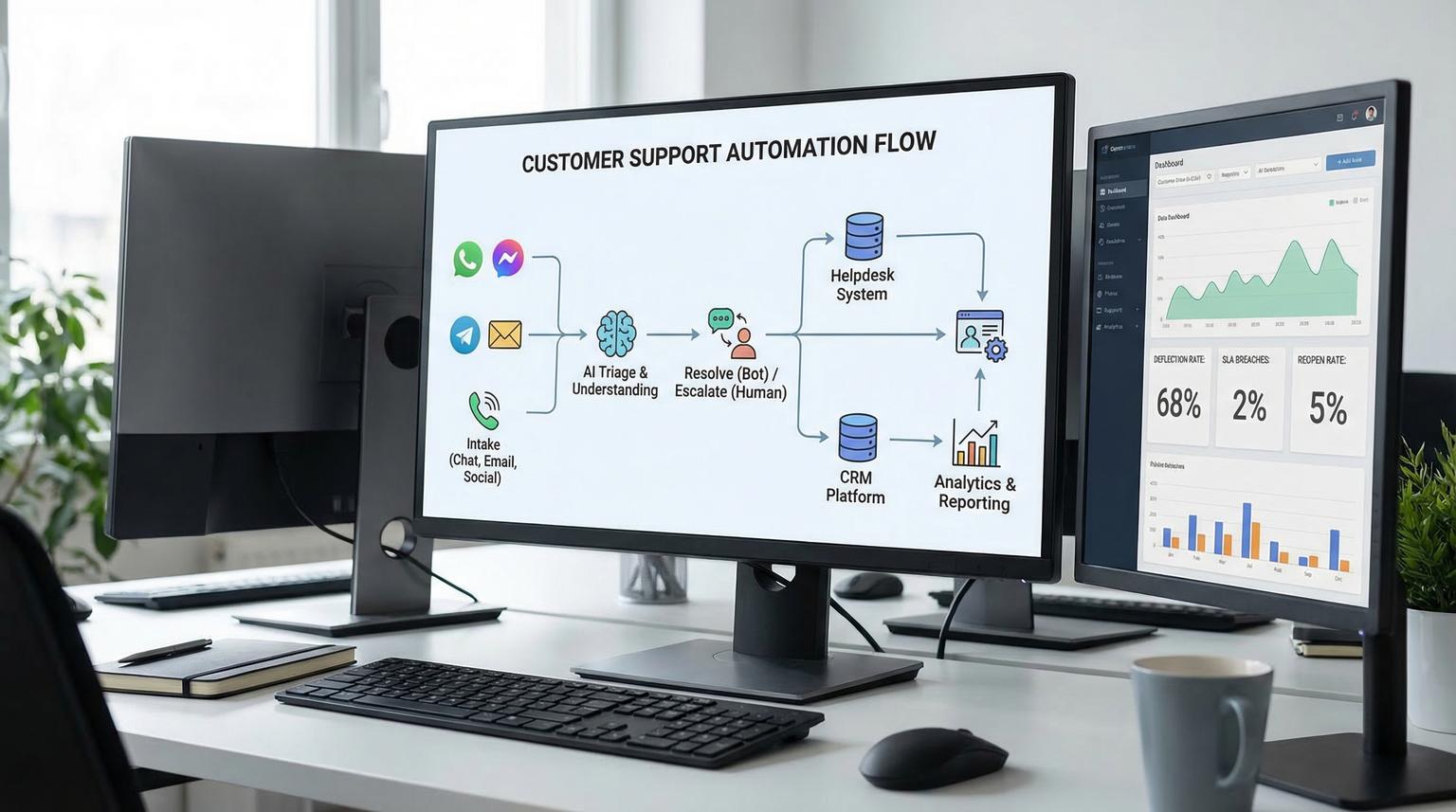
Customer support teams are being asked to respond faster, document more context and still keep quality high. This is where AI-powered chatbots and automation workflows can help, not by replacing your team, but by handling repetitive questions, collecting the right fields and escalating complex cases with clean context.
In this guide, we show a practical blueprint ThinkBot Agency uses to automate support intake with n8n, route by intent and sentiment, create or update helpdesk tickets and sync the full conversation context to your CRM for reporting and follow ups. If you want a deeper build guide, see our chatbot development for businesses walkthrough.
Quick summary:
- Use n8n to centralize intake from chat, email and forms then normalize the payload.
- Run AI triage to classify topic, priority and sentiment then branch to self serve or human escalation.
- Create or update Zendesk or Freshdesk tickets and notify agents in Slack or MS Teams with a one sentence summary.
- Sync conversation metadata and structured fields into HubSpot or Salesforce to improve attribution and data quality.
- Measure deflection, escalation, reopened tickets and SLA breaches with consistent workflow logging.
Quick start
- Pick your intake channels (web chat, email, website form, WhatsApp or social DMs) and send all messages into one n8n workflow via Webhook and IMAP and API triggers.
- Normalize fields (customer email, channel, message text, conversation_id, attachments) and store the raw transcript in a Data Store or your database.
- Add an AI triage step that outputs strict JSON for category, priority, sentiment, summary and needs_human.
- If self serve, answer from your FAQ or knowledge base then log the resolution and optional CRM note.
- If needs_human, create or update a helpdesk ticket then post a compact handoff summary to Slack or MS Teams and write context back to your CRM.
To automate customer support with an AI chatbot, route every incoming message through an n8n workflow that (1) classifies intent, sentiment and urgency, (2) resolves common FAQs instantly, (3) escalates complex cases by creating or updating a helpdesk ticket and (4) syncs a structured summary and key fields into HubSpot or Salesforce so agents can pick up the thread without asking customers to repeat themselves.
What great support automation actually changes
Most support delays are not caused by agents typing slowly. They come from manual sorting, unclear ownership, missing context and repetitive back and forth to collect basics like order number, plan tier or screenshots. Automation fixes those operational bottlenecks.
In 2026, the most effective pattern we see is a hybrid model:
- Bot handles the first mile: identify what the customer wants, gather required fields and resolve common questions.
- Workflow enforces consistency: route, tag, prioritize and trigger SLAs and notifications deterministically.
- Humans focus on edge cases: complex technical issues, sensitive billing disputes, account security and exceptions.
This is also how you avoid a common failure mode, automation that creates more work because it produces messy tickets and incomplete CRM data.
n8n blueprint: Intake -> Triage -> Resolve or Escalate
Think of n8n as the orchestration layer between your chat widget, email inbox, helpdesk and CRM. A reliable workflow generally includes these stages:
1) Intake and normalization
Unify all inbound messages into one schema. Whether the message arrives from a web chat webhook, an email inbox or a form submission you want the same fields downstream:
- conversation_id
- channel (chat, email, form, sms)
- customer_email (or a temporary identifier until captured)
- message_text
- attachments (links or IDs)
- timestamp

2) AI triage and routing
Your AI step should not output paragraphs that you then try to parse. It should output strict JSON so n8n can branch reliably. This mirrors a proven triage agent pattern and makes downstream automation stable. You can use an explicit output contract similar to the one shown in this blueprint.
3) Resolve FAQs or escalate with context
When the triage result indicates the request is straightforward, your workflow can respond with an FAQ answer and log the outcome. When it needs a human, you create or update a ticket then send a compact summary and extracted fields to the agent channel and CRM.
Support triage output contract (copy and adapt)
Use this schema when you build your n8n AI node prompt. It keeps classifications consistent, prevents brittle parsing and makes it easy to enforce SLA rules and routing. For more implementation patterns around routing-safe prompts, thresholds, and fallbacks, see AI-driven customer service automation with n8n.
{
"category": "billing|technical|account|general|urgent",
"priority": "high|medium|low",
"sentiment": "frustrated|neutral|positive",
"summary": "One sentence summary of the issue",
"suggested_response": "Draft response only if straightforward",
"needs_human": true
}

Implementation notes we use in production:
- Keep enums aligned to your helpdesk groups and macros. Avoid dozens of categories at first.
- Gate escalation on both priority and sentiment, not just keywords.
- If the model output is invalid JSON, rerun a repair prompt once then escalate to a fallback queue.
- Store the raw customer message and the structured output together for audits and prompt iteration.
Workflow examples: Ticket triage, helpdesk actions and CRM sync
Below are practical workflow patterns we implement in n8n for support teams. They apply whether your front end is chat, email or a portal.
Example 1: Route by topic and sentiment, then enforce SLAs
After triage, use Switch or IF nodes to branch:
- Billing + frustrated: notify finance queue in Slack or Teams, set ticket priority to high and attach last invoice ID if collected.
- Technical + high priority: create ticket in the engineering support group and include environment details and recent error messages.
- Account access: route to security trained agents, require identity verification step before any changes.
- General + low priority: respond with FAQ and offer a human option if unresolved.
For notifications, include three items only: one sentence summary, a direct link to the ticket and the extracted entities. Long transcripts belong in the ticket or CRM note, not in chat.
Example 2: Create a Zendesk ticket via HTTP Request
If your helpdesk node does not support a needed action or you want full control, use HTTP Request. A community pattern shows a minimal payload with required headers and fields. See the n8n example for a concrete starting point.
POST https://create-zendesk-ticket.p.rapidapi.com/create-zendesk-ticket
Headers:
X-RapidAPI-Key: {{$env.RAPIDAPI_KEY}}
X-RapidAPI-Host: create-zendesk-ticket.p.rapidapi.com
Content-Type: application/json
Body:
{
"subject": "{{summary}}",
"description": "{{transcript}}\n\nAI triage: {{category}}, {{priority}}, {{sentiment}}",
"priority": "normal",
"requester_email": "{{customer_email}}",
"api_token": "{{zendesk_api_token}}"
}
Best practice: never hardcode secrets. Use n8n environment variables, credentials or external secret management and log request metadata without tokens.
Example 3: Sync context into HubSpot or Salesforce
Support automation is not only about closing tickets faster. It is also about improving customer data for reporting and lifecycle automation. Common fields we write back to the CRM:
- Last support category and subcategory
- Last sentiment and priority
- Conversation_id and ticket_id for traceability
- Products mentioned, plan tier and order_id if captured
- Resolution type (self serve vs escalated)
In HubSpot, that can be custom contact properties plus a timeline event or note. In Salesforce, that can be a Case update plus fields on Contact or Account. The key is consistent mapping so your dashboards are meaningful.
Implementation playbook: Owners, monitoring and rollback
Use this playbook when you want a repeatable rollout across teams and channels.
Roles and ownership
- Support lead (Owner): defines categories, SLA rules, escalation policy and approval for auto responses.
- Ops or RevOps (Co-owner): owns CRM field mapping, reporting requirements and data retention rules.
- Automation builder (ThinkBot Agency or in house): builds n8n workflows, integrations and error handling.
- Security or IT (Reviewer): reviews secrets handling, permissions, PII policy and audit logging.
Monitoring that actually matters
- Workflow errors by node and by integration (email, helpdesk, CRM, Slack/Teams)
- Escalation rate and top escalation reasons
- Average time to first response (bot and human)
- Reopened tickets linked to conversation_id
- Fallback volume (invalid JSON, missing email, unknown intent)
Rollback and safe deployment
- Deploy behind a routing flag, for example only 20% of inbound chats go through automation at first.
- Keep a manual queue path that always works if the AI step times out or the CRM API fails.
- Version prompts and schemas. Treat them like code with changelogs.
- Define a stop condition, for example if ticket creation failure exceeds a threshold in 15 minutes then disable auto escalation and route everything to humans.
Failure modes and mitigations for automated support
Automation becomes trusted when it is predictable. These are common failure modes we design around and how to mitigate them.
- Misclassification routes a ticket to the wrong team -> Keep categories small, add confidence thresholds and allow a human reclassify action that feeds back into prompt improvements.
- Bot replies with incorrect information -> Restrict answers to approved FAQ or knowledge base snippets, do not allow free form policy statements.
- Missing identity data blocks follow up -> Add a required field collection step early, ask for email or account ID before attempting account specific actions.
- PII leakage into Slack or Teams -> Redact sensitive tokens and payment details from summaries, keep full transcripts inside the helpdesk only.
- Latency spikes cause poor customer experience -> Split triage and response generation, set timeouts and use cached FAQ answers for common intents.
- Duplicate tickets created -> Deduplicate by conversation_id plus time window and search existing open tickets before creating new ones.
When you need a formal handoff pattern, treat escalation as a deliberate transfer with context. Both handoff guidance and handoff signaling emphasize passing conversation history and structured variables so customers do not repeat themselves. In n8n, that means attaching a summary plus key fields into the ticket and CRM, not just forwarding a transcript.
Measure what changed: KPIs to baseline and improve
Before you automate, baseline your current performance. After rollout, track the same metrics with consistent logging. Inspired by enterprise patterns, these KPIs are practical for most teams.
| KPI | What it measures | Why it matters | How to capture in n8n |
|---|---|---|---|
| Escalation rate | % of conversations transferred to humans | Shows coverage of self serve and gaps in FAQs | Log needs_human true and category to a Data Store or BI table |
| Self serve resolution | Sessions ended without ticket creation | Indicates deflection without harming experience | Mark handled_by=bot and outcome=resolved in your workflow log |
| Time to first response | Seconds to first meaningful reply | Directly impacts satisfaction and SLA compliance | Store intake timestamp then response timestamp per conversation_id |
| Reopen rate | Tickets reopened after resolution | Flags low quality answers or incomplete fixes | Sync ticket status changes into your reporting table keyed by ticket_id |
Once measurement is in place, prompt and routing improvements become straightforward. You can see which categories drive escalations, which FAQs need updates and which customer segments need faster routing.
If you want a production ready workflow that connects your chat channel, helpdesk and CRM with strong guardrails, ThinkBot Agency can build and harden it in n8n. Book a consultation and we will map your current support process, define the triage schema and deliver an implementation plan you can maintain. For a full implementation-oriented pillar guide that connects intake, triage, routing, SLAs, escalation, knowledge workflows and QA, use our support ticket automation playbook.
Prefer to evaluate us first? You can review our automation track record on Upwork.
FAQ
How do AI-powered chatbots reduce support workload without hurting quality?
They reduce workload by answering repetitive FAQs, collecting required details up front and routing requests to the right queue with a clear summary. Quality improves when the workflow enforces consistent categorization, prioritization and data capture, while complex cases still go to a human with context.
What should an n8n triage step output so routing is reliable?
Use strict JSON with fixed enum values for category, priority and sentiment plus a one sentence summary and a needs_human boolean. This makes branching deterministic and prevents downstream parsing errors.
Can n8n sync chatbot conversations into HubSpot or Salesforce automatically?
Yes. n8n can create or update contacts, companies and cases then write conversation metadata like category, sentiment, conversation_id and ticket_id back to CRM properties or notes so reporting is cleaner and follow ups can be automated. If you also need robust cross-app mapping, retries, and idempotent upserts, see API integration solutions to unify CRM, email, and support data.
How do you handle live agent handoff so customers do not repeat themselves?
Pass a short agent summary, the conversation transcript link and key variables like conversation_id, last topic, language and extracted entities into the ticket and CRM record. Then notify the agent channel with only the essentials and a link to the full context.
Can ThinkBot Agency build this end to end for our helpdesk and chat channels?
Yes. We design the triage schema, build n8n workflows for routing, ticketing and CRM sync and add monitoring, error handling and rollback controls so the automation is reliable in production.
