
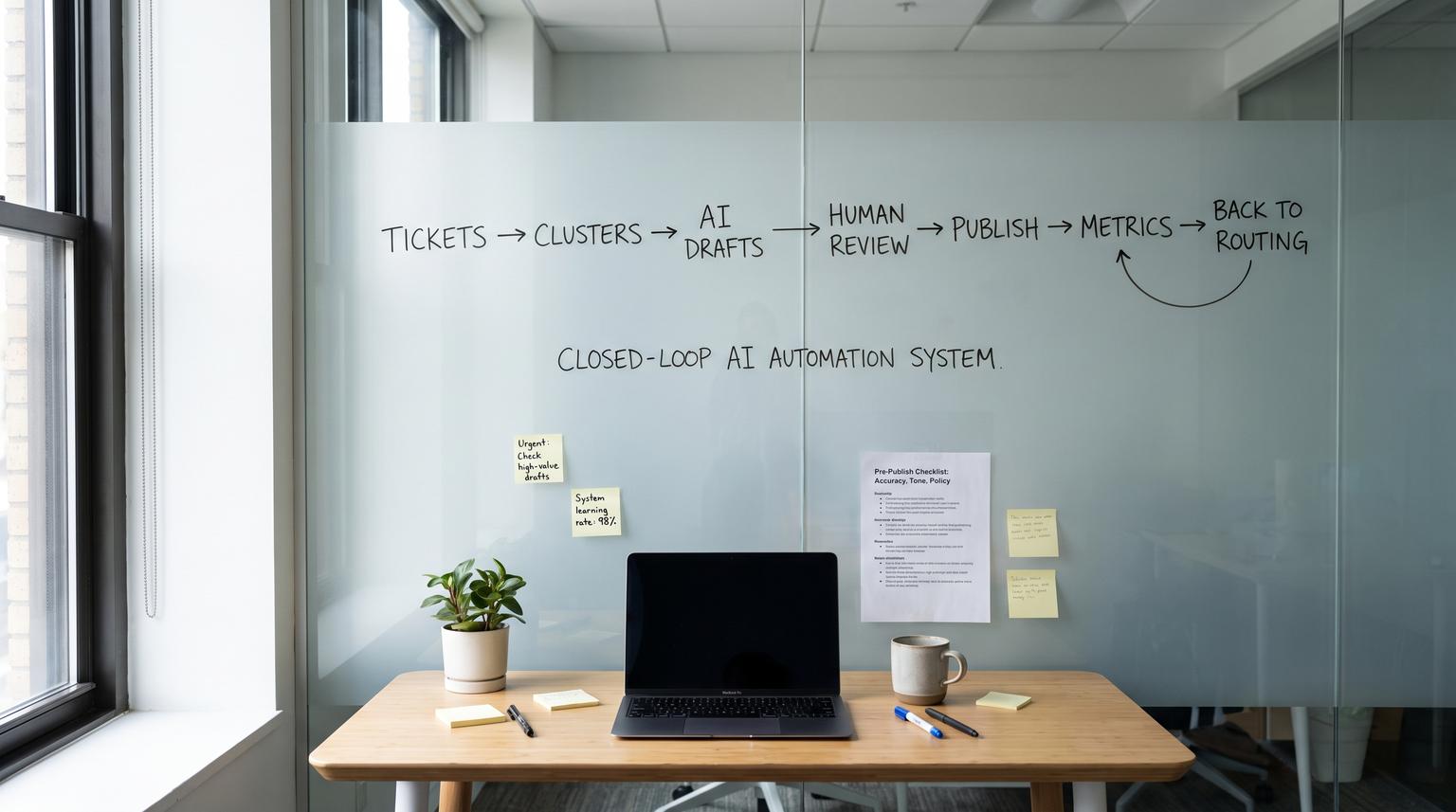
Support teams already have the best knowledge base material in their helpdesk: resolved tickets. The problem is that the signal is buried in thousands of conversations and it rarely turns into publishable help center content fast enough to prevent the next wave of repeat contacts. This playbook shows how to build AI-powered customer service automation that detects repeated issues, clusters similar tickets, drafts new or updated articles then routes them through a durable human review queue before safe publishing. It is written for ops leaders and support teams who want measurable ticket deflection without risking accuracy, tone or policy compliance.
At a glance:
- Convert solved ticket patterns into KB drafts using clustering plus grounded AI drafting.
- Use a WIP-limited human approval queue with structured decisions, versioning and rollback.
- Publish safely with segmentation (internal or targeted audiences) then expand after impact is proven.
- Close the loop by feeding deflection and repeat-contact metrics back into routing and content priorities.
Quick start
- Define a ticket taxonomy: product area, issue type, severity, customer segment and resolution status.
- Schedule a weekly job to pull solved tickets, embed or vectorize summaries then cluster by similarity.
- For the top clusters, generate an AI draft that cites its source tickets and proposes either a new article or an update to an existing one.
- Push each draft into an approval queue with a WIP limit and a required reviewer decision schema.
- On approval, publish as a draft or segmented article first then promote broadly after metrics improve.
- Track deflection and repeat-contact metrics for each cluster and use them to prioritize next week’s drafts and routing rules.
This workflow works by continuously mining solved tickets for repeated problems, clustering them into topics, drafting KB changes with AI using those tickets as sources then pausing for human review before publishing. After publishing you measure deflection and repeat contacts per topic then feed those results back into ticket tagging, routing and next content priorities so the system improves over time.
The closed-loop system you are building
The goal is not “more articles” or “a smarter bot.” The goal is an operating loop that reliably reduces inbound volume while staying safe and auditable:
- Ticket clustering identifies repeated issues and normalizes inconsistent tagging.
- AI draft proposes an article create or update with steps, prerequisites and warnings grounded in solved tickets from a defined time window.
- Approval queue forces human accountability for accuracy, tone and policy constraints.
- Publish uses controlled permissions, segmentation and notification control.
- Deflection + repeat-contact metrics tie each published change to measurable outcomes then route future work.
In practice, the “hard boundary” is between helpdesk data and controlled publishing. If you get governance wrong, you ship incorrect steps or policy statements at scale. If you get measurement wrong, you keep drafting content that does not change ticket volume.
Data model and integrations that make this operational
Before you automate, decide what metadata must travel end to end. A simple model that works well across most helpdesks and CRMs:
- Ticket fields: ticket_id, created_at, solved_at, channel, language, product_area, issue_type, tags, customer_id, segment, first_contact_resolution flag, reopens count.
- Cluster fields: cluster_id, cluster_label, top_phrases, sample_ticket_ids, volume_30d, repeat_contact_rate, suggested_article_action (create or update).
- Draft fields: draft_id, target_kb (Zendesk or Intercom), target_location (section or collection), locale, audience scope, risk_flags, source_ticket_ids, ai_output_html.
- Publish fields: kb_article_id, kb_state (draft or published), version_hash, published_by, published_at, rollback_pointer.
- Metrics fields: help center sessions, ticket submitters, deflection proxy, repeat-contact by topic, time-to-first-response.
Common integration layout we implement at ThinkBot Agency:
- Helpdesk for tickets and tags
- Knowledge base for article reads and publishing API
- CRM for segment and account context (SMB vs enterprise, plan tier, region)
- Automation orchestrator (often n8n) for scheduling, enrichment and state management (see AI-driven customer service automation with n8n for routing-safe prompts and fallback rules)
- Durable human approval (Conductor or an equivalent wait state) so the workflow can pause for days and resume safely

Ticket clustering that produces useful topics not noisy buckets
Clustering is where most teams either create magic or create churn. The fastest path to value is not a perfect ML pipeline. It is a practical weekly batch that yields 5 to 20 topics a reviewer would agree are real.
Recommended clustering inputs
- Only solved tickets (or solved plus closed) from a fixed window such as last 30 to 90 days
- Ticket subject plus a short summary of the resolution, not the full raw thread by default
- Existing tags and product area fields as “soft hints” not hard truth
- Language split first if you support multiple locales
One operations insight that saves weeks
Do not cluster on the initial complaint alone. Cluster on the resolution summary. Two tickets can look different at the top but share the same fix. When you cluster on the fix, the resulting article drafts are more actionable and deflect more tickets.
Decision rule for scope
If a cluster mixes more than one product area, split it even if similarity is high. Cross-area articles tend to become long and hard to maintain and they confuse ownership. Support deflection improves when each article has a clear owner and a clear product boundary.
AI drafting spec that reviewers can approve quickly
Your AI output should feel like a senior support engineer wrote it, not marketing copy. Build a strict draft template and enforce it. Zendesk’s pattern of generating procedure drafts from common issues, recent solved tickets and existing articles is a solid model to copy and operationalize. If you want the reference behavior, see reviewing and publishing AI-generated procedures. If you’re also deploying agent-assist for faster replies with human control, pair this loop with AI-powered customer service solutions that assist agents.
Use a draft template like this:
- Title: task-oriented, includes the product area keyword
- Who this is for: segment or plan notes if relevant
- Prerequisites: permissions, browser, required settings
- Steps: numbered, concrete UI labels
- Common errors: what users see and how to fix it
- Warnings: policy and security notes
- Agent-only notes: internal macros or escalation path (keep this out of public articles)
- Sources: list of ticket IDs and links for reviewers
A common failure pattern is letting the model invent steps or UI labels. Avoid it by grounding drafts in a curated input set and requiring “sources” for every draft. If the model cannot cite enough solved tickets for a claim, it should flag it for manual fill-in instead of guessing.
Mini template for the AI prompt inputs
{
"cluster_id": "clu_0142",
"cluster_label": "Invoice PDF export fails",
"product_area": "Billing",
"locale": "en-us",
"audience_scope": "internal_first",
"known_constraints": [
"Do not mention internal tools",
"No policy promises",
"Do not include PII"
],
"source_tickets": [
{"id": 88321, "resolution_summary": "Enable setting X then retry export", "tags": ["billing","export"]},
{"id": 88410, "resolution_summary": "User lacked permission Y", "tags": ["billing","permissions"]}
],
"existing_articles": [
{"kb_id": "kb_192", "title": "Exporting invoices", "gap": "Missing permission error"}
]
}
Approval queue with durable human review, WIP limits and auditability
If you only approve drafts in Slack, you will eventually publish the wrong thing. A durable human step should be part of the workflow graph so it pauses, resumes and records structured outputs. Conductor’s HUMAN task is a clean reference for this pattern: Human Task documentation. For a full implementation-oriented pillar on building end-to-end governance (intake, triage, routing, SLAs, escalation, knowledge workflows, QA, handoff), use this playbook: support ticket automation system playbook.
Operationally, implement three rules:
- WIP limit: cap unreviewed drafts so reviewers are never buried. Zendesk uses a hard cap for unreviewed recommendations which is a strong model for stability.
- Structured decision: approval must include fields like approved, publish_scope and risk_flags.
- Routing by risk: drafts with policy flags go to the right reviewer group before any publishing step runs.

Reviewer decision schema
{
"approved": true,
"reviewer": "[email protected]",
"required_changes": "Add screenshot for step 3",
"risk_flags": ["policy_claim"],
"publish_scope": "segmented",
"segment": "enterprise_only"
}
This is also where tone and brand voice get enforced. The tradeoff is speed versus safety: the more reviewers you require the slower you publish. A practical rule is to start with one trained support lead as the approver then add Legal or Security only for specific risk flags.
Safe publishing with permissions, segmentation and rollback
Publishing is not a single API call. It is a controlled state transition with the ability to roll back fast.
Zendesk publishing guardrails
If you publish to Zendesk Help Center, use the Articles API with safe defaults. Create drafts with a service account then let humans with publishing rights promote them. Zendesk supports creating articles as draft or published and supports segmentation with user_segment_id and permission_group_id. For implementation reference see Zendesk Articles API.
Example create-as-draft payload pattern:
POST /api/v2/help_center/sections/{section_id}/articles.json
{
"notify_subscribers": false,
"article": {
"title": "Export invoice PDFs when the button is missing",
"locale": "en-us",
"body": "<p>...sanitized HTML...</p>",
"draft": true,
"user_segment_id": 123456789,
"permission_group_id": 987654321
}
}
Intercom publishing guardrails
If you publish to Intercom Articles, set state to draft for AI output and only promote after approval. Intercom also supports audience targeting via audience_ids and a clear error behavior for unknown IDs which helps transactional safety. Reference: Intercom create article.
One subtle pitfall: Intercom article tags are not managed via the Articles API. Do not design your loop assuming you can write tags there. Store your own mapping metadata externally or use the correct tagging mechanism.
Rollback and versioning
- Store every AI draft, approved edit and published HTML in your own system of record with a version hash.
- For updates, generate and store a diff so reviewers can see exactly what changes.
- Keep “last known good” content available for immediate rollback if ticket volume spikes after a publish.
Measurement and feedback loop that drives priorities
You need a measurement spine that proves the loop is working. A practical starting point is a self-service ratio style metric plus topic-level repeat-contact rates. Zendesk describes a “self-service score” proxy using help center sessions and ticket submitters and recommends tracking in consistent windows. See tracking essential self-service metrics.
Weekly scorecard template (copy into your ops doc)
| Metric | How to compute | Why it matters |
|---|---|---|
| Help center sessions | From analytics on KB | Denominator for deflection proxy |
| Ticket submitters | Unique users creating tickets in window | Tracks inbound pressure |
| Self-service score | Sessions / ticket submitters | Higher over time suggests better self-service adoption |
| Repeat-contact rate by cluster | Users with 2+ tickets in same cluster / users in cluster | Shows where articles are unclear or missing steps |
| Deflection candidates | Top clusters by volume and repeat-contact | Next draft batch input |
Close the loop with one simple prioritization rule: if a cluster’s ticket volume is rising or repeat-contact is high while your self-service score is flat, that cluster becomes next week’s draft batch and its tag routing should be tightened so it is measured consistently.
Implementation checklist for an ops-ready rollout
- Define a canonical tag and product-area taxonomy and enforce it in the helpdesk UI.
- Set a fixed reporting window (example 30 days) and do not change it mid-quarter.
- Schedule a weekly batch job for clustering and draft generation rather than on-demand drafting.
- Sanitize AI-generated HTML to what your KB supports.
- Create drafts only from the automation service account and restrict publish permissions to a reviewer group.
- Enforce a WIP limit on unreviewed drafts so the system cannot flood reviewers.
- Require structured approval output including publish scope and risk flags.
- Publish segmented first for higher-risk topics then expand when repeat-contact improves.
- Store versions and diffs externally for audit and rollback.
- Instrument post-publish metrics and tie them to the originating cluster_id.
When this approach is not the best fit
If your ticket volume is low, your product changes daily or your support team does not consistently mark resolutions, this loop can cost more than it saves. In those cases start with manual monthly content updates plus better ticket tagging and only automate drafting once you have stable signals and owners.
How ThinkBot Agency implements this safely in n8n
We typically build this as a scheduled n8n workflow with durable state stored outside the workflow run, plus an approval step that can pause and resume without losing context. A production-grade build includes:
- Connectors to your helpdesk, KB and CRM plus any custom APIs
- Clustering using embeddings with guardrails for language and product boundaries
- AI drafting that outputs a strict template, references source ticket IDs and flags risk
- A reviewer inbox that writes structured approvals back to the workflow (for more on approval guardrails and audit trails, see human-in-the-loop AI drafts and CRM audit trails)
- Controlled publishing with segmentation, permissions and notification suppression
- Metrics jobs that write deflection and repeat-contact outcomes back to the cluster record
If you want us to map this to your exact stack and ship a governed version with approval, versioning and rollback, book a consultation. We will review your ticket data quality, KB structure and publish permissions then propose an implementation plan you can operate long-term.
FAQ
These are common questions we hear when teams move from ad hoc KB updates to a governed automation loop.
How many drafts should we generate per week to stay safe?
Start small: 3 to 10 drafts per week with a strict WIP limit in the review queue. The right number is the amount your reviewers can consistently approve without rushing. If the queue grows faster than it clears, reduce draft generation or narrow clustering to the highest-volume topics.
Should we publish AI drafts directly if we restrict them to an internal audience?
Internal targeting reduces risk but it does not remove it. Incorrect steps can still harm operations and trust. A lightweight human approval step is still recommended, even if the reviewer only checks sources, tone and obvious errors before allowing internal publish.
What data should we send to the model to avoid hallucinations?
Send resolution summaries and a small set of representative solved tickets plus any existing related articles. Require the draft to include a sources section listing ticket IDs used. If the model cannot support a statement with those sources, it should flag the gap for manual input instead of guessing.
How do we measure ticket deflection from help center updates?
Use a consistent time window and track help center sessions alongside unique ticket submitters to compute a self-service score proxy (sessions divided by ticket submitters). Then track topic-level repeat-contact rates for clusters tied to published updates. Improvements should show up as fewer repeat contacts for those topics and a healthier ratio over time.
Do we need Conductor or can this be done with just n8n?
You can do it with n8n if you design a durable waiting pattern and store state externally so approvals can happen days later without losing context. Conductor provides a native human task concept that makes long-lived approvals and auditable transitions easier. The best choice depends on your reliability needs, approval complexity and how many parallel drafts you will manage.
