
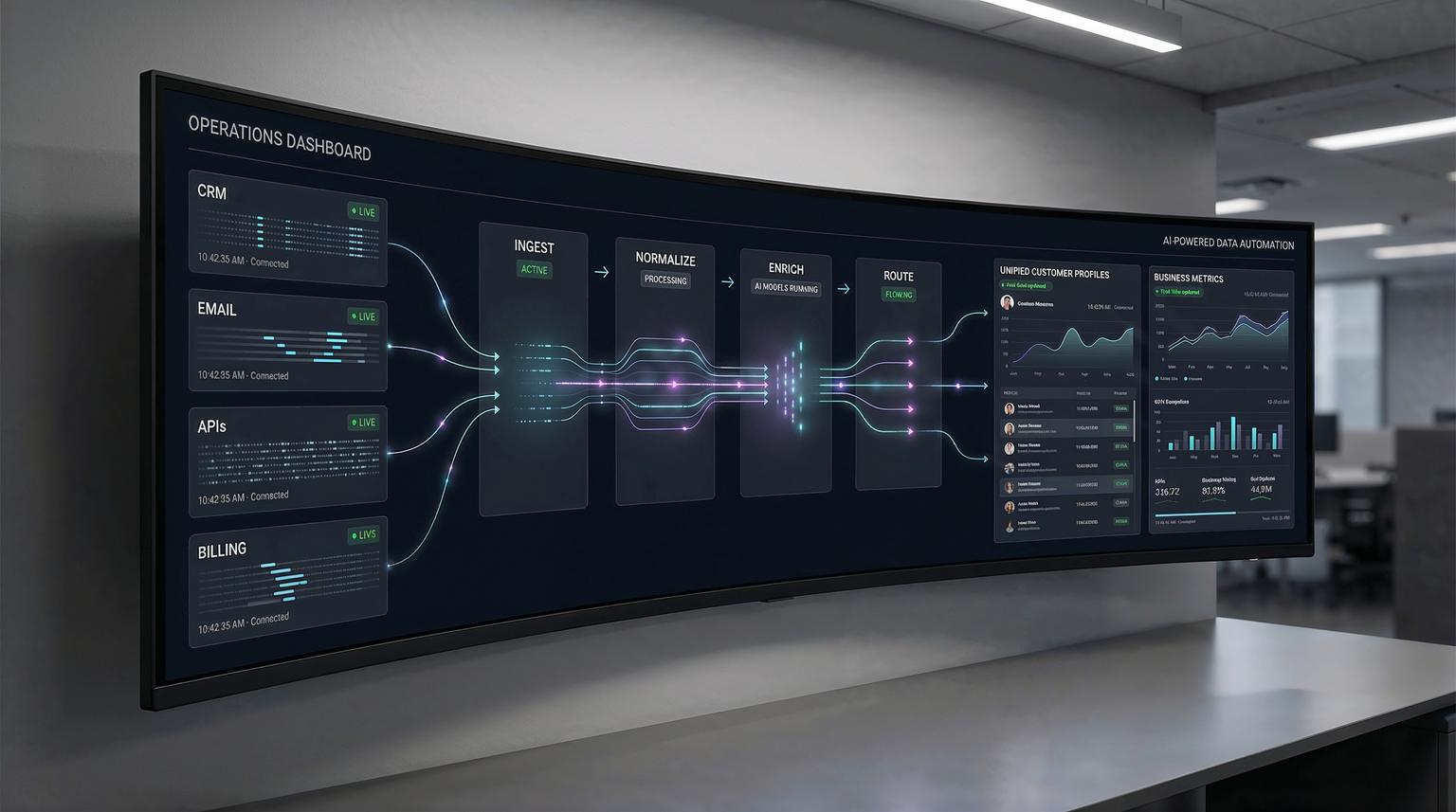
Most teams do not have a data problem, they have a workflow problem. Customer details live in a CRM, conversations live in email and chat, product usage lives behind APIs, and the only thing tying it together is manual cleanup in spreadsheets. AI-powered data processing changes that by collecting, cleaning and unifying data automatically so your workflows can act on reliable information in real time.
This post is for ops leaders, marketing and CRM teams and tech-savvy founders who want fewer manual steps and more trustworthy reporting. We will walk through practical automation patterns we build at ThinkBot Agency using tools like n8n, plus the guardrails that keep these systems safe and maintainable. For a broader view on how AI fits into end-to-end workflows, you can also read our guide on AI integration in business automation.
Quick summary:
- Turn messy CRM, email and API inputs into a consistent customer record you can trust.
- Use workflow automation (n8n) to enrich and route data in real time, not at month end.
- Detect trends and trigger personalized journeys automatically, without spreadsheet work.
- Reduce errors with validation, confidence checks and human review queues.
Quick start
- List your sources: CRM, email platform, forms, billing system and any key APIs.
- Define your "source of truth" fields: customer_id, email, company, lifecycle_stage and consent.
- Build an n8n workflow that ingests events, normalizes fields and deduplicates records.
- Add enrichment: parse emails, infer missing fields and score lead quality with AI where it helps.
- Validate and route: quarantine low-confidence records, notify an owner, then sync clean data back to your CRM and reporting layer.
AI-assisted data pipelines transform everyday workflows by automatically turning scattered raw inputs into clean, unified records that your CRM, email journeys and dashboards can trust. Instead of exporting CSVs and fixing formatting issues, you use event-driven automations to normalize fields, resolve duplicates, detect anomalies and trigger next actions, like customer follow-ups or alerts, as soon as new data arrives.
Why raw business data breaks workflows
When teams say "our automations do not work" the root cause is usually inconsistent data. A few common examples we see across CRMs and marketing stacks:
- Schema mismatch: "Company" vs "Account" vs "Organization" plus different required fields across tools.
- Duplicate identities: one person appears as multiple contacts due to aliases, typos or multiple forms.
- Unstructured inputs: lead details trapped in email threads, PDFs, call notes and chat transcripts.
- Latency: weekly imports mean your reporting is always behind and your follow-ups are late.
- Silent failures: API changes or new fields cause sync errors that nobody notices until metrics look wrong.
The fix is not "better spreadsheets". The fix is a processing layer that standardizes inputs before they hit downstream workflows. In practice, that layer is usually a combination of deterministic rules (validation and mapping) plus AI-assisted extraction and enrichment where it is appropriate. If you are comparing tooling for this layer, our automation platform comparison for CRM and AI workflows walks through tradeoffs between popular platforms.
A practical architecture for turning inputs into a source of truth
At ThinkBot we typically design a simple but resilient flow that works for SMBs and scaling teams. It is tool-agnostic but n8n is often the best orchestration hub because it can connect CRMs, email platforms, warehouses and custom APIs and it supports strong error handling and branching logic.
The 5-stage pipeline we implement most often
- Ingest: webhooks, inbox listeners, scheduled pulls and API polling.
- Normalize: canonical field names, type casting, date formatting and text cleanup.
- Resolve identity: dedupe rules, fuzzy matching and entity resolution for contacts and companies.
- Enrich: parse unstructured content, infer missing attributes, tag intent and compute scores.
- Distribute: sync back to CRM, trigger email journeys, update dashboards and log lineage.

If your team already uses a warehouse, we can also push cleaned events into a warehouse-first flow then sync curated outputs back into operational tools. Some platforms now offer AI-assisted data preparation and drift handling that can complement this approach, for example AI-assisted prep capabilities in modern analytics stacks. The key is that your workflow tool remains the conductor, coordinating validation, routing and business actions.
Customer data mapping checklist (use this before you build)
Use this checklist when you are defining what "clean" means for your business. It prevents the most common rework we see after workflows go live.
- Pick a canonical customer key strategy (CRM contact ID, email, or an internal UUID) and document it.
- Define required fields for downstream actions (lifecycle stage, owner, consent status, region).
- Set normalization rules for email, phone and country (case, spacing, prefixes).
- Standardize timestamps (timezone, format and event time vs processing time).
- Decide how you handle multi-source conflicts ("CRM wins" vs "latest wins" vs "manual review").
- Define dedupe thresholds (exact match, fuzzy match and what requires human approval).
- Classify PII fields and decide where masking or tokenization is required.
- Create an error taxonomy (validation error, enrichment error, API error, rate limit) and routing rules.
- Establish a data lineage log format (what changed, when, by which workflow version).
Real-time enrichment and routing with n8n (three workflows we deploy often)
Below are three concrete patterns that turn clean data into business outcomes. Each can run event-driven and can be expanded gradually, which is usually safer than trying to build a "perfect" data program up front. For more patterns that connect CRM, email and AI, see our article on optimizing workflows with AI and n8n integrations.
1) Lead capture -> clean -> enrich -> assign
Trigger: new form submission, inbound email, chat lead or webhook.
- Normalize fields (name casing, phone formatting and UTM parsing).
- Check CRM for duplicates using email plus fuzzy company match.
- Enrich with firmographic data from your approved sources or internal APIs.
- Score the lead using a transparent rule set plus optional AI classification for intent.
- Assign owner, create tasks and start the right email sequence.
Result: leads stop getting stuck in "needs cleanup" and your follow-up time drops because routing happens automatically.
2) Support inbox -> structured ticket fields -> smart escalation
Trigger: new email to support@ or a new chat transcript.
- Extract structured fields from unstructured text (product, urgency, account and category).
- Detect sentiment and escalation keywords, then apply guardrails like confidence thresholds.
- If confidence is low, route to a review queue and do not auto-update the CRM.
- If confidence is high, update the ticket system, notify the right team and log the decision.
This is where cautious AI-in-workflows design matters. Workflow guardrails, validation steps and fallbacks are a practical way to reduce risk when using models in production, similar to the patterns described in cautious enterprise guidance.
3) Billing and product usage -> churn signals -> proactive outreach
Trigger: webhook from billing, daily API pull from product analytics, or event stream.
- Unify accounts across systems (billing account, CRM account and workspace IDs).
- Compute health metrics (usage trend, payment status and time since last activity).
- Detect anomalies (sudden drop in usage, repeated failed payments).
- Trigger a customer journey: CSM task, personalized email, or in-app message.
Result: teams stop reacting after churn happens and start acting on early signals.
Example payload: a unified customer event you can reuse across tools
When data is consistent, automation becomes simpler. Here is a lightweight event format we often implement as the "contract" between ingestion, enrichment and downstream actions. You can store it in a database, send it to a warehouse, or pass it between n8n workflows.
{
"event_type": "lead.created",
"event_time": "2026-01-08T14:22:31Z",
"source": "website_form",
"customer": {
"customer_id": "crm_123456",
"email": "[email protected]",
"full_name": "Alex Rivera",
"company": "Example Co",
"domain": "example.com",
"country": "US",
"consent": {
"marketing": true,
"timestamp": "2026-01-08T14:22:31Z"
}
},
"attributes": {
"utm_source": "linkedin",
"utm_campaign": "q1-demo",
"intent": "request_demo",
"lead_score": 78
},
"quality": {
"dedupe_status": "merged",
"confidence": 0.92,
"validation_errors": []
}
}
Once you have a stable schema like this, you can plug in new sources and destinations without rewriting everything. That is the difference between a one-off automation and a reusable processing pipeline.
Failure modes and mitigations for AI-assisted processing
AI can reduce manual work but it can also introduce new failure modes. Use the guardrails below when you add extraction, classification, or inference steps to operational workflows.
- Failure mode: Model extracts the wrong field (for example, swaps first and last name).
Mitigation: Validate against patterns, keep raw input, and only auto-write to CRM when confidence is above a threshold. - Failure mode: Duplicate merges combine two different people at the same company.
Mitigation: Use conservative merge rules, require two matching signals (email plus domain) and route ambiguous matches to human review. - Failure mode: Schema drift breaks integrations after a vendor adds or renames fields.
Mitigation: Add schema checks, log unknown fields, and alert on mapping changes before downstream sync runs. - Failure mode: Over-enrichment causes privacy or compliance issues (PII stored where it should not be).
Mitigation: Classify PII early, mask or tokenize sensitive fields, and enforce least-privilege API credentials. - Failure mode: Hallucinated classifications trigger the wrong customer journey.
Mitigation: Use deterministic rules for high-impact actions, keep AI as a recommender, and add a fallback path. - Failure mode: Costs spike due to excessive model calls or heavy transformations.
Mitigation: Cache enrichment results, batch where possible, and add rate limits and circuit breakers in n8n.

Implementation playbook: how ThinkBot ships these pipelines safely
If you want a system that runs for months without constant babysitting, treat it like a product. Here is the playbook we use for many client builds. You can also see how we apply similar principles in our overview of business process automation with n8n.
Roles and owners
- Ops owner: defines required fields, exception SLAs and success metrics.
- CRM or marketing owner: owns lifecycle stages, routing rules and journey logic.
- Engineering or automation owner: owns n8n workflows, API auth, logging and deployments.
- Data steward (can be part-time): reviews low-confidence queues and resolves edge cases.
Monitoring that actually helps
- Track workflow execution errors by category (validation vs API vs enrichment).
- Track queue size and time-to-review for exceptions.
- Track dedupe rate and merge reversals.
- Track downstream outcomes (reply rate, conversion rate, time-to-first-response) tied to clean inputs.
Rollback and change control
- Version workflows, mapping rules and prompts.
- Deploy changes in a staging environment with sample payloads.
- Use feature flags for new enrichment steps so you can disable them without stopping ingestion.
- Keep raw inputs for reprocessing when rules improve.
If you want help designing and implementing a pipeline like this with n8n plus your CRM and email stack, book a consultation with ThinkBot here: book a consultation.
Prefer to validate experience first? You can also review our automation delivery track record on Upwork.
FAQ
Common questions we hear when teams are planning an AI-assisted processing layer for CRM and workflow automation.
What is AI-powered data processing in a business workflow context?
It is the use of automation plus AI techniques like extraction, classification, entity resolution and anomaly detection to turn raw inputs from CRMs, email and APIs into clean, consistent records that downstream workflows can trust.
Do I need a data warehouse to unify CRM and email data?
No. Many teams start with an operational "source of truth" using a database plus n8n workflows that normalize and sync data. A warehouse can help later for analytics at scale but it is not required for better routing and reporting.
How do you prevent AI steps from writing incorrect data into our CRM?
We use validation rules, confidence thresholds, audit logs and human review queues for low-confidence cases. For high-impact fields we keep deterministic rules as the primary decision maker and use AI as a helper, not the final authority.
What are the most common pitfalls when implementing these pipelines?
The biggest issues are unclear ownership of fields, weak dedupe logic, missing exception handling, and no monitoring. Another common pitfall is treating prompts and mappings as informal instead of versioned assets.
Can ThinkBot build this in n8n and integrate it with our existing CRM and email platform?
Yes. ThinkBot designs end-to-end workflows in n8n and connects CRMs, email platforms and APIs. We also implement data quality checks, enrichment steps, logging and safe rollout practices so the system stays reliable as your tools evolve.
