
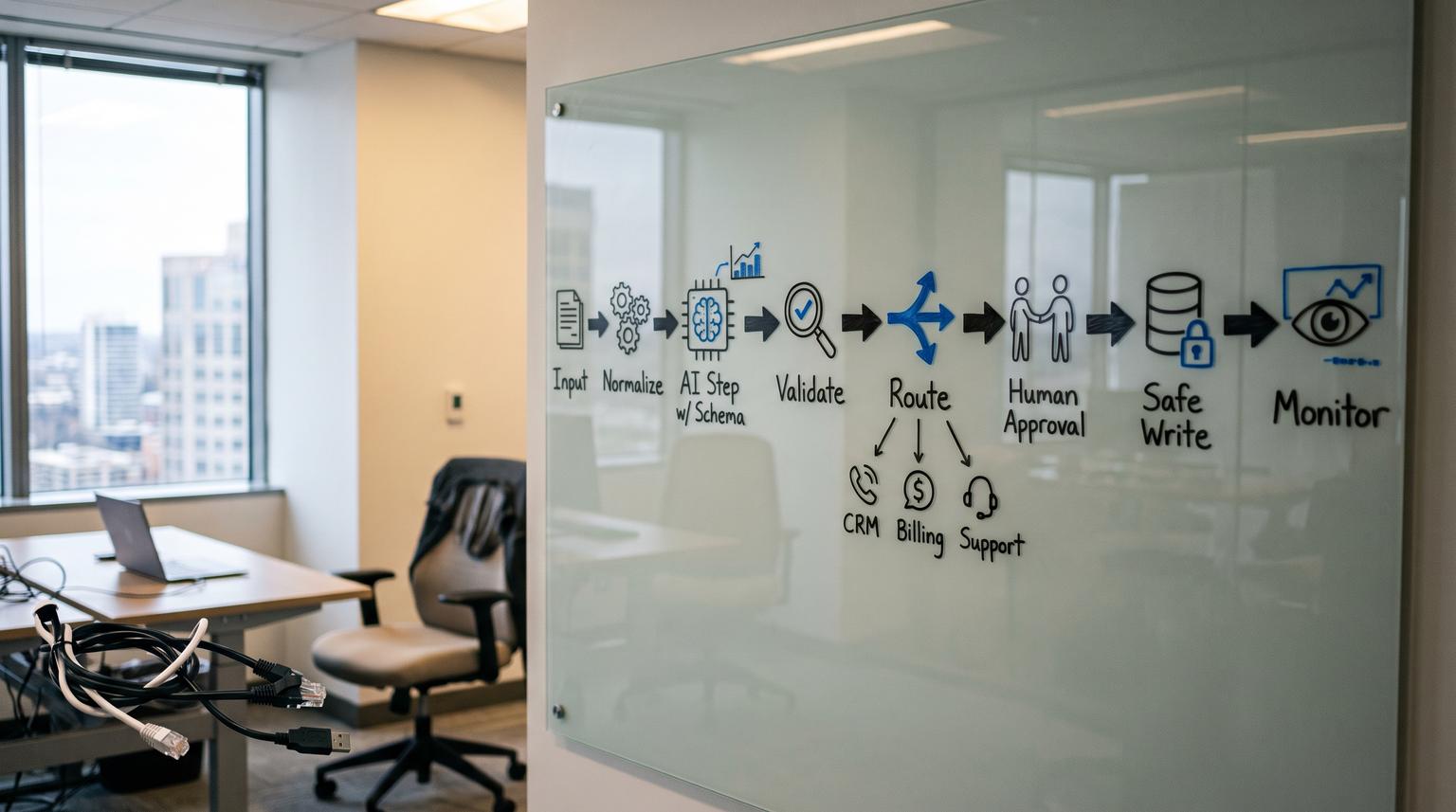
Embedding AI into operations is no longer the hard part. The hard part is making it behave reliably inside real workflows, with the same predictability you expect from your CRM, billing system, and support tools. This AI workflow blueprint shows how to design AI steps (classification, extraction, summarization, and controlled task execution) so they are measurable, debuggable, and governed instead of turning into fragile experiments.
This guide is for business owners, ops leaders, RevOps and support teams, and technical founders who want AI to reduce cycle time and errors without creating new operational risk. We will cover design patterns, step contracts, human-in-the-loop routing, fallbacks, governance controls, and how to monitor AI behavior in production in 2026.
Key takeaways:
- Design AI as small, testable workflow steps with clear inputs, outputs, and validation, not one giant prompt.
- Use routing and approvals to match autonomy to risk, cost, and confidence.
- Make reliability a first-class feature: retries, idempotency, circuit breakers, and safe degradation.
- Govern AI like any other system: permissions, audit trails, data minimization, and change management.
- Monitor quality in production with structured logs, feedback loops, and regression evals.
Quick start
- Pick one workflow with repeatable volume and clear pain, like inbox triage, invoice intake, or call-to-CRM updates.
- Map the existing process end-to-end and label each step as deterministic (rules/API) or probabilistic (AI).
- Choose one high-leverage AI touchpoint (classify, extract, summarize, or draft) and define a strict output schema.
- Add response validation and bounded retries, then a fallback route (human queue, smaller model, or rules).
- Define routing logic by risk and confidence, including when the workflow must pause for approval.
- Instrument the step: log inputs (redacted), prompt version, model, latency, token cost, validation result, and final action.
- Ship to one team or one segment first, monitor incidents and overrides, then expand autonomy gradually.
A reliable AI-enabled workflow is built by decomposing work into small AI steps with contracts (schemas), validation, deterministic routing, and selective human approvals. You treat model calls like unreliable dependencies, so each step has timeouts, bounded retries, fallbacks, and safe degradation. Governance is implemented in the execution layer through permissions, audit trails, data handling rules, and change control. Finally, production monitoring uses structured logs and feedback loops to drive regression testing and continuous improvement.
Table of contents
- Why AI inside workflows breaks, and how to prevent it
- The core design principle: AI as steps with contracts
- High-leverage AI touchpoints you can reuse everywhere
- A practical step-by-step design methodology
- Workflow patterns for scale and reliability
- Human-in-the-loop routing that scales
- Risk and guardrails: failure modes and mitigations
- Governance essentials: data, permissions, audit trails, and change management
- Evaluation and QA: acceptance criteria, golden sets, and regression gates
- Monitoring in production: logging, feedback loops, and drift signals
- Implementation examples across ops, sales, and support
- Getting help: a practical engagement path with ThinkBot Agency
Why AI inside workflows breaks, and how to prevent it
Most AI automation failures are not caused by the model being "bad". They happen because workflows treat AI output as if it were deterministic, like a calculator or a database query. In reality, AI steps are probabilistic, non-deterministic, and sensitive to small changes in inputs, prompts, model versions, and tool context.
Common breakpoints show up at boundaries: when an AI-generated field is written into a CRM, when a support ticket is routed to the wrong queue, when an invoice extraction returns malformed totals, or when an agent triggers an API action it should not. If you want a grounded view of these boundary failures and how to design safe writes, we mapped them out in failure modes.
The fix is architectural: you separate workflow topology (deterministic control flow) from AI reasoning (inside a constrained step) and you add contracts, validation, routing, and observability at every step boundary. This is the difference between a clever demo and operational infrastructure.
The core design principle: AI as steps with contracts
Instead of building one prompt that tries to read an email thread, interpret intent, extract entities, decide next actions, and write to five systems, you decompose AI into steps with explicit state passed between them. This is a foundational production approach in modern LLM workflow architecture, where a workflow is a structured sequence of model calls, tool invocations, and data transformations with explicit boundaries and observability (source).
Think of each AI step as a governed component with:
- Inputs: what data is allowed in, how it is normalized, and what context is attached.
- Prompt/tools: the specific instruction and tool scope for that step only.
- Outputs: a strict schema and meaning of each field.
- Validation: schema validation, constraints, and sanity checks.
- Routing: what happens on success, low confidence, invalid output, or policy violations.
- Auditability: logs that connect outputs and actions to versions and approvals.
This is the mindset behind schema-first and structured output designs in production: define the contract first, validate the response, then route through bounded retries and fallbacks rather than letting malformed output leak into downstream logic (source).
High-leverage AI touchpoints you can reuse everywhere
Across sales ops, finance ops, marketing ops, and support ops, the same AI primitives appear again and again. Treat them as reusable modules and your workflow library becomes easier to scale and govern.
Classification
Examples: lead intent, spam vs real, ticket category, invoice vs receipt, contract type, escalation risk. Classification is often cheap and fast, and it is ideal for routing to specialized handlers. "Router" patterns intentionally pay one extra classification call to increase downstream quality and reduce prompt complexity (source).
ThinkBot examples: lead intake routing and scoring is covered in lead routing, and support routing tradeoffs are covered in support ops.
Extraction
Examples: invoice totals, vendor name, PO number, contract dates, meeting action items, RFP requirements. Extraction works best when you enforce structured outputs and validate them before any write-back.
ThinkBot examples: for AP, see invoice extraction. For contract PDFs into clean records, see contract intake.
Summarization
Examples: daily ops brief, call notes, long email threads, RFP evidence packs. For long documents, avoid stuffing everything into one prompt. Use chunking patterns like map-reduce to stay within context limits and keep outputs stable (source).
ThinkBot example: building a daily decision brief with anomaly alerts is covered in daily brief.
Controlled task execution (agentic, but bounded)
Examples: drafting an email reply, generating a proposal section, creating a ticket with prefilled fields, preparing a CRM task list. The trick is to keep execution deterministic and constrain AI to propose actions rather than directly execute high-risk actions, unless governance and approvals support it.
Architecture guidance commonly distinguishes predefined workflows (predictable, auditable) from agents (flexible, less predictable). A practical approach is to keep the workflow topology stable and introduce AI-driven decision points inside it only where variability demands it (source).
A practical step-by-step design methodology
Use this section as your repeatable blueprint for adding an AI step to any workflow in n8n, Zapier, Make, or a custom orchestration layer. If you want a concrete n8n-oriented implementation style, our structured, approval-based approach is demonstrated in structured workflows.

1) Define the step goal and success criteria
Write down what the step is responsible for and what it is not responsible for. Then define success in measurable terms:
- Quality: accuracy, completeness, and format compliance.
- Operations: reduction in handling time, fewer handoffs, lower rework rate.
- Reliability: percent of runs that validate on the first pass, and percent that require escalation.
- Cost and latency: maximum tokens per run, max runtime, and acceptable model cost.
2) Specify inputs and context
Normalize inputs (trim signatures, remove boilerplate, de-dupe threads), then attach only the context required. Data minimization reduces risk and also reduces token spend. Where possible, pass stable IDs and fetch details deterministically from systems of record rather than pasting full records into prompts.
3) Define a strict output contract
Decide what the step must output, including allowed labels, formats, and ranges. For extraction, require typed fields (numbers, dates). For classification, define the label set and disallow free-text categories. This contract-first approach is central to structured outputs in production, where schema validation is the primary gate that turns text generation into reliable automation (source).
4) Design prompts and tool scope
Keep prompts small and specific. Avoid mixing sensitive instructions with untrusted user content. If the step uses tools (CRM lookup, ticket creation, billing queries), apply least privilege and limit actions to the minimum scope needed for that step.
5) Add validation, retries, and bounded recovery
LLM calls fail in multiple ways: malformed outputs, policy blocks, rate limits, and transient outages. Treat them like unreliable dependencies and handle errors intentionally: validate, retry only when recoverable, and route failures to safe fallbacks. Reliability patterns like separating recoverable vs non-recoverable errors, using retry budgets, and designing idempotency are strongly recommended for LLM integrations (source).
6) Implement routing logic and fallbacks
Routing should be deterministic and testable like code. For multi-agent or multi-step systems, deterministic orchestration separates routing from token-consuming reasoning and makes the execution topology reproducible (source).
Common fallbacks:
- Smaller model for classification, larger model for complex reasoning.
- Rule-based default when output is invalid or confidence is low.
- Human review queue for ambiguous or high-risk cases.
- Skip-step and notify when the step is non-critical.
Workflow patterns for scale and reliability
Once you can build one governed AI step, the next challenge is choosing workflow topologies that scale. These patterns are widely used as reusable building blocks for production LLM workflows (source).
Chain (sequential transforms)
Summarize -> extract -> format is common, but can be brittle because one failure blocks everything. Use it when each stage is easy to validate and failures have clean fallbacks.
Fan-out/fan-in (parallelize then merge)
Use when the unit of work is naturally parallel, such as processing many tickets, chunking many attachments, or generating multiple candidate drafts then selecting one. This improves throughput and gives you options when one branch fails.
Map-reduce (chunk then combine)
Use for long documents beyond context limits, such as contracts, RFPs, and long email threads. Chunk, process each chunk with strict schemas, then combine results deterministically.
Router (classify then dispatch)
Use when inputs are heterogeneous. A router pays one extra call to choose the right prompt, tools, or model for the case, which often improves quality and reduces total token spend.
Multi-stage document pipelines (production archetype)
A canonical pattern for many businesses is OCR/extraction -> classification -> summarization -> indexing/storage -> routing/escalation, with validations and business rules between stages. This multi-stage approach is explicitly recommended for real pipelines because each stage can have independent prompts, schemas, and fallbacks (source).
Human-in-the-loop routing that scales
Human-in-the-loop (HITL) is not a binary choice. The goal is selective, signal-driven oversight so you are not stuck in the two bad extremes: "always automate" or "always review." Practical HITL implementation patterns include confidence-based escalation and risk-based approval gates (source).
Risk tiers: what actions require approval?
- Low risk: auto-execute, log only. Example: classify an email tag.
- Medium risk: notify-then-act, with quick revert. Example: create a draft ticket or CRM task.
- High risk: recommend-only or human-decides. Example: updating financial totals, changing contract terms, sending outbound emails to customers, or closing a ticket.
Confidence-based escalation triggers
Use calibrated confidence scores, novelty signals, policy triggers, or contradiction detection to route to review. Implementation guidance emphasizes designing reviewer queues that humans can actually process, prioritizing cases, and closing the feedback loop without contaminating training data (source).
In practice, the approval step should be designed for fast decisions. Give reviewers only what they need: the extracted fields, key evidence snippets, the proposed action, and one-click approve/reject with a reason code.
Risk and guardrails: failure modes and mitigations
Use this section when you are deciding where AI is allowed to act and what guardrails must exist before you let it touch production systems. Many of these controls map to well-known reliability and security guidance for LLM applications.
Failure mode -> mitigation pairs
- Malformed output breaks downstream logic -> Enforce structured outputs and validate against schema; route invalid outputs to bounded retries then fallback (source).
- Retry storms during rate limits or partial outages -> Separate recoverable vs non-recoverable errors, use exponential backoff, enforce global retry budgets and circuit breakers (source).
- Duplicate writes to CRM or accounting -> Design idempotency keys for every write action, log external IDs, and make writes safe to retry.
- Prompt injection causes tool misuse or data exfiltration -> Apply defense-in-depth: input separation, output validation, least privilege tools, and monitoring. Prompt injection is a core vulnerability because instructions and data are processed together without secure separation (source).
- Model drift changes behavior after a provider update -> Pin model versions where possible, run regression evals before changing prompts or models, monitor quality metrics over time.
- Over-automation in high-risk scenarios -> Add risk-tiered approval gates and confidence-based escalation, then graduate autonomy only after measured performance (source).
Governance essentials: data, permissions, audit trails, and change management
Governance is what makes AI automation maintainable. It is not only about security, it is also about being able to explain what happened and change behavior safely. A strong way to align stakeholders is to use a shared risk vocabulary, such as the NIST AI Risk Management Framework and its generative AI profile guidance (source).
Data handling and minimization
- Only send the minimum fields needed for the step.
- Redact or tokenize PII when possible.
- Define retention: how long prompts, completions, and traces are stored, and who can access them.
- Separate environments: sandbox vs production credentials and datasets.
Permissions and least privilege tool access
When AI can call tools, permissions are the real guardrail. Give the workflow identity only the API scopes it needs for that step. For high-risk tools (sending emails, issuing refunds, editing legal terms), require human approval and use restricted service accounts.
Security-wise, prompt injection is a practical concern whenever untrusted text can influence tool calls. OWASP recommends combining deterministic controls (least privilege, validation, monitoring) with additional guard models rather than trusting the prompt alone (source).
Audit trails and change management
- Log prompt IDs and versions, model name, temperature, tool calls, and final actions.
- Record approvals: who approved, when, and what evidence was shown.
- Use environment-level config for thresholds and routing so changes are reviewed and versioned.
- Maintain rollback plans for prompt changes and routing logic.
Evaluation and QA: acceptance criteria, golden sets, and regression gates
You cannot govern what you cannot measure. AI steps need acceptance criteria that map to outcomes: format compliance (automation), correctness (rework), and latency/cost budgets (operations). Then you test changes like you would test code.
Golden sets: the minimum viable QA asset
Build a curated "golden set" of real examples and expected behavior. Start small (even 20-50 cases) and grow it continuously from production incidents and escalations. This is the core artifact that makes regression evals repeatable and turns iteration into an engineering process (source).
Prompt regression testing as a release gate
Treat prompts like code: run evals in CI on every change, block merges on regressions, and version the eval contract when behavior changes intentionally. A layered scoring approach reduces flakiness: schema checks first, then rubric scoring, and then diff against baseline to focus on what got worse (source).
Comparison table: QA methods and when to use them
Use this table to decide what evaluation method matches your workflow risk and change velocity.
| Method | Best for | What it catches | Limitations |
|---|---|---|---|
| Schema validation | Extraction and routing steps | Malformed JSON, missing fields, invalid labels | Does not guarantee correctness of content |
| Golden set regression evals | Prompt/model changes | Known failure cases returning, quality regressions | Needs curation and continuous updates |
| Human review sampling | High-risk workflows and early rollout | Subtle errors, policy issues, tone problems | Costly, can be slow without good UI/queue |
| Online A/B monitoring | High-volume workflows | Real-world KPI shifts, drift effects | Requires instrumentation and careful rollout |

Monitoring in production: logging, feedback loops, and drift signals
Production monitoring closes the loop between what you tested and what actually happens. For multi-step systems and agentic behaviors, structured trace capture is foundational for accountability and real-time monitoring, not just debugging (source).
What to log for every AI step
- Workflow run ID and step ID
- Input hashes (and redacted raw text when needed)
- Prompt ID/version, model, parameters
- Latency, token usage, and estimated cost
- Validation result, confidence signals, route taken
- Tool calls made, including request/response metadata
- Final action executed and external system IDs
Operational metrics that matter
- Escalation rate by category
- Reviewer override rate and agreement
- Schema invalid rate and retry rate
- Time-to-decision and time-to-resolution
- Cost per processed item
How to implement observability without overengineering
Modern LLM observability practice emphasizes tracking prompts, completions, token usage, latency, and quality then using traces to debug and monitor regressions over time (source). You do not need perfection on day one, but you do need consistent identifiers (prompt version, model version, workflow version) so you can connect incidents to changes.
Implementation examples across ops, sales, and support
Below are repeatable patterns we commonly implement with n8n as an orchestration layer, connecting CRMs, email platforms, helpdesks, Slack/Teams, and accounting systems through APIs. The goal is not to copy these verbatim, it is to recognize the reusable AI steps and governance gates.
AP invoice intake -> validated bill draft -> approval -> accounting sync
Pattern: extract fields -> validate totals/vendor -> route to approval if mismatched -> write to accounting with idempotency keys. For a concrete AP flow, see bill drafting.
Call transcript -> structured CRM updates -> safe writeback
Pattern: summarize -> extract action items and entities -> validate fields -> create drafts -> require approval for field overwrites. This is the governed approach behind CRM updates.
Sales follow-up -> next steps -> tasks and sequences
Pattern: classify intent -> extract next steps -> draft follow-up -> route by confidence and deal stage -> write tasks with dedupe checks. See follow-up automation.
RFP or questionnaire processing -> owned record -> drafted answers -> approvals
Pattern: map-reduce extraction for long PDFs -> classify requirements -> draft sections -> evidence pack -> human approval for final submission. This is similar to the controlled approach in RFP workflows.
Marketing ops content drafts -> brand checks -> approvals -> CRM/email sync
Pattern: generate drafts -> validate required elements (UTMs, disclaimers, lists) -> route approvals -> sync to HubSpot/Klaviyo. See marketing ops.
Getting help: a practical engagement path with ThinkBot Agency
If you want this blueprint applied to your systems, ThinkBot Agency designs and implements governed AI automation across CRMs, email platforms, helpdesks, and accounting tools. We typically start with workflow mapping, risk tiering, step contracts (schemas), and a pilot rollout with monitoring and rollback plans. You can see examples of our automation work in our portfolio.
Primary next step: Book a working session and we will map one workflow, identify the best AI touchpoints, and outline the governance gates and monitoring you need to ship it safely. Book a consultation.
Prefer to evaluate implementation capability first? You can also review our track record as a top performer on Upwork.
FAQ
What is an AI workflow blueprint?
It is a repeatable method for adding AI steps to business workflows with clear input/output contracts, validation, routing, fallbacks, and governance. The blueprint focuses on reliability and maintainability, not just prompt writing.
When should a workflow use an agent versus a deterministic flow?
Use deterministic flows when you can enumerate steps, decision points, and acceptable outcomes, especially in regulated or high-traceability work. Add limited agentic behavior only inside bounded steps, where the agent can propose actions or gather information but cannot execute risky changes without routing and approvals.
How do you decide where to add human approval?
Tier actions by risk and cost, then use confidence signals and policy triggers to route low-risk cases straight through and send ambiguous or high-impact cases to review. Design the review queue so decisions are fast and measurable, then graduate autonomy as performance data accumulates.
How do you keep AI outputs from breaking CRM or accounting data?
Use schema-first outputs, validate responses, and only allow safe writes with idempotency keys and strict constraints. For high-risk updates, create drafts and require approval before overwriting existing fields. Log every write with external IDs so you can trace and reverse changes when needed.
What should we monitor after launching AI automation?
Monitor schema invalid rates, retries, latency, token cost, escalation rate, and reviewer overrides. Also track business KPIs like time-to-response, rework rate, and resolution time. Make sure logs include prompt and model versions so incidents can be tied to changes.
Can ThinkBot implement this in n8n with our current tools?
Yes. We commonly implement these patterns in n8n and connect CRMs, email platforms, helpdesks, accounting tools, and internal systems via APIs. The deliverable is a governed workflow with step contracts, approvals, audit trails, monitoring, and a rollout plan.
