
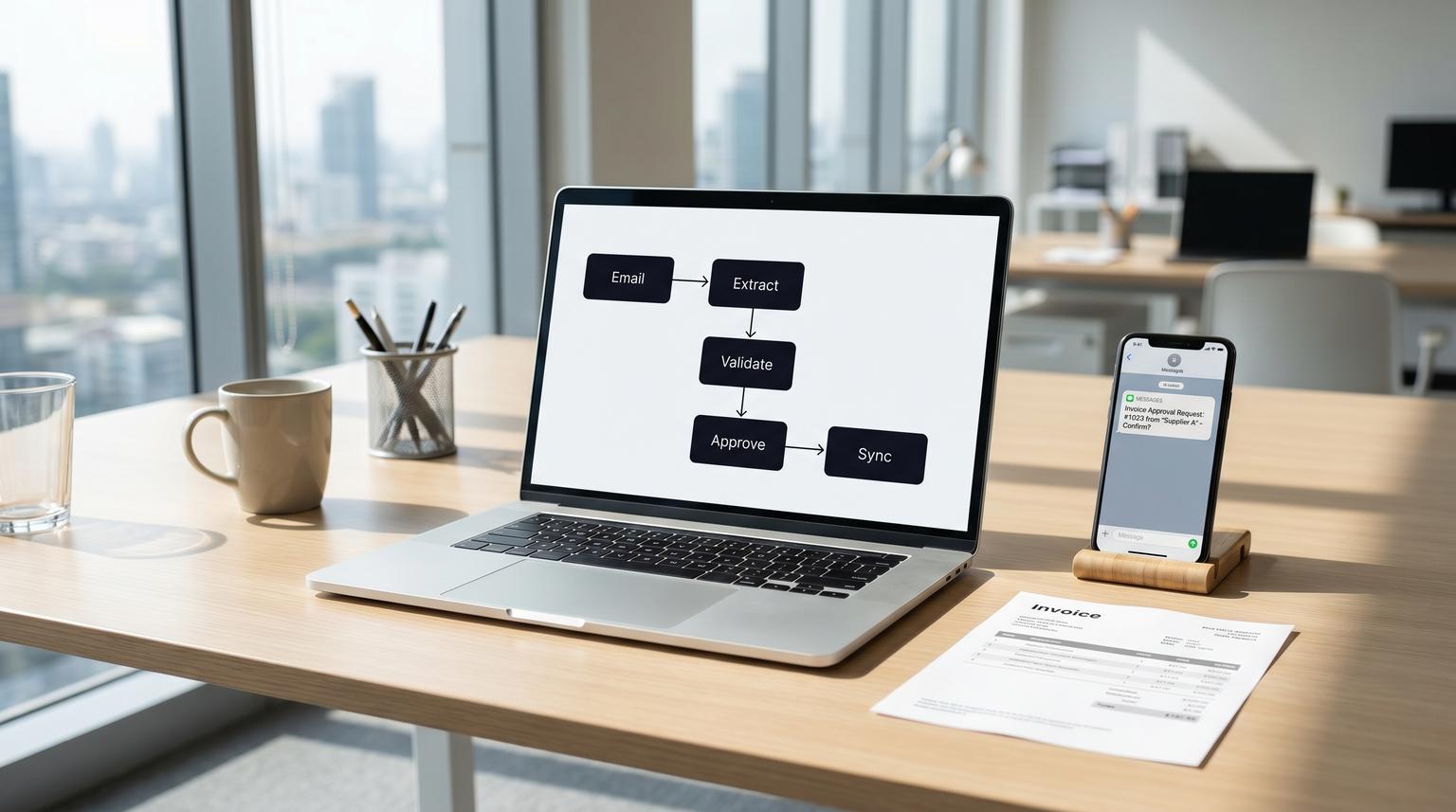
Vendor invoices should not live in inboxes, get retyped into accounting, then spark a week of Slack messages when something looks off. This post shows a practical AI workflow integration for accounts payable where emailed PDFs become structured draft bills, pass a deterministic validation layer (including 3-way match) and only then get approved in Slack and synced to QuickBooks with a clean audit trail. It is written for ops leaders and finance teams that want speed without losing control.
At a glance:
- Turn invoice emails into structured draft bill data with AI plus document-aware extraction.
- Block bad data with deterministic checks: vendor match, duplicates, totals and tax math and PO/receipt matching with tolerances.
- Route exceptions to Slack for human approval with a payload-bound decision record.
- Create the QuickBooks Bill only after gates pass then attach the source PDF for auditability.
Quick start
- Create a dedicated AP inbox and route all invoices there (or use a shared mailbox label).
- In n8n, ingest new emails and store the PDF plus raw email metadata (message-id, sender, received time).
- Run PDF classification (native vs scanned) then extract invoice fields with AI and OCR as needed.
- Run validation gates: vendor resolution, duplicate detection, totals and tax checks and PO/receipt match with tolerances.
- Send a Slack approval card that includes the extracted fields, exceptions and a payload hash then wait for Approve or Hold.
- On approval, create the Bill in QuickBooks with resolved reference IDs and attach the PDF then write back status and logs.
This workflow works by separating probabilistic extraction from deterministic accounting controls. AI produces a structured draft from an emailed PDF. Your automation then validates vendor identity, prevents duplicates, verifies totals and tax math and performs PO and receipt matching. Only approved invoices create a QuickBooks Bill with the original PDF attached so you get faster AP cycle time without silent finance errors. For a broader pattern library on designing, evaluating, and operating reliable AI steps, see our pillar playbook: Build AI workflow automation that behaves like a reliable workflow step.
Why this invoice-to-bill boundary is where automations succeed or fail
Invoices arrive as unstructured documents: email text, PDFs, scans and vendor-specific layouts. QuickBooks expects structured records with correct references, correct amounts and correct coding. If you let AI write directly to QuickBooks, you risk errors that look plausible and are hard to unwind later.
The reliable pattern we implement at ThinkBot Agency is: AI drafts data, deterministic rules validate data, a human approves exceptions, then a write action occurs. This is the same control backbone you see in mature AP processes such as 3-way matching and approval routing described in AP workflow stages like those outlined by Parsli.
A real operations insight: the biggest time sink is rarely extraction. It is exception resolution. If your workflow cannot explain why something is blocked, approvers will bypass it. So we design holds with reason codes and clear next steps, not just a red flag.
End-to-end architecture and data flow
Here is the component view. You can build it fully in n8n or split it across your automation platform and existing systems.
- Capture: AP inbox intake, PDF download, store email metadata.
- Document handling: detect native vs scanned PDF, normalize image quality if needed.
- AI extraction: produce a draft JSON with header fields and optional line items.
- Validation and matching: deterministic checks plus PO and receipt reconciliation with tolerances.
- Approval UI: Slack message with Approve, Hold and Request info actions.
- Accounting sync: create QuickBooks Bill only after approval, attach PDF, store QuickBooks IDs.
- Evidence: internal audit log plus Slack records. Slack can also provide audit logs depending on plan capabilities as described in Slack audit logs.
Decision rule that keeps this stable: treat QuickBooks as the system of record for posted accounting entries but treat your workflow database as the system of record for approvals and holds. Slack is the interface, not the ledger.
Extraction design that produces usable drafts not fantasy data
Extraction is inherently imperfect because invoices are not standardized. The same number can appear multiple times and tables are hard to reconstruct from PDFs. A practical approach is to classify the PDF first then choose an extraction path, as highlighted in the technical constraints discussed by Gennai.
Step 1: classify the PDF
- Native PDF: embedded text, higher extraction reliability, faster processing.
- Scanned PDF: requires OCR, more errors, lower confidence especially on line items.
Step 2: define the draft schema that AI must output
Do not ask the model to generate QuickBooks IDs or final GL accounts. Ask it for business meaning. Your draft schema should include:
- vendor_name, vendor_address (optional), vendor_tax_id (optional)
- invoice_number, invoice_date, due_date, currency
- subtotal, tax_total, shipping_total (optional), total
- line_items (optional): description, qty, unit_price, line_total
- po_number (if present), receipt_reference (if present)
- notes and extraction_confidence per field
Common failure pattern: letting AI guess missing fields like tax or due date. Instead, enforce three states per field: present, missing or ambiguous. Missing should trigger a hold or a request for info, not a guess. If you want a related end-to-end example of structured extraction plus guardrails, see ChatGPT for Business Productivity (reliable, structured workflows).

Validation and matching layer that must pass before QuickBooks writes
This is the control layer that prevents duplicate bills, bad vendor assignment, wrong totals and subtle mismatches. It should run before any Bill creation call.
Pre-sync validation checklist
- Vendor match: resolve vendor to an existing QuickBooks vendor by ID. If the vendor is not found, route to vendor onboarding approval. Do not auto-create vendors from invoice PDFs.
- Duplicate detection: search recent bills by vendor and invoice number. Also check fuzzy duplicates using vendor plus total plus invoice date window because vendors sometimes change invoice numbering or include prefixes.
- Totals and tax checks: verify that subtotal + tax + shipping equals total within a configured tolerance. If line items exist, verify sum(line_total) matches subtotal within tolerance.
- PO match: if a PO number exists, fetch the PO and compare vendor, currency, items and amounts.
- Receipt match (3-way match): compare invoice quantities and amounts to what was received. If receipts are missing, the invoice should go to hold.
- Coding guardrails: map suggested category to an allowed GL account list per vendor or cost center. Block any AI suggestion outside allowed mappings.
Tolerances and holds (how to handle real-world variance)
Invoice matching is not always exact. You need configurable tolerances and a formal hold state. Procedures for 2-way and 3-way matching often include a hold mechanic when tolerances are exceeded as described in this matching procedure. In practice, we recommend:
- Price variance tolerance: for example 1% or a fixed dollar amount per line.
- Quantity variance tolerance: typically 0 for many goods unless partial shipments are common.
- Tax tolerance: small rounding tolerance, higher only when vendors apply local tax rules that differ from expectation.
If any tolerance fails, set status to HOLD with a reason code such as PRICE_VARIANCE, QTY_VARIANCE, MISSING_RECEIPT or DUPLICATE_SUSPECTED. Do not create the Bill. Route to Slack with the reason and the comparison data. For a deeper look at failure modes and the guardrails needed at the API/ledger boundary, read A failure map for AI automation in business workflows that touch CRMs and APIs.

Three-way match mechanics (PO, receipt, invoice)
A 3-way match is most effective when you can tie invoice lines to PO lines and receiving lines. If your invoices do not have reliable line items, you have two options:
- PO-first reconstruction: use the PO as the authoritative line list and match invoice totals to PO plus receipts, then code based on PO lines.
- Human review lane: if AI cannot reliably extract tables, route to AP review where a person confirms line mapping. This is often faster than chasing downstream reconciliation issues.
Tradeoff: deeper matching reduces risk but increases implementation complexity. The decision rule we use is simple: if more than a small portion of spend is PO-backed and inventory or project costing matters, invest in 3-way matching. If most invoices are services without POs, focus on vendor, duplicate and totals controls plus strong approvals.
Slack approval with a payload-bound audit trail
Slack works well as an approval surface because it meets approvers where they already work. The key is to make approvals auditable and resistant to last-minute data changes.
What the approval message should include
- Vendor name (resolved vendor record), invoice number, invoice date, due date, total
- PO number and receipt status if applicable
- GL coding summary (mapped accounts, cost centers, classes if used)
- Exceptions and holds with clear reason codes
- A link to the stored PDF in your system or a secure file reference
Payload hash and replay protection
When you post the approval request, compute a hash of the draft payload you intend to sync (for example sha256 of canonical JSON). Store it with the approval request ID. When the user clicks Approve, re-check the hash before syncing. If the payload changed due to re-extraction or edits, require a new approval. This prevents the classic failure where an approver approves one version and the system posts another.
Also store: approver user ID, Slack message timestamp, decision, decision timestamp and any typed reason for overrides. Slack can provide additional audit evidence depending on your plan but your workflow should be able to stand alone during a finance audit.
QuickBooks Bill creation and attachment after gates pass
Only after validation passes and Slack approval is captured should you create the Bill in QuickBooks. At this stage, every reference must be resolved deterministically. Intuit's QuickBooks Online billing implementation shows the required shape: VendorRef, APAccountRef and line-level AccountRef are IDs, not names, and you typically query the chart of accounts and vendor list to resolve them before writing.
Reference: QuickBooks basic billing implementation.
Mini spec for the Bill payload (conceptual example)
This is an intentionally simplified example to illustrate what your workflow must construct after validation and mapping.
{
"VendorRef": { "value": "123" },
"APAccountRef": { "value": "45" },
"DocNumber": "INV-10493",
"TxnDate": "2026-05-10",
"PrivateNote": "Approved in Slack by U12345. Request ID: ap_8f2c... PayloadHash: 6b1f...",
"Line": [
{
"Amount": 100.00,
"DetailType": "AccountBasedExpenseLineDetail",
"AccountBasedExpenseLineDetail": {
"AccountRef": { "value": "789" }
},
"Description": "Office supplies"
}
]
}
Implementation detail that matters: do not let AI supply those reference IDs. Your validation layer should map vendor and accounts from your authoritative lists. If mapping fails, hold the invoice and request input.
Attach the source PDF and write back results
- Attach the original invoice PDF to the created Bill (or store a stable link and reference it in the memo based on your compliance needs).
- Store the created Bill ID, sync timestamp and the final payload hash in your workflow log.
- Post a Slack confirmation message with the Bill ID and status.
Operating the workflow in production (ownership, monitoring, rollback)
This kind of automation touches money and month-end close, so it needs clear operations. The most common mistake we see is building a great happy path then leaving no room for holds, overrides and retriable errors.
Ownership and segregation of duties
- Ops owner: maintains vendor mapping rules, PO integration and Slack routing rules.
- Finance owner: owns tolerance policies, approval thresholds and override permissions.
- Approvers: approve only within their authority. Avoid a setup where the same person can add vendors, approve invoices and trigger payments.
Monitoring signals to add on day one
- Hold rate by reason code (DUPLICATE_SUSPECTED, MISSING_RECEIPT, PRICE_VARIANCE)
- Touchless rate (approved without human edits)
- Average time in each state: CAPTURED, EXTRACTED, HOLD, APPROVED, SYNCED
- Extraction confidence trends by vendor and PDF type (native vs scanned)
Rollback and safe reprocessing
- If QuickBooks write fails, do not re-run blindly. Use idempotency keys based on vendor, invoice number and payload hash.
- If a bill was created incorrectly, the workflow should stop further actions and notify finance with the QuickBooks Bill ID and the original approval record.
- Keep raw inputs (email metadata and PDF) for a retention period that matches your finance policy.
When this approach is not the best fit
If your business has very low invoice volume, highly variable one-off vendors or invoices that regularly require complex allocations across jobs and departments, you might get more value from standardizing intake and approvals first before adding AI extraction. AI drafting still helps but the ROI comes later when your vendor master, PO process and coding rules are more consistent.
Want this built end to end in n8n with the validation gates and approval audit trail? Book a consultation and we will map your current AP process, identify where matching data lives and design the safest QuickBooks sync path: https://calendar.google.com/calendar/u/0/appointments/schedules/AcZssZ1tUAzf35rX7wayejX0LBdPIa5EnrtO1QB6iwmVmbYSZ-PkX1F_zJrNd9VrKiZMnyt4FN9mMmWo
FAQ
Common implementation questions we get when teams move from manual AP entry to AI-assisted intake with approvals.
Should the workflow ever auto-create a new vendor in QuickBooks?
Usually no. New vendors and bank detail changes are high-risk. A safer pattern is to hold invoices for unknown vendors and route a separate vendor onboarding approval that validates legal name, tax info and payment details before any bills are posted.
What if the invoice has no PO number but we still want automation?
You can still automate capture, extraction, vendor match, duplicate detection and totals checks. For non-PO spend, enforce tighter approval thresholds and vendor-specific GL rules so coding stays consistent even without 3-way matching.
How do we prevent duplicates if vendors resend the same invoice PDF?
Use layered checks: exact match on vendor plus invoice number, then fuzzy checks on vendor plus total plus a date window and finally a file hash of the PDF. If any trigger hits, mark it HOLD as a suspected duplicate and require a human decision before syncing.
What is the simplest way to keep an audit trail across email, Slack and QuickBooks?
Store a workflow request ID and payload hash from the moment the email is captured. Include those values in the Slack approval message and in the QuickBooks Bill memo or private note. Also store timestamps and user IDs for each transition so you can trace every bill back to the original email and approval.
