
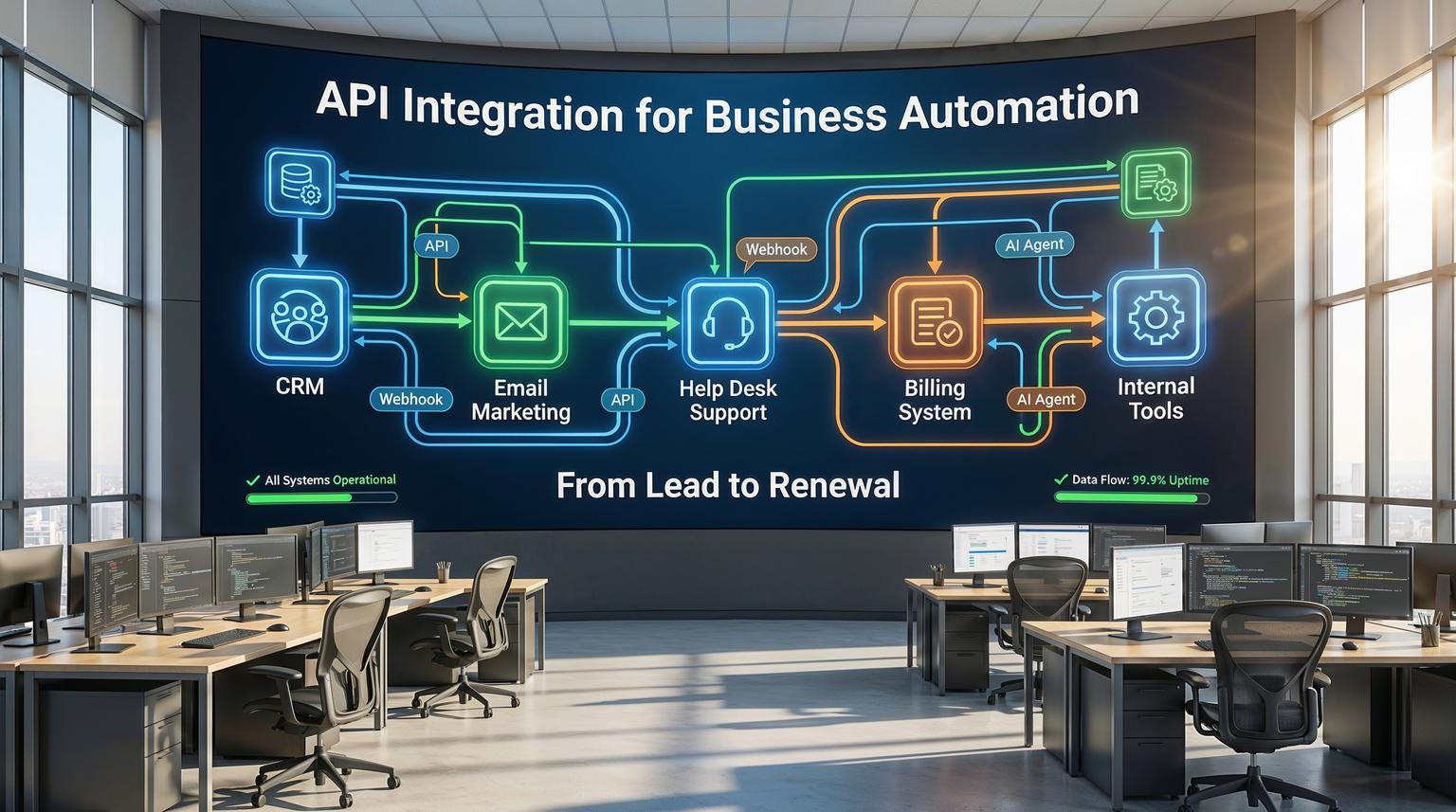
Most teams already use a CRM, an email platform, a help desk, and internal tools, yet staff still retype the same data in three places and chase updates manually. API integration for business automation is how you turn that scattered stack into a single, connected system that runs itself in the background.
This guide is for founders, operations leaders, and marketing or CRM teams who want practical, real-world workflows, not just theory. We will walk through how ThinkBot designs and implements automations across tools like n8n, Make, Zapier, HubSpot, Salesforce, and your internal APIs, and where AI fits into customer journeys.
What is API integration for business automation in plain language?
API integration for business automation means connecting your tools so they can share data and trigger actions for each other without manual work. Your web forms, CRM, email platform, help desk, and internal databases exchange information through APIs, while an automation layer like n8n, Make, or Zapier runs rules and AI models to keep everything in sync, route tasks, and send the right messages automatically.
The core building blocks of a modern automated stack
Before you design workflows, it helps to understand the main components involved in API integration for business automation.
1. Systems of record (where truth lives)
These are platforms like Salesforce, HubSpot, Pipedrive, Zoho CRM, or Freshsales that store contacts, companies, and deals. A CRM is usually the central system of record for revenue teams. Its APIs and integration ecosystem determine how easy it is to automate around it. For example, HubSpot's REST APIs and strong marketplace make it a popular choice for integration-heavy teams, while Salesforce APIs provide deep flexibility for enterprise environments.
2. Engagement channels (how you talk to customers)
These include email platforms (HubSpot Marketing, ActiveCampaign, Mailchimp), support tools (Zendesk, Freshdesk, Intercom), and communication apps like Outlook, Gmail, and Teams. They expose APIs to send messages, create tickets, and log activity.
3. Automation and orchestration layer
This is where tools like n8n, Zapier, and Make sit. They listen for events, call APIs, transform data, and coordinate complex workflows. Make describes this as visual orchestration, combining no-code builders, observability, and AI agents to build and scale automations.
4. AI and decision engines
Large language models and AI agents classify tickets, score leads, summarize conversations, and choose next-best actions. Platforms like Make are adding native AI capabilities, such as next-generation AI agents and the Make Code app for advanced logic, while n8n lets you embed AI agents and LLM calls directly into workflows.
5. Internal and custom APIs
Your own databases, billing systems, and internal apps often have REST APIs or can be wrapped with FastAPI or similar frameworks. With tools like FastAPI-MCP, these endpoints can be safely exposed to AI agents as tools, which is powerful for custom, AI-driven automation.
From chaos to clarity: a 5-step automation blueprint
At ThinkBot we use a repeatable framework to design and deploy API-driven automations that actually stick. For a deeper comparison of the orchestration platforms we use, see our automation platform comparison for CRM, email, and AI workflows, which helps you choose between Zapier, Make, and n8n for your stack.
Step 1: Audit your tools and data flows
List your core systems: CRM, email, help desk, billing, product, analytics. For each, note:
- What data it owns (contacts, subscriptions, tickets)
- How data enters (forms, imports, API, manual entry)
- How data leaves (exports, reports, webhooks, API)
Then capture your pain points: slow lead follow-up, double data entry, missed renewals, inconsistent statuses between CRM and support, and so on.
Step 2: Map key customer and internal journeys
Pick 2 to 3 high-impact journeys, such as:
- New lead from website to first meeting
- New customer onboarding
- Support request to resolution and expansion opportunity
For each journey, sketch the current steps and where humans are copying data or checking multiple tools. These are prime candidates for API integration for business automation.
Step 3: Design event-driven workflows
Shift from scheduled batch tasks to event-driven flows. Examples:
- Trigger: form submitted on website -> Action: create or update CRM contact, start nurture sequence.
- Trigger: deal marked "Won" in CRM -> Action: create customer in billing tool, generate contract, kick off onboarding tasks.
- Trigger: ticket marked "At risk" in help desk -> Action: create opportunity in CRM, notify account owner, schedule outreach.
Tools like n8n and Make use webhooks and app triggers so workflows run in near real time. In n8n, this is often a Webhook or app-specific Trigger node. In Make, authenticated webhooks and scenario triggers start visual scenarios.
Step 4: Implement, test, and backfill safely
Production-grade automation needs guardrails:
- Use sandbox accounts where possible.
- Log every change you make to CRMs or billing systems.
- Test with a small cohort before rolling out globally.
Platforms like Make provide Scenario Run Replay so you can replay historical events to test or backfill missed records, and scenario rate limits to protect APIs from spikes. In n8n, we use error workflows and retry logic to keep runs resilient.
Step 5: Optimize and govern
Once flows are live, you need observability and ownership. Make offers Make Grid for a real-time map of your automation estate, while n8n supports centralized monitoring and error-handling workflows. Define owners for each journey, document what each workflow does, and schedule periodic reviews as your processes evolve.
Practical workflows: from form fill to CRM to email
Below are concrete patterns we implement for clients using n8n, Make, and Zapier.
Workflow 1: Lead capture and CRM sync from web forms
Goal: eliminate manual lead entry, ensure every form submission lands in the CRM with clean data.
Typical stack
- Form: Webflow, WordPress, Typeform, HubSpot Forms
- CRM: HubSpot, Salesforce, Pipedrive, Zoho CRM
- Automation: n8n, Make, or Zapier
Implementation pattern
- Form submission triggers a webhook in n8n or a scenario in Make.
- Workflow normalizes data (name, phone, country, consent flags).
- Search CRM for existing contact by email.
- If found, update fields and log a new activity; if not, create a new contact and optionally a deal.
- Tag the source ("Website demo form", "Pricing page") for attribution.
With Make, you can encapsulate the "search or create" logic in a reusable subscenario, so any lead source calls the same dedupe and upsert routine. Subscenarios and Module Tools, described in the Make Code and Waves release content, let us standardize this across many client workflows.

Adding AI for enrichment and qualification
Once the basic sync is reliable, we layer in AI:
- Call enrichment APIs to fetch company size, industry, and tech stack.
- Use an LLM to classify fit and intent based on job title, company, and form answers.
- Write a lead score and a "persona" label back to the CRM.
In Make, this can run through the native AI Provider for text classification, while in n8n we often call external LLMs or AI Agent nodes. For more advanced setups, we can expose internal enrichment services to AI agents via FastAPI-MCP, so agents can call your own APIs as tools.
Designing AI-powered customer journeys across CRM and email
Once your data is flowing cleanly, you can orchestrate sophisticated customer journeys that mix deterministic rules with AI decisions. If you want to go deeper on how AI fits into these flows, our guide on AI integration in business automation covers additional patterns and case studies that complement the examples below.
Journey 1: Personalized nurture after demo request
Scenario:
- Lead submits "Request a demo" form.
- Workflow creates or updates contact in CRM and logs the request.
- AI agent reads the form answers, website behavior, and any existing notes.
- Agent chooses one of several nurture tracks (e.g., "self-serve", "enterprise", "agency partner").
- Workflow triggers the right email sequence in HubSpot or ActiveCampaign and creates tasks for sales where needed.
In Make, hybrid flows combine visual steps with AI agents on the canvas. The Waves releases describe how AI agents can be reused across scenarios and how MCP Server and Client expose scenarios as tools for agents to call, which is ideal for journeys where AI chooses the path and deterministic modules perform the actual writes.
Journey 2: Onboarding new customers with zero manual handoff
When a deal is marked "Won" in the CRM:
- Trigger workflow from CRM event (Salesforce, HubSpot, Pipedrive, etc.).
- Validate key fields (billing email, legal entity, plan, region).
- Create records in billing and subscription tools.
- Generate welcome documents or contracts from templates and send them by email.
- Create onboarding project and tasks in tools like Asana or ClickUp.
- Send a personalized welcome email sequence from your marketing platform.
The Goomer case study on the n8n blog shows a similar "deal won" pattern, where a single workflow fans out data to billing, accounting, reporting, and onboarding systems using webhooks and HTTP Request nodes. We use the same approach, often self-hosting n8n to connect securely to internal databases as described in the Goomer automation story.

Journey 3: AI-assisted support and success routing
Support tickets and customer messages are rich signals for churn and expansion. A typical pattern we implement:
- Ingest tickets from Zendesk, Intercom, or ServiceNow into n8n or Make.
- Use AI to classify intent (bug, how-to, feature request) and sentiment (positive, neutral, negative).
- Route high-risk or high-value tickets to a specific queue and notify account owners in Slack or Teams.
- For feature requests, create linked items in product tools or CRM.
With n8n's integration with Microsoft Agent 365, described in their enterprise automation post, AI agents can post updates directly into Outlook or Teams using a managed identity, schedule follow-ups, and keep an auditable trail inside your Microsoft 365 tenant.
How AI agents extend traditional API automation
Traditional automation follows strict rules. AI agents add flexible reasoning, but they must be safely constrained.
Where AI adds real value
- Classification: routing tickets or leads by topic, sentiment, or urgency.
- Summarization: condensing long email threads or call transcripts into CRM notes.
- Decision support: recommending next-best actions based on customer history.
- Content drafting: generating first drafts of emails or knowledge base replies for human review.
Patterns we use to keep AI safe and reliable
- Hybrid flows: AI suggests, deterministic nodes execute. For example, an AI agent chooses a nurture path, but only pre-approved sequences can be triggered.
- Tool-based access: with standards like MCP, documented in Model Context Protocol coverage, AI agents call specific tools ("create CRM contact", "update ticket") rather than free-form APIs.
- Human-in-the-loop: for high-impact actions like discounts or contract changes, workflows pause for human approval.
- Rate limits and monitoring: Make's rate limits and n8n error workflows prevent runaway loops and catch anomalies early.
Common mistakes with API-driven automation (and how ThinkBot avoids them)
We see similar pitfalls across companies attempting API integration for business automation on their own. If you are specifically focused on CRM-centric automation, our article on CRM automation with AI and end-to-end workflows shows how these mistakes play out in sales and marketing pipelines.
Mistake 1: Automating broken processes
Automation amplifies whatever you feed it. If your lead routing rules are unclear, an automation will simply misroute faster. We start with process mapping and stakeholder alignment before touching any n8n, Make, or Zapier canvas.
Mistake 2: Ignoring data quality and deduplication
Without careful design, your CRM ends up with duplicates and conflicting fields. We use standardized dedupe and upsert routines, often encapsulated as reusable sub-workflows. On Make, subscenarios plus Scenario Run Replay let us fix past mapping issues and backfill clean data. In n8n, we combine HTTP Request nodes with database checks to enforce uniqueness.
Mistake 3: No observability or ownership
Complex automation estates without monitoring are fragile. Make Grid provides a real-time view of all scenarios, their health, and API usage, while n8n offers centralized logs and error hooks. We assign clear owners to each journey and document failure modes and recovery steps.
Mistake 4: Over-relying on AI without guardrails
Letting an LLM write directly to production systems without constraints is risky. We use tool-based access via standards like MCP, human approvals for sensitive actions, and strict schema validation. With FastAPI-MCP we can expose only specific, safe endpoints to agents, preserving your existing auth and validation layers.
How ThinkBot implements API integration for your business
ThinkBot specializes in designing and implementing custom workflows that connect CRMs, email platforms, help desks, and internal tools into a cohesive automation layer. A typical engagement looks like this:
Phase 1: Discovery and architecture
We run workshops with your ops, marketing, and success teams to identify high-ROI journeys, review your current stack, and assess API capabilities. Insights from resources like Make's CRM automation comparison help us validate whether your existing CRM is the right fit or needs augmentation.
Phase 2: Implementation in n8n, Make, or Zapier
Depending on your requirements, governance, and budget, we choose the right orchestration platform:
- n8n for self-hosted, highly customizable workflows and on-prem or VPC connectivity.
- Make for fast visual orchestration, strong SaaS connectivity, and advanced features like subscenarios, Maia for conversational scenario building, and Make Code for complex transformations.
- Zapier for straightforward, small-scope automations where simplicity is key.
We build, test, and document each workflow, then gradually expand coverage as results come in. To see how these platform choices affect broader business operations, you can also review our overview of business process automation solutions that connect CRMs, email, and internal tools with APIs and AI.
Phase 3: AI augmentation and agentic workflows
Once your core data flows are stable, we introduce AI:
- LLM-based ticket and lead classification.
- Summaries of calls and threads posted into CRM notes.
- AI agents that orchestrate across tools, for example an engineering manager assistant similar to the n8n + Microsoft Agent 365 example that aggregates Jira and PagerDuty data and posts summaries into Teams.
- Agent access to internal APIs via MCP, using patterns inspired by FastAPI-MCP so we can keep security and governance intact.
Phase 4: Ongoing optimization and support
Customer journeys and tools change. We provide continuous improvement, adding new triggers, refining AI prompts, and using observability tools like Make Grid or n8n monitoring to keep your automation estate healthy.
If you want to see what this could look like for your stack, you can book a consultation with the ThinkBot team and we will walk through your specific workflows and tools.
When should you invest in API integration for business automation?
You do not need to automate everything at once. Clear signals that it is time to invest include:
- Sales or support teams retyping data between systems daily.
- Leads waiting hours or days for a first touch.
- Management asking for reports that require manual spreadsheet merges.
- Onboarding tasks slipping through the cracks because there is no single source of truth.
- Multiple tools disagree about customer status or plan.
In 2026, the opportunity is not just saving time. It is about building responsive, AI-augmented journeys that feel personal at scale, while keeping your operations auditable and under control.
FAQ
How do I start with API integration for business automation if my tools are all different?
Begin by mapping your core journeys and identifying a single source of truth, usually your CRM. Then select an orchestration platform like n8n, Make, or Zapier, and start with one workflow such as lead capture to CRM. Connect tools via their APIs or webhooks, test with a small subset of data, and expand gradually.
Which CRM is best for automation-focused businesses?
CRMs like HubSpot, Salesforce, and ActiveCampaign are strong choices because they have robust REST APIs and rich integration ecosystems. Comparative guides such as Make's CRM automation overview highlight that HubSpot and ActiveCampaign balance integrations and usability well, while Salesforce offers maximum flexibility for complex enterprise environments.
Where should I use AI in my customer journeys?
AI is most effective for tasks like classifying leads and tickets, summarizing conversations, choosing nurture tracks, and drafting emails for human review. It should sit inside a guarded workflow where deterministic rules control which tools AI can call and when human approvals are required for high-impact actions.
Is it safe to let AI agents write to my CRM and help desk?
It can be safe if you design for it. Use tool-based access (for example MCP tools) instead of raw API calls, enforce strict schemas and validation, limit what each agent can do, and add human approvals where needed. Monitoring, logging, and rate limits are essential so you can trace and control every change.
How can ThinkBot help my team implement these automations?
ThinkBot handles the full lifecycle: discovery, architecture, workflow implementation in n8n, Make, or Zapier, AI augmentation, and ongoing optimization. We connect your CRM, email, support, and internal systems via APIs, design safe AI-assisted journeys, and put governance and observability in place so your automations stay reliable as you scale.
