
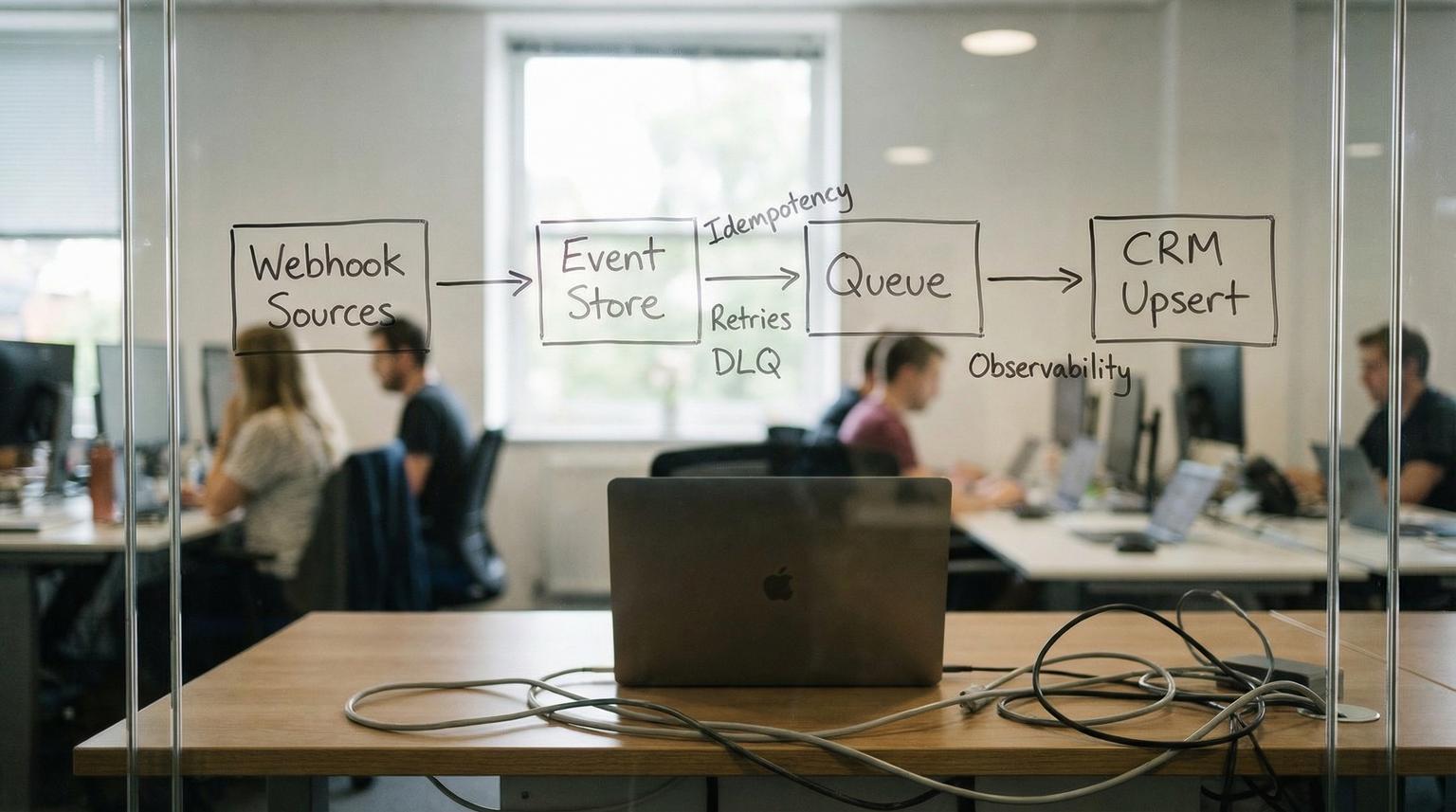
Inbound webhooks are where revenue quietly leaks. One vendor retries a lead event three times, your CRM creates three contacts, sales calls the same person twice and trust drops. Another time your CRM has a short outage, the webhook sender gives up and a high-intent lead never makes it into a sequence. This implementation-focused article shows an API integration for business that treats inbound events as at-least-once delivery then guarantees exactly-once effects inside your CRM through idempotent upserts, controlled retries and a dead-letter queue with audit-grade logging.
This is written for operators, marketing ops and tech-savvy founders who need a webhook-to-CRM pipeline that survives bursts, partial payloads and vendor downtime without corrupting data.
At a glance:
- Design your pipeline for at-least-once delivery and make CRM writes idempotent so retries do not create duplicates.
- Normalize and persist raw events first then process asynchronously via a queue and worker.
- Use a retry policy with backoff for timeouts, 5xx and 429 then quarantine failures to a DLQ for triage and replay.
- Enforce data quality using stable external IDs, mapping rules and an explicit upsert strategy for create vs update-only.
- Ship with observability: correlation IDs, structured logs, metrics and alerting tied to lead-loss risk.
Quick start
- Pick a canonical external ID for each CRM object you upsert (Contact, Lead, Company) and make it immutable.
- Build a webhook intake endpoint that validates, normalizes and stores the raw event plus an idempotency record.
- Publish the normalized event to a queue then process CRM writes in a worker with concurrency limits.
- Implement retries with exponential backoff for retryable failures and move poison messages to a dead-letter queue after N attempts.
- Add logging, metrics and alerts for queue age, DLQ growth and upsert error rates then test with burst traffic and forced CRM outages.
A resilient webhook-to-CRM integration works by accepting that the same event can arrive more than once then ensuring the CRM ends up in the correct state only once. You do this by storing each event with a unique idempotency key, upserting records using a stable external ID and retrying only the failures that can recover (timeouts, 5xx, 429). Anything that still fails after controlled retries goes to a dead-letter queue so no lead disappears silently.
Why webhook-to-CRM is the highest risk integration boundary
Webhook sources behave like this in the real world:
- At-least-once delivery: most senders retry on network timeouts or non-2xx responses. You may see duplicates even if nothing is wrong.
- Burst traffic: campaigns, webinars and product launches create spikes. Even if average volume is low, your peak can be 20x.
- Partial payloads: an early event may only contain email while enrichment arrives later. If you create records too early you lock in bad data.
- Vendor outages: your CRM API or your integration runtime can be degraded for minutes or hours.
The common failure pattern we see in ops is a synchronous webhook handler that calls the CRM directly and returns 200 only if the CRM write succeeds. During an outage, the handler slows down, requests time out, the sender retries, duplicate contacts appear when the CRM recovers and some requests eventually exceed sender retry limits so leads get dropped.
Reference architecture that guarantees exactly-once CRM effects
Instead of treating the webhook request as the unit of work, treat the event as the unit of work. The integration becomes a small event processing system:
- Webhook receiver: validates, normalizes and persists raw payload then enqueues a normalized event.
- Event store: keeps raw payload, normalized payload, idempotency key, processing state and correlation metadata.
- Queue: buffers bursts and decouples intake from CRM write latency.
- Worker: performs CRM upsert with idempotency and concurrency limits.
- Retry controller: applies backoff for retryable failures.
- Dead-letter queue (DLQ): quarantines poison events after max attempts for replay and root-cause fixes.
- Observability layer: structured logs, metrics and alerts plus an audit trail.
If you want a deeper, repeatable methodology for reliability patterns like idempotency, retries with backoff, rate-limit handling, dead-letter queues, and production monitoring, use our pillar guide: API integration engineering playbook for reliable API and webhook connections.
If you use managed queues, the DLQ concept is consistent across platforms. For example Amazon SQS uses a redrive policy with maxReceiveCount to move repeatedly failing messages into a separate queue for debugging and recovery, as described in SQS dead-letter queues. Google Pub/Sub offers dead-letter topics with approximate delivery attempts which is another reminder that your idempotency layer must tolerate more retries than you expect, as outlined in Pub/Sub dead-letter topics.
Data identity and upsert strategy that stops duplicates
Duplicate prevention is mostly an identity problem. CRMs can dedupe in some entry points but you should not rely on it because behavior differs by channel. HubSpot, for example, deduplicates contacts by email in common creation flows but uniqueness rules are not uniform across all intake paths, per HubSpot deduplication. If you’re evaluating broader patterns to keep systems aligned beyond webhooks, see API integration solutions that unify CRM, email, and support data using custom n8n workflows.
Choose a single canonical key per object
Pick one of these per object and document it:
- External lead ID: a stable ID from the source system (form submission ID, chat conversation ID, product user ID).
- Email: only if email is guaranteed and stable. Email changes and shared inboxes are common edge cases.
- Phone: risky due to formatting and shared numbers.
- Composite key: source + source_record_id is often best (example
"facebook_leads:12345").
Decision rule: if the source can re-send the same lead without a stable unique ID, create one in your integration layer (hash of normalized fields plus a source namespace) but be careful because hashing personal data can create privacy concerns. In regulated industries, store the hash only and keep the raw payload encrypted and access-controlled.
Use CRM-native upsert by external ID whenever possible
Some CRMs allow upserts using a declared external ID field which is ideal for webhooks. In Salesforce you can upsert using a REST PATCH to an external ID endpoint and choose whether to allow creates or updates only. The documented pattern is:
/services/data/vXX.X/sobjects/Contact/External_Id__c/{external-id-value}
Salesforce also supports updateOnly=true as a guardrail when you want to prevent accidental creation on partial events, as described in the Salesforce REST API guide for upsert using an External ID.
Field mapping rules that prevent silent corruption
Define rules for every inbound field:
- Identifier fields: external ID, email, domain. These drive matching and should not be overwritten casually.
- Attributes: name, job title, UTM params, source metadata. These can be updated on every event.
- Trust levels: prefer first-party product data over ad platform fields when values conflict.
A common mistake is treating email as both identifier and attribute then overwriting it with a lower-trust value from a later event. If email is your match key, changing it can split identities and create a second contact later.
The concrete idempotency, retry-backoff and DLQ pattern (with logging and alerting)
This is the core production pattern we deploy in webhook-to-CRM pipelines. It is tool-agnostic so you can implement it in n8n, a custom service or a serverless stack.

Step 1: Normalize the event and compute an idempotency key
Normalize payloads from multiple sources into one schema. Then compute a deterministic key that uniquely represents the event effect you intend to apply.
- Good idempotency key:
source + event_type + source_event_id - Fallback key:
source + event_type + hash(normalized_identity_fields + occurred_at)
Store this key in an idempotency table with a unique constraint so only one processor can claim it.
Step 2: Persist raw and normalized events before doing any CRM write
Write two records:
- Raw event: full payload, headers, signature verification result, received_at timestamp.
- Normalized event: canonical fields, target CRM object, intended upsert key, mapping version.
This audit trail is invaluable for compliance and debugging because you can prove what was received and what was sent to the CRM.
Step 3: Enqueue the normalized event and return fast
Return a 2xx to the sender after you have persisted and enqueued. This minimizes sender retries and protects your endpoint during CRM latency spikes.
Step 4: Worker does idempotent upsert with concurrency limits
Worker flow:
- Dequeue message.
- Try to acquire idempotency key with an atomic insert or compare-and-set state change.
- If already processed, log as duplicate delivery and ack.
- Call CRM upsert by external ID or do lookup then update/create depending on CRM capabilities.
- Write processing result to event store (crm_record_id, timestamps, request_id, response code).
Real-world ops insight: set worker concurrency based on the CRM rate limit and your typical payload size. Many teams set concurrency too high then hit 429 which causes more retries which increases duplicates if idempotency is missing. A steady smaller concurrency often produces higher throughput across an hour because it avoids throttle storms. For a broader view of how API integration for business processes supports reliable automation across teams, see our guide on unifying workflows end-to-end.
Step 5: Classify failures then retry with backoff
Use a clear error classification table. A practical model comes from SNS HTTP delivery behavior where 5xx and 429 are treated as retryable while other errors are considered permanent, see SNS message delivery retries.
| Failure | Examples | Action |
|---|---|---|
| Retryable | Timeouts, network errors, HTTP 429, HTTP 5xx | Retry with exponential backoff |
| Potentially retryable | HTTP 409 conflict, validation race, duplicate external ID error | Retry a small number of times then quarantine if persistent |
| Permanent | HTTP 400 bad request, 401/403 auth, required field missing, schema mismatch | Send to DLQ immediately with reason |

A simple backoff schedule you can adopt:
- Attempts 1 to 3: immediate retries (0s delay) for transient network hiccups.
- Attempts 4 to 5: short fixed delay (1s).
- Attempts 6 to 15: exponential backoff (2s, 4s, 8s ... up to 60s cap).
- Attempts 16 to N: fixed max delay (60s) to ride out a vendor incident.
Tradeoff: more attempts reduce dropped leads during outages but increase time-to-visible in CRM. For high-intent sources like sales demo requests, consider fewer attempts plus a faster human alert so the team can capture the lead through an alternate path.
Step 6: Dead-letter queue quarantine with replay workflow
After the maximum number of attempts, move the message to a DLQ. In SQS this is controlled by maxReceiveCount via the redrive policy. In Pub/Sub the max attempts are approximate and can exceed your setting in some scenarios so idempotency must still hold.
Your DLQ record should include:
- idempotency_key
- source and event_type
- first_received_at and last_attempt_at
- attempt_count
- failure_class and error_message
- normalized payload pointer and raw payload pointer
Do not make DLQ a graveyard. Create a weekly or daily triage process: fix mapping, fix auth, backfill missing reference data then replay the event with the same idempotency key so you still get exactly-once effects.
Step 7: Logging and alerting that prevents silent lead loss
Minimum observability set:
- Structured logs with correlation_id, idempotency_key, source, crm_object, crm_record_id and response status.
- Metrics: intake rate, queue depth, age of oldest message, worker success rate, retry rate, DLQ count and DLQ growth rate.
- Alerts: DLQ > 0 for longer than X minutes, queue age beyond SLA, sustained 429 or 5xx rate from CRM, sudden drop in intake from a key source.
Operational nuance: some queue systems can move repeatedly received messages to the back of the queue which can distort age-of-oldest metrics. Treat queue age as a signal not as proof and always correlate with retry and DLQ metrics.
Mini spec and example payload for a normalized lead event
Below is a compact event shape that supports multi-source inbound leads while staying stable over time. This makes mapping and replay far easier.
{
"schema_version": "1.0",
"event_id": "facebook_leads:987654321",
"event_type": "lead.created",
"source": "facebook_leads",
"occurred_at": "2026-03-22T12:34:56Z",
"idempotency_key": "facebook_leads|lead.created|987654321",
"identity": {
"contact_external_id": "facebook_leads:lead:987654321",
"email": "[email protected]",
"phone_e164": "+14155550123"
},
"attributes": {
"first_name": "Alex",
"last_name": "Rivera",
"company": "Rivera Labs",
"utm_source": "facebook",
"utm_campaign": "spring-launch"
},
"routing": {
"crm": "salesforce",
"object": "Lead",
"upsert_key": "External_Lead_Id__c",
"mode": "upsert"
},
"audit": {
"received_at": "2026-03-22T12:34:58Z",
"raw_event_ref": "s3://events/raw/...",
"normalized_event_ref": "db://events/123"
}
}
Implementation detail that helps in production: version your mapping rules (example mapping_version) so you can understand why older records look different and safely replay old events with the correct transformation.
Failure modes you should design for on day one
- CRM rate limiting (429): backoff and reduce concurrency. If you retry too fast you amplify the problem.
- Partial identity (missing email or external ID): send to DLQ with a clear reason unless you have a deterministic way to enrich. Creating a record without an identity key is how duplicates multiply.
- Out-of-order events: store and process based on occurred_at where possible. Idempotency ensures duplicates do not hurt but ordering can still affect field freshness.
- Schema drift: vendors add fields silently. Validate required fields, ignore unknowns and log mapping warnings.
- Auth misconfiguration (401/403): treat as permanent for the worker and alert immediately. Retrying for an hour will not fix a revoked token.
When this approach is not the best fit: if your volume is very low and you only have one source with a reliable native CRM integration, a full event store and queue can be overkill. In that case, a simpler synchronous flow can work if you still implement idempotency and error reporting. The moment you add multiple webhook sources or you care about sub-5-minute follow-up SLAs during outages, the queued architecture pays for itself.
Implementation checklist for ops and CRM teams
- Define external ID fields in the CRM for each object you will upsert and confirm they are indexed and unique where supported.
- Document one canonical identity key per source per object (example contact_external_id format) and forbid ad hoc alternatives.
- Implement webhook signature verification and reject invalid signatures with 401 or 403.
- Persist raw payloads with encryption at rest and strict access controls.
- Store idempotency records with a unique constraint and a clear state machine (received, processing, succeeded, failed, quarantined).
- Implement error classification and confirm retry behavior with forced 429 and 5xx tests.
- Configure DLQ with max attempts aligned to your outage tolerance and set alerts on DLQ backlog.
- Run a burst test at 10x expected peak and validate CRM record counts and the absence of duplicates.
- Define a replay procedure that preserves the idempotency key and logs who replayed and why.
How ThinkBot Agency typically deploys this in n8n or custom services
ThinkBot Agency builds these pipelines as either:
- n8n-first: webhook intake, normalization and queue publish in n8n with a separate worker workflow that consumes from the queue. This is fast to iterate and easy for ops teams to understand.
- Hybrid: a small custom ingest service for high volume endpoints plus n8n for enrichment and downstream routing.
Either way, the same principles apply: idempotency keys stored durably, CRM upserts keyed by external IDs and an explicit DLQ process with alerting.
Primary CTA: If you want this implemented against your specific CRM, lead sources and compliance requirements, book a consultation here: https://calendar.google.com/calendar/u/0/appointments/schedules/AcZssZ1tUAzf35rX7wayejX0LBdPIa5EnrtO1QB6iwmVmbYSZ-PkX1F_zJrNd9VrKiZMnyt4FN9mMmWo
For examples of the kind of automation systems we ship, you can also review our portfolio at https://thinkbot.agency/portfolio.
FAQ
Common follow-ups we hear when teams are hardening webhook-driven CRM pipelines.
What should I use as the idempotency key for webhook events?
Use a deterministic key based on the event source, event type and a stable source event ID. If the sender does not provide a stable ID, create a namespaced key from normalized identity fields and occurred_at but treat it as a fallback and store the raw payload for audit and replay.
How many retries should I allow before sending an event to the DLQ?
Pick a retry window that matches your CRM outage tolerance and lead follow-up SLA. Many teams start with immediate retries then exponential backoff up to a 60-second max delay and 10 to 50 total attempts. Anything still failing should be quarantined to a DLQ with alerting so it never becomes a silent drop.
How do I prevent duplicates if the webhook sender retries multiple times?
Make the CRM write idempotent. Store an idempotency record with a unique constraint then upsert into the CRM using an external ID or unique property. If the same event arrives again, detect it using the idempotency key and skip the CRM write while still acknowledging the message.
When should I use update-only instead of upsert create-or-update?
Use update-only when the event is known to be incomplete or when a missing match should be treated as a data issue rather than a new record. For example, enrichment events should usually update an existing contact and go to DLQ if the external ID does not exist so you do not create partial duplicates.
