
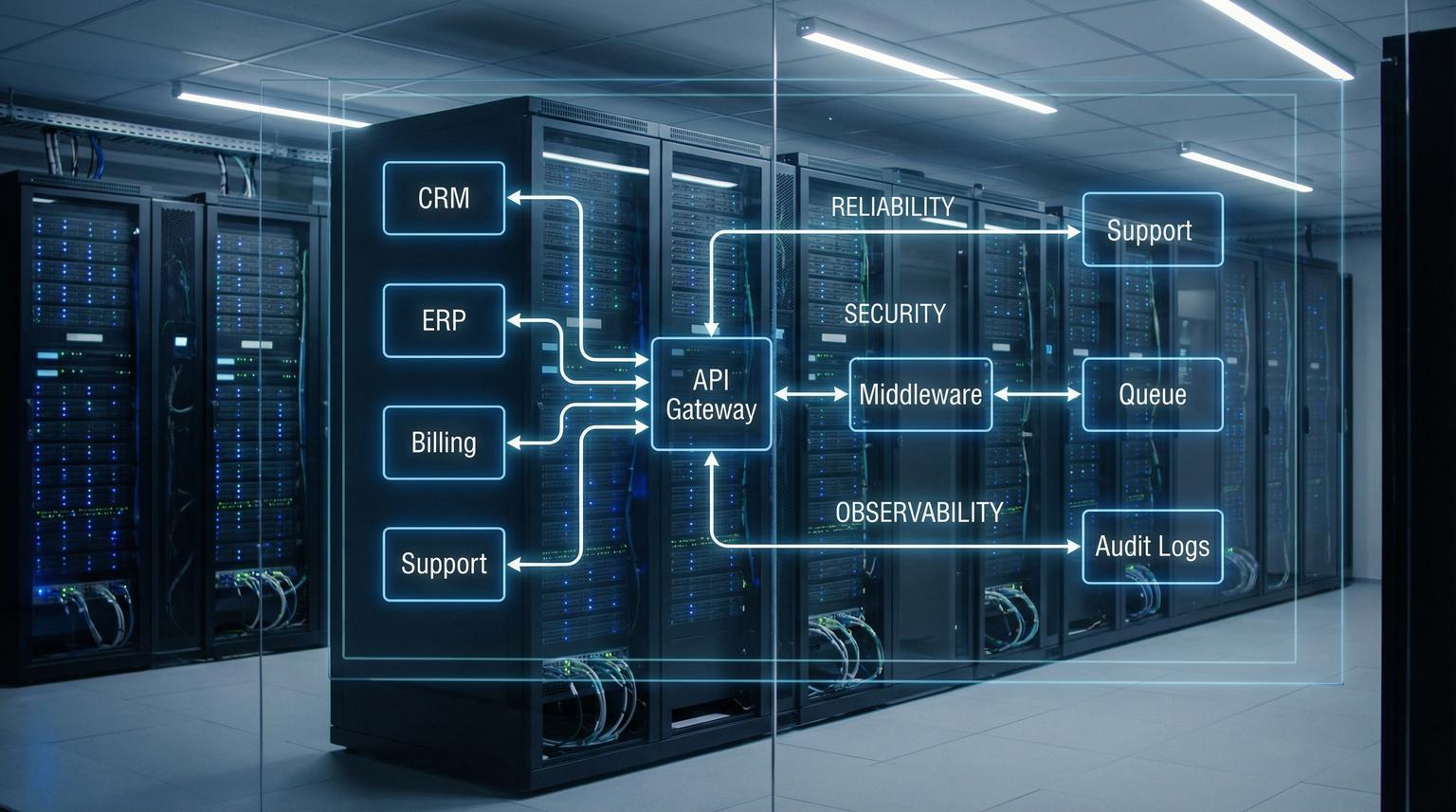
When your CRM, ERP, billing and support platform each hold a different version of the truth, teams lose time to manual fixes, customers feel the gaps and leadership stops trusting reports. API integration for enterprises is not just about connecting endpoints, it is about creating a governed integration layer that standardizes identity, data contracts and failure handling so systems stay aligned as volume and complexity grow.
This guide is for ops leaders and technical teams who need reliable bi-directional sync across core systems without sacrificing security or auditability. We will walk through a practical reference architecture, the controls enterprises expect and a proven blueprint for syncing accounts, orders and tickets with SLAs and rollback. For related patterns that unify customer data across tools, see API integration solutions to unify CRM, email, and helpdesk data.
At a glance:
- Use a middleware layer to standardize auth, data mapping, retries, monitoring and audit logs across every system.
- Put an API gateway in front to enforce validation, rate limits, routing and consistent security policies.
- Queue-first execution and idempotency prevent duplicates and make retries safe during outages and timeouts.
- Blend iPaaS automation (n8n, Make, Zapier) with custom services for speed plus governance; if you are deciding the right mix, read No-Code vs Low-Code automation with n8n and custom integrations.
Quick start
- Inventory your systems of record (CRM, ERP, billing, support) and list the objects that must sync (accounts, contacts, orders, invoices, tickets).
- Define canonical data contracts for each object and version them (what fields exist, formats, required vs optional).
- Front the integration layer with an API gateway that enforces OAuth2/SSO validation, request schemas and rate limits.
- Adopt queue-first processing for writes and webhook events so spikes do not overload ERP or support APIs.
- Implement idempotency keys and a retry policy with backoff and clear non-retryable error codes.
- Add monitoring, alerting and audit trails, then test replay and rollback procedures before production rollout.
A secure enterprise integration approach uses a custom middleware layer to normalize data and authentication between systems and to handle failures consistently. The best design combines an API gateway for centralized policy enforcement with asynchronous processing via webhooks and queues. Add idempotency, structured errors, monitoring and audit logs so CRM, ERP, billing and support stay in sync even under rate limits, outages and human error.
Why enterprise integrations fail without a middleware layer
Point-to-point connections look fast at first. Over time they become a web of one-off mappings, hidden credentials and inconsistent assumptions about what a field means. The result is predictable:
- Data drift: one system updates an account name and another never receives it, or receives it with a different format.
- Duplicate records: retries after timeouts create two orders or two tickets.
- Broken SLAs: support and fulfillment depend on an ERP update that silently failed overnight.
- Security gaps: shared API keys in scripts, no RBAC and no audit trail of changes.
- Unreliable reporting: finance sees invoices, ops sees shipments and nobody reconciles quickly.
A middleware layer fixes this by creating a consistent integration surface: the same auth model, canonical schemas, error contracts and observability across every connector.
Reference architecture for secure and scalable integration middleware
Think of enterprise middleware as a set of standard components you can reuse across every workflow. The goal is to remove special cases and push cross-cutting concerns into shared layers.

1) API gateway as the front door
An API gateway centralizes request validation, security enforcement and observability so each downstream system does not need custom protections. AWS guidance highlights the gateway as a control point for validation, monitoring and security decisions, including request validation using JSON Schema and token validation patterns (API gateway).
In enterprise environments we typically enforce:
- Schema validation for write endpoints (reject malformed payloads before they hit ERP and CRM APIs).
- Authentication validation (SSO/OAuth2 bearer tokens for users, signed requests for services).
- Authorization checks (RBAC and route-level policies).
- Rate limits and quotas per consumer and per workflow.
- Consistent correlation IDs for tracing across systems.
2) Webhooks and message queues for asynchronous processing
Webhooks are great for near-real-time events but they are bursty and downstream SaaS tools can throttle. Platforms can return HTTP 429 when rate limits are exceeded and in high activity periods they may even accept a request but delay processing (rate limits). A queue protects your systems by buffering spikes and letting workers process at a controlled pace.
A queue-first pattern also improves resilience: if a worker crashes mid-execution the event stays durable and can be picked up by another worker. This model maps well to stateless workflow execution and high availability.
3) Canonical data model and mapping layer
Enterprises rarely want to expose raw CRM or ERP field sets across the company. Instead define a canonical schema per object, then map each system to and from that schema. This reduces coupling and makes future migrations easier.
Best practice is to prefer business identifiers in the canonical layer, for example customer email, external account number or order number, then resolve internal IDs within adapters. That approach prevents integrations from breaking when internal IDs change or when you add a second CRM instance after an acquisition.
4) Retries, idempotency and structured errors
Retries are necessary but unsafe without idempotency. Every create and update that can be retried needs an idempotency token and a dedupe lookup in the target system using an external ID field. Also standardize error responses so the middleware can decide if an error is retry-safe.
API gateway standardization checklist for enterprise teams
Use this checklist when you design or review the gateway policy for your integration layer. It helps you keep security and reliability consistent as you add new endpoints and consumers.

- Define JSON Schema validation for every write endpoint and version schemas alongside code.
- Choose an auth approach per consumer type: SSO/OAuth2 for user context and signed service requests for internal calls.
- Enforce RBAC at the gateway using route policies and claims-based rules.
- Apply rate limits and quotas per tenant or per workflow to prevent noisy neighbors.
- Treat API keys as metering and throttling controls, not identity or authorization.
- Decide exposure model per API: private only for internal integration surfaces, regional or edge as needed for partners.
- Standardize routing rules (path or header based) for multi-backend aggregation.
- Centralize logging, metrics and tracing hooks, including correlation_id injection at ingress.
- Document a change process for gateway policies and keep approvals auditable.
This checklist aligns with enterprise gateway guidance that emphasizes centralizing request validation, security and observability rather than re-implementing them per service (request validation).
How do you secure enterprise API integrations end to end?
Security is not a single control, it is a chain. In enterprise programs we design security so a compromised credential or a misconfigured workflow does not become a company-wide incident.
Identity: SSO and OAuth2, plus service identities
- User-facing flows: Use SSO-backed OAuth2 and validate tokens at the gateway.
- Service-to-service calls: Use signed requests or client credentials with strict scopes.
- Least privilege: Scope tokens to the minimal set of actions and objects.
Authorization: RBAC and environment boundaries
At ThinkBot Agency we separate privileges by role and environment. For example, ops can view run logs and replay events but only integration engineering can publish workflow changes. Production credentials are isolated from dev and staging and never reused.
Audit logs you can defend in a review
Audit trails should capture both administrative changes and sensitive data access. Cloud audit logging best practices frame audit logging as a program of work and recommend least privilege access to logs plus retention planning because data access logs can grow quickly (audit logs).
In an integration layer, we typically log:
- Admin activity: workflow edits, credential changes and policy updates.
- Data access: reads of sensitive objects, exports and bulk sync runs.
- Policy denied: blocked requests due to RBAC or schema validation failures.
- System events: worker restarts, queue reconnects and deployment events.
Secrets management
Store OAuth tokens and API keys in an encrypted vault and rotate on a schedule. Avoid secrets in environment variables for long-lived workers when you can use managed secret injection. For iPaaS tools, enforce credential ownership and limit who can attach credentials to workflows.
n8n vs custom middleware: when to use each and how to blend them
Most enterprise teams do not need to pick one forever. The best results come from combining the speed of iPaaS with the governance and performance of custom components.
| Need | Best fit | Why | Typical ThinkBot approach |
|---|---|---|---|
| Fast workflow delivery with many SaaS connectors | n8n automation | Visual builds, connectors and quick iteration | Use n8n for orchestration, approvals and notifications |
| Strict governance, reusable APIs and shared policies | Custom services plus API gateway | Centralized auth, schema validation and versioned contracts | Expose a canonical API and keep adapters behind it |
| High throughput event processing | Queue-first workers | Smooths bursts, supports retries and horizontal scaling | Queue + stateless workers, with idempotency required |
| Proprietary systems or unusual protocols | Custom connectors | iPaaS may not support edge cases | Build internal connectors, then call them from n8n |
| Compliance and data residency constraints | Self-hosted components | Control execution, logs and storage locations | Self-host n8n with RBAC, audit logs and restricted egress |
n8n is especially useful when self-hosted in a controlled environment with RBAC, encrypted credential storage and queue-based scaling. It can serve as the orchestration layer while custom code handles canonical APIs, complex transformations and governance-heavy endpoints. If you are comparing platforms for scalable workflows, see Zapier vs. n8n for business automation.
Blueprint: bi-directional sync of accounts, orders and support tickets
This is a practical pattern we implement frequently: CRM is the system of record for accounts, ERP for orders and invoices and a support platform for tickets and SLAs. The integration layer enforces one set of contracts so each system can evolve independently.
Canonical objects and ownership
- Account: Owned by CRM. ERP and support receive updates from CRM. ERP may contribute fields like credit status through a controlled feedback contract.
- Order: Owned by ERP. CRM receives order status and totals for pipeline visibility. Support receives order context for faster resolution.
- Ticket: Owned by support. CRM receives ticket summary fields and ERP receives only finance relevant flags, for example refund requested.
Event flow pattern
- Ingress events arrive via webhooks or scheduled pulls.
- Gateway validates schema and identity and assigns correlation_id.
- Event is persisted to a durable queue and acknowledged quickly.
- Workers execute mapping and calls to target systems with idempotency tokens.
- Results are logged with structured fields and emitted to monitoring.
- Failures route to a dead-letter queue with replay controls.
Example payload: idempotent write request
This is a compact example of how we pass a dedupe key through the middleware so retries do not create duplicates.
{
"object": "order",
"action": "upsert",
"order_number": "SO-104883",
"account_external_id": "ACCT-77291",
"total": 2499.00,
"currency": "USD",
"idempotency_token": "550e8400-e29b-41d4-a716-446655440000"
}
The adapter for the target system stores idempotency_token as an external ID and performs an existence check before create. If the request is replayed, the adapter returns the existing record rather than creating a second one.
SLAs, alerting and data drift prevention
- Latency SLO: Track time from event ingestion to completion, not just HTTP 200 responses because downstream tools can accept but delay processing.
- Error budget: Separate transient errors (timeouts, 429 throttling, 5xx) from hard failures (schema invalid, auth denied, conflict).
- Drift detection: Run a daily reconciliation job that compares key fields across systems and creates a correction queue for mismatches.
Primary CTA
If you want a governed integration layer designed around your exact CRM, ERP and support stack, book a consultation with ThinkBot Agency. We will map your objects, failure modes and rollout plan and recommend where n8n accelerates delivery and where custom middleware is the safer long-term choice.
Implementation playbook: roles, monitoring and rollback that prevents data drift
Use this playbook when you need to ship quickly without losing control. It is designed for environments where multiple teams own different systems and governance matters.
Owners and responsibilities
- Platform or API team: gateway policies, schema validation, routing, rate limits, secrets integration.
- Integration engineering: adapters, mappings, queue workers, idempotency and replay tooling.
- App owners (CRM, ERP, support): define source-of-truth fields, provide external ID storage fields, approve write scopes.
- Security: SSO/OAuth2 configuration, RBAC model, secrets rotation, audit requirements.
- Ops or SRE: monitoring, alerting, runbooks, on-call and incident response.
Monitoring signals to implement on day one
- Queue depth and age of oldest message (backlog growth is early warning).
- End-to-end latency per object type (account, order, ticket).
- Rate of 429 responses and retry attempt counts per connector.
- Idempotency dedupe hits (helps spot repeated retries and noisy integrations).
- Error codes grouped by retry_safe true or false.
Rollback strategy and safe replay
- Version everything: schemas, mappings and workflow definitions. Deploy with explicit versions.
- Stop the bleeding first: use a circuit breaker to pause writes to a failing target system while still ingesting events into the queue.
- Replay from stored events: keep the original payload and headers for re-drive, never reconstruct from partial logs.
- Guard against duplicates: reject writes that lack idempotency_token and enforce dedupe lookups in adapters.
- Compensate only when needed: for non-idempotent side effects, route to manual remediation with an audit trail rather than auto-retrying.
Secondary CTA: If you want to see the kind of automation and integration delivery we are known for, view our agency profile on Upwork.
FAQ
What is enterprise API integration middleware?
It is a custom integration layer that sits between your CRM, ERP, billing and support tools and enforces consistent authentication, data contracts, error handling, retries, monitoring and audit logs. Instead of each system integrating directly with every other system, they integrate through the middleware using standardized APIs and events.
When should we choose n8n instead of custom code?
Choose n8n when you need fast delivery, many SaaS connectors and clear visual workflows for approvals, notifications and orchestration. Use custom code when you need strict governance, complex transformations, high throughput processing or reusable canonical APIs. Many enterprises combine both, using n8n to orchestrate and custom services for core contracts and policies.
How do we prevent duplicates in bi-directional sync?
Require an idempotency token on all write operations and store it as an external ID in the target system. On retries, look up by that external ID and return the existing record. Combine this with a structured error contract that marks failures as retry-safe or not.
What security controls do enterprises expect for integration layers?
Common requirements include SSO/OAuth2 token validation, RBAC for who can edit and run workflows, secrets management with encrypted storage and rotation, detailed audit logs for admin actions and data access and monitoring with alerting for suspicious behavior and operational failures.
Can ThinkBot Agency build a custom middleware that still uses iPaaS tools?
Yes. We often design a gateway and queue-based middleware core with canonical schemas, then connect n8n workflows where it speeds delivery. This approach keeps governance centralized while letting teams iterate quickly on automations and integrations.
