
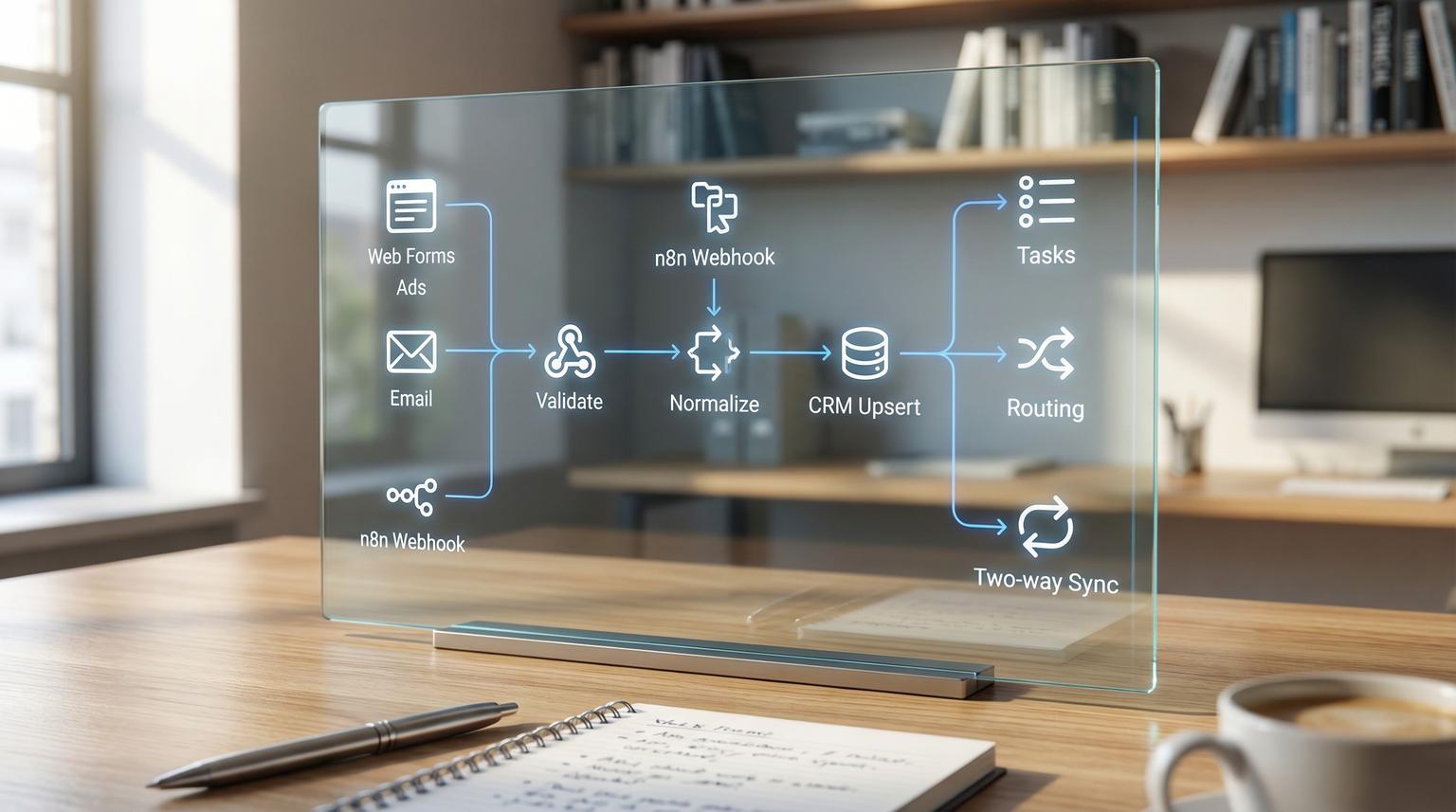
CRM data problems rarely start inside the CRM. They start at the edges, web forms, ad leads, inbound emails, calendars, and hand typed notes. If you are automating CRM workflows with n8n you can centralize lead intake, enforce clean data rules, assign ownership automatically and keep deals and tasks moving without relying on manual updates.
This guide is for ops leaders, RevOps teams, founders and marketing teams who want practical, buildable patterns. We will cover end to end workflow design from lead capture to stage updates, follow-ups, notifications and two-way syncing with email and calendars, with guardrails that prevent duplicates and bad merges.
Quick summary:
- Use one n8n webhook as the canonical entry point so every lead is validated and normalized before it hits your CRM.
- Upsert contacts and companies using stable identifiers, not names, and store cross-system IDs for reliable two-way sync.
- Trigger stage changes, tasks and personalized sequences from CRM events so follow-ups are never missed.
- Add monitoring, retries and a staging queue so enrichment failures or missing IDs do not create dirty data.
Quick start
- List your lead sources (forms, ads, inbound email, chat) and route them into a single n8n Webhook workflow.
- Normalize fields early (trim whitespace, lowercase email, standardize phone, extract company domain) and fail fast on missing required fields.
- Search-before-create in the CRM, then create or update contacts, companies and optionally a deal.
- Add routing rules for owner assignment and Slack or Teams notifications with a link to the record.
- Trigger follow-up tasks and email sequences based on lifecycle stage, fit score and SLA timers.
- Enable two-way sync only after you store external IDs on both sides and add dedupe monitoring.
n8n lets you connect lead capture channels to your CRM so contacts are created or enriched instantly, owners are assigned based on rules and deal stages and follow-ups update automatically. The key is to treat data quality as part of the workflow: normalize identifiers, dedupe before writes and store cross-system IDs to make two-way sync reliable with email platforms and calendars.
Design the end-to-end CRM workflow first
Before you open n8n, map the lifecycle as a set of events and outcomes. This prevents the most common automation mistake: building point solutions that fight each other. A clean design usually has four lanes:
- Intake events: web form submit, ad lead, inbound email, chat, manual entry.
- Identity and enrichment: determine if the person and company already exist, enrich without blocking capture.
- Operational actions: owner assignment, deal creation, task creation, notifications, sequences.
- Sync and governance: two-way updates, conflict rules, dedupe monitoring and audit logs.
In practice this becomes a small set of reusable n8n workflows that are easier to maintain than one giant workflow:
- Lead intake gateway (canonical webhook)
- CRM upsert and routing
- Deal and pipeline automation
- Follow-up and SLA timers
- Two-way sync worker (with conflict resolution)
n8n templates in the community often follow this pattern. For example, the lead capture workflow on n8n.io shows the value of a single webhook entry point plus early validation and normalization.
Lead intake pipeline in n8n: webhook, validation, normalization, upsert
Your intake workflow is where you win or lose data quality. The goal is simple: accept leads from anywhere, convert them into one standard schema and then upsert into your CRM using a consistent identifier strategy.
Recommended node sequence
- Webhook (single canonical endpoint)
- Set or Function (map source fields into your internal schema)
- IF validation gates (required fields, basic email validation, spam checks)
- Normalization step (trim, lowercase email, E.164 phone, domain extraction)
- CRM search (find contact by email or external_id)
- CRM create or update (upsert behavior)
- Optional enrichment (non-blocking branch)
- Notify sales (Slack or Teams message with record link)
- Respond to webhook (return 200 on success, 400 on validation fail)

Lead capture hardening checklist
Use this checklist when you turn an intake workflow into a production system. It is designed to reduce duplicates and prevent broken records from entering your CRM.
- Use one inbound webhook endpoint as the canonical intake for all form providers and ad lead sources.
- Validate required fields before any enrichment or CRM writes.
- Normalize email (trim and lowercase) before search or create.
- Normalize domain values (lowercase, strip protocol and paths) before company matching.
- Return HTTP 400 immediately when validation fails so the website can surface an error.
- Keep enrichment optional and non-blocking so lead capture never fails because an API is down.
- Use search-before-create and then create-or-update to enforce deduplication behavior.
- Post a Slack or Teams notification that includes a direct link to the CRM record for fast follow-up.
- Log every intake event (source, payload hash, CRM record IDs, status) for audit and debugging.
- Add anti-spam controls such as a honeypot or CAPTCHA if the webhook receives junk.
Example normalized payload (internal schema)
Standardizing your internal schema makes it easy to add sources later without rewriting downstream logic. For a broader set of lead-to-CRM patterns (including AI scoring and safe personalization), see our related guide on automating CRM with artificial intelligence.
{
"source": "web_form",
"submitted_at": "2026-02-21T10:15:00Z",
"person": {
"email": "[email protected]",
"first_name": "Jane",
"last_name": "Doe",
"phone_e164": "+14155550100"
},
"company": {
"name": "Acme Inc",
"domain": "acme.com"
},
"attribution": {
"utm_source": "google",
"utm_campaign": "brand_search",
"ad_click_id": "..."
},
"intent": {
"requested_demo": true,
"message": "Looking for pricing"
}
}
Routing and follow-ups: owners, tasks, sequences, Slack or Teams alerts
After intake and upsert, the next value is consistency. Every qualified lead should be owned, tracked and followed up within a defined SLA. n8n is a good fit because you can combine rule based routing with time based automation and AI assisted personalization where it is appropriate. If you are deciding whether to standardize on n8n or another tool, our Zapier vs. n8n comparison breaks down the scalability and data-control tradeoffs.
Owner assignment patterns that scale
- Territory routing: region, country, state, time zone, language.
- Account based routing: match company domain to an existing account owner.
- Round robin: balance load across a team with business hours checks.
- Source based routing: high intent sources (pricing page, demo request, referral) go to senior reps.
Follow-up automation patterns
- Create a task when lifecycle stage changes to MQL or SQL.
- Start an email sequence when a lead is created and has consent.
- Send a Slack or Teams alert with context (source, fit signals, last touch, record link).
- Set an SLA timer, wait 10 minutes or 2 hours then check if the rep engaged and if not escalate.
A strong approach is the accountability loop used in the demo scheduling template on n8n.io, where the workflow waits, checks for a response and triggers a fallback action if needed. You can adapt the same idea to Teams, email or your CRM task completion status.
Deal stage updates and pipeline visibility without manual admin
Leads are only half the story. Pipeline quality comes from deals that reflect reality. n8n can update deal stages based on customer actions and internal signals, while preserving your team process.
Common triggers for stage changes
- Meeting booked -> move deal to Discovery scheduled, create prep task and notify owner.
- Proposal sent (from e-sign or email event) -> move to Proposal, create follow-up reminder in 3 days.
- Invoice paid -> move to Closed won, trigger onboarding workflow and create handoff summary.
- No activity for X days -> move to Stalled and alert manager with context.
Keep humans in control with guardrails
Many teams fear automation will fight their reps. The fix is to design stage changes as suggestions with verification when data is ambiguous. For example:
- If a meeting is canceled, do not revert stage automatically, instead create a task to reschedule.
- If an email bounce occurs, flag the contact as needs verification and pause sequences.
- If multiple deals exist for one company, update only the deal linked to the most recent lead event.
Clean data sync and deduplication: identifiers, normalization, and two-way rules
Automation amplifies data issues. If duplicates slip in at intake, every downstream workflow splits activity across records, sequences target the wrong contact and reporting becomes unreliable. Deduplication is not a one time cleanup task, it is a design requirement. For a complete, practical operating model that covers routing precedence, lifecycle handoffs, data hygiene, and revenue reporting, use our pillar framework: The CRM Automation Operating System.
If you are using HubSpot, it helps to know what it deduplicates automatically. HubSpot contacts are automatically deduplicated by email and companies by domain. The official details are documented in HubSpot guidance and it is worth aligning your n8n logic to those rules.
Practical identifier strategy for two-way sync
- Pick a canonical person key: ideally the CRM record ID or a dedicated external_id that never changes.
- Store cross-system IDs: write hs_contact_id, sf_contact_id or similar fields so you can upsert reliably.
- Normalize before match: email casing and whitespace create false negatives, domains with protocols create duplicate companies.
- Do not rely on names: name matching creates false positives and merges the wrong records.
Two-way sync rules you should define in writing
- Which system is source of truth for each field (phone, title, lifecycle stage, consent flags).
- Conflict resolution, last write wins vs CRM wins vs field-level precedence.
- When to create a new record vs route to a staging queue for manual matching.
- How you handle secondary emails to avoid overwriting the primary identifier.

Implementation note for cleanup windows
If you already have two CRMs syncing bidirectionally, deduping safely often requires a maintenance window. A practical operating sequence is to pause sync, merge duplicates in both systems, verify the master records align and then re-enable sync. This reduces the domino effect where duplicates created in one platform propagate to the other.
Failure modes and mitigations for CRM automation
Use the list below as a pre-launch review. It is focused on issues we see in production: API limits, missing identifiers, sync conflicts and follow-up gaps.
- Enrichment API fails -> Do not block lead capture, continue with baseline routing and log the failure for later retries.
- False positives in fit scoring -> Recalibrate weights monthly using booked to closed outcomes, adjust your threshold and keep a manual override path.
- Sales does not respond to alerts -> Add an SLA timer, then escalate or send a fallback email with a booking link if there is no engagement.
- Notification latency -> Track time from submission to Slack or Teams message and alert if it exceeds your target.
- Two-way sync creates duplicates -> Standardize on one canonical ID, require it for upserts and route missing ID events to a staging queue.
- Conflicting field updates -> Implement field-level source-of-truth rules and write an audit log entry for every update.
Build it in n8n: recommended workflow modules and what to monitor
Most teams get better results when they build a small set of reusable workflow modules rather than one monolith. Here is a practical layout ThinkBot Agency typically implements for clients, regardless of CRM.
Workflow modules
- Intake gateway: webhook, validation, normalization, spam control, logging.
- CRM upsert: search-before-create, contact and company upsert, record ID capture.
- Routing: owner assignment, scoring, segmentation, team notifications.
- Engagement: tasks, sequences, calendar booking, SLA timers and escalation.
- Sync worker: two-way updates, conflict checks, dedupe alerts and retry queues.
Operational metrics worth tracking
- Time from lead submission to CRM write (seconds).
- Time from lead submission to sales notification (seconds).
- Duplicate candidate rate per week (trend line).
- SLA breach rate for first response (by owner and by source).
- Error rate by integration (CRM API, email platform, calendar).
If you want help designing and building these workflows in your stack, book a working session with ThinkBot Agency and we will map your lead sources, CRM objects and owner rules into an implementation plan you can run with: book a consultation.
For examples of the types of systems we ship, you can also review our recent automation builds in our portfolio.
FAQ
These are the most common questions we hear when teams want to improve lead handling, follow-ups and data quality with n8n and CRM automation.
What is the fastest way to automate CRM workflows with n8n without breaking data quality?
Start with a single intake webhook workflow that validates required fields and normalizes identifiers like email and company domain, then use search-before-create upserts into your CRM. Add logging and notifications, then layer in follow-ups and stage updates only after your identity matching is reliable.
How do you prevent duplicates when syncing a CRM with an email platform and calendar?
Use a canonical ID strategy. Store the CRM record ID or a dedicated external_id in every connected system and upsert using that key. Normalize email and domain values, avoid matching on names and route events with missing IDs to a staging queue instead of creating new contacts.
Can n8n update deal stages automatically based on meetings or email activity?
Yes. n8n can listen to booking events, webhook callbacks or CRM property changes then update deal stages, create tasks and notify owners. The best practice is to add guardrails so ambiguous signals create tasks or alerts rather than forcing a stage change.
What CRM platforms can ThinkBot Agency integrate with using n8n?
We regularly integrate CRMs and supporting tools using n8n, APIs and webhooks, including common combinations like CRM plus forms, ad platforms, email marketing, Slack or Teams and calendars. The exact approach depends on your CRM objects, identifiers and source-of-truth rules.
Do you offer ready-to-implement n8n templates for lead routing and follow-up automation?
Yes. ThinkBot Agency can adapt proven workflow patterns into templates aligned to your CRM schema, routing rules and compliance requirements, then help you deploy them with monitoring, retries and rollback options.
