
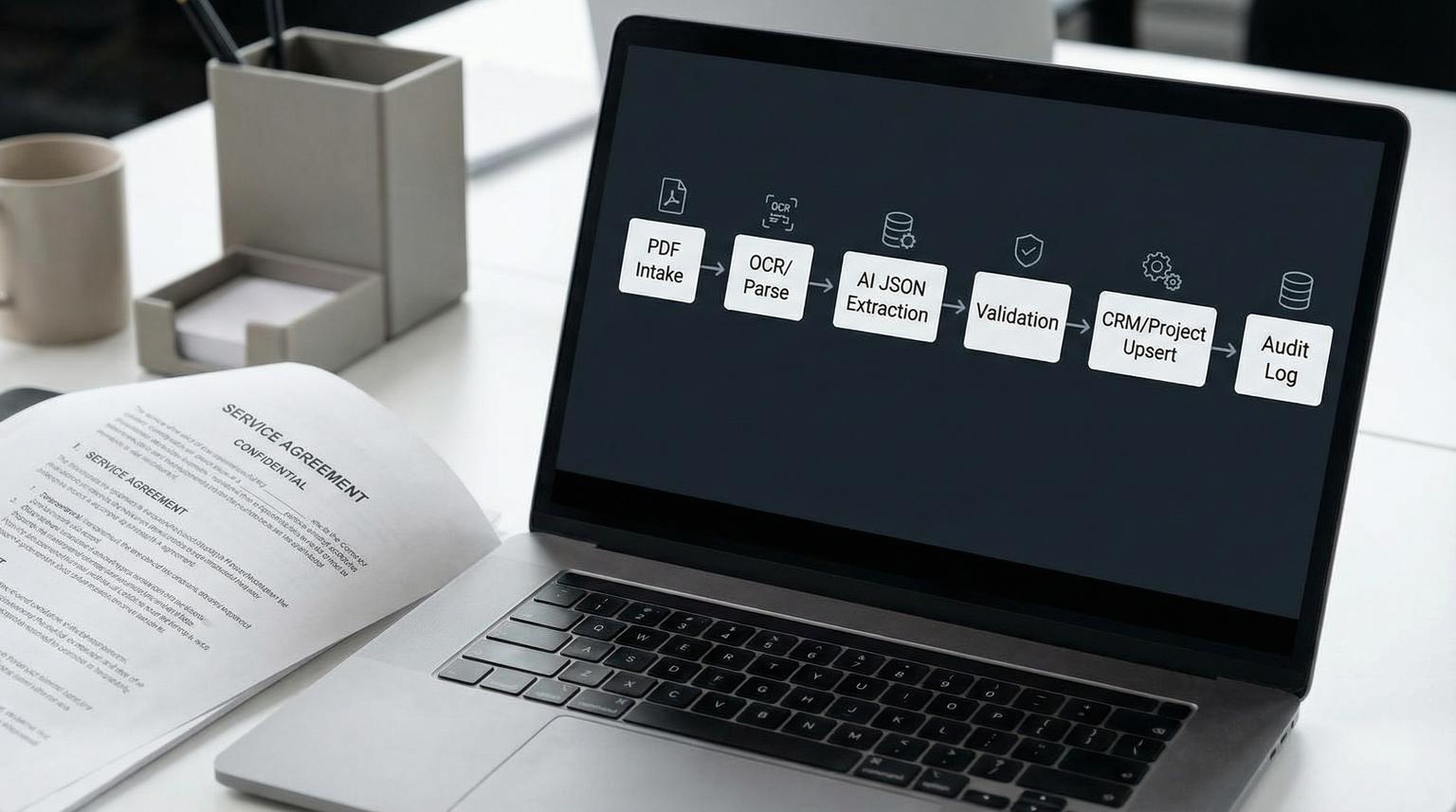
Contract PDFs are one of the most expensive handoffs in ops: sales closes, a PDF lands in an inbox and someone rekeys names, dates, pricing and scope into the CRM and project system. That is slow and error-prone. This post shows how automating data processing with AI can convert inbound contract PDFs into validated CRM + project records with strict schema extraction, confidence-based routing, deduplication and a human approval gate that produces an audit trail before anything gets written.
Quick summary:
- Turn contract PDFs into structured fields, validate them and then upsert CRM and delivery records without manual rekeying.
- Use a typed extraction schema with per-field confidence and evidence so you can enforce quality not just guess.
- Route low-confidence or high-risk cases into human approval and log every decision for auditability.
- Prevent duplicates and bad updates with idempotency keys, schema checks and deterministic validation rules.
Quick start
- Pick your contract intake channel (sales inbox, upload form or shared drive) and normalize every PDF into text/markdown using a parser.
- Extract against a strict JSON schema (fields, types, allowed values) and capture per-field confidence plus evidence quotes.
- Run deterministic validation (required fields, date logic, totals, enum checks) and dedupe (existing account or deal lookup).
- If risk is low, auto-write to CRM and create the project record. If risk is high, pause for human approval first.
- Write an immutable audit log that links source PDF, extracted JSON, validation results, approval action and final API payload.
To automate contract PDFs into trustworthy CRM and project records, you need more than extraction. The production pattern is: intake the PDF, parse it into clean text, extract fields into a typed schema with confidence, validate deterministically, dedupe and then place a human approval and audit-log gate before any CRM or project writes. This keeps straight-through processing fast while preventing costly downstream ops errors.
The bottleneck at the CRM to delivery boundary
The biggest failures usually happen after the deal is signed but before delivery is set up. A slightly wrong parse can create weeks of churn: wrong legal entity, incorrect effective date, missed renewal notice period or a pricing table that does not match the amount entered into the CRM. Those errors propagate into invoicing, provisioning and reporting.
In practice, ops teams do not just need extraction. They need control:
- A schema that forces the model to output what your systems need.
- Confidence-aware routing so risky cases cannot write automatically.
- Deterministic validation rules that are consistent across reviewers.
- Idempotent upserts and dedupe logic so reprocessing the same PDF does not create duplicates.
- An audit trail so a human can explain why a record was created or updated.
Architecture overview from PDF to validated records
A robust pipeline separates concerns. Each component can be swapped (OCR provider, LLM vendor, CRM, project tool) without changing the guardrails.

1) Intake and normalization
Contracts come in through email attachments, uploads or a shared folder. In n8n the common pattern is email ingestion, attachment download and then a parser API call using an asynchronous sequence (upload, poll, fetch). n8n shows this workflow shape clearly in their PDF parsing example using a WAIT and SWITCH loop (PDF parsing pattern in n8n).
Why normalize first? Because raw PDFs are inconsistent. A parser that returns text or markdown gives the LLM a stable substrate. This reduces hallucination and improves field evidence capture.
2) Extraction with strict output
Use an LLM (or rules for simple parts) to output JSON that matches your schema exactly. Require:
- Strict types (string, number, date, enum, array of objects).
- Per-field confidence (0-100) and evidence snippets.
- Null for unknown values, never guessed values.
3) Deterministic validation and routing
Run rules that a machine can judge consistently. Validation outputs a status plus a list of failures. Routing uses confidence thresholds, missing fields and dedupe ambiguity to decide if the workflow can proceed automatically.
4) Human approval gate before writes
Writes to CRM and project tools are the irreversible step. In n8n you can implement a pause-for-approval pattern where the workflow stops until a reviewer approves or denies the write (human-in-the-loop tools in n8n). The key is gating the tool call itself, not reviewing after the write happened.
5) Upsert and association writes
After approval, perform idempotent upserts to CRM objects (company, contact, deal) and then create or update the project record and tasks. For HubSpot deal writes, the API expects a properties object plus associations (HubSpot deal API mechanics).
6) Immutable audit log
Store: source file hash, extracted JSON, validation results, dedupe matches, approval decision and the final write payload with timestamps. This is what lets ops trust the automation and it is also how you debug edge cases quickly.
Implementation checklist for production readiness
- Loop through multiple attachments per email and process each contract independently.
- Compute a deterministic file hash and an external contract ID to support idempotency.
- Store the normalized text output so you can reproduce extraction results.
- Throttle parser polling with WAIT to avoid rate limits.
- Block writes when required fields are missing or confidence is below threshold.
- Always write an audit record, even when the workflow stops for human review.
Extraction schema your workflow should enforce
Start with a schema that mirrors what your CRM and project system actually need to create a clean handoff. Below is a concrete baseline we use for contract-to-CRM to delivery setups. You can extend it for line items, complex pricing or addenda.
| Field | Type | Required | Notes |
|---|---|---|---|
| external_contract_id | string | Yes | From contract number or computed hash. Used for idempotent upserts. |
| customer_legal_name | string | Yes | Exact legal entity, not trade name. |
| customer_address | string | No | Useful for invoicing workflows and compliance checks. |
| primary_contact_name | string | No | Only if explicitly present in the contract. |
| primary_contact_email | string | Preferred | Validate format and domain. |
| vendor_legal_name | string | Yes | Your entity as shown on the contract. Helps multi-entity orgs. |
| effective_date | date (ISO 8601) | Yes | Normalize all date formats to YYYY-MM-DD. |
| term_start_date | date | Yes | Sometimes same as effective date but not always. |
| term_end_date | date | Yes | Must be after start date. |
| auto_renew | boolean | No | True if renews automatically. If missing treat as unknown not false. |
| renewal_notice_days | number | No | Used to schedule renewal reminders. |
| contract_value_total | number | Yes | Total contract value. Must reconcile with pricing table if present. |
| currency | enum | Yes | USD, EUR, GBP etc. |
| billing_frequency | enum | No | Monthly, annual, one-time. Drives invoicing setup. |
| product_or_service_summary | string | Yes | Short normalized scope description for CRM and project kickoffs. |
| deliverables | array of objects | Preferred | Each item: name, quantity, unit_price (optional), notes. |
| project_start_trigger | enum | Yes | On effective date, on countersignature, on first payment. |
| governing_law | string | No | Legal metadata. Often used for risk review. |
| signatures | array of objects | Preferred | Each: party, signer_name, signer_title, signed_date (optional). |
Require the extractor to return for each field: value, confidence (0-100) and evidence (a short quote or page reference). Evidence is the fastest way for a reviewer to approve edge cases.
Validation, dedupe and confidence routing rules
Extraction quality alone is not a safety mechanism. The safety mechanism is the combination of schema validation, confidence thresholds and dedupe checks.

Confidence thresholds that match operational risk
Use tiered thresholds by field criticality. OCR systems commonly emit confidence on a 0-100 scale and best practice is to enforce minimum thresholds for sensitive workflows. AWS Textract guidance notes higher thresholds for financial decisioning and lower thresholds for archival use (confidence best practices). Contracts that drive billing and delivery should be treated like financial decisioning.
- Tier 1 (must be correct): customer_legal_name, effective_date, term_start_date, term_end_date, contract_value_total, currency, project_start_trigger. Threshold: 90+ for auto-write.
- Tier 2 (important but recoverable): billing_frequency, renewal_notice_days, deliverables summary. Threshold: 80+ for auto-write.
- Tier 3 (nice-to-have): governing_law, address, notes. Threshold: 60+ or allow null.
Decision rule: if any Tier 1 field is below threshold, the workflow must require approval. Do not average confidences across fields because one wrong date can cost more than ten correct notes.
Activation rules for human review (configurable)
Even if you do not use AWS A2I you can borrow the same activation logic pattern: trigger review on missing keys, low confidence or sampling for QA. AWS provides a clear schema for this concept (human loop activation conditions). Adapt it into your rules config so ops can version and approve it.
{
"review_rules": {
"missing_required_fields": [
"external_contract_id",
"customer_legal_name",
"effective_date",
"term_start_date",
"term_end_date",
"contract_value_total",
"currency",
"project_start_trigger"
],
"confidence_thresholds": {
"tier1": 90,
"tier2": 80,
"tier3": 60
},
"qa_sampling_percent": 3
}
}
Include aliases for common label variants so you reduce false missing-field triggers. Example: effective_date aliases can include Effective Date, Commencement Date and Start Date.
Dedupe and idempotency checks
Before you create anything, search for existing records using stable identifiers:
- external_contract_id: the safest approach. If the contract has a number use it. If not compute a deterministic ID from file hash plus customer_legal_name plus effective_date.
- Company match: exact match on normalized legal name, then fallback to domain match if you have an email domain.
- Deal match: match on external_contract_id first. If missing, match on company plus close date window plus amount, then require approval because ambiguity is high.
Common failure pattern: teams rely on fuzzy matching of company names without a stable contract identifier. That seems fine until you reprocess a revised PDF and create duplicate deals and duplicate projects. Make external_contract_id a required field and store it in a unique CRM property so you can update instead of create.
Human approval gate and audit log design
Human review is not a fallback for a weak system. It is a control plane that lets you automate aggressively while keeping writes safe. In n8n, human-in-the-loop review can pause the workflow and require an approve or deny action before the tool executes (how n8n handles approvals).
When approval is required
- Any required field missing.
- Any Tier 1 field confidence below 90.
- Any dedupe match ambiguous (multiple candidate companies or deals).
- Material change to an existing record (amount changes, term dates shift, renewal toggles).
- QA sampling: send 1-5% of high-confidence contracts for review to catch drift.
Tradeoff: higher thresholds reduce bad writes but increase review volume. Our rule of thumb is to start conservative (more review) for the first few weeks then lower review rates once you have baseline metrics and a good alias list.
What the reviewer sees
Make approvals fast by showing:
- Link to the source PDF and the normalized text snippet for the relevant evidence.
- Extracted JSON with highlights on low-confidence fields.
- Validation failures and suggested fixes (for example, “term_end_date is before term_start_date”).
- Planned write payload preview for CRM and project tool.
Audit log record (minimum viable)
Your audit record should be append-only and queryable. Store it in a database table, an internal system of record or at minimum an immutable log store. Minimum fields:
- audit_id (UUID)
- source_file_name, source_file_hash, intake_channel, received_at
- parser_version, extractor_model, prompt_version
- extracted_json (full)
- validation_results (full)
- dedupe_results (candidates and chosen match)
- approval_required (boolean), approval_status (approved/denied), reviewer_id, reviewed_at, reviewer_notes
- final_write_payload_crm, final_write_payload_project
- write_results (record IDs, timestamps, errors)
Real-world ops insight: the audit log becomes your fastest incident response tool. When a stakeholder asks “why did this project start date get set to the 12th” you can show the evidence quote that drove the field value and the reviewer who approved it. Without this, teams lose trust and revert to manual rekeying.
Implementation notes in n8n and API write patterns
This section maps the architecture into concrete workflow steps you can build in n8n or replicate in any workflow tool. The key is to keep extraction and validation deterministic and to make the write step idempotent. For a broader operational playbook on building reliable AI steps (schema contracts, approvals, evaluation, and monitoring), see our AI workflow automation playbook.
Suggested n8n node flow
Email trigger or Webhook upload
-> Split In Batches (attachments)
-> HTTP Request (upload PDF to parser)
-> Wait
-> HTTP Request (poll job status)
-> Switch (done?)
-> HTTP Request (fetch parsed text/markdown)
-> LLM (extract JSON schema with confidence and evidence)
-> Function (schema validation and normalization)
-> HTTP Request (CRM search by external_contract_id)
-> Function (dedupe decision and risk score)
-> IF (auto-write allowed?)
-> HTTP Request (CRM upsert)
-> HTTP Request (project create)
-> HTTP Request (write audit log)
ELSE
-> Human approval
-> IF (approved)
-> HTTP Request (CRM upsert)
-> HTTP Request (project create)
-> HTTP Request (write audit log)
ELSE
-> HTTP Request (write audit log with denied)
Example CRM write payload (HubSpot deal create)
HubSpot uses a properties object and optional associations. The internal IDs for pipeline stages matter so keep those IDs in configuration not prompts (HubSpot API reference).
{
"properties": {
"dealname": "Acme Corp - Master Services Agreement",
"pipeline": "default",
"dealstage": "contractsent",
"amount": "25000.00",
"closedate": "2026-04-02T00:00:00.000Z",
"external_contract_id": "MSA-2026-0142",
"contract_effective_date": "2026-04-01",
"term_start_date": "2026-04-01",
"term_end_date": "2027-03-31",
"currency": "USD",
"project_start_trigger": "on_countersignature"
},
"associations": [
{
"to": { "id": 12345 },
"types": [{ "associationCategory": "HUBSPOT_DEFINED", "associationTypeId": 5 }]
}
]
}
Project record creation (generic pattern)
Even if your project system is Asana, Jira, Monday or a custom tool the record model is similar: project name, customer reference, start date rule and a scope summary. The safest strategy is to pass only validated, normalized fields. For pricing tables and deliverables, create a second step that expands line items only when the table validation passes.
Decision rule: do not auto-create detailed tasks from messy deliverables tables until you have stable table extraction. Start by creating the project with a single kickoff task and attach the contract, then expand tasks after review if needed.
Testing, monitoring and rollout
Rolling this out like a software system prevents surprises. The goal is fast deal-to-delivery handoff without silently corrupting data. If you want adjacent patterns for keeping downstream analytics trustworthy, see AI-driven business intelligence dashboards with n8n.
Test set and acceptance criteria
- Build a test corpus of 30-50 real contracts across templates, scan quality and complexity.
- Define acceptance per field: exact match, normalized match (dates) or allowed null.
- Track: auto-write rate, review rate, reviewer edit rate and dedupe ambiguity rate.
Common mistake to avoid
Do not let the LLM pick pipeline stages, project templates or internal IDs. That is configuration, not inference. Store those values in environment config and map from extracted business facts (like product tier) to internal IDs deterministically.
When this approach is not the best fit
If your contracts are highly bespoke with heavy redlines, non-standard tables or multi-document packets where critical terms live in exhibits, you may not get reliable straight-through automation. In that case, use the same intake, parsing and audit trail but treat the output as a reviewer-prep package, not an auto-write system. You still save time by pre-filling fields and highlighting evidence.
Primary CTA
If you want a production implementation in n8n with your CRM and project stack, book a build consult with ThinkBot Agency and we will map your schema, validation rules, approval flow and audit logging to your exact systems: book a consultation.
For examples of similar workflow builds across CRM, email platforms and API integrations, you can also review our work here: ThinkBot Agency portfolio. If you’re applying the same extraction + validation + approvals pattern to finance documents, see our guide on stopping invoice rekeying with AI automation.
FAQ
What confidence score should we use to auto-write contract fields?
Use tiered thresholds based on risk. For Tier 1 fields like legal name, dates and contract value, require 90+ for automatic writes. For less critical metadata you can allow lower thresholds or null. The safest rule is that any low-confidence Tier 1 field triggers human approval before CRM or project writes.
How do we prevent duplicate deals or duplicate projects when the same PDF is re-sent?
Create and store an external_contract_id as a unique identifier. Use it to search and upsert rather than always creating new records. If the contract has no explicit number, compute a deterministic ID from the file hash plus stable attributes and treat that ID as required.
What should the human approval step include for fast reviews?
Show the extracted JSON, highlight low-confidence fields, include short evidence quotes and preview the exact CRM and project payload that will be written. The reviewer should be able to approve or deny quickly and add a note. The workflow should pause until a decision is made.
What needs to be stored in the audit log to make this trustworthy?
Log the source PDF reference and hash, the parsed text version, extracted JSON with confidence and evidence, validation and dedupe results, the approval decision with reviewer identity and the final write payload plus API results. This creates an end-to-end trail that supports troubleshooting, compliance and continuous improvement.
