
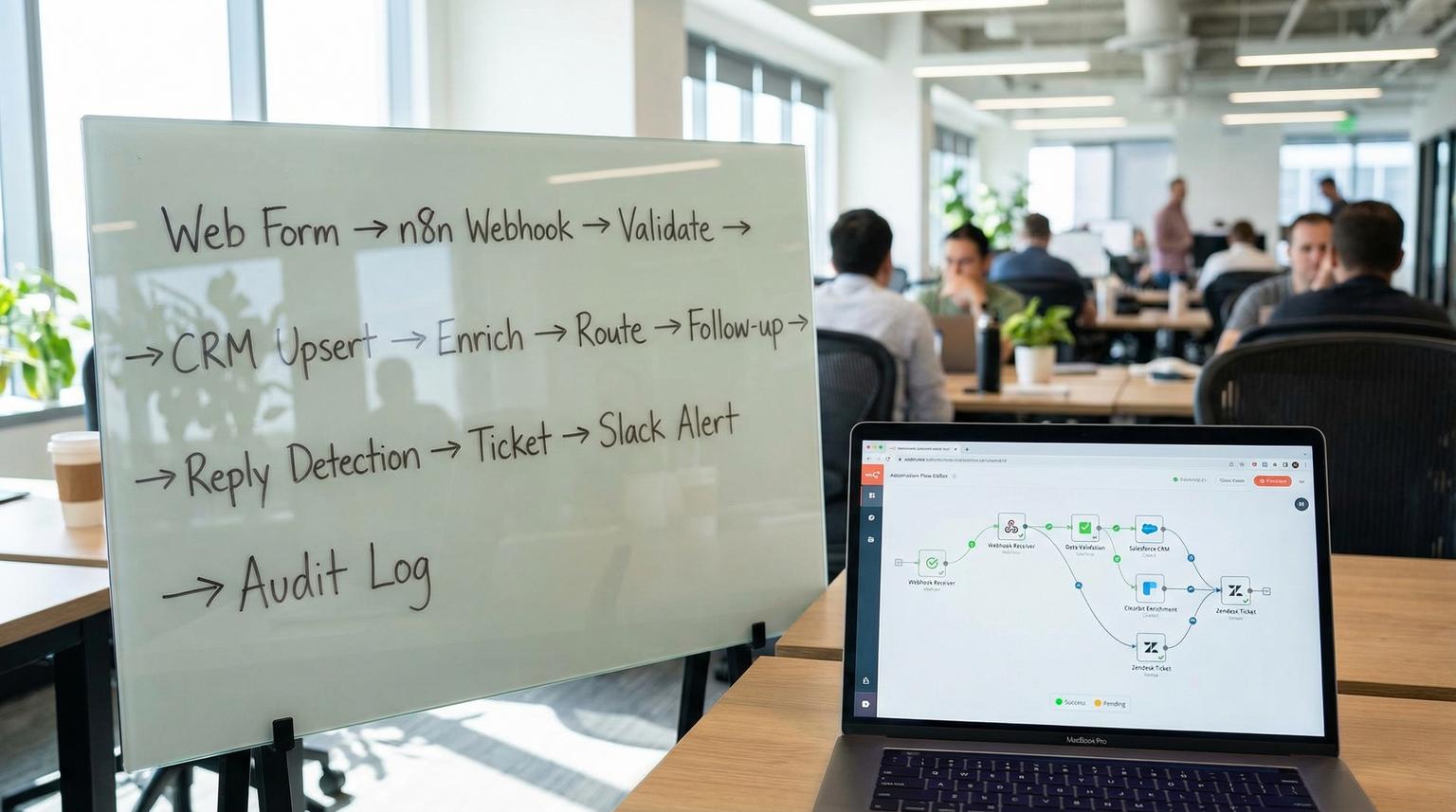
When your web form, CRM, email platform and support tool are not connected, the same problems show up every week: leads get lost, follow-ups are late, and customer issues get buried in inboxes. At ThinkBot Agency, we design end-to-end automation in n8n so every request is captured, enriched, routed and tracked from the first click to final resolution.
If you are a founder, ops lead or marketing and CRM owner, this guide walks you through a practical blueprint you can adapt. You will see how an automation agency typically structures a workflow that starts with lead capture and ends with support ticket resolution, with reliability patterns that keep it running in production in 2026.
At a glance:
- Capture web leads via an n8n webhook, validate inputs and write to a system of record like a CRM.
- Enrich lead data without blocking intake, then route to the right pipeline stage and owner.
- Trigger personalized follow-ups and log activity so sales and marketing stay aligned.
- Convert customer replies that contain issues into tickets, acknowledgements and internal alerts.
- Add error handling, retries and monitoring so failures do not silently drop revenue or support requests.
Quick start
- Create an n8n Webhook trigger and connect your website form to POST lead payloads.
- Add a validation and normalization step, then upsert the lead into your CRM.
- Branch into enrichment and routing rules, then send the right follow-up email sequence.
- Set up an email trigger for replies and classify whether the reply is a support issue.
- Create a ticket in your tracker, send a customer acknowledgement and notify the team.
- Implement retries, dead letter logging and alerts for failed runs.
An n8n based automation workflow streamlines business processes by using a webhook to capture leads, validating and enriching the data, syncing it to your CRM, then triggering personalized follow-ups. When customers reply with a problem, the same automation can detect the issue, create a support ticket, acknowledge receipt and alert your team. With solid error handling and monitoring, the process stays reliable even as tools and APIs change.
The end-to-end workflow we implement most often
This is the pattern we see deliver the biggest operational win because it closes the loop between marketing, sales and support:
- Lead intake from website forms or landing pages.
- Data hygiene so your CRM stays clean and deduped.
- Enrichment to add firmographic context, without slowing intake.
- Routing into the correct pipeline stage, owner and segment.
- Follow-up via email and optional notifications to your team.
- Reply handling that detects support intent and creates tickets automatically.
- Support resolution loop with internal alerts, status updates and audit logs.
n8n is a great fit because it can sit in the middle as an integration hub. You can connect webhooks, CRMs, email providers, Slack and ticketing systems with the same orchestration layer and consistent error handling.
For lead capture, the n8n team publishes a solid reusable pattern for webhook intake and CRM writes that we often adapt for production builds. See the lead capture workflow for the core structure.
Lead capture and CRM sync in n8n
The lead intake workflow should be designed for speed and correctness. Your website form is a public endpoint, so the goal is to accept valid submissions quickly, reject bad payloads and always return a clear response to the browser.
Step 1: Webhook intake and schema
In n8n, start with a Webhook node. Define the minimum schema you expect, for example:
- first_name
- last_name
- company
- message
- source and campaign parameters (utm_source, utm_campaign)
We recommend treating the webhook as your single intake door. Whether the lead comes from a WordPress form, a landing page or a partner referral form, you normalize it into one canonical lead object. For a broader lead-to-customer pattern that extends this intake into scoring and handoffs, see our guide on workflow automation using n8n.
Step 2: Normalize, validate and fail fast
Before you call a CRM API, do the boring but essential hygiene:
- Trim strings, lowercase email and standardize phone formats.
- Check required fields and reject clearly invalid payloads.
- Return HTTP 400 when validation fails, so you do not pollute downstream systems.
This design also protects your paid tools. Most CRMs and enrichment providers bill by usage, so validation saves money and keeps your data clean.
Lead intake reliability checklist
Use this checklist when you build or review a web form -> CRM flow in n8n. It is intentionally specific because the small details are where automations typically break.

- Define a strict input schema and document required fields and allowed values.
- Store raw payloads for troubleshooting, but keep PII access controlled.
- Normalize inputs, especially email casing, whitespace and phone formatting.
- Validate required fields and return HTTP 400 for invalid submissions.
- Add basic anti-spam controls, such as a honeypot field and rate limiting upstream.
- Implement deduplication, usually by email, before creating new records.
- Upsert into the CRM using search -> update, else create to avoid duplicates.
- Write a lead source trail, such as page URL, UTM fields and form name.
- Return HTTP 200 with a small success payload so the website can show confirmation.
- Alert on workflow errors so lead intake never fails silently.
Step 3: Upsert into your system of record
In most client stacks, the system of record is a CRM like HubSpot, Salesforce or Pipedrive. The core logic is the same: search by unique key, then update or create. If you do not have a CRM yet, a spreadsheet can be a temporary system of record, but it should be a stepping stone, not the final destination.
We like to add tracking fields at this stage:
- Lead status, lifecycle stage and pipeline stage
- Owner assignment and routing reason
- Last automation run timestamp and workflow version
Those fields are what make troubleshooting possible later because you can see what happened without reading logs.
Enrichment, routing rules and follow-up personalization
Once the lead is safely stored, enrichment can be best effort. Capture first, enrich second. If the enrichment API is down, you still want the lead in your CRM.
Best practice: non-blocking enrichment
In n8n this is typically an IF branch or error-handled HTTP Request node. If enrichment succeeds, merge fields like company domain, industry and company size into the CRM. If enrichment fails, continue with minimal lead data and log the enrichment failure for later review.
Routing logic that sales teams actually follow
Routing is where disconnected systems create the most friction. We aim for routing rules that are transparent and explainable, such as:
- Territory routing by country or state
- Segment routing by company size or plan type
- Product interest routing by form selection or page path
- Priority scoring based on intent signals, such as demo request vs newsletter signup
Then the workflow updates the CRM with owner and stage and triggers a follow-up. Follow-up can be email, a sales task in the CRM or a notification in Slack. The key is to log it in the CRM so your team does not duplicate outreach. If you want to go deeper on AI-driven CRM personalization and pipeline visibility, read CRM automation with AI.
If you want a practical support style intake pattern for email and ticket creation, n8n also shares a working example you can adapt. Here is the support ticket workflow for the core Gmail -> ticket -> notification structure.
From customer reply to support ticket resolution
A common bottleneck appears after follow-up emails start working: customers reply with questions and issues that should become tickets, but they land in a shared inbox and nobody owns them. You can fix that by turning replies into structured tickets with acknowledgements and internal alerts.
Step 1: Trigger on inbound replies
Set up an email trigger for your support mailbox or for replies to a specific campaign address. Filter out auto-replies and spam. If you are using Gmail or Microsoft 365, you can filter by labels or folders so you only process messages meant for support.
Step 2: Classify and route
We usually implement one of these classification approaches:
- Rule-based: keywords and sender domain, good for simple setups.
- AI-assisted: summarize the message, extract the issue type and set priority.
AI is most valuable when it turns messy free text into a consistent ticket title, a clean description and clear reproduction steps. This reduces the human overhead of writing good tickets and improves time to resolution.
Step 3: Create the ticket and close the loop
Create the ticket in your tracker of choice, then do two immediate actions:
- Send the customer an acknowledgement so they know you received the request.
- Notify the internal team with a link to the ticket and key context.
For teams that use Slack for support intake, a reaction based triage signal can reduce noise by only creating tickets when a teammate marks a message for escalation. n8n demonstrates this idea in their guide on ticket automation using Slack and an issue tracker.
Example ticket mapping template
This is the kind of mapping we implement so every ticket is readable and actionable even if the inbound email is messy:

Title: Support request from {{from_email}} - {{subject_short}}
Description:
Customer: {{from_name}} ({{from_email}})
Account: {{crm_account_name}} | Plan: {{plan}}
Original subject: {{subject}}
Message:
{{body_text}}
Links:
CRM record: {{crm_url}}
Last order/invoice: {{billing_url}}
Reliability patterns that keep n8n automations running
The difference between a prototype and a production workflow is not the happy path. It is what happens when APIs time out, credentials expire or an upstream system changes a field name.
We borrow proven error handling principles from broader workflow automation best practices and adapt them to n8n with consistent conventions. For a good overview of error handling concepts that translate well, see error handling guidance and apply the same categories and alerting discipline inside n8n.
To standardize and automate back-office workflows without breaking operations, use our pillar guide: Business Process Automation Playbook.
Failure modes and mitigations
Use this list during build and during quarterly reviews. Most automation incidents fall into these buckets.
- Failure: Invalid lead payload reaches the CRM API and causes a rejected request. Mitigation: Validate required fields early, stop the run and return HTTP 400 to the form.
- Failure: Enrichment provider is down and blocks lead capture. Mitigation: Make enrichment best effort, capture lead first, enrich second and continue on error.
- Failure: Duplicate leads or duplicate tickets created from retries or repeated messages. Mitigation: Add dedupe keys, such as email for leads and message-id hash for emails, then store processed IDs.
- Failure: Customer acknowledgement fails to send and the customer follows up again. Mitigation: Alert internally on acknowledgement failure and retry with backoff when safe.
- Failure: Credential expires for Gmail, CRM or ticketing tool and runs fail until someone notices. Mitigation: Monitor failures, route alerts to a dedicated channel and document credential rotation.
- Failure: Transient timeouts and rate limits cause partial writes. Mitigation: Use controlled retries with wait intervals and design idempotent writes where possible.
In client builds, we also add a simple dead letter mechanism: when a run fails after retries, we write the payload and error context to a log store and alert with a link so an operator can reprocess safely.
DIY vs hiring a specialist team: a practical comparison
Many teams can build the first version internally. The question is whether you can operate it without hidden costs, such as missed leads, inconsistent data and firefighting.
| Decision area | DIY in-house | Work with ThinkBot Agency |
|---|---|---|
| Process clarity and ownership | Works if you already have documented stages, fields and routing rules. | We help define the data model, lifecycle stages and owners so the automation matches how your team works. |
| Integrations and API complexity | Fine for 1-2 tools with standard connectors. | Best when you need custom API connections, webhooks, multi-step orchestration and data transformations. |
| Reliability and monitoring | Often missed until something breaks, then it becomes urgent. | We implement validation gates, retries, alerts, execution logs and safe rollback patterns from day one. |
| AI driven support and data extraction | Possible, but prompt design, structured outputs and guardrails take iteration. | We add AI only where it improves consistency and speed, with guardrails and human review when needed. |
| Time to value | Slower if you are learning n8n while also shipping core product work. | Faster builds with proven patterns from real client work and active n8n community experience. |
Implementation plan you can reuse (and what we handle for clients)
If you want to adapt this blueprint, keep it operationally grounded. A good rollout plan includes owners, monitoring and a rollback path.
Phase 1: Design and mapping
- Owner: Ops lead or RevOps
- Deliverables: lead schema, CRM fields mapping, pipeline stages, routing rules, ticket categories and SLAs
Phase 2: Build in n8n with test data
- Owner: Automation builder
- Deliverables: webhook intake, upsert logic, enrichment branch, follow-up triggers, reply -> ticket flow
Phase 3: Add reliability and observability
- Owner: Automation builder with ops sign-off
- Deliverables: validation gates, retry policies, alerting, dead letter logging, runbooks for common failures
Phase 4: Launch and monitor
- Owner: Ops lead
- Monitoring: daily check for failed runs, weekly review of duplicates, monthly review of routing outcomes
- Rollback: keep the old form routing and support inbox process available for 1-2 weeks, then switch fully once error rate is stable
If you want a build that is tailored to your CRM, your email platform and your support process, we can help. Book a working session with ThinkBot Agency here: book a consultation.
If you prefer to vet us first, you can also review our track record as a top performer on Upwork.
If you want the deeper, node-by-node support automation pattern (email + CRM + Slack) that expands on the ideas above, see how an n8n automation agency builds an AI-powered support workflow.
FAQ
Common questions we hear when teams want to connect lead capture, CRM workflows and support ticketing with n8n.
What does an automation agency do differently than basic Zapier style integrations?
A specialist team designs the full process, not just point-to-point connections. That includes data modeling, deduplication, routing rules, error handling, monitoring and safe retries. The result is an automation that behaves like a reliable system instead of a fragile chain of triggers.
Can n8n handle both sales workflows and support ticket automation in one setup?
Yes. n8n can orchestrate multiple workflows that share the same data model, such as a lead record in your CRM. You can run a web form intake workflow and a reply or inbox intake workflow, then route both into consistent logging, notifications and ticket creation.
How do you prevent duplicate leads and duplicate tickets?
We use idempotent patterns: upsert by email for leads, then store a unique message identifier for inbound emails and Slack messages. We also add a short time window dedupe guard so retries do not create extra records.
When should we DIY our n8n automation and when should we hire ThinkBot Agency?
DIY works when the process is simple and you have internal time to test and maintain it. Hiring is usually the better path when multiple systems must stay in sync, reliability matters for revenue or support SLAs and you need custom API logic, monitoring and AI assisted classification.
Do you offer ongoing monitoring and improvements after launch?
Yes. We can set up monitoring, alerting and a review cadence so your workflows keep working as APIs change. We also iterate on routing rules, messaging and AI extraction prompts based on real outcomes.
