
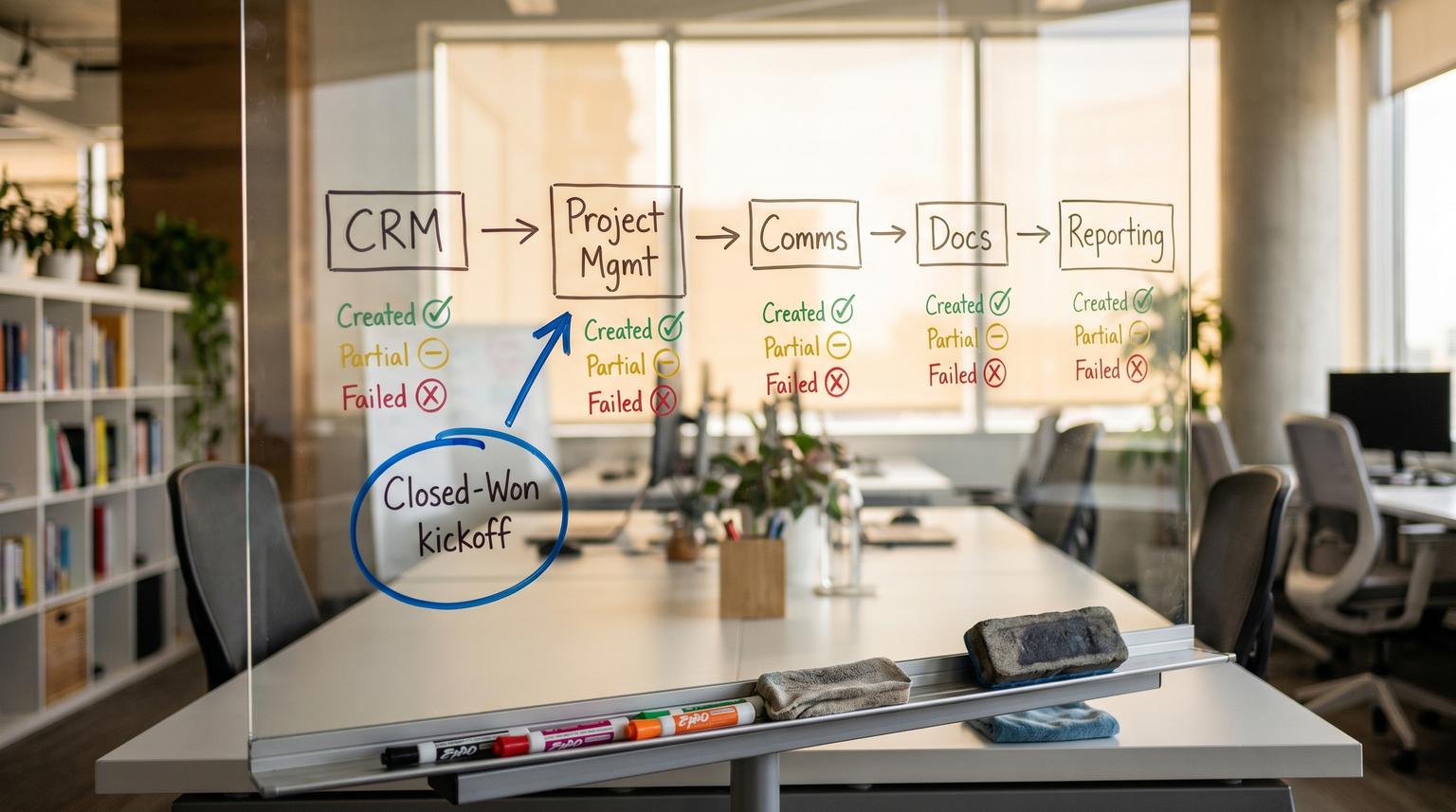
When a deal hits Closed-Won the handoff from sales to delivery is a make-or-break moment. If your team is copying fields into Asana or Jira creating a Slack or Teams channel then building a Google Drive or SharePoint folder by hand you are burning time and inviting missed steps. This implementation-focused walkthrough shows how to design automation for CRM and productivity tools so a single stage change creates the kickoff stack reliably and safely even when triggers replay or steps fail.
At a glance:
- Create a repeatable kickoff factory that builds the project tasks comms channel and document space from CRM fields.
- Prevent duplicates with an idempotency key and a kickoff registry stored back in the CRM.
- Add preflight checks so missing owners templates and invalid names fail fast with alerts.
- Use retries for transient API errors and a rollback or safe-stop approach for partial creations.
Quick start
- Define your kickoff template set: one PM template (Asana project or Jira epic) one comms template (Slack channel or Teams team/channel) and one folder template (Drive or SharePoint).
- Add CRM fields to support mapping: delivery owner start date target launch date project type and a unique
kickoff_keyfield plus kickoff status fields. - Build a stage-change trigger with a first-step gate: if kickoff status is already Created or kickoff_key exists then stop.
- Run preflight validation: owner present valid channel name template IDs present required CRM fields populated.
- Create assets in a controlled order then write each created ID and URL back to the CRM after every step.
- Add monitored retries alerts and a rollback plan for partial failures.
A reliable Closed-Won handoff works best when you treat the stage change as an at-least-once event and design the workflow to be safe to re-run. Use a deterministic unique key from the CRM deal to prevent duplicate projects channels and folders. Validate owners and templates before creating anything then create each asset step-by-step writing created IDs back to the CRM. Add retries for rate limits and transient outages and send failure alerts with enough context to fix and resume without guessing.
The Closed Won handoff problem and the target outcome
In most teams sales lives in the CRM and delivery lives in a separate stack:
- Work management: Asana project templates or Jira epics with issues and subtasks
- Comms: Slack channels or Microsoft Teams channels for internal delivery and client collaboration
- Docs: Google Drive folders or SharePoint sites and libraries for statements of work onboarding assets and deliverables
The handoff breaks in predictable ways:
- Duplicate kickoffs: the stage update fires twice or someone toggles stages and you end up with two projects and two channels.
- Missing owners: the CRM record has no owner so channel creation fails or tasks have no assignee and quietly rot.
- Partial creation: the PM project exists but the folder does not or the channel exists but invites failed.
- Invisible failures: the automation fails without a clear trace and delivery cannot see what happened from the CRM.
The measurable target outcome is simple: within minutes of Closed-Won you have a single canonical kickoff package and the CRM record shows links to everything. Delivery can start without searching and sales can see the handoff is complete.
Architecture of a rerunnable kickoff factory
Think of the workflow as a small provisioning system with governance not a single zap. The core components look like this:
- Trigger: Deal stage transitions to Closed-Won (HubSpot workflow action model is a common choice) or Dataverse row updated with a stage filter.
- Gate: An idempotency check that decides whether this Closed-Won event has already been processed.
- Preflight validation: Ensure required data exists before calling external APIs.
- Provision steps: Create PM project or epic then tasks then comms channel then doc folder then permissions.
- Writeback: After each successful step store external IDs and URLs in the CRM.
- Observability: A run log plus alerting on failures and a retry policy for known transient errors.

This is the order we typically recommend in production:
- Create the primary work object (Asana project or Jira epic) because it becomes the anchor for everything else.
- Create the comms space (Slack or Teams) once you have a deterministic name and an owner to invite.
- Create the document space (Drive or SharePoint) then attach folder links back to the PM project and CRM.
- Backfill tasks if your PM tool requires the project ID first or if you want tasks to include links to the channel and folder.
The tradeoff: creating tasks last means fewer broken task links but it delays task visibility by a minute or two. If your delivery team wants tasks immediately then create tasks right after the PM object and update descriptions later with links once the channel and folder are ready.
Field mapping and templates that do not break
The fastest way to get consistent kickoffs is to stop building new structures for every deal. Instead maintain a small set of templates and map CRM fields into them. Start by listing the minimum data you need to create each asset:
- PM: template ID project key issue type epic name sprint or milestone dates owners
- Comms: normalized channel name channel purpose owner to invite client participants list
- Docs: parent folder or site ID client name project code folder template choice and permission group
Preflight checklist for Closed-Won kickoff
- Deal has an owner and delivery owner is set (do not assume they are the same).
- Required fields present: client name project type start date target launch date and billing model.
- Template IDs configured for the selected project type (PM template ID folder template ID channel naming pattern).
- Channel name normalized to platform rules. For Slack the name must be lowercase with numbers hyphens or underscores and under 80 characters. HubSpot notes the channel will not be created if the record has no owner and the name rules are violated.
- Kickoff registry fields exist in the CRM: kickoff_key kickoff_status kickoff_last_run kickoff_error.
A simple mapping spec you can reuse
Document your mapping as a short spec so changes are intentional. Example:
| CRM field | Target | Rule | Writeback |
|---|---|---|---|
| Deal ID | kickoff_key | Prefix with system and environment | Store on deal |
| Client name | PM project name | Client + project type + month | Project URL |
| Delivery owner | Task assignee | Map email to user ID | Owner ID used |
| Deal amount or package | Jira custom field or Asana custom field | Validate required fields | Field values confirmed |
| Close date | Kickoff due date | Close date + SLA days | Due date stored |
A real-world operations insight: most kickoff failures we see come from identity mapping not API calls. The CRM has an owner but the PM tool expects a user ID that is different from email. Build a single cross-system user map once and reuse it rather than trying to infer identities on every run.
Idempotency and duplicate prevention with unique keys
Closed-Won is not a clean one-time event. Update-based triggers can fire multiple times even when values do not change which Microsoft calls out for Dataverse triggers in Power Automate. You should assume at-least-once delivery and build the workflow so replays are harmless. For a deeper production-ready approach, use this pillar guide: CRM automation framework for routing, lifecycle stages, data hygiene, and reporting.
Choose a deterministic kickoff key
Use a unique key that is stable and specific to the deal and template variant. Examples:
kickoff_key = "crm:hubspot:deal:" + deal_idkickoff_key = "crm:dataverse:opportunity:" + opportunity_id- If you have multiple delivery tracks per deal include a suffix like
:implementationor:support
Use a kickoff registry in the CRM
Add these fields on the deal record (or a related custom object if you prefer):
- kickoff_status: Not started In progress Created Partial Failed
- kickoff_key: the unique key
- pm_project_id / pm_project_url
- comms_channel_id / comms_channel_url
- doc_folder_id / doc_folder_url
- kickoff_run_id: execution id for tracing
First step of the workflow:
- If kickoff_status is Created then exit.
- If kickoff_status is In progress then exit unless the run is stale (for example older than 30 minutes) then alert for investigation.
- If kickoff_key exists but assets are missing treat it as Partial and move into a repair path.
Make each downstream create idempotent
There are two common patterns:
- Search-then-create: look up by name or by a stored external key then create only if missing. This works for Drive folder search and Slack channel name checks but it is vulnerable to collisions and naming changes.
- Create-once then store IDs: create and immediately write the external ID back to the CRM. On replay use the stored ID as the source of truth and skip creation. This is more reliable and is the default we recommend.
Decision rule: if the platform has weak search or strict naming rules prefer create-once with CRM writeback. Slack channel names have constraints and name_taken collisions are common so storing the created channel ID and URL back on the deal is critical.
Reliable execution retries alerts and rollback
Once you have idempotency the next risk is partial creation. You want an approach that is safe under rate limits timeouts and occasional API validation errors. Workato documents a practical pattern using a monitored block with an On error path and optional retries which translates cleanly to n8n Zapier Make or custom code.
Retry policy for transient failures
Use short controlled retries only for errors that are likely transient:
- HTTP 429 rate limited
- HTTP 502 503 504 temporary outage
- Network timeouts
Typical settings: up to 3 retries with exponential backoff (for example 10s then 30s then 90s). Do not retry on 400 validation errors or missing required fields. Those should fail fast and alert.
Rollback vs safe-stop for partial creates
There is no single best answer. The tradeoff is auditability versus cleanliness:
- Rollback (delete what you created) keeps the workspace clean but can be risky if people already started using the channel or project.
- Safe-stop (leave created assets and mark the deal as Partial) preserves work but requires a repair runbook.
In most delivery orgs safe-stop is the better default because deletion can destroy early collaboration. Reserve rollback for resources that are truly empty and safe to delete like an unused folder created seconds ago.
Failure modes and mitigations
| Failure mode | Likely cause | Mitigation | What to write back to CRM |
|---|---|---|---|
| Duplicate PM project or Jira epic | Trigger replay or stage toggled | Idempotency gate and store pm_project_id after first create | kickoff_key pm_project_url kickoff_status |
| Slack channel not created | Missing owner or invalid channel name rules | Preflight owner check and channel name normalization | kickoff_error step=slack_create message |
| Drive folder created but files not copied | Permissions or template file missing | Retry copy for 5xx then safe-stop and alert if permission denied | doc_folder_url plus error details |
| Tasks created without assignees | User mapping missing | Preflight user map and block creation if owner unknown | kickoff_error step=task_assign |
| Automation silently dies | Timeout before error handler or platform edge case | External heartbeat: set kickoff_status=In progress then require completion update within SLA | kickoff_last_run kickoff_status |
Example payload snippets you can adapt
If your delivery team lives in Jira you can create a kickoff issue or epic via REST and persist the returned key. Atlassian shows the single-call create pattern in their example for Jira Cloud issue creation.
POST https://your-domain.atlassian.net/rest/api/3/issue
Headers:
Authorization: Basic base64(email:api_token)
Accept: application/json
Content-Type: application/json
Body:
{
"fields": {
"project": { "key": "DEL" },
"issuetype": { "id": "10001" },
"summary": "Kickoff - {{client_name}} - {{project_type}}",
"description": {
"type": "doc",
"version": 1,
"content": []
}
}
}
Response fields to store back in CRM:
id, key, self
For Google Drive folder provisioning the Drive API treats folders as files with a specific MIME type. Google documents the folder create sequence including the folder id you should store back in the CRM.
Request body:
{
"name": "{{client_name}} - {{deal_id}}",
"mimeType": "application/vnd.google-apps.folder",
"parents": ["{{parent_folder_id}}"]
}
Store back in CRM:
doc_folder_id and doc_folder_url
Rollout ownership and monitoring in real operations
Automation that touches multiple systems needs clear ownership. Otherwise failures become political and projects slip.
Suggested ownership model
- Revenue ops: owns CRM fields stage definitions and who can change Closed-Won.
- Delivery ops or PMO: owns project templates task standards and due date rules.
- IT or systems admin: owns Slack or Teams policies permissions and retention settings.
- Automation owner: owns the workflow run log alerting and incident response.
Monitoring and alerting that actually helps
Alerts should be actionable. Include these fields in your alert message and in the CRM writeback:
- Deal link and deal id
- kickoff_run_id and kickoff_key
- Step that failed (pm_create tasks_create comms_create doc_create permissions)
- Error type message and retry count
- Which assets were already created (IDs and URLs)
Common mistake: sending an alert that says only Slack channel creation failed without the channel name and deal link. The person on call cannot fix it quickly and the handoff stays stuck.
When this approach is not the best fit
If every deal is truly bespoke with radically different deliverables owners and folder structures you may be better served by a human-approved kickoff form that generates tasks only after a delivery lead signs off. Full auto-provisioning shines when you have repeatable delivery packages or at least a small number of standardized templates.
Implementation outline in n8n Zapier Make or native CRM workflows
The exact clicks differ by platform but the flow is consistent. This outline is how ThinkBot Agency typically implements it with n8n when clients need cross-tool flexibility and deep error handling. If you want more hands-on guidance for building these kinds of flows in n8n, see Automating CRM workflows with n8n.

- Trigger: CRM deal updated with stage Closed-Won. Filter tightly to reduce noise and avoid triggering on unrelated updates.
- Gate: Read deal kickoff_status and kickoff_key. If Created then stop. If In progress and not stale then stop. Else set kickoff_status=In progress and set kickoff_run_id.
- Preflight: Validate owner and required fields. Normalize comms channel name. Validate template IDs exist for the selected project type. If any fail set kickoff_status=Failed write kickoff_error and alert.
- Create PM object: Create Asana project from template or Jira issue. Write pm_project_id and url back to CRM immediately.
- Create comms channel: Create Slack channel or Teams channel. Invite owner and core participants. Write channel id and url back to CRM.
- Create doc folder: Create Drive folder or SharePoint folder structure. Apply permissions. Write folder id and url back to CRM.
- Create tasks: Create tasks or issues from a standard list. Assign owners and due dates based on CRM fields and your delivery SLA rules.
- Finalize: Update kickoff_status=Created kickoff_last_run timestamp and include a short kickoff summary note on the deal.
If you want this built and hardened for your stack we can review your CRM fields templates and failure modes and deliver a production workflow with idempotency and monitoring. Book a consultation here: https://calendar.google.com/calendar/u/0/appointments/schedules/AcZssZ1tUAzf35rX7wayejX0LBdPIa5EnrtO1QB6iwmVmbYSZ-PkX1F_zJrNd9VrKiZMnyt4FN9mMmWo
For examples of similar cross-system implementations in CRMs PM tools and collaboration platforms you can also review our automation work at https://thinkbot.agency/portfolio. If you are comparing approaches across platforms, this broader guide on no-code automation platforms and CRM integrations is a useful next read.
FAQ
Common follow-ups we get when teams implement Closed-Won kickoff provisioning across project management chat and docs.
How do we prevent duplicate projects if Closed-Won fires more than once?
Create a deterministic kickoff_key from the CRM deal id then store it with kickoff_status and created asset IDs back on the deal. On every run check the status and IDs first and skip creation if they already exist. Treat the trigger as at-least-once and design every step to be safe to re-run.
What should we do when a step fails after some assets were already created?
Default to a safe-stop approach: leave created assets in place write their IDs back to the CRM mark kickoff_status as Partial and alert with the failed step and error. Then allow a repair run that continues from the last completed step. Use rollback only for assets that are safe to delete and unused.
How do we handle missing owners so Slack or task assignment does not silently fail?
Make ownership a preflight requirement. If the deal or company owner is missing or the delivery owner cannot be mapped to a user in Asana Jira Slack or Teams then stop before creating anything. Write a clear error back to the CRM and notify the right ops owner to assign the correct owner then re-run. For related patterns around CRM automation and reliable handoffs across the customer journey, see CRM automation with no-code tools.
Do we need separate templates for Asana and Jira and for Drive and SharePoint?
Yes. Keep your automation mapping consistent but use tool-native templates per platform. The CRM fields should map into a normalized internal spec then each connector translates that spec into Asana or Jira and Drive or SharePoint. This keeps the workflow maintainable when one tool changes.
What is the minimum we should write back to the CRM for visibility?
At minimum store the PM project or issue URL the comms channel URL and the doc folder URL plus kickoff_status kickoff_last_run and kickoff_error if any. This makes the CRM the source of truth for whether handoff completed and where delivery work lives.
