
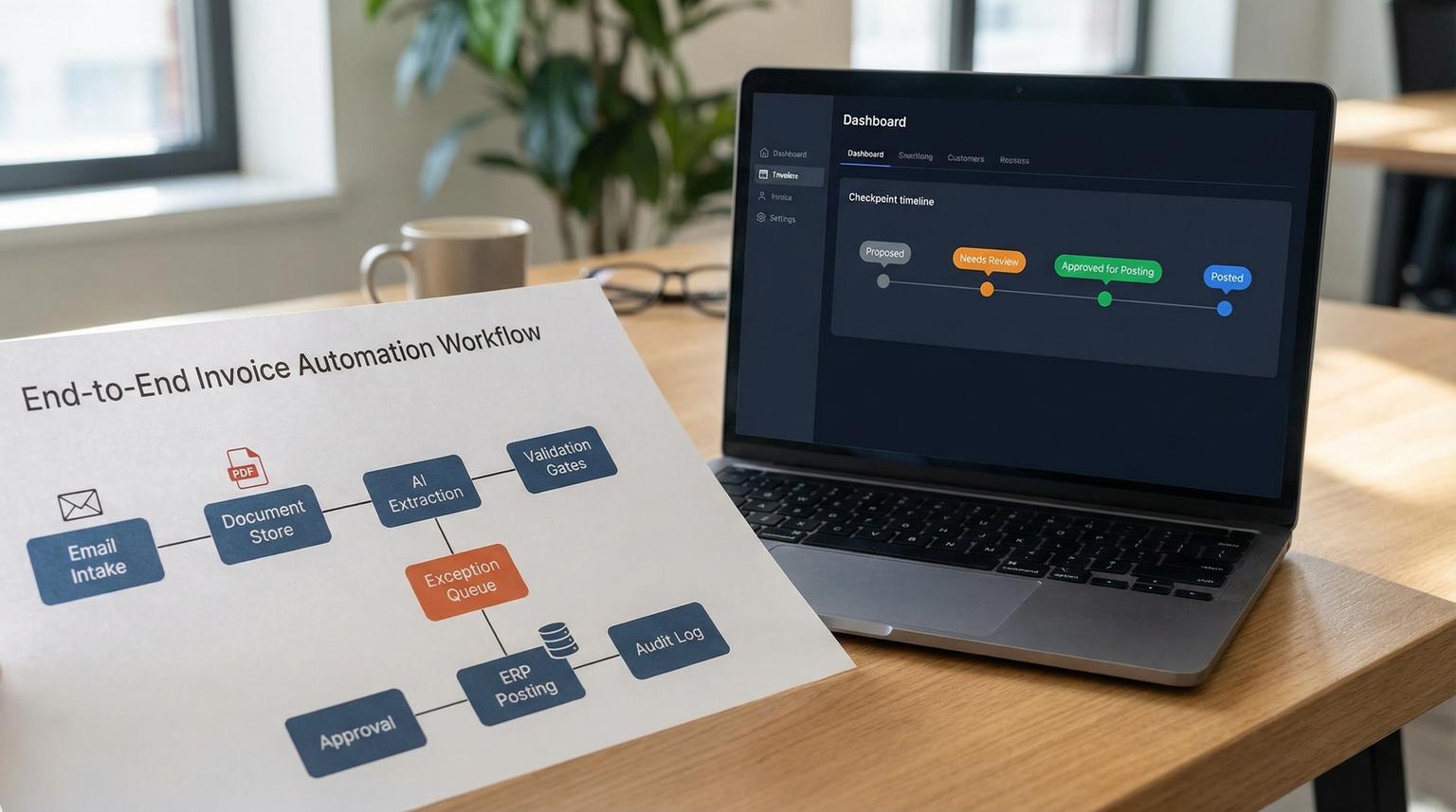
Email and PDF invoices are one of the most expensive back office bottlenecks because they sit at the boundary between unstructured documents and structured accounting fields. This is where business process automation with AI can help, but only if you design the right controls so an AI extraction mistake cannot silently post the wrong vendor, totals or GL coding. This article is for finance leaders and ops teams who want faster AP without giving up auditability.
Quick summary:
- Design a controlled boundary: AI produces a proposed invoice that must pass schema validation and business rules before posting.
- Use field-level confidence thresholds plus deterministic checks (duplicates, totals math, PO readiness) to route exceptions.
- Build a human-in-the-loop path with approve, edit and rollback so nothing hits the ledger without an explicit gate.
- Operate it like a system: clear owner queues, SLAs, monitoring and vendor format drift handling.
Quick start
- Define a schema-locked bill object (vendor, invoice number, dates, currency, header totals, line items, GL, cost centers, tax).
- Automate invoice intake from email to a processing queue and store the original file plus metadata.
- Run AI extraction then compute confidence and required-field completeness.
- Apply validation rules (duplicate detection, totals reconciliation, PO match readiness, vendor master checks).
- Route: auto-post only if it passes all gates. Otherwise send to a role-based exception queue with approve, edit or rollback.
- Log every decision and measure exception rate, touch time and drift by vendor.
The safest way to automate AP is to treat AI extraction as a proposal. Convert invoices into a validated, schema-locked bill object then decide whether to auto-post or send to humans based on confidence thresholds and business-rule exceptions. A human-in-the-loop gate with approve, edit and rollback prevents low-quality extractions, duplicates and mismatches from reaching accounting while still reducing manual entry for clean invoices.
The real problem is the boundary from PDF to ledger fields
Most AP teams do not struggle with storing PDFs. They struggle with turning the PDF into the exact fields your accounting system expects, consistently and safely:
- Identity: vendor, remit-to, tax IDs and bank details (if present)
- Uniqueness: invoice number and invoice date
- Math: subtotal, tax, freight, discounts and grand total
- Accounting: GL, department, cost center, project and location
- Line items: description, quantity, unit price and amount
AI can extract these fields quickly, but ambiguity is common: invoice numbers look like PO numbers, remittance blocks look like vendor names and totals are presented in multiple places. The cost of a wrong post is not just rework. It is misstatements, approval bypass and noisy month-end cleanup.
So the goal is not OCR. The goal is a controlled boundary: unstructured invoice in and validated bill object out with explicit gates that are easy to audit and operate.
Reference workflow architecture that scales without getting fragile
A reliable AP automation stack can be simple if you keep step boundaries clear and store artifacts at each step. Many teams follow a pattern similar to the serverless pipeline described in Google Cloud Document AI examples where a storage trigger kicks off extraction then downstream rules and integrations handle posting and approvals. See this invoice processing architecture overview for a concrete reference pattern.
Core components
- Intake: mailbox listener (AP@) that saves attachments and captures email metadata (sender, subject, received time).
- Document store: immutable storage for original PDFs and images plus a unique document ID.
- Extraction: an AI invoice parser (Document AI, Textract or similar) returning fields with confidence scores.
- Normalization: mapping vendor names and currencies, cleaning dates and standardizing line item structure.
- Validation: deterministic business rules and schema validation.
- Exception queues: role-based review in AP, procurement or accounting with tracked outcomes.
- Approval routing: decision table by vendor, amount, department, GL and policy thresholds.
- Accounting sync: create bill, attach original document, sync approval outcomes and write back posting IDs.
- Audit log: every gate decision, edit, approver and rollback reason.

Why an orchestrator matters
Even if you use n8n, you still want orchestration concepts: retries, timeouts, idempotency and a clear resume point after human review. Cloud-native examples show this clearly, like building a document pipeline with Workflows and Document AI where you pass config parameters and branch after extraction. The idea is portable even if you do not use Google Workflows. For a template of how an orchestrated pipeline is structured, see Build a document processing pipeline with Workflows.
Define the schema-locked bill object first
Before you automate anything, lock the contract that downstream systems will accept. This prevents a common failure pattern: automation that works for three vendors then breaks as soon as a new layout appears and fields move around. If you want a broader systems view of designing, evaluating, and operating AI steps inside automations, use our pillar guide: AI workflow automation playbook.
Minimum bill schema (recommended)
- Document identifiers: documentId, source (email, upload), receivedAt
- Vendor: vendorId (internal), vendorNameRaw, remitToRaw
- Invoice: invoiceNumber, invoiceDate, dueDate, currency
- Amounts: subtotal, taxTotal, shippingTotal, discountTotal, grandTotal
- PO context: poNumber (optional), matchType (2-way, 3-way, none)
- Lines: array of {description, qty, unitPrice, lineAmount, glCode, costCenter, department, project}
- Controls: extractionConfidenceByField, validationResults, exceptionFlags
- Workflow: status (proposed, needs_review, approved, posted, rejected, rolled_back)
Mini payload example (what you store after extraction)
{
"documentId": "inv_2026_03_001924",
"vendor": {"vendorId": "V-10392", "vendorNameRaw": "Acme Industrial Supply"},
"invoice": {"invoiceNumber": "INV-88421", "invoiceDate": "2026-03-05", "currency": "USD"},
"amounts": {"subtotal": 1240.00, "taxTotal": 99.20, "shippingTotal": 0.00, "grandTotal": 1339.20},
"po": {"poNumber": "PO-77812", "matchType": "3-way"},
"lines": [
{"description": "Safety gloves", "qty": 20, "unitPrice": 12.50, "lineAmount": 250.00, "glCode": "6100", "costCenter": "WAREHOUSE"}
],
"controls": {
"confidence": {"vendorName": 0.93, "invoiceNumber": 0.88, "grandTotal": 0.98, "poNumber": 0.91},
"requiredFieldsPresent": true
},
"status": "proposed"
}
Store the original PDF plus this structured object. Every later step reads and writes only this object, not the raw extraction output. That separation makes it easier to test, version and audit.
Confidence thresholds plus validation rules create a safe autopost gate
Confidence scores are useful only if you turn them into policy. AWS Textract guidance explicitly recommends using confidence scores in decision-making and enforcing thresholds for error-sensitive workflows. See Textract best practices on confidence scores for the underlying principle.
A practical gating policy (field criticality)
Do not use one threshold for everything. Use higher thresholds for fields that can cause financial or compliance issues and lower thresholds for fields that are easy to correct.
- Critical fields (route to human if below threshold or missing): vendorId match, invoiceNumber, invoiceDate, currency, grandTotal, taxTotal (if applicable), remit-to anomalies
- Important fields (human review if below threshold and rule checks fail): PO number, payment terms, due date, ship-to
- Context fields (often acceptable to default and review later): line descriptions, SKU, memo text

Decision rule example
- If any critical field confidence < 0.95 OR required critical field missing then status = needs_review
- If all critical fields pass but any important field confidence < 0.90 then status = needs_review
- If all fields pass thresholds then run deterministic validations. Only if validations pass then status = approved_for_posting
- Even when everything passes, send 1 to 3 percent to QA sampling (rotating vendors) to detect drift
This maps cleanly to a callback-style human loop where the workflow pauses for review then resumes after a reviewer completes the task, similar to the pattern described in the AWS human-in-the-loop pipeline using Textract and Augmented AI. See this human review callback approach for the concept you can mirror in your own stack.
Deterministic validations you should run every time
- Schema validation: required fields present and types correct (numbers parse, dates valid, currency supported)
- Totals math: sum(lines) + tax + shipping - discounts equals grandTotal within tolerance
- Duplicate detection: vendorId + invoiceNumber plus fallback heuristics
- Vendor master checks: vendor exists, payment hold status, remit-to rules, tax requirements
- PO match readiness: PO exists, open balance, receiving status and partial match policy
A real-world operations insight: duplicates are rarely identical. Vendors resend the same invoice with a different PDF filename, a slightly different invoice number format (INV88421 vs INV-88421) or the same amount within the same week. If your dedupe relies only on invoiceNumber you will still double-pay.
Exception taxonomy and routing that keeps automation from creating hidden queues
Touchless processing improves only when exceptions are categorized, routed to the right owner and resolved with a defined action. This aligns with the exception-first approach described in exception management in AP where the goal is fewer touchpoints without losing control.
| Exception category | Typical triggers | Owner queue | Resolution actions |
|---|---|---|---|
| Low confidence on critical fields | Vendor, invoice number or totals below threshold or missing | AP Review | Confirm fields, correct values, approve to proceed or reject and request corrected invoice |
| Suspected duplicate | Same vendor + similar amount + close dates, repeated attachments, invoiceNumber variants | AP Supervisor | Link to existing bill, mark as duplicate, rollback any draft and notify vendor if needed |
| Missing PO or invalid PO | PO required by policy but missing, PO closed, no remaining balance | Procurement or Requester | Provide PO, convert to non-PO flow, request vendor reissue with PO |
| Mismatch totals or quantity | Totals math fails, 3-way match fails, partial receiving | Receiving or AP + Buyer | Allow partial match per policy, request receipt, hold invoice until goods received |
| Vendor master data issue | Vendor not found, remit-to differs, payment hold, tax form missing | Accounting Ops | Create or update vendor, validate remit-to, enforce compliance checklist, then re-run validation |
| Approval routing failure | No approver found, approver out of office, ambiguous department | Finance Ops | Apply fallback approver, delegate, fix decision table, set escalation timer |
A common mistake: teams route all exceptions to AP. That works for week one then becomes a permanent backlog. Your routing should reflect who can actually resolve the root cause, not who happens to touch invoices today.
Human-in-the-loop path with approve, edit and rollback gates
Your automation should explicitly prevent posting when an invoice is uncertain or inconsistent. The human review step is not a nice-to-have. It is the safety barrier.
Minimum human review actions
- Approve as-is: the reviewer confirms fields and approves the bill object for posting.
- Edit then approve: the reviewer corrects fields (for example invoiceNumber, grandTotal, GL coding) then approves. The system logs every changed field.
- Rollback and reject: the reviewer rejects the proposal, marks a reason (duplicate, invalid vendor, missing PO) and the workflow rolls back any drafts and stops posting.
How the gate should work in practice
- Extraction produces proposed status.
- Validation sets exception flags and computes a risk score.
- If exceptions exist, move to needs_review and assign to the correct queue.
- Only an explicit human action can move it to approved_for_posting when exceptions exist.
- The posting step requires status = approved_for_posting and writes back a posting ID plus timestamp.
- If anything fails after posting, create an automated rollback task (void, credit, or reversal according to your accounting rules) and log it.
Tradeoff decision rule: if you are choosing between higher automation and lower risk, raise thresholds on critical fields and accept a higher exception rate at first. Then use exception analytics to reduce exceptions by fixing master data and vendor onboarding. Trying to force touchless rates early usually increases downstream corrections and weakens trust.
Reviewer checklist (what to verify in under 60 seconds)
- Vendor matched to the correct vendorId and remit-to is not suspicious
- Invoice number and date look plausible and are not a near-duplicate
- Grand total matches the document and the line math is reasonable
- PO number present when required and match type is correct (2-way vs 3-way)
- GL and cost center coding aligns with policy for that vendor or category
- Attachments are the correct invoice and not a statement or packing slip
Implementation details that make or break production reliability
Idempotency and dedupe keys
Your workflow will see repeats: vendor resends, internal forward chains and mailbox rules duplicating attachments. Use a deterministic document fingerprint like (vendor email domain + invoiceNumber normalized + grandTotal + invoiceDate) and a hash of the PDF bytes. If either matches an existing processed invoice, route to duplicate review and prevent a second post.
Partial match policy reduces false exceptions
Strict 3-way matching can flood exceptions when receipts lag behind invoices. Define policy tolerances upfront: for certain categories you may allow partial receiving matches or amount tolerances, while for regulated spend you keep stricter gates.
Where n8n fits (and why teams like it)
At ThinkBot Agency we often implement the orchestration in n8n because it is transparent, testable and easy to maintain. A typical n8n build includes: email trigger, document storage, extraction call, validation function node, exception routing, approval notifications, accounting API sync and an audit log write. The same HITL gating logic applies regardless of tools (see structured n8n workflows with validation and approvals for more examples of schema-first AI steps).
Rollout, ownership and monitoring so it stays accurate as vendors change formats
AP automation is not set-and-forget. Vendor templates change and new vendors introduce new layouts. The difference between a pilot and a durable system is operations.
Operating model (who owns what)
- AP Lead: owns exception queues, reviewer training and SLA adherence
- Accounting Ops: owns vendor master data governance and posting rules
- Procurement: owns PO policy and match type definitions
- Automation Owner (Ops or IT): owns workflow uptime, integrations and change management
Monitoring metrics that matter
- Touchless rate (percent auto-posted)
- Exception rate by category and by vendor
- Average time in queue and time to resolve
- Duplicate prevention count
- Validation failure trends (totals mismatch, missing PO, vendor not found)
- Sampling QA pass rate and drift alerts
Rollout approach that reduces risk
- Phase 1: start with a limited vendor set, manual intake to the queue, strict thresholds, mandatory review on most invoices.
- Phase 2: automate email intake, refine decision tables and carve out vendors that are consistently clean for auto-post.
- Phase 3: add sampling-based QA, vendor-specific normalization rules and continuous improvement from exception analytics.
When this approach is not the best fit: if you receive very low invoice volume (for example a few invoices per week) or your invoices are already structured through EDI or a supplier portal then the ROI of AI extraction may be limited. In those cases simple form-based intake and approval routing might be enough. For a broader view of how teams scale automation and integrations beyond AP, see AI-driven business process optimization.
Primary CTA: If you want an AP workflow that is fast but audit-friendly, ThinkBot Agency can design and implement the end-to-end pipeline in n8n with confidence gating, exception queues and accounting sync. Book a consultation.
Secondary CTA: You can also review similar automation builds in our portfolio.
FAQ
Common follow-ups we hear when teams move from manual AP to AI-assisted processing.
What confidence thresholds should we start with for invoice automation?
Start high for critical fields that drive posting and payment such as vendor match, invoice number and grand total. A common starting point is 0.95 for critical fields and 0.90 for important but less risky fields then adjust based on measured exception accuracy. Always treat missing critical fields as an automatic exception regardless of confidence scores elsewhere.
How do we prevent duplicate invoices from being paid twice?
Use multi-factor detection, not invoice number alone. Combine vendorId, normalized invoice number, amount and date windows plus a file hash of the PDF. If any duplicate signal hits, route to a duplicate review queue and block posting until a human confirms it is unique.
Can we auto-code GL and cost centers with AI?
Yes, but it should be gated. Use AI to propose coding based on vendor, line descriptions and historical patterns then require higher confidence and rule checks for sensitive accounts. For low-confidence coding, route to the correct departmental reviewer and log any edits so the model and rules can improve over time.
What should happen when the AI extraction is wrong after the bill posts?
Your workflow should create a rollback task with a clear reason, owner and an approved reversal method for your accounting system (void, credit or reversal). Store the before and after values plus who approved the rollback. Then update validation rules or vendor-specific parsing to reduce repeat errors.
