
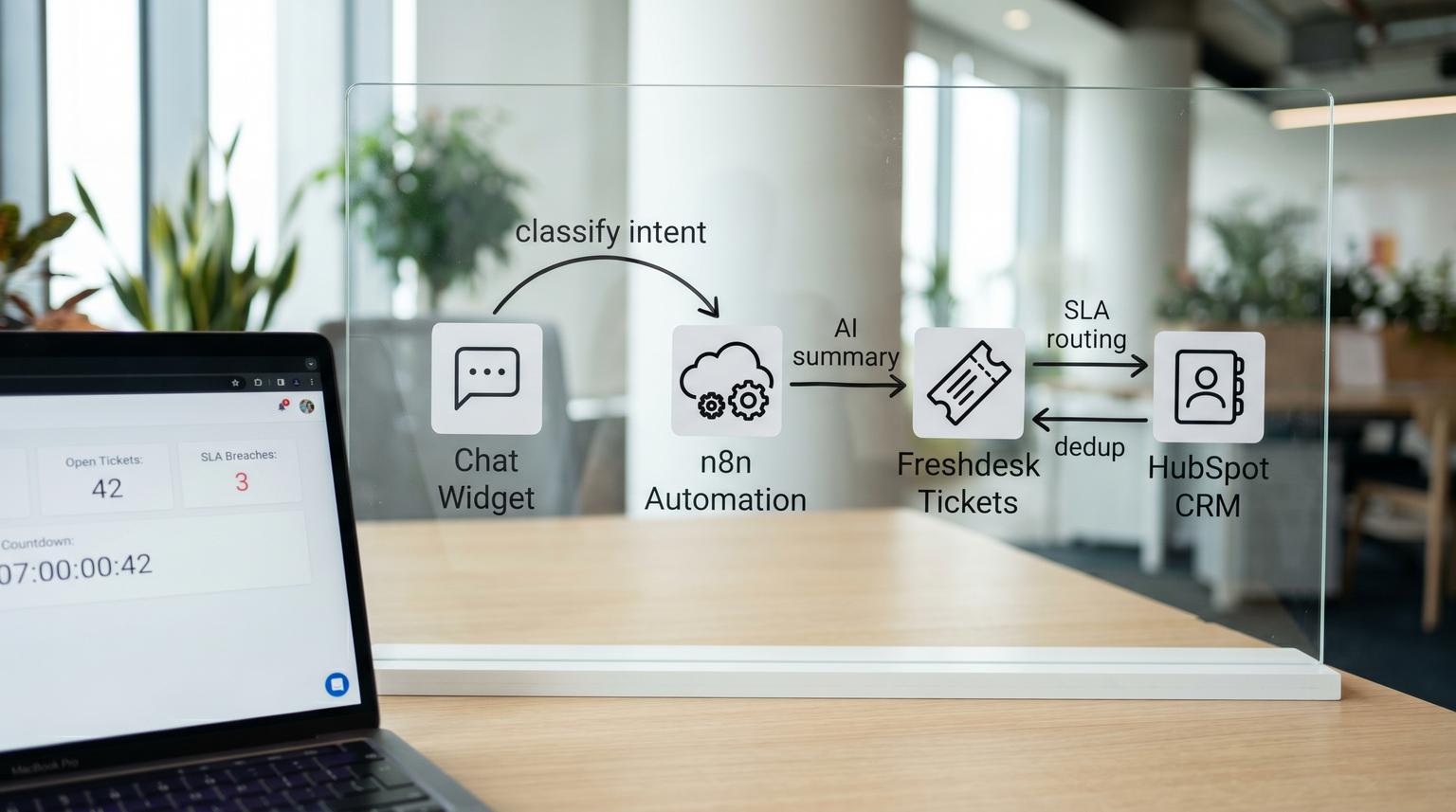
Most teams do not struggle with getting a chatbot to answer questions. The real bottleneck is what happens after the conversation ends: chats that never become tickets, missing context when a human takes over and duplicate cases across chat and email that wreck reporting. This implementation-focused walkthrough shows how to operationalize chatbot automation for customer service so every resolved or escalated chat is summarized, intent-tagged, outcome-coded and written into Freshdesk plus HubSpot with SLA-safe routing and dedup protection.
At a glance:
- Turn each chat into a deterministic pipeline: identify customer, find or create ticket, write AI summary and intent metadata, then escalate or close with an outcome code.
- Route by intent and confidence with SLA-safe rules that set priority, group and status correctly so timers and escalations work.
- Prevent duplicate tickets by matching on stable keys (conversation_id, requester email, open-ticket windows) then merging with an audit note.
- Keep the automation accurate with monitoring tags, QA sampling and drift checks as products and policies change.
Quick start
- Create Freshdesk custom fields: cf_intent, cf_intent_confidence, cf_outcome_code, cf_conversation_id, cf_hubspot_contact_id and cf_model_version.
- In your automation layer (n8n is our default), ingest the chat end event and normalize identity: email, name, phone, account id and conversation id. If you want a deeper implementation pattern, see AI-driven customer service automation with n8n: Auto-triage tickets, sync your CRM and send personalized follow-ups.
- Classify intent and confidence then apply routing rules: (a) deflect and log, (b) create or update ticket, (c) escalate with SLA-safe priority and group mapping.
- Dedup before create: search for an existing open ticket by requester and issue fingerprint then update instead of creating new.
- Write a private Freshdesk note with a concise AI handoff summary and structured fields then upsert the HubSpot contact and write back the HubSpot contact id.
You can operationalize this by treating post-chat as a strict data pipeline: capture customer identity, classify intent with a confidence threshold, then create or update a Freshdesk ticket and link the correct HubSpot contact. Add an internal AI summary note plus intent tags and outcome codes for reporting. Finally deduplicate by matching on conversation id and recent open issues then merge duplicates with an audit note while keeping escalations mapped to the right priority and SLA policy.
What the post-chat pipeline must guarantee
A reliable after-chat workflow has three non-negotiables:
- No orphan conversations: every chat is either logged as a deflection record or written into a ticket with a trackable outcome.
- No missing context: agents see the summary, what the bot tried, what is still needed and the next best action.
- No duplicates: the same issue raised across chat and email should converge into one canonical ticket and one CRM identity.
The operational trick is to keep the pipeline deterministic. Use the same keys and the same mapping every time, even if the AI model changes. That means: consistent custom fields, consistent tags and a consistent note template. Freshdesk supports ticket creation, notes and merges via API which is exactly what we need (Freshdesk API reference).
Field mapping that stays reportable
Use Freshdesk tags for flexible filtering and automation breadcrumbs and use custom fields for stable reporting dimensions. This reduces dashboard drift when naming changes or when teams add new intents.

| Data element | Where to store in Freshdesk | Where to store in HubSpot | Why it matters |
|---|---|---|---|
| conversation_id | custom field (cf_conversation_id) and tag (channel_chat) | optional custom property on Contact or engagement note | Hard key for dedup and audits across systems |
| intent | custom field (cf_intent) and tag (intent_x) | optional property like last_support_intent | Reporting by top issues and routing rules |
| intent_confidence | custom field (cf_intent_confidence) | optional property for QA sampling | Controls escalation thresholds and review queues |
| outcome_code | custom field (cf_outcome_code) and required for closure if possible | optional property like last_support_outcome | Clean deflection, escalation and resolution reporting |
| AI summary | private note on the ticket | optional note or activity | Agents start with context and fewer back-and-forth messages |
| HubSpot contact id | custom field (cf_hubspot_contact_id) | native id | Stable join key for follow-ups and lifecycle reporting |
| model version | tag (model_vX) and custom field (cf_model_version) | optional property | Helps detect drift after model or prompt changes |
In HubSpot, treat email as your primary identity key. HubSpot also enforces uniqueness on additional emails so check both primary email and additional emails before creating a new contact (HubSpot contacts guide). This is one of the most common sources of CRM duplication in support pipelines: a chat collects a different email format, the automation creates a second contact, then reporting breaks.
Private note template for the agent handoff
Write the summary into Freshdesk as a private note so customers do not see internal classifications. Freshdesk supports posting notes with a private flag (Freshdesk API reference).
AI HANDOFF SUMMARY
Summary: Customer cannot log in after password reset. Error: "Invalid token".
Intent: login_help
Confidence: 0.82
Outcome: ESCALATED_AGENT
What the bot tried: password reset link, cleared cache guidance.
Missing info: device type, browser version, approximate time of last successful login.
Next best action: check auth logs for token failures and reset MFA if enabled.
Identifiers: conversation_id=abc123, hubspot_contact_id=123456
Routing and escalation logic that does not break SLAs
Routing needs to be opinionated. If you leave it vague, you will either under-escalate (hidden SLA breaches) or over-escalate (bot deflection looks worse than it is and the queue floods). Build a routing matrix that maps intent plus confidence to: ticket action, priority, group, status and required fields. For a broader SLA-safe triage blueprint that complements this routing matrix, see From messy inbox to SLA-safe triage with AI that tags, routes and escalates correctly.
| Intent class | Confidence rule | Action | Freshdesk priority and group | Outcome code |
|---|---|---|---|---|
| Order status, how-to | >= 0.75 and resolved | Log deflection record (optional ticket only if you need full audit) | Low priority, no assignment | DEFLECTED_SELF_SERVE |
| Account access, login | >= 0.65 and not resolved | Create or update ticket and assign | Medium priority, Support L1 | ESCALATED_AGENT |
| Billing failure, refunds, chargeback risk | Any confidence if customer requests human | Immediate escalation | High priority, Billing queue | ESCALATED_BILLING |
| Security, privacy, data access | Any confidence | Immediate escalation with strict routing | Urgent priority, Security queue | ESCALATED_SECURITY |
| Unknown or low confidence | < 0.65 | Create ticket in review queue | Medium priority, Triage | NEEDS_REVIEW_LOW_CONF |
Freshdesk SLAs depend on correct priority and correct queue coverage. If the chatbot creates tickets in a catch-all group with no SLA policy, you will silently miss targets. Align your intent matrix to your SLA policy and escalation ladders and validate reminders and escalation emails are set per priority (Freshdesk SLA reminders and escalations).
A practical ops insight we see in real deployments: set status to a working state that actually starts the right timers and is visible to agents, not a custom holding status that nobody monitors. If you need a holding state for automation, keep it short-lived and immediately transition into a queue that is SLA-covered.
Decision rule for confidence thresholds
Use higher thresholds for actions that avoid humans (deflection logging without ticket creation) and lower thresholds for routing that still lands in a triage queue. In other words: it is safer to be strict about calling something resolved than it is to be strict about creating a ticket.
Concrete routing and dedup flow across chat, Freshdesk and HubSpot
Below is the end-to-end flow we implement most often. You can run it in n8n, a serverless function or a lightweight integration service. The key is that it behaves consistently and is idempotent.

- Ingest chat end event: transcript, timestamps, channel, conversation_id, visitor email if available and any account identifiers.
- Normalize identity:
- If email is present, treat it as primary key.
- If email is missing, ask for it before escalation or create a ticket with a placeholder and force a follow-up step. Do not create HubSpot contacts without a stable identifier.
- Classify intent and extract structured fields: intent, confidence, entities (order id, invoice id, product) and a short summary.
- Compute issue fingerprint: (intent + primary entity + normalized subject). This helps match the same issue across chat and email.
- Find existing open ticket:
- Match on cf_conversation_id if you have seen the chat before.
- Else match on requester email + same issue fingerprint within a time window (for example last 3 to 7 days) and status not in closed.
- If match found: update the existing ticket (add tags, update custom fields, add a new private summary note with the latest chat).
- If no match: create a new ticket and set custom fields for intent, confidence, outcome and conversation_id. Freshdesk supports creating tickets by passing requester email and custom fields (Freshdesk API reference).
- Upsert HubSpot contact:
- Get by email using
idProperty=emailfirst. - If not found, create.
- Optionally check additional emails when your chat identity sometimes uses aliases.
- Get by email using
- Write back cf_hubspot_contact_id to Freshdesk so later workflows can join records deterministically. Freshdesk automations can call external APIs and write the response into custom fields using Trigger API flows (Freshdesk webhooks and Trigger API).
- Escalate safely when needed by setting priority, group and status immediately so SLA timers start in the right place. Add an internal note that includes what the bot tried and what the agent should do next.
- Dedup merge when duplicates already exist: if your search finds multiple open tickets for the same requester and fingerprint, merge into a primary ticket and leave an audit note.
Freshdesk payload examples you can adapt
These are minimal shapes based on the Freshdesk API patterns for ticket create, note create and merge (Freshdesk API reference).
POST /api/v2/tickets
{
"email": "[email protected]",
"subject": "Chat escalation: login issue",
"description": "Customer escalated from chatbot. See private note for summary.",
"priority": 2,
"status": 2,
"custom_fields": {
"cf_intent": "login_help",
"cf_intent_confidence": 0.82,
"cf_outcome_code": "ESCALATED_AGENT",
"cf_conversation_id": "abc123",
"cf_model_version": "prompt_v7"
},
"tags": ["channel_chat", "intent_login_help", "handoff_ai"]
}
POST /api/v2/tickets/3/notes
{
"body": "AI HANDOFF SUMMARY<br/>Summary: ...<br/>Intent: login_help (0.82)<br/>Outcome: ESCALATED_AGENT",
"private": true
}
PUT /api/v2/tickets/merge
{
"primary_id": 20,
"ticket_ids": [20, 21, 22],
"convert_recepients_to_cc": true,
"note_in_primary": {
"body": "Merged duplicates raised across chat and email. Canonical ticket is #20.",
"private": true
}
}
Preventing duplicate tickets without losing important context
Dedup is half data and half policy. The data part is stable keys. The policy part is deciding when to merge versus when to keep separate. Here is a practical rule set that works well in Freshdesk:
- Always treat conversation_id as authoritative. If the same conversation replays due to retries, your pipeline should update not create.
- Use a short time window for fingerprint-based matches (3 to 7 days) to avoid merging unrelated repeat issues.
- Never auto-merge across different high-risk intents (security vs billing) unless you have a human review step.
- Merge only when both tickets are in safe statuses (new, open, pending). Avoid merging when one is already in a specialized escalation path unless you intentionally want to collapse queues.
A common failure pattern is merging too aggressively and breaking ownership. In Freshdesk, merges can move conversations and recipients in ways that surprise agents. If you implement automatic merging, exclude tickets tagged with something like no_auto_merge and exclude VIP or legal queues. Also, stamp a private merge note every time so future audits explain why a case disappeared from a queue.
Implementation in n8n plus Freshdesk automations
We usually implement the cross-system orchestration in n8n because it is easy to keep the logic versioned and observable and it integrates cleanly with helpdesk APIs, HubSpot and LLM providers. Freshdesk automations then act as guardrails and enrichment steps.
Recommended division of responsibilities
- n8n (or your integration layer): intent classification, confidence gating, dedup search, ticket create or update, HubSpot get or create and AI summary generation.
- Freshdesk Workflow Automations: post-create enrichment, SLA routing verification, operational breadcrumbs, retry tags and backfill when fields are missing. Use Trigger API when you need to write back API response values into the ticket (Freshdesk Trigger API pattern).
Why this split is a tradeoff worth making
Putting everything inside Freshdesk automations can be tempting, but complex intent logic and multi-step dedup checks become hard to test and hard to roll back. Putting everything outside the helpdesk can also be risky because you might bypass native SLA safeguards and queue rules. The split above keeps Freshdesk authoritative for SLA behavior while keeping decision logic observable and version-controlled.
Ownership and rollout rhythm
- Ops owner: defines intent taxonomy, outcome codes, SLA mapping and QA sampling.
- Support lead: signs off on routing matrix and escalation behaviors.
- Automation owner: maintains n8n workflows, credentials, retries and monitoring.
- Rollout: start with 1 to 2 intents and a low confidence threshold that routes to triage, then expand. Turn on deflection logging only after QA shows the summaries and outcomes are accurate.
- Rollback: keep a feature flag that disables ticket creation and switches to log-only mode or routes all chats to a human queue temporarily.
Monitoring, QA sampling and drift control
The fastest way these systems degrade is taxonomy drift: new product features, policy changes and seasonal ticket types slowly invalidate your intent model and routing rules. Add lightweight controls that do not require a full replatform.
- Operational tags: tag tickets with
api_success,api_error,low_confidence,needs_reviewandmodel_vX. These become your daily dashboard. - QA sampling rule: review 10 to 20 tickets per week per high-volume intent plus 100% of low_confidence tickets. Check summary quality, correct routing and correct outcome codes.
- Exception queues: route low confidence and unknown intents to a dedicated triage group so you can refine prompts and rules without breaking frontline SLAs.
- SLA audits: monthly check that chatbot-created tickets land in SLA-covered groups and priorities and that reminders and escalations fire as expected (Freshdesk SLA setup).
- Dedup audits: track merges per week and manual unmerge incidents. A spike usually means the fingerprint logic is too broad or the identity matching is unstable.
One real-world detail that saves teams time: include the model version and prompt version in tags. When a summary format regresses, you can filter by version and roll back fast instead of arguing about anecdotal agent feedback.
Fit, limits and the one thing not to automate
This approach is not the best fit when your support org does not use Freshdesk as the system of record or when you have strict regulatory constraints that prohibit storing any AI-generated text in ticket notes. In those cases you can still store structured intent and outcome fields while keeping the summary as a link to an internal transcript store.
Also, do not fully automate merges until you have at least a few weeks of data. Start with a dedup suggestion tag and let agents confirm merges. Once you can measure false-merge rates and the edge cases, move to automatic merging for the safest scenarios only. If you want the broader, implementation-oriented playbook that covers intake, triage, SLAs, escalation, knowledge workflows, QA, and human handoff end-to-end, use this pillar guide: Support ticket automation playbook for triage, routing, SLAs, knowledge, and QA.
If you want help implementing this end-to-end in n8n with Freshdesk plus HubSpot and clear monitoring, ThinkBot Agency can build and harden the workflow with deterministic mapping, retries and QA hooks. Book a consultation.
For examples of production automations we have delivered across CRMs, helpdesks and AI workflows, you can also review our work here: ThinkBot Agency portfolio.
FAQ
Common implementation questions we hear when teams connect chat, helpdesk and CRM into one reliable support pipeline.
Should we create a Freshdesk ticket for every chat even if it is resolved?
Not always. If you need full auditability, create tickets for all chats and close them with a deflection outcome code. If ticket volume becomes noise, log deflections to a separate dataset while still writing structured intent and outcome metrics somewhere reportable.
What confidence threshold should we use for routing by intent?
Use a higher threshold for deflection (for example 0.75+) and a lower threshold for triage creation (for example 0.60 to 0.70). For high-risk categories like billing and security, escalate regardless of confidence when the customer requests a human or when the topic matches a protected intent class.
How do we prevent duplicate HubSpot contacts when chats use different emails?
Always look up contacts by primary email first and consider additional emails before creating a new record. If you frequently see aliases, add a step to capture the billing email or login email and use it consistently as the CRM key.
What is the safest way to merge duplicate Freshdesk tickets automatically?
Only auto-merge when identity matches strongly (same requester and same conversation id or same recent issue fingerprint) and both tickets are in safe open statuses. Add a private merge note to the primary ticket and exclude sensitive queues, VIP customers and any ticket tagged no_auto_merge.
Where should the AI summary live so agents actually use it?
Put it in a Freshdesk private note at the top of the timeline with a consistent prefix like AI HANDOFF SUMMARY and include intent, confidence, steps tried, missing info and next action. Agents should not have to scan transcripts to understand what happened.
