
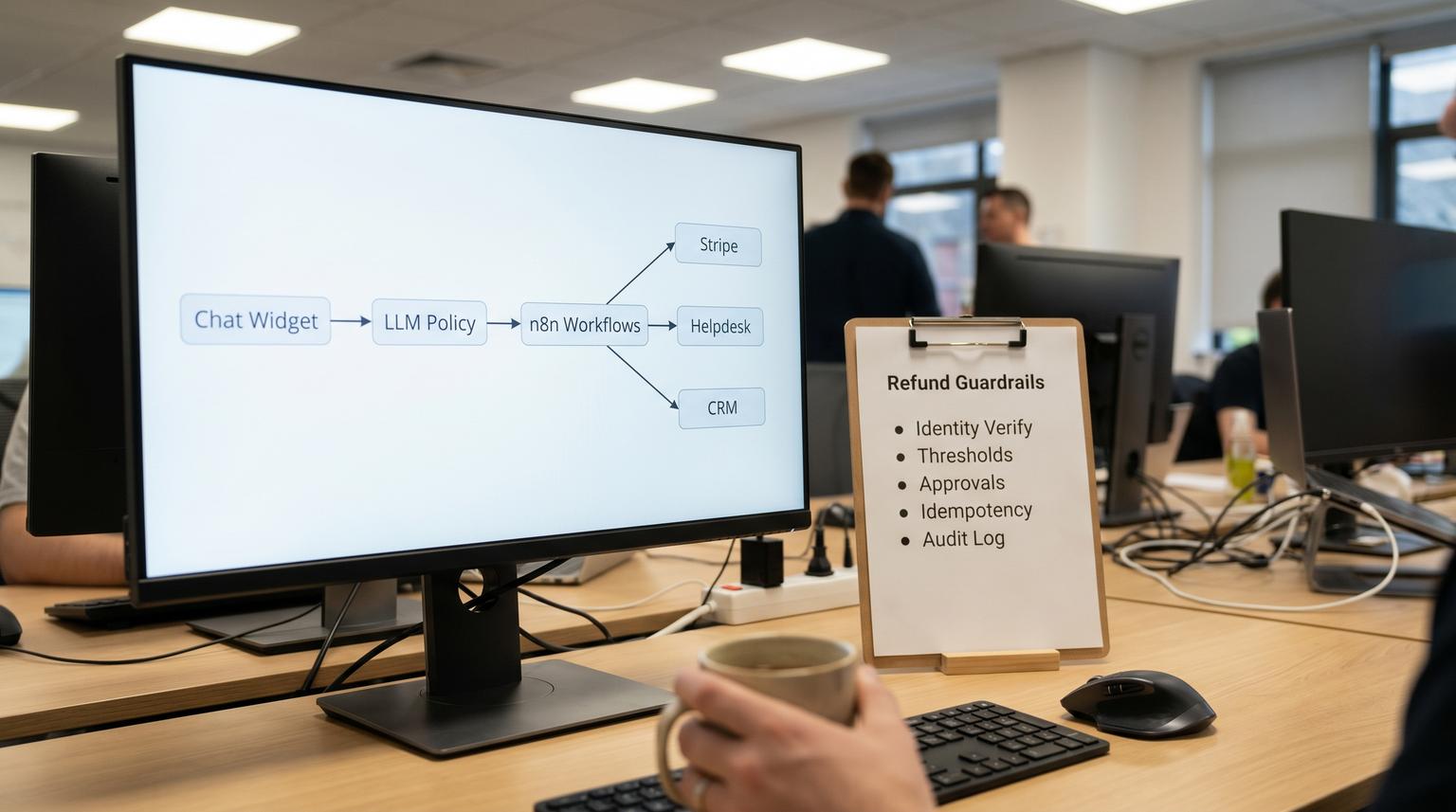
Billing tickets are repetitive but the actions behind them are high-stakes. Customers want instant answers about invoices, receipts, failed payments and subscription status. Your team wants faster resolution without granting risky permissions or creating refund mistakes that lead to chargebacks and rework. This implementation-focused article shows how to deploy a chatbot for customer service that can pull real-time billing context from Stripe, verify identity, automate common fixes and initiate refunds or credits with guardrails then hand off edge cases to humans with clean helpdesk and CRM context.
Quick summary:
- Resolve common billing questions with real-time Stripe context (invoices, payment status, subscription state) without exposing card data.
- Trigger refunds and credits only through controlled workflows with verification, thresholds, approvals, idempotency and audit logs.
- Route edge cases to a human using a structured helpdesk ticket plus an immutable CRM timeline entry for traceability.
- Reduce billing ticket volume and shorten time-to-resolution while lowering financial risk.
Quick start
- Define your billing intents: receipt resend, invoice copy, update billing details link, cancel subscription, refund, credit and dispute info.
- Implement identity verification rules and a safe data policy (never collect PAN or CVV in chat).
- Build a Stripe context fetcher (customer lookup, latest invoice, payment intent status and subscription state) and return masked fields only.
- Create refund guardrails: thresholds, approval gates, idempotency keys and a refund state machine with webhook confirmation.
- Standardize a handoff payload and write it to your helpdesk ticket audit metadata plus your CRM timeline.
- Launch to a small segment, monitor refund outcomes and tune routing then expand.
A safe billing bot works when it separates conversation from money movement. Let the chatbot answer invoice and subscription questions by pulling masked context from Stripe and executing low-risk actions. For refunds and credits, require identity checks, enforce thresholds and approvals, use idempotency so retries cannot duplicate refunds and log every decision to the helpdesk and CRM so humans can quickly validate and intervene.
Why billing automation fails in production
Most billing chat experiences break down at the boundaries between systems: helpdesk, CRM and payment processor. The bot might answer correctly but still create operational mess because:
- Missing context: the bot cannot see the latest invoice or payment status so it guesses.
- Unsafe inputs: customers paste card numbers or CVV, which you do not want in chat logs or tickets. OpenAI explicitly warns against sharing cardholder data in ChatGPT inputs, including PAN and CVV (cardholder data guidance).
- Refund duplication: network timeouts and retries cause duplicate money-moving requests unless you design for idempotency (Stripe idempotency pattern).
- Messy handoffs: the human agent receives a vague summary, has to re-ask verification questions and then repeats the same Stripe lookups.
The operational goal is not just deflection. It is consistent resolution with reliable controls and a handoff that preserves the work already done.
Reference architecture across Helpdesk, CRM and Stripe
You can implement this with n8n as the orchestration layer (ThinkBot Agency is active in the n8n community for exactly these integration-heavy workflows) plus your helpdesk and CRM of choice. If you also need a broader template for routing, CRM sync, and safe fallbacks, see AI-driven customer service automation with n8n. The pattern is stable even if you use Zapier or Make for parts of the stack.
Core components
- Chat front end: website chat, in-app chat or a helpdesk widget that can pass an authenticated user ID when available.
- LLM policy layer: intent detection, response drafting and tool routing with strict instructions about what data is allowed.
- Tooling layer (workflows): API calls to Stripe, helpdesk and CRM. This layer generates idempotency keys and writes audit logs.
- Helpdesk ticketing: create or update tickets with internal notes, custom fields and audit metadata (Zendesk ticket create/update).
- CRM timeline logging: immutable events for audit and visibility (HubSpot timeline events).
Data handling boundaries that keep you out of trouble
- The bot must never ask for or accept PAN, CVV, PIN or full card details. If a customer tries, redact and redirect to a secure payment page.
- The LLM should only receive masked payment method data (brand, last4, exp month/year) if you need it for confirmation. Avoid passing raw payment method objects.
- Tickets and CRM logs should store references (invoice_id, payment_intent_id, charge_id) plus masked values, never raw card data. This aligns with the security-by-design principle that training alone is not enough because systems should prevent exposure by design.
Guardrails for refunds and credits that reduce risk
Refunds are money-moving POST requests. Treat them as a controlled workflow with explicit gates rather than a conversational side effect.
1) Identity verification
Use at least one strong verification method and a fallback path. Decision rule: the more money you can move the stronger verification must be.
- Best: authenticated session (logged-in customer) plus email match to Stripe customer email.
- Good: one-time passcode (OTP) sent to the billing email on file.
- Fallback: verify two non-sensitive facts (last invoice amount and billing ZIP) then require human review for refunds above a low threshold.
Do not rely on asking for card details as verification. That increases PCI exposure and does not prove ownership in a safe way.
2) Thresholds and eligibility rules
- Auto-approve ceiling: for example refunds up to X dollars per customer per rolling 30 days.
- Policy checks: within trial period, duplicate charge detected, unused subscription criteria, or invoice within N days.
- Velocity limits: no more than Y refunds per account per week without review.
- Dispute awareness: if a dispute exists or is likely (multiple failed verifications or charge already disputed) route to a human immediately.
3) Approvals
Use approvals when the refund is above the auto-approve ceiling or when confidence is low. You can implement approvals as:
- A helpdesk macro that changes status to “pending approval” and pings a finance or support lead queue.
- A Slack or Teams approval step with buttons that write back the approver, timestamp and decision.
- A CRM task for an owner to approve within an SLA window.
4) Idempotency and a refund state machine
Stripe recommends idempotency keys so retries do not create duplicate effects (idempotency design). A common failure pattern we see is generating a new key on every retry. That turns a harmless timeout into a double refund.
Implementation rules:
- Generate the idempotency key in the backend workflow, not in the chat client or LLM.
- Make one key per business action, reuse it across retries until the action is confirmed.
- Store the key and the internal refund_request_id so your worker can restart safely.
Minimal state machine:
- requested
- verified
- approval_required (optional)
- approved (optional)
- submitted_to_stripe
- confirmed (via response and webhook)
- failed or canceled
Refund request shape (illustrative):
POST /v1/refunds
Idempotency-Key: refund:{internal_refund_request_id}
payment_intent=pi_123
amount=2500
reason=requested_by_customer

5) Audit trail
Write the same decision trail to two places:
- Helpdesk: internal note plus compact metadata stored in the ticket audit (Zendesk supports metadata for ticket audits, which is ideal for this) as long as the update is not a no-op (ticket metadata behavior).
- CRM timeline: immutable events for “refund requested” and “refund confirmed”. HubSpot app events are immutable which is useful for an audit log but means you must design your event schema carefully (event occurrences).
What to automate vs what to hand to humans
Not every billing issue should be automated end-to-end. A practical tradeoff: the more deterministic the outcome the more you can automate. The more policy nuance or fraud risk the more you should route. For a deeper comparison of handoff patterns and integration tradeoffs, use this matrix: Choosing chatbot integration for businesses without breaking your helpdesk or CRM.
| Billing request | Automation fit | Recommended handling |
|---|---|---|
| Send receipt or invoice PDF | High | Auto-send from Stripe invoice link or attach non-sensitive PDF. Log action to ticket and CRM. |
| Update payment method | High | Send secure update link. Never collect card data in chat. Confirm update via webhook then log. |
| Explain a failed payment | Medium | Show failure reason codes at a customer-friendly level. Offer next steps and link to update billing. |
| Cancel subscription | Medium | Automate if verified and within policy. Offer proration explanation. Route if contract terms apply. |
| Refund under threshold with clear eligibility | Medium-High | Automate with idempotency and audit logging. Confirm via webhook before closing. |
| Large refund, partial refund, multiple invoices, suspected abuse | Low | Create ticket with full payload and request approval. Keep the bot in an information and routing role. |
When this approach is not the best fit: if your billing is handled by offline invoices, bank transfers or complex contract billing with manual approvals on every change, a chat-based flow may not reduce work. In those cases start with agent-assist tooling inside the helpdesk rather than customer-facing automation.
The exact handoff payload to attach to the helpdesk ticket and CRM
A safe handoff means the human can take over without redoing verification or repeating Stripe lookups. It also means you can audit what happened later. Below is a compact ASCII payload spec you can store in helpdesk metadata and replay into a CRM timeline event. If you want the full, implementation-oriented blueprint for intake → triage → routing → SLAs → escalation → knowledge workflows → QA → handoff, use our pillar guide: support ticket automation playbook.
Handoff payload spec (ASCII JSON)
{
"handoff_version": "1.0",
"conversation": {
"channel": "web_chat",
"conversation_id": "conv_9c2d",
"started_at": "2026-05-17T14:22:10Z",
"ended_at": "2026-05-17T14:28:43Z",
"language": "en",
"user_sentiment": "neutral"
},
"customer_identity": {
"claimed_email": "[email protected]",
"authenticated_user_id": "user_12345",
"verification": {
"method": "otp_email",
"status": "passed",
"verified_at": "2026-05-17T14:26:02Z",
"evidence": ["otp_to_billing_email"]
}
},
"billing_context": {
"stripe_customer_id": "cus_123",
"subscription_id": "sub_123",
"latest_invoice_id": "in_123",
"invoice_status": "paid",
"payment_intent_id": "pi_123",
"charge_id": "ch_123",
"currency": "usd",
"amount_last_invoice": 4999,
"payment_method_masked": "visa_4242"
},
"intent": {
"primary": "refund_request",
"secondary": ["receipt_request"],
"customer_message_summary": "Customer reports double charge and requests refund.",
"bot_actions_completed": [
"sent_receipt_link",
"pulled_stripe_context"
]
},
"refund_control": {
"refund_requested": true,
"refund_type": "refund",
"requested_amount": 4999,
"policy": {
"policy_version": "refund_policy_v3",
"eligibility": "manual_review",
"reasons": ["amount_over_auto_threshold"]
},
"thresholds": {
"auto_approve_max": 2000,
"customer_30d_refund_cap": 5000
},
"approvals": {
"required": true,
"approver_role": "finance_lead",
"status": "requested"
},
"idempotency": {
"internal_refund_request_id": "rr_8f31",
"idempotency_key": "refund:rr_8f31"
}
},
"risk_flags": [
"multiple_refund_requests_30d"
],
"audit": {
"automation_run_id": "run_71b9",
"workflow": "billing-refund-v2",
"model": "llm-router-1",
"tools_used": ["stripe", "helpdesk", "crm"],
"pii_redaction": {
"triggered": false,
"redacted_fields": []
}
},
"next_best_action_for_agent": "Review invoices in Stripe. Approve or deny refund request rr_8f31. If approved, execute refund via workflow which will reuse idempotency_key refund:rr_8f31."
}

Where this payload lives
- Helpdesk internal comment: human-readable summary plus what was verified plus clear next step.
- Helpdesk custom fields: queryable fields like verification_status, refund_requested, stripe_customer_id, latest_invoice_id, requested_amount, policy_result.
- Helpdesk audit metadata: store the compact JSON above or a compressed subset. Zendesk audit metadata only persists when the update changes the ticket so always add an internal note when attaching metadata.
- CRM timeline event: store a subset: ids, verification status, policy outcome, amount and internal_refund_request_id plus timestamps. HubSpot event occurrences are immutable so you get a durable audit history.
Implementation steps in n8n with safe retries and logging
Below is a practical sequence we use when implementing this workflow for support teams. You can adapt the same steps to another orchestration tool but n8n is a strong fit when you need API control, branching and reliability patterns.
Step 1: Intake and intent routing
- Capture: user message, channel, authenticated user id (if available) and claimed email.
- Run intent classification with a small list of billing intents and a strict refusal policy for card data.
- Detect and redact cardholder patterns. If triggered, respond with a secure payment update link and create a ticket for follow-up without the raw text.
Step 2: Stripe context fetch (masked output only)
- Lookup Stripe customer by internal user id mapping or email match with safeguards.
- Fetch latest invoice, subscription and payment intent status.
- Return to the bot only what it needs to explain the situation: invoice status, amount, dates and masked payment method summary.
Step 3: Execute low-risk actions
- Receipt resend: send invoice hosted URL.
- Billing update: generate a secure update link (do not accept card details in chat).
- Subscription cancellation: execute only if verified and within policy.
Step 4: Refund workflow with gates
- Create internal_refund_request_id and persist it with status requested.
- Run policy engine: threshold checks, eligibility window, velocity limits and dispute flags.
- If auto-approved: submit refund to Stripe using idempotency key
refund:{internal_refund_request_id}. - If approval required: create a helpdesk ticket and request approval. Do not submit to Stripe yet.
- Listen for Stripe webhooks to confirm outcome before closing the loop with the customer.
Step 5: Helpdesk and CRM logging
- Create or update ticket with internal note, custom_fields and audit metadata payload.
- Send CRM timeline event for “refund_requested” and later “refund_confirmed” with accurate timestamps.
Rollout operations, monitoring and rollback
This is where billing automations either become trustworthy or get shut off after one incident. Assign ownership and make rollback simple.
- Owner: Support ops for intent taxonomy and macros. Finance lead for policy thresholds and approvals. Engineering or automation partner for workflow reliability.
- Monitoring: track refund submissions, refund confirmations, duplicate submission attempts blocked by idempotency and handoff rate to humans. Review a sample of conversations weekly for policy drift.
- Rollback: a feature flag that disables refund submission but keeps context lookup and ticket creation. This lets you continue deflecting information requests while you investigate issues.
- Quality control: run a daily reconciliation job: compare internal refund_request records to Stripe refunds and flag any mismatch in state.
A real-world ops insight: do not auto-close tickets on refund submission. Close on confirmation. Refund APIs can return success but downstream webhook confirmation can still surface failures, disputes or partial outcomes. Closing too early creates reopen churn and customer distrust. For more on escalation and clean CRM logging when bots hand off, see When chatbots escalate without chaos.
If you want ThinkBot Agency to implement this end-to-end, book a build consult and we will map your verification rules, refund policies and integrations then deliver the n8n workflows, payload spec and monitoring hooks: book a consultation.
For examples of similar multi-system automations we have shipped, see our portfolio.
FAQ
Common implementation questions we hear when teams automate billing support and refunds across helpdesk, CRM and Stripe.
How do we prevent customers from sharing card numbers in chat?
Use a clear upfront message that the bot cannot accept cardholder data and implement pattern-based detection to redact PAN and CVV. When triggered, stop the flow, confirm redaction and route the customer to a secure payment update page while logging only masked and non-sensitive context.
What is the minimum verification you should require before issuing a refund?
At minimum, require an authenticated user session or an OTP delivered to the billing email on file. For larger refunds or higher-risk signals, require stronger verification and a human approval gate. Do not use card details as verification.
How do we avoid duplicate refunds if Stripe times out or our workflow retries?
Generate one idempotency key per internal refund request and reuse it for every retry until the refund is confirmed. Persist the internal_refund_request_id and idempotency key in your database and in the helpdesk audit metadata so you can safely re-run after failures without creating a second refund.
What fields should the chatbot attach when handing off to a human agent?
Attach a structured payload that includes conversation identifiers, verification method and status, Stripe identifiers (customer, invoice, payment_intent, charge), the refund policy outcome, thresholds hit, approval status, idempotency key and a clear next best action. Store it in helpdesk custom fields plus audit metadata and mirror key properties into a CRM timeline event.
Can we fully automate refunds for all billing requests?
Not safely. Fully automate only low-risk refunds that meet strict eligibility criteria and fall under a threshold. Route large amounts, partial refunds, multiple invoices, suspected abuse or disputes to a human with the full context payload and an approval workflow.
