
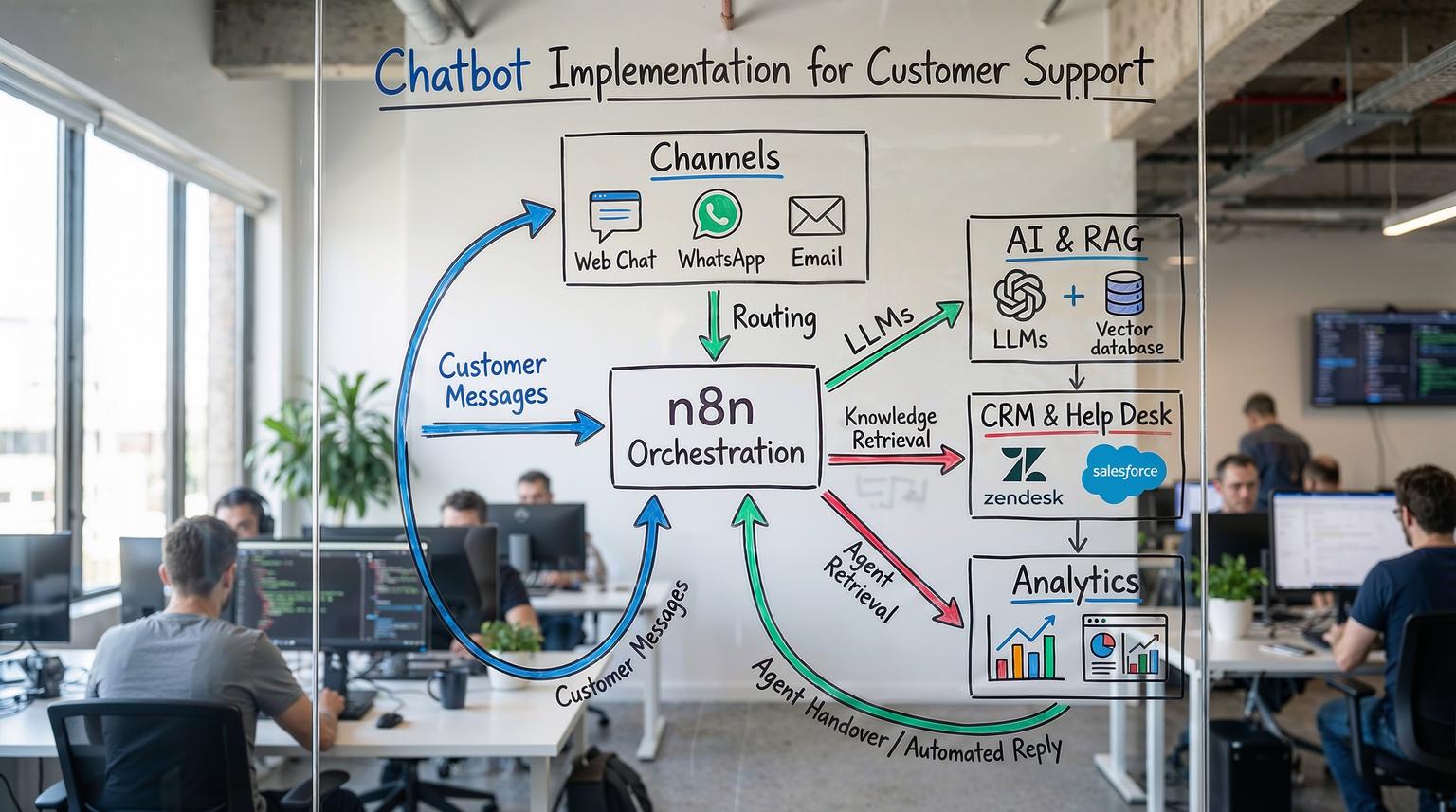
Customer expectations keep rising while support teams are under pressure to respond faster, across more channels, without blowing up headcount. Done well, chatbot implementation for customer support can give you 24/7 coverage, instant answers for routine questions, and clean handoffs to your agents when things get complex. Done badly, it becomes another frustrating bot that customers try to avoid.
In this guide, we walk through an end-to-end, practical framework for implementing a production-ready support chatbot using n8n and AI integrations. It is written for operations leaders, customer support managers, and founders who want a real system, not a toy demo. For a broader view of how AI fits into automation strategy, you can also read our overview of AI integration in business automation.
What does a successful support chatbot implementation actually look like?
A successful chatbot implementation for customer support starts with a clear list of high-volume, low-risk questions, then connects your chat channels to n8n workflows that use AI to understand intent, retrieve answers from your documentation, and decide whether to reply automatically or escalate. The bot is integrated with your CRM and help desk, logs every interaction, and is continuously improved based on real usage and agent feedback.
From idea to production: the 5-phase chatbot implementation framework
At ThinkBot Agency we use a simple but robust framework: Discover -> Design -> Build -> Pilot -> Scale. You can adapt this to any stack, but we will focus on n8n plus modern AI tooling.
Phase 1: Discover - define scope, channels, and success metrics
Before touching n8n, get clarity on three things: what the bot should handle, where it will live, and how you will measure success.
Start with data from your help desk or CRM. Export the last 3 to 6 months of tickets and group them by topic, channel, and complexity. You will almost always find a long tail of repetitive questions that are perfect for automation.
Typical Tier 1 use cases include:
- Order status, shipping, and basic account questions
- Password resets and simple troubleshooting flows
- Product information and pricing FAQs
- Policy clarifications that are clearly documented
Industry research suggests that well designed chatbots can handle a large share of routine queries and cut service costs by up to 30 percent, which aligns with figures cited by IBM. Use this as directional validation, then define your own targets.
Set measurable goals such as:
- Containment rate: percentage of conversations resolved by the bot without human intervention
- Time-to-first-response: reduction vs baseline (for example from minutes to seconds)
- Agent workload: reduction in new tickets per month
- CSAT on bot-handled conversations
Phase 2: Design - architecture, human-in-the-loop, and data sources
Next, design the architecture and decision logic. With n8n, you are essentially designing workflows that sit between your channels and your systems of record.
Core architecture with n8n
A typical end-to-end support chatbot powered by n8n looks like this:
- Channel intake: Website chat widget, WhatsApp, email, Slack, or other channels send messages to n8n via Webhook, IMAP, or native connectors.
- Context enrichment: n8n queries your CRM (HubSpot, Salesforce, Pipedrive, or a custom system) to pull customer profile and history.
- AI understanding: an LLM or NLU model classifies intent, extracts entities, and optionally drafts a response.
- Knowledge retrieval: Retrieval Augmented Generation (RAG) pulls relevant snippets from your documentation or knowledge base.
- Decision logic: n8n evaluates confidence, sentiment, and business rules to decide whether to send the AI reply or escalate.
- Action and logging: the workflow sends the reply through the original channel, creates or updates tickets in your help desk, and logs interaction data for analytics.
The RAG-powered customer support template from the n8n community is a strong reference architecture. It normalizes messages from email, WhatsApp, Slack, Discord, and live chat, retrieves documentation context, scores the AI output, escalates low-confidence or negative sentiment cases, and logs everything for weekly reporting.

Human-in-the-loop and escalation design
One of the biggest mistakes in chatbot implementation is trying to fully automate everything from day one. Research summarized by Make.com shows that fully automated support often struggles with complex or sensitive issues and that customers expect easy access to a human when needed. A better pattern is to automate to augment the agent, not to replace them.
In practice, this means defining escalation rules in your n8n workflows, for example:
- If AI confidence is below a threshold, route to a human agent.
- If sentiment is clearly negative, escalate to a priority queue.
- If the detected topic is sensitive (billing disputes, cancellations, security), bypass automation and open a ticket directly.
The n8n Zendesk RAG workflow, described in detail on the AI-powered Zendesk template page, uses exactly this pattern. It tags tickets that need human review and only posts AI replies when the model is confident and relevant content exists in the knowledge base.
Designing your knowledge and data layer
High quality RAG depends on high quality documentation. Before you build, audit your docs:
- Consolidate scattered FAQs, internal docs, and macros.
- Remove duplicates and outdated content.
- Chunk long documents into smaller sections with clear headings and metadata.
Store this content in a searchable system that your AI layer can access. Options include Notion, Google Docs, a CMS, or a dedicated vector database such as Supabase, Pinecone, or Weaviate. The Zendesk RAG template uses Supabase as a vector store plus OpenAI embeddings, which works well for many teams.
Implementing your chatbot in n8n: step-by-step
With scope and architecture defined, you can move into implementation. Below is a practical, channel-agnostic pattern that ThinkBot Agency uses, mapped to n8n components. For more examples of how we orchestrate complex workflows with n8n and APIs, see our guide to ChatGPT automation examples with n8n.
Step 1: Connect your intake channels
In n8n, create workflows for each channel you want to support, then normalize them into a common message format.
- Web chat or in-app chat: connect via Webhook node or a specific integration if your provider offers one.
- Email: use IMAP Email or a webhook from your email provider.
- WhatsApp, Slack, Discord: use the respective n8n nodes or HTTP webhooks, similar to the omnichannel setup in the RAG template.
- Help desk triggers: for tools like Zendesk, use webhooks for new tickets, as the Zendesk RAG workflow does.
Immediately after the trigger, add a Function or Set node to standardize fields such as message text, channel, user id, and timestamp. This makes downstream logic reusable across channels.
Step 2: Enrich with CRM and previous interactions
Next, pull context from your CRM or database. Use n8n nodes for HubSpot, Pipedrive, Salesforce, or generic HTTP/SQL nodes to fetch:
- Customer name and segment
- Account status or plan tier
- Open tickets or recent orders
The RAG-powered support workflow from n8n also retrieves conversation history to give the AI model full context, which is essential for multi-turn conversations.
Step 3: Add AI intent detection and classification
Use the HTTP Request or dedicated AI node in n8n to call your LLM provider (OpenAI, Azure OpenAI, Anthropic, or a self-hosted model). Pass in the normalized message and relevant context, and ask the model to output:
- Intent label (for example, track_order, reset_password, cancel_subscription)
- Entities (order id, product name, email)
- Confidence score
- Optional: a draft answer
Store this in the workflow and use an IF or Switch node to route based on intent and confidence. This mirrors the pattern described in Make.com guidance where chat intake flows route high-confidence FAQ queries to automated responses and low-confidence ones to human agents.
Step 4: Implement Retrieval Augmented Generation (RAG)
For accurate and auditable answers, you want the AI to ground its responses in your documentation, not just its generic training data.
A typical RAG implementation in n8n follows the pattern used in the Zendesk and omnichannel support templates:
- Embed the incoming question using an Embeddings node or API call.
- Query your vector store (for example, Supabase, Pinecone, or a custom Postgres extension) for the most similar documents.
- Pass the retrieved snippets, conversation history, and customer context into the LLM.
- Ask the model to answer strictly based on the provided documents and to say when it does not know.
This reduces hallucinations and improves consistency. Just remember that RAG quality depends heavily on documentation quality, chunking, and freshness, as the n8n RAG workflow page points out.
Step 5: Decision logic, escalation, and ticket routing
Now you combine AI output with business rules to decide what happens next. In n8n, chain IF and Switch nodes to implement logic such as:
- If confidence >= 0.8 and sentiment is neutral or positive, send the AI answer automatically.
- If confidence is between 0.5 and 0.8, send the draft to an internal review channel (for example, Slack) for an agent to approve or edit.
- If confidence < 0.5 or sentiment is negative, escalate immediately and do not send the AI reply.
For escalations, use help desk nodes or HTTP calls to create or update tickets in Zendesk, Freshdesk, HubSpot Service Hub, or your existing system. The Zendesk RAG template tags tickets as ai_reply or human_requested, which is a simple but powerful pattern for reporting and continuous improvement.
Step 6: Send responses and synchronize systems
Once you have a final answer, send it back to the originating channel using the appropriate connector. At the same time, log the interaction in your CRM or data warehouse.
Typical synchronization steps include:
- Update contact records with the latest interaction and sentiment.
- Attach the conversation transcript to the ticket record.
- Store inputs, retrieved documents, and model outputs in a database for audit and training.
The omnichannel RAG workflow logs every interaction and compiles weekly reports in Google Sheets or other stores, which is a pattern we often extend into full dashboards. If you are interested in how these patterns generalize beyond support, explore our article on AI-powered workflow automation.

Connecting your chatbot to CRM, help desk, and email platforms
To create a truly end-to-end experience, the chatbot must not live in isolation. It should be a first-class participant in your CRM, ticketing, and email ecosystem.
CRM integration for context and lifecycle tracking
In n8n, you can use native CRM nodes or HTTP calls to:
- Enrich conversations with customer attributes (plan, lifecycle stage, industry).
- Trigger follow-up sequences such as onboarding or renewal reminders.
- Feed chatbot interactions into lead scoring or health scoring models.
For example, if a high-value customer expresses frustration in chat, your workflow can tag the account, notify the account manager in Slack, and trigger a personalized follow-up email.
Help desk integration for tickets and SLAs
Help desk systems remain the backbone of most support operations. Your chatbot should respect existing SLAs, queues, and reporting.
Using n8n, you can:
- Create tickets when the bot escalates or when a conversation exceeds a complexity threshold.
- Update ticket status when the bot resolves an issue or when the customer replies.
- Auto-tag tickets based on intent, sentiment, or channel to improve routing.
The Zendesk RAG workflow shows how to post AI-generated replies directly into Zendesk tickets and tag them for later analysis. The same pattern applies to other platforms via their APIs.
Email and notification workflows
Not every interaction stays inside chat. You may want to follow up by email after a session, send satisfaction surveys, or escalate urgent issues to internal channels.
Patterns we commonly implement in n8n include:
- Post-chat follow-up email with a summary of the conversation and links to relevant articles.
- Automated CSAT or NPS surveys after resolutions.
- Internal alerts to Slack or Microsoft Teams when the bot detects high-risk situations.
These flows are similar to the automated email and voice-based assistant patterns described on Make.com, but implemented with n8n as the orchestration layer.
How to keep humans in the loop without slowing everything down
Human-in-the-loop design is not just about safety. It is also how you train and improve the system over time without burning your team out.
Approval queues and agent assist
Instead of forcing agents to rewrite every AI suggestion, give them structured choices. For medium-risk flows, we often design n8n steps that:
- Generate two or three AI draft replies with different tones or levels of detail.
- Send them to an internal channel with buttons or links for agents to approve, edit, or reject.
- Record which option was chosen and any manual edits.
This matches the agent assist pattern highlighted in the Make.com article, where AI drafts responses and humans provide final judgment. Over time, you can analyze which drafts are most often accepted and refine prompts or thresholds accordingly.
Feedback loops and training data pipelines
Every low-confidence or escalated conversation is a learning opportunity. Use n8n Cron nodes to schedule regular exports of:
- Conversations where the bot failed to answer.
- Tickets that were escalated due to negative sentiment.
- Cases where agents significantly edited AI drafts.
Route these to a review queue, where your team can decide whether to update documentation, refine intents, or adjust prompts. This is the learning loop pattern described in the Make.com automated customer service guide, and it is critical for continuous improvement. For organizations looking to extend these practices across departments, our article on business process automation with n8n outlines how the same principles apply beyond support.
Best practices for data, testing, and ongoing optimization
Once your chatbot is live, the real work begins. Production support automation is an ongoing program, not a one-off project.
Data quality, privacy, and compliance
Support conversations often contain sensitive information. Good governance is non-negotiable.
Key practices include:
- Masking or removing PII before sending content to external LLMs.
- Choosing data stores and AI providers that meet your regulatory requirements.
- Defining retention policies for transcripts and embeddings.
- Maintaining an audit trail of model inputs and outputs for high-risk flows.
The n8n RAG workflows explicitly recommend aligning with company privacy and data handling policies. We extend this with encryption, role-based access, and, for some clients, self-hosted vector databases and models.
Testing strategy and rollout plan
Resist the temptation to flip the switch for all customers at once. Instead:
- Run internal pilots with your own team as test users.
- Move to a beta group of customers or a single channel.
- Gradually increase coverage as metrics stabilize.
Test scenarios should include:
- Happy path queries that match existing FAQs.
- Questions with no good answer in the knowledge base.
- Sensitive topics that should always escalate.
- Multi-turn conversations with clarifying questions.
The Zendesk and omnichannel RAG templates both encourage scenario-based testing before going to production, which we strongly echo.
Metrics and optimization cycles
Finally, define a regular cadence for reviewing metrics and improving the system. Useful KPIs include:
- Containment rate and automated resolution rate.
- Time-to-first-response and average handle time.
- Escalation rate by intent and sentiment.
- CSAT or NPS for bot-handled vs human-handled tickets.
- API cost per ticket for AI and embeddings.
The Make.com pros-and-cons article highlights that around 30 percent of customer service tasks can be automated, but only if you continuously tune routing, prompts, and documentation. We typically recommend a weekly review during the first 2 to 4 months, then monthly once performance stabilizes.
When to bring in an implementation partner
You can absolutely start small with internal resources, especially if you already use n8n. But once you move into omnichannel support, RAG, CRM and help desk integration, and governance, the complexity grows quickly.
ThinkBot Agency specializes in building and scaling these workflows with n8n, Make, Zapier, and custom APIs. If you want to accelerate your chatbot implementation for customer support, from discovery to production rollout, you can book a consultation with our team to review your current stack and design a tailored roadmap.
FAQ
How long does chatbot implementation for customer support usually take with n8n?
For a focused Tier 1 support scope and one or two channels, a basic n8n and AI chatbot can often be piloted in 2 to 4 weeks. This includes discovery, workflow setup, RAG integration, and initial testing. More complex, omnichannel projects with CRM, help desk, and analytics integrations typically take 6 to 10 weeks to reach a stable production rollout.
Which systems can ThinkBot connect my support chatbot to?
We regularly integrate n8n chatbots with CRMs such as HubSpot, Pipedrive, and Salesforce, help desks like Zendesk and Freshdesk, and communication channels including web chat, WhatsApp, email, Slack, and voice providers. If your platform has an API, we can usually connect it and synchronize context, tickets, and analytics across systems.
How do you keep AI responses accurate and safe for customers?
We use Retrieval Augmented Generation so that answers are grounded in your own documentation and policies, not generic model knowledge. n8n workflows apply confidence and sentiment scoring, and we define strict escalation rules so low-confidence or sensitive queries go to human agents. We also implement logging, audit trails, and regular review cycles to catch issues early.
Can we start with a simple FAQ bot and evolve to a full omnichannel assistant?
Yes, and this is usually the best approach. Many clients begin with a single web chat or Zendesk channel focused on a small set of FAQs, then expand into additional channels, RAG over broader documentation, and deeper CRM and email automation once metrics are strong. n8n makes it straightforward to extend existing workflows instead of rebuilding from scratch.
What does ThinkBot Agency typically handle vs our internal team?
ThinkBot usually leads architecture design, n8n workflow implementation, AI and RAG integration, and initial monitoring setup. Your team provides domain knowledge, approves escalation rules, curates documentation, and participates in testing and tuning. Over time, we can either keep managing optimization or hand over a documented system your team can maintain.
