
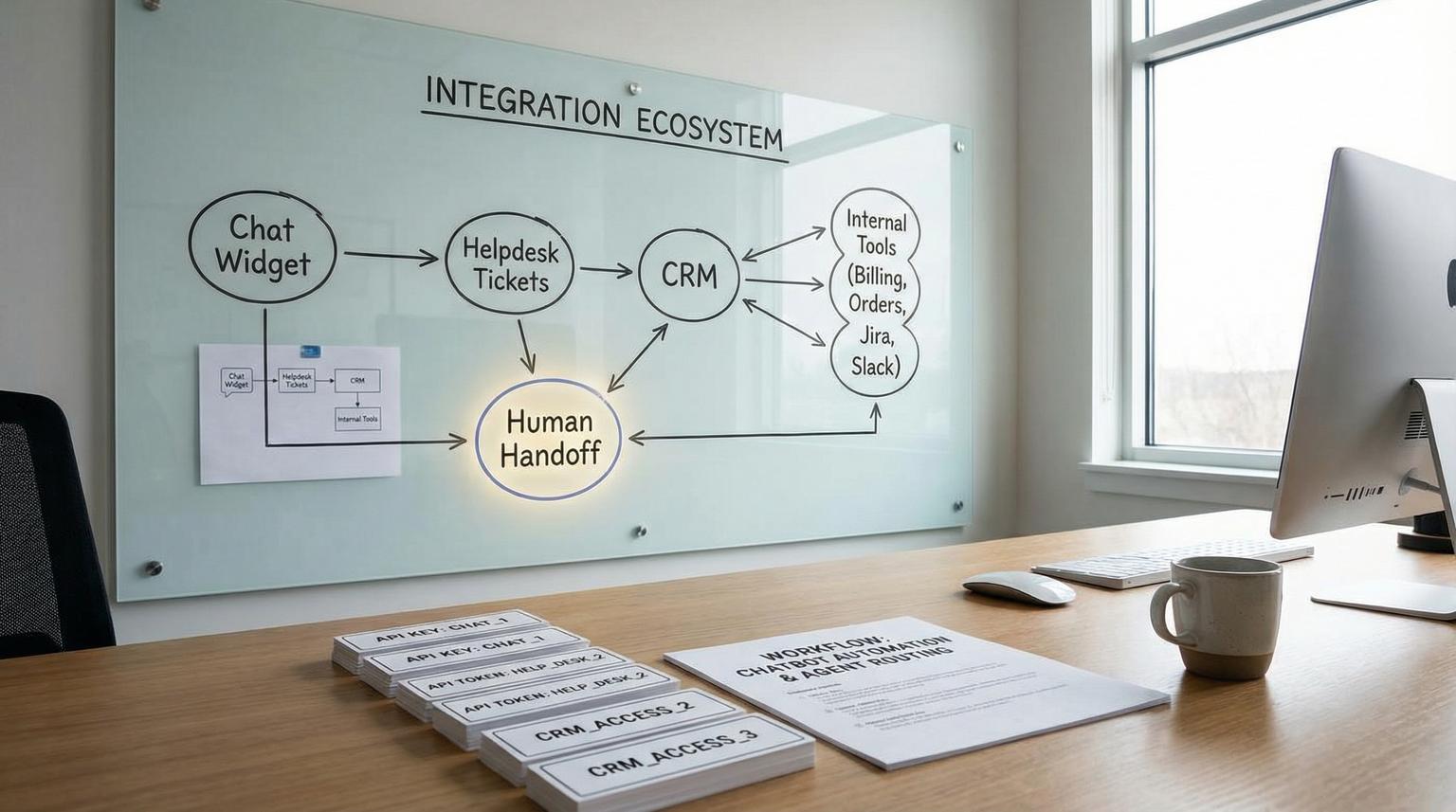
Most teams do not fail at support automation because the bot gives a bad answer. They fail because the bot cannot reliably hand off to a human with the right context or it cannot write clean structured data back to the system of record. This buyer-focused breakdown of chatbot integration for businesses compares two common paths: native helpdesk chatbots (like Zendesk or Intercom) and custom LLM chat connected to your helpdesk, CRM and internal tools via workflow automation (n8n, Make or Zapier).
You will learn how each option behaves at the most important integration boundary: ticket lifecycle plus identity plus handoff. That is the boundary that determines first response time, data accuracy, reporting integrity and agent workload after launch.
Quick summary:
- Choose a native helpdesk bot when the helpdesk must stay the system of record for SLAs, reporting, routing and conversation continuity.
- Choose a custom LLM plus workflow automation when you need deep cross-system actions (CRM updates, order systems, billing tools) with deterministic writeback and auditable logic.
- Human handoff quality is not a feature checkbox. It depends on how transcripts, metadata and identity are injected into the agent workspace and ticket fields.
- Security and PII risk grows quickly when the bot can call internal APIs. Use least privilege tokens, scoped identifiers and explicit logging.
Quick start
- Decide your system of record: is the canonical truth the helpdesk ticket, the CRM record or a shared case object?
- List the minimum structured fields the bot must write back (customer identity, product/account, category, urgency, order ID and desired outcome).
- Define handoff completeness: what the human must see at takeover (summary, transcript slice, collected fields and links to records).
- Score native bot vs custom LLM using the decision matrix below and do not proceed until one option clearly wins on handoff plus writeback.
- Run a staging test with 5 real scenarios: one FAQ deflection, one account-specific question, one angry escalation, one attachment case and one multi-step troubleshooting case.
If your primary goal is fast deflection with clean agent takeover inside one helpdesk, a native helpdesk chatbot is usually the safer choice. If your goal is to resolve requests end to end across multiple systems with reliable structured writeback (not just chat replies) a custom LLM connected through workflow automation is usually the better fit, but only if you design identity, permissions, monitoring and handoff like an ops system not a demo.
Why the system-of-record boundary decides success
Support teams live and die by system-of-record integrity. If the bot answers in one place, creates tickets in another, updates a CRM sometimes and hands off without context, you get hidden costs: duplicate tickets, broken SLA reporting, agents re-asking questions and messy customer histories.
Native helpdesk chatbots tend to win when you want the messaging conversation, ticket, routing rules and agent workspace to remain one coherent object. In Zendesk Messaging, for example, handoff is an explicit control transfer between responders and the platform can inject conversation history into the ticket in a controlled way. Zendesk calls this routing and responder control a switchboard and it matters because it defines who owns the conversation first and what happens on escalation.
Custom LLM plus automation tends to win when the bot must act like an operator across systems: verify identity, look up account data, create or update tickets, update the CRM, trigger refunds, open Jira issues and notify Slack. That value is real, but it also means you now own a production integration surface.
Support automation requirements that matter in real operations
Before you compare vendors or architectures, write down the requirements in operational language. This is where teams get clarity fast because vague goals like "deflect tickets" become measurable behaviors like "create a ticket with the right fields and a usable summary".
1) Authenticated customer context
Can the bot reliably know who the user is, what account they belong to and what they are allowed to see? For authenticated web apps, this often means passing a signed user identifier from your product to the chat layer then using scoped API tokens to fetch data. For email or unauthenticated channels, it means collecting and verifying a stable identifier before any account-specific answer.
2) Deterministic ticket creation and updates
Support ops usually needs predictable outcomes: if the user asks for a refund, a ticket must be created or updated with category, urgency, order ID and a clear next action. A major difference between options is whether writeback is deterministic (workflow step always runs) or discretionary (the AI may decide whether to call a connector or how to format the result).
3) Knowledge base answers plus safe fallbacks
Deflection is the easy part when the question is generic. The real requirement is knowing when not to answer and how to escalate with minimal friction. If your bot sometimes improvises instead of pulling from approved sources, you will trade ticket volume for risk.
4) Human handoff that keeps the thread intact
A good handoff is not "we emailed the transcript". A good handoff means the agent receives an actionable ticket with structured fields populated and the relevant portion of the conversation attached in the right place. In Zendesk Agent Workspace, agents can see prior bot conversation before takeover which is a strong native advantage, but you still need to design what gets captured and how it renders for agents.
Decision matrix native helpdesk bots vs custom LLM plus workflow automation
Use this matrix as a practical way to predict time-to-value, maintenance burden and failure risk before you commit. Score each row from 1 to 5 for your environment. If you cannot confidently score a row, that is a signal you need a staging test or an integration spike.

| Criteria | Native helpdesk chatbot | Custom LLM + workflow automation |
|---|---|---|
| Human handoff quality (transcript, summary, fields, agent UX) | Usually strong inside the same platform. Control transfer and transcript injection are built in when configured correctly. Risk: rich bot UI may degrade to text in agent view. | Highly variable. Can be excellent if you implement structured summaries, field mapping and deep links. Can be poor if you create separate tickets and lose the conversation thread. |
| CRM and helpdesk sync (structured writeback) | Strong for helpdesk-native fields, tags, routing and macros. Cross-system updates may be limited or require add-ons and still be less deterministic. | Strong if you build it well. You can enforce field schemas, update both CRM and helpdesk and run validations. You also own mapping drift over time. |
| Security and PII controls (auth, scoping, least privilege) | Often simpler governance because data stays inside the helpdesk ecosystem. Still requires careful configuration for identity capture and access rules. | Higher risk surface because the bot can call internal APIs. Requires token strategy, scoping by account, logging, redaction and hard deny rules for sensitive data. |
| Ongoing maintenance (monitoring, prompts, workflows, change management) | Lower ops burden. Platform updates and analytics are built in. You still need content governance and routing tuning. | Higher ops burden but more control. You must maintain workflows, API versions, model behavior, evaluation tests and incident response. |
Practical evaluation checklist before you buy or build
Run this checklist in procurement or during a pilot. It is designed to flush out the hidden work that shows up after launch. If you want deeper rollout phases, safety guardrails, and the metrics to track deflection vs resolution, see Best Practices and Challenges in AI Chatbot Implementation for Customer Service.
- System of record: Which object is canonical for SLA reporting and audits: helpdesk ticket, messaging conversation or CRM case?
- Identity binding: How do you attach an authenticated user or account ID to the conversation? What happens in guest mode?
- Structured fields: Which ticket or CRM fields must be populated every time on escalation (category, product, priority, environment, order ID)?
- Transcript hygiene: Do agents see the entire chat, or only the relevant slice? Can you start transcript injection at the escalation trigger to reduce noise?
- Handoff payload: Do you send a short summary plus extracted entities or do you dump the full transcript as text?
- Routing compatibility: Can your escalation include metadata that drives routing rules and views?
- Failure behavior: If an API call fails, does the user get a clear message and does a ticket still get created with an error note?
- Audit trail: Can you later prove what the bot did, what it wrote and why?
Integration patterns that keep handoffs reliable
Pattern A: Native bot with platform-native escalation
This is the simplest way to protect your ticket lifecycle. In Zendesk Messaging, you can route first responder behavior and escalations using the switchboard and use control transfer on escalation. One operational detail that often improves agent experience is controlling where transcript injection starts. Zendesk supports metadata such as first_message_id so the injected history can begin at the escalation point, not at the start of a long bot interaction. That reduces noise and avoids burying the key customer request.
Also watch lifecycle semantics: a solved ticket is not always the same as an ended conversation. If your configuration routes follow-up messages back to the bot as first responder, customers may feel like they are starting over. Align your routing rules with how your team expects reopens to work.
Pattern B: Native bot front end with API-based handoff to another tool
Some teams keep a native bot in one platform and create tickets in another via API. Intercom documents a workflow where the bot collects required fields then creates a ticket in an external system using a data connector and a web request. The upside is speed to launch. The downside is that you now have two parallel records unless you implement clean linkage.
If you use this pattern, decide which system is canonical for SLAs and reporting and ensure the created ticket includes a backlink and a stable conversation identifier.
Pattern C: Custom LLM plus deterministic workflow automation as the control plane
This is where ThinkBot Agency typically sees the largest payoff for complex operations: the LLM handles language understanding and summarization while the workflow engine enforces deterministic steps, validation and writeback. For example, an n8n workflow can require an account ID, call your billing API, write a structured update to the helpdesk ticket, update a CRM field and post a Slack alert for exceptions. The workflow is the guardrail that prevents "creative" output from becoming corrupted data. For a concrete, step-by-step example of triage + CRM sync + follow-ups, see AI-driven customer service automation with n8n: Auto-triage tickets, sync your CRM and send personalized follow-ups.

A real-world ops insight: the fastest way to reduce agent handle time is not longer transcripts. It is a short structured handoff note plus correctly populated fields that drive the right routing view. Agents trust fields and tags because they are actionable. They skim transcripts only when needed.
Common failure pattern that creates ticket chaos
The most common mistake we see is treating escalation as a separate ticket creation step without preserving conversation continuity. Teams wire a bot to call the helpdesk API and open a new ticket, but the agent cannot see the original conversation in the same thread. Customers then reply in the chat widget, the bot responds again and a second ticket gets created. In a week, you have duplicates, broken SLAs and frustrated agents.
The fix is architectural, not prompt-based:
- If you are inside a helpdesk messaging platform, use its native handoff mechanism so control transfer and transcript injection stay consistent.
- If you are outside the platform, implement a single conversation identifier and enforce idempotency so follow-ups update the same ticket instead of creating new ones.
- Do not dump everything into comments. Map extracted data into custom ticket fields so routing and reporting remain accurate.
Security and PII design for chatbots that call internal systems
Once a bot can fetch account data or write updates, security becomes part of the buyer decision. Intercom notes a real risk with connectors: parameter passing can accidentally retrieve another user’s information if identifiers are not scoped correctly. The same risk exists in any custom workflow.
Minimum controls we recommend in 2026 for any support chatbot with integrations:
- Scoped identity: Use an internal immutable account ID, not an email address alone, when querying sensitive systems.
- Least privilege tokens: Separate read tokens from write tokens and restrict endpoints by environment.
- Explicit allowlist: Only allow the bot to call specific APIs and block everything else.
- Redaction: Remove secrets, full card data and sensitive identifiers from logs and from any model context.
- Human approval for high-risk writes: For refunds, cancellations or access changes, create a ticket and route to an agent instead of letting the bot execute immediately.
Choosing the right option using a simple decision rule
Here is a decision rule that works in most support orgs:
- If your helpdesk is the system of record and your top priority is consistent conversation-to-ticket continuity with reliable agent takeover, start with a native helpdesk chatbot and invest your time in routing, field mapping and transcript hygiene.
- If your top priority is end-to-end resolution across multiple systems with deterministic updates to helpdesk and CRM, start with a custom LLM plus workflow automation, but budget for monitoring, regression tests and security design.
When this is not the best fit: if your support volume is low and your questions are mostly static, you may not need an LLM at all. A well-maintained knowledge base, better forms and a few targeted automations can outperform a bot with far less risk.
If you want to operationalize routing, escalation, SLAs, knowledge linking at closure, QA, and human handoff as one system, use our pillar playbook: Build a reliable support ticket automation system (triage, routing, SLAs, knowledge, QA).
If you want a second set of eyes on your system-of-record decision and a concrete integration plan that protects handoffs, structured writeback and governance, book a consultation with ThinkBot Agency here: https://calendar.google.com/calendar/u/0/appointments/schedules/AcZssZ1tUAzf35rX7wayejX0LBdPIa5EnrtO1QB6iwmVmbYSZ-PkX1F_zJrNd9VrKiZMnyt4FN9mMmWo
FAQ
Common follow-ups we hear from support ops teams when evaluating bot options and integration scope.
Do native helpdesk chatbots always provide better human handoff?
Not always, but they usually provide more reliable continuity because the conversation, ticket and agent workspace are part of the same platform. Handoff quality still depends on configuration, especially what transcript portion is injected, what fields are populated and how routing is triggered.
What should a chatbot write back to a helpdesk ticket during escalation?
At minimum: verified customer identity or account ID, a one paragraph summary, the key customer goal, extracted entities (order ID, product, environment) and a clean transcript slice starting at the escalation trigger. Structured fields should be populated whenever possible instead of putting everything in a comment.
Is a custom LLM chatbot safe for PII-heavy support?
It can be safe, but only with strong controls: scoped identifiers, least privilege tokens, strict API allowlists, redaction and logging. For high-risk actions, route to a human for approval rather than letting the bot execute writes directly.
How do we prevent duplicate tickets when customers follow up later?
Use a single conversation identifier and idempotent ticket logic so follow-ups update the existing ticket when appropriate. Also align your setup with the helpdesk conversation lifecycle so you understand when conversations end versus when tickets are solved or reopened.
What is the typical maintenance burden difference between native bots and custom LLM workflows?
Native bots usually have lower maintenance because analytics, routing and the agent experience are built into the platform. Custom LLM plus automation has higher ongoing work because you own workflow changes, API version updates, test coverage, monitoring and incident response, but you also gain deeper cross-system control.
