
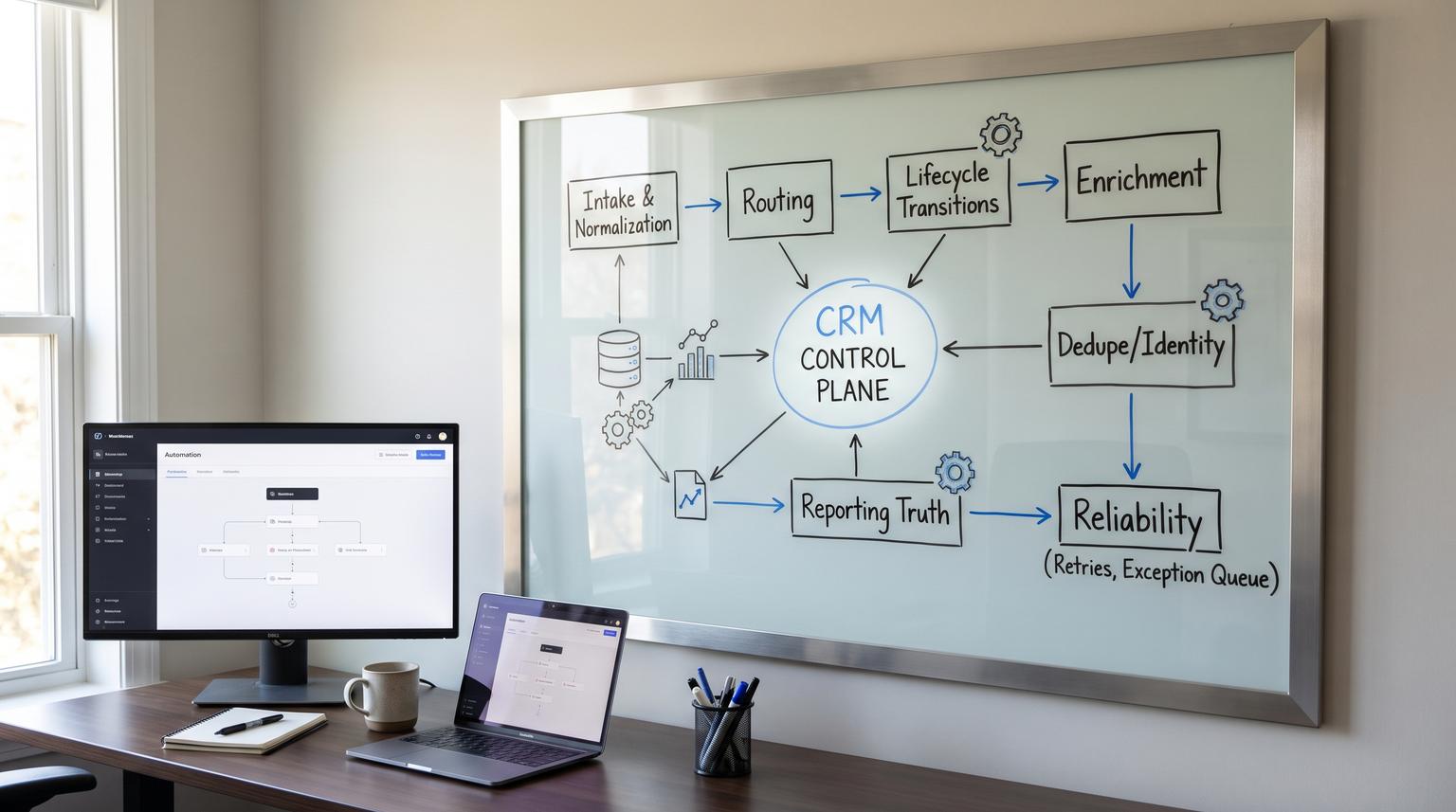
Most teams do not have a CRM automation problem, they have an operating system problem. If routing rules, lifecycle updates, enrichment jobs, dedupe, and dashboards are designed as one-off fixes, the CRM slowly drifts away from reality. This guide introduces a crm automation framework you can reuse to make the CRM the control plane: a governed lifecycle model, standardized triggers and handoffs and reliability controls that keep leads and accounts moving predictably while preserving reporting integrity.
This pillar is for operators, RevOps, sales and marketing leaders, and tech-savvy founders who want automation that survives headcount changes, new tools, new channels and new territories.
Key takeaways:
- Design automation as an OS: lifecycle as the spine, routing as a stateful service, hygiene as preventive controls and reporting as enforced truth.
- Define stages with entry and exit criteria, owners and SLAs so handoffs become measurable gates, not opinions.
- Build routing with explicit fairness logic, exception queues and audit fields that explain every assignment.
- Stop data drift by standardizing point-of-entry normalization, dedupe tiers and governed field write policies.
- Make revenue reporting match reality by declaring source-of-truth fields, logging changes and testing data accuracy continuously.
Quick start
- Write a lifecycle spec: stage definitions, entry/exit criteria, owners and SLAs, then map every tool to the CRM stages (not the other way around).
- Create a routing policy: segments, fairness model (round robin vs load balancing), after-hours behavior and a single exception queue.
- Implement a normalization layer at intake: canonical picklists, UTM rules, phone and country formats and required identifier checks before routing.
- Set identity rules: tiered matching (auto-merge vs review), merge policies for attribution fields and logging for every merge decision.
- Turn stage transitions into plays: automated tasks, sequences, notifications and SLA timers based on stage entry timestamps.
- Declare reporting truth: source-of-truth per key field, audit trails for lifecycle and attribution and dashboards that track exceptions and drift.
- Harden reliability: retries, dead-letter style exception storage, alerts and a reprocess mechanism for failed runs.
A CRM automation operating system is a repeatable design approach where lifecycle stages define the business state, automations enforce the rules for moving between states, and data hygiene plus audit trails keep reporting trustworthy. Instead of scattered workflows, you build a small set of governed services: intake and normalization, routing, stage transitions, enrichment and dedupe, plus reliability controls like retries and exception queues. Integrations support the system, but the CRM remains the control plane.
Table of contents
- Why CRM automation breaks in the real world
- The CRM Automation OS model: control plane, services, and contracts
- Lifecycle architecture: stages as enforceable gates
- Lifecycle stage spec checklist (use this to align teams)
- Lead routing patterns that stay fair, fast, and explainable
- Journey automations: tasks, sequences, and SLA timers
- Data hygiene OS: normalization, governance, and prevention
- Dedupe and identity resolution without breaking attribution
- Revenue reporting integrity: source of truth, audit trails, and drift prevention
- Reliability and change management for automations
- An example operating rhythm (weekly to quarterly)
- When to bring in ThinkBot Agency
- FAQ
Why CRM automation breaks in the real world
Most CRM setups start with good intentions: route inbound fast, update lifecycle, trigger follow-ups, and build dashboards. Then reality hits:
- Definitions diverge: Sales and Marketing interpret stages differently, so conversion rates and SLAs become meaningless.
- Routing loses trust: territories change, reps go inactive, and round robin order gets perturbed by manual assignments.
- Data decays: titles change, emails bounce, company names fragment and enrichment overwrites human-verified fields.
- Reporting drifts: attribution fields get overwritten, picklists become free-text, and pipeline stages are used as labels not gates.
- Automations fail silently: integrations time out, APIs change, and there is no exception queue or reprocess path.
If this feels familiar, it is because automation is being treated like a collection of rules, not a system. ThinkBot often sees this during audits of routing and attribution, where a few small governance and reliability changes unlock trustworthy reporting again. Our related breakdown on diagnosing drift is in attribution drift.
The CRM Automation OS model: control plane, services, and contracts
To make automation durable, treat the CRM as the control plane and build a small number of reusable services around it:
1) Control plane objects and fields
Decide which objects are the core truth (usually Contact, Company/Account, Deal/Opportunity and Activities). Then define the minimum governed fields that power downstream decisions: lifecycle stage, owner, lead source, territory/segment, identifiers, consent, and timestamps.
2) System services (reusable modules)
- Intake and normalization service: validates required identifiers, standardizes formatting and blocks or queues records that cannot be routed safely.
- Routing service: applies segmentation logic, selects an owner using a fairness model and writes a routing audit trail.
- Lifecycle transition service: enforces entry/exit criteria, triggers plays (tasks, sequences) and records stage entry times.
- Enrichment and refresh service: enriches and verifies fields using tiered cadence policies and safe overwrite rules.
- Identity and dedupe service: matches records using tiers (auto vs review) and merges using attribution-safe policies.
- Observability service: logs every automation decision, monitors error rates, and routes failures to an exception queue.
3) Contracts between services
A contract is a set of assumptions that must be true for the next service to behave correctly. Examples:
- Routing assumes country, segment and a usable identifier are present.
- Lifecycle transitions assume stage entry timestamps are system-controlled and not freely edited.
- Reporting assumes source-of-truth fields have controlled writers.
If you use no-code tools for these services, you can still run the OS approach. The difference is you design shared modules and governance, not one automation per request. For an implementation view using operators tools, see n8n workflows and our broader overview on no-code platforms.
Lifecycle architecture: stages as enforceable gates
Your lifecycle is the spine of the OS. The goal is to stop debating lead quality in the abstract and instead agree on a shared stage model that is defined by observable buyer progress and enforced in systems, including entry/exit criteria, owners and SLAs. This shared model aligns teams and prevents local optimization, such as Marketing optimizing volume while Sales optimizes close rate. These concepts are outlined clearly in this guide.
Two practical rules make lifecycle work:
- Define stages as states: "what is true right now" about the record, not what someone hopes is true.
- Enforce exit criteria at the moment of stage change: do not rely on pipeline inspection meetings to enforce discipline.
To keep the pipeline from bloating, add stage aging thresholds and rituals. Tracking days in stage is a reliable way to detect stuck deals, broken handoffs, or unclear next steps, and it supports weekly review cadences that maintain integrity over time, as recommended in this write-up.
Lifecycle stage spec checklist (use this to align teams)
Use this checklist when you build or reset lifecycle stages. Treat it like a governed spec that changes via change control, not ad hoc edits. It is based on the stage model elements recommended for cross-team alignment and enforceability in this overview and the measurable stage gate approach in this practical guide.

- Stage name and one-sentence, buyer-centered definition (state-based).
- Entry criteria as explicit data rules (fields, events, thresholds).
- Exit criteria as explicit, verifiable conditions (2-4 per stage).
- Owner (team and role) accountable for action in the stage.
- SLA requirement: response time plus required action (task, call, email, meeting set).
- Required fields at entry and required fields to change stage.
- Stage entry timestamp fields (date entered) and stage exit timestamp fields if available.
- Max days in stage and what happens when exceeded (escalation, recycle, re-qualify).
- Primary KPI per stage: progression, conversion, velocity, revenue contribution.
- Audit fields: who changed stage, change reason, automation vs manual flag.
Once you have this, the rest of the OS becomes simpler: routing can key off the lifecycle state, plays can trigger off stage entry and reporting becomes about measurable progression.
Lead routing patterns that stay fair, fast, and explainable
Routing is where most teams first feel automation pain because it is visible. Treat routing as a stateful system with memory and document where routing state lives. In Dynamics assignment rules, for example, distribution can use round robin (fairness by time since last assignment) or load balancing (fairness by workload). The nuance is that round robin order is stored at the organization level, not per rule, so multiple routing rules can share the same "next seller" state. That design detail matters operationally and is explained in this documentation.
Routing inputs (the minimum contract)
- Segment or tier (SMB, Mid, Enterprise, Partner, Existing customer).
- Territory keys (country, state, region, timezone).
- Intent or priority (inbound, outbound, referral, expansion).
- Availability signals (active user, OOO flag, capacity score).
- Identifiers (email, domain, external id) to prevent duplicates and misassignment.
Common routing algorithms
- Round robin: best when you want simple fairness and reps have similar capacity. In Salesforce, one approach uses an autonumber and a formula MOD index plus rule entries; you must update the divisor when headcount changes and ensure manually created leads also use assignment rules. The implementation mechanics are detailed in this guide.
- Load balancing: best when capacity varies. You need a capacity field and a consistent way to update it (open leads, active deals, or a weighted score).
- Territory first, fairness second: route by geo or industry then apply round robin within the segment.
- Account-based routing: route new contacts to the existing account owner if the account is already owned, otherwise use fairness logic.
Exception handling is part of routing, not an afterthought
Design what happens when data is missing, the rep is inactive, the record looks like a duplicate, or it arrives after-hours. This is where many teams leak leads. If you want a speed-to-lead focused implementation, our tactical walkthrough is in 5 minute SLA.
Journey automations: tasks, sequences, and SLA timers
Once lifecycle stages and routing are stable, you can implement journey automation as a set of plays tied to stage transitions and stage aging, not as random tasks. Many CRMs can track date entered stage fields, which become the backbone for SLA timers and escalation logic. HubSpot, for example, supports lifecycle stages plus calculated properties like date entered stage and encourages using stage entry timestamps as first-class automation triggers, as described in this doc.
Pattern: stage transition -> handoff play
- Trigger: lifecycle stage changes to SQL (or equivalent).
- Guardrails: required fields present (phone, company, intent, notes) and owner exists.
- Actions: create a task, enroll in a sequence, notify owner, stamp SLA start time.
- Escalation: if no activity by N minutes or hours, notify manager and route to exception queue.
Pattern: aging timeouts -> unstick the pipeline
Use days-in-stage thresholds to create tasks or escalations and to recycle records that are not progressing. This is the operational control that keeps automations from silently stalling and is recommended as a reliability control in workflow building blocks like the "time-out" concept in this guidebook.
Pattern: one SLA clock from capture to first touch
Operators get better outcomes when there is one clock that starts at inbound capture and continues through routing and rep contact, rather than separate clocks per tool. Build this by writing a single timestamp field at the moment of capture, then measuring first-touch against it across channels. This single-clock idea is also emphasized in the same guidebook.
If you want end-to-end journey examples from lead to post-sale, we also mapped practical flows in customer journeys.
Data hygiene OS: normalization, governance, and prevention
Hygiene is not a cleanup project, it is an operating process. A durable system starts with measurement (completeness by object and field), then adds preventive controls such as validation rules and governed picklists. A playbook-style view of ongoing hygiene as an operating cadence is outlined in this playbook.
Normalization layer at point of entry
Most "dirty data" is inconsistency, not blanks. Inconsistency fragments reporting categories and breaks routing logic, so rule-based normalization should happen before routing and stage transitions. A practical six-step approach that prioritizes field profiling and deterministic cleanup before using AI is described in this guide.
- Canonical casing and trimming whitespace for names and titles.
- Phone normalization to a single format.
- Country and region normalization to consistent codes.
- UTM parameter normalization (lowercase, trimmed, allowed characters).
- Picklist enforcement for lead source, lifecycle status, industry and channel.
Field governance (who can write what)
Define governed fields and allowed writers. For example:
- System-captured attribution fields: written by tracking scripts or ingestion only.
- Lifecycle stage: written by automation and controlled transitions, with limited manual overrides and mandatory reasons.
- Owner: written by routing service or managers, not by every integration.
This is also where you decide overwrite policy, such as write-to-empty first and approvals for overwriting governed fields. That pattern is recommended as a guardrail for accuracy audits in this guide.
Dedupe and identity resolution without breaking attribution
Dedupe is both a hygiene and a revenue integrity issue. If you merge incorrectly, you can destroy attribution, ownership history, and consent records. Use a tiered matching strategy: strict rules for auto-merge, broader rules for a review queue. In Salesforce identity resolution, a match rule is a set of criteria and if multiple match rules are active, unification can occur when any single rule matches, which is why you should create strict tiers rather than one permissive rule. This "any-rule" behavior is clarified in this documentation.
Tiered matching strategy
- Tier 1 auto-merge: exact email or exact external id after normalization.
- Tier 2 review: domain + last name + phone similarity, or company name similarity + address match.
- Tier 3 do-not-merge: shared inboxes, role accounts, low confidence matches, conflicting consent.
Mapping is upstream architecture, not a merge tool setting
Identity resolution depends on mandatory field mappings across systems. If key identifiers are not mapped consistently (emails, phones, addresses, stable ids), matching will miss and fragmentation will increase. This dependency on mappings is emphasized in this explanation. In OS terms, every new integration should pass a mapping gate before go-live.
Merge policies that protect attribution
Decide field-level merge policies, especially for lead source and original attribution. A practical example is "most recent wins, except Lead Source keep the first" as a guardrail so attribution does not get overwritten during merges, as mentioned in this playbook.
Revenue reporting integrity: source of truth, audit trails, and drift prevention
Dashboards do not fix reporting. Enforcement fixes reporting. The OS approach is to declare a source of truth per key field, test it continuously, and add audit trails so you can explain how a number was produced. A practical method for auditing revenue data accuracy, including completeness, consistency, cross-system reconciliation and root-cause remediation, is laid out in this guide.
Attribution guardrails (system-captured vs editable)
Separate system-captured attribution from human-entered categorization. In HubSpot, Original Traffic Source is first known web source and Latest Traffic Source is the most recent, and drill-down properties are automatically set and cannot be updated manually. If traffic source is changed, drill-down properties are cleared, which has implications for how you design edits and audit trails. These behaviors are detailed in this doc.
Practical implications for your OS:
- Do not overwrite first-touch attribution with self-reported fields.
- Store raw UTMs separately from your internal channel taxonomy.
- Log any manual overrides of marketing source fields with a reason.
- Design "Unknown" handling. Avoid forced guesses when tracking is missing.
Comparison table: reporting fields and how to govern them
Use this table when deciding which fields must be governed to keep funnel and revenue reports stable.

| Field | Recommended source of truth | Allowed writers | Audit requirement |
|---|---|---|---|
| Lifecycle stage | CRM stage model | Automation service, limited manager override | Log stage change actor and reason |
| Owner | Routing service in CRM | Routing, managers | Log routing rule and manual reassignment reason |
| Original source | Tracking or ingestion system | System-only (prefer immutable) | Preserve first-touch, log merges |
| UTM parameters | Raw capture at intake | Intake normalization only | Store raw plus normalized copy |
| Pipeline stage | Deal stage gates | Reps with enforcement rules | Require exit criteria at stage change |
This is the same theme we see when disconnected processes are stitched together after the fact. If you want examples of connecting CRM, email and ops systems without breaking truth, see revenue engine.
Reliability and change management for automations
Automations will fail. The OS goal is to make failures visible, recoverable and safe. Reliability patterns from durable workflow systems translate well to CRM automation: versioning, structured logs, retries with backoff, dead-letter style exception queues and replay mechanisms. These practices are summarized in this guidance.
Risk and guardrails: failure modes and mitigations
Use this section when hardening your routing, lifecycle and reporting automations.
- Failure mode: Lead routed to inactive user. Mitigation: availability flag check, overflow queue, nightly audit for inactive owners.
- Failure mode: Duplicate created during import, then routed twice. Mitigation: identifier contract at intake, tiered matching, block routing until dedupe check completes.
- Failure mode: Enrichment overwrites verified fields and breaks segmentation. Mitigation: write-to-empty default, confidence thresholds, approval for governed overwrites.
- Failure mode: Routing algorithm state is perturbed by manual assignments, causing fairness complaints. Mitigation: policy for manual overrides, log the event, reconcile distribution metrics weekly. The stateful nuance is highlighted in this doc.
- Failure mode: Workflow update changes step behavior and breaks in-flight records. Mitigation: versioned deployments, compatibility rules and stable step identifiers, as recommended in this guide.
- Failure mode: Automation fails silently due to API timeout. Mitigation: retries with exponential backoff, terminal failure alerts, exception queue with payload capture.
Testing and rollback are not optional
Treat routing rules, stage criteria, validation rules and dedupe policies like deployments. Automate tests for the highest-risk journeys and define quantitative rollback triggers such as spikes in unassigned leads, exception queue depth, or SLA breaches. This mindset is a core recommendation of this best practice.
For implementation teams, this is where no-code tooling still benefits from engineering discipline: a staging environment, named versions, a release checklist and a runbook.
An example operating rhythm (weekly to quarterly)
Automation needs a cadence so integrity does not decay. A hygiene-as-operations framing with weekly to quarterly rhythms is recommended in this playbook. Here is a practical rhythm that works well for most teams:
Weekly
- Review exception queue: unroutable leads, missing identifiers, failed enrichments, dedupe review candidates.
- Check SLA dashboard: speed-to-lead, first-touch within SLA, stage aging outliers.
- Spot-check routing health: assignments per rep by segment, manual reassignment rate.
Monthly
- Dedupe run: prioritize Company/Account first, then Contacts, then Deals.
- Refresh enrichment for active pipeline and tier-1 accounts, aligned to decay rates. Field decay and trigger-based refresh are discussed in this overview.
- Normalize picklist drift: collapse new free-text variants into canonical values and update mappings.
Quarterly
- Lifecycle spec review with a revenue council cadence, then update stage criteria deliberately, as suggested in this guide.
- Revenue data accuracy audit: null rates, mismatches, outliers, cross-system reconciliation, based on this method.
- Release retrospective: incidents, new tests, updated rollback triggers.
This is also the cadence that keeps advanced plays possible, such as automatically suppressing customers from ad audiences based on governed lifecycle stages. We show that pattern in audience suppression.
When to bring in ThinkBot Agency
If you can write the lifecycle spec and routing policy but struggle to enforce it across tools, you are in the zone where an implementation partner helps. ThinkBot Agency builds CRM automation operating systems with tools like n8n, Zapier, Make and direct API connections, including logging, exception queues and governance so the system keeps working as you scale. If you want to sanity-check your current setup and get a build plan, book a consult here: book a consultation.
If you prefer to evaluate implementation track record first, you can also review our recent work.
FAQ
What is a CRM automation operating system?
A CRM automation operating system is a governed set of reusable services (intake, routing, lifecycle transitions, hygiene, dedupe, reporting controls and reliability) that treats the CRM as the control plane. It replaces one-off workflows with standardized contracts, audit trails and exception handling so the pipeline behaves predictably.
How do we prevent lifecycle stages from becoming subjective labels?
Define each stage as a measurable state with explicit entry and exit criteria, required fields, an owner and an SLA. Enforce criteria at the moment of stage change using validation and automation and track stage aging with weekly integrity reviews.
Which data hygiene rules matter most for automation?
Prioritize fields that drive decisions: lifecycle stage, owner, lead source, territory keys, identifiers (email, domain, external id), consent and timestamps. Normalize formats at intake and use governed picklists so routing and reporting do not fragment.
How do we do dedupe safely without breaking attribution?
Use tiered matching: strict auto-merge rules and broader review rules. Define merge policies per field, especially for first-touch source fields, and require mandatory identifier mappings across tools. Log every merge and keep a review queue for low-confidence matches.
What reliability features should every CRM automation have?
Retries with backoff for transient failures, an exception queue that stores the original payload and error context, structured logs with correlation IDs, alerts on terminal failures and an idempotent reprocess mechanism. Treat changes like deployments with tests and rollback triggers.
