
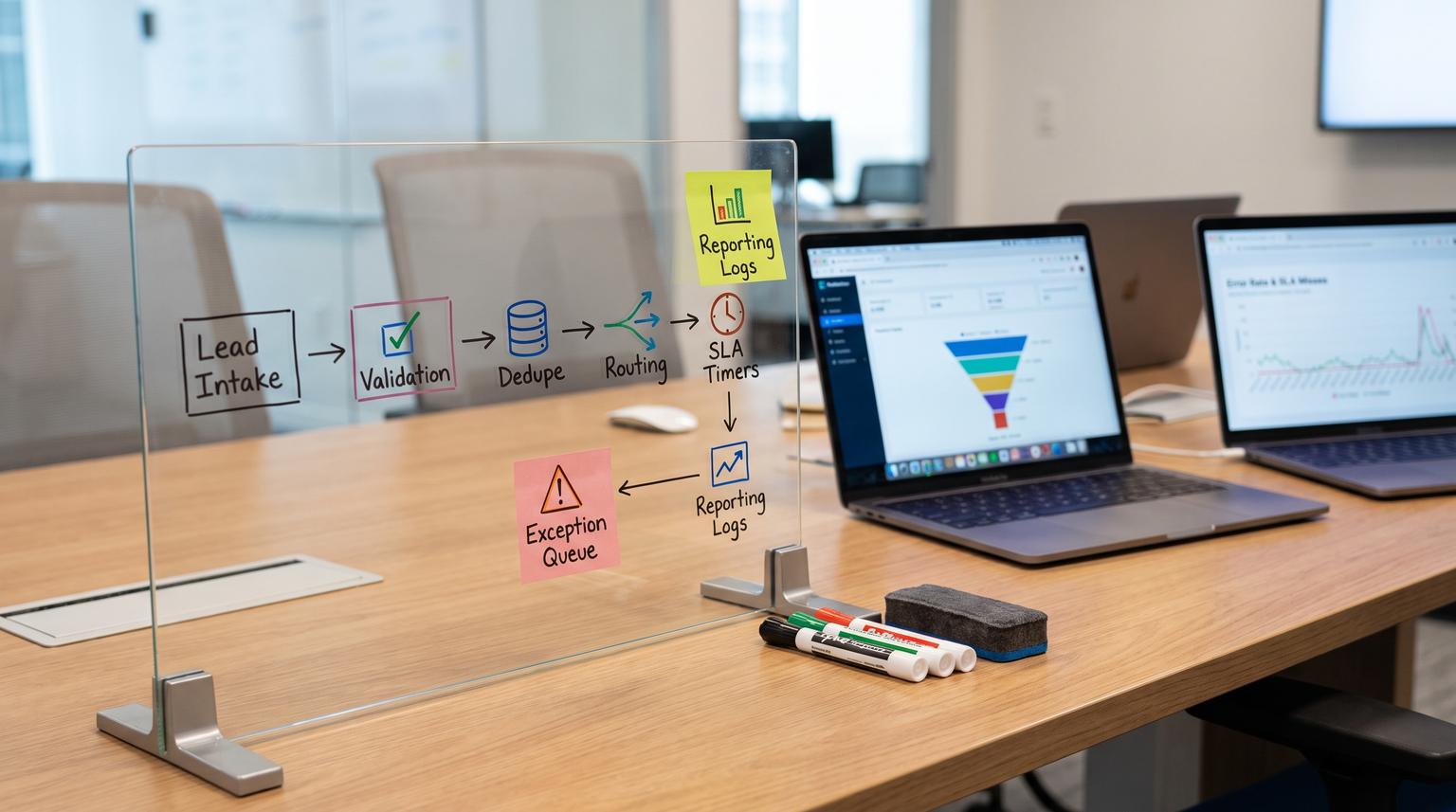
A CRM that looks accurate but behaves inconsistently creates a quiet tax on growth: leads slip through cracks, lifecycle stages drift, duplicates inflate pipeline, and dashboards stop matching reality. This post introduces a CRM automation framework you can reuse to design reliable, auditable automations for lead routing, stage progression, data quality, and reporting readiness without turning your CRM into a fragile maze of one-off workflows.
It is written for operators, RevOps leaders, sales and marketing teams and tech-savvy founders who want automation that moves records forward automatically while keeping human oversight, clear exceptions and defensible metrics.
Key takeaways:
- Design CRM automation as controlled handoffs with explicit contracts, not scattered field updates.
- Make lifecycle stages measurable with entry and exit criteria that are enforced at the moment of change.
- Use a routing rules matrix with clear precedence and an Ops exception queue for edge cases.
- Prevent duplicates and reporting noise with point-of-entry validation, dedupe-before-create, and weekly audits.
- Make revenue reporting trustworthy by stamping timestamps, logging stage changes and modeling history explicitly.
Quick start
- Write down your current lifecycle stages and pipeline stages, then add one sentence for the purpose of each and the evidence required to move forward.
- Define lead routing precedence (named account -> territory/product -> channel -> round-robin) and list all exceptions that must go to an Ops queue.
- Standardize identity keys (canonical email, company domain, external IDs) and implement dedupe-before-create for every intake source.
- Add a routing decision log and stage history log so every automated change is explainable later.
- Implement SLA timestamps (time-to-first-touch, acceptance time) and escalation rules for missed follow-up.
- Create a weekly data hygiene audit and a weekly stale-deal exception review with explicit outcomes (keep active, correct, recycle, close, escalate).
- Ship changes behind versioned rules, monitor error rates, and rehearse rollback and recovery for your top failure modes.
A CRM Automation Operating System is a set of repeatable rules and automations that route leads, move records through lifecycle stages, enforce data quality and produce reporting-ready datasets. The goal is not to automate everything, it is to make every handoff explicit, every update auditable and every exception visible to a human owner. Done well, pipelines stay current, ownership is predictable, duplicates drop and dashboards reflect reality instead of wishful data entry.
Table of contents
- The CRM Automation OS: think in handoffs, not workflows
- Architecture principles: triggers, contracts, idempotency, and queues
- Lifecycle stages as a state machine (with human oversight)
- Lead routing playbook: inbound, outbound, partner, reassignment
- Routing decision log template (copy and adapt)
- Follow-up guardrails that prevent stalled deals
- Data hygiene operating loop (checklist)
- Enrichment without conflicts: authority rules and refresh cadence
- Reporting-ready data model: timestamps, history, and audit trails
- Production readiness: security, monitoring, testing, rollback
- Implementation roadmap and ownership model
- FAQ
The CRM Automation OS: think in handoffs, not workflows
Most CRM automation failures are not logic failures, they are handoff failures. A lead arrives with missing context, gets routed anyway, then a rep cannot act. Or a duplicate is created, then enrichment updates the wrong record. Or a stage is changed, but timestamps are not stamped, so reporting breaks.
A useful mental model is to treat every automation as a controlled handoff between a producer (form, import, ad platform, outbound tool, partner portal, rep) and a receiver (CRM object, owner assignment, sequence enrollment, reporting dataset). The automation is the contract in between. This contract-based view is emphasized in an architecture guide on CRM automation handoffs and exception queues, including the idea that an exception queue is part of the product, not an afterthought; see this guide.
When you design it this way, you naturally answer the operational questions teams actually care about:
- What must be true before we accept this record into the pipeline?
- Who owns it next, by what rule, with what SLA?
- What happens when data is missing, duplicated, delayed, or contradictory?
- What evidence do we store so reporting and audits remain trustworthy?
If you want examples of end-to-end automation patterns across lead capture, enrichment, pipeline updates and follow-up, our broader guide on CRM automation gives additional journey-level context. This pillar focuses on the operating system that keeps those journeys consistent over time.
Architecture principles: triggers, contracts, idempotency, and queues
Before lifecycle stages and routing rules, you need architecture that prevents the most common automation hazards: duplicates from retries, silent defaults, conflicting authorities and partial failures.
Define a handoff contract for every trigger
For each inbound trigger (form submit, inbound email, API event, partner referral, rep-created lead), document:
- Trigger and scope (what event starts the handoff).
- Required values (fields that must be present and valid).
- Allowed state (what lifecycle stage or record state is eligible).
- Duplicate behavior (how to recognize a replay or correction).
- Acknowledgement and rejection (what gets returned or logged when it fails).
This contract checklist approach is recommended in a practical automation architecture write-up that also stresses keeping provenance so a reviewer can reconstruct how a record changed; see source.
Make idempotency non-negotiable
Retries and duplicate deliveries are normal in real integrations. If the same business action is processed twice, you get double leads, double tasks, or double opportunity creation. Architect guidance on integration patterns calls out idempotent design as a first-class guardrail: repeated invocations must be safe and receivers should track duplicates using unique message identifiers or upsert-style keys; see patterns.
In practical terms, every automated create should have at least one of:
- An external ID (source record ID) to upsert instead of insert.
- An idempotency key per business action (for example, form_submission_id, referral_id, meeting_booking_id).
- An operation log that records the first accepted outcome and prevents duplicates on replay.

Use exception queues as a first-class workflow
When required context is missing or two rules conflict, do not silently guess. Quarantine the record and route it to an Ops queue with an actionable reason code and the next permitted actions. The same architecture guide argues that the exception queue should include business identifier, failed step, owner, priority, source context and evidence created by repair; see details.
ThinkBot builds these queues and repair loops often in tools like n8n, but the principle is tool-agnostic. If you want to see what this looks like in practice for a speed-to-lead workflow, our post on response SLA shows a queue-based fallback pattern.
Lifecycle stages as a state machine (with human oversight)
Lifecycle stages and pipeline stages only work when they reflect how your team actually sells, not generic labels. A stage should have a purpose, measurable evidence and explicit entry and exit criteria. Guidance on aligning pipeline stages to selling motion emphasizes that exit criteria often depend on fields being populated and that stage movement should be tied to visible criteria, not rep intuition alone; see overview.
Define stages with evidence, not vibes
For each stage (lifecycle and opportunity pipeline), document:
- Purpose: why this stage exists.
- Entry criteria: what must be true to enter.
- Exit criteria: what must be true to leave.
- Allowed automated actions: what automations can run here.
- Allowed manual actions: what reps or managers can change.
Stage exit criteria are the conditions that must be true to consider the stage complete, otherwise stages become labels rather than measurements. Practical guidance also notes that exit criteria should be surfaced at the point of stage progression so they are enforced during the workflow, not discovered later; see definition.
Automate stage movement carefully
Use automation to propose and assist, not to erase judgment. Strong patterns include:
- Auto-stamp timestamps when a stage changes (first qualified date, accepted date, first meeting booked date).
- Require fields on stage change (conditional required fields) so you prevent stage drift.
- Auto-create the next action (task, sequence enrollment, meeting link) but keep the rep accountable.
- Route ambiguous cases (missing context, conflicting ownership) to a queue instead of forcing the record forward.
To understand how lifecycle stages also affect downstream automation like ad audience suppression, see our guide to lifecycle automation in marketing systems.
Lead routing playbook: inbound, outbound, partner, reassignment
Routing is where automation either earns trust fast or loses it permanently. The right approach is not one routing rule, it is a routing model with precedence, cohorts, pools, SLAs and exceptions.
Start with routing styles, then pick your mix
A lead management excerpt outlines common routing styles as building blocks: round-robin, territory-based, account-based (named accounts) and demand prioritization; see routing styles. Most teams need a hybrid:
- Named account matching for existing relationships and account-based selling.
- Territory and product rules for coverage models.
- Channel rules for partner vs direct and SDR vs AE handoffs.
- Round-robin pools within a cohort for fair distribution and capacity control.
Use a rules matrix with explicit precedence
For complex sales teams, routing works best as a rules matrix with priority tiers, not ad hoc workflow sprawl. A practical routing article provides a precedence example: account ownership first, then territory/product, then channel, then pool selection, plus logging assignment metadata for audits; see guidance.
Recommended precedence you can adopt immediately:
- Tier 1: Named account or existing account owner match.
- Tier 2: Open opportunity owner or active deal team ownership.
- Tier 3: Territory and product line rules.
- Tier 4: Channel rules (partner vs direct, inbound vs outbound).
- Tier 5: Round-robin pool selection with capacity and availability checks.
- Tier 6: Exception queue for anything unclassifiable.

Inbound routing pattern
Inbound records are high-velocity and high-penalty for delays. The operating system should:
- Normalize and validate identity before create (email, domain, phone format).
- Match to existing person/account, then decide create vs update.
- Apply routing precedence tiers, then assign and stamp SLA start.
- Create the first task or sequence enrollment and alert the owner.
- If anything is missing (no region, unknown channel, invalid email), route to Ops queue with a reason code.
Our implementation guide on n8n workflows includes concrete patterns for validation, deduplication, alerts and two-way sync that support this routing flow.
Outbound routing pattern
Outbound leads often come from list uploads, enrichment providers, or sales engagement tools. The risks are duplicates, wrong ownership and inflated pipeline. Guardrails to include:
- Dedupe-before-create using canonical email plus company domain or external IDs.
- Assignment based on territory or named accounts, but with protections against overwriting current owners.
- Automatic suppression of disqualified customers, competitors and do-not-contact segments.
- Stamped source metadata (list name, campaign, upload ID) for auditability.
If your CRM reports do not match what marketing believes it sent, our audit guide on fixing attribution and scoring can help you identify where identity and lifecycle rules are breaking.
Partner and channel routing pattern
Partner-sourced leads require special handling: you often must preserve partner attribution and respect registration rules. Build a dedicated partner intake contract:
- Required: partner ID, referral ID, registration status, company name, contact method and consent metadata.
- Routing: partner manager or channel team first, then territory overlay if applicable.
- Reporting: stamp partner fields on first touch and protect them from being overwritten by later inbound sources.
Reassignment pattern (vacation, departures, SLA breach)
Routing is not only initial assignment. You need deterministic rules for reassignment when:
- A rep is out of office or at capacity.
- A rep leaves the company and ownership must move.
- An SLA breach occurs and escalation is required.
Lead routing styles guidance calls out operational requirements like skipping reps on vacation and reassignment when reps leave; see source. Build these events into your OS so reassignment is explainable and not political.
Routing decision log template (copy and adapt)
Routing disputes happen. The simplest way to defuse them is to make routing explainable. Log the rule path, routing tier and assignment reason every time automation assigns or reassigns ownership. A routing article recommends recording assignment metadata such as timestamp, rule path and previous owner for audits and coaching; see source.
Use this minimal log spec as a starting point:
RoutingDecisionLog
- record_type: lead|contact|account|opportunity
- record_id: ...
- routing_version: vYYYY-MM-DD
- routing_tier_applied: named_account|territory|product|channel|round_robin|manual
- rule_path: "NamedAccountMatch=true -> AssignTo=CompanyOwner"
- pool_id: ... (if round robin)
- selected_owner_id: ...
- previous_owner_id: ...
- assignment_reason_code: ...
- sla_seconds: ...
- sla_deadline_ts: ...
- escalation_path: "owner->manager->ops_queue"
- created_ts: ...
Implementation tip: store this in a lightweight table, custom object, or logging datastore. What matters is that you can answer, in seconds, why a record ended up with an owner and what rule version did it.
Follow-up guardrails that prevent stalled deals
Even with perfect routing, pipelines decay after assignment. Tasks get completed without a next step, meetings are canceled, owners change and the CRM still shows a deal as active. Your OS should detect these conditions and create recovery actions.
Automate the detection, not the decision
A practical workflow for deals with no next step recommends detecting open deals that have lost a valid future action then creating a recovery task, rechecking after a response window and escalating if still missing. It also recommends storing evidence like rule version, activity snapshot and chosen outcome; see workflow.
Guardrails to include so you avoid false positives:
- Define eligible deals (exclude true waiting states like legal or procurement if you have them).
- Define what counts as a valid next step (owned, dated, customer-facing where appropriate).
- Use snapshots when you create an exception so reviewers can see context without reconstructing history.
- Cap automation noise with suppress rules (for example, do not create a new recovery task if one exists).
Run a weekly exception review cadence
Automation should surface exceptions, humans decide. A weekly stale-deal exception review playbook recommends combining signals like stage age, close date movement, missing next step, owner gaps and change history, then forcing explicit outcomes like keep active, correct, recycle, close, or escalate; see playbook.
This is where your OS becomes operational, not theoretical. You get a predictable weekly meeting and a predictable queue. The CRM becomes more trustworthy each week because exceptions are resolved with evidence.
Data hygiene operating loop (checklist)
Data hygiene is not a cleanup project, it is a repeating operating loop. A best-practices guide frames hygiene as ongoing validation at entry, dedupe before creation, weekly audits against explicit rules and reviewed fixes in small batches, with one named owner responsible for the system; see best practices.
Use this checklist when you design or refactor your hygiene OS:
- Define 10-20 reporting-critical fields and the required format for each (data type, allowed values, examples).
- Implement point-of-entry validation for those fields across forms, imports and APIs.
- Dedupe before create: define match keys, match thresholds and merge policy.
- Ban fuzzy match auto-merges above your confidence threshold, route to human review instead.
- Create an exceptions view or queue where each record shows the rule that fired and the fix options.
- Schedule weekly audits with explicit rules (missing critical fields, invalid formats, stale records, owner gaps).
- Fix issues in small reviewed batches, avoid blind bulk edits.
- Stamp each fix with who/when/why (ticket link or reason code).
- Track fill rate and exception volume weekly, review top recurring exceptions monthly.
- Assign a single data steward owner who can approve or reject standards changes.
Governance guidance on CRM data standards also recommends controls like deduplication rules, required fields, validation rules, audits for stale records and field descriptions so users understand meaning and usage; see overview. Combine governance with the weekly loop above and hygiene becomes sustainable.
Enrichment without conflicts: authority rules and refresh cadence
Enrichment can improve routing, segmentation and scoring, but it can also create conflicting profiles and erode trust if it overwrites rep-verified values or introduces mismatched identities.
Pick enrichment fields based on decisions, not availability
An evidence-based enrichment strategy recommends using data profiling to identify where low fill rate and low distinct values are harming segmentation, then enriching those fields with explicit refresh cadence. It also stresses storing enrichment source and last refreshed date so data is explainable across workflows and analytics; see strategy.
Practical approach:
- List the decisions that need enrichment (routing, scoring, ICP fit, territory, compliance).
- For each decision, list the minimum fields required and acceptable confidence.
- Enrich only those fields, store source and refreshed timestamp.
Define field-level authority and conflict handling
A data quality analysis warns that enrichment does not automatically solve data quality. Without match resolution and governance, enrichment can create conflicting attribute sets across fragmented profiles. It recommends a field-level policy: which source has highest authority, when the field refreshes, when it is locked to verified values and what happens on conflicts; see analysis.
Rules that keep teams sane:
- Never overwrite rep-verified fields without an explicit approval path.
- Write enriched values to shadow fields when you need comparison (for example, enriched_industry vs verified_industry).
- When two sources conflict, either choose the highest authority source or route to a review queue, but do not silently alternate.
- Refresh on a schedule for firmographics and mark stale values, do not treat enrichment as permanent.
Reporting-ready data model: timestamps, history, and audit trails
Trustworthy dashboards require two things: consistent definitions and data that can be audited. Automation is what makes that possible at scale because it stamps timestamps, stores history and enforces required fields.
Define a shared scoreboard and reconcile it
Unified revenue reporting is a shared scoreboard across Marketing and Sales built on shared definitions, a shared data model and governed measurement rules. A reporting view guide emphasizes consistency and explainability, plus a short reconciliation loop comparing CRM pipeline, marketing reporting and finance outcomes until totals align; see guide.
Operationally, this means your OS should:
- Stamp key timestamps automatically (created, qualified, accepted, first touch, stage changes).
- Enforce campaign/source fields and identity matching at intake so attribution does not rely on heroics later.
- Monitor integrity KPIs like routing accuracy, required field completeness and match rate.
Model stage history explicitly (do not rely on the current field)
A RevOps data model design write-up recommends storing lifecycle stage as a field plus a separate history table that logs each stage change with timestamp and trigger, and doing the same for opportunity stage history to compute velocity and conversion accurately; see model.
Minimum history records to log:
- Lifecycle stage history: from, to, timestamp, actor (user/system), rule version, trigger source.
- Opportunity stage history: from, to, timestamp, actor, reason code.
- Owner history: previous owner, new owner, assignment reason, routing version.
If you want a practical example of how automations can keep two-way sync accurate so activity and stage changes are not lost, see our article on two-way sync.
Production readiness: security, monitoring, testing, rollback
A CRM Automation OS is production software. Treat it that way or it will eventually corrupt data and erode trust.
Common failure modes and guardrails
The most valuable reliability work is anticipating failures and deciding what to do before they happen. A CRM automation architecture guide highlights guardrails for missing required context, duplicate delivery, authority conflicts and dependency outages, plus the warning not to use fuzzy match results as automatic merges; see guardrails. Use these failure mode pairs as a baseline:
- Missing context at trigger time -> quarantine/hold with explicit reason code, require upstream fix, do not default.
- Duplicate delivery or retries -> idempotency key plus operation log, preserve first accepted outcome.
- Policy or permission conflict -> block action and route to approval queue with policy version and evidence snapshot.
- Downstream outage -> durable recovery state, retry only safe steps with backoff, do not mark complete before confirmation.
- Dedupe ambiguity -> route to human review with match evidence, forbid auto-merge above threshold.
- Silent owner overwrite -> require assignment reason and rule path, restrict overwrites to explicit conditions (blank owner, inactive owner, SLA breach).
Security and access controls
Integration patterns guidance stresses least-privilege access, strong authentication and restricting API access where appropriate; see security. For an automation OS, apply that as:
- Use service identities for automations, not shared user credentials.
- Limit automation permissions to the objects and fields required for the workflow.
- Protect PII fields and consent flags from being overwritten by non-authoritative sources.
- Log writes by actor (system vs user) so audits are clear.
Monitoring, versioning, and rollback
CRM administration guidance highlights workflow governance practices like suppress lists, enrollment caps, error monitoring and documentation for what each workflow is supposed to do; see admin. Turn that into an OS discipline:
- Version your routing rules, stage gates and enrichment policies. Store the version on log records.
- Monitor automation error rate, exception queue volume, routing corrections and SLA misses weekly.
- Use enrollment caps and rate limits to prevent runaway automation on bad data.
- Rehearse rollback: keep the prior rule version and a way to reprocess quarantined items safely.
Implementation roadmap and ownership model
To make this operational, you need a phased rollout and clear decision rights. A CRM deployment guide frames governance as decision rights, approval processes and accountability structures and recommends a structured program with workstreams and RACI ownership; see deployment.
Recommended phases
- Phase 1: Definitions - lifecycle and pipeline stages, entry/exit criteria, routing precedence, critical fields list.
- Phase 2: Plumbing - identity keys, dedupe-before-create, routing cohorts and pools, exception queues.
- Phase 3: Guardrails - stage gates, SLA timers, stale-deal detection, enrichment authority rules.
- Phase 4: Reporting - timestamps, history logs, unified KPI dictionary, reconciliation cadence.
- Phase 5: Production hardening - monitoring, backups, rollback steps, security review, permission testing.
Ownership roles that keep it from drifting
- Business owner (RevOps or Ops): owns definitions and prioritization.
- CRM admin: owns configuration, permissions, change control.
- Automation owner: owns workflows, queues, idempotency and observability.
- Data steward: owns hygiene rules, audits and merge policy.
- Sales and marketing leads: own adoption, coaching and exception review decisions.
If you want to see how ThinkBot approaches connecting disconnected processes into a single revenue engine with robust guardrails, our post on workflow automation shares the broader approach across CRM, email and internal systems.
Primary CTA: If you want a practical assessment of your routing, lifecycle stages, hygiene and reporting readiness, book a working session and we will map your current handoffs, identify the failure modes and produce a phased automation plan you can execute. Book a consultation.
Secondary CTA: If you want to review examples of how we implement automations and integrations for real teams, browse our portfolio.
FAQ
What is a CRM automation operating system?
It is a coordinated set of rules, automations, logs and governance practices that manage CRM handoffs end-to-end: lead intake, deduplication, routing, lifecycle and pipeline stage updates, follow-up SLAs, exception queues and reporting-ready history. The goal is consistent execution and trustworthy metrics, not automation for its own sake.
How do I prevent routing automation from overwriting a rep's ownership?
Use explicit overwrite conditions (owner blank, owner inactive, SLA breach, approved reassignment) and log every assignment with the rule path and reason code. For everything else, route to an Ops queue for a human decision so automation does not silently create disputes.
What lifecycle stage fields should be required for reporting?
Start with the fields needed to compute your core KPIs and to audit how a record moved: lifecycle stage, opportunity stage, owner, created timestamp, qualified/accepted timestamps, stage change timestamps, primary source or campaign metadata and canonical identity keys. Then enforce them at entry or on stage change instead of trying to backfill later.
How often should we run data hygiene audits?
Weekly is a practical cadence for most teams because it keeps exception volume manageable and prevents mass corruption. Pair weekly audits with small reviewed batch fixes and a monthly review of recurring exception causes to improve standards and automation over time.
Can ThinkBot implement this without locking us into a specific tool?
Yes. We design the operating system at the contract, data model and governance level first, then implement the plumbing with the tools you already use. We are active in the n8n community and also build on other automation platforms when appropriate, but the framework is tool-agnostic.
