
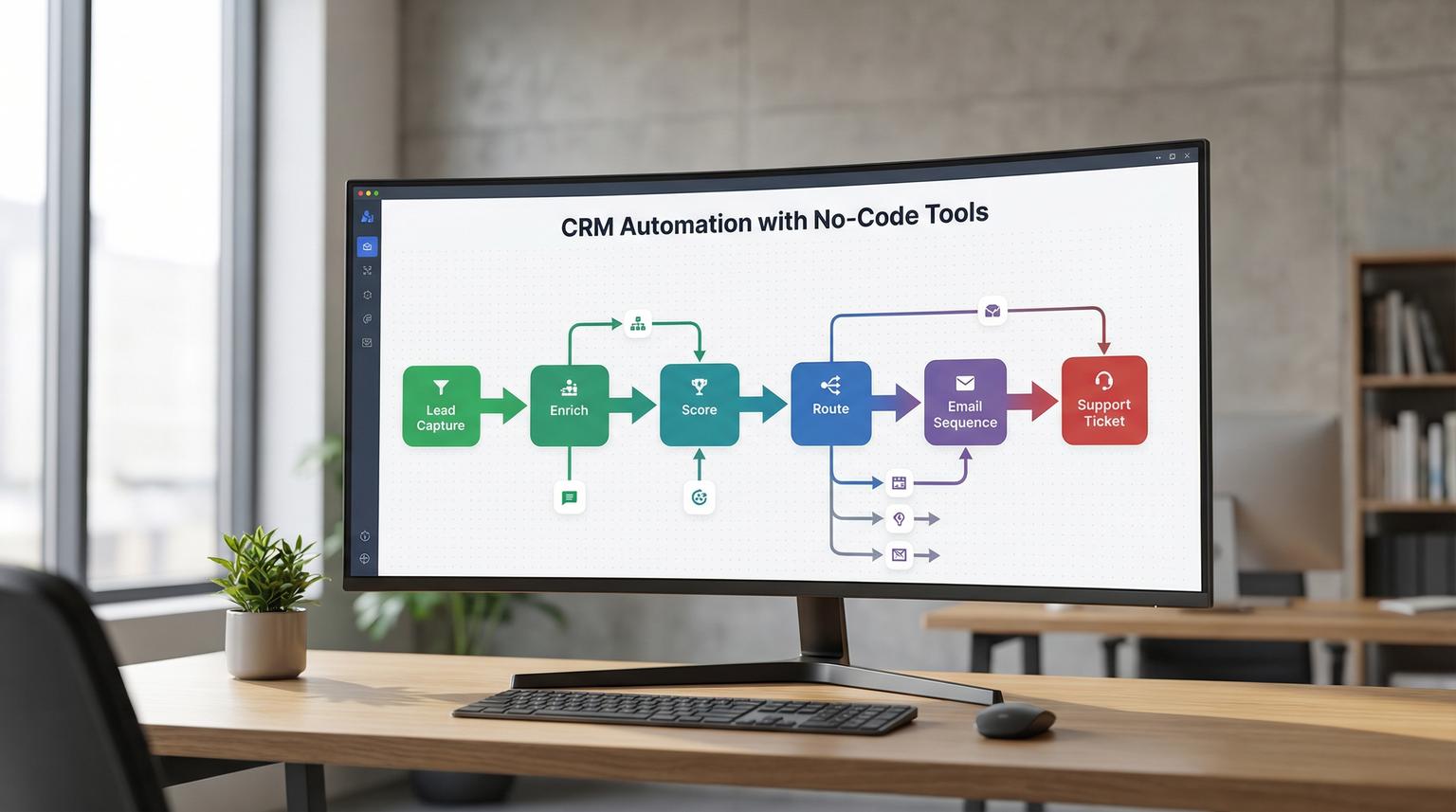
Most teams do not struggle because they lack a CRM. They struggle because customer data and customer actions live in too many places: forms, ads, spreadsheets, calendars, inboxes, chat widgets and support desks. This is where CRM automation with no-code tools becomes a practical advantage. With platforms like n8n, Zapier and Make you can connect your CRM to your marketing and support stack and run consistent customer journeys without writing code.
This guide is for business owners, ops managers and marketing or CRM teams who want fewer handoffs, cleaner data and faster response times across HubSpot, Pipedrive and Zoho. We will walk through journey design, real workflow examples and ready-to-use blueprints ThinkBot commonly implements.
At a glance:
- Map your customer journey as events and states, then automate the transitions in your CRM pipeline.
- Sync lead capture, enrichment, scoring, routing, email sequences and support handoffs across tools.
- Use guardrails like idempotency, rate limits and rollbacks to keep automation reliable.
- Start with proven playbooks: abandoned lead reactivation, trial onboarding and churn prevention.
Quick start
- Pick one journey to automate end-to-end: inbound lead -> qualified -> booked meeting -> won -> onboarding.
- Choose your system of record (usually the CRM) and define required fields and naming rules.
- Create one trigger (form submit, inbound email, webhook) and one outcome (create or update deal and contact).
- Add enrichment and routing: company lookup, owner assignment, pipeline stage update, task creation.
- Connect messaging: send the right email sequence and notify sales or support in the right channel.
- Test with 10 real examples, then add monitoring, retries and a rollback plan.
You can build an end-to-end customer journey without code by using a visual automation platform to connect your lead sources, CRM, email system and support tools. Start with a single trigger like a form submission, then automate enrichment, pipeline updates, owner assignment and personalized emails. Add handoffs to sales and support plus monitoring and rollback so the journey stays reliable as volume grows.
What an end-to-end CRM journey looks like in practice
Think of a customer journey as a set of transitions your business wants to happen automatically. A transition is triggered by an event and results in a CRM change plus one or more actions in other systems.
Common journey stages we automate for clients include:
- Lead capture -> create or update contact, create deal, tag source and campaign.
- Qualification -> enrich company data, score lead, route to the right owner.
- Sales motion -> update pipeline stage, create tasks, schedule follow-ups, send sequences.
- Onboarding -> create project, provision access, send onboarding emails, collect required docs.
- Support and success -> create tickets, summarize interactions, detect churn risk and trigger outreach.
In 2026 most teams already have the apps. The win comes from defining what should happen automatically and making the CRM reflect reality at all times.
Choosing the right no-code automation approach for your CRM stack
n8n, Zapier and Make can all connect CRMs, email platforms and support tools. The best choice depends on how complex your routing is, how much control you need and how you want to deploy and govern workflows. To go deeper into platform tradeoffs, see our automation platform comparison for CRM, email and AI workflows which expands on these differences.
Make offers a strongly visual scenario builder and is often a good fit when you want to see data move through routes and conditions. Their overview of no-code automation frames a useful distinction between text-based and visual approaches that we also see in CRM projects. n8n is excellent when you want flexible logic, self-hosting options and strong workflow governance. Zapier is often fastest for simpler trigger-action patterns and quick wins.
Comparison table: practical differences for CRM journeys
| Need | n8n | Make | Zapier |
|---|---|---|---|
| Complex branching and multi-step routing | Strong, supports complex logic and sub-workflows | Strong, visual routes are easy to reason about | Good for simpler paths, can get harder to manage at scale |
| Change control and rollback discipline | Strong publish and version history patterns, safer iteration (see versioning) | Good, visual debugging helps, governance varies by team process | Basic, relies more on careful editing and testing discipline |
| Connecting unsupported tools via APIs | HTTP requests and custom logic are straightforward | HTTP connector is a common approach | Possible, sometimes more constrained depending on plan and app |
| Self-hosting and data residency preferences | Often a top choice for self-hosted deployments | Typically cloud-first, options depend on constraints | Cloud-first, best for quick deployments |
At ThinkBot we implement across these platforms. The best results come from designing the journey first then selecting the tool that matches your complexity and governance needs.
Journey mapping checklist for reliable CRM automation
Use this checklist when you map a journey before building anything. It prevents the most common failures: duplicate records, wrong pipeline stages and emails sent at the wrong time.
- Define your system of record: which app owns contact, company and deal truth.
- List triggers as events: form submit, inbound email, calendar booking, payment success, ticket created.
- Define required fields for each stage: lifecycle stage, lead source, owner, pipeline, next step date.
- Choose a unique key strategy: email, CRM contact ID and external IDs for ads or product accounts.
- Write dedupe rules: when to update vs create, how to merge, which fields never overwrite.
- Define scoring inputs: firmographics, intent events, engagement and product usage signals.
- Clarify routing: territories, round-robin, account-based assignment and SLA rules.
- Define messaging rules: which sequence, when to stop, suppression lists and consent requirements.
- Document handoffs: sales -> onboarding, onboarding -> support, support -> success.
- Add observability: what to log, who gets alerts and what metrics indicate drift.
This is the difference between a set of disconnected zaps and an actual operating system for your revenue process.
Build the core workflow: lead capture -> enrichment -> pipeline -> outreach
Here is a practical pattern we deploy in HubSpot, Pipedrive and Zoho setups. The same logic applies no matter which CRM you use.

Step 1: Capture the lead and normalize fields
Triggers can be a web form, a Typeform, a landing page submission or a webhook from your product. The first automation step should normalize data so the CRM stays clean. Examples:
- Split full name into first and last name.
- Standardize phone formatting.
- Map UTM parameters into consistent properties.
- Set lifecycle stage and lead source based on rules.
Step 2: Dedupe and upsert into the CRM
Instead of always creating a new contact, use an upsert strategy:
- Find contact by email.
- If found, update only allowed fields and append timeline notes.
- If not found, create contact, then create a deal if your process is deal-driven.
Step 3: Enrich and score the lead
Lead enrichment can be as simple as extracting domain from email and populating company name. For deeper enrichment, call an enrichment API or your internal database. Then compute a score and store it in the CRM.
We recommend storing why a lead got a score, not just the number. That makes sales adoption much higher.
Step 4: Route to the right owner and create next actions
Routing is where no-code platforms earn their keep. Typical rules include:
- Round-robin for SMB leads.
- Territory routing by country, state or region.
- Account-based routing by company domain match to existing accounts.
- SLA-based escalation if no response within X minutes.
Actions should include pipeline stage updates, task creation and notifications to the right channel.
Step 5: Start the right email sequence and stop the wrong ones
Connect your email platform (HubSpot sequences, Mailchimp, ActiveCampaign or similar) and start a targeted sequence based on score, segment and intent. Also add suppression rules so you do not send a generic nurture to someone who already booked a call.
Example payload: a simple lead event schema
Even in no-code projects, a consistent event schema prevents confusion. Here is a compact example you can adapt for webhooks and internal handoffs:
{
"event": "lead.captured",
"source": "website_form",
"timestamp": "2026-02-04T12:34:56Z",
"person": {
"email": "[email protected]",
"first_name": "Jane",
"last_name": "Doe",
"phone": "+15551234567"
},
"company": {
"domain": "acme.com",
"name": "Acme"
},
"attribution": {
"utm_source": "google",
"utm_campaign": "demo-intent",
"utm_medium": "cpc"
},
"crm": {
"target": "hubspot",
"pipeline": "new_business"
}
}
This makes it easier to debug later and it also lets you reuse the same workflow for multiple lead sources. For more examples of how we design these schemas and flows, see our guide on no-code automation solutions for client onboarding and CRM workflows.
ThinkBot blueprints: 3 automations we deploy constantly
Below are three ready-to-use journey patterns that solve common requests we get from sales and ops teams. Each can be implemented in n8n, Zapier or Make and connected to HubSpot, Pipedrive or Zoho.
1) Abandoned lead reactivation (no response within SLA)
- Trigger: new lead created or meeting requested.
- Check: no outbound email logged and no call outcome within X hours.
- Actions: send a short personal follow-up email, create a high-priority task, notify a manager if still untouched after Y hours.
- CRM updates: set stage to "At risk" and store SLA breach timestamp.
2) Trial onboarding (activation milestones)
- Trigger: trial started event from product or billing.
- Actions: create onboarding deal or ticket, enroll in onboarding sequence, schedule a check-in task for day 2 and day 7.
- Milestones: if user completes activation event, move stage to "Activated" and stop generic emails.
- Handoff: if no activation by day 3, route to customer success for proactive outreach.
3) Churn prevention (early warning signals)
- Trigger: low usage event, failed payment or negative support sentiment flag.
- Actions: create a retention task, open a support ticket if needed and send a targeted save email.
- CRM updates: set health score, add churn reason category and log last risk signal.
- Escalation: if risk persists for N days, notify success lead and schedule a call.
If you want these implemented for your stack with clean data rules and monitoring, we can help. Book a working session with ThinkBot here: book a consultation.
Failure modes and mitigations for no-code CRM workflows
Automation is only valuable if it is reliable. These are the most common failure modes we see in CRM journeys and the guardrails we put in place.
- Failure: Duplicate contacts or deals created from multiple lead sources. Mitigation: Upsert by email and domain, store external IDs and add a dedupe step before create.
- Failure: Pipeline stage flips backwards due to out-of-order events. Mitigation: Enforce allowed stage transitions and ignore older timestamps.
- Failure: Emails sent twice or to the wrong segment. Mitigation: Use idempotency keys, store "sequence_enrolled" flags and add suppression logic.
- Failure: API rate limits cause partial updates. Mitigation: Add retries with backoff, queue updates and batch writes where possible.
- Failure: Silent failures that nobody notices for days. Mitigation: Central error alerts, daily reconciliation reports and dashboard metrics for volume and conversion.
- Failure: A workflow change breaks production. Mitigation: Use versioned publishing and rollback discipline, n8n in particular supports safer iteration with publish and version history concepts (see publish controls).
These guardrails are also why we recommend treating automations like operational infrastructure, not like quick experiments.
Implementation playbook: owners, monitoring and rollback
If you want automations that survive team changes and tool changes, define ownership and an operating rhythm. For broader patterns on designing resilient CRM and AI workflows, you can also review our article on B2B automation best practices with n8n and CRM workflows.
Roles and owners
- Business owner: defines journey goals and success metrics.
- CRM owner: owns fields, pipelines and data rules.
- Automation owner: builds workflows, manages credentials and monitors runs.
- Support or success lead: owns handoffs and SLA definitions.
Monitoring basics
- Track run failures and error rate by workflow.
- Log key events: lead created, deal created, stage changed, sequence enrolled, ticket created.
- Reconcile daily: leads captured vs contacts created, deals created vs meetings booked.
- Alert on anomalies: sudden drop in lead volume, spike in duplicates or backlog in tasks.
Rollback steps
- Pause the workflow or disable the trigger if customer-facing messaging is impacted.
- Rollback to the last known good published version where your platform supports it.
- Replay failed items from logs or a dead-letter queue if you use one.
- Run a data fix script using no-code steps: find impacted records and correct fields.
- Document the change and update the checklist so it does not recur.

If you want to see examples of how we build and govern these automations across CRMs and platforms, you can also review our work here: portfolio.
FAQ
Answers to common questions we hear from teams planning end-to-end CRM journeys with no-code automation.
What is CRM automation with no-code tools?
It is the practice of connecting your CRM to other systems like forms, email platforms, calendars and support tools using visual workflow builders. Instead of writing code you configure triggers, rules and actions that keep your CRM updated and move customers through a defined journey automatically.
Which CRMs work best with no-code automation platforms?
HubSpot, Pipedrive and Zoho are common because they have mature APIs and strong native integrations. The best CRM is usually the one your team already uses consistently, then we design the automation around clean fields, pipelines and ownership rules.
Can no-code workflows handle complex routing and data enrichment?
Yes, when designed properly. You can enrich leads via APIs, compute lead scores, route by territory or account ownership and update multiple objects. The key is to add guardrails like dedupe logic, idempotency and retries so the workflow stays reliable.
How do you prevent duplicate contacts and accidental email sends?
Use an upsert strategy, define a unique key, store external IDs and add suppression checks before enrolling someone in a sequence. We also log enrollment state in the CRM so every downstream step can verify whether an action already happened.
Can ThinkBot Agency build these automations for our stack?
Yes. ThinkBot designs and implements end-to-end customer journeys across CRMs, email platforms and support tools using n8n, Zapier and Make. We focus on clean data models, reliable execution and monitoring so your team can scale without manual busywork. For a deeper dive into extending these journeys with AI, see our article on CRM automation with AI and end-to-end workflows.
