
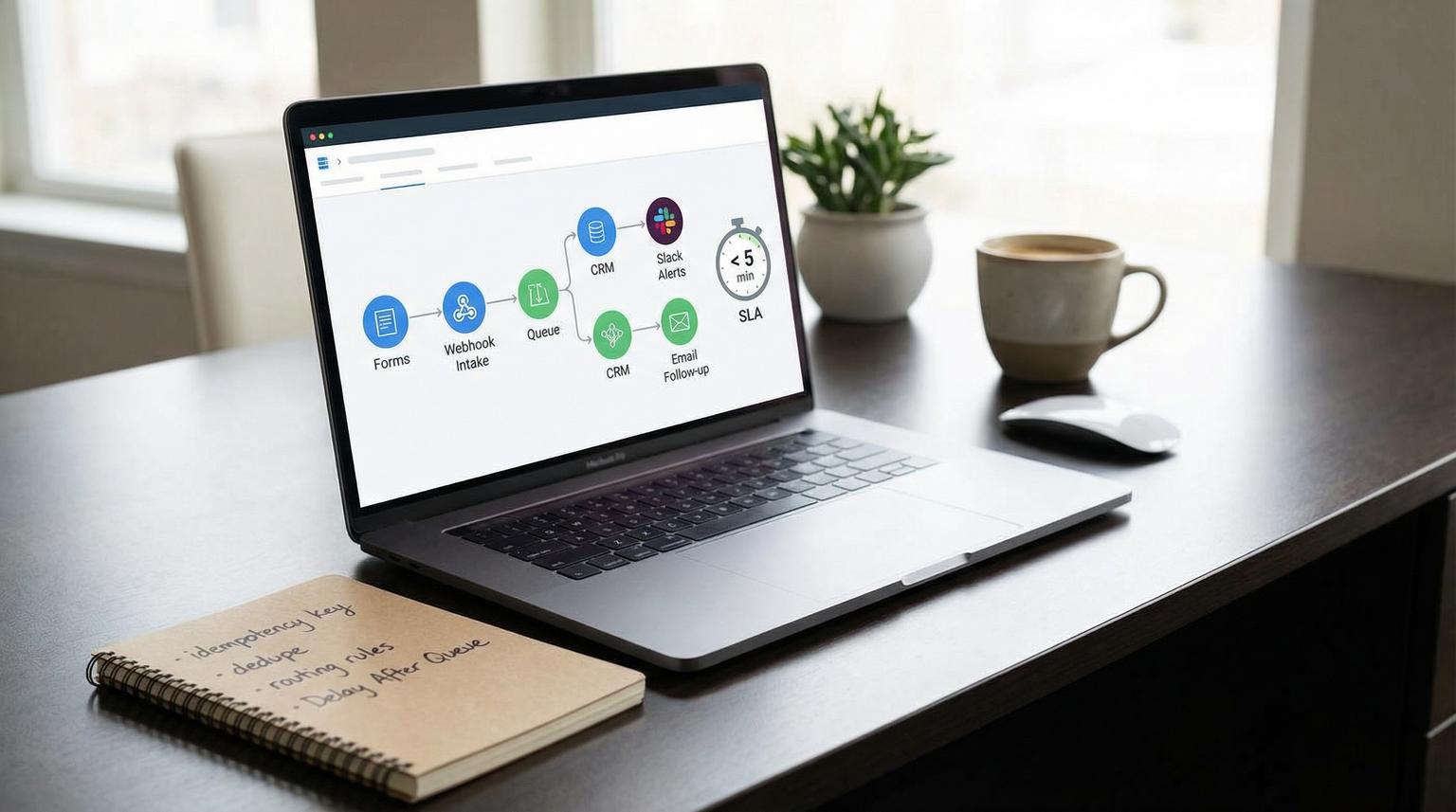
Speed to lead is not just a sales problem. It is a systems problem. If you rely on manual handoffs, one missed notification, one API timeout or one duplicate record can turn a hot inbound lead into a quiet loss. This playbook shows how CRM automation with Zapier can enforce a measurable under-5-minute lead-response SLA by capturing every lead, routing it deterministically, enriching and deduping before CRM writes and using a fail-safe queue with alerting so nothing disappears.
Who this is for: ops managers, founders and marketing or RevOps teams who want reliable ownership assignment, clean CRM data and immediate follow-up without babysitting automations.
At a glance:
- Route every inbound lead using clear rules (priority tiers, territory and round-robin) so ownership is predictable.
- Prevent duplicates by using a match-key hierarchy and idempotency keys before creating or updating CRM records.
- Add enrichment only after validation so bad inputs do not pollute your CRM.
- Never drop leads by writing raw payloads to a fallback queue (Zapier Storage or Tables) plus Slack or email alerts.
- Track SLA with explicit timestamps so you can report weekly on response speed and failure recovery.
Quick start
- Define your SLA and what counts as first response (task created, email sent or call attempt) then add timestamp fields in your CRM.
- Build a lead intake Zap that captures the raw payload and writes it to a fallback queue first (Storage or Tables) with a unique idempotency key.
- Add validation, dedupe and enrichment steps then a deterministic routing step that assigns an owner.
- Use a shared Delay After Queue step before the CRM write actions to reduce rate-limit failures.
- Trigger immediate follow-up (task plus email or Slack) and write back assigned_at and first_followup_sent_at.
- Add SLA monitoring: alert when assigned_at is missing after 5 minutes and review Zap History daily for replays.
A reliable under-5-minute lead-response SLA in Zapier works by separating lead intake from CRM updates, enforcing deterministic assignment rules and writing every lead into a fallback queue before you attempt any API calls. Then you dedupe and enrich, queue CRM writes to avoid rate limits, trigger immediate follow-up and track timestamps for received, assigned and first touch. With alerts and replay procedures, you stop silent failures and prevent dropped leads.
The SLA architecture that prevents dropped leads
Most teams build a single Zap that starts with a form submission and ends with a CRM record and a task. It looks fine until volume spikes or an integration hiccup hits. The failure mode is usually silent: the trigger fires, a step errors, the team never sees it and the lead sits unworked.
Instead, treat your workflow like an operating model with three layers:
- Intake layer (capture and persist): accept leads from forms, ads, chat and scheduling tools and immediately persist the payload to a queue so the lead exists even if the rest fails.
- Processing layer (clean and decide): validate, dedupe, enrich and compute routing decisions without hammering the CRM.
- Execution layer (write and notify): queue CRM writes, assign owner, create tasks and send follow-ups plus write SLA timestamps.

This separation matters because inbound triggers can be delayed or throttled during bursts. Zapier notes that webhook intake can be rate limited and even return HTTP 200 while processing is delayed which can break a strict SLA unless you design around it. See Webhooks by Zapier rate limits for the operational constraints.
Use an idempotency key from the start
Idempotency is your main defense against duplicate records when a Zap retries, a run is replayed or the same lead submits twice. Create a stable key early and reuse it everywhere.
- If your source provides a lead ID, use it.
- If not, hash a normalized value like lowercased email plus form ID plus submission timestamp bucket.
- Store the key in the fallback queue record and in the CRM (custom field) when possible.
Minimum data contract for every lead
Before you do anything else, decide the minimum fields that must exist to proceed and what happens when they do not. Example contract:
- Required: email or phone, source, submitted_at, consent status if applicable
- Optional: company, website, UTMs, job title, message
- If required fields are missing, route to an exception queue and alert ops instead of guessing.
Lead routing rules that work in production
Routing is where many SLAs fail. Not because the logic is hard but because it is not governed. People add one more exception, the round-robin breaks and ownership becomes random. Keep routing deterministic, testable and easy to change without editing ten Zaps. If you need a broader blueprint for governance (routing precedence, field hygiene, audit trails), use our pillar guide: CRM automation framework for routing, lifecycle hygiene, and reporting.
Routing order of operations
Use this decision order so the highest priority logic wins:
- Priority tiers: VIP accounts, partner referrals, high intent sources or specific form selections should override everything.
- Territory rules: country, state, region or industry routing based on your CRM fields.
- Account matching: if the company already exists and has an assigned rep, route to that rep to preserve continuity.
- Round-robin: only for the remaining pool.
Round-robin that does not drift
Zapier does not natively keep a perfect rotating pointer across users unless you store state. Use Zapier Storage or Tables to hold the last_assigned_index per team queue. Then assign the next rep based on that index and update it atomically.
Real-world ops insight: teams often forget to remove a rep from the rotation when they go on leave. Build a simple “active” flag in your rep table so the Zap always picks from active users only. That reduces emergency reassignments which are a common cause of delayed first touch.
Decision rule for speed vs fairness
Fair round-robin is not always the right objective. If your SLA is strict, route by availability. One practical rule: during business hours use availability or “last activity” weighting. After hours route to an on-call queue plus an automated first follow-up message.
Dedupe and enrichment that keep your CRM clean
If you create duplicates, your SLA metrics become meaningless and reps lose trust in alerts. Dedupe must happen before you create records and it must have a clear match-key hierarchy. For a broader look at how no-code systems handle end-to-end CRM workflows (capture → dedupe → follow-up), see CRM automation with no-code tools.
Match-key hierarchy
- Primary: normalized email (trim, lowercase).
- Secondary: phone (E.164 formatting) when email is missing.
- Tertiary: company domain for company objects and associations.
Many CRMs dedupe contacts by email by default. For example HubSpot contacts dedupe by email and companies by primary domain. If email is missing, every import can become a new contact which is why you should treat missing email as an exception path. See deduplication of records for how those defaults behave.
Validation checklist before any CRM write
- Normalize email and validate format. If missing, send to exception queue and alert.
- Normalize company domain (strip protocol and paths). If missing, keep company optional and do not fabricate it.
- Check for role-based emails (sales@, info@) if your team treats them differently.
- Set source fields consistently (channel, campaign, medium, content).
- Attach the idempotency key to the record payload and to the fallback queue item.
Enrichment without slowing the SLA
Enrichment is helpful but it can become the bottleneck. The tradeoff is speed vs completeness. A practical rule: do not block assignment and first follow-up on enrichment unless your routing depends on it. Instead:
- Run lightweight enrichment first (domain parsing, country from phone, UTM cleanup).
- Assign owner and trigger follow-up.
- Run heavier enrichment as a second Zap that updates the CRM later.
Common mistake that causes duplicates
Replaying errored runs without an idempotency key often creates a second contact and a second task. Later, reps respond to one record and marketing nurtures the other. You can avoid this by always searching before creating, using update-if-found logic and recording the dedupe decision in the queue item for auditing.
Fallback queue design with Storage or Tables plus alerts
The fail-safe queue is the difference between “automation” and “reliable automation.” The goal is simple: every lead must be recoverable even when a Zap fails mid-run, a webhook processing delay hits or the CRM API rate-limits.
Queue schema (minimum viable)
| Field | Purpose |
|---|---|
| queue_id | Unique key for the queue item (can be the idempotency key) |
| raw_payload | Original submission JSON for rehydration |
| normalized_payload | Cleaned fields you plan to write to the CRM |
| lead_received_at | Timestamp when the lead was captured by Zapier |
| status | new, processing, completed, exception, needs_review |
| assigned_owner | Owner ID or email once routing runs |
| crm_record_id | Contact or lead ID after create or update |
| error_code | 429, timeout, validation_error, duplicate_ambiguous |
Where the queue sits in the Zap
- Trigger fires (form, ads lead, chat, webhook)
- Immediately create or upsert queue item in Storage or Tables with raw payload and lead_received_at
- Validate and normalize
- Dedupe lookup in CRM
- Routing decision
- Queue CRM writes using Delay After Queue
- Write to CRM then mark queue item completed

Alerts that catch silent failures
Create two alert paths:
- Hard failure alerts: when any step errors, send Slack or email to an ops channel with queue_id, source and error message then set status=exception.
- SLA breach alerts: a scheduled Zap runs every 5 minutes and finds queue items where status is not completed and now - lead_received_at > 5 minutes. Alert the team and escalate if it passes 15 minutes.
Zapier Storage is often fastest to implement. Zapier Tables is easier for humans to inspect, filter and triage. Either works as long as it is the system of record for “what we received.”
Protect CRM writes with Delay After Queue
To reduce bursts that trigger rate limits, add Delay After Queue immediately before the CRM create or update steps. Use a shared queue name like crm-write-queue across any Zaps that write to the same CRM objects. Zapier explains how Delay After Queue serializes runs to help avoid throttling and record conflicts. See Add delays to Zaps for mechanics and limits.
SLA instrumentation and weekly reporting
If you cannot measure the SLA, you cannot enforce it. Use explicit timestamps that live in your CRM so reporting is consistent even if tools change.
Recommended timestamp fields
- lead_received_at: when Zapier captured the lead (from trigger)
- assigned_at: when owner was written to the CRM
- first_followup_sent_at: when the first automated follow-up was sent or the first task was created
- first_connection_at: when a rep actually connects (optional and often manual)
This mirrors the common “speed to lead” concept used in CRMs such as HubSpot where you measure time from conversion to first connection. If you are in HubSpot, the measurement approach is discussed in how to measure speed to lead.
What counts as “response”
Define this once and stick to it. Otherwise teams game the metric by creating a task without outreach. For many orgs, a good hierarchy is:
- Best: first_connection_at (actual contact)
- Good proxy: first_followup_sent_at (email or SMS sent)
- Weak proxy: task created
A simple weekly SLA report
- Median and 90th percentile time from lead_received_at to first_followup_sent_at
- Count of leads breaching 5 minutes and 15 minutes
- Error rate by integration step (CRM write, enrichment, notifications)
- Backlog size in fallback queue by status
Failure modes and how to mitigate them
Below are the reliability issues we see most often when teams try to respond in under 5 minutes.
| Failure mode | What you see | Mitigation |
|---|---|---|
| Webhook burst throttling | Some leads arrive late or show processing delays even when the trigger returned 200 | Persist to fallback queue first, distinguish intake time vs CRM write time and ask the source system to retry on non-200 with backoff. Reference Zapier webhook limits. |
| CRM API rate limit (429) | Owner assignment or task creation fails intermittently | Use Delay After Queue before CRM writes, reduce parallelism and batch where possible. |
| Duplicate or ambiguous match | Multiple contacts with same email or missing email causes create to error or create duplicates | Use match-key hierarchy and route ambiguous cases to exception queue with an alert instead of guessing. See dedupe rules. |
| Silent Zap step failure | No one notices for hours | Send hard-failure alerts to Slack or email, monitor SLA breaches via scheduled checks and keep a human-readable queue. |
| Replay creates duplicates | After fixing a Zap, replaying runs produces double tasks or contacts | Store idempotency key, search-before-create and update queue item status so replays are safe. Use Replay Zap runs as an ops tool, not a guessing game. |
Operational rollout, ownership and recovery
To keep a fast SLA stable, treat it like production software. Assign owners, set up monitoring and define how you recover when something breaks.
Roles and responsibilities
- RevOps owner: owns routing rules, rep rotations and SLA definitions.
- Ops or automation owner: owns Zapier changes, queue health and alert triage.
- Sales manager: owns rep compliance for first_connection_at logging and escalation behavior.
Daily and weekly ops loop
- Daily: review exceptions in the fallback queue, fix mapping issues and replay errored runs in bulk when needed.
- Weekly: review SLA report, update routing governance and remove or add reps to the rotation table.
Zapier supports manual replay and autoreplay for errored runs. Replays count as new runs and may consume tasks again so you should use them intentionally and ensure your idempotency approach prevents duplicates. Details are covered in Replay Zap runs.
When this approach is not the best fit
If you receive extremely high lead volume that requires sub-minute response or you need complex, multi-step enrichment and scoring that must happen before assignment, you may outgrow a Zapier-centric orchestration pattern. In those cases, a dedicated message queue and a custom service can provide tighter control. For most small to mid-market teams, the queue plus alerts pattern in Zapier is enough and much faster to deploy.
Mini template: queue item payload
This is a simple shape you can store in Zapier Tables or Storage to support recovery and monitoring:
{
"queue_id": "lead_7f3c1f0a",
"lead_received_at": "2026-03-25T14:03:12Z",
"source": "website_form",
"raw_payload": {"email":"[email protected]","company":"Example Inc","message":"Pricing"},
"normalized_payload": {"email":"[email protected]","company_domain":"example.com"},
"status": "processing",
"assigned_owner": null,
"crm_record_id": null,
"error_code": null,
"error_detail": null
}
Primary CTA: If you want ThinkBot Agency to implement this under-5-minute SLA workflow in your exact stack and include monitoring, dedupe governance and a fail-safe queue, book a consultation.
For examples of the kinds of automation systems we ship across CRMs, email platforms and internal ops tools, you can also review our portfolio.
FAQ
Common implementation questions we hear when teams roll out a fast lead-response SLA with Zapier.
How do I keep the lead-response SLA if Zapier webhooks are delayed?
Separate intake from processing. Persist the raw lead to a fallback queue immediately, record lead_received_at and then process CRM writes and follow-up steps after. This way, even if webhook processing is delayed during bursts, you can still recover every lead, measure the delay and alert on any item that is not assigned within 5 minutes.
What routing rules should I start with for reliable assignment?
Use a simple precedence order: priority tiers first, then territory rules, then account matching, then round-robin. Keep reps and eligibility in a small table with an active flag so the rotation does not drift. If a lead cannot be matched confidently, route it to an exception queue and alert instead of guessing.
How do I prevent duplicates when I replay Zap runs or a lead submits twice?
Create an idempotency key at intake, store it in the fallback queue and search your CRM before creating a record. Prefer update-if-found behavior and record the decision. When you replay errored runs, the Zap should resolve to the same CRM record rather than creating a new one. If you’re evaluating alternatives to Zapier for similar patterns (webhooks, validation, dedupe, SLA timers), compare with our playbook on automating CRM workflows with n8n.
Should I use Zapier Storage or Zapier Tables for the fallback queue?
Use Storage when you want the simplest key-value persistence and speed. Use Tables when you want human-friendly triage with filters, views and status columns. Either option works as long as every lead is persisted first, statuses are updated and alerts fire on exceptions and SLA breaches.
What should I track to report speed to lead weekly?
At minimum track lead_received_at, assigned_at and first_followup_sent_at. If you can, also track first_connection_at for actual contact. Report median and 90th percentile response times plus the count of leads that breached 5 minutes and the size of the exception backlog so you can fix systemic issues quickly.
