
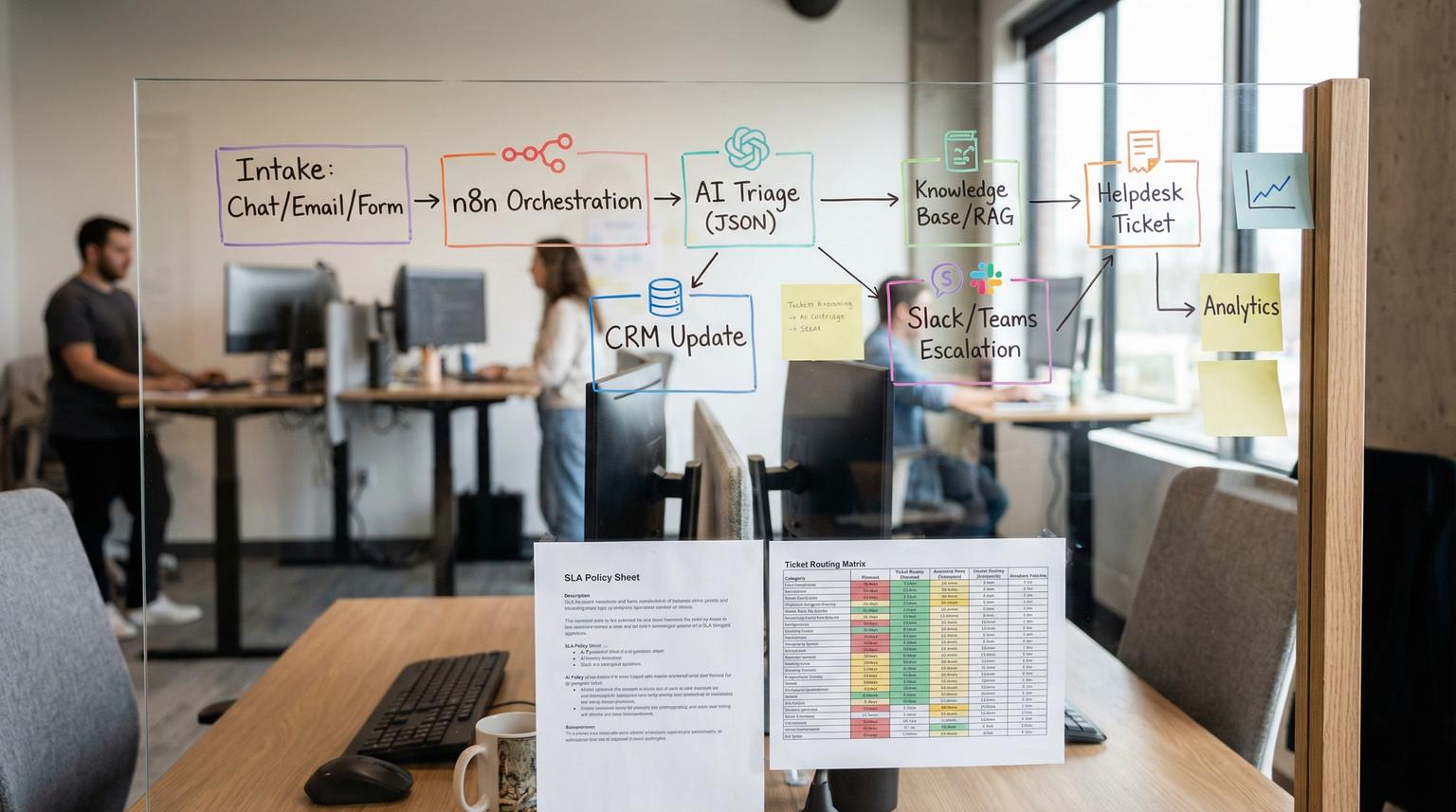
Support teams in 2026 are expected to reply faster, personalize every interaction and keep CRM data clean, all while ticket volume keeps climbing. This is where custom AI chatbot development becomes practical, not just experimental. In this guide, we show how ThinkBot Agency designs an n8n-powered helpdesk that can triage live chat and email, answer FAQs from an approved knowledge source, collect missing details, update your CRM and escalate edge cases to humans with the right context.
This is written for founders, ops leaders and support or RevOps teams who want measurable deflection, fewer back-and-forth emails and better SLA performance without losing control of quality or data privacy.
At a glance:
- Use n8n to connect chat or email intake to your helpdesk, CRM and Slack or Teams for escalations.
- Classify intent, urgency and sentiment with structured outputs, then route tickets deterministically.
- Ground AI answers in an approved knowledge base and use safe fallbacks when confidence is low.
- Give agents conversation summaries and extracted fields so they start with complete context.
- Track deflection, repeat issues and SLA risk in a lightweight analytics dashboard.
Quick start
- Pick your intake channels (chat widget, shared inbox, web form) and decide which should create tickets automatically.
- In n8n, build an intake workflow that normalizes messages into one schema (customer identity, message, channel, timestamps).
- Add an LLM classification step that returns structured fields (intent, urgency, sentiment, confidence) and a suggested next action.
- Route to: self-serve answer, ticket creation in Zendesk or Freshdesk, CRM update in HubSpot or Salesforce or human review when confidence is low.
- Add SLA timers and "due soon" escalations to Slack or Teams, then log all outcomes for reporting and tuning.
An n8n-powered AI helpdesk works by capturing every incoming request, classifying it into a small set of support intents, answering only from approved knowledge when possible, creating and enriching tickets when needed and escalating high-risk or low-confidence cases to a human. The best implementations keep deterministic rules around the AI so your team gets speed and consistency without losing safety, auditability or CRM accuracy.
Reference architecture: n8n as the support automation hub
Think of n8n as the orchestration layer that sits between your channels and systems. Instead of replacing your helpdesk or CRM, it coordinates them with a repeatable workflow. The same patterns apply whether your stack is Zendesk, Freshdesk, HubSpot Help Desk, Salesforce Service Cloud or a custom ticket database. For a deeper end-to-end framework, see our chatbot implementation guide for customer support with n8n and AI.
Core components
- Intake: live chat webhook, shared inbox (Gmail or Microsoft 365), contact forms and in-product feedback.
- Normalization: map all channels into one internal schema so your routing is consistent.
- Identity resolution: match email/domain/user ID to CRM contact and company, identify VIP or contract tier.
- AI triage: intent, urgency, sentiment, key entities, missing fields and a response draft.
- Deterministic routing: create ticket, answer with knowledge base, request more info or escalate.
- Agent assist: summary, suggested reply, links to relevant articles and extracted fields.
- Analytics: deflection rate, top intents, SLA risk and common product issues.
n8n has several proven workflow patterns for support triage and reporting, including Gmail to Slack escalation and dashboards, which you can adapt to your own helpdesk and CRM using the same building blocks described in this workflow.
Support intake and ticket triage design that scales
Triage is where automation either saves the team hours or creates chaos. The key is to keep the AI output small, structured and directly mapped to actions. Avoid open-ended "agent" behavior as the first step. Start with classification and extraction, then apply rules.
Recommended triage fields
These fields are easy to store and map to common ticketing systems:
- Intent or category (billing, bug, account access, integration, how-to)
- Urgency (low, medium, high, critical)
- Sentiment (positive, neutral, negative, critical)
- Confidence (0.0 to 1.0)
- Key issues (array)
- Missing details (array)
- Suggested reply (draft)
- Recommended route (self-serve, create ticket, human review, escalate now)

Support triage checklist for your n8n workflow
Use this checklist when you build or audit your first version. It prevents the most common failure modes: routing noise, duplicates and unclear ownership.
- Define what counts as "a ticket" vs "a question" per channel.
- Normalize all inbound messages into one schema before calling any AI model.
- Decide your label taxonomy for intent, urgency and sentiment and keep it stable for reporting.
- Require structured classifier output with a confidence score.
- Set a confidence gate, for example anything below 0.7 goes to human review.
- Add deduplication using a correlation ID (message ID, email thread ID or chat conversation ID).
- Implement a numeric priority score in a Code node so ops can tune it without prompt changes.
- Route critical urgency or critical sentiment to an escalation channel with context and a suggested reply.
- Log every triage decision and outcome (auto-answer, created ticket, escalated, ignored) for analytics.
- Use a second periodic analysis to find trends and repeat issues for product and ops updates.
For an example of email-based intake, escalation and a lightweight dashboard, review the pattern used in this n8n template and mirror the key idea: one pass per ticket for classification and a second pass for aggregated insights.
How do you ground AI answers in a maintained knowledge base?
Deflection only works when the bot answers correctly and consistently. We recommend a "grounded by default" approach: the assistant should answer from approved sources, not from generic model knowledge. There are two common options:
- Help center search tool: query your existing support portal and have the assistant compose an answer from returned snippets.
- Vector search RAG: index docs into a vector store and retrieve relevant chunks.
When speed and maintenance matter, using your existing portal search API can be ideal. n8n can expose a subworkflow as a "knowledgebase tool" that searches your help center, returns top results and provides URLs the agent can cite. This pattern is described in this example and it is a strong option when you want the help center to remain the single source of truth.
Safe fallback responses that protect trust
- If no knowledge results are returned, ask 1 to 3 clarifying questions and offer to create a ticket.
- If the question is high risk (billing disputes, security, cancellations) route to a human queue by policy.
- If confidence is below threshold, do not guess. Summarize and escalate with the missing details list.
Workflow build: from chat or email -> helpdesk -> CRM -> escalation
Below is a practical build sequence we use at ThinkBot Agency. The specific nodes change per stack but the logic stays consistent.
Step 1: Intake and normalize
Examples:
- Email: Gmail trigger polling unread messages on an interval.
- Chat: webhook from your chat widget or an n8n chat trigger.
- Forms: Webhook node or form provider connector.
Normalize into fields like: channel, from_email, customer_id, subject, body_text, thread_id, message_id and received_at.
Step 2: Identity resolution and CRM enrichment
Before you route, enrich. Common lookups:
- HubSpot: search Contact by email, then Company by domain, then pull lifecycle stage and owner.
- Salesforce: find Contact and Account, then entitlements or contract tier.
- VIP detection: tag accounts by MRR tier, plan name or a custom property.
This is where automation becomes a revenue-protecting process, not just a support shortcut. The escalation rules can use VIP or renewals data from CRM. If you need a field-mapping and idempotent upsert blueprint, use our API integration solutions guide for unifying CRM, email, and helpdesk data.
Step 3: AI triage with structured outputs
Keep outputs deterministic. A small contract makes routing stable:
{
"intent": "Billing|Bug|HowTo|AccountAccess|Integration|Other",
"urgency": "Low|Medium|High|Critical",
"sentiment": "Positive|Neutral|Negative|Critical",
"confidence": 0.0,
"missing_details": ["..."],
"key_issues": ["..."],
"suggested_reply": "...",
"recommended_route": "Answer|CreateTicket|HumanReview|Escalate"
}
We often compute a priority score in a Code node using urgency and sentiment weighting so ops can tune behavior without reworking prompts. This mirrors the approach used in this workflow.
Step 4: Create or update helpdesk tickets
Typical mappings:
- Zendesk or Freshdesk: create ticket, set tags from intent, set priority from score, set group or assignee from routing rules.
- HubSpot Help Desk: create ticket and set properties used for SLA segmentation and reporting.
- Custom: store a record in Postgres or Airtable plus a link back to the thread.
Step 5: CRM updates and closed-loop data
Decide which support events should update CRM. Common safe updates:
- Log a support interaction note on the contact record.
- Set a "Support last contacted" date.
- Increment a "Support touches" counter for churn risk scoring.
- Create a task for the account owner when the ticket is high priority or cancellation-related.
Step 6: Escalation to Slack or Teams with SLA context
Escalation should be policy-driven, not ad hoc. Use the "due soon" concept to warn before breaches. If you use HubSpot SLAs, note that SLAs include first reply, next reply and close goals, along with schedules and pause conditions, which map cleanly to automation timers and reminders as described here. For a full system view of triage, routing, SLAs, knowledge, QA and human handoff, use The Customer Support Automation Playbook: Triage, Routing, SLAs, Knowledge, QA, and Human Handoff as One System.

Failure modes and mitigations for an AI helpdesk
Automation is only valuable when it is reliable under real-world messiness. Use the list below during design reviews and pre-launch testing.
Common failure modes -> guardrails
- Wrong routing (incident vs request) -> Require structured outputs with confidence and send low-confidence cases to human review.
- Long transcripts create messy tickets -> Add a summarization step to produce short_description and description fields before ticket creation.
- Duplicate tickets from polling or retries -> Use correlation IDs and idempotency checks before creating a new ticket.
- Sensitive data is stored or sent to tools -> Sanitize PII fields, limit what is logged and store secrets in n8n credentials.
- Runaway costs from repeated model calls -> Rate-limit AI nodes, skip AI for known deterministic intents and cache results for repeated FAQs.
- Over-confident answers harm trust -> Ground responses in knowledge sources and require a fallback when results are empty.
If you want a concrete example of chat triage routing and confidence gating, the branching pattern in this workflow demonstrates the idea well and it translates directly to Zendesk, Freshdesk or HubSpot via their APIs.
Rollout plan and metrics to prove support cost reduction
A successful launch looks boring. It is staged, measurable and reversible. At ThinkBot Agency, we recommend shipping in phases so you can prove value with low risk.
Phase 1: Agent assist only
- AI generates intent, urgency, sentiment, extracted fields and a suggested reply.
- No auto-responses to customers yet.
- Measure: agent handle time, tagging consistency and escalation accuracy.
Phase 2: Safe deflection for known FAQs
- Auto-answer only for approved intents and only when grounded knowledge results exist.
- Anything ambiguous becomes a ticket or human review.
- Measure: deflection rate, CSAT impact, reopen rate and time to first reply.
Phase 3: Full routing and CRM synchronization
- Auto-create tickets with correct tags, priority and assignment.
- Update CRM properties and notify account owners for high-risk cases.
- Measure: SLA compliance, escalations, duplicate rate and time to resolution.
Metrics dashboard ideas
- Deflection rate (auto-answered and resolved without agent)
- Top intents and top missing details fields
- SLA "due soon" volume and breaches
- Escalation volume by reason (VIP, critical sentiment, refund keywords)
- Common product issues detected in weekly trend summaries
If you want to see how we implement real-world n8n workflows across helpdesk, CRM and internal notifications, you can review our automation examples in the ThinkBot Agency portfolio.
Primary CTA: If you want a production-grade build with privacy controls, human-in-the-loop approvals and measurable reporting, book a consultation with ThinkBot Agency and we will map your current support flow into an n8n design you can operate confidently.
FAQ
Answers to common implementation questions we hear when teams evaluate AI-led support workflows and CRM-connected ticket automation. If you want a build blueprint that goes deeper on CRM integration, ticketing and human handoff, see our AI-powered chatbot development guide for support automation in n8n.
- What is custom AI chatbot development for customer support?
It is the process of designing a chatbot that matches your support policies, knowledge sources and tools, then integrating it with systems like Zendesk, Freshdesk, HubSpot or Salesforce so it can triage, answer FAQs, create tickets and escalate to humans safely. - Can an n8n workflow update my CRM without creating messy data?
Yes, if you restrict updates to a small set of approved fields, resolve identity before writing and log changes. We typically write interaction notes, last-contacted timestamps and escalation tasks while avoiding free-form overwrites of core CRM properties. - How do you prevent the bot from guessing answers?
We ground responses in an approved knowledge base, enforce confidence thresholds and implement fallbacks that ask clarifying questions or escalate. If retrieval returns no results or the request is high risk, the workflow routes to a human queue. - What helpdesks can ThinkBot Agency integrate with?
Common builds include Zendesk, Freshdesk, HubSpot Help Desk and Salesforce Service Cloud. When a native connector is not ideal, we use secure API connections through n8n with structured payloads and idempotency to avoid duplicates. - How long does it take to deploy an AI-powered helpdesk automation?
Most teams can pilot in 2 to 4 weeks with agent-assist and safe routing, then expand to deflection and CRM sync after validation. Timelines depend on channel count, knowledge base readiness and the number of escalation and SLA rules.
