
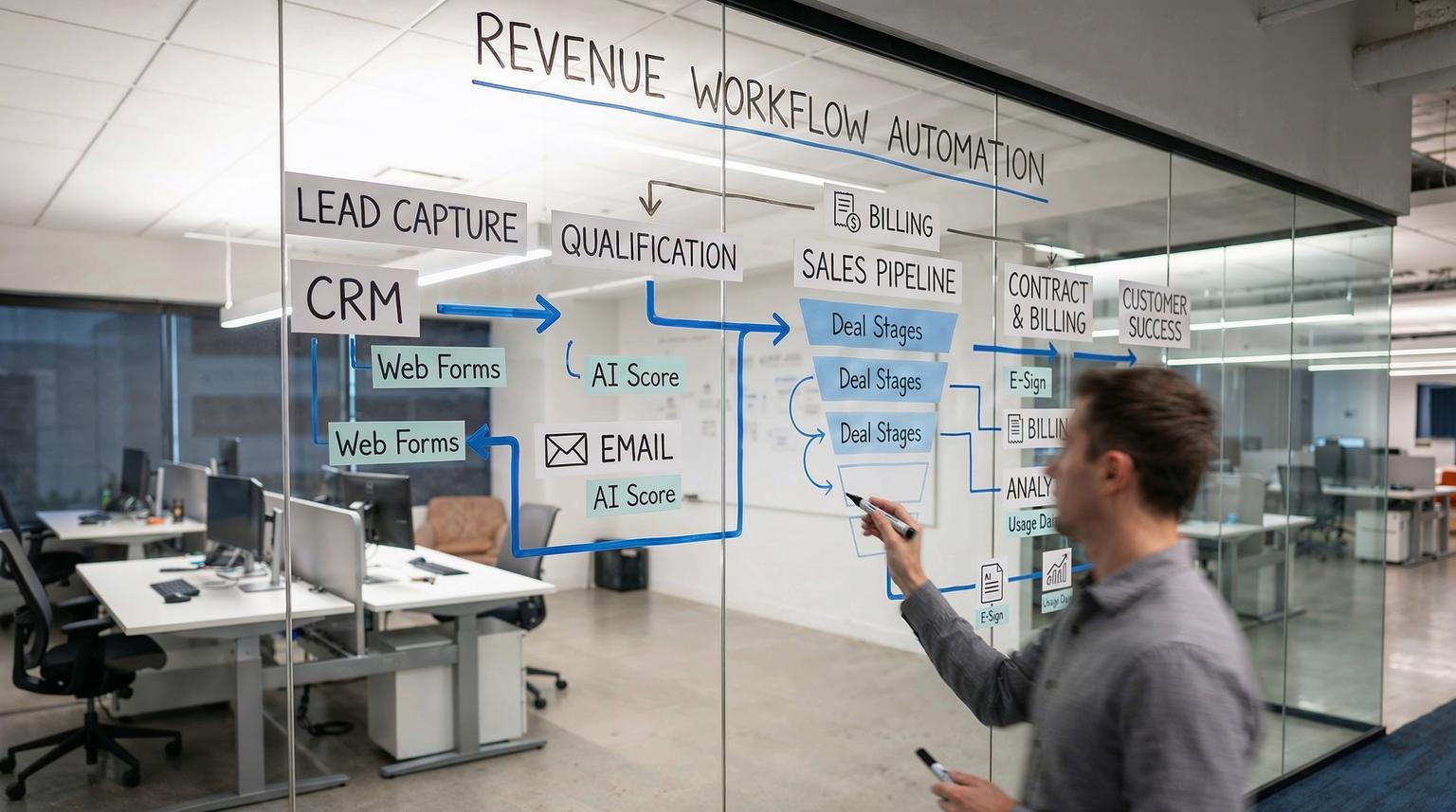
If your CRM, email platform, and internal tools all run in their own lanes, you are almost certainly leaking revenue. Leads get lost between forms and inboxes, follow-ups happen too late, and data never quite matches across systems. This article is for founders, revenue leaders, and operations teams who want to fix that with custom workflow automation solutions built around their real business logic, not generic templates.
From disconnected apps to a single revenue engine
Custom workflow automation solutions connect your CRM, email, forms, billing, and internal tools into one coordinated system. Events like a new lead, contract signed, or invoice overdue automatically trigger the right sequence of actions across platforms, with AI helping classify, prioritize, and personalize. The result is a continuous lead-to-cash pipeline with fewer manual steps, faster response times, and far less revenue leakage.
Why most revenue processes feel broken
Most teams do not suffer from a lack of tools. They suffer from tools that do not talk to each other in a reliable, structured way. Common symptoms include:
- Leads captured in multiple places (web forms, chat, events, inboxes) with no unified intake.
- Sales reps manually copying data into the CRM, often days late and with errors.
- Marketing automations that run in isolation and are blind to sales activity or product usage.
- Finance teams chasing overdue invoices by hand, with no system-level follow-up logic.
- Leadership dashboards that never match what is actually in the CRM or billing system.
Research on workflow automation shows that automating these repeatable processes significantly cuts manual effort and improves consistency. Accounting firms, for example, reported task setup time dropping from hours to under an hour after automation, a roughly 5x reduction according to a recent survey. The same patterns apply to revenue operations. For a deeper dive into CRM-focused orchestration, see our guide on CRM automation with AI and end-to-end workflows.
What makes a workflow automation solution truly “custom”
Out-of-the-box CRM workflows and basic zaps are useful, but they tend to break when your process deviates from the default template. Custom workflow automation solutions are different in three key ways:
- They mirror your real process. You start from your lead-to-cash journey, then design automations around it, not the other way around.
- They orchestrate across multiple systems. Tools like n8n, Make, and Zapier act as an integration layer between your CRM, email, project management, billing, and data warehouse.
- They embed AI where judgment is needed. AI can score leads, classify emails, summarize conversations, and route work, while deterministic rules handle the rest.
Modern orchestration platforms offer visual, low-code builders with triggers, actions, routing, and error-handling, similar to what the Make ecosystem describes. ThinkBot uses these capabilities to implement logic that is specific to your funnel, territories, products, and SLAs.
Core building blocks of a seamless revenue workflow
Across tools like n8n, Make, and Zapier, the same foundational concepts show up again and again. Understanding them helps you see what is possible.
Triggers: when something important happens
Every automated revenue workflow starts with a trigger, such as:
- New form submission on your website or landing page.
- New lead created in your CRM.
- New email received in a shared inbox.
- Contract signed in your e-signature tool.
- Invoice overdue in your accounting system.
Platforms like Make describe this as “start with a trigger,” then build downstream actions from there, an approach that is broadly applicable across automation stacks.
Data mapping: keeping systems in sync
Once the trigger fires, you need to map data between systems. For example:
- Map web form fields to CRM fields (first name, company, source, product interest).
- Normalize country and state values for territory routing.
- Combine CRM data with product usage to compute health scores.
Visual mapping tools, similar to those described in leading automation platforms, let you drag and drop fields between steps. ThinkBot typically adds validation and transformation layers so that what lands in the CRM is clean, standardized, and analytics-ready.
Routing and conditional logic: acting differently on different signals
Not every lead or customer event should trigger the same behavior. Using filters and branching logic, you can:
- Route high-intent demo requests directly to senior sales reps.
- Send lower-intent content downloads into a nurture sequence.
- Escalate high-value churn risks to customer success with a Slack alert.
- Trigger different invoice follow-up cadences based on amount and customer segment.
This type of conditional orchestration is what turns simple integrations into a true revenue engine.
Scheduling, monitoring, and error handling
Revenue workflows must be reliable. That means:
- Running scheduled jobs (daily syncs, weekly reports, payment reminders).
- Using instant webhooks when real-time speed matters (lead notifications, support escalations).
- Logging every run and surfacing errors to the right team.
- Retrying failed steps automatically and falling back to human intervention for edge cases.
In enterprise-focused platforms, observability and SLAs are core features, similar to what AWS highlights for modern iPaaS solutions. ThinkBot bakes the same principles into n8n, Make, and Zapier implementations.
How custom workflow automation solutions fix lead intake and routing
One of the highest-impact areas for automation is the top of the funnel, where speed and consistency directly affect conversion.
Unifying lead intake from every channel
A typical B2B company might receive leads from:
- Website forms (multiple pages and offers).
- Paid landing pages and webinar registrations.
- Chat widgets and chatbots.
- Marketplace listings and partner referrals.
- Inbound emails to sales@ or info@.
Without orchestration, each source lands in a different silo. With a custom workflow, ThinkBot uses tools like n8n or Make to capture all of these into a single standardized pipeline. For example:
- Web form submits to a webhook in n8n.
- Data is validated, enriched, and normalized.
- A contact and deal are created in your CRM, with the correct source and campaign.
- A confirmation email is sent from your primary domain via your email platform.
- Slack or Teams alerts notify the right channel with key lead details.
The same pattern can be extended to spreadsheet-based lead trackers. The n8n template that turns a Google Sheet into a lightweight CRM, with automated qualification and booking emails, is a good illustration of how on-edit events can feed a centralized pipeline via webhooks, as shown in this public workflow example. You can also explore our overview of workflow automation solutions for customer onboarding to see how similar orchestration patterns apply post-sale.
AI-assisted lead qualification and prioritization
Once leads are in a unified pipeline, AI can help decide what happens next. Using large language models and classifiers, ThinkBot often implements:
- Automatic categorization of inbound emails and form messages by intent.
- Lead scoring models that combine firmographics, behavior, and message content.
- Priority flags for time-sensitive or high-value opportunities.
The AI-powered email auto-responder template in n8n, which classifies Gmail messages, sends tailored HTML replies, and pushes contacts into a CRM like Brevo, is a practical example of this pattern in action, similar to the approach documented in this AI classification workflow. ThinkBot extends that concept to your own categories, languages, and CRMs.
Transforming the full lead-to-cash journey
To truly operate as a revenue engine, your automation needs to span more than just lead capture. It should cover the entire lifecycle from first touch to cash in the bank.
1. Lead capture and enrichment
Once a lead hits your system, a custom workflow can:
- Cleanse and standardize contact data.
- Enrich company information via external APIs.
- Assign an owner based on territory, segment, or product line.
- Drop the lead into the right nurture or outbound sequence.
2. Sales engagement and opportunity management
Inside the sales process, orchestrated workflows keep momentum:
- Notify reps instantly when key events occur (proposal viewed, contract sent, trial started).
- Trigger task creation in tools like ClickUp or Monday.com when deals reach specific stages.
- Sync meeting notes and call summaries back into the CRM using AI-generated summaries.
- Update forecasts automatically as deal amounts and close dates change.
Visual automation platforms described in the Make tools overview show how project management, CRM, and communication tools can all be orchestrated in one flow. ThinkBot uses the same orchestration approach, but with your particular sales methodology and tech stack.
3. Contracting, billing, and collections
Revenue leakage often happens after the verbal “yes.” Custom workflows can:
- Create draft contracts in your e-sign tool when a deal hits a specific stage.
- Generate invoices in your accounting platform when contracts are signed.
- Sync payment status back into the CRM and analytics tools.
- Trigger overdue invoice reminders using personalized email sequences.
Automation examples like following up on overdue invoices with attached PDFs and CC/BCC logic, as shown in some Make templates, showcase how well-designed workflows can reduce manual collections work and improve cash flow.
4. Post-sale onboarding and customer success
After the sale, automation ensures customers get value quickly and stay engaged:
- Kick off onboarding projects in tools like ClickUp or Asana when a deal closes.
- Provision accounts and send welcome sequences automatically.
- Monitor product usage and trigger playbooks for low adoption or expansion signals.
- Generate time-to-deliver and SLA metrics similar to the “Time to Deliver” calculation in the Google Sheets + n8n example referenced earlier.
5. Analytics and revenue operations
With the right pipelines, you can consolidate CRM, billing, and product data into near real time dashboards:
- Automate data syncs into a warehouse or BI tool.
- Compute metrics like lead-to-win rate, average sales cycle, DSO, and net revenue retention.
- Feed AI models that forecast revenue or recommend next best actions.
Market research shows the workflow automation market is expected to grow significantly over the next few years, with estimates from Mordor Intelligence projecting substantial expansion. This reflects how central end-to-end automation is becoming to modern revenue operations.
Where AI elevates your revenue workflows
AI is not a replacement for process design; it is an accelerator inside your workflows. ThinkBot typically applies AI in four areas:
- Classification: Categorizing inbound emails, tickets, and leads by intent, product, or urgency.
- Summarization: Condensing long email threads or call transcripts into short notes for CRM records.
- Scoring and routing: Combining historical data and real-time signals to decide who should handle what.
- Content generation with guardrails: Drafting personalized outreach or follow-up messages, then allowing humans to approve or edit.
Patterns highlighted in AWS examples of using vector embeddings and email summarization alongside orchestration platforms map closely to what we build with n8n and Make, where a file upload or new message triggers an AI step and then writes structured output back to your systems. If you want to go deeper on this topic, our article on AI-powered workflow automation explores additional use cases and design patterns.
How ThinkBot implements custom workflow automation solutions
While every engagement is unique, our implementation approach usually follows a simple but rigorous pattern.
Step 1: Audit
We start by mapping your current lead-to-cash journey:
- Where leads originate and how they are captured.
- Which tools are involved at each stage.
- Where handoffs, delays, and errors occur.
- What data you need for reporting and decision-making.
Step 2: Map
Next, we design the target-state workflow:
- Define triggers and outcomes for each key event.
- Specify data models and field mappings across systems.
- Decide where AI adds value and where rules are sufficient.
Step 3: Integrate
We then build the integrations using tools like n8n, Make, Zapier, and direct APIs:
- Connect CRMs like HubSpot or Salesforce with email platforms, project tools, and billing.
- Implement webhooks, polling triggers, and scheduled jobs.
- Set up secure authentication and access controls.
Step 4: Test
Before going live, we run end-to-end tests:
- Simulate leads from each channel and verify routing.
- Check data integrity in every connected system.
- Stress-test high-volume paths like email classification or invoice reminders.

Step 5: Optimize
After launch, we monitor and iterate:
- Track KPIs like response time, conversion, and hours saved.
- Refine AI prompts and thresholds based on real outcomes.
- Add new branches and automations as your process evolves.
Common mistakes when automating revenue workflows
We regularly inherit half-built or broken automations. The most common pitfalls are:
- Automating a bad process. If your underlying process is unclear or inconsistent, automation will amplify the chaos.
- Over-reliance on native app automations. CRM or email-native workflows are helpful but often cannot orchestrate cross-app logic or handle complex routing.
- No monitoring or error handling. Silent failures in lead capture or billing follow-up are extremely expensive.
- Ignoring data models. Inconsistent field usage makes reporting and AI unreliable.
- Over-automation of human moments. High-value deals and escalations still need personal attention; automation should support, not replace, your team.
ThinkBot designs with these risks in mind: we prioritize observability, data quality, and human-in-the-loop patterns where appropriate.

How to get started with your own seamless revenue engine
You do not need to rebuild everything at once. A practical starting roadmap might look like this:
- Pick one high-impact area, such as lead intake or invoice follow-up.
- Document the current process step by step.
- Identify the apps and data fields involved.
- Design a simple trigger -> actions -> routing flow in a tool like n8n, Make, or Zapier.
- Launch a pilot, measure results, and expand from there.
If you want an experienced partner to design and implement this with you, you can book a consultation with ThinkBot to review your current stack and define a tailored automation roadmap. You may also find our comparison of Zapier vs. n8n for scalable workflows helpful when choosing your orchestration platform.
FAQ
How do custom workflow automation solutions differ from standard CRM automations?
Standard CRM automations are limited to what that single platform can see and do. Custom workflow automation solutions orchestrate events across your entire stack, including email, billing, project management, and data tools. They also allow richer logic, AI steps, and error handling that go far beyond simple “if field changes, send email” rules.
Which tools does ThinkBot use to build custom workflow automation solutions?
ThinkBot primarily works with n8n, Make, and Zapier as orchestration layers, combined with CRMs like HubSpot or Salesforce, email platforms, project management tools, billing systems, and custom APIs. We choose the stack based on your requirements, scale, and security needs.
Can AI be safely used in revenue-critical workflows?
Yes, when designed correctly. We use AI for classification, summarization, and scoring, while keeping critical actions under deterministic rules or human approval. We also log AI decisions, set confidence thresholds, and provide fallbacks so that misclassifications do not silently affect revenue.
How long does it take to implement a basic lead-to-cash automation?
For a small to mid-sized team with a clear process and modern tools, an initial lead intake and routing automation can often be implemented in a few weeks. More complex end-to-end lead-to-cash workflows, including billing and analytics, typically take several weeks to a few months depending on scope and integrations.
What results can I expect from automating my revenue workflows?
Clients usually see faster response times, fewer lost leads, more accurate CRM data, and increased team capacity. Over time, this translates into higher conversion rates, shorter sales cycles, and improved cash flow, as manual handoffs and follow-up gaps are systematically removed.
