
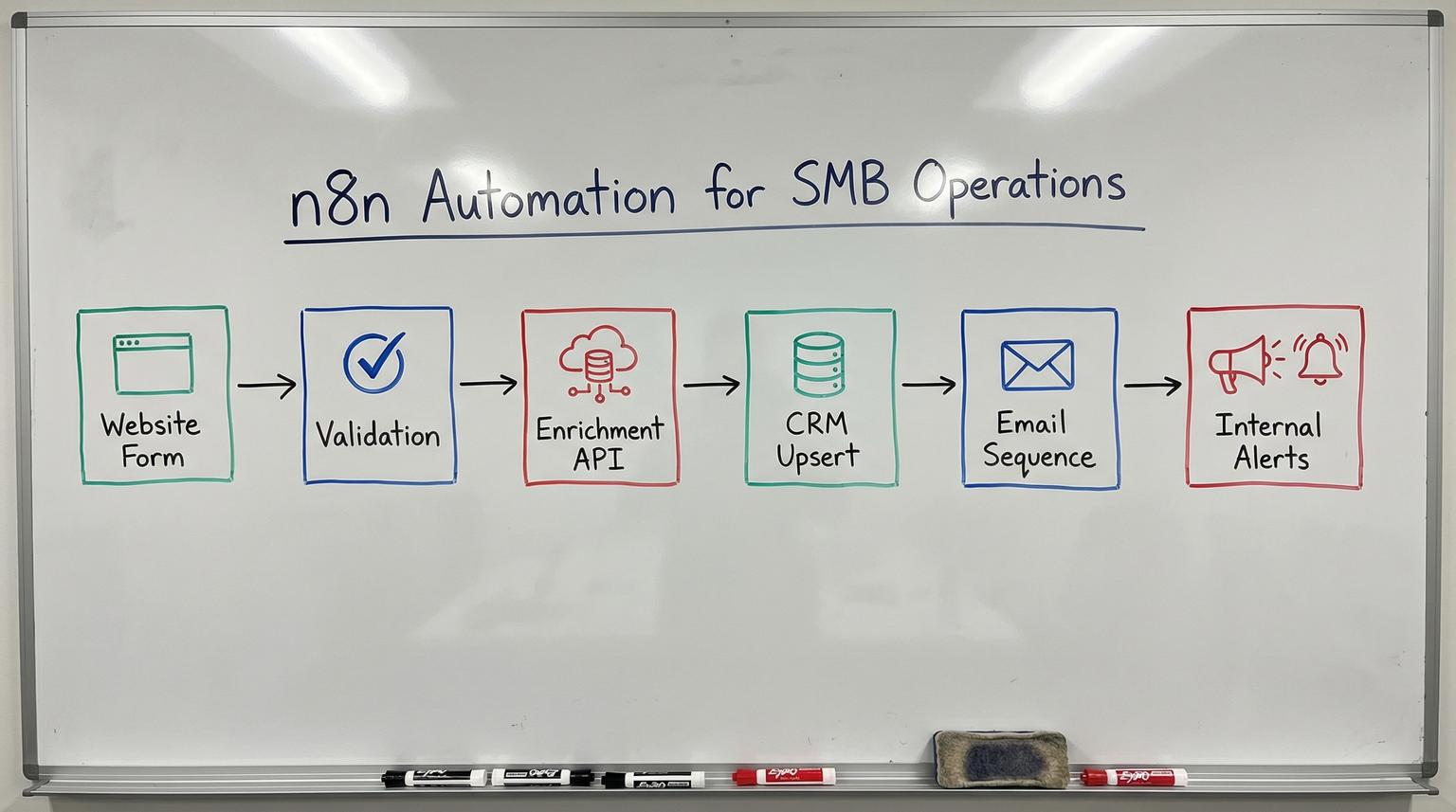
Small and medium businesses usually do not struggle because they lack tools. They struggle because every tool becomes its own island, so leads get missed, follow-ups are late and data quality erodes over time. This is where n8n automation shines, it lets you connect web forms, CRMs, email platforms and internal systems into one reliable operational flow that your team can trust.
This guide is for owners, ops leaders and marketing or CRM teams who want a practical blueprint for building end-to-end workflows that reduce manual work, improve response time and keep data clean as you scale.
At a glance:
- Turn lead capture into a single workflow that validates data, enriches it and routes it to the right place.
- Design for reliability with idempotency, retries, dead-letter handling and structured logging.
- Use conditional logic to personalize outreach and assign leads based on fit and intent.
- Harden your setup with secure credential practices and an upgrade plan for newer n8n releases.
Quick start
- Pick one high-volume process, usually inbound leads or support intake, and define a single source of truth (your CRM). For a broader blueprint on using automation to streamline operations, see our guide on business process automation with n8n.
- Create a webhook or form trigger in n8n, then normalize fields (email, company, source, consent).
- Add validation and enrichment via HTTP APIs, then upsert into your CRM to prevent duplicates.
- Trigger an email sequence or internal notification based on lead score or routing rules.
- Add error handling, logging and a manual review queue so failures do not block revenue.
To build an end-to-end workflow for SMB operations, start with a trigger (form, webhook or inbox) then standardize the incoming data, validate it, enrich it through APIs and upsert it into a CRM. From there, branch into personalized email sequences and internal notifications based on rules. Add retries, idempotency and logging so the workflow stays reliable as volume grows.
Why SMB operations become chaotic (and where automation helps most)
Most operational chaos is not caused by one big failure. It is caused by small breakdowns repeated hundreds of times:
- Leads arrive in multiple places, web forms, chat, referrals and partner lists.
- Sales and marketing disagree on what counts as a qualified lead.
- Duplicate contacts pile up because data entry is inconsistent.
- Follow-ups happen late because someone is busy or out of office.
- Reporting is unreliable because fields are missing or mapped differently across tools.
Workflow automation is most valuable when it removes handoffs. Instead of asking a person to copy, paste, enrich and route data, you use a single orchestration layer to connect systems and enforce standards. In practice, that means consistent field mapping, CRM upserts, lead routing rules and automatic customer communication.
At ThinkBot Agency we typically see the fastest ROI in processes that touch revenue or customer experience: lead intake, onboarding, renewals, support triage and billing ops. Those are also the processes where small delays and errors cost real money.
A practical end-to-end workflow: form -> enrichment -> CRM -> email sequence
Let us walk through a workflow pattern we deploy often, with variations for HubSpot, Salesforce and other CRMs. This is based on common n8n lead-capture templates such as this workflow and a validation-first variant like this one, then hardened for production.
Step 1: Trigger and normalize the payload
Typical triggers include a Webhook node (from your website form), a form trigger, or a connector from Typeform or a landing page tool. The first job is normalization:
- Trim whitespace, lowercase emails and standardize phone formats.
- Capture UTM parameters and referrer for attribution.
- Record consent flags and the timestamp of consent.
- Generate a deterministic idempotency key so replays do not create duplicates.
Step 2: Validate email and basic quality gates
SMBs often waste time on bad data. Add an email verification step and simple rule checks, for example block disposable domains, require a company domain for B2B, or route free email domains into a nurture path. Validation also protects your email deliverability and keeps your CRM clean.
Step 3: Enrich with APIs, then score
Enrichment can be as simple as finding a job title and LinkedIn URL or as advanced as pulling firmographics, technographics and intent signals. In n8n this is typically an HTTP Request node or a native integration. Once you have enrichment data, score the lead with a transparent ruleset your team can maintain.
Example scoring inputs:
- Role seniority (Director+)
- Company size range
- Industry match
- Geography
- Inbound message intent keywords

Step 4: CRM upsert with deduplication
Do not blindly create records. Use a lookup by email, then update if found, otherwise create. This is one of the most important patterns for long-term scalability because it prevents reporting drift and sales confusion.
Step 5: Personalized email sequence and internal routing
Once the CRM is updated, branch:
- Send a confirmation email immediately with personalization tokens and relevant next steps.
- Enroll qualified leads into a nurture sequence in your email platform.
- Notify the right owner with context, for example territory, account type, lead score and enrichment highlights.
- Create a task in the CRM with an SLA due date.
Example payload template you can reuse
Use this as a lightweight internal contract between your form, n8n and your CRM mapping. It makes debugging and field governance much easier. If you want to go deeper on how AI and automation enhance this kind of contract, see our article on optimizing workflows with AI and n8n integrations.
{
"event_id": "evt_20260112_8f3c1a",
"submitted_at": "2026-01-12T10:14:22Z",
"source": {
"channel": "website_form",
"page_url": "https://example.com/contact",
"utm_source": "google",
"utm_campaign": "brand-search"
},
"person": {
"first_name": "Taylor",
"last_name": "Reed",
"email": "[email protected]",
"phone": "+15551234567",
"consent": {
"marketing_opt_in": true,
"consent_text_version": "v3"
}
},
"company": {
"name": "Example Co",
"website": "https://example.com"
},
"enrichment": {
"status": "ok",
"provider": "api_vendor",
"job_title": "Operations Manager",
"linkedin_url": "https://linkedin.com/in/example",
"employee_count": 85
},
"routing": {
"lead_score": 72,
"segment": "smb",
"owner": "sales-east"
}
}
Build it once, trust it daily: the workflow design checklist
Use this checklist when you are turning a prototype into a workflow you can rely on for revenue operations and customer response time.
- Define the system of record for each entity (contact, company, deal, ticket).
- Create an idempotency key for each trigger event to prevent double-processing.
- Normalize core fields (email, phone, country, company name) before enrichment.
- Implement deduplication using CRM lookup and upsert logic.
- Add rate-limit handling for third-party APIs (throttle, backoff, batching when needed).
- Store a minimal audit log (event_id, timestamp, status, error_message, crm_record_id).
- Route failures to a manual review queue, not to silent failure.
- Separate draft edits from production changes, document publish steps and rollback.
- Secure credentials with least privilege and a rotation plan.
- Test with representative payloads, including missing fields and edge cases.

Error handling and observability patterns that scale
Most SMB workflows fail for predictable reasons: API timeouts, missing fields, rate limits and unexpected duplicates. Reliability comes from designing for failure from day one.
Failure modes and mitigations
- API timeout during enrichment: retry with exponential backoff, then fall back to minimal CRM record and flag for later enrichment.
- Rate limit exceeded: add throttling and queueing, store pending events and resume processing on a schedule.
- Duplicate record created: enforce lookup-by-email and use a single upsert path, log CRM IDs and prevent parallel creates.
- Bad input data (missing email): stop early, notify ops and store the raw payload for manual correction.
- Email deliverability risk: verify email first, segment free domains, avoid auto-enrolling low-quality addresses into sequences.
- Workflow partially succeeds: use clear status fields like received -> enriched -> crm_upserted -> emailed, then re-run only missing steps.
Logging that helps you debug in minutes
At minimum, log these fields to a database table, a sheet or your monitoring tool: event_id, lead email, workflow version, step status, external API response codes and CRM record IDs. This makes it possible to answer, what happened to this lead, without guessing. For more patterns on connecting APIs and CRMs around this logging, you can review our guide to custom API integration for workflow automation.
Security and upgrade readiness for modern n8n setups
Automation becomes critical infrastructure quickly. That means security and upgrade discipline matters, especially for self-hosted instances.
Secure-by-default changes you should plan for
Newer releases introduced a more secure execution model and a safer Save vs Publish workflow lifecycle. If you are upgrading to n8n 2.x, review breaking changes and run a migration report before moving production workloads. The official guidance is available in the migration notes and the migration tool.
Patch management for form-based workflows
If you self-host and use form triggers, stay current on security advisories. A recent advisory highlighted a vulnerability in certain form workflows in older versions and recommended upgrading to a patched release. Review the details in the advisory and keep a recurring maintenance window for upgrades.
Credential and data handling basics
- Use least-privilege tokens for CRM and email providers.
- Rotate keys and document ownership.
- Do not store unnecessary PII in logs.
- Capture consent and honor deletion requests with a dedicated workflow. You can see how this fits into broader CRM and revenue workflows in our article on B2B automation best practices for n8n CRM workflows.
Where ThinkBot Agency typically plugs in for SMB teams
Many teams can build a first workflow. The hard part is making it reliable across edge cases, new tools and growth. ThinkBot Agency helps SMBs design and implement end-to-end automations that connect CRM workflows, email platforms and internal systems with clean data contracts and operational guardrails.
Common client outcomes we deliver:
- Lead intake that routes in seconds, not hours, with clean CRM records.
- Automated enrichment and lead scoring to prioritize sales effort.
- Customer service workflows that tag, triage and summarize requests for faster resolution.
- API connections between finance, inventory and ops tools to eliminate manual reconciliation.
- Monitoring and runbooks so workflows stay dependable after launch.
If you want a workflow blueprint tailored to your stack and your routing rules, book a working session with our team here: book a consultation.
Prefer to evaluate us through delivery history first? You can also review ThinkBot Agency on Upwork.
FAQ
Answers to common questions we hear from SMB teams planning workflow orchestration and CRM integration projects.
What is n8n automation and when should an SMB use it?
It is a way to connect apps and APIs into repeatable workflows, for example form -> enrichment -> CRM -> email follow-up. SMBs should use it when manual handoffs cause delays, errors or missed revenue, especially in lead management, onboarding and support operations.
How do you prevent duplicate leads when syncing web forms to a CRM?
Use a lookup-by-email step before creating records, then update existing contacts instead of creating new ones. Add an idempotency key to each submission so retries or replays do not create duplicates.
Can ThinkBot Agency connect my CRM, email platform and internal tools in one workflow?
Yes. We build and maintain custom workflows that connect CRMs, email platforms and internal systems using native nodes and API integrations. We also handle field mapping, routing logic, testing, monitoring and secure credential practices.
What happens if an enrichment API fails or rate limits us?
A production workflow should retry with backoff, then fall back to storing a minimal CRM record and flagging it for later enrichment. We also add throttling and queue-based patterns when volume or provider limits require it.
Do we need to worry about security updates if we self-host?
Yes. Self-hosted instances require an upgrade process and regular patching. We recommend scheduled maintenance windows, reviewing breaking changes before major upgrades and monitoring security advisories that affect triggers and file handling.
