
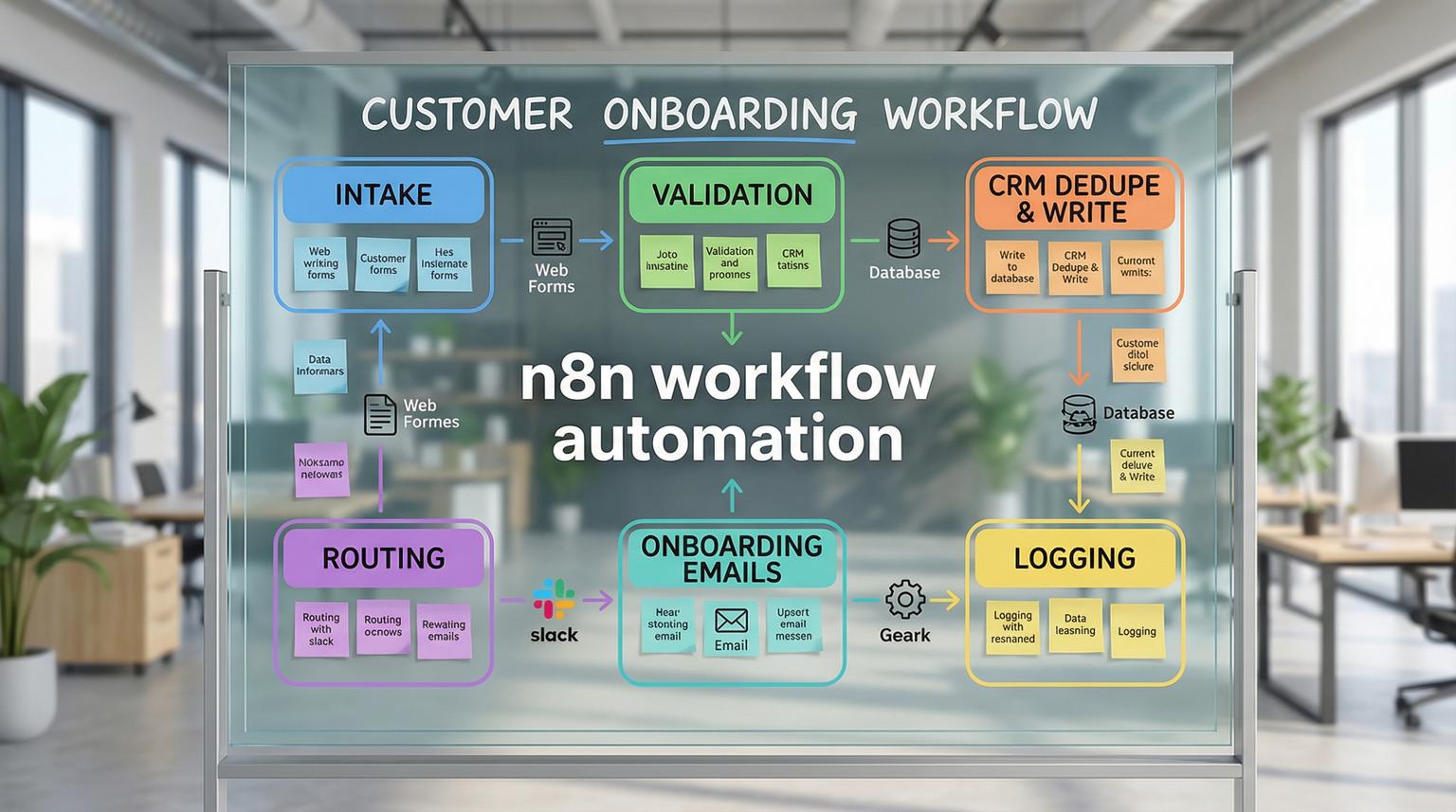
Manual customer onboarding usually starts with good intentions and ends with scattered spreadsheets, missed follow ups and inconsistent CRM data. If your team is copying form submissions into a CRM, sending emails one by one and chasing internal updates in Slack, you are paying an operations tax every day. This post shows how n8n workflow automation turns that chaos into a reliable system that captures leads, validates data, enriches contacts, routes ownership and triggers onboarding sequences with full traceability.
This is written for business owners, ops leads and CRM teams who want faster response times, cleaner pipelines and fewer handoffs between tools. We will walk through a practical workflow pattern ThinkBot Agency builds often, then share implementation guardrails so it runs safely in production.
Quick summary:
- Automate intake -> validation -> CRM create/update -> notifications -> email sequence so nothing gets dropped.
- Use deduplication and field normalization to prevent messy CRM records and reporting gaps.
- Add lead routing and scoring so sales sees the right lead at the right time.
- Build observability with logs, retries and alerts so workflows are trustworthy at scale.
Quick start
- Pick one onboarding entry point, for example a web form, Typeform or Jotform, then define the required fields and success criteria.
- In n8n, start with a Webhook or form trigger, then add validation and normalization before any CRM write.
- Search the CRM by email, then branch: update existing contact or create a new one with mapped properties.
- Notify the team in Slack or email and start a timed onboarding sequence with Wait nodes.
- Add logging, error handling and a rollback plan, then test with real sample payloads before turning it on.
To transform customer onboarding and CRM operations, design one end to end workflow that captures intake data, validates and deduplicates it, writes to your CRM as the source of truth and then triggers consistent follow ups and internal alerts. n8n makes this practical because it can connect your forms, CRM, email platform and internal tools in one traceable flow, with branching logic and retries that reduce errors and response time. For more patterns that connect forms, CRMs and email tools with enrichment and logging, see our guide on designing n8n automation workflows for SMB operations.
Why manual onboarding breaks as volume grows
Most teams start with a simple process: a form submission lands in an inbox, someone creates a contact in the CRM, then they send a welcome email and notify the team. The problem is that every step depends on a person remembering the next step, and each tool becomes its own mini database.
Common failure points we see when we audit onboarding and CRM operations:
- Slow first response because leads wait in an inbox or chat channel.
- Duplicate contacts when multiple people create records from the same submission.
- Field drift where form fields do not match CRM properties, leading to blank segments and broken automation.
- Untracked handoffs where sales thinks onboarding owns it, and onboarding thinks sales owns it.
- Data silos across CRM, email tools and internal trackers, which makes reporting unreliable.
The goal is not to automate everything at once. The goal is to automate the critical path so every lead or customer gets the same high quality experience and your CRM stays accurate.
A practical onboarding workflow blueprint you can reuse
At ThinkBot Agency, we typically implement onboarding as a single orchestrated workflow with clear stages. A proven pattern is similar to the community template that uses a Webhook trigger, validation, HubSpot create/update, staged emails and team alerts, which is a strong starting point you can adapt to your stack. You can see a representative flow pattern here.
Here is the blueprint in plain language:
Stage 1: Intake and validation
- Trigger from Webhook, Typeform, Jotform or another source.
- Validate required fields, for example email and customer name.
- Normalize values, for example trim whitespace, lowercase email, standardize phone format and split full name into first and last.
Stage 2: CRM dedupe and write
- Search CRM by email, then decide whether to update an existing record or create a new one.
- Map fields to standard and custom properties, including consent fields if applicable.
- Optionally create a deal, set lifecycle stage or assign an owner.
Stage 3: Routing and internal visibility
- Post a formatted message to Slack or send an email to the right channel.
- Route leads based on rules, for example region, product line, lead tier or account size.
- Create tasks for follow up in the CRM or project tool.
Stage 4: Timed onboarding sequence
- Send a welcome email immediately with personalization tokens.
- Wait 2 hours, then send onboarding docs or next steps.
- Wait 1 day, then send a check in and scheduling link.
- Wait a few more days, then send a success guide or activation tips.
Stage 5: Traceability and measurement
- Log events to a database, Google Sheets or a data warehouse.
- Track timestamps for time to first response and time to first meaningful action.
- Update CRM status at each milestone so sales and success share the same view.

Customer onboarding workflow build checklist
Use this checklist when you are turning a diagram into a production workflow. It prevents the most common CRM and onboarding failures we see in real accounts.
- Define required fields and reject or quarantine incomplete submissions.
- Normalize email, phone and name formatting before CRM writes.
- Implement deduplication, at minimum by email, and consider phone plus company for edge cases.
- Map every form field to a specific CRM property, including custom properties.
- Add owner assignment rules and a default fallback owner.
- Send internal notifications with enough context to act, not just "new lead".
- Use Wait nodes for a human cadence and avoid sending multiple emails at once.
- Store an audit log entry for each major step, including failures.
- Add retries for transient API failures and a dead letter path for hard failures.
- Test with at least 10 realistic payload variations, including missing fields and duplicates.
How do you connect forms, CRM, email and notifications without creating new silos?
The key is to treat your CRM as the system of record and use n8n as the orchestration layer. That means the workflow does not just push data into multiple tools independently. Instead, it writes to the CRM first, then uses the CRM record ID as the reference for downstream steps.
A practical approach:
- Intake via Webhook, Typeform or Jotform.
- Upsert contact in CRM, then store the CRM ID in the workflow context.
- Notify Slack with the CRM link and key fields, so the team clicks into the source of truth.
- Send emails using your email platform, but also update the CRM status property so reporting stays consistent.
- Log workflow execution metadata, for example execution ID, timestamps and error messages.
If you want an example of lead capture, dedupe, scoring and Slack alerts in one flow, the Typeform to HubSpot pattern is a good reference here. We often adapt that structure even when the CRM is not HubSpot because the underlying logic is universal. For a broader comparison of how different platforms handle CRM workflows, see our automation platform comparison for CRM, email and AI workflows.
Lead routing, enrichment and follow up sequences that sales teams actually trust
Automation only helps if the sales team trusts the output. That trust comes from predictable routing rules, clean records and follow ups that match your sales motion.
Lead routing rules we implement often
- Route by territory using country, state or time zone fields.
- Route by product interest based on form answers.
- Route by lead tier using a score, for example Cold, Warm and Hot.
- Route by account type, for example agency, ecommerce, SaaS, local service.
Contact enrichment that improves conversion without bloating your CRM
Enrichment should be deliberate. We typically enrich only what affects qualification or personalization, such as company domain, industry and employee range. Enrich first, then write the final version to the CRM so your CRM properties stay consistent and searchable.
Follow up sequences with timing and branching
The simplest onboarding sequence is timed emails. The better version is timed emails with branching, for example:
- If the customer books a call, stop the generic sequence and notify the owner.
- If an email bounces, flag the record and switch to a different channel.
- If a lead is Hot, shorten delays and escalate internal alerts.
When we build AI assisted onboarding, we add controlled personalization, for example generating a short onboarding summary from the intake form and adding an approval gate before sending. The multi tool onboarding template that combines intake, AI analysis, project creation, CRM sync and audit logging is a useful reference pattern here. If you are exploring how AI can further optimize these journeys, our article on optimizing workflows with AI and n8n integrations goes deeper into real use cases.
Failure modes and mitigations for production grade onboarding
Real systems fail in boring ways: rate limits, expired tokens, schema changes and unexpected payloads. Build guardrails early so your workflow does not silently drop customers.
- Failure mode: Duplicate contacts created when two submissions arrive quickly.
Mitigation: Search by email, apply idempotency keys and lock on email for a short window when possible. - Failure mode: CRM property mismatch causes write failures after a schema change.
Mitigation: Centralize mapping in one node, validate required properties and alert when a write fails. - Failure mode: API rate limits or temporary outages break downstream steps.
Mitigation: Add retries with backoff, queue bursts and separate critical writes from non critical notifications. - Failure mode: Email deliverability issues, bounces or unsubscribes cause a poor experience.
Mitigation: Use verified domains, capture consent, handle bounce events and stop sequences on unsubscribe flags. - Failure mode: Sensitive data leaks into logs or Slack messages.
Mitigation: Redact PII in notifications, limit fields in logs and use least privilege credentials. - Failure mode: A workflow update introduces a logic bug and affects live onboarding.
Mitigation: Version workflows, test in a staging environment and keep a rollback toggle to pause client facing steps.
Implementation playbook: roles, monitoring and rollback
When ThinkBot delivers onboarding and CRM automation, we follow a simple playbook so the workflow is not just built, it is operated.
Owners and responsibilities
- Ops owner: defines the process, required fields, routing rules and SLA.
- CRM owner: manages property schema, lifecycle stages, pipelines and permissions.
- Automation owner: builds and maintains the workflow, error handling and logging.
- Sales manager: confirms routing outcomes and follow up steps match reality.
Monitoring setup
- Alert on failed executions and repeated retries.
- Log a compact audit record per onboarding, including CRM ID and timestamps.
- Track two KPIs: time from submission to CRM write, and time from submission to first human touch.
- Review dedupe metrics monthly to catch drift.

Rollback plan
- Keep a manual fallback process documented, even if it is basic.
- Add a switch in the workflow to disable client facing emails while keeping CRM writes active.
- Maintain previous workflow versions so you can revert quickly.
- Use a quarantine path for unexpected payloads so leads are not lost.
When to use n8n vs Zapier or Make for onboarding and CRM ops
We work across tools, but n8n is often the best fit when onboarding needs real logic, traceability and custom API work. Here is a practical comparison based on what matters in CRM operations.
| Requirement | n8n | Typical outcome |
|---|---|---|
| Complex branching and multi step onboarding sequences | Strong visual logic, Wait nodes, code support | Fewer brittle workarounds as flows grow |
| Custom API connections and legacy systems | HTTP Request and Webhook patterns are first class | Integrate niche tools without waiting for a connector |
| Data transformation and enrichment | Function/code nodes plus native transformations | Cleaner CRM data and better segmentation |
| Hosting and data control | Cloud or self hosted options | Better fit for stricter security and compliance needs |
| Operational visibility and maintainability | Execution history, structured error handling patterns | Teams trust the system because it is observable |
As a reminder, automation is a living system. The n8n community has long emphasized maintainability at scale, including teams running hundreds of workflows in production. The operational lessons in this case align with what we see in client environments: build with governance and monitoring from day one. If you want a broader playbook that compares n8n with Zapier and Make for CRM automation, review our article on CRM automation with AI and end-to-end workflows.
How ThinkBot Agency helps you ship onboarding automation that sticks
ThinkBot Agency designs and implements end to end onboarding and CRM operations that reduce admin work and increase speed to lead. Typical requests we solve include:
- Automated lead capture from web forms into CRM with dedupe and normalization.
- Lead routing to reps based on territory, product interest or score.
- Contact enrichment and scoring to prioritize outreach.
- Automated follow up sequences and internal notifications with audit logs.
- API connections to billing, databases and internal tools to eliminate data silos.
If you want a second set of eyes on your current onboarding flow or you are ready to implement a production grade workflow, book a working session with ThinkBot here: book a consultation.
Prefer to review our delivery track record first? You can also see ThinkBot as a top performer on Upwork.
FAQ
Answers to common questions we hear when teams are planning onboarding and CRM automation projects.
What is n8n workflow automation used for in customer onboarding?
It is used to connect intake sources like web forms to your CRM and communication tools so onboarding steps happen automatically. Common steps include validation, deduplication, contact creation or updates, timed email sequences and internal notifications with logging.
Can n8n update an existing CRM contact instead of creating duplicates?
Yes. A standard pattern is to search the CRM by email first, then branch. If the contact exists, update it. If not, create it. We also add normalization and sometimes multi field matching to reduce duplicate risk.
How do you keep automated onboarding emails from feeling spammy?
Use a staged cadence with Wait nodes, send fewer but higher value messages and branch based on engagement or key events like booking a call. Also stop sequences on unsubscribe or bounce signals and keep personalization grounded in verified intake data.
Is self hosting n8n necessary for CRM and onboarding workflows?
Not always. Cloud is fine for many teams. Self hosting can be the better choice when you need data locality, private network access to internal systems or stricter compliance controls. We help clients choose based on risk and operational overhead.
What does ThinkBot Agency typically deliver for onboarding and CRM operations?
We deliver a complete workflow design, implementation and testing, including integrations, field mapping, routing logic, email sequences, internal alerts and monitoring. We also provide documentation, runbooks and ongoing optimization when needed.
