
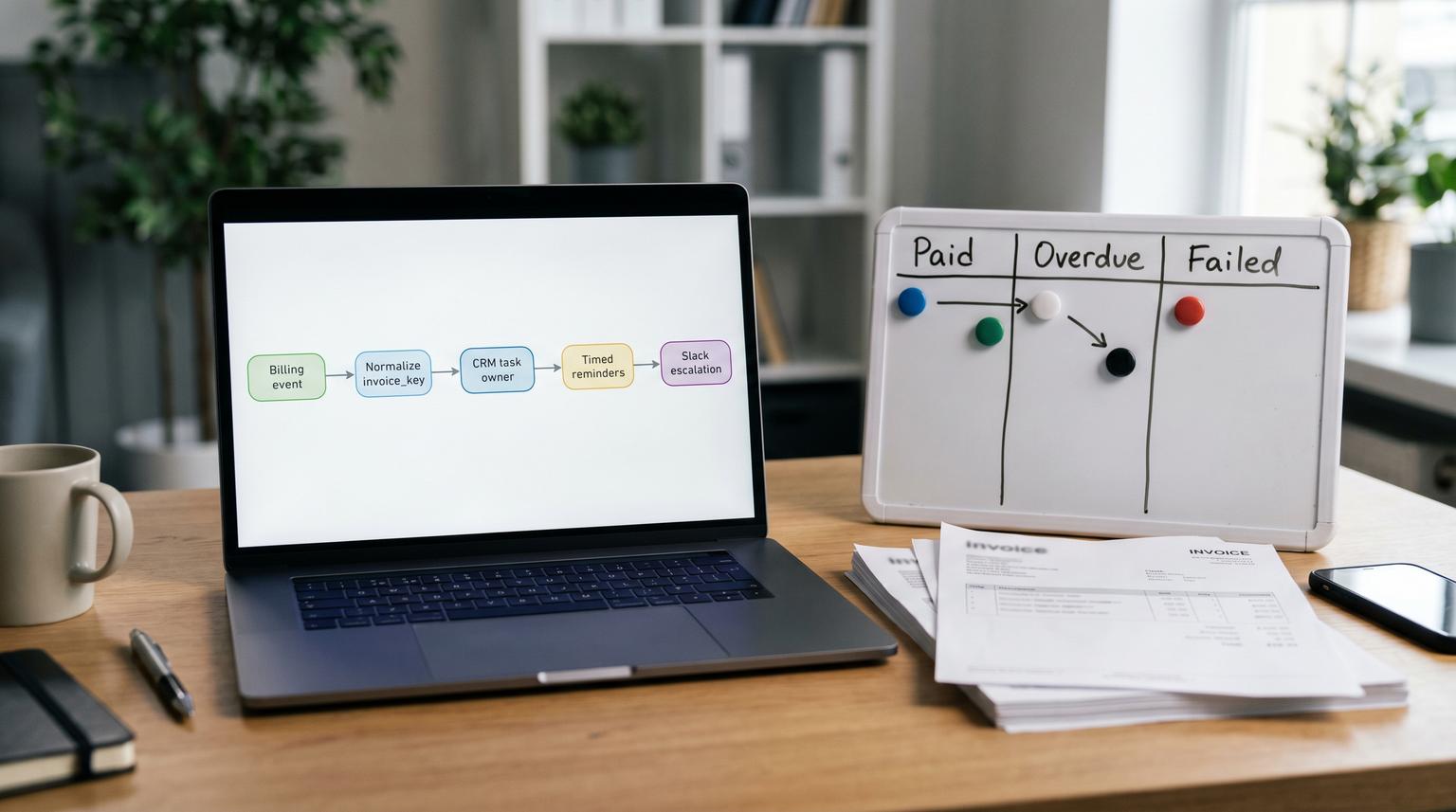
Accounts receivable breaks down in the handoff between billing, ownership and communication. Invoices get created, payments fail, reminders go out late or twice and nobody knows who is accountable. This post shows implementing Zapier for business efficiency by automating the loop end to end: Stripe or QuickBooks invoice events feed a single invoice key, your CRM gets the right owner task and customers receive timed follow ups with Slack escalation for high risk situations.
At a glance:
- Normalize Stripe or QuickBooks invoice updates into one canonical invoice_key so every action is deduped and replay-safe.
- Create CRM tasks with clear ownership and due dates so invoices never become "nobody's problem".
- Send customer follow ups on a schedule that is customer-friendly and avoids spam using Delay and Delay After Queue.
- Escalate to Slack for high value overdue invoices or repeated failures plus log errors so you can replay safely.
Quick start
- Pick your billing source: Stripe invoice events or QuickBooks invoice change notifications.
- Define a canonical invoice_key format and create a Zapier Storage or Zapier Tables dedupe record.
- Build a "Normalize and Upsert" Zap that writes invoice status to your CRM and creates or updates an AR owner task.
- Build a "Reminder Scheduler" Zap that uses Delay Until and Delay After Queue to send reminders without bursts.
- Add a Slack escalation path for high value or repeated failures plus an error alert Zap for failures in Zap History.
You can implement Zapier to improve AR speed by treating each invoice like a small state machine: always compute a unique invoice key, look it up in storage to decide what has already happened, then create CRM tasks and schedule follow ups using Zapier Delay tools. Add Slack escalation for exceptions and set up a replay process in Zap History so a failed run can be rerun without double emailing customers.
The AR workflow boundary that causes DSO to drift
Most teams have the same pain pattern:
- Billing system updates happen in Stripe or QuickBooks but the CRM does not reflect reality.
- Customer follow ups are done manually or inconsistently and end up late, duplicated or skipped.
- Escalations rely on someone noticing an overdue invoice in a dashboard.
The fastest operational win is to automate the boundary: billing status to CRM ownership to customer communication to internal escalation. The key is doing it safely. AR automation fails when it spams customers after a retry or it misses edge cases like invoice finalization failures, partial payments or multiple QuickBooks companies.
Architecture overview with one invoice key and one source of truth
Before you build Zaps, lock the design decisions that keep things stable in production. If you want a deeper framework for production-ready governance, naming, ownership, reliability and monitoring, use our Zapier automation blueprint for production-ready team workflows as a reference.
Canonical invoice key spec
You need one ID that is consistent across systems and safe across replays. Use the billing system as the source of truth and compute this key early in every Zap:
- Stripe:
stripe:{invoice_id}(invoice_id is the Stripe Invoice object id) - QuickBooks Online:
qbo:{realm_id}:{invoice_entity_id}(realmId prevents collisions across multiple companies)
QuickBooks webhook payloads are pointers, not full invoice records, so plan a follow up read using the entity id to fetch due date, balance and customer details. Intuit also includes an event id and event time that are useful for logging and traceability.
Minimal invoice state model
Keep your internal state simple so it is maintainable:
- collection_ready: invoice finalized and collectible
- payment_failed: a payment attempt failed
- overdue: due date passed and balance remains
- paid: settled
- finalization_failed: internal only action required (Stripe can expose
last_finalization_error)
Decision rule: start customer reminders from collection_ready or overdue, not from invoice creation. For Stripe subscriptions, invoice.created can happen before the invoice is actually collectible and Stripe often attempts payment later, so reminders off invoice.created create noise.
Implementation steps in Zapier from event to CRM task to follow up
Build this as staged Zaps. That is easier to debug and reduces blast radius when something changes.
Zap 1 Normalize invoice event and upsert to your tracking store
Trigger options:
- Stripe: use Stripe triggers aligned to invoice lifecycle. Consider invoice.finalized for "collection_ready" and add a branch for invoice.finalization_failed for internal triage.
- QuickBooks: use the webhook notification as the trigger then add a step to fetch the invoice by ID since the webhook is a change notification.
Steps:
- Formatter step: build
invoice_key. - Storage or Tables lookup: fetch existing record by
invoice_key. - Code or Paths: compute new status plus next action flags (create task, send reminder, escalate).
- Storage or Tables upsert: store the latest status and a small set of idempotency flags (examples below).

Real ops insight: separate the tracking store from your CRM. CRMs are great at tasks and pipelines but they are rarely a good idempotency database. You want a tiny record that answers "did we already send reminder 1" even if the CRM API is down or the task was edited by a rep. For a decision framework on picking the right source of truth (CRM vs Zapier Tables vs other stores) to avoid duplicates, see Stop duplicates and drift in Zapier automation by choosing the right source of truth.
Zap 2 Create or update the CRM task and assign an owner
Once the invoice record is normalized and stored, create CRM work that is unambiguous. The most important attribute is ownership. If you cannot assign ownership programmatically, this approach will still help but you will lose the biggest DSO gains.
Suggested CRM task fields:
- Subject:
AR: Invoice {{invoice_number}} {{status}} - Owner: account owner or AR queue user
- Due date: based on due date plus status (for overdue, set due today)
- Description: invoice link, amount, customer contact, last attempt result, next automated reminder time
Common failure pattern: teams create a new task on every update which floods reps and causes task blindness. Instead, store crm_task_id in your tracking store and update the same task as status changes.
Dedupe and idempotency that prevents duplicate reminders
This is the safeguard that makes replays safe and keeps customers from getting double contacted.
Concrete method using unique invoice key plus lookup and flags
Use Zapier Storage or Zapier Tables keyed by invoice_key. Each invoice has one record with:
invoice_keybilling_source(stripe or qbo)status(collection_ready, payment_failed, overdue, paid, finalization_failed)crm_task_idreminder_1_sent_at,reminder_2_sent_at,final_notice_sent_atpayment_fail_countlast_event_idandlast_event_timefor traceabilitylock_untilfor short term dedupe during bursts
Idempotency rule: every side effect checks a flag before it runs. If a run is replayed, the lookup returns the flag and the Zap safely skips sending the email or creating a second task.
Mini template for a tracking record
{
"invoice_key": "qbo:1234567890:987",
"status": "overdue",
"crm_task_id": "TASK-44521",
"reminder_1_sent_at": "2026-05-10T09:02:00Z",
"reminder_2_sent_at": null,
"final_notice_sent_at": null,
"payment_fail_count": 2,
"last_event_id": "qboevt_abc123",
"last_event_time": "2026-05-10T08:58:11Z",
"lock_until": "2026-05-10T09:08:11Z"
}
TTL and lock strategy
Two practical options:
- TTL on invoice record: if your store supports expiration, set it to something like 120 days after paid so old invoices age out. If you use Tables, you can run a monthly cleanup Zap.
- Short lock: set
lock_untilto now plus 5 to 10 minutes when you begin processing an invoice event. If another event arrives during that window, you can safely halt or route it to a queue. This reduces duplicate runs during webhook bursts or when multiple systems update the same invoice.
Tradeoff: a strict lock reduces duplicates but can delay legitimate updates during heavy activity. For most SMB AR workloads, a short lock plus Delay After Queue for outbound steps is the best balance.
Timing rules that feel human using Delay Until and Delay After Queue
Customers do not want reminders at 2 AM and your CRM does not want 200 simultaneous updates. Zapier delays let you control both.
| Need | Zapier tool | Recommended rule | Why it matters in AR |
|---|---|---|---|
| Send at a specific local time | Delay Until | Due date + 1 day at 9:00 AM account timezone | Avoids off-hours messages and improves response rate |
| Fixed cadence after an event | Delay For | 3 days after first overdue reminder | Creates consistent follow up without manual chasing |
| Prevent bursts and race conditions | Delay After Queue | Shared queue name like ar-outbound-email and spacing 1 to 3 minutes |
Serializes sends and reduces throttling plus duplicate actions |
| Serialize CRM writes | Delay After Queue | Shared queue name like ar-crm-writes and spacing 30 to 60 seconds |
Prevents conflicting updates when many invoices update at once |

Keep a key platform constraint in mind: Delay After Queue has a maximum hold window of 30 days. If you need longer schedules, break the reminder plan into shorter segments or re-trigger from a daily scheduler that checks the tracking store.
Escalation to Slack for high value and repeated failures
Escalation should be predictable and limited. You want Slack to highlight true exceptions, not normal overdue flow.
Escalation conditions
- High value overdue: invoice amount greater than your threshold (example: 5,000) and status is overdue for 7 days.
- Repeated payment failures: payment_fail_count >= 2 within 72 hours.
- Finalization failed: Stripe invoice.finalization_failed should create an internal task immediately and notify Slack if it blocks collection.
Slack message content: invoice link, customer name, amount, days overdue, CRM task link and the assigned owner. Make it actionable so the team does not have to hunt.
When this approach is not the best fit: if your AR process requires approvals, legal language changes, dispute workflows or complex partial payment allocations, you may outgrow simple Zaps. At that point, a custom workflow orchestrator like n8n with a database-backed state machine can be a better long term foundation.
Monitoring, error alerting and a replay process that does not double-contact
AR automation must be recoverable. You should assume a CRM outage, an email provider timeout or a bad field mapping will happen at some point. Zapier gives you the operational tools to recover if you design for it. For a broader reliability checklist covering error handling, Zap History, alerts, and owners, see Stop Silent Failures in Business Process Automation With Zapier Using a Reliability Audit.
Error alerting pattern
- Turn on Slack alerts for Zap errors for your AR Zaps and route them to a channel like
#ar-automation. - Log failures to your tracking store:
last_error,last_error_stepandlast_error_at. - Use Paths for "handled error" behavior where appropriate: if the CRM update fails, notify internally and do not send a customer email that depends on that CRM write.
Replay and re-run SOP
This is the operational routine we recommend to clients:
- Triage: check whether it is transient (timeouts, rate limits) or persistent (auth failure, bad mapping). If transient, let Autoreplay handle it. If persistent, fix the root cause first.
- Pause customer-facing steps if needed: if emails could misfire, temporarily turn off just the reminder Zap while you fix the issue.
- Replay from Zap History: once fixed, replay the errored runs. Prefer replaying errored steps when possible. Full run replay is acceptable only because dedupe flags prevent duplicate tasks and emails.
- Verify: confirm the invoice tracking record shows the correct sent flags and that the CRM task is updated not duplicated.
Zapier supports manual replay and also Autoreplay settings at the account level or per Zap. Autoreplay is useful for occasional outages but it will not rescue safely halted runs so you still need visibility and ownership.
Rollout plan with owners, guardrails and rollback
A staged rollout helps you avoid customer-facing mistakes while still getting value quickly.
- Owner: assign an ops owner for the billing source and a CRM owner for task mapping. If these are two different people, define who has the final say on reminder timing.
- Pilot scope: start with one business unit or one invoice type (subscription invoices or net-30 invoices) then expand.
- Guardrails: add a "do_not_email" field check and always suppress reminders for disputed accounts or invoices under a minimum amount.
- Rollback: keep customer reminders in a separate Zap so you can disable that Zap without losing internal CRM updates and Slack escalation.
Primary implementation mistake we see: teams try to do everything in one Zap. When one step fails, the entire flow becomes hard to replay safely and hard to reason about. Separate normalization, CRM work and outbound reminders so you can control risk.
Need a hand building this safely? ThinkBot Agency implements AR automations with reliable dedupe, queued timing and replay-safe design across Zapier, CRMs and billing tools. Book a consultation and we will map your invoice states and escalation rules to a rollout plan.
If you want examples of the kinds of integrations we ship, you can also review our portfolio.
FAQ
Should I trigger reminders from Stripe invoice.created or invoice.finalized?
Use invoice.finalized as the starting point for customer reminders in most cases because it signals the invoice is ready to be paid. invoice.created can fire before the invoice is collectible and Stripe may attempt payment later. Triggering reminders too early creates noise and increases support tickets.
How do I prevent duplicate reminders if QuickBooks sends multiple webhook notifications?
Create a canonical invoice_key like qbo:{realmId}:{invoiceId} then store reminder sent flags in Zapier Storage or Tables. Every email step should first look up the record and only send if the matching sent flag is empty. This keeps replays and duplicate notifications from spamming customers.
What is the simplest way to handle failed Zap runs in an AR workflow?
Enable Slack error alerts and turn on Autoreplay for transient issues. For persistent issues, fix the configuration then replay the failed runs from Zap History. Because your Zaps check invoice_key and sent flags before sending emails or creating tasks, replays can recover missed steps without duplicating customer contact.
When should I use Delay After Queue instead of Delay For?
Use Delay After Queue when you need to serialize actions like CRM updates or outbound emails so they do not collide during bursts. Use Delay For for simple wait periods like "send the second reminder 3 days later". Many AR workflows use both: Delay Until for a friendly send time then Delay After Queue to control throughput.
