
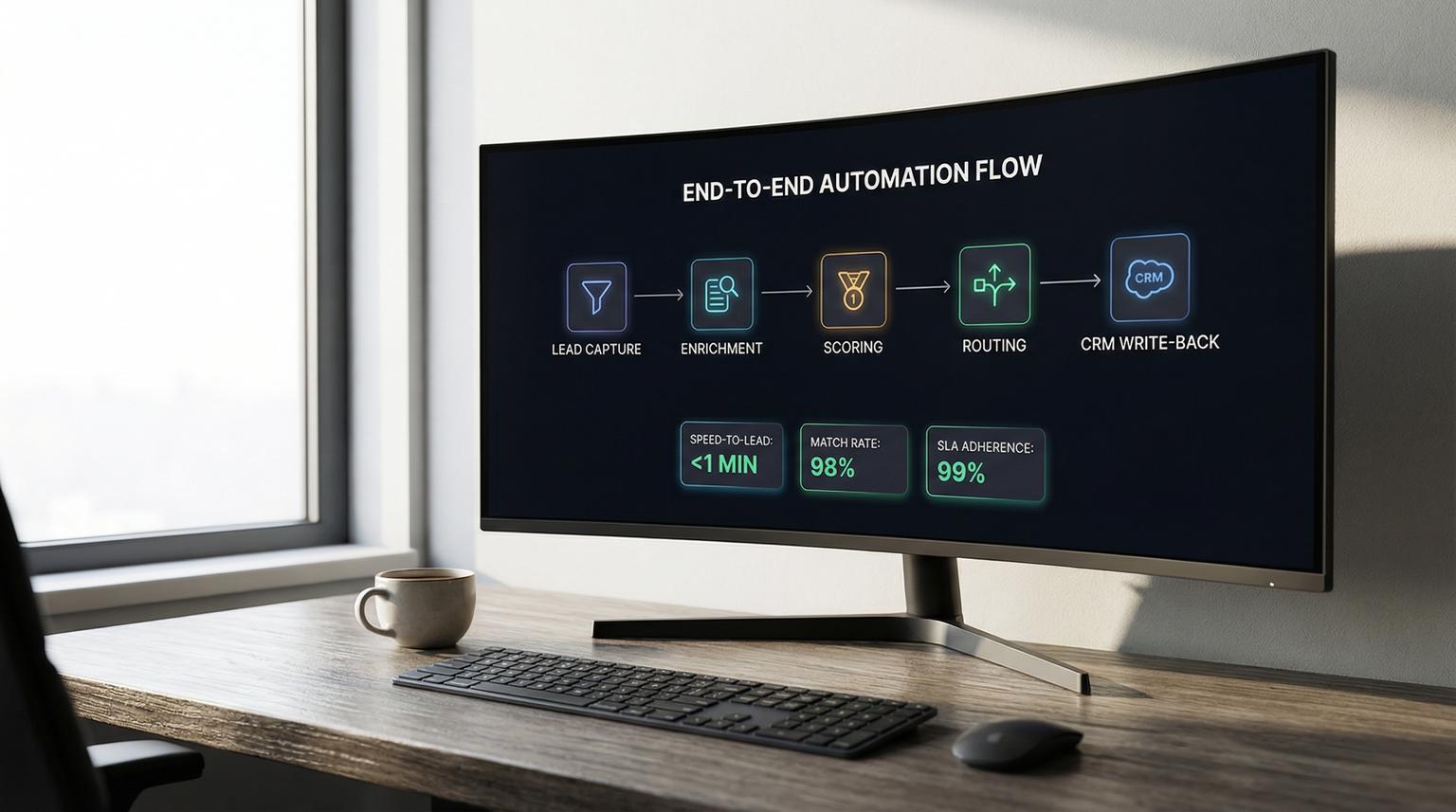
Most teams do not have a lead problem, they have a lead-to-customer workflow problem. Leads arrive from forms, ads, chat and email then people manually copy data, guess intent and forget follow-ups. This is where machine learning for business productivity becomes practical: use AI signals plus automation to enrich, score and route every lead consistently across your CRM and email tools.
This guide is for business owners, ops leaders and marketing and sales teams who want a deployable blueprint using n8n, CRM integrations and AI triage. We will show how ThinkBot Agency designs these systems so you respond faster, keep data clean and gain pipeline visibility without adding admin work.
At a glance:
- Turn low-context leads into sales-ready records with enrichment, validation and CRM upserts.
- Use scoring and intent signals to route follow-ups, create tasks and open deals automatically.
- Apply AI triage to conversations to auto-tag, summarize and prioritize based on sentiment and urgency.
- Deploy with guardrails: dedupe, throttling, human approvals and audit logs for prompts and outputs.
Quick start
- Pick one entry point, for example a form webhook or ad lead webhook, and capture the raw payload in n8n.
- Normalize and dedupe, then enrich the lead with firmographic and contact attributes.
- Upsert into your CRM using deterministic match keys, then apply tags and lifecycle stage rules.
- Score intent, then route actions: create tasks, open deals, send alerts and draft personalized outreach for review.
- Add AI triage on replies and tickets: sentiment, urgency, summaries and next-step suggestions.
Use n8n as the orchestrator: every inbound lead is normalized, enriched and written back to your CRM as the system of record, then scored to trigger fast follow-up. Add AI triage on inbound messages so your team sees a prioritized queue with summaries and clear next actions, while guardrails prevent duplicates, spam and risky auto-sends.
Why lead-to-customer workflows break in real teams
Even with a good CRM, the workflow between systems is usually stitched together with manual steps. The most common failure patterns we see when auditing revenue operations:
- Missed or slow follow-up: leads sit in an inbox or spreadsheet until someone notices, which hurts speed-to-lead.
- Inconsistent data: different people enter company names, titles and notes differently, so reporting and routing rules fail.
- Duplicate records: ad leads, form fills and referrals create multiple contacts and competing owners.
- No intent visibility: high-intent leads look the same as low-intent leads until a human reads the context.
- Too much admin after calls: notes and next steps stay in email threads and never make it to deals and tasks.
Automation is not just about sending emails. It is about building a reliable system that moves data and decisions from capture to qualification to follow-up, while preserving quality and compliance.
The n8n blueprint: enrichment -> scoring -> routing -> CRM write-back
Think of your workflow as four layers that n8n can coordinate. n8n works well here because it can ingest webhooks, call APIs, transform data and update CRMs and email platforms in one place, with full logging. If you are evaluating tooling, see our Zapier vs. n8n comparison for scalable business automation for practical tradeoffs.

1) Capture leads from every channel
Typical triggers include:
- Website forms (webhook, Typeform, Gravity Forms or custom endpoints)
- Ad platform lead webhooks
- Chat and chatbot leads
- Email list signups from marketing platforms
Best practice: store the raw inbound payload as an attachment or note in your CRM or in a lightweight data store. This makes debugging and auditing easier later.
2) Normalize and dedupe early
Normalization should happen before enrichment or AI. Common steps:
- Trim and lowercase email addresses
- Split full name into first and last name when possible
- Extract company domain from email
- Standardize phone formatting if present
Dedupe rules should be deterministic. We commonly use email plus company domain as a starting match key, then apply CRM-specific match logic for contacts and companies.
3) Enrich with a waterfall when needed
Inbound forms should stay short. Let enrichment fill in missing context like company size, industry and seniority. If your primary enrichment source cannot match, use a fallback provider as a waterfall step. This pattern reduces missing data without lowering standards and it also prevents unnecessary calls when the first match succeeds.
To keep data safe, use conditional updates so inferred or low-trust fields do not overwrite verified CRM fields. This mirrors the upsert-first approach described in this guide but implemented in n8n with your tools.
4) Score intent and route the next action
Scoring can come from rules, AI or both. Examples of signals:
- Source and campaign
- Company size and industry fit
- Job title or seniority
- Engagement history, pages visited and email clicks
- Free-text intent, for example pricing questions or integration needs
Route based on score bands and confidence. High-scoring leads can create deals and urgent tasks, while lower scoring leads go to nurture. n8n makes this easy with IF nodes and switch logic.
Lead enrichment and routing checklist for a deployable workflow
Use this checklist when you want a workflow that is stable in production and easy to maintain. We use a version of this internally when building n8n automations for clients. For a broader end-to-end pattern, compare this to our guide to automating CRM with artificial intelligence from capture through follow-ups.
- Trigger on inbound lead capture (form submit, ad webhook, chat lead or booking)
- Normalize payload (name casing, email trim and lowercase, domain extraction)
- Run dedupe checks using match keys (email plus company domain, plus CRM ID when available)
- Enrich with primary provider (person and company attributes)
- If no match, enrich with fallback provider (waterfall step)
- Validate critical fields (email domain vs company domain, required firmographics)
- Upsert into CRM (match rules and conflict rules for field precedence)
- Apply conditional updates so high-trust fields are protected (owner, lifecycle stage and verified email)
- Derive ICP tier tags from title or seniority, industry and company size
- Map score bands to actions (nurture vs task vs deal vs immediate alert)
- Notify the team with a lead card that includes enrichment highlights and routing decision
- Log match rate, enrichment success rate and time-to-first-touch
This checklist prevents the two biggest automation killers: inconsistent inputs and uncontrolled writes to the CRM.
AI triage for follow-ups, replies and support tickets
Once your lead record is clean and routed, the next bottleneck is conversation handling. Replies, call notes and support tickets include the information you need to move deals forward, but it is unstructured. A reliable pattern is unstructured -> structured -> CRM updates, similar to the approach in this example. For more practical patterns, see AI for business productivity workflows that connect CRM, email, and support.

Where AI triage fits in the pipeline
- Auto-tagging: detect topic like pricing, integrations, timeline, procurement or cancellation risk.
- Summaries: generate a short account of what happened and what the next step is.
- Urgency and sentiment: prioritize queues using sentiment labels and confidence scores, a common pattern in sentiment models like sentiment analysis.
- Next-step suggestions: create tasks and propose an email draft for human review.
Keep AI outputs structured so automation stays deterministic
Freeform AI text breaks downstream automation. In n8n we recommend strict JSON outputs and validation before any CRM writes. Below is a compact example payload spec for triaging inbound email replies and creating CRM tasks.
{
"contact_email": "[email protected]",
"company_domain": "acme.com",
"intent": "pricing",
"urgency": "high",
"sentiment": "negative",
"sentiment_confidence": 0.82,
"summary": "Wants pricing and asks if SOC2 is available. Concerned about response time.",
"next_steps": [
"Send pricing overview and security packet",
"Offer 15-minute call"
],
"recommended_owner": "sdr_team",
"create_task": true,
"task_due_hours": 2
}
Store both the raw message and the extracted JSON. This supports audits, tuning and accountability.
Risk controls and guardrails (failure modes and mitigations)
Automation that touches customer communications and pipeline stages needs guardrails. These are the most common failure modes we design for and how to mitigate them.
- Duplicate contacts or deals -> Use CRM upserts, explicit match keys and a dedupe check before create actions.
- Bad enrichment match -> Validate company domain and require a lightweight human approval when match confidence is low or fields conflict.
- AI overwrites verified data -> Tag AI-inferred fields as inferred and block overwriting verified fields unless rules allow it.
- Over-automation spams leads -> Add throttling, per-domain caps, suppression lists and do-not-contact checks before any send.
- Hallucinated personalization -> Retrieve CRM history and known facts first, then generate drafts grounded in that context and block sends when required fields are missing.
- Low confidence sentiment or mixed sentiment -> Use confidence thresholds to decide auto-routing vs human review and use sentence-level cues when available.
- API rate limits and timeouts -> Add retries with backoff, queueing and caching by message ID or lead ID.
These controls are why we often include human-in-the-loop approvals for high stakes actions like sending first-touch emails or changing deal stages, especially early in rollout.
What to automate first (and how to measure success)
Teams get the best results when they start with one narrow workflow and instrument it well. A strong starting point is inbound lead enrichment plus SLA-based task creation. Then you can expand to AI triage for replies, meeting summaries and ticket prioritization.
Recommended phase order
- Phase 1: Inbound capture -> normalize -> enrich -> upsert -> task creation and alerts
- Phase 2: Score then route -> create deals for high intent leads -> sequence enrollment with approval
- Phase 3: AI triage on replies and call notes -> summaries -> next steps -> automatic CRM updates
- Phase 4: Closed-loop reporting -> attribution, stage velocity and exception dashboards
Metrics that show real productivity gains
- Time-to-first-touch and percent within SLA
- Enrichment match rate and dedupe rate
- Reply rate and meeting rate by score band
- Stage-to-stage velocity and leakage points
- Manual admin time reduced, measured by sampled time studies or rep feedback
- Error rate, for example misroutes, bounced emails and incorrect stage changes
If you want a reference for how larger teams structure the context -> generation -> orchestration loop, the pattern aligns with the workflow thinking in this overview, but n8n lets you implement it with your existing stack.
If you want ThinkBot Agency to map this to your exact tools (HubSpot, Salesforce, Pipedrive, Zoho, Gmail, Outlook, Mailchimp, ActiveCampaign and custom APIs) and build it in n8n with testing and monitoring, book a working session here: book a consultation.
Prefer to validate capability first? You can also review our automation track record on Upwork.
FAQ
Common questions we get when teams are planning an AI-enabled lead-to-customer workflow in n8n.
How is machine learning used in business productivity workflows without replacing my CRM?
We use ML outputs as signals, not as the system of record. n8n captures the lead, calls enrichment and AI services for scoring, tagging, summaries or sentiment and then writes the results back into the CRM with clear field rules. Your CRM stays authoritative, while AI reduces research and admin work.
What CRMs and email tools can n8n integrate with for lead automation?
n8n can connect to popular CRMs like HubSpot, Salesforce, Pipedrive and many others via native nodes or HTTP APIs. It also integrates with Gmail, Outlook and marketing tools like Mailchimp and ActiveCampaign, plus ad webhooks and custom backends.
How do you prevent AI from sending incorrect or risky outreach?
We add guardrails: structured JSON outputs, required field validation, suppression lists, throttling and human approval steps for high-risk actions. We also log prompts and outputs so you can audit decisions and improve templates over time.
Can AI triage prioritize tickets and replies using sentiment and urgency?
Yes. We combine sentiment labels and confidence scores with business rules like VIP status, SLA tier and keywords like "cancel" or "refund". This creates a priority score that routes messages to the right queue and owner and includes a short summary for fast handling.
What does ThinkBot Agency deliver for a lead-to-customer automation project?
We typically deliver an n8n workflow build with field mappings, scoring rules, AI extraction specs, logging and monitoring plus rollout support. We also document ownership, exception handling and rollback steps so your team can run it confidently.
