
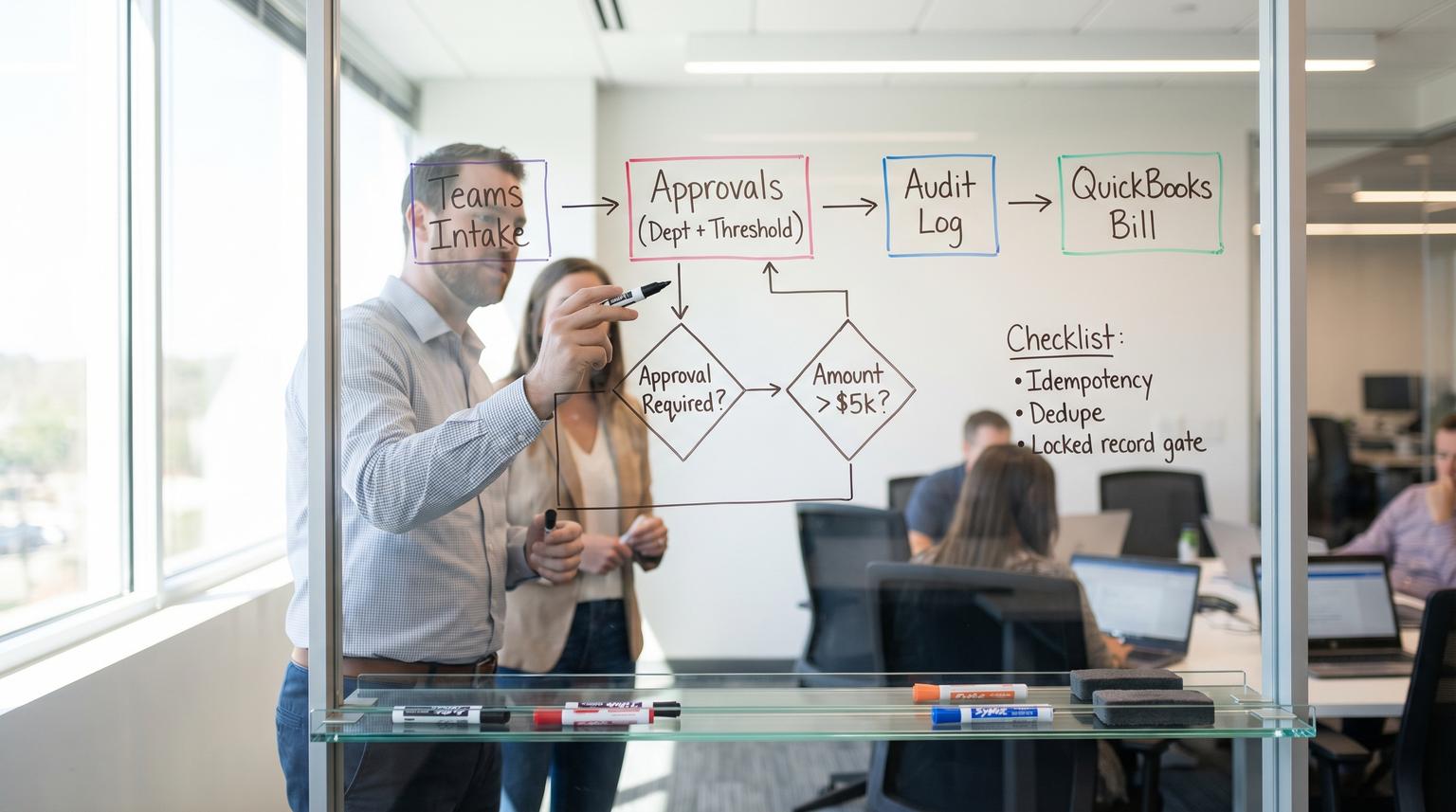
Purchase requests that start in chat often end as accounting headaches: missing approvals, duplicate bills and no clear record of who said yes. This implementation-focused article is for Make.com automation consultants and operators who want a controlled workflow that begins in Microsoft Teams then routes multi-step approvals by department and spend thresholds and creates a QuickBooks vendor bill only after approval with a durable audit trail.
At a glance:
- Capture requests in Teams using an Adaptive Card that includes hidden control fields and a stable request ID.
- Persist the request before any approvals then route approvals by department and amount thresholds.
- Write every decision event to an audit log and gate QuickBooks bill creation on an approved locked record.
- Prevent bypassing controls and duplicates with idempotency keys, dedupe checks and restricted write routes.
- Package for production with monitoring, permissions, exception queues and handoff documentation.
Quick start
- Design a Teams Adaptive Card form that submits required fields plus hidden
request_idandcorrelation_id. - Create a Make datastore (or database) with two tables:
purchase_requestsandapproval_events. - Build the intake scenario: on submission, validate fields then create the request record and post an approval card to the first approver.
- Build the approval scenario: on approve or deny, append an approval event then route to the next approver or close the request.
- Build the QuickBooks write scenario: trigger only when request status becomes APPROVED and vendor validation and dedupe checks pass.
A reliable Teams-to-QuickBooks purchase workflow in Make starts by storing each request with a unique request ID before any approvals. Approvals are routed by department and amount thresholds and every decision is logged with who approved what and when. QuickBooks bill creation is gated so it can only run from an approved locked request and it includes duplicate prevention and exception handling for denied requests, budget overages and vendor mismatches.
Why Teams to QuickBooks purchase intake breaks controls
The risk is not that people request purchases in Teams. The risk is that a chat message is not a controlled transaction. At the collaboration to accounting boundary three failure patterns show up repeatedly:
- Bypassed approvals: someone forwards an invoice and a well-meaning teammate creates a bill without checking who approved it.
- Duplicate bills: the same request gets re-submitted or re-approved and the automation creates a second vendor bill.
- Unclear decision history: you can see messages but you cannot reliably prove who approved what amount at what time and under what policy.
So the design goal is not simply speed. It is speed with enforced controls. That means: persist a record first, route approvals based on policy, log every decision event and allow the accounting write step to run only from an approved state.
A real-world operations insight: the fastest way to lose user trust is to make approvals feel automated but still require Finance to chase missing details later. Build validation into the intake (required fields, evidence link, vendor selection) so the request is complete before it enters the approval chain.
Teams intake contract using Adaptive Cards
In Teams your intake form should be an Adaptive Card using Action.Submit. The key mechanic is that Teams sends back both user input values and any hidden data you embed in the card payload. That lets you carry control fields that users should not edit such as a request ID and a correlation ID for idempotency. Microsoft documents how card actions send payload data back with submissions in this overview of card actions. If you need to choose the right automation platform for more complex routing and auditability, see our Zapier vs Make.com comparison for complex workflows.
Minimum required fields (what operators fill out)
- Vendor name (or vendor selection if you can provide a known list)
- Amount and currency
- Description of goods or services
- Department or cost center
- Needed by date
- Evidence link (quote, invoice or PO link) or attachment reference if you handle files separately
Hidden control fields (what the workflow relies on)
request_id(human-friendly, stable and unique)correlation_id(a GUID used for dedupe and tracing)requested_by_user_idandrequested_by_displaypolicy_version(useful when approval rules evolve)scenario_instanceorintake_message_id(helps debugging)
Example submit payload (pattern)
Action.Submit
data: {
"request_id": "PR-2026-000123",
"correlation_id": "9b2d9f76-2d2a-4f05-b5b6-5d2b2c61cbb0",
"department": "Marketing",
"amount": 1840.55,
"currency": "USD",
"vendor_hint": "ACME Printing",
"description": "Trade show booth graphics reprint",
"evidence_url": "https://...",
"requested_by_user_id": "29:1abc...",
"policy_version": "1.3"
}
Common mistake: treating a plain Teams message as an intake signal. That makes it easy to bypass required fields and it makes idempotency hard. Use the card submission as the authoritative contract and reject messages that do not include the hidden control fields.
Scenario map in Make with threshold routing and an auditable gate
Below is a concrete scenario map that meets the core constraint: persist first, route approvals by threshold and department, log every decision and create the QuickBooks bill only from an approved locked record. You can implement this as three Make scenarios or as one scenario with multiple webhooks and routes. In production we prefer separating intake, approvals and accounting writes so access can be scoped and failures are easier to isolate.

Scenario A: Teams Intake (Webhook or Teams event)
1) Receive Adaptive Card Action.Submit payload
2) Validate required fields (amount, vendor, dept, evidence_url)
3) Generate request_id if missing (or validate format)
4) Upsert purchase_requests by request_id (idempotent)
- status = "PENDING"
- lock_state = "UNLOCKED"
- requested_by, dept, amount, vendor_hint, evidence_url
5) Write approval_events record
- event_type = "REQUEST_CREATED"
- actor = requested_by
- timestamp, payload_hash
6) Determine approval route (rules table)
7) Post approval card to Approver 1 in Teams
8) Notify requester "Submitted" with request_id
Scenario B: Approvals (Webhook for Approve/Deny button)
1) Receive approval action with request_id + approver_user_id + decision
2) Load purchase_requests by request_id
3) Guardrails
- if status in ("DENIED","APPROVED") stop
- if approver_user_id not allowed for this step stop and log
4) Append approval_events record
- event_type = "APPROVED" or "DENIED"
- step_name, actor, timestamp, comment
5) If DENIED
- update purchase_requests status="DENIED"
- notify requester and stakeholders
6) If APPROVED
- if more steps required: post next approval card
- else: update purchase_requests status="APPROVED"
set lock_state="LOCKED"
set approved_at timestamp
Scenario C: QuickBooks Bill Creation (Scheduled or webhook on status change)
1) Fetch requests where status="APPROVED" and bill_id is empty
2) For each request
- verify lock_state="LOCKED"
- dedupe check using correlation_id or request_id
3) Vendor lookup in QuickBooks (match rules)
4) Create Bill in QuickBooks (single controlled route)
5) Write approval_events record
- event_type="BILL_CREATED"
- actor="system"
- quickbooks_bill_id, timestamp
6) Update purchase_requests with bill_id and bill_created_at
7) Notify requester and AP channel with bill link or bill number
Approval routing rule (a practical decision rule)
Keep threshold logic explicit and reviewable. A simple and effective rule is: department owner approves all requests, Finance approves any request above a threshold and the CFO approves any request above a higher threshold. The tradeoff is speed versus risk tolerance: more approval steps reduce risk but can slow throughput. Use a threshold that matches how your business actually buys.
Approval matrix example (implement as a Make data store table)
| Department | 0 to 1000 | 1000 to 5000 | 5000+ |
|---|---|---|---|
| Marketing | Marketing Lead | Marketing Lead then Finance | Marketing Lead then Finance then CFO |
| Operations | Ops Manager | Ops Manager then Finance | Ops Manager then Finance then CFO |
| Engineering | Eng Manager | Eng Manager then Finance | Eng Director then Finance then CFO |
Implementation detail that prevents bypassing controls: every approval action must include request_id and the expected current_step in hidden fields so Make can reject stale cards and out-of-order approvals. For a broader, production-readiness framework (error handling, retries, idempotency, logging, governance), use our pillar guide: Make.com automation playbook for reliable scenarios operating at scale.
QuickBooks bill creation that is idempotent and hard to duplicate
QuickBooks Online bill creation has a dependency order: confirm the vendor, build the bill payload then create the bill. Intuit describes the concept in its basic billing implementation docs and Make provides a dedicated Create a Bill module in its QuickBooks app.
Field mapping from Teams request to QuickBooks bill
| Teams intake field | Request record field | QuickBooks bill field (typical) |
|---|---|---|
| Vendor name or selection | vendor_hint and vendor_id (if known) | VendorRef |
| Amount | amount | Line.Amount (or calculated from line details) |
| Description | description | Line.Description and PrivateNote |
| Department or cost center | department | ClassRef or Department custom field (if used) |
| Needed by date | needed_by | DueDate or TxnDate (policy-dependent) |
| Evidence URL | evidence_url | Store in PrivateNote or an attachment reference strategy |
| request_id and correlation_id | request_id and correlation_id | Use as DocNumber or a memo field when feasible plus store in your log |

Idempotency pattern (how you stop duplicates)
- Primary key:
request_idis the only identifier used to look up and update the request. - Bill creation gate: only create a bill when
status=APPROVED,lock_state=LOCKEDandbill_idis empty. - External dedupe: before calling Create a Bill, search QuickBooks for an existing bill where DocNumber or memo contains your
request_id. If found, write the found bill ID back and stop. - Single write route: all QuickBooks write modules live in one Make route that is not reused anywhere else.
QuickBooks preflight checklist (run before Create a Bill)
- Vendor match strategy selected: exact name match, vendor ID stored or a controlled alias list.
- Line item strategy selected: single expense line to an AP clearing account or itemized lines per category.
- DocNumber or memo carries
request_idso accounting can trace it. - Dedupe check implemented in both your datastore and QuickBooks search.
- Error handler attached to QuickBooks modules with a clear exception queue. (If you want another QuickBooks-focused reliability example with deduping + exception routing, see Stripe to QuickBooks reconciliation with Make.com.)
Vendor mismatches are not edge cases. They are a normal operational reality especially when users type vendor names differently. Treat vendor matching as a first-class exception path, not a best-effort guess.
Exception paths and failure modes to design for
A production workflow needs explicit exception routes so operators can resolve issues without editing scenarios or rerunning bundles manually.
Denials and change requests
- If denied, set
status=DENIED, log the denial event and notify the requester with the reason and next steps. - If the approver wants changes, treat it as deny with guidance to resubmit rather than editing the original request in place. This keeps the audit trail clean and reduces disputes.
Budget overages
- Add a budget check step before routing to Finance. If your budget system is external, call an API and store the response snapshot in the request record.
- If over budget, route to a specific budget owner or require an extra approval step.
Vendor mismatch or missing vendor
- If no vendor match found, route to AP Ops with a task card: create vendor, select an existing vendor or map an alias.
- After resolution, write the resolved vendor reference to the request record then allow the bill creation scenario to proceed.
Duplicate submissions and stale approval cards
- Reject approval actions that do not match the current step number and log an
INVALID_ACTIONevent. - If the same intake payload arrives twice, use upsert by
request_idthen return a message that the request already exists.
QuickBooks API failures and partial writes
- Wrap QuickBooks modules in an error handler that writes an
INTEGRATION_ERRORevent including the error message and request_id. - Never mark the request as bill-created until you have the QuickBooks bill ID saved.
Packaging this for production in Make
Consultants get judged on how the workflow behaves on a random Tuesday, not on a demo day. A maintainable implementation includes permissions, monitoring, a rollback plan and handoff documentation.
Governance and permissions
- Restrict who can edit scenarios and connections in the Make organization. This supports separation of duties: the person requesting should not also be able to change the automation that creates bills.
- If you have access to Make Audit Logs, use them for platform-level change history. They are not a substitute for the business-process audit trail you store per request but they help you answer, who changed the scenario and when. See Make Audit Logs for details and access requirements.
Monitoring and alerting
- Create an Ops channel in Teams for exception notifications: vendor mismatch, QuickBooks errors and stalled approvals.
- Add a daily digest scenario that lists requests stuck in PENDING beyond an SLA (for example 24 hours) and pings the next approver.
- Track three operational states: pending approvals, approved awaiting bill creation and exception queue.
Handoff documentation (what you leave behind)
- Approval matrix and threshold table with owners and escalation contacts.
- Data dictionary for
purchase_requestsandapproval_eventsincluding which fields are immutable after approval. - Runbook: how to resolve vendor mismatches, how to re-open a denied request and how to handle a QuickBooks outage.
- Connection inventory: which QuickBooks company, which Teams tenant and which service accounts are used.
Primary CTA: If you want ThinkBot Agency to help you implement this workflow with production-grade logging, idempotency and exception handling, book a consultation.
For examples of the types of scenarios we ship and support, you can also review our portfolio.
When this approach is not the best fit
If your organization requires three-way matching (PO, receipt and invoice) with formal procurement controls or if you need complex approval delegation rules that change daily, you may outgrow a Teams card-based intake. In that case a procurement system or a dedicated intake app with stronger catalog and receiving features may be a better front end. Make can still orchestrate integrations but Teams should not be the primary UI for the entire procurement lifecycle.
FAQ
Common implementation questions we hear when building Teams approvals that gate QuickBooks bills.
Where should the approval audit trail live if Make Audit Logs exist?
Store the per-request approval history in your own data store as an append-only list of events (created, approved, denied, bill created). Make Audit Logs are for platform governance like who edited a scenario or connection. You typically need both for a complete picture.
How do you prevent someone from approving twice or approving out of order?
Include hidden fields in each approval card such as request_id and current_step then validate them before accepting an approval. If the request is already approved or denied or the step does not match the current step in the stored request record, reject the action and log it.
What is the safest way to prevent duplicate vendor bills in QuickBooks?
Use a stable request_id and correlation_id then gate bill creation on a locked approved record with bill_id empty. Before creating a bill, also search QuickBooks for an existing bill that contains the request_id in DocNumber or a memo field. If found, write the existing bill ID back and stop.
How do you handle vendor mismatches when users type vendor names differently?
Do not guess. Treat it as an exception path. Route the request to AP Ops to select or create the vendor then store the resolved VendorRef on the request record. Only then should the QuickBooks bill creation route run.
