
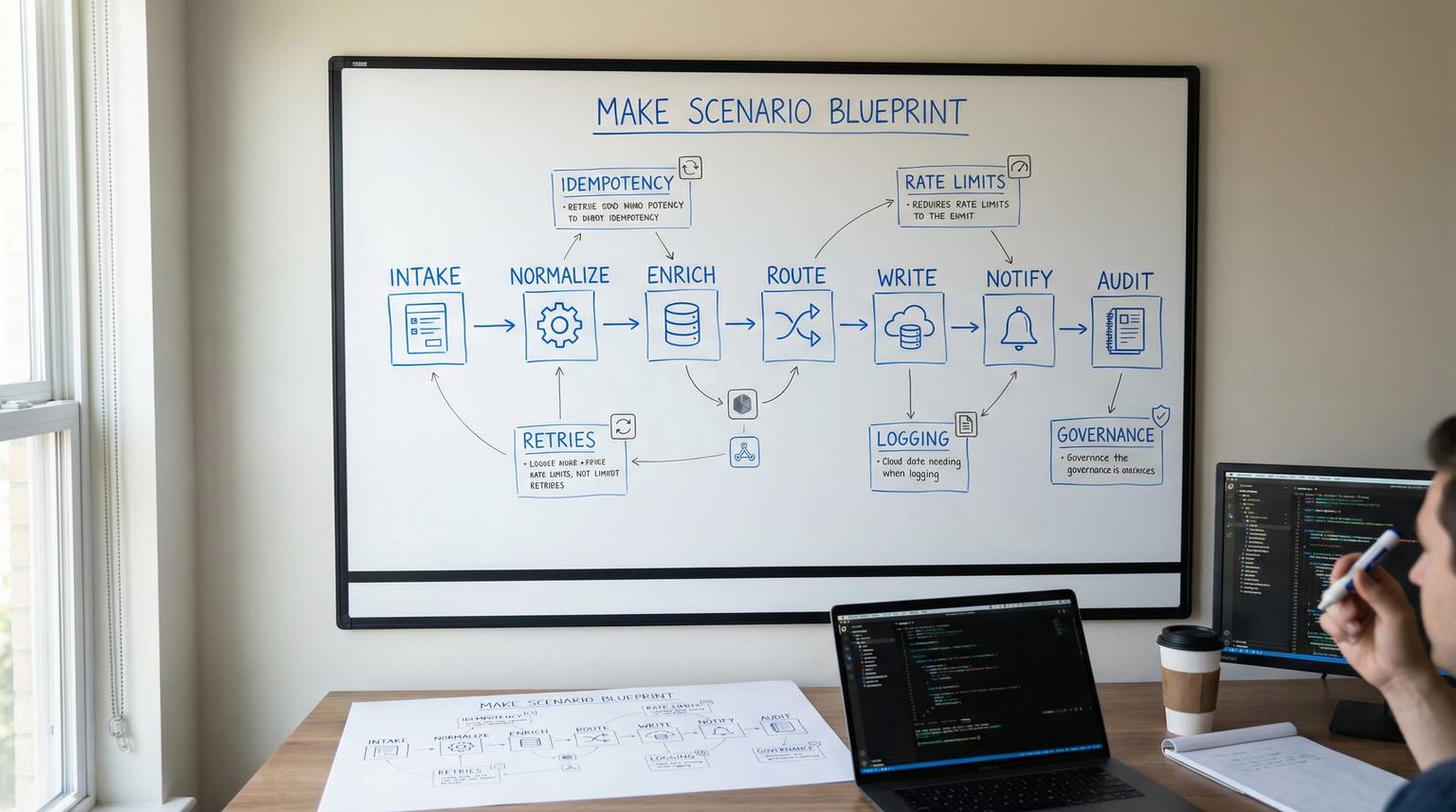
Teams rarely fail at Make.com because they cannot connect apps. They fail because scenarios grow without a consistent design and operations model, so every change becomes risky, debugging takes too long and ownership becomes unclear. This pillar introduces a reusable Make scenario blueprint that ThinkBot Agency uses to design, deploy and operate scenarios across departments without turning your automation layer into a fragile tangle.
You will learn how to translate business goals into modular scenario architecture using routers, subscenarios, data stores and standardized payloads. You will also get production reliability practices like retries, idempotency, rate-limit handling, logging, alerting and run-history diagnostics, plus governance fundamentals like documentation, versioning and environment separation.
At a glance:
- Design scenarios contract-first with stable inputs/outputs so they are reusable across teams and calling contexts.
- Decompose large workflows into subscenarios, cohesive router branches and shared normalization blocks.
- Ship production safeguards: idempotency gates, structured retries and rate-limit traffic shaping.
- Operationalize: run-history triage, incomplete executions workflows, alerting and replay-based recovery.
- Govern changes with blueprint exports, environment separation and clear ownership and permissions.
Quick start
- Write a one-page automation requirement: event, outcome, systems, SLAs and failure impact.
- Define the scenario interface first: inputs, outputs and success criteria, then build internal logic around it.
- Split the flow into reusable blocks: normalize -> enrich -> route -> write -> notify -> audit.
- Use subscenarios for stable building blocks (upsert contact, create ticket, send alert) and return normalized outputs.
- Add reliability defaults: idempotency key, error handlers to incomplete executions, retries and rate-limit controls.
- Instrument operations: correlation_id, structured logs, alert routes and a runbook for replay/backfill.
- Export a blueprint before activating, then promote to production via a controlled clone and activation checklist.
A production-grade Make.com scenario blueprint is a repeatable framework for turning a business requirement into a modular scenario with defined inputs/outputs, reusable subscenarios, and operational safeguards. Instead of building one-off automations, you standardize payloads, routing patterns and recovery behaviors so scenarios stay maintainable as volume and complexity grow. The blueprint also includes governance practices like documentation, versioning via exports and environment separation to keep changes safe over time.
Table of contents
- Why scenarios break at scale (and what a blueprint fixes)
- The blueprint, from requirement to operations
- Define scenario contracts with inputs and outputs
- Checklist: Hardening your scenario data contract
- Modular architecture in Make: routers, iterators and subscenarios
- Integration patterns that work across app stacks
- Production reliability: error handlers, idempotency and rate limits
- Observability and recovery: run history, replay and incident workflow
- Governance: documentation, versioning and environment separation
- Common failure modes and guardrails
- When to bring in ThinkBot Agency
Why scenarios break at scale (and what a blueprint fixes)
Most Make.com teams start with a quick win: a webhook catches a form submission, a router sends it to a CRM and Slack, done. Six months later, the same scenario has 40 modules, three different owners and hidden assumptions in mappings. The result is predictable:
- Mapping drift: fields are renamed or repurposed without updating downstream modules, causing silent data quality issues.
- Duplicate side effects: retries create duplicate contacts, duplicate invoices or double-sent emails.
- Unbounded branching: routers become a dumping ground, each route doing multiple jobs.
- Operational blind spots: no consistent logging, no correlation IDs and unclear recovery steps.
- Governance gaps: no blueprint backups, no promotion process and no permissions model for edits.
A blueprint fixes this by making every scenario follow the same lifecycle: contract-first design, modular build, reliability defaults, and repeatable operations. If you are still deciding platform fit, we break down practical differences in platform tradeoffs and when Make is the better choice for modular, production-grade flows.
The blueprint, from requirement to operations
This is the repeatable sequence we recommend, regardless of department or tool stack:

1) Requirements that translate into automation design
Capture requirements in automation-native terms:
- Trigger: webhook event, schedule, manual run, or called subscenario.
- Inputs: what must be present, what is optional, what you can look up.
- Outputs: what downstream steps must receive, plus status and metadata.
- Side effects: records created/updated, emails sent, tickets created, files written.
- SLAs: time to act, retry window, acceptable delay for backlogs.
- Risk: what happens if it duplicates, misses an event or writes wrong data.
Think of scenarios as internal products. The interface and reliability expectations matter as much as the app connections.
2) Architecture as a set of reusable blocks
Across use cases, most flows reduce to the same blocks:
- Intake (webhook/poll/call)
- Normalize (canonical payload, field cleanup, defaults)
- Enrich (lookups, dedupe checks, context fetch)
- Route (business logic branching)
- Write (CRM/helpdesk/DB updates)
- Notify (Slack/email/Teams, optional)
- Audit (logging, metrics, run notes)
This is the same mental model we expand on in our cross-functional guide to unified workflows, but here we will focus on the reusable blueprint and production operations.
3) Operate like production software
A scenario is not done when it runs once. It is done when it can safely handle:
- Retries without duplicates (idempotency)
- Rate limits and spikes (traffic shaping)
- Partial failures (error handlers, incomplete executions)
- Change and rollback (blueprint export, controlled promotion)
Define scenario contracts with inputs and outputs
Make treats scenario inputs and outputs as first-class boundaries, which lets you design reusable interfaces for parent scenarios, API callers, and scenario-as-a-tool usage. This is not a nice-to-have. It is the mechanism that keeps scenarios stable as more teams call them. Make documents this contract-first approach in the docs.
Contract-first design: define the interface, then build internals
Instead of starting in the canvas with modules, start by writing:
- What the scenario receives (required vs optional fields, types, defaults).
- What it guarantees to return (status, IDs, normalized payload, error metadata).
When you formalize this, a CRM upsert subscenario can be reused by marketing ops, support operations and finance workflows, even if the intake systems differ.
Mini template: Scenario contract spec (copy/paste)
Use this template when you create a new scenario or refactor an existing one into a subscenario with a stable interface.
Scenario name:
Purpose:
Trigger type: (webhook | schedule | manual | API | called-subscenario)
Success criteria: (what must be true in outputs + side effects)
Inputs:
- name: <snake_case>
type: (text|number|boolean|date|collection|array|uuid|email|url|any)
required: (yes|no)
description:
default:
Outputs:
- name: <snake_case>
type: (text|number|boolean|date|collection|array|any)
description:
Error outputs (optional):
- error_type
- error_message
- retryable (true|false)
When you implement this in Make, follow the platform naming and typing constraints for input/output structure, including underscore-friendly names, Required flags and type selection, as described in this guide.
Checklist: Hardening your scenario data contract
Use this checklist when you want scenarios to be reusable across teams, resilient to partial data and easier to maintain during growth.
- Standardize parameter naming in snake_case, avoid ad-hoc fields and inconsistent casing.
- Mark truly required fields as Required so bad payloads fail fast.
- Add a description for every parameter so future owners understand intent.
- Use Select for fields with limited allowed values to prevent business logic drift.
- For arrays, define nested item types to avoid untyped lists.
- For collections, define a specification when stability matters, do not leave it open-ended by default.
- Use default values for optional fields to reduce mapping complexity in callers.
- If accepting JSON/dynamic collection, document the expected schema and include an example payload internally.
- Version contract changes, prefer additive changes before renames or deletions.
- Add a conformance test run: known payload -> expected output shape and side effects.
Modular architecture in Make: routers, iterators and subscenarios
The fastest path to maintainability is decomposition. Instead of one scenario that does everything, build a small number of parent orchestration scenarios that call reusable subscenarios. Make explicitly supports this pattern, including synchronous and asynchronous calls, in its overview.
Routers: cohesive branching, not branching by convenience
Routers are your decision layer. Treat each route as a single responsibility. A common anti-pattern is to branch and then implement multiple concerns per route. A better pattern is:
- Route 1: Normalize and validate input
- Route 2: CRM write path (upsert)
- Route 3: Helpdesk write path (ticket update)
- Route 4: Notification path (Slack/email)
This keeps debugging simple and makes future refactors into subscenarios obvious. For practical router and iterator concepts that generalize beyond Airtable, see this walkthrough.
Iterators and aggregators: control fan-out and fan-in
Any time a module returns an array, decide explicitly how you want to process it:
- Fan-out: iterator processes each item as its own bundle, good for per-record enrichment.
- Fan-in: aggregator collects bundles to perform a bulk write, good for rate limits and cost control.
In production, the aggregator pattern is often a rate-limit strategy as much as it is a data shaping technique.
Subscenarios as building blocks
Think in terms of reusable internal services:
- normalize_lead_payload
- upsert_contact
- upsert_company
- create_or_update_ticket
- send_ops_alert
- write_audit_log
Each subscenario should have stable inputs/outputs. This is what makes it callable from multiple parents and safe to evolve with versioning discipline.
Integration patterns that work across app stacks
This section focuses on patterns that survive tool changes. You can swap HubSpot for Salesforce, Zendesk for Freshdesk or Airtable for a database and keep the same architecture if your payload contracts and building blocks remain stable. If you want examples of end-to-end flows across CRM, email and support, see real-world examples and then apply the blueprint principles here.
CRM and RevOps: intake -> normalize -> dedupe -> upsert -> route ownership
RevOps scenarios fail most often due to duplicates and unclear identifiers. The core pattern is to treat dedupe as an integration responsibility and prefer upsert semantics using a stable unique key. This identifier strategy and upsert-first framing is consistent with common CRM integration guidance in this guide.
Make implementation details that matter:
- Normalize before matching: lower-case emails, standardize phone formats, trim whitespace.
- Idempotency key: build from source_event_id or hashed canonical fields.
- Source of truth rules: decide which system owns which fields to avoid ping-pong updates.
- Round-robin and routing: keep assignment logic separate, ideally as a subscenario.
For lead intake specifics, including routers, deduplication and alerting, reference our implementation-focused guide on lead workflows.
Customer support: event-driven enrichment and write-back
Support integrations usually need near-real-time behavior, plus strict idempotency because helpdesk providers can retry events. A durable pattern is:
- Ticket created/updated -> webhook intake
- Enrich (account, plan, entitlement, recent orders)
- Write back (custom fields, internal note, tags, routing)
- Optional: AI triage/draft response with human review step
This bidirectional architecture and the importance of webhooks over polling for ticket streams is well explained in this guide. In Make, model a standardized support_event payload so your enrichment and write-back subscenarios can work across helpdesks.
Ops and back office: reconcile, approve, and keep a clear audit trail
Finance and operations flows are less tolerant of duplicates. Design for strict idempotency and explicit audit logs. A common pattern is:
- Ingest payment/refund/dispute events
- Match to internal invoice or ledger object
- Write reconciliation result, exceptions to a queue
- Notify only on exception, not on every success
For a concrete example using Stripe and QuickBooks principles that translate to other stacks, see reconciliation workflows.
Marketing ops: segment, enrich, and schedule safely
Marketing automation breaks when triggers are too frequent, data is incomplete or campaigns require coordinated writes across tools. Key blueprint patterns:
- Use a canonical lead/contact payload, then map to each destination tool.
- Batch where possible, especially for list membership updates or tag assignments.
- Use schedules as throttles during rollout, then increase frequency after stability validation.
Scheduling choices have real cost and operational implications. Make provides examples of how frequency impacts operations in this guide.
Reporting and analytics: standardize events, not dashboards
Instead of building one scenario per dashboard, build one standardized event pipeline:
- Define event types (lead_created, ticket_resolved, invoice_paid)
- Normalize event schema and timestamps
- Write to your reporting store (sheet, database, warehouse, BI ingestion endpoint)
- Maintain replay and backfill ability
This is where scenario contracts and run replay become operational superpowers.
Production reliability: error handlers, idempotency and rate limits
Reliability in Make is a combination of scenario settings, per-module error handlers and architectural guardrails. Do not treat it as a final step. Build it in as defaults.

Error handlers and incomplete executions as your recovery queue
For transient failures (timeouts, 5xx, temporary auth issues), route errors into a recoverable path and use retry behavior that matches the external system. Make error handler directives like Break, Resume and Ignore have real operational consequences, and Break is commonly used to push failed bundles into incomplete executions for retry and manual triage, as described in this guide.
Decide in advance:
- Which errors are retryable vs non-retryable
- What context to include in alerts and logs
- Whether to allow manual edits of failed bundles before retry
Idempotency: the rule that prevents duplicate side effects
Idempotency means repeated processing of the same event results in the same final state, without duplicates. In Make, implement it with a dedupe gate before side effects:
- Compute an idempotency_key (source event ID if available, otherwise a deterministic hash of canonical fields and event time bucket).
- Store the key with status (started, committed) in a data store or external DB.
- If key exists and committed, stop early and return a safe output.
This pattern matters most for webhook intake where upstream retries are common, and for replay/backfills.
Rate limits: traffic shaping, batching and recovery
Rate limits are not solved by retries alone. You need to shape traffic, batch work and ensure recovery paths exist. Make documents RateLimitError behavior and prevention tactics in its guidance, including throttling maximum runs per minute, using sequential processing where needed and favoring bulk modules or aggregators to reduce API calls.
Practical blueprint defaults:
- Set ingestion throttles for instant scenarios handling high-volume webhooks.
- Prefer bulk endpoints, aggregators and batched updates when supported.
- Enable incomplete executions so you can recover without dropping work.
- Use sequential processing only when order and shared state require it.
Observability and recovery: run history, replay and incident workflow
Production operations needs two things: you can see what happened and you can safely recover. Make provides scenario-level settings that directly change incident behavior, such as sequential processing, storing incomplete executions and confidentiality settings, documented in scenario settings.
What to log every time (even in simple scenarios)
Standardize a minimal logging payload you can search in run history and external logs:
- correlation_id (generated at intake, passed through subscenarios)
- event_type
- source_system and source_event_id
- primary_object_id (contact_id, ticket_id, invoice_id)
- idempotency_key
- status (ok, skipped_duplicate, retry_scheduled, failed_validation)
If you need to tighten privacy, understand the tradeoff of disabling stored processed data. It can reduce diagnostics during incidents.
Replay as a testing and recovery primitive
Scenario run replay lets you rerun the current version of a scenario using trigger data from a previous run, which is useful for debugging, recovery and controlled backfills. Make describes replay mechanics and constraints in the docs. Note that replay uses historical trigger data but current scenario logic, consumes credits and is not bulk.
Blueprint rollout tactic:
- Clone production to staging.
- Apply changes.
- Replay representative historical runs.
- Temporarily disable notification routes during replay to avoid duplicate Slack/email noise.
Governance: documentation, versioning and environment separation
Governance is what lets scenarios be owned and improved over time without fear. In Make, your practical version control primitive is the blueprint export. Make defines blueprints as reusable scenario representations and explains export/import and limits in its overview.
Versioning with blueprint exports (lightweight, but effective)
Adopt a simple policy:
- Export a blueprint before any high-risk change.
- Store it in your central repository (Drive, Git repo, or document system) with a naming convention.
- Include a short changelog in the scenario description.
- Keep a known-good rollback blueprint for production.
Also note blueprint import behavior, importing into an unsaved scenario can overwrite changes. Treat import like a deployment action, not a casual paste.
Environment separation options
Make does not force a single staging model, so choose one and standardize it:
- Separate teams or organizations for staging vs production (clean permissions and connection separation).
- Duplicate scenarios with naming conventions (STG vs PROD) and separate connections where feasible.
- Use separate webhooks and API keys per environment.
If you want to automate governance and inventory, Make exposes scenario lifecycle operations via API, which can support cloning and controlled promotion patterns, as shown in the API reference. Plan for constraints like custom apps/functions availability when cloning across environments.
Ownership and permissions
Scenarios should have an explicit owner, a backup owner and an on-call or incident contact. Permissions should match risk. Not everyone who can build should be able to edit production-critical scenarios.
Common failure modes and guardrails
Use this risk list during design reviews and whenever you promote a scenario to production. These issues show up repeatedly in webhook-based systems and high-volume integrations.
Risk and guardrails for webhook ingestion
- Failure: Duplicate deliveries from upstream retries -> Mitigation: idempotency key plus dedupe gate before side effects.
- Failure: Parallel webhook runs create race conditions -> Mitigation: enable sequential processing when ordering/state matters, otherwise isolate stateful writes.
- Failure: Webhook queue fills and backlog grows -> Mitigation: schedule webhook processing in batches and tune maximum results and schedule frequency.
- Failure: Downstream errors hidden because webhook response is sent early -> Mitigation: place webhook response at the end or implement explicit alerting when a later module fails.
- Failure: Missed events during outage or deactivation -> Mitigation: periodic reconciliation job plus a replay/backfill strategy.
These behaviors and configuration levers are described in Make webhook documentation, including queueing, sequential processing and response placement nuances, in the docs.
When to bring in ThinkBot Agency
If you have multiple teams building scenarios, or you are moving from prototypes to revenue-critical automations, it is usually time to standardize architecture and operations. ThinkBot Agency helps companies design contract-first Make.com scenarios, refactor large flows into reusable subscenarios and set up production safeguards, monitoring and governance. You can see the kinds of systems we build in our portfolio.
If you want a blueprint review and an implementation plan tailored to your stack, book a working session here: book a consultation.
FAQ
What is a Make.com scenario blueprint?
It is a reusable framework for designing and operating scenarios, including a contract-first interface (inputs/outputs), modular architecture (routers and subscenarios), and production operations (error handling, retries, idempotency, monitoring and governance).
How do I make Make.com scenarios reusable across teams?
Define stable inputs and outputs, standardize a canonical payload and move shared logic into subscenarios. Treat each subscenario like an internal service with a clear contract and predictable outputs.
How do I prevent duplicates when webhooks retry?
Implement idempotency: compute an idempotency key from the source event ID or a deterministic hash, store it in a data store or database and block side effects if it has already been committed.
What is the best way to handle rate limits in Make.com?
Combine throttling and batching with recovery. Limit runs per minute for instant scenarios, prefer bulk modules and aggregators to reduce API calls and enable incomplete executions so work can be retried safely.
Can ThinkBot refactor an existing complex scenario into a modular architecture?
Yes. We typically start by defining the scenario contracts, then split the flow into reusable subscenarios, add reliability defaults (idempotency, retries, alerting) and implement a promotion and rollback process using blueprint exports.
