
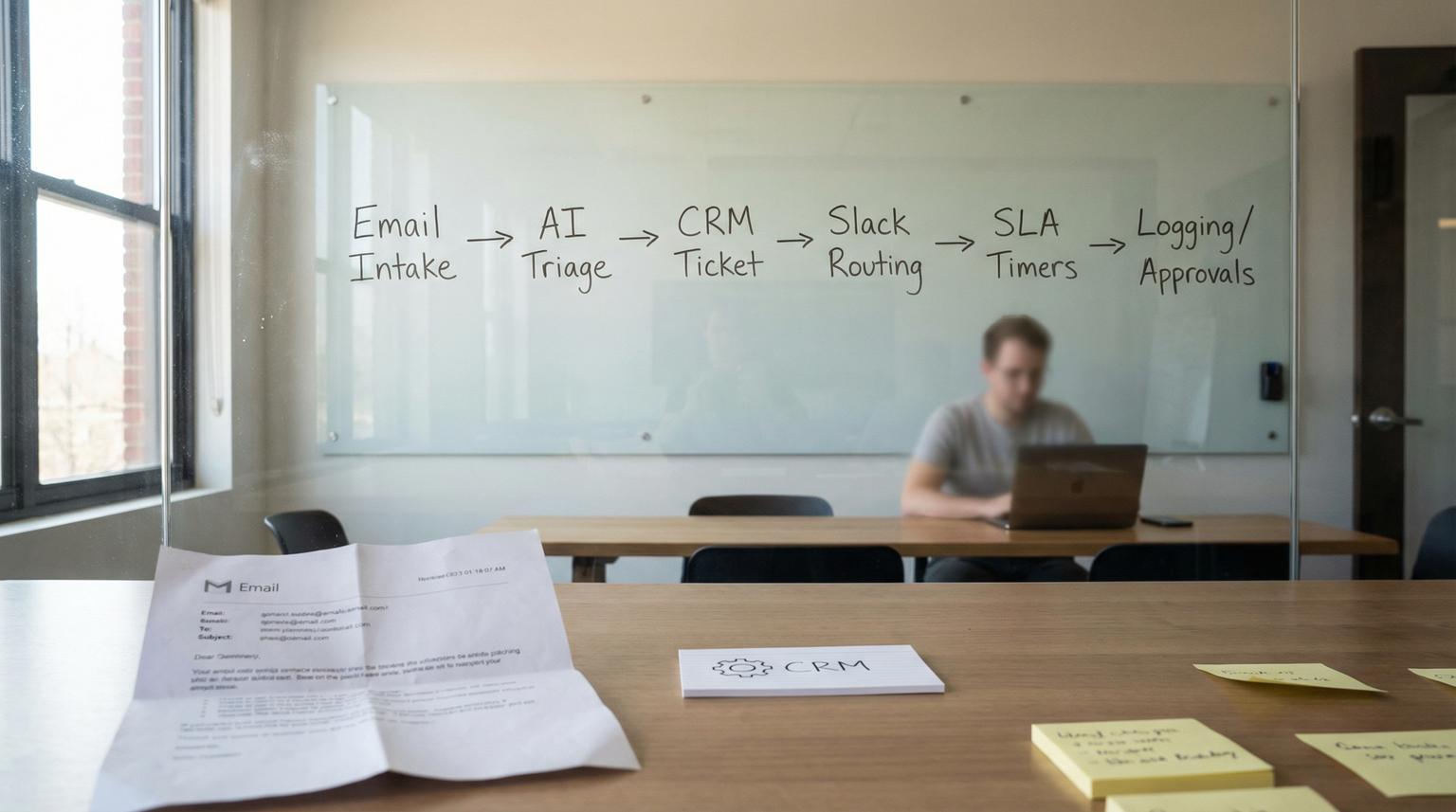
Support inboxes become messy fast, multiple teams reply in parallel, important requests get buried, and CRM records drift from what actually happened in email. At ThinkBot Agency we build reliable automations that turn raw emails into structured tickets and routed work. This guide shows how an n8n automation agency designs an AI-powered customer support workflow that connects Gmail or Outlook with HubSpot or Salesforce and routes context into Slack without losing auditability.
This is for ops leaders, support managers and tech-savvy founders who want faster first response, fewer dropped tickets and consistent triage across tools in 2026.
At a glance:
- Capture new support emails, classify intent with AI and route to the right Slack channel with full context.
- Auto-create or update HubSpot tickets or Salesforce Cases and enrich contacts from the email.
- Add SLA timers and follow-ups for waiting-on-customer states so threads do not stall.
- Make it production-ready with deduplication, logging, retries and human approvals for risky actions.
Quick start
- Create a dedicated support label or folder in Gmail or Outlook and decide what counts as a new ticket versus an update.
- In n8n, trigger on new messages, normalize the payload and run AI classification that returns structured fields (category, urgency, sentiment and summary).
- Upsert the CRM record (HubSpot Ticket or Salesforce Case) using a stable dedupe key like Message-ID or InternetMessageId.
- Post a Slack message to the right channel with the ticket link, extracted context and a draft reply for the agent.
- Start an SLA timer branch for high priority items and a follow-up branch for waiting-on-customer.
An AI-powered support workflow in n8n typically ingests new support emails, uses an LLM to classify the request into structured fields and then upserts a ticket in HubSpot or a Case in Salesforce. It posts the right context to the right Slack channel, starts SLA reminders for urgent issues and triggers follow-ups when customers do not respond. With deduplication, logging and approvals you get faster response times without breaking trust or losing traceability.
Architecture overview: email intake -> AI triage -> CRM ticketing -> Slack collaboration
The core pattern is simple, but the details determine whether it scales:
- Email intake: Gmail trigger or Microsoft 365 Outlook trigger (polling or webhook depending on setup) captures new messages and attachments.
- Normalization: Convert raw email into a consistent JSON shape: sender, subject, body, thread IDs, message IDs and any headers you will need later.
- AI triage: An LLM classifies intent and extracts key facts into strict fields so downstream routing is deterministic. The n8n pattern of category plus urgency plus sentiment works well for support operations.
- CRM upsert: Create or update HubSpot Tickets or Salesforce Cases and link to Contact and Company objects.
- Slack routing: Post to team channels for triage or escalation and keep the CRM as the system of record.
- Lifecycle automation: SLA timers, reminders, waiting-on-customer follow-ups and closure handling.
- Reliability layer: Idempotency keys, retries, dead letter handling, logs and human approvals.
Recommended data model (the fields that make everything easier)
Even if your CRM has its own schema, we recommend standardizing these fields early in the workflow:
- dedupe_key: InternetMessageId or Gmail Message-ID, fall back to hash(sender+subject+date).
- thread_key: Gmail threadId or Outlook conversationId, used to group updates.
- category: Technical, Billing, Feature request, Bug, General.
- urgency: Low, Medium, High, Critical.
- sentiment: Positive, Neutral, Negative, Critical.
- priority_score: Computed numeric score for routing and SLA decisions.
- customer_tier: Optional, derived from CRM properties or a lookup table.

Support triage checklist before you build (keeps routing consistent)
Use this checklist when you are about to implement the workflow in n8n, it prevents 80 percent of misroutes and duplicate tickets we see in the wild.
- Define 5 to 8 support categories and keep them stable for reporting.
- Define urgency levels and what qualifies as Critical in your org.
- Decide escalation rules, for example urgency=Critical or sentiment=Critical triggers an immediate Slack alert.
- Choose a dedupe key strategy that survives replies and forwards (Message-ID preferred).
- Decide the system of record for status and ownership, CRM should usually win.
- Define required CRM fields for ticket creation (pipeline, stage, subject, description, requester).
- Decide Slack channel mapping by category, customer tier and priority.
- Define SLA timers and reminder cadence per priority level.
- Decide when AI is allowed to auto-draft versus auto-send, most teams start with draft-only.
- Define what must be logged for audit, at minimum message IDs, classification output, CRM IDs and Slack timestamps.
Building the workflow in n8n: nodes and logic that matter
Below is how we typically build this in n8n for Gmail or Outlook plus HubSpot or Salesforce plus Slack. We keep it modular with Execute Sub-workflow so you can update triage logic without risking the whole pipeline, and if you want a reusable production architecture across teams, use our pillar framework: The n8n Workflow Operating System.
1) Trigger and intake (Gmail or Outlook)
Two common approaches:
- Polling: Simple and dependable, check every 1 to 5 minutes for new unread messages in a label or folder.
- Event-driven: Preferable when available for near-real-time, but depends on your email platform and permissions.
Immediately normalize the email body, strip signatures where possible and capture headers you will need for deduplication.
2) AI classification with strict output
The key is to force deterministic, machine-readable output. We usually request JSON with fixed enums. Keep temperature low so categories do not drift. You can also add language detection and translation before classification if you support multiple languages.
{
"category": "Billing|Technical|Feature Request|Bug Report|General Inquiry",
"urgency": "Low|Medium|High|Critical",
"sentiment": "Positive|Neutral|Negative|Critical",
"key_issues": ["..."],
"entities": {
"product": "...",
"account_id": "...",
"order_id": "..."
},
"suggested_reply": "...",
"needs_human_approval": true
}
We also compute a priority_score after parsing the AI output, for example urgency weight plus sentiment impact. This mirrors the scoring approach used in the template and makes SLA branching easy. For more routing-safe prompt and fallback patterns, see AI-driven customer service automation with n8n.
3) Deduplication and idempotency (do this before touching the CRM)
To prevent duplicate tickets you need a store for processed message IDs. Options include Postgres, Redis, Airtable, Google Sheets or a lightweight internal database. The rule is:
- If dedupe_key has been processed, treat the email as an update and append context to the existing ticket.
- If thread_key maps to an existing ticket, update that ticket instead of creating a new one.
This is especially important when both email intake and CRM triggers exist in the same environment.

4) CRM upsert (HubSpot Tickets or Salesforce Cases)
HubSpot: The built-in node supports Tickets, Contacts, Companies and Search operations, which covers most support use cases. If you need an edge case, you can fall back to HTTP Request using the same credential as recommended in the HubSpot node docs.
Salesforce: Many teams treat Cases as the system of record and use event triggers for lifecycle updates. The Salesforce Trigger is ideal for reacting to Case updates like escalations or waiting-on-customer transitions.
5) Slack routing that stays connected to the ticket
Post a single Slack message per ticket to the correct channel and reply in-thread for subsequent updates. Include:
- Ticket link (CRM deep link)
- Customer name and email
- Category, urgency, sentiment and priority_score
- Key issues list and any extracted IDs
- Suggested reply draft as a collapsible block or plain text
If you are running ticket work inside Slack, you can take inspiration from the Slack ticket sync operating model described in HubSpot guidance and replicate property-based routing and comment syncing patterns in n8n.
Reliability at scale: guardrails for errors, approvals and logging
When support volume increases the failure modes change. The workflow must be able to fail safely, resume cleanly and provide an audit trail.
Failure modes and mitigations
| Failure mode | What happens | Mitigation in n8n |
|---|---|---|
| Duplicate tickets from replies or re-sends | Multiple CRM tickets for the same thread | Use dedupe_key and thread_key, store processed IDs, make CRM create idempotent by searching before create |
| AI returns invalid JSON or new labels | Routing breaks or messages go to wrong team | Strict schema validation, fallback to General category, alert on schema mismatch, lower temperature |
| Slack post succeeds but CRM upsert fails | Team sees a message with no ticket link | Upsert CRM first, then post to Slack, if Slack must be first then update Slack message after CRM succeeds |
| Transient API failures (email, CRM, Slack) | Lost events or partial execution | Retry on Fail for transient nodes and an Error Trigger workflow that logs and alerts with context |
| Agents reply outside the Slack thread | Conversation is not associated with the ticket record | Enforce thread replies operationally, include instructions in the Slack message, sync thread replies when possible |
| Message storms from noisy updates | Slack channels get spammed | Filter on meaningful state changes, throttle notifications and store last_notified_state per ticket |
Human-in-the-loop approvals (where we recommend them)
Even strong AI classification can make mistakes. For many teams we add an approval step for:
- Auto-sending an email response
- Closing a ticket
- Refund or cancellation requests
- VIP or legal keywords
In n8n this can be implemented as a Slack interactive message or an internal approval queue, with a timeout that escalates if no one approves within a window.
Logging and analytics
Log every run to a durable store: ticket IDs, message IDs, classification output, timestamps, SLA metrics and error context. This enables:
- First response time tracking
- Backlog by category and priority
- AI drift detection, for example sudden category spikes
- Post-incident audits
SLA timers and follow-ups that prevent stalled tickets
Support is not just triage. The real leverage comes from lifecycle automation that nudges the right people at the right time.
SLA timers
We usually implement SLA reminders as separate branches:
- Critical: Immediate Slack alert, then reminder at 15 minutes and 30 minutes if no owner is assigned or no first response is logged.
- High: Reminder at 1 hour, then escalate if still unassigned.
- Medium and Low: Daily backlog digest or scheduled reminders to triage channel.
Technically in n8n this is done with Wait nodes keyed by ticket ID, plus checks against the CRM status to cancel the timer if the ticket is resolved. If you want broader patterns for scalable, error-proof automation design across CRMs, see B2B automation best practices.
Waiting-on-customer follow-ups
When the ticket moves to waiting-on-customer, start a follow-up cadence:
- After 2 business days, send a polite check-in email draft for agent approval.
- After 5 business days, send a second message and flag for closure.
- After 10 business days, close with a templated note, optionally require human approval depending on your policy.
For Salesforce-centric teams, using Case Updated triggers to start and stop these timers is a clean event-driven approach.
What you get from ThinkBot Agency and how to engage
Our focus is building support workflows that are fast to operate and easy to evolve. That means clean data contracts, predictable routing and clear ownership so your team trusts the automation. If you want a hands-on build in your environment with your categories, your SLA policy and your CRM schema, book a working session and we will map the workflow and implementation plan to your tools.
Book a consultation with ThinkBot Agency to scope your email -> AI -> CRM -> Slack support automation.
If you prefer to review past automation work first, you can also browse our portfolio. If you are comparing tooling options before engaging an n8n automation agency, use Zapier vs. n8n comparison to understand scalability and governance tradeoffs.
FAQ
These are the most common questions we hear when teams evaluate n8n-based support operations with AI triage and CRM ticketing.
How long does it take to implement an AI support workflow in n8n?
Most teams can get a first production version in 1 to 3 weeks depending on how many inboxes, categories and CRM fields are involved. The timeline is usually driven by access, data mapping and testing in a sandbox, not the n8n build itself.
Can this work with both HubSpot and Salesforce?
Yes. We typically choose one system of record for ticket lifecycle, then sync summary fields to the other if needed. n8n supports HubSpot Tickets via the HubSpot node and Salesforce Cases via Salesforce nodes and triggers.
How do you prevent duplicate tickets when customers reply to an existing thread?
We use idempotency keys like Message-ID plus a thread or conversation ID and we store processed IDs in a database. The workflow searches the CRM before creating a new ticket, then updates the existing ticket and posts updates in the same Slack thread.
Does ThinkBot Agency auto-send AI replies to customers?
We usually start with AI drafting only, then add human approvals for sending. After your team trusts the classification and templates, we can enable safe auto-send for low-risk categories with strict guardrails and auditing.
What should I look for when hiring an n8n automation agency for support operations?
Look for a team that designs for reliability, not just a demo. You want idempotency, error handling, logging, rollback strategy, CRM field governance and a clear operational handoff so your support leads can adjust routing without breaking the workflow.
