
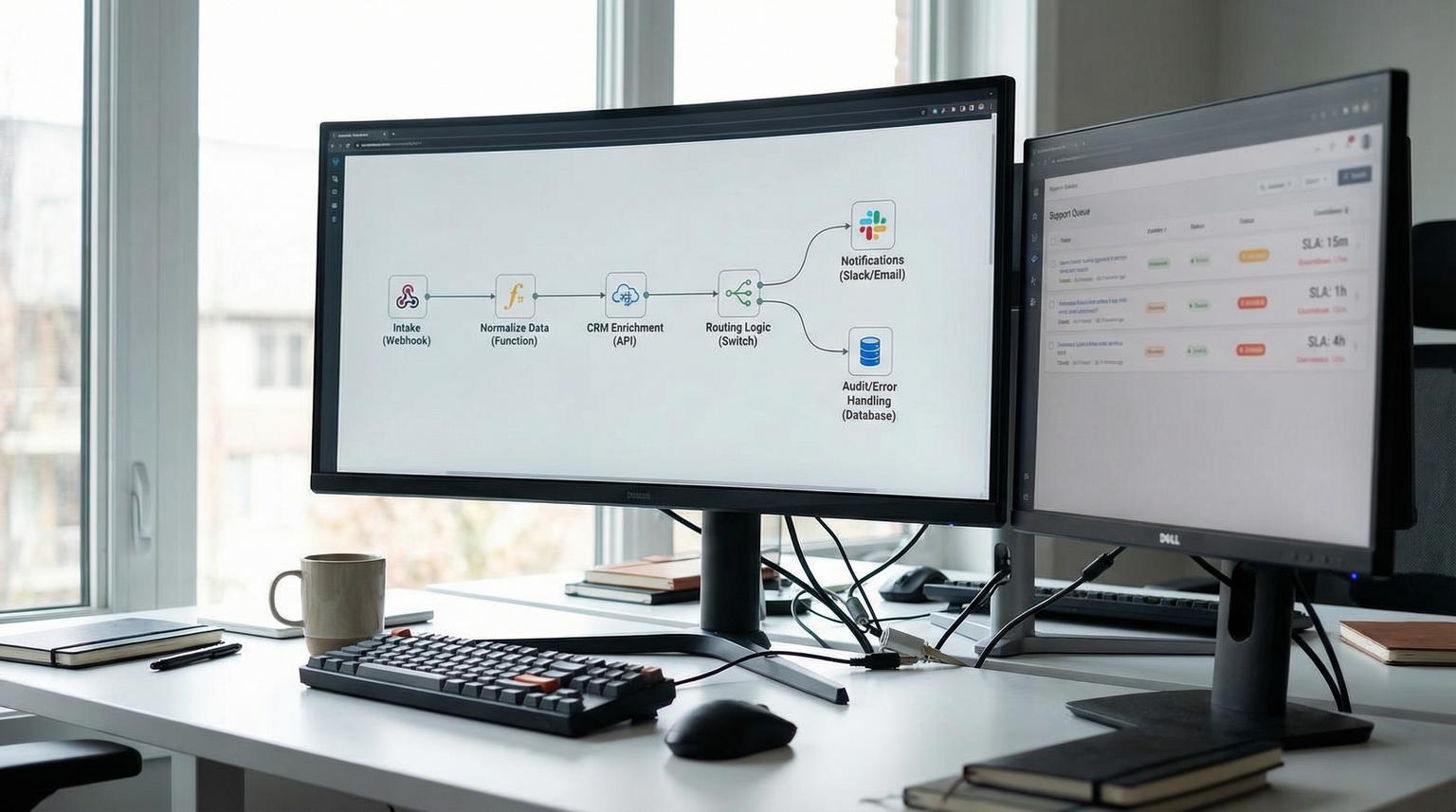
Support operations break down when tickets arrive through too many channels, customer context lives in the CRM and agents have to copy and paste between tools. In 2026 most teams do not need a new helpdesk, they need reliable orchestration. This is exactly where an n8n automation agency can help, by connecting your helpdesk, CRM and notifications into one controlled workflow that scales with volume.
This post is for ops leaders, founders and support managers who want practical automation, not vague AI promises. We will walk through a realistic build we deliver at ThinkBot Agency, including node-by-node logic, error handling, audit trails and an AI drafting step that still keeps humans in control.
At a glance:
- Design a single intake workflow that triages tickets, enriches requester data from your CRM and routes work to the right queue automatically.
- Add AI-generated draft replies with human approval so handle time drops without risking brand voice or policy errors.
- Ship safely in under a week by starting with deterministic routing then layering AI and SLA escalation once logging and retries are in place.
- Use error workflows, retries and audit logs so automation is observable and reversible.
Quick start
- Pick one helpdesk source of truth (Zendesk or Freshdesk) and define the 6-10 ticket fields you will standardize in n8n.
- Decide your routing rules: intent tags, severity levels, VIP accounts, product area and required response SLA.
- Connect your CRM (HubSpot or Salesforce) and map which contact and company properties should influence priority.
- Add notification channels (email and Slack) with clear ownership per queue and escalation.
- Implement logging and an error workflow first, then add AI drafting with an approval step.
An experienced team can build an end-to-end n8n support workflow in under a week by standardizing ticket data, enriching it with CRM context, applying deterministic routing rules, adding SLA timers and escalations and optionally generating AI draft replies that require human approval before sending. The key is shipping a safe baseline with logging, retries and an error workflow so you can iterate quickly as ticket volume grows.
What we build in week one: an end-to-end support workflow blueprint
When ThinkBot Agency scopes a fast support automation, we aim for one workflow that covers the full path from intake to resolution signals. The tools vary but the architecture stays the same:
- Helpdesk intake: Zendesk or Freshdesk trigger via webhook or polling.
- Normalization layer: create a minimal ticket schema so downstream logic is consistent.
- CRM enrichment: pull contact and company data from HubSpot or Salesforce.
- Triage and routing: intent detection, severity scoring and queue assignment.
- Notifications: email and Slack for assignment, escalations and approval tasks.
- AI assist (optional but common): generate draft responses grounded in your knowledge base then require approval.
- Audit and ops: logs, execution trace links, retries and an error workflow.
We like this approach because it avoids brittle point-to-point automations. Instead you get one observable automation layer that can integrate additional systems later, like Jira for engineering escalations, a data warehouse or CSAT tools. If you want a governed, reusable architecture across teams, see The n8n Workflow Operating System for a production-ready framework (trigger, orchestration, mapping, enrichment, actions, feedback) plus scaling and reliability patterns.

Support triage checklist for a reliable under-a-week launch
Use this checklist when you want a fast rollout that still feels enterprise-grade. It is also how we keep week-one builds predictable, even when internal processes are messy.
- Define the actionable ticket states (exclude closed, solved, spam and anything you do not want alerts for).
- Standardize a minimal ticket schema (ticket_id, subject, body, requester_email, status, priority, created_at, tags, product_area).
- Confirm the primary customer identifier (usually requester email) and what to do when it is missing.
- Map CRM properties that affect routing (plan tier, lifecycle stage, ARR, account owner, health score if available).
- Write deterministic rules first (VIP -> priority, billing keywords -> billing queue, bug keywords -> engineering triage).
- Decide where human approval is required (AI drafts, refunds, security issues and account changes).
- Implement dedupe guards for polling triggers (store last processed ticket id or timestamp).
- Add logging for every route decision (why a ticket was tagged and where it was sent).
- Define SLA timers and escalation thresholds, including who owns the escalation channel.
- Attach an error workflow and choose retry vs stop per API call.
If you are starting from scratch, ship the deterministic version first and confirm routing and audit logs for 48 hours. Then add AI drafting once you can see stable execution patterns.
Node-by-node: helpdesk -> CRM enrichment -> routing -> notifications
Below is a practical n8n build that works whether your helpdesk is Zendesk or Freshdesk and whether your CRM is HubSpot or Salesforce. The node names are descriptive so your team can audit the flow quickly. If your bigger challenge is keeping data consistent across systems, the mapping and idempotent patterns in API integration solutions to unify CRM, email, and support data are a strong companion read.
1) Trigger: webhook or polling
Preferred: helpdesk webhook for ticket created and ticket updated events.
Fallback: Cron polling every 5 to 10 minutes when webhooks are not available or when you want a low-risk rollout.
2) Normalize ticket payload
Use a Set node to produce a consistent schema. This reduces branching later and makes testing easier.
{
"ticket_id": "{{ $json.id }}",
"subject": "{{ $json.subject }}",
"body": "{{ $json.description }}",
"requester_email": "{{ $json.requester.email }}",
"status": "{{ $json.status }}",
"priority": "{{ $json.priority }}",
"created_at": "{{ $json.created_at }}",
"tags": "{{ $json.tags }}"
}
3) Guardrails: validate required fields
Before enrichment, add an IF node that checks required inputs. If requester_email is empty or malformed, route to a manual review queue or fail intentionally using Stop And Error. Failing intentionally is sometimes the correct choice because it forces visibility and keeps automation from making wrong assumptions.
4) CRM enrichment (HubSpot or Salesforce)
Next, pull contact details and optionally company details. CRM-aware support is where routing becomes truly valuable, because the same issue from a trial user and a VIP account should not be treated the same.
- HubSpot: search contact by email, then read properties like lifecycle stage and annual revenue.
- Salesforce: query Contact and Account fields such as account tier, owner and entitlement.
If a contact is not found, do not block the workflow. Tag the ticket as CRM-not-found and continue with text-based routing, then create a follow-up task to reconcile records.
5) Intent and severity decision
Start deterministic, then layer AI later:
- Deterministic: keyword rules for billing, login, bug, cancellation and security. Add severity upgrades for VIP tiers.
- Optional AI: classify intent and sentiment from the ticket text, then map to tags and queues. Keep the AI output advisory, not authoritative, until you validate it.
A common pattern is using a Code node to compute severity based on CRM fields and high-risk terms, similar to the HubSpot to Jira triage template on n8n. Even if you do not use Jira, the same logic works for routing to support squads.
6) Route to the right team and notify
Use a Switch node by intent, product area or severity:
- Billing -> billing group + notify billing Slack channel
- Bug -> engineering triage queue + notify triage channel
- Account access -> support queue + notify on-call if severity is high
- Security -> security queue + notify security channel and require approval
At this stage we usually also update the helpdesk ticket with tags, internal notes and the assigned group. This creates an audit trail inside the helpdesk itself, not just in n8n.
AI draft replies with human approval (safe, grounded and measurable)
AI is most valuable in support when it reduces writing time, not when it auto-sends messages. We recommend a drafting workflow with approval for most teams, especially for refunds, policy topics and technical troubleshooting. For a deeper implementation guide with confidence thresholds and fallback rules, read AI-driven customer service automation with n8n.
We borrow the architectural idea of retrieval-augmented generation from guidance like this and implement it pragmatically inside n8n:

Drafting flow in n8n
- Retrieve: search your knowledge base for relevant snippets using tags, keywords or embeddings.
- Generate: call your chosen LLM with ticket context plus the retrieved snippets.
- Package for review: post to Slack or create an internal note in the helpdesk with the draft and the snippets used.
- Approval gate: agent clicks approve, edits the draft or rejects and escalates.
- Send: only after approval, send via helpdesk reply or email node.
This approach keeps brand voice and policy accuracy under human control, while still removing the heavy lifting of first drafts.
SLA timers, escalations and audit trails that support ops can trust
Once routing is stable, SLA enforcement is the next highest ROI feature. We typically implement two complementary patterns:
Pattern A: scheduled SLA watchdog
This is a Cron workflow that periodically checks open tickets, calculates time remaining and escalates at thresholds. The n8n template concept is well demonstrated in this workflow.
- At 75 percent of SLA elapsed -> Slack warning
- At 90 percent of SLA elapsed -> escalate priority, add an internal note and notify Slack
Percent thresholds travel well across different SLA durations, which prevents constant tuning when you have multiple support plans.
Pattern B: per-ticket timer after routing
For high severity cases, a Wait node can pause for a defined time then re-check ticket status. If the ticket has not moved, it triggers an escalation path. This is useful for critical incidents and VIP requests where you want deterministic enforcement, not just periodic checks.
Audit trail options
- Helpdesk notes: write routing decisions and AI draft metadata into internal notes.
- Google Sheets log: lightweight operational reporting for teams that do not want BI work in week one.
- Data store or database: for larger teams that need event-level audit, dashboards and compliance.
Failure modes and mitigations for helpdesk, CRM and email automations
Automation only helps if it fails loudly and predictably. Here are common failure modes we design for and how we mitigate them.
- Missing or renamed CRM properties -> validate property names in the CRM node, add defaults and log missing fields for cleanup.
- Duplicate processing from polling overlap -> store last processed ticket id or timestamp and dedupe before routing and sending notifications.
- Wrong queue due to brittle keyword rules -> add an override tag and let agents correct routing, then feed those corrections into rule updates.
- Email or Slack spam during outages -> add rate limits and suppression logic when error volume spikes.
- AI draft contains incorrect policy details -> require retrieval step, include cited snippets in the approval message and block auto-send.
- Helpdesk API throttling -> implement retry with backoff for safe calls and stop for destructive calls, then alert via error workflow.
Production hardening: retries, error workflows and rollback
Week-one success is less about fancy logic and more about operational safety. n8n has strong primitives for this, especially error workflows and execution tracing. We treat these as delivery requirements, not extras.
Recommended reliability baseline
- Error workflow: create a separate workflow starting with Error Trigger, then attach it in Workflow Settings. Reference: n8n docs.
- Retries: retry safe external API calls (reads, searches) and be cautious with writes (ticket updates, sending emails).
- Stop And Error guardrails: fail intentionally when required fields are missing or when an unsafe condition is detected.
- Execution links: include execution URL in Slack alerts so responders can open the exact failed run.
- Rollback plan: keep the prior workflow version and define who can deactivate the workflow quickly.
How we typically deliver this in under a week
- Day 1: map fields, confirm routing rules, set up credentials and environments.
- Day 2: build intake, normalization and CRM enrichment, log everything.
- Day 3: implement routing, notifications and helpdesk updates, add dedupe guards.
- Day 4: add SLA watchdog or timers, attach error workflow and retries.
- Day 5: add AI drafts with approval and run controlled testing, document handoff.
If you want ThinkBot Agency to design and ship this for your tools and processes, book a consult here: book a consultation.
Prefer to start via marketplace procurement? You can also view our agency profile on Upwork.
FAQ
Common questions we hear when teams evaluate n8n-based support automation and AI-assisted triage.
How quickly can ThinkBot Agency connect Zendesk or Freshdesk with HubSpot and Slack?
For a well-scoped workflow, we typically ship a production baseline in under a week: intake, normalization, CRM enrichment, routing, notifications, logging and an error workflow. AI drafting and advanced SLA escalations can be included if your knowledge base and approval process are ready.
What does an AI-assisted support workflow do safely without auto-sending replies?
It drafts responses using ticket context plus retrieved knowledge base snippets then routes the draft to an approval step in Slack or the helpdesk. An agent edits and approves before anything is sent, which keeps policy and tone under human control.
Do we need webhooks or can this work with polling?
Webhooks are ideal for real-time intake, but polling works well for week-one delivery when webhooks are limited. We add dedupe guards to prevent duplicates and keep the polling interval aligned to your volume and SLA needs.
How do you handle errors and outages in production?
We attach an n8n error workflow that alerts with execution details, implement retries for safe API calls, stop intentionally on missing required fields and log routing decisions for audit. We also define a rollback plan so you can deactivate or revert quickly if error volume spikes.
Can you adapt the workflow to Salesforce and email-first support teams?
Yes. The same pattern applies: ingest from email or helpdesk, enrich from Salesforce, route by intent and account context and send notifications to email and Slack. The main difference is field mapping and how you record the audit trail inside your systems.
