
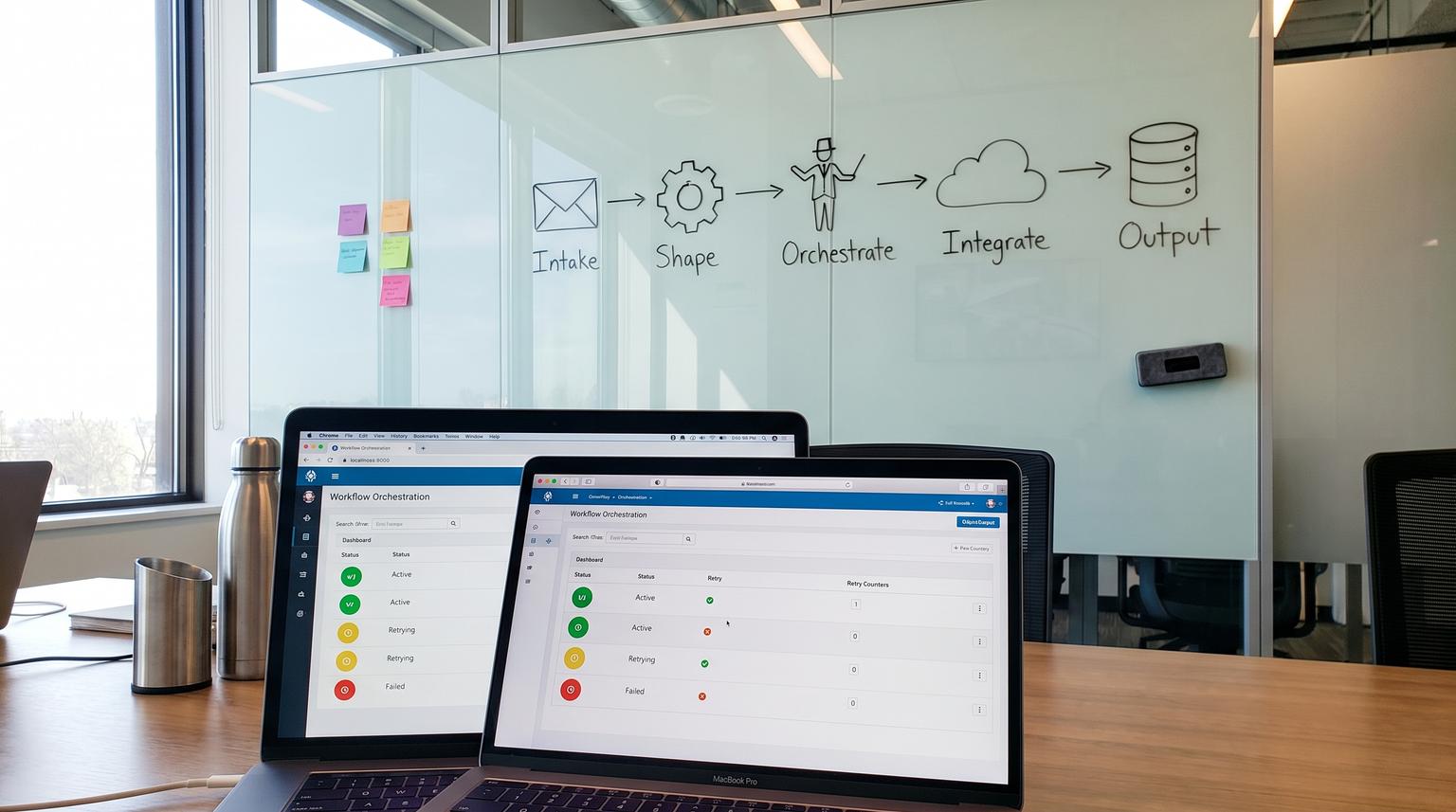
Most teams start with one or two useful automations, then wake up months later with dozens of brittle flows, unclear ownership and no consistent way to debug failures. This playbook is a practical framework for designing, deploying and operating n8n production workflows that stay maintainable as they spread across departments. It is written for ops leaders, RevOps, support teams and technical owners who need consistent standards, safe change control and reliable execution at scale.
The core idea is simple: standardize how you design every workflow using a repeatable structure (intake -> data shaping -> orchestration -> integrations -> outputs), then back it with production essentials specific to n8n: environments, credentials and secrets, error handling, retries, alerting, logging, versioning and scaling.
At a glance:
- Use a single workflow design framework so every automation is readable, testable and reusable across teams.
- Separate concerns with sub-workflows to reduce duplication and prevent "spaghetti" as volume grows.
- Build reliability in with error classification, retries with backoff and a centralized error workflow.
- Operate like a platform: environments, versioning, credential strategy, retention policy and monitoring.
- Choose the right execution model (webhook vs polling, synchronous vs queued) based on load and risk.
Quick start
- Create a shared workflow skeleton with five stages: Intake, Shape, Orchestrate, Integrate, Output.
- Define team standards for workflow naming, node naming, notes and ownership.
- Set up dev/staging/prod instances and connect them to source control for reviewable deployments.
- Adopt a secrets strategy (no hardcoded tokens) and standardize credential names across environments.
- Implement a centralized error workflow, plus local guard clauses for predictable failure behavior.
- Wrap all external writes with idempotency and retries (exponential backoff + jitter).
- Decide retention and logging defaults, then route logs to your monitoring stack and alert on failure patterns.
This playbook gives you a reusable method to design and operate n8n automations that are safe to run in production: each workflow follows the same staged structure, uses shared sub-workflows for common logic, and ships with consistent controls for secrets, environments, retries, logging and scaling. It also includes decision guides for triggers and execution modes, plus cross-functional blueprints for RevOps, support, ops and analytics so multiple teams can build on the same standards without creating fragile one-off flows.
Table of contents
- Why most n8n automations break in production
- The five-stage workflow design framework (intake -> shape -> orchestrate -> integrate -> output)
- Workflow standards teams can reuse (naming, layout, documentation)
- Sub-workflows as your reusable automation library
- Production reliability: errors, retries, idempotency and replay
- Observability and retention: logs, execution data and alerting
- Deployment and governance: environments, versioning and secrets
- Scaling execution: concurrency limits and queue mode
- Decision guides: webhooks vs polling, synchronous vs queued, monolith vs modular
- Use-case blueprints mapped to the framework
- How ThinkBot implements and operates n8n in production
Why most n8n automations break in production
n8n makes it easy to connect systems quickly. The failure mode is also predictable: workflows grow organically, one-off fixes get copied, and production becomes a collection of undocumented assumptions. Common symptoms include:
- Unclear interfaces: nodes pass inconsistent fields, so a small data change breaks downstream mapping.
- No environment separation: testing happens in production, credentials are shared, and rollback is manual guesswork.
- Silent failures: errors stop executions without a consistent alert or triage path.
- Duplicate side effects: retries or replays create duplicate tickets, duplicate CRM records or double-sent emails.
- Scaling surprises: polling triggers and long-running workflows pile up, throttling your database or third-party APIs.
If you are evaluating long-term fit, see our platform choice breakdown. This article assumes you want to operate n8n like a production integration platform, not a collection of personal automations.
The five-stage workflow design framework (intake -> shape -> orchestrate -> integrate -> output)
To make workflows maintainable across teams, standardize a single mental model. Every workflow, regardless of department, should be understandable as five stages:
- Intake: how the event enters n8n (webhook, trigger, schedule, manual).
- Data shaping: validate, normalize, enrich and deduplicate; produce a stable internal schema.
- Orchestration: apply business rules, approvals, routing, AI classification and branching.
- Integrations: read/write to external systems (CRM, helpdesk, email, data warehouse).
- Outputs: the measurable outcomes (records created, notifications sent, dashboards updated) plus audit links.
This staged structure also becomes your refactoring strategy. When a workflow becomes hard to explain to a new operator, split by stage and extract repeated patterns into reusable components. The n8n community consistently highlights naming and structure as the real scaling lever, not just node selection; treat it as an engineering standard, not aesthetics, based on community guidance.
For AI-driven orchestration patterns, you can align this framework with the same structure we use in AI workflow optimization so model calls remain auditable and safe.

Stage outputs: define a stable internal schema early
The fastest way to reduce breakage is to create a stable internal item shape after the data shaping stage. Downstream nodes should reference your internal schema, not raw vendor payloads. This improves portability across CRMs and ticketing systems and makes testing easier.
Production workflow readiness checklist
Use this checklist when promoting any workflow from "works" to "safe for teams". It is designed to align with the five-stage framework so reviews are fast and consistent.
- Intake includes deduping key(s) and a clear trigger contract (what event types are in scope).
- Data shaping validates required fields, normalizes types and sets default values.
- Orchestration separates decisions (rules, approvals, AI classification) from side effects (writes and notifications).
- All writes are idempotent (upsert, or check-before-create) and safe to retry.
- Error handling is defined: local guard clauses plus a centralized error workflow for failures.
- Retries are configured for external API calls with backoff and max attempts.
- Observability exists: correlationId, source ids and destination ids are logged or recorded.
- Execution data retention is explicitly set (what you keep, for how long) and pruning is enabled.
- Credentials are stored in n8n credentials and or external secrets, never inline in nodes.
- Ownership is documented (team, on-call or escalation path) and the workflow has a short runbook note.
Workflow standards teams can reuse (naming, layout, documentation)
Standardization is how you make cross-team reuse realistic. Without it, even well-built workflows are difficult to operate when the original builder is unavailable.
Naming conventions that scale
Adopt a consistent workflow naming scheme so lists remain scannable at 50+ workflows. One reliable pattern is:
- [Domain] [Trigger] [Outcome] ([System])
Example: Support Email -> Create Ticket (Zendesk) or RevOps Form Submit -> Upsert Lead (HubSpot).
For nodes, rename them so the workflow reads like a narrative. Practitioner advice in the n8n community recommends renaming IF nodes to state intent as a question and action nodes as verb + noun; see community notes.
Layout: group by stage
Visually group nodes into the five stages, and use consistent colors or sticky notes sparingly to document assumptions. Keep each stage small enough that you can point to it during incident response: "The failure happened in Integrations -> CRM write".
Top-of-workflow "Readme" note
Add a Note node at the top with: owner, purpose, upstream dependencies, downstream side effects, data contract and escalation. This becomes essential in shared ownership models like the ones described in our lead-to-customer pipeline patterns.
Sub-workflows as your reusable automation library
Sub-workflows let you build microservice-like components, so teams reuse validation, normalization, enrichment, retry wrappers and notification logic instead of copying nodes. n8n supports calling one workflow from another using nodes like Execute Sub-workflow, and it supports defining expected inputs so callers must provide the right shape, as described in docs.
What belongs in a sub-workflow
- Normalization: map raw vendor payload -> internal schema.
- Enrichment: firmographic lookup, account matching, SLA rules.
- Resilience wrappers: retries, rate limit handling, dead-letter routing.
- Notifications: standardized Slack message format and escalation routing.
- Audit logging: append-only logging to Sheets, database or ticket comments.
When you adopt this approach, you also reduce AI risk. For example, you can isolate AI classification into a single component with consistent prompt, confidence threshold and auditing. If you are building support automations, compare with our support workflow structure and extract shared pieces into your library.
Sub-workflow interface template (copy and use)
This template is designed to make components safe to reuse across departments. It is inspired by how n8n encourages defining inputs using fields or JSON examples for contracts, per docs.
Component name:
Owner team:
Purpose:
Inputs (item schema):
Outputs (item schema):
Side effects (writes, emails, tickets):
Idempotency key:
Retry policy:
Error classification (retryable vs non-retryable):
Observability (fields to log):
SLO (max duration, max retries):
Change notes + version:
Over time, this becomes your internal component registry: NormalizeLead, UpsertCRM, PostSlackAlert, RetryHttp, WriteAuditLog, BuildCorrelationId.
Production reliability: errors, retries, idempotency and replay
Production reliability starts at design time. You need predictable behavior for failures, a standard retry mechanism and a safe replay strategy. n8n supports centralized error workflows that can capture context when an execution fails, as covered in the official guidance.

Centralized error workflow plus local guard clauses
Use local handling for expected conditions (missing field, no matching record, low confidence AI result). Use a centralized error workflow for unexpected failures (timeouts, auth failures, upstream API outages). In the error workflow, capture:
- workflow name and environment
- failed node name
- executionId and a deep link to the execution
- correlationId and source record identifiers
- error payload (redacted)
This makes failures triageable across teams and aligns with the debugging loop described in docs.
Retries with exponential backoff and jitter
Retries must be deliberate. A production-friendly pattern is to classify errors as retryable vs non-retryable using HTTP status codes, then apply exponential backoff with random jitter to avoid retry storms. n8n provides a reusable workflow example that wraps an operation, classifies status codes and alerts after max attempts, in this pattern.
In practice, teams often treat 408, 409, 425, 429, 500, 502, 503, 504 as retryable and 400, 401, 403, 404, 422 as fail-fast, matching the approach in the example. Whatever rules you adopt, standardize them in one component so behavior is consistent across workflows.
Idempotency: make writes safe to retry and replay
Retries are dangerous without idempotency. Your goal is that re-running the same logical event produces the same external state. Common techniques:
- Use upsert semantics when writing to CRMs and databases.
- Generate an idempotency key per event (sourceSystem + sourceId + eventType + version).
- Before creating records, search for an existing one by idempotency key or external id.
- Separate decision logging from execution. Record the decision first, then perform side effects.
This is especially important in approvals and back-office workflows where double-logging and double-notifying is costly, similar to the guardrails implied by the approvals blueprint in this workflow.
Observability and retention: logs, execution data and alerting
In production, the question is not "did it run" but "can we explain what happened." Observability in n8n is a mix of: platform logs, execution data retention and downstream audit trails (ticket comments, CRM notes, database tables).
Logging: make it machine-readable and consistent
n8n exposes environment variables to control logging behavior. For example, you can enable Code node logs to stdout and disable ANSI colors for clean log ingestion, as documented in docs. A simple baseline looks like:
DB_LOGGING_MAX_EXECUTION_TIME=1000
CODE_ENABLE_STDOUT=true
NO_COLOR=1
Standardize what you log at key boundaries: correlationId, workflow version, source record id, destination record id, external requestId. This pairs well with analytics flows described in our predictive analytics automation patterns.
Execution data retention: balance debuggability and cost
Execution history is essential for debugging but can overwhelm your database at scale. n8n lets you control what execution data is stored and how it is pruned. A common production posture is to save full data for failed runs and minimize successful run storage, guided by docs. Example settings include:
EXECUTIONS_DATA_SAVE_ON_SUCCESS=none
EXECUTIONS_DATA_SAVE_ON_PROGRESS=false
EXECUTIONS_DATA_SAVE_MANUAL_EXECUTIONS=false
Retention should match your incident SLA. If your business expects investigations within 7 days, ensure execution details are available at least that long, or export the audit trail elsewhere.
Alerting: alert on outcomes, not noise
Alerts should fire on final failure states, unusual volume, and backlog buildup. Combine:
- Central error workflow notifications (Slack, email, ticket creation)
- Backlog indicators (queued executions rising)
- External API rate limit errors trending upward
If you are already routing operational messages into collaboration tools, keep PII minimal and link back to the execution details for full context.
Deployment and governance: environments, versioning and secrets
Running n8n across teams requires change control. n8n supports Git-based source control with multiple environments, enabling reviewable diffs, controlled promotion and rollback, described in docs. Treat workflows like code, even if the builders are not traditional developers.
Environment separation: dev, staging, prod
Minimum viable setup:
- Dev: rapid iteration, mock data, safe credentials.
- Staging: production-like integrations, limited scope, test executions and regression checks.
- Prod: locked down, monitored, controlled deployments only.
Promote changes by merging to the appropriate branch, deploying to staging, running representative test cases, then promoting to prod. Rollback is a revert and redeploy, plus an operational plan to compensate or re-run affected events.
Secrets and credentials: keep tokens out of workflows
Credentials management is an operational risk area. n8n supports external secrets so workflows can be promoted without editing keys, and so dev/staging/prod can use different secrets. A key detail is that environments do not inherently support different credentials per instance, so you map each instance to a different vault scope or project, per docs.
Practical standards:
- Use OAuth2 where possible for scoped access and rotation.
- For server-to-server APIs, use bearer tokens stored as credentials, not in nodes.
- Standardize credential naming so workflows are portable (same credential name in each env).
For HTTP Request node auth patterns, n8n documents header, bearer and other methods in docs, including the canonical header format:
Authorization: Bearer <token>
Scaling execution: concurrency limits and queue mode
Scaling is not only about speed. It is about protecting downstream systems, keeping the n8n database healthy and ensuring predictable throughput.
Concurrency control to protect systems
n8n supports a production concurrency limit to cap how many executions can run at once. This applies to both regular and queue mode, and in queue mode the environment variable can override worker concurrency unless set to -1, per docs. Use concurrency limits to prevent accidental spikes from overwhelming your CRM, helpdesk or data warehouse.
Queue mode for parallelism and isolation
When workflows become high volume or long-running, move to queue mode so a main process handles UI/webhooks and workers execute jobs concurrently. n8n documents queue mode architecture and worker concurrency configuration in docs. Example worker command:
n8n worker --concurrency=5
Queue mode also introduces operational responsibilities: Redis and Postgres tuning, safe deploy ordering and database connection pool awareness. The docs note that very low concurrency with many workers can exhaust the database connection pool, so tune concurrency as a system, not per workflow, based on guidance.
Regular mode vs queue mode comparison
| Concern | Regular mode | Queue mode |
|---|---|---|
| Parallelism | Limited by single process behavior | Workers run jobs concurrently |
| High availability | Harder to implement | Multi-main is possible with requirements |
| Long-running workloads | Riskier under load | Better isolation with workers |
| Tuning knobs | Fewer | Worker concurrency and infrastructure scaling |
| Operational complexity | Lower | Higher, requires Redis/Postgres discipline |
Decision guides: webhooks vs polling, synchronous vs queued, monolith vs modular
Standardizing decisions prevents architecture drift. Use the following rules of thumb.
When should you use webhooks vs polling?
- Use webhooks when the source system supports event delivery, you need low latency and you can validate signatures and payloads at intake.
- Use polling when webhooks are not available, but add guardrails: narrow time windows, dedupe keys and maximum pages per run.
Polling often implies pagination. n8n provides patterns for paginating HTTP requests using counters like $pageCount, where many APIs expect 1-indexed pages so you request page = $pageCount + 1, per docs. Add maximum page and item limits so a vendor bug does not create runaway executions.
Synchronous runs vs queued jobs
- Synchronous is best for short workflows that must respond to a webhook caller quickly, like validating a form submission and returning a success message.
- Queued is best for long-running and high-volume processing: enrichment, large data pulls, AI steps, heavy writes and backfills.
If you see growing active execution counts, increasing timeouts or delayed triggers, move the heavy work behind a queue and keep the intake workflow thin.
Monolith vs modular workflows
- Keep it together when the flow is small, tightly coupled and owned by one team.
- Split into sub-workflows when logic is reused, when ownership spans teams, or when a stage needs specialized runbooks and SLOs.
A practical refactoring threshold: if a new operator cannot understand the workflow in under 10 minutes, it is time to modularize and document contracts.
Use-case blueprints mapped to the framework
The five-stage model stays consistent across departments. Below are blueprints you can adapt to your stack in 2026, whether you run HubSpot, Salesforce, Zendesk, Jira, Pipedrive, Gmail, Slack, Notion or a data warehouse. Use these to build a shared library of intake, shaping and integration components.
CRM and RevOps: lead routing and enrichment
A common pattern is: capture lead events, enrich, score, assign and notify. n8n provides a lead routing blueprint that uses AI scoring and a distribution table, then writes owner assignment back to the CRM and notifies the rep, as shown in this example.
- Intake: CRM new lead trigger or form webhook
- Shape: normalize fields, validate email, dedupe by email + source id
- Orchestrate: AI score or rule-based scoring, territory rules, routing table lookup
- Integrate: upsert CRM contact, write routing decision, notify in Slack and email
- Output: assignedOwnerId, reason, audit links
If your broader objective is AI-assisted CRM operations, see how this connects to our CRM automation approach and expand with consistent governance.
Customer support: ticket triage, enrichment and safe AI routing
Support workflows benefit from strict data shaping and auditability. An n8n blueprint for ticket triage classifies severity, sets components and adds guidance fields, designed to be adaptable to other helpdesks, in this workflow. Your production additions should include:
- Confidence thresholds for AI routing
- Human-in-the-loop path for low confidence or high risk changes
- Store model output plus rationale for auditability
- Manual triage queue fallback if enrichment fails
For an end-to-end build pattern that includes deduplication and SLA timers, compare with our helpdesk delivery guide.
Ops and back office: approvals and audit trails
Approvals are a reliability stress test because they involve state transitions and humans. An n8n blueprint shows intake via a form, threshold-based auto-approval, Slack approval for larger amounts and audit logging to Google Sheets, in this pattern. Map it like this:
- Intake: form submission or webhook
- Shape: validate required fields, generate requestId, set policy variables
- Orchestrate: threshold rules, approval routing, wait for response
- Integrate: log to ledger, notify approver, notify requester, optional purchasing actions
- Output: final status, approver identity, timestamps, links
Ops workflows often overlap with security and compliance. If your team needs evidence collection and retention, the same audit-ledger approach works well with our SOC 2 pipeline patterns.
Marketing ops: campaign routing, enrichment and content handoffs
Marketing ops workflows often combine lead capture, segmentation, list hygiene and content approvals. This is where standardized data shaping matters most: normalize UTM fields, campaign ids and source attribution before any routing or scoring. For multi-client and agency contexts, see our marketing agency workflow architecture and reuse components across clients.
Reporting and analytics: scheduled pulls with pagination and guardrails
Analytics workflows often poll APIs, paginate and write to spreadsheets or warehouses. Standardize pagination patterns (page-number, next-url, cursor) and enforce max pages. Use the $pageCount approach from docs as a baseline, and always log progress markers (page number, cursor) for resumability.
How ThinkBot implements and operates n8n in production
ThinkBot Agency helps teams go from isolated automations to a governed automation platform: shared patterns, strong reliability defaults and clear operational ownership. We design workflow architecture, build sub-workflow libraries, connect APIs, implement environment separation, and set up monitoring and optimization loops.
If you want an implementation partner to set up a production-ready n8n platform and ship your first set of reusable workflows, book a working session here: book a consultation.
For examples of what we build across CRM, support and ops stacks, you can also browse our recent work.
FAQ
What is the best way to structure workflows for long-term maintainability?
Use a consistent five-stage layout (intake, shaping, orchestration, integrations, outputs), enforce naming conventions and extract repeated logic into sub-workflows with explicit input and output contracts. This keeps workflows readable, reduces duplication and makes cross-team ownership practical.
How do you handle errors in production n8n automations?
Combine local guard clauses for expected conditions with a centralized error workflow for unexpected failures. Capture execution context (workflow, node, executionId, correlationId, source ids) and alert only when a failure is final. Design replay and compensation paths for workflows with side effects.
When should we move to queue mode?
Move to queue mode when you have high volume triggers, long-running jobs, frequent timeouts, or a need to isolate execution load from the main UI and webhook handling. Queue mode also helps when you need controlled parallelism via workers and concurrency tuning.
How do we avoid duplicate records when retries happen?
Make every external write idempotent. Use upserts where possible and generate an idempotency key per logical event. Before creating a ticket, record or message, check whether it already exists by external id or a stored idempotency key, then update instead of creating.
Can ThinkBot manage our n8n workflows after launch?
Yes. We can implement monitoring, alerting and runbooks, then provide ongoing operations such as incident response support, reliability improvements, optimization, and safe change control across environments so your automations keep working as systems evolve.
