
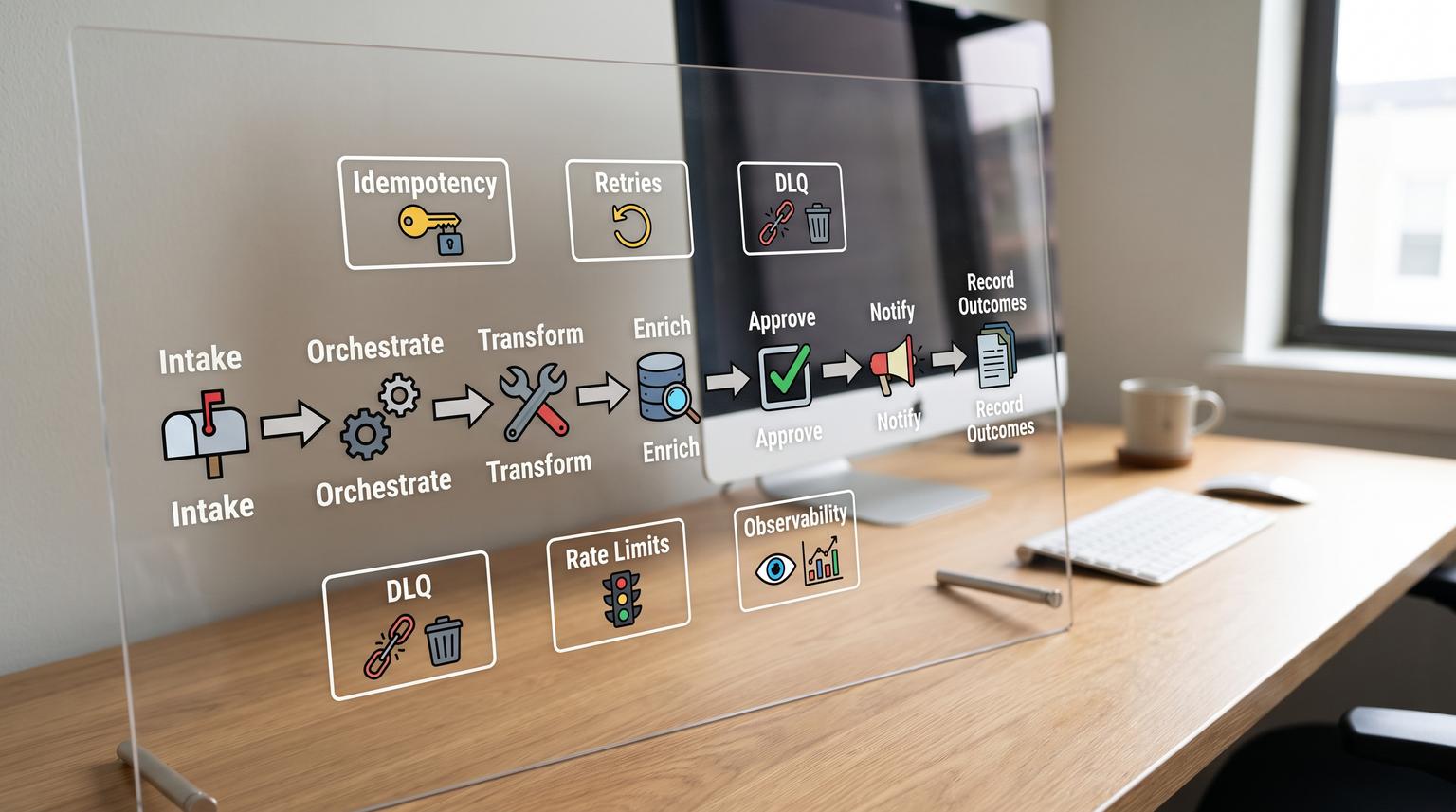
Teams usually do not fail at automation because they cannot connect apps, they fail because every workflow is built differently. Different naming, different error behavior, different data shapes, and different ways to monitor. This playbook standardizes n8n workflow patterns you can reuse across CRM, support, ops, marketing, and reporting so automations ship faster and stay reliable in production.
It is written for operators, RevOps, support leaders, and technical founders who want a repeatable approach to building and operating n8n systems across teams, not a one-off set of templates.
At a glance:
- Break workflows into repeatable building blocks: intake, orchestration, transform, enrich, approve, notify, and record outcomes.
- Design modular sub-workflows with explicit input/output contracts so reuse does not break data.
- Adopt production defaults: retries with backoff, idempotency, DLQ/replay, and rate-limit aware pacing.
- Standardize observability: execution correlation IDs, log streaming, and SLO-style monitoring.
- Use the same patterns across teams with function-specific examples: CRM/RevOps, support, ops/back office, marketing ops, and analytics.
Quick start
- Pick 2-3 cross-team building blocks to standardize first (for example: intake normalizer, dedupe/upsert, notifications).
- Create them as sub-workflows with explicit input/output contracts and restrict who can call them.
- Define a canonical data model per domain (Lead, Ticket, Order, CampaignEvent) and transform at the boundary.
- Implement reliability defaults: classify errors, add retry/backoff for transient failures, and route permanent failures to a DLQ for replay.
- Add idempotency keys to every workflow with side effects (creates, updates, refunds, ticket creation).
- Turn on log streaming or tracing and standardize fields for correlation (workflow_name, execution_id, correlation_id, entity_id).
- Promote via environments and Git, protect production from in-place edits, and define rollback steps.
A production-grade n8n system is a library of reusable workflow building blocks with explicit contracts, plus operating rules for reliability, security, and change management. When you standardize the same intake, transform, dedupe/upsert, approvals, notifications, and logging patterns across teams, you reduce workflow drift, prevent silent data loss, and make it easy to ship new automations that behave predictably in production.
Table of contents
- Why most n8n automations stop scaling across teams
- The playbook framework: seven reusable workflow building blocks
- Standard library architecture with sub-workflows and contracts
- Implementation checklist for production readiness
- Pattern deep dives: intake, orchestration, transform, enrich, approve, notify
- Reliability patterns: retries, idempotency, DLQ, and rate limits
- Observability and runbooks: logs, traces, and monitoring
- Governance: environments, versioning, secrets, and RBAC
- Use-case clusters by team (with the same underlying patterns)
- Reference architectures for common integrations
- When to bring in ThinkBot Agency
- FAQ
Why most n8n automations stop scaling across teams
The early stage is easy: a single workflow solves a single problem. The scaling stage is where most organizations run into friction:
- Workflow drift: every builder invents their own conventions for naming, data mapping, and error handling.
- Implicit contracts: downstream workflows expect fields that upstream workflows do not consistently provide, causing breakage when inputs change.
- Silent failure modes: partial failures get dropped, retries cause duplicates, or rate limits create gaps that no one notices.
- Ops blind spots: execution logs exist but no one is alerted, no correlation IDs exist, and no runbooks exist.
- Uncontrolled change: edits happen directly in production, credentials sprawl, and ownership is unclear.
Think of n8n as part of your production system. That means you need reusable architecture patterns, not just node chains. If you are deciding between platforms, our platform comparison and scaling guide help frame when n8n is the right fit.
The playbook framework: seven reusable workflow building blocks
Most production automations, regardless of department, can be decomposed into seven building blocks. Standardizing these is what makes reuse real:
- 1) Intake (trigger): webhooks, polling, schedules, queues, inbound email.
- 2) Orchestration: routing, branching, state checks, fan-out, fan-in, sub-workflow calls.
- 3) Transform: normalize fields, map schemas, validate types, handle schema drift.
- 4) Enrich: lookup CRM records, enrich firmographics, fetch order history, retrieve SLA tier.
- 5) Approve: human-in-the-loop gates, exception handling, escalation paths.
- 6) Notify: Slack/Teams alerts, emails, ticket comments, stakeholder summaries.
- 7) Record outcomes: write back to source of truth, log execution metadata, DLQ failed items.
Once you adopt this breakdown, you can design each workflow as a composition of stable components rather than a one-off build. This complements AI-enabled automations; we cover AI workflow structure and guardrails in this guide.
Standard library architecture with sub-workflows and contracts
The most important scaling capability in n8n is modularity: a parent workflow can call a child workflow using Execute Sub-workflow and the child starts with Execute Sub-workflow Trigger. This is the foundation for reusable building blocks that behave like functions, with explicit inputs and outputs, as described in docs. A practical recommendation is to treat each child as a product with an owner, an input contract, and a stable return shape.
Two details matter in production:
- Explicit contracts: define inputs as fields or a JSON example, avoid accepting arbitrary data for shared components unless you also validate heavily. This reduces accidental coupling and prevents broken data flowing through shared nodes.
- Governance controls: restrict which workflows can call a shared sub-workflow using workflow settings. This helps prevent one team from inadvertently relying on another team’s internal component.
For broader architectural guidance on avoiding duplication and preventing output drift, see this guide, which emphasizes stable I/O and careful orchestration choices (for example: only wait for completion when you truly need the result).

Sub-workflow contract checklist (use this for every shared component)
Use this checklist when you create any shared workflow that multiple teams will call.
- Name convention: [Sub] verb noun (for example: [Sub] Normalize Lead)
- Owner: team name and escalation contact
- Trigger: Execute Sub-workflow Trigger only
- Input mode: fields or JSON example, not Accept all data for shared components
- Required inputs: list, types, validation rules
- Optional inputs: defaults and behavior if missing
- Output schema: example payload and stable field names
- Error behavior: what is thrown vs what is returned as a structured error envelope
- Calling policy: restrict allowed callers
- Traceability: require correlation_id and pass execution_id through all calls
Implementation checklist for production readiness
Before you call any workflow production-grade, validate it against a consistent readiness checklist. This is where many teams move from “it works in a demo” to “it runs every day without babysitting.”
- Every side effect is idempotent (create/update/refund/ticket create)
- Retry policy exists for transient errors, with backoff and max attempts
- Permanent failures route to a DLQ store with replay capability
- Rate limits are handled via pacing, batching, or queue-based execution
- All intake data is normalized and validated at the boundary
- Dedupe/upsert logic is explicit, no “create then check” anti-patterns
- Observability: correlation_id, entity_id, workflow_name recorded in logs
- Notifications: failures produce actionable alerts, not just logs
- Access control: workflows and credentials live in the right RBAC project
- Change management: deployed via environments/source control, not edited in prod
Pattern deep dives: intake, orchestration, transform, enrich, approve, notify
Intake pattern: webhooks, polling, and the hybrid fallback
Intake is where reliability starts. Webhooks give near real-time events but require signature verification, idempotency, and duplicate handling. Polling is simpler to secure but requires cursor checkpoints, pagination, and reconciliation. A pragmatic production pattern for critical systems is “webhook + reconciliation poll,” which catches missed events when endpoints are down or retries exhaust, as explained in this overview.
In n8n terms, treat intake as a strict boundary layer that immediately produces a canonical object and a correlation_id. Everything downstream assumes that contract.
Orchestration pattern: compose small workflows, do not copy node chains
Orchestration is where you decide what happens next. In team environments, copy-paste is the enemy. Compose workflows from sub-workflows: “normalize,” “dedupe,” “upsert,” “notify,” “error-handler,” and “audit-log writer.” The Execute Sub-workflow model supports traceability by letting you jump from a parent execution to the child sub-execution and back, which is vital for debugging multi-step systems, as described in docs.
Transform pattern: mapping specs as data, plus validation reports
Most automation failures come from inconsistent shapes: extra fields, missing required fields, numbers parsed as strings, and localized date formats. A reusable approach is to store a mapping spec in a Set node (or external config) and apply it with a Code node. n8n published a practical workflow that transforms and validates webhook records using configurable type conversion and produces a structured validation report instead of failing the entire batch, which is ideal for partial acceptance and remediation workflows, see this workflow.
Example mapping spec template (drop-in starter)
Use this as a shared “normalize” contract. Teams can extend the mappings without rewriting node expressions.
{
"mappings": [
{"from":"email","to":"email","type":"string","required":true,"default":null},
{"from":"created_at","to":"created_at","type":"date","required":true,"default":null},
{"from":"amount","to":"amount","type":"number","required":false,"default":0}
],
"removeUnmappedFields": true,
"trimStrings": true,
"emptyStringToNull": true,
"decimalSeparator": ",",
"dateInputFormat": "DD.MM.YYYY",
"dateOutputFormat": "YYYY-MM-DD"
}
Enrichment pattern: lookups and joins with a single source of truth
Enrichment usually means “join against another system”: look up a contact by email, fetch the account owner, retrieve last order, or add firmographic fields. Keep enrichment steps separated from transform steps so your transformer can remain system-agnostic. When enrichment calls external APIs, it should inherit your retry and rate-limit rules, and it should log external request identifiers where available.
Approval pattern: human gates, exception queues, and auditability
Approvals are where cross-team trust breaks down if you do not standardize. Treat approvals as an explicit branch that records: who approved, what they saw, what they changed, and what happened next. For support and AI-assisted flows, approvals are often tied to human handoff; our handoff blueprint shows how to structure the payload and transcript logging.
Notification pattern: fewer alerts, better signals
Notifications should be actionable and consistent. Standardize message structure across workflows:
- What happened (event type)
- Which entity (lead_id, ticket_id, order_id)
- Correlation and execution identifiers
- What is required (approve, fix data, retry, ignore)
Put the formatting and routing rules in a shared notification sub-workflow so every team’s alerts look the same.
Reliability patterns: retries, idempotency, DLQ, and rate limits
Production workflows must assume that external systems fail, rate limit, or return partial results. The worst outcome is silent data loss, where executions look fine but records never arrive. Practical n8n error handling guidance emphasizes designing for verifiable delivery and replayability, see this guide.
Retry policy: classify transient vs permanent failures
Default to exponential backoff for transient failures like timeouts, 429s, and 5xx responses. Immediate retries can worsen congestion and rate limiting. A simple backoff progression is 1s, 2s, 4s, 8s, then stop, and route to DLQ if still failing. This is a common production pattern for n8n workflows, see this overview.
Idempotency: make retries safe
Retries are only safe if side effects are idempotent. For every “create” action, define an idempotency key and store it in the destination, or use an upsert pattern that is deterministic. For example:
- CRM contact: use email as the unique key, search then update/create.
- Ticket creation: use message-id or an external_event_id to prevent duplicates.
- Financial operations: always use a provider idempotency key if available, and record it.
ThinkBot’s refund and returns workflows are a good example of where idempotency and approvals matter; see refund gating.
DLQ and replay: treat failure as a queue, not a panic
A Dead Letter Queue (DLQ) is not just a list of failures, it is a structured store that contains enough context to replay. Capture the original input payload, where it failed, and a reason classification so humans can fix data issues and reprocess safely. This matches the “capture enough context to replay later” recommendation in this guide. Build a dedicated replay workflow that reads DLQ records, re-validates, applies idempotency checks, and retries under the same pacing rules.

Rate limits and pacing: design for throughput, not just success
High-volume workflows should avoid N+1 “check before insert” calls. Use batch-friendly patterns, cache snapshots where possible, and pace outbound requests. When polling APIs, design pagination loops that persist cursor state so you can resume after failures. Cursor pagination is usually more stable and efficient at scale than offset pagination, especially under concurrent writes, see this overview. Many JSON APIs also expose next links in response bodies or headers, which affects how you build your loop, see this guide.
Observability and runbooks: logs, traces, and monitoring
Once workflows span multiple sub-workflows and systems, “checking the executions page” stops working. You need streaming logs, standard identifiers, and runbooks that define how to respond.
Log streaming: get events out of the UI
n8n can stream workflow events, audit events, and queue events to external systems such as a syslog server, a generic webhook, or Sentry. This allows centralized alerting on failures and stalled jobs instead of relying on manual checks. The setup and event categories are documented in docs. A minimal production policy is to stream workflow started/success/failed and queue failed/stalled, plus audit events around credentials and workflow changes.
Tracing with OpenTelemetry: treat n8n as part of your distributed system
For organizations that already run tracing, n8n supports OpenTelemetry so workflow executions map to traces and node executions map to spans. This enables end-to-end visibility across n8n, your apps, and your APIs, see this post. If you standardize correlation_id propagation, you can join logs, traces, and tickets during incidents.
Governance: environments, versioning, secrets, and RBAC
Cross-team automation only scales when change control is explicit and secrets are handled correctly.
Environments and source control: promote changes, do not edit production
n8n environments integrate with Git to support a push/pull promotion model across instances. A recommended setup is multi-instance, multi-branch with PR review gating production changes. You can also protect production to prevent in-place editing. One important nuance is that n8n pushes the saved version, not the published version, and after pulling into production you must publish on the remote server, see docs. This detail should be in your release runbook.
Secrets management: move tokens out of workflows
For production systems, moving sensitive values into an external vault reduces secret sprawl and supports per-environment configuration. n8n supports multiple secret managers and references secrets in credentials using expressions like {{ $secrets.. }}, see docs. Two practical constraints matter for teams: secret names must be alphanumeric plus underscores and secret values are plaintext only, so plan naming conventions early.
RBAC projects: align access with PII boundaries
Use Projects as the RBAC boundary for grouping workflows and credentials, and give users different roles per project to enforce least privilege. Moving workflows or credentials can revoke sharing and potentially break dependencies, so it needs process and ownership, see this overview.
Use-case clusters by team (with the same underlying patterns)
The goal is not separate “RevOps automations” and “Support automations.” The goal is a single library of patterns that different teams reuse with different connectors.
CRM and RevOps: intake -> normalize -> dedupe -> upsert -> notify
A reliable CRM workflow usually follows the same skeleton: webhook intake from a form or ad lead, normalize fields, dedupe/search by a stable key, then upsert and notify. A practical CRM blueprint that includes owner assignment, linked objects, and follow-up email is described in this guide. This pattern maps directly to end-to-end pipeline workflows like lead-to-customer systems.
Customer support: intake -> classify -> route -> handoff -> SLA tracking
Support flows are approvals and handoffs heavy. A typical system ingests tickets from email or a helpdesk API, enriches requester context, routes by intent and urgency, notifies the right channel, then tracks status transitions and escalations. A template-style overview of these building blocks is in this page. For deeper operational structure with AI routing and error handling guardrails, see this build approach.
Operations and back office: approvals, audit trails, and deprovisioning
Back office workflows often touch identity, billing, and access control. This is where governance patterns matter most: approvals, detailed logs, and clear rollback. Employee offboarding is a classic example because it spans systems and requires auditability; see offboarding automation.
Marketing ops: campaigns, list hygiene, personalization guardrails
Marketing ops often needs the same canonical pieces: normalize inbound leads, validate consent fields, dedupe, update CRM segments, and notify sales. AI-driven personalization adds more requirements: approvals, safe prompting, and strict logging. If you run automations across multiple clients or business units, standardization is the only way to avoid inconsistent attribution and reporting. For agency-oriented orchestration patterns, see campaign workflows.
Reporting and analytics: aggregation, rationalized schemas, and incremental sync
Analytics automations usually follow an aggregation pattern: pull from multiple systems, translate semantics into a unified schema, and load into a warehouse, sheet, or BI dataset. n8n’s integration pattern framing calls out that this requires a deliberate translation layer, not just a quick mapping, see this overview. When syncing large datasets, prefer cursor-based pagination and persist cursor checkpoints so runs can resume without reprocessing everything.
Reference architectures for common integrations
These are implementation-oriented shapes you can copy into your own internal standards. They are intentionally industry-agnostic.
Webhook to SaaS upsert (event-driven)
- Trigger: Webhook
- Normalize: shared transformer sub-workflow (mapping spec)
- Validate: required fields and schema report
- Dedupe: search destination once when possible, otherwise use deterministic key
- Upsert: create/update with idempotency key
- Notify: shared notifier
- Record: write execution metadata and entity_id to a log table
Polling sync to database (batch, resumable)
- Trigger: Schedule
- Load last cursor checkpoint from storage
- Paginate: cursor loop until done
- Transform: normalize to canonical schema
- Dedupe: filter against existing keys using a snapshot-based approach
- Write: batch insert/update
- Persist: new cursor checkpoint and counts processed
Deduplication at scale without N+1 calls
When you ingest a batch into a database or sheet, do not check existence with an API call per item. A community workflow demonstrates a snapshot-based deduplication pattern: pull existing records once, tag streams, merge, then use a Code node with a Set for O(1) lookups, see this post. The key is to normalize the dedupe key (trim, lowercase) before lookup to avoid false duplicates caused by casing and whitespace drift.
Workflow failure modes and guardrails (what to prevent, how to mitigate)
Use this section as a design review tool when a workflow moves from “internal convenience” to “team-critical.”
- Failure mode: Duplicate records due to retries or webhook duplicates. Guardrail: idempotency keys plus deterministic upsert, and normalize the dedupe key before comparison.
- Failure mode: Silent drops in partial batch failures. Guardrail: return validation reports, route failed items to DLQ, and replay with controls, aligned with replayability guidance in this guide.
- Failure mode: Rate limit gaps (429) causing missing updates. Guardrail: backoff retries and pacing, plus reconciliation polling for critical workflows, aligned with backoff patterns and hybrid intake.
- Failure mode: Schema drift breaks downstream steps. Guardrail: transformer contracts with mapping specs as data and strict boundary validation, as shown in this workflow.
- Failure mode: Uncontrolled production changes introduce regressions. Guardrail: environments with PR promotion, protected production, and a rollback runbook, per docs.
- Failure mode: Credential sprawl and unauthorized access. Guardrail: RBAC projects for least privilege and external secrets for environment-scoped values, per projects and secrets.
When to bring in ThinkBot Agency
If you already have a handful of workflows and want to turn them into a governed, reusable system, ThinkBot can help you define your pattern library, refactor into modular components, implement DLQ/replay, add monitoring, and set up environments and secrets for safe deployments. You can review relevant work in our portfolio. If you want to scope a playbook-based rollout across teams, book a consult here: book a consultation.
For buyers who prefer vetted delivery history, you can also view ThinkBot as a top performer on Upwork.
FAQ
What are the most reusable building blocks in n8n across teams?
Start with a transformer/validator workflow, a dedupe and upsert workflow, a standard notification workflow, and a standard error handler that writes to a DLQ with replay. These components show up in CRM, support, ops, and analytics with only connector changes.
How do I prevent sub-workflow reuse from breaking data?
Define explicit input and output contracts for each shared sub-workflow, including required fields, defaults, and a stable return shape. Restrict which parent workflows can call shared components and version contract changes through environments and Git promotion.
What is the minimum production error handling I should implement?
Classify transient vs permanent failures, implement retry with exponential backoff for transient errors, route permanent failures to a DLQ record that includes the original payload and execution context then build a replay workflow. Add idempotency so retries do not create duplicates.
How should we monitor n8n automations in production?
Stream workflow and queue events to an external log or alerting system, standardize correlation_id and entity_id fields in every workflow, and define alert thresholds (failure rate spikes, stalled jobs, missing heartbeat). For deeper visibility, export traces with OpenTelemetry and correlate with downstream API latency.
Do we need environments and source control if only one person builds workflows?
Yes, once workflows affect revenue, support SLAs, or access control. Environments let you test safely, protect production from in-place edits, and roll back quickly. Source control also creates a durable audit trail for changes and approvals.
Can ThinkBot build a reusable n8n playbook for our company?
Yes. ThinkBot typically starts with an architecture and standards workshop, then builds a shared library of sub-workflows, operating runbooks, monitoring, and a deployment pipeline. From there, we implement function-specific workflows (RevOps, support, ops, marketing ops, analytics) on top of the same components.
