
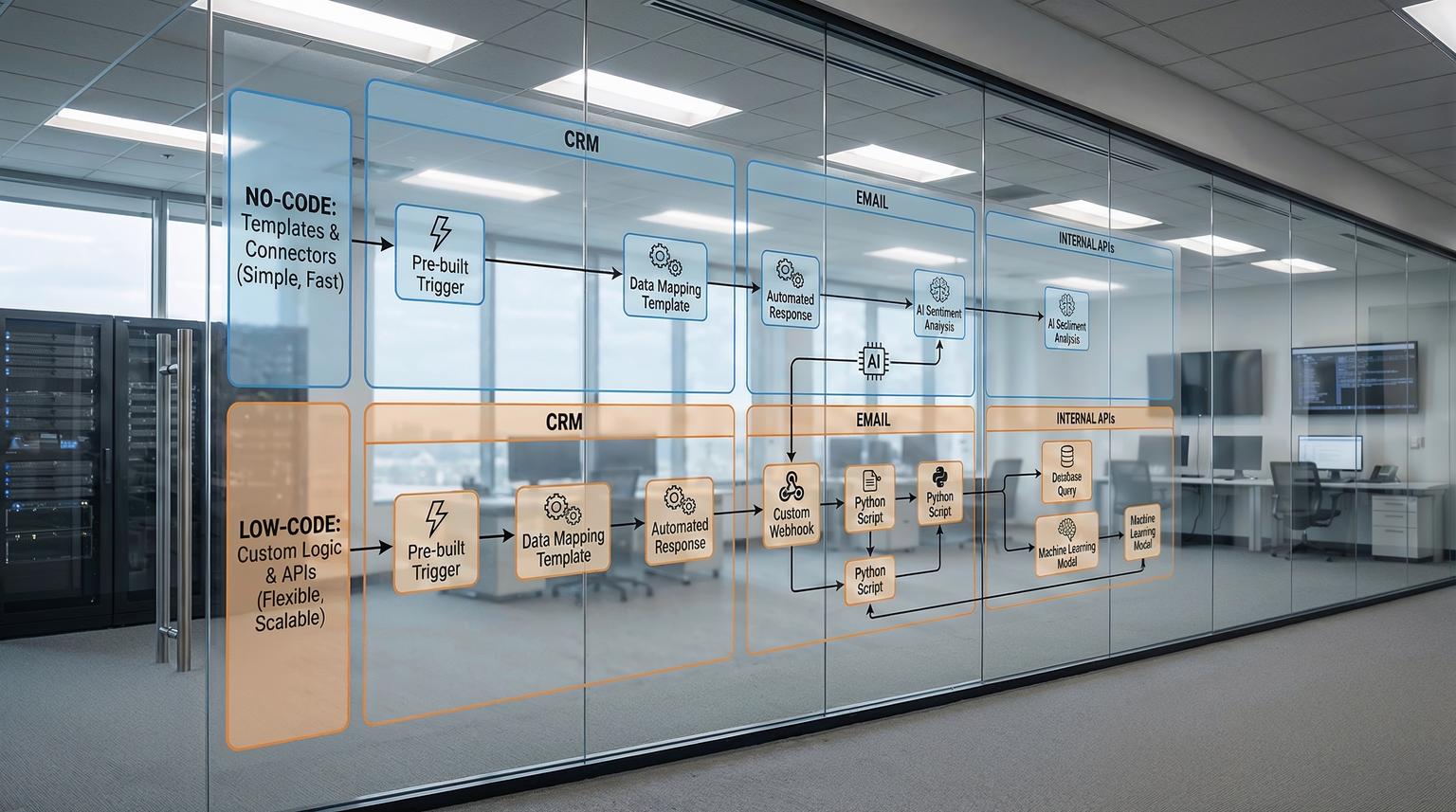
For growing teams, the question is no longer whether to automate, but how. The real decision is how to balance no-code vs low-code automation so you can move fast today without painting yourself into a corner tomorrow. At ThinkBot Agency, we see this play out every week in n8n, Make, and Zapier projects that touch CRMs, email platforms, and internal tools.
This article is for operations leaders, marketers, and founders who want to streamline lead routing, onboarding, and support, and who need a clear, practical way to choose the right automation stack and level of technical depth.
In simple terms, no-code vs low-code automation is a tradeoff between speed and flexibility. No-code tools rely on visual builders and prebuilt connectors so non-developers can launch workflows quickly. Low-code adds custom logic, code snippets, and API-level control for edge cases, complex data, and scale. For most growing companies, the best approach is a hybrid: start in no-code where possible, then introduce low-code in n8n and custom integrations where it removes bottlenecks and future-proofs your operations.
No-code vs low-code automation: what is the real difference?
Most definitions of no-code and low-code sound similar, but the differences become obvious once you try to automate real business processes.
No-code automation in practice
No-code automation lets you build workflows with visual interfaces, drag-and-drop modules, and configuration panels instead of writing code. Platforms like Make and Zapier provide thousands of prebuilt connectors, text-based or visual builders, and templates for common flows such as syncing contacts or sending notifications. As one Make article explains, the platform handles the backend logic so non-developers can focus on business rules, not syntax. For a deeper look at how these visual tools connect CRM, email, and support systems, see our guide on Make.com workflow automation.
In no-code tools you typically:
- Pick a trigger, for example a new lead in HubSpot or a form submission
- Add actions, such as creating a deal, sending an email, or updating a spreadsheet
- Configure mappings and simple conditions through dropdowns and fields
This works extremely well for linear, predictable processes. It is also an ideal way to prototype and validate new automation ideas quickly. McKinsey has cited that no-code and low-code can reduce development time by up to about 90 percent, and that matches what we see when teams move manual work into visual workflows.
Low-code automation in practice
Low-code automation keeps the visual workflow builder, but adds the ability to insert custom logic, scripts, and advanced API calls. In n8n this often means using Function nodes, HTTP Request nodes, or custom nodes. In platforms like Make, the Make Code App allows JavaScript or Python to run directly inside a scenario.
Low-code becomes important when you need to:
- Transform complex or nested data into CRM-ready formats
- Call niche or internal APIs that have no prebuilt connector
- Implement proprietary scoring, routing, or pricing logic
- Handle complex error recovery, retries, or rate limits
Instead of giving up when a no-code tool hits a logic wall, low-code lets your team or a partner like ThinkBot extend the platform while keeping workflows visual and maintainable.
How no-code and low-code map to real business workflows
To decide between no-code vs low-code automation, it helps to look at concrete workflows that most growing companies need: lead routing, customer onboarding, and customer support.
Example 1: Lead routing from forms to CRM and email
Imagine you capture leads from multiple sources: a website form, LinkedIn ads, and webinars. You want to:
- Push all leads into your CRM (HubSpot, Pipedrive, or Salesforce)
- Tag them by source and campaign
- Notify the right sales rep
- Start a tailored email nurture sequence
With a pure no-code approach in n8n or Zapier you might:
- Use a webhook or form trigger
- Map fields directly into the CRM contact and deal
- Add a simple If node to route high-value leads to a Slack channel
- Trigger an email sequence in your marketing platform
This works when your routing rules are simple. But as you grow, you may want rules such as:
- Assign leads based on territory, product interest, and current rep capacity
- Score leads using website behavior and historical conversion data
- Call an internal data enrichment API before routing
At that point, low-code in n8n lets you:
- Call enrichment and scoring services via HTTP Request nodes
- Implement multi-factor assignment logic inside a Function node
- Persist routing decisions and errors to a database for later analysis
ThinkBot often designs these as hybrid flows: non-technical sales ops can adjust high-level routing rules in a Data Table or Google Sheet, while the low-code layer in n8n enforces those rules reliably at scale.

Example 2: Customer onboarding workflows
Many Make users report onboarding time reductions of up to 80 percent when they automate repetitive steps such as document collection and account setup, a result highlighted in the Make no-code overview. In our projects, onboarding is usually a mix of no-code orchestration and low-code decision-making. If you are designing similar journeys, our article on business process automation with n8n walks through how to connect CRMs, email, and internal tools in a scalable way.
A typical SaaS onboarding flow might:
- Trigger when a deal is marked Closed Won in the CRM
- Create an account in the product database
- Generate a welcome email and invite links
- Schedule a kickoff call
- Provision access in tools like Slack, Notion, or Jira
No-code is perfect for chaining these standard actions together. However, onboarding often requires branching logic such as:
- Different steps based on plan tier or region
- Custom contract clauses that must match internal policies
- Internal approvals for large accounts
In n8n, low-code nodes can implement these rules cleanly, while AI nodes can summarize contracts or classify risk levels. The n8n AI workflow guidance shows how pre and post processing around AI steps helps enforce compliance, which is critical in onboarding for regulated industries.
Example 3: Customer support and AI-assisted triage
Support workflows are a natural fit for automation plus AI. Common goals include:
- Automatically categorizing tickets
- Routing urgent issues to the right team
- Summarizing long conversations for handoffs
No-code tools can listen to new tickets from systems like Zendesk or Intercom and push them to Slack or email. To go further, low-code plus AI inside n8n lets you:
- Use an LLM node to classify sentiment and topic
- Apply guardrails and validation steps around the AI output, as recommended in the n8n AI workflows article
- Route tickets by priority, language, and product line using custom logic
- Store summaries and labels in your CRM for reporting
This is where the distinction between no-code and low-code matters less than the overall design: the AI is a component inside a larger workflow that enforces your business rules and data policies.
When should you stay mostly no-code?
No-code is not just for tiny teams. It is often the right choice when your priority is speed and accessibility.
Good fits for a no-code-first strategy
Stay primarily in no-code when:
- Your workflows are relatively simple and linear
- Most of your tools have robust prebuilt integrations
- Non-technical staff need to build and maintain automations
- You are validating a new process or business model
For example, a marketing team might use Make or Zapier to sync leads from Facebook Ads to HubSpot, post them into Slack, and trigger a welcome email. The Make overview describes these visual builders as ideal for fast deployment with minimal learning curve, and that aligns with what we see in early-stage automation projects.
Risks of only using no-code
However, if you stay purely no-code as your operations grow, you may encounter:
- Logic walls where templates and simple conditions are not enough
- Workarounds that become fragile and hard to debug
- Vendor lock-in when you cannot easily export or extend workflows
- Difficulty enforcing governance, testing, and version control
ThinkBot often engages with clients at this stage. They have dozens of no-code workflows across tools, but no unified architecture, and small changes become risky. Moving selected flows into n8n with low-code extensions provides a path to regain control without losing the benefits of visual automation. To understand the broader strategic impact, you can also explore our overview of low-code automation benefits for growing businesses.
When do you need low-code and custom integrations?
Low-code and custom integrations become essential as your automation footprint expands across systems, teams, and regions.
Signals that it is time to introduce low-code
Based on our client work, you should consider a low-code-first or hybrid strategy when:
- You hit data transformation limits inside your current no-code tools
- You need to integrate with internal systems, old databases, or niche APIs
- Compliance or data residency rules require self-hosting or strict audit trails
- AI workflows must be tightly controlled and monitored
- Per-seat or task-based pricing in hosted tools is inflating your costs
Open-source and self-hosted platforms like n8n are strong fits here because they combine a visual builder with full access to JavaScript, HTTP, and custom nodes. You can run n8n on your own infrastructure for predictable costs and data control, then connect it to cloud tools such as CRMs and email platforms.
Low-code patterns that unlock scale
Low-code is not just about writing scripts. It is about introducing reusable patterns that make your automations more robust:
- Centralized error handling and retries for all workflows
- Reusable sub-workflows for common tasks like enrichment or notifications
- Shared code libraries for transformations and validations
- Audit logging to databases or data warehouses
The Make Code App article describes how embedded code modules close the gap between visual automation and full custom development. In n8n we achieve the same effect with Function nodes and dedicated microservices when needed, giving teams both transparency and power.
Hybrid automation with n8n: a practical decision framework
For most organizations the best answer is not no-code vs low-code automation, but how to mix both. At ThinkBot, we use a simple framework to design hybrid architectures around n8n.
Step 1: Audit
List your existing processes and automations across tools. Capture:
- Triggers and data sources, such as forms, CRM events, or webhooks
- Systems involved, like HubSpot, Salesforce, Gmail, Slack, or custom apps
- Failure points, manual steps, and frequent exceptions
Step 2: Map
Group workflows into three buckets:
- No-code friendly: simple, well-supported by existing connectors
- Hybrid: mostly standard steps with a few complex rules
- Low-code heavy: deep integrations, complex logic, or AI governance needs
For example, automated newsletter tagging is no-code friendly, while multi-region lead routing with AI scoring is likely hybrid.
Step 3: Integrate
Design your n8n architecture around these buckets:
- Use n8n or Make as the orchestration layer that connects CRMs, email platforms, and internal tools
- Keep straightforward flows in visual, no-code nodes so non-developers can manage them
- Introduce Function, HTTP Request, and custom nodes where you need extra control
- For AI, follow the pipeline pattern described in the n8n AI workflows guide: trigger -> pre-process -> retrieve context -> LLM -> post-process and route
Step 4: Test
Before going live, invest in:
- Sandbox environments for your automation platform
- Test data sets that cover edge cases
- Alerting on failures, latency spikes, and API rate limits
Both Make and n8n emphasize live visualization of data through flows, which is extremely helpful for debugging complex branches. Use this to your advantage during testing.
Step 5: Optimize
After launch, treat automation as a living system:
- Measure time saved per workflow and error rates
- Identify steps that are still manual and can be automated next
- Refine AI prompts, retrieval logic, and guardrails to improve accuracy
- Refactor repeated logic into shared components or sub-workflows
This iterative approach is how teams realize the kind of 80 percent onboarding time reduction and campaign uplift that no-code vendors highlight, but with the resilience and governance that low-code and custom integrations provide.

How AI changes the no-code vs low-code conversation
AI is often marketed as magic, but in real-world automation it behaves like another service with inputs, outputs, and failure modes. The key question is how you orchestrate AI inside workflows.
AI inside workflows, not on an island
The n8n team argues that embedding AI inside workflows reduces risk because you can pre-process, sanitize, and post-process data around the model. Their cautious enterprise guide recommends patterns such as:
- Input validation and redaction before calling the model
- Retrieval-augmented generation using tools like Qdrant or other vector stores
- Output checks and confidence thresholds, with human-in-the-loop fallbacks
No-code tools can trigger AI calls, but low-code is usually required to implement robust guardrails, logging, and routing based on AI responses. For example, a Function node might decide whether an AI-generated answer is safe to send directly to a customer or should be sent to a human agent first.
Agentic and research workflows
Modern automation increasingly uses agentic patterns, where AI agents decide which tools to call next. The Make blog describes this as agentic automation, with agents able to choose tools through a context server. In the n8n ecosystem, a practical example is the Oxylabs research workflow, where n8n orchestrates web scraping, AI summarization, and synthesis across parallel sub-workflows.
From a no-code vs low-code automation perspective:
- No-code gives you the orchestration canvas and prebuilt nodes for services like Oxylabs and OpenAI
- Low-code lets you control concurrency, dynamic polling, and data quality, for example using n8n Data Tables and custom loops instead of fixed wait times
ThinkBot builds on these patterns to create research agents, support assistants, and analytics workflows that plug directly into CRMs and ticketing systems, while respecting each client's security and compliance requirements. If you are exploring how AI fits into this picture, our article on AI integration in business automation covers additional real-world patterns and safeguards.
Comparing no-code and low-code for your automation stack
To make this more concrete, here is a simplified comparison of how no-code and low-code approaches stack up across key decision factors.
| Factor | Primarily no-code | Hybrid / low-code with n8n |
|---|---|---|
| Speed to first workflow | Very fast, templates and wizards | Fast, slightly more setup |
| Complex logic and data transforms | Limited, workarounds common | Strong, custom code and APIs |
| Integration with niche/internal systems | Only if a connector exists | Full HTTP and custom node support |
| Governance and observability | Basic logs, limited control | Centralized logging and custom policies |
| Cost predictability at scale | May be constrained by per-task pricing | Self-hosting and tuning options |
| Maintainability by non-developers | High for simple flows | High if visual flows are preserved and code is modular |
How ThinkBot helps you choose and implement the right mix
Choosing between no-code and low-code is not a one-time decision. It is an ongoing architectural choice that should match your growth, team skills, and risk profile.
As a top-rated automation and AI integration agency on Upwork, ThinkBot specializes in:
- Designing automation roadmaps that balance no-code agility with low-code robustness
- Implementing n8n workflows that connect CRMs, email platforms, and internal tools
- Embedding AI safely using patterns from the n8n ecosystem, including self-hosted options
- Maintaining and evolving workflows as your processes mature
If you want an expert review of your current automations and a concrete plan for where to use no-code vs low-code automation, you can book a consultation with ThinkBot and we will walk through your stack, use cases, and constraints.
FAQ
What is the main difference between no-code and low-code automation?
No-code automation uses visual builders and prebuilt connectors so non-developers can create workflows without writing code. Low-code keeps the visual approach but allows custom logic, scripts, and API calls, which is essential for complex data transformations, niche integrations, and advanced error handling.
When should my business move from no-code to low-code with n8n?
You should consider low-code with n8n when you hit limitations in your current tools, such as needing to integrate internal systems, enforce strict data or compliance rules, or implement complex routing and AI guardrails. These are signs that visual configuration alone is no longer enough to keep workflows reliable and scalable.
Can non-technical teams still manage workflows if we adopt low-code?
Yes, if the architecture is designed correctly. In a hybrid setup, non-technical users work with the visual parts of n8n workflows, while low-code logic is encapsulated in reusable nodes or sub-workflows maintained by technical staff or a partner like ThinkBot. This preserves accessibility without sacrificing flexibility.
How does ThinkBot typically combine no-code tools like Make or Zapier with n8n?
ThinkBot often keeps quick, simple automations in tools like Make or Zapier and centralizes more complex or sensitive workflows in n8n. We use n8n as an orchestration and integration hub, especially where custom APIs, AI models, or self-hosted requirements are involved, while still allowing teams to use familiar no-code platforms for lightweight tasks.
What types of workflows benefit most from AI inside n8n?
Workflows that involve classification, summarization, or decision support benefit most from AI inside n8n. Examples include lead scoring, ticket triage, document summarization, and research pipelines. Embedding AI inside the workflow, with pre and post processing and guardrails, provides better control and reliability than calling AI in isolation.
