
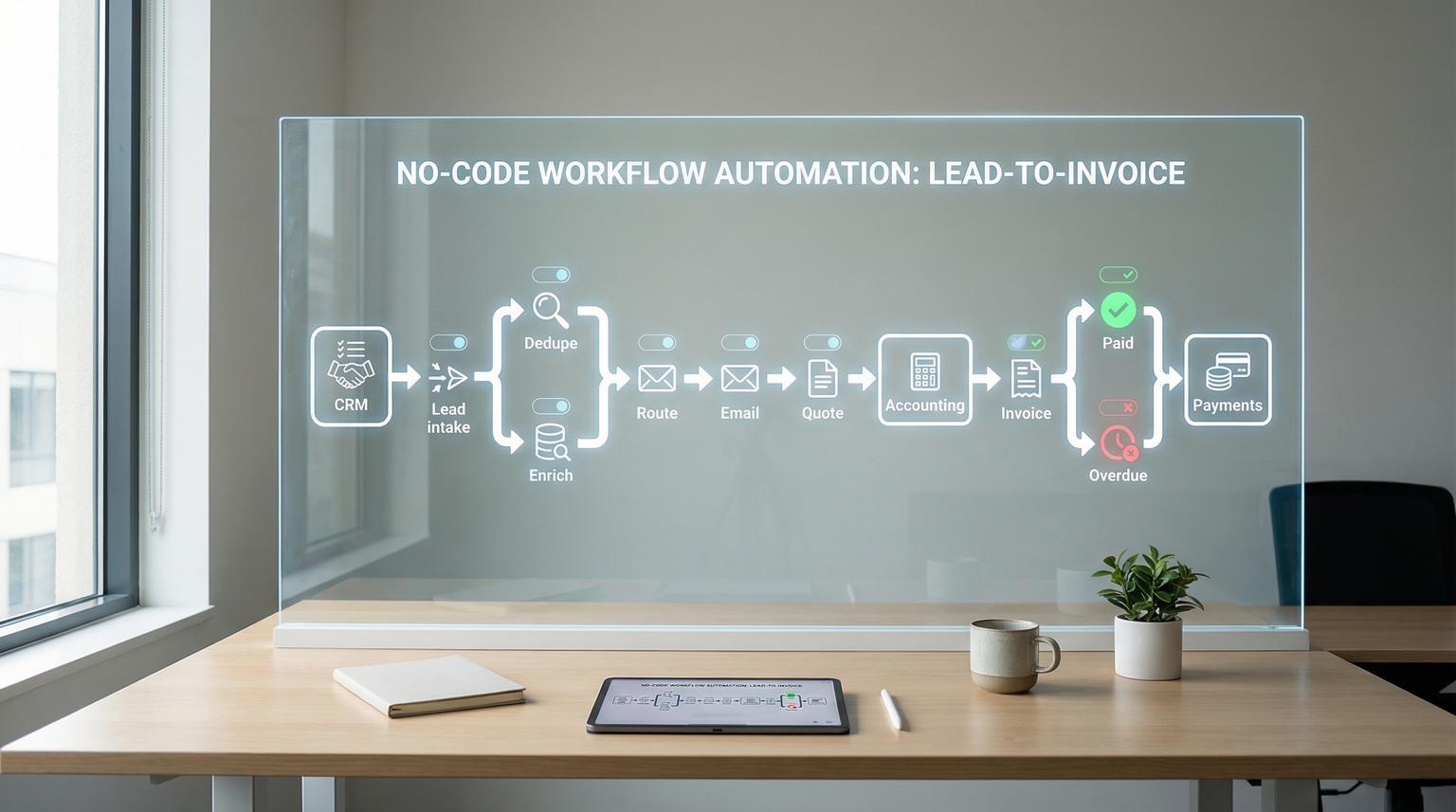
Lead-to-invoice is where revenue either flows smoothly or gets stuck in handoffs, inboxes and spreadsheets. This guide is for ops leaders, founders and RevOps teams who want no-code workflow automation that connects their CRM, email platform and accounting tool into one reliable pipeline using n8n. We will walk through a practical workflow design you can implement, plus the reliability patterns that prevent missed follow-ups, incorrect invoices and stale payment status.
Quick summary:
- Capture inbound leads from forms and email, normalize data and dedupe before anything hits your CRM.
- Enrich and score leads then route them to the right owner with clear SLAs and automated follow-ups.
- Generate quotes and invoices from CRM stages with validation gates so finance controls billing-critical steps.
- Sync payment status back to CRM and trigger reminders or escalations with audit logs and retries.
Quick start
- Define your system of record for each object: Lead, Account, Deal, Quote, Invoice and Payment.
- In n8n, create one workflow for lead intake and qualification and one for deal-to-invoice-to-cash.
- Add a shared data normalization step that produces a consistent schema across all sources.
- Attach an error workflow to both pipelines, log failures and alert the right owner.
- Roll out in phases: lead capture -> follow-up -> quote -> invoicing -> payment sync and reminders.
Connect your CRM, email platform and accounting tool with n8n so every lead is captured, enriched, assigned and followed up automatically then converted into a quote and invoice when a deal reaches the right stage. Use validation gates before sending financial documents, keep invoice status in a single source of truth and sync it back to the CRM. Add retries, audit logs and an n8n error workflow so failures are visible and recoverable.
Why lead-to-invoice breaks in real operations
Most teams do not fail because they lack tools, they fail because the process spans multiple systems with inconsistent data and unclear ownership. Common breakpoints we see when we audit revenue operations for clients:
- Lead capture gaps: form submissions, chat leads and inbound emails do not land in the CRM consistently, or they land without required fields.
- Duplicate records: the same company arrives via webinar, demo request and referral, which splits activity and reporting.
- Slow follow-up: reps miss the first response window because alerts are manual and routing rules live in someone1s head.
- Quote and invoice drift: pricing, tax fields or billing contacts are missing so finance has to chase details.
- Payment status mismatch: accounting shows paid while the CRM still shows open, so teams send incorrect reminders or forecast incorrectly.
The fix is not just connecting apps. The fix is designing one end-to-end workflow with a shared schema, clear stage gates and operational reliability.
Lead-to-invoice architecture in n8n: the reference workflow
We recommend splitting the pipeline into two main n8n workflows plus one shared error handler (if you are also comparing stacks, see our Zapier vs. n8n comparison for scalable workflows).
Workflow 1: Lead intake -> enrichment -> routing
- Triggers: Webhook (forms), IMAP or API poll (inbound email), ad lead webhooks.
- Normalize: map raw fields into a single Lead schema.
- Dedupe: search CRM by email and domain then merge or update.
- Enrich: company data, role parsing, region mapping, optionally AI classification for lead type (for deeper patterns, use this guide on automating CRM with artificial intelligence).
- Score and route: assign owner based on territory, company size, product line and SLA rules.
- Follow-up orchestration: send personalized email sequences, create tasks and book meetings.

Workflow 2: Deal -> quote -> invoice -> payment sync
- Triggers: CRM stage updates, signed proposal event, project completion event.
- Validate: ensure billing contact, legal name, address, tax fields and line items exist.
- Create quote: generate and send quote or proposal, track acceptance.
- Generate invoice: create invoice in accounting as Draft, run checks then send.
- Sync status: paid, partial, overdue or disputed back to CRM.
- AR reminders: schedule tiered reminders, pause on disputes and escalate as needed.
Workflow 3: Error handler and audit logging
Attach a separate error workflow so issues do not silently fail. n8n supports this pattern directly via an Error Trigger workflow, which is the foundation for production-grade reliability. The official docs cover how to set this up and what payload you receive in the handler, see error handling.
Build a consistent data model first (use this checklist)
Before you drag nodes in n8n, define the minimum fields each stage requires. Use this checklist when you align marketing, sales and finance so the workflow can make decisions without human guesswork.
Lead-to-invoice data readiness checklist
- Lead object has: email, full name, company, website or domain, source and consent status.
- Account object has: legal name, billing address, tax ID or VAT field if applicable and industry.
- Deal object has: owner, pipeline stage, expected close date, currency and product or service package.
- Quote object has: line items, discount rules, payment terms and expiry date.
- Invoice object has: unique invoice number policy, line items, tax logic, due date and payment method link.
- There is one system of record for invoice state, usually the accounting tool.
- CRM stages map to financial actions, for example Won -> invoice draft, Approved -> invoice send.
- Dedupe rules are defined, for example match by email then domain, with merge precedence rules.
- Owner routing rules are explicit and stored in a table or config, not in people1s memories.
- Every workflow writes an audit log entry with key IDs: leadId, accountId, dealId and invoiceId.
This is also where tool evaluation matters. The n8n team calls out why flexibility, monitoring and version control influence long-term maintainability, see this evaluation guide for a practical framework you can reuse.
Implementation steps in n8n: from inbound lead to booked meeting
Below is a concrete build sequence we use at ThinkBot Agency when implementing CRM and email automations. It keeps complexity manageable while still delivering measurable operational improvement quickly.
1) Capture leads from every inbound channel
Use n8n Webhook triggers for forms and landing pages. For inbound email leads, use an email trigger or scheduled polling. Normalize everything into one schema so downstream nodes never care where the lead came from.
2) Normalize and validate
Apply field formatting and validation early. For example, lowercase emails, strip whitespace and validate required fields. If something is missing, fail fast with a controlled error so the issue is logged and assigned.
3) Dedupe and upsert into the CRM
Search CRM for existing contact and account. If found, update and append activity history. If not found, create a new contact and account. Always store the CRM IDs in your workflow context and audit log so later stages can reference them.
4) Enrich and score
Enrichment can be a mix of deterministic rules and AI-assisted parsing. Typical enrichments include region from country, company size bucket, and lead intent classification from message text. Keep AI outputs as labels or flags, not as final decisions.
5) Route and trigger follow-ups
Routing should end with a single owner assignment and an SLA timestamp. Then trigger the right follow-up path: a personalized email, a task creation, a Slack or Teams notification and an automated booking link email. In 2026, response time is often a competitive advantage, automation makes it consistent.
Primary CTA: If you want this built and productionized with proper logging, retries and handoff documentation, book a consultation with ThinkBot Agency here: book a consultation.
Deal-to-invoice automation with controls finance will trust
Once lead qualification is stable, the next step is to automate quoting and invoicing without creating billing risk. The key is to treat CRM stages as signals but keep accounting as the source of truth for invoice state.

Stage gates that prevent billing errors
- Gate 1: Billing readiness -> billing contact, address, currency and tax fields present.
- Gate 2: Pricing validation -> line items match your price book, discounts are within policy.
- Gate 3: Anomaly check -> invoice amount is not unusually high compared to typical deal size for that customer or package.
- Gate 4: Approval path -> if any check fails, route to a manual approval queue.
In n8n, implement each gate as a decision node that either continues or triggers Stop And Error to push the run into your error handler, which creates an auditable incident record.
Example: invoice creation payload you can standardize
Standardizing the invoice create request makes your integration easier to maintain across accounting systems. Use a consistent internal schema then map to the accounting API in one dedicated node or sub-workflow.
{
"accountId": "crm_account_123",
"dealId": "crm_deal_987",
"invoice": {
"currency": "USD",
"billingContact": {
"name": "Jane Buyer",
"email": "[email protected]"
},
"billingAddress": {
"line1": "100 Main St",
"city": "Austin",
"region": "TX",
"postalCode": "78701",
"country": "US"
},
"terms": {
"dueDays": 14,
"lateFeePolicy": "net14"
},
"lineItems": [
{"sku": "SVC-ONBOARD", "description": "Onboarding", "quantity": 1, "unitPrice": 2500}
],
"metadata": {
"source": "n8n",
"owner": "rep_42"
}
}
}
Error handling, retries and audit logs: no missed revenue
Reliability is where most automations fail in production. We design n8n workflows with the assumption that APIs time out, auth tokens expire and webhooks occasionally deliver partial data. n8n supports a clean pattern: a dedicated error workflow that runs whenever your main workflow fails.
Failure modes and mitigations (practical patterns)
- Upstream API timeout or 5xx -> retry with backoff, if still failing route to error handler and create an incident log entry with execution URL.
- Duplicate invoice candidate -> check for existing invoice by dealId and amount, if found Stop And Error and assign to finance for review.
- Trigger node failure for lead capture -> log trigger context separately because execution IDs can differ for trigger failures.
- Business rule violation such as missing tax fields -> fail fast with Stop And Error so the workflow does not progress into invoicing.
- Intermittent data mapping bugs -> store key inputs in an audit log and use execution replay to reproduce with the same payload.
What to store in your audit log
At minimum, store timestamp, workflow name, execution ID, last node executed, error message and the relevant business IDs (leadId, dealId, invoiceId). This makes support and finance reviews fast and defensible.
How to wire the error workflow
Create a new workflow with Error Trigger as the first node then in each main workflow set Workflow Settings -> Error workflow and select your handler. When a run fails, the handler receives context including execution.id, execution.url, execution.retryOf and the last node executed. This is described in the n8n documentation for error workflows.
Automated AR follow-ups and payment-status syncing
Once invoices are being generated reliably, collections and payment visibility become the next leverage point. Automating accounts receivable does not mean spamming customers. It means consistent reminders, fast dispute handling and accurate forecasting. A good best-practices overview of AR automation and tiered reminders is available here. If you want a broader playbook on choosing and rolling out automation, see how no-code automation platforms streamline operations.
Recommended reminder logic
- Pre-due reminder a few days before due date.
- Friendly nudge a few days after due date if unpaid.
- Escalation after a set threshold with an explicit human handoff.
- Immediate pause of reminders if the invoice is disputed.
Payment status sync pattern
Schedule a job that pulls invoice status changes from your accounting tool and updates your CRM deal fields. When an invoice is paid, update the deal stage to a finance-complete state and send a confirmation email. When overdue, update the CRM and start the reminder cadence. When disputed, notify the owner and stop reminders.
Secondary CTA: Prefer to see how we build similar automations for real teams? View examples in our portfolio: ThinkBot portfolio.
FAQ
These are the most common questions we get when teams plan an end-to-end lead-to-invoice build in n8n.
What does no-code workflow automation mean in a lead-to-invoice process?
It means using a visual workflow builder like n8n to connect your CRM, email and accounting tools so leads are captured, routed and followed up automatically then converted into quotes, invoices and payment updates, with rules and logging that make the process reliable.
Can n8n replace my CRM or accounting system?
No. n8n is best used as the orchestration layer that moves data and triggers actions across systems. Your CRM stays the system of record for pipeline activity and your accounting platform typically stays the system of record for invoices and payment status.
How do you prevent duplicate contacts and duplicate invoices?
You implement dedupe checks at ingestion, for example matching by email then domain, and you enforce idempotency on financial steps, for example checking whether an invoice already exists for a dealId before creating a new one.
What is the best way to handle workflow failures so we do not miss revenue?
Attach an n8n error workflow to every production workflow. Log execution details, alert the right owner, retry transient failures and fail fast on business rule violations so issues become visible and recoverable.
Can ThinkBot Agency implement this across our exact tools and data model?
Yes. We build custom n8n workflows, CRM and email integrations and accounting automations with staging, monitoring and rollback. If your team needs a production-ready build, we can scope it quickly and implement it with clear ownership and documentation.
