
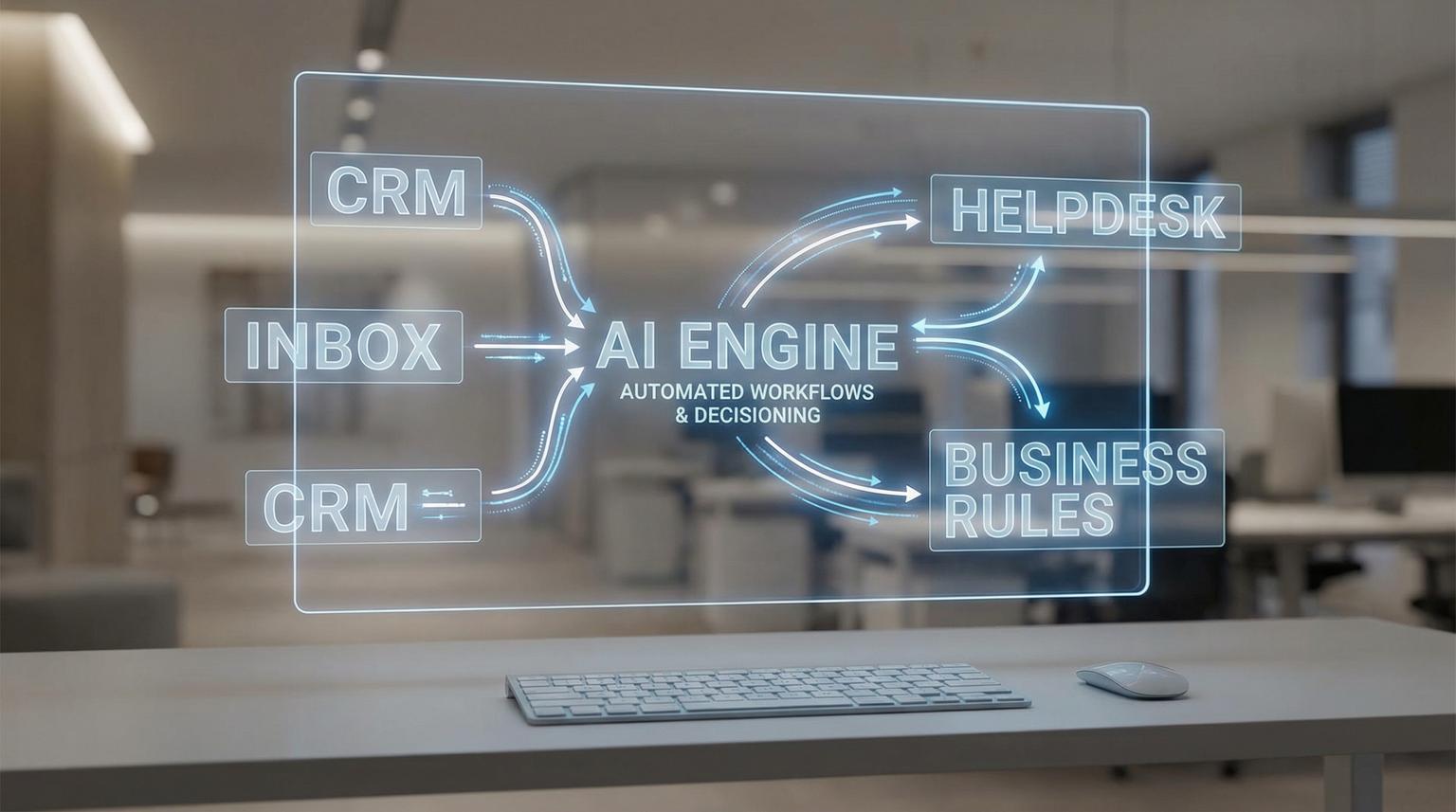
Most teams do not need more tools, they need fewer manual handoffs. The fastest wins come from connecting the systems you already rely on, like your CRM, inbox, helpdesk and internal data, then adding AI where it improves decisions and response quality. This practical guide to AI integration for business automation shows how ThinkBot Agency designs real workflows in n8n that qualify leads, route support and personalize email, without turning your operations into a science project.
If you are an ops manager, founder or marketing and CRM owner who is tired of copy paste work, inconsistent follow ups and messy data, this is for you. We will focus on patterns you can implement in weeks, not months.
At a glance:
- Use n8n as the orchestration layer to connect CRM, email and external APIs, then add AI for classification, summarization and drafting.
- Start with one workflow that removes a daily bottleneck, then harden it with logging, retries and human approvals.
- Keep AI steps bounded, deterministic where possible and auditable, especially for routing and customer messaging.
- Design for data quality first, because AI output quality follows your CRM and inbox hygiene.
Quick start
- Pick one process with clear inputs and outputs, like inbound leads or new support emails.
- Map your systems of record, usually CRM for contacts and deals and helpdesk for tickets, then define which system writes truth.
- Build an n8n workflow that ingests events, enriches data via APIs and writes back to the right objects in your CRM.
- Add an AI step for one decision, like intent classification or reply drafting, then gate it with confidence thresholds.
- Ship with monitoring, error workflows and a rollback plan, then iterate based on real logs and edge cases.
AI enabled automation works best when n8n handles the predictable integrations and business rules, while an LLM handles language tasks like classification, summarization and drafting. The result is faster lead follow up, cleaner CRM data and support workflows that escalate the right issues to humans, while routine requests get handled consistently. For a deeper dive into how this looks across your stack, you can also review our overview of AI integration in business automation and see additional n8n patterns.
Where AI belongs in an automation stack
We see the best outcomes when AI is treated as a component, not the entire system. In practice, n8n acts as the orchestration and control plane that coordinates triggers, API calls, data transformations and retries. AI is inserted only where it adds leverage.
Common high ROI AI steps in business workflows include:
- Classification: detect lead intent, support category, priority or sentiment from text.
- Extraction: pull structured fields from unstructured messages, like company size, timeline, product interest or invoice totals.
- Summarization: compress long threads into a CRM note or internal handoff summary.
- Drafting: generate email replies or internal responses that follow your tone and policy.
- Decision assistance: propose next best action, then let rules or a human approve.
In 2026, many teams are experimenting with agentic patterns. For enterprise contexts, n8n is expanding how agents can operate inside Microsoft 365 with managed identity and governance features, which helps align automation with tenant permissions and audit requirements. See the n8n writeup here if your workflows live in Outlook and Teams.
Workflow blueprint: n8n as the hub for CRM and email automation
Before we talk use cases, here is the blueprint we typically implement. This structure makes workflows easier to test, monitor and extend.
Core building blocks
- Triggers: webhook, form submit, new email, CRM event, helpdesk ticket created.
- Normalization: convert incoming payloads into a standard internal schema.
- Enrichment: call APIs for company enrichment, product catalog, pricing, knowledge base or internal databases.
- AI step: classify, extract, summarize or draft. Keep prompts short and outputs structured.
- Business rules: deterministic routing, SLA rules, assignment logic, dedupe logic.
- Write back: update CRM objects, create tasks, send emails, open tickets, post to Teams or Slack.
- Observability: log inputs, outputs, decisions and errors to a datastore or monitoring channel.

Implementation checklist for AI enabled workflows
Use this checklist when you scope your first integration so you do not ship something that works only in the happy path.
- Define the system of record for each entity, like contact, deal, ticket and email thread.
- Document required fields and validation rules before AI touches anything.
- Decide where AI is allowed to act automatically and where it must request approval.
- Force structured AI output using JSON schemas or strict formatting instructions.
- Set confidence thresholds and fallbacks, for example route to a human queue when confidence is low.
- Add idempotency keys to prevent duplicate CRM records on retries and timeouts.
- Log every decision, including prompt version, model used and the final action taken.
- Redact or minimize sensitive data before sending content to external model APIs.
- Create an error workflow that alerts a human and captures the failing payload.
- Plan a rollback, including how to disable the AI step while keeping the base integration running.
Use case 1: Lead qualification and routing that keeps your CRM clean
Lead management breaks down in predictable ways, slow follow up, inconsistent qualification and duplicate records. A well designed n8n workflow can solve this by combining deterministic checks with AI classification. If you want a broader playbook for this, our guide to AI-powered business process automation walks through lead management, support routing and reporting patterns built on n8n.
Example flow
- Trigger on new form submit or inbound lead email.
- Normalize fields, clean phone and email, split name and standardize company domain.
- Dedupe in CRM using email and domain, then update existing records instead of creating new ones.
- Enrich with external APIs, for example firmographics and website metadata.
- AI step: classify intent, urgency and product fit from free text fields and email content.
- Rules: assign owner based on territory, account tier and intent score.
- Create CRM task and send a personalized first response email.
We recommend keeping lead scoring partially rule based. Let AI interpret messy text, but keep your tiering logic deterministic so sales leadership can audit and adjust it.
Mini template: Structured output for lead intent classification
This is the kind of output format we enforce so n8n can route reliably. The prompt asks the model to output only JSON, then n8n validates it before writing to the CRM.
{
"intent": "demo_request | pricing | support | partnership | other",
"urgency": "low | medium | high",
"confidence": 0.0,
"summary": "One sentence summary",
"recommended_next_step": "book_call | send_pricing | ask_clarifying_question | route_support"
}
When confidence is below a threshold, for example 0.75, we route to a human review queue. That single guardrail prevents most misroutes.
Use case 2: Support ticket triage with human-in-the-loop escalation
Support teams get buried when every message looks urgent. AI can help classify and summarize, but escalation needs guardrails. A strong pattern is to run a hidden classification step, then branch based on severity and sentiment.
This mirrors the broader concept of online human intervention workflows described by AWS, where a model triggers a human workflow when risk signals appear. Reference this if you want the deeper architecture view.
Example flow
- Trigger on new support email or chat transcript.
- AI step: categorize issue type, detect priority and summarize the problem with requested outcome.
- Rules: if VIP customer, payment issue or negative sentiment, create a high priority ticket and notify the on call queue.
- Otherwise, draft a response using approved knowledge base snippets and send for optional agent approval.
- Write a structured summary back to the ticket and CRM contact timeline.
When escalations are handled by humans, we log the final resolution and feed it back into your knowledge base pipeline. Over time, this reduces repeat questions and improves automated drafts.

Use case 3: Personalized email responses and campaigns without losing control
Email automation fails when it is either too generic or too risky. The middle path is to let AI draft and personalize while n8n enforces brand rules, compliance checks and sending limits.
Example flow for outbound follow up
- Trigger: deal stage changes to Proposal Sent or lead hits a score threshold.
- Pull context: last 5 emails, CRM notes, industry and product interest.
- AI step: draft a short email that references the context and proposes a clear next action.
- Rules: block disallowed claims, enforce length limits and ensure opt out language is present when required.
- Send via your email platform and store the sent content back to the CRM.
If you want to go further, you can centralize prompts and reuse them across workflows, similar to the idea of globally managed agents described by Make. Reference here for the concept, then implement the governance version inside n8n with prompt versioning and approvals. For more patterns on connecting CRM, email and AI for these kinds of journeys, see our guide to business process automation with n8n.
Tooling choices: n8n vs Zapier vs Make for AI driven operations
We build across platforms, but for many teams n8n is the best fit when you need deeper control, complex branching and reliable error handling. Here is a practical comparison you can use during planning.
| Requirement | n8n | Zapier | Make |
|---|---|---|---|
| Complex branching and sub-workflows | Strong, modular workflows and reusable components | Good for simpler linear zaps, can get hard to manage at scale | Strong visual scenarios, good branching |
| API customization and data transforms | Very strong, code friendly when needed | Moderate, often depends on available actions | Strong, good mapping tools |
| AI governance and observability patterns | Strong when designed properly with logs, error workflows and approvals | Varies, often requires extra tooling for deeper logs | Improving with managed agents and reuse concepts |
| Enterprise identity and permissions | Growing, including Microsoft 365 agent identity patterns | Depends on app connectors and admin controls | Depends on app connectors and admin controls |
Platform selection is not just features, it is also ownership. If your workflows are core operations, you want strong monitoring, clear versioning and a path to extend with APIs. For help comparing options across your whole stack, our automation platform comparison for CRM, email and AI workflows breaks down tradeoffs between n8n, Zapier and Make.
Failure modes and mitigations for AI powered automations
AI inside operations changes the risk profile. The fix is not to avoid AI, it is to design guardrails and fallbacks from day one.
- Failure mode: AI returns unstructured output that breaks routing. Mitigation: require JSON output and validate schema before action.
- Failure mode: Hallucinated facts in customer emails. Mitigation: constrain drafts to known CRM fields and approved knowledge base snippets, require approval for high risk categories.
- Failure mode: Duplicate CRM records due to retries. Mitigation: idempotency keys, dedupe searches and upsert logic.
- Failure mode: Sensitive data leakage to model providers. Mitigation: redact PII, minimize payloads and enforce least privilege access.
- Failure mode: Latency spikes slow down inbound responses. Mitigation: async processing, smaller models for classification and timeouts with deterministic fallbacks.
- Failure mode: Prompt drift and inconsistent behavior across teams. Mitigation: centralized prompt library, versioning and change approvals.
What a real ThinkBot implementation looks like
Most projects follow a predictable path. This is the approach we use to ship quickly while keeping workflows reliable.
Implementation playbook
- Discovery and mapping: We map your current process, data sources and failure points, then define the system of record and handoffs. Owner: Ops lead and ThinkBot solution architect.
- Workflow design: We draft the n8n workflow with clear inputs, outputs, error handling and logging. Owner: ThinkBot automation engineer.
- AI design: We define the AI tasks, output schemas, confidence thresholds and approval steps. Owner: ThinkBot AI engineer with your process owner.
- Build and test: We run scenario tests using real examples, edge cases and red team prompts for customer facing drafts. Owner: ThinkBot, with UAT by your team.
- Monitoring and rollout: We deploy with alerting, dashboards and an error workflow. We start with a limited rollout, then expand. Owner: ThinkBot and your ops admin.
- Rollback plan: We keep a switch to disable AI steps while preserving the base integration, so operations continue even if a model changes. Owner: ThinkBot.
If you want to see the kinds of systems we integrate and the level of workflow complexity we ship, you can review our past work in our portfolio.
If you are ready to scope a workflow that connects your CRM and email systems with safe AI decisioning, book a working session with ThinkBot here: book a consultation.
FAQ
How long does an AI enabled automation project usually take?
For a single workflow like lead routing or support triage, we typically deliver an initial production version in 2 to 6 weeks depending on integrations, data quality and approval requirements.
Can you integrate AI into my existing CRM and email platform without replacing them?
Yes. Most of our work is additive. We connect your existing CRM, email provider and internal tools via n8n and APIs, then add AI steps for classification, extraction or drafting where it improves outcomes.
How do you prevent AI from sending incorrect emails to customers?
We use structured outputs, strict prompting, allow lists of approved data sources and confidence thresholds. For high risk categories we add human approval steps and we log every decision for audit and tuning.
Do you support Microsoft 365 workflows like Outlook and Teams?
Yes. We commonly automate email triage, notifications and internal coordination. When needed we also design workflows that align with Microsoft tenant permissions and governance patterns.
What should I prepare before starting?
Bring examples of real lead and support messages, your current routing rules, a list of required CRM fields and access to sandbox environments or test accounts. This helps us build and validate quickly.
