
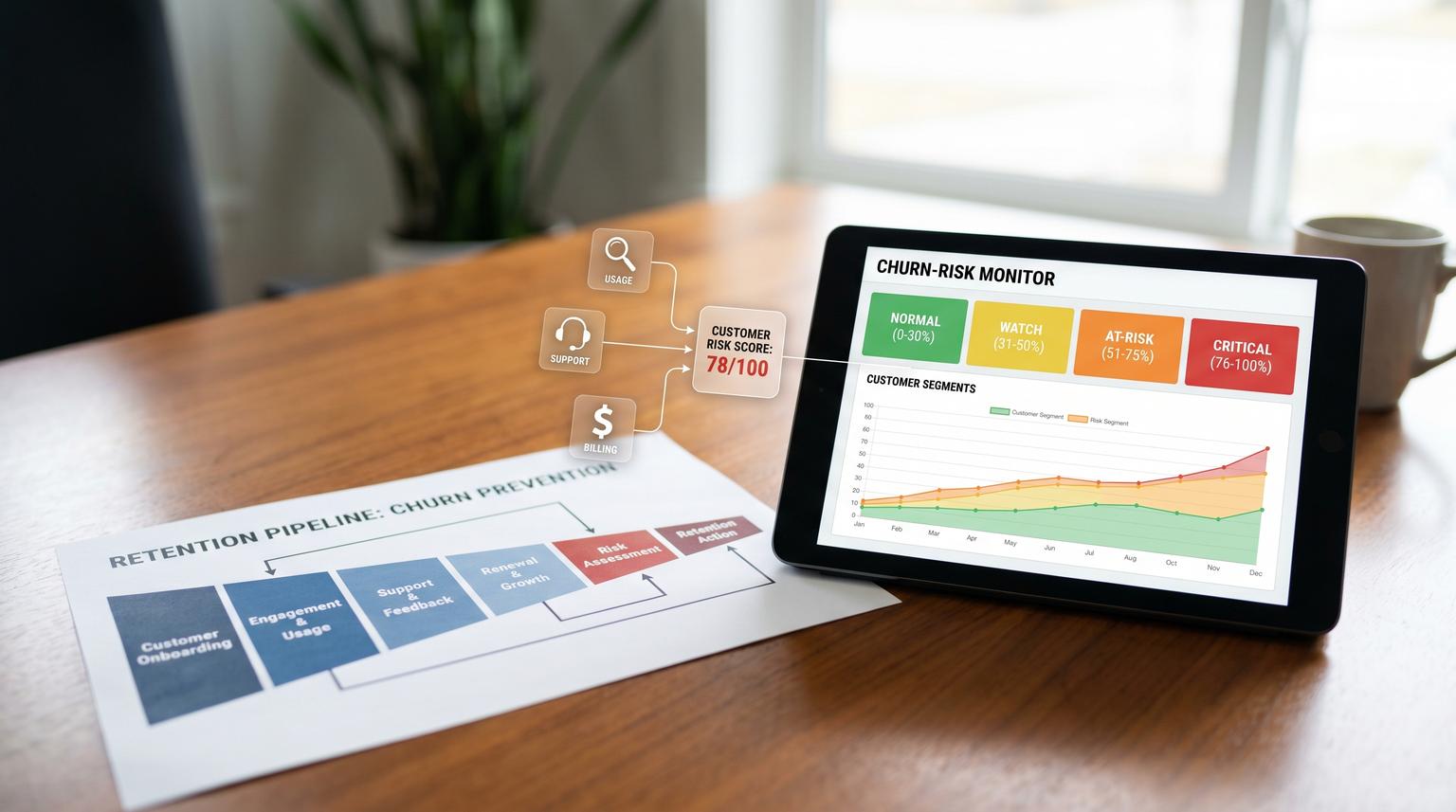
Surprise churn is rarely a surprise to your systems. The signals are usually there: usage quietly drops, support friction rises and billing starts to wobble. The problem is that those signals live in different tools and nobody owns turning them into timely action. This article shows how to operationalize predictive analytics for business growth by building a churn early-warning loop that converts product usage, support and billing events into a continuously updated risk score and then triggers the right retention workflows in your CRM and customer messaging.
It is written for founders, ops leaders and CRM teams who want an implementation-first approach that works even if you are not ready for a full machine learning program on day one.
Quick summary:
- Start with a simple weighted churn-risk score that updates from usage, support and billing events.
- Use tiered thresholds (Watch, At-risk, Critical) to trigger different actions, not one noisy alert.
- Write the score into your CRM as a first-class property so it drives tasks, sequences and reporting.
- Monitor webhook delivery, score drift and outcome labels so accuracy improves as you scale.
Quick start
- Define the churn event and prediction window (example: churn in the next 30 days, renewal in the next 45 days).
- Create a CRM account property for Churn Risk Score (0-100) and Churn Risk Tier (Normal, Watch, At-risk, Critical).
- Ingest three signal streams: usage rollups (weekly), support events (real time) and billing lifecycle events (real time).
- Implement the scoring table below, then write the score and top drivers back to the CRM on every update.
- Wire tier thresholds to automated actions: CSM tasks, internal alerts, in-app nudges and email sequences.
- Add monitoring: webhook failures, sudden score spikes, action completion and churn outcomes for recalibration.
A churn early-warning system is predictive when it uses current and historical signals to output a risk score and prescriptive when that score automatically triggers the next best retention action. The fastest path is to start with a rules-based score that updates from usage, support and billing events, then tune thresholds based on outcomes. You reduce surprise churn by making risk visible in the CRM and by ensuring every high-risk state creates a timed, owned workflow.
Define the outcome and the operating boundaries
Before you score anything, define three things that will prevent months of rework:
- What counts as churn: cancellation, non-renewal, downgrade below a minimum plan, or unpaid after grace period.
- Prediction horizon: the window your team can realistically act on (common: 14, 30, or 60 days).
- System of record for each signal: where a value is authored and updated. Usage usually comes from product analytics or your app database. Support signals come from the helpdesk. Billing signals come from your payment platform.
A real-world operations insight that saves teams: do not start by building the perfect data warehouse model. Start by making the score a first-class CRM field that downstream automation can reliably read. You can enrich later, but if the score is not inside the system where tasks, sequences and reporting happen, it will not change behavior.
Signal design that is actionable not just predictive
High-leverage churn signals share two traits: they update frequently and they map to a specific intervention. Here is a practical set that works well in B2B SaaS, service retainers and subscription businesses.
Usage signals (leading indicators)
- Activation and key feature usage: last key event date, key events per active user, or weekly active users.
- Usage trend: percent drop week-over-week or month-over-month.
- Time to value regression: onboarding steps incomplete or no usage in the first N days.
Support signals (friction indicators)
- Negative CSAT or low satisfaction rating.
- Ticket volume spike or repeated reopenings.
- Stale escalations: open tickets older than your SLA.
Billing signals (late but decisive indicators)
- Trial ending soon or renewal upcoming (pre-renewal window).
- Payment failed, past due or dunning started.
- Invoice paid as a risk reset event.
Billing lifecycle events are ideal automation triggers because they arrive as discrete webhooks. Stripe documents common subscription webhooks like invoice.upcoming and trial end warnings that you can convert into proactive retention actions via subscription webhook events.
Support dissatisfaction can also be streamed into alerts and structured updates. Zendesk shows a simple negative rating trigger that sends notifications to Slack via a webhook, which is the same event-to-action pattern you will use to update churn risk fields and assign owners in your CRM. See negative CSAT notifications for the underlying mechanics.
A concrete churn-risk scoring model you can deploy this week
The goal is not statistical perfection. The goal is consistent, explainable scoring that drives the right action before renewal is at risk. Start with a 0-100 score and store the top 2-3 drivers as text for context in alerts.

| Signal group | Signal | Threshold | Points | Notes |
|---|---|---|---|---|
| Usage | Days since last key action | 8-14 days | +10 | Pick one key action that correlates with renewal value. |
| Usage | Days since last key action | 15-30 days | +20 | Escalates quickly because it is a leading signal. |
| Usage | Weekly active users trend | Drop 25%+ vs prior 2-week avg | +15 | Use a rolling baseline to avoid one-off dips. |
| Usage | Seat utilization | Below 40% of purchased seats for 14+ days | +10 | Strong expansion protection signal for multi-seat accounts. |
| Support | Negative CSAT | Any negative rating in last 14 days | +20 | High urgency because emotion and churn risk align. |
| Support | Open critical ticket age | Over SLA by 3+ business days | +15 | Only for priority tags to avoid noise. |
| Support | Ticket volume spike | 2x normal weekly volume | +10 | Normal = avg last 4 weeks per account tier. |
| Billing | Trial ending | 7 days to trial end and no payment method on file | +25 | Strong preventable churn, automate outreach immediately. |
| Billing | Payment failed | Any failure event in last 7 days | +30 | Route to dunning plus CSM visibility. |
| Billing | Past due | Status is past_due | +40 | Critical tier by itself for many businesses. |
| Reset | Invoice paid | Payment successful in last 24 hours | -30 | Do not drop to zero if usage and support risks remain. |
Tier thresholds (starting point):
- Normal: 0-24
- Watch: 25-49
- At-risk: 50-69
- Critical: 70-100
A decision rule that keeps this useful: tune thresholds based on your team capacity. If you only have bandwidth to actively manage 20 accounts per week, set Critical so that it selects roughly that volume, then adjust points over time. A smaller set of high-confidence interventions beats alerting every account and training the team to ignore the system.
Automated actions per risk tier across CRM and customer messaging
This is where churn scoring becomes growth infrastructure. The same score that protects renewals also protects expansion because it keeps healthy accounts eligible for upsell sequences and keeps at-risk accounts from receiving tone-deaf marketing.
Data written to the CRM (every score update)
- Churn Risk Score (0-100)
- Churn Risk Tier (Normal, Watch, At-risk, Critical)
- Top drivers (example: "No key usage 18d, payment failed, negative CSAT")
- Last risk update timestamp
- Churn reason (dropdown) when confirmed by humans
HubSpot-oriented workflows often use a health score property and a threshold like 55/100 to trigger actions and segmentation. The idea translates to any CRM: make the score queryable everywhere and drive lists and workflows from it. If you want a parallel example of writeback-driven scoring and routing, see our guide on predictive analytics for business automation in HubSpot. The Project36 workflow pack illustrates this pattern with tiering and timed escalation after outreach. See import-ready retention workflow concepts.

Tier actions (what happens automatically)
- Normal (0-24): no interruption. Keep in standard lifecycle. If usage is strong, allow expansion plays.
- Watch (25-49): create a low-priority CSM task with context. Trigger an in-app tip or checklist for the feature that is declining. Send a light-touch email that points to a relevant resource or a 15 minute check-in option.
- At-risk (50-69): notify the account owner in Slack or email with top drivers. Enroll the primary contact in a short re-engagement sequence. Create a due-date task for a personal outreach within 1 business day. If the account is in a renewal window, create a renewal risk flag for leadership visibility.
- Critical (70-100): open an urgent CRM ticket or task for same-day contact. Trigger a targeted in-app banner with one clear recovery CTA (book a call, update payment method, complete setup). If billing-driven (payment failed or past due) trigger dunning plus a human follow-up. Pause non-essential marketing to avoid mixed messaging.
A common failure pattern is to blast emails at Critical accounts without creating an owned internal task with a due date. That looks automated but it is not operational. Your highest-risk tier should always create a human-owned action and a measurable completion event.
Implementation architecture that stays reliable at scale
At ThinkBot Agency we typically implement this loop with an automation layer (often n8n, sometimes Zapier or Make) that can ingest events, dedupe them and update CRM records consistently. The exact tools matter less than the reliability patterns; for a deeper operating playbook on designing and monitoring these AI steps inside automations, use our pillar guide: AI workflow automation playbook.
1) Ingest signals as events then compute score in one place
- Usage: a nightly or hourly job computes per-account rollups (last key action date, WAU trend, utilization) and emits an event.
- Support: webhook on negative CSAT and priority ticket status changes.
- Billing: webhooks for payment failed, past due, upcoming renewal and paid.
Do not compute score in three different systems. Centralize scoring so the same inputs always lead to the same score.
2) Make webhook processing idempotent
Billing and support systems will retry webhooks. Build a dedupe key like source_event_id and store it for 30-90 days so you do not create duplicate tasks and messages. Stripe notes that retries can occur over multiple days with backoff if your endpoint fails, so correct 2xx responses and idempotency are non-negotiable in production. For common failure modes and guardrails at the CRM/API boundary, see a failure map for AI automation in business workflows.
3) Store both the score and the evidence
Scores without context create distrust. Store top drivers and the last 5 driver events. When a CSM opens the account they should immediately see why the system changed the tier.
Rollout, ownership and monitoring so the system improves instead of rotting
This is the part most teams skip and it is why early-warning projects fail after an exciting first month. You need clear owners, data quality rules and a lightweight calibration routine.
Ownership model (simple and effective)
- Ops owner: owns the score definition, thresholds and automation health.
- CS leader: owns the playbook actions, SLAs and feedback capture (churn reason and save outcomes).
- Engineering or data owner: owns event integrity for usage rollups and billing webhook endpoint uptime.
Monitoring checklist (copy into your ops doc)
- Event delivery: daily check of failed webhooks and delayed jobs, alert if failures exceed a small threshold.
- Score distribution: weekly histogram of tiers by segment. Watch for sudden spikes that indicate a broken signal.
- Action completion: percent of At-risk and Critical tasks completed within SLA.
- Outcome labeling: require churn reason and save status when an account churns or is recovered.
- False positive review: 10 accounts per month that were Critical but renewed. Identify which signals were misleading.
- False negative review: churned accounts that never crossed At-risk. Add or reweight signals.
A tradeoff you will face early: tighter thresholds catch more churn but create more workload and more false positives. Looser thresholds reduce noise but miss preventable churn. Choose based on team capacity first, then gradually tighten as you automate more of the response and as confidence improves.
When this approach is not the best fit: if you have very low account volume (example: fewer than 30 customers) or if churn is driven mostly by external constraints like budget freezes and contract changes that do not show up in usage or support, a heavy scoring system can be overkill. In that case, focus on a renewal calendar plus high-touch QBR cadence and use a smaller set of billing and support triggers only.
How to improve accuracy over time without jumping straight to ML
You can get strong results with rules, then graduate to a probabilistic model when you have enough labeled outcomes. A practical path:
- Phase 1: rules-based score and tiered actions. Measure task completion and renewal outcomes.
- Phase 2: add features like rolling usage deltas, cohort baselines and segment-specific thresholds.
- Phase 3: train a churn classifier that outputs a probability, then set action thresholds based on precision and recall tradeoffs.
If you go to ML later, keep the operational contract the same: a score, a tier and a list of drivers. Microsoft Fabric provides an end-to-end churn modeling flow including training, evaluation and experiment tracking that maps well to this graduation path, especially the idea of using confusion matrices to pick thresholds that match operational capacity.
Build it with ThinkBot Agency
If you want this churn early-warning system implemented end-to-end, from event capture through CRM workflows and messaging, ThinkBot Agency can design and deploy it using n8n and your existing stack with reliability monitoring and a calibration loop.
Book a consultation and we will map your signals, define thresholds and ship a first version that your CS team can use within weeks.
If you want to see examples of automation-heavy builds similar to this, review our work here: https://thinkbot.agency/portfolio.
FAQ
Common implementation questions we hear when teams turn churn signals into automated retention workflows.
What data do I need to start a churn early-warning score?
You can start with three streams: a weekly usage rollup (last key action date and usage trend), real-time support events (negative CSAT and SLA breaches) and real-time billing events (payment failed, past due, renewal upcoming). You do not need a data warehouse on day one as long as you can write the score into your CRM consistently.
How often should the churn-risk score update?
Update in real time for billing and support events and on a scheduled cadence for usage (nightly is common). The key is that the CRM field should be refreshed whenever a meaningful signal changes so tasks and sequences do not lag behind what is happening.
How do I prevent alert fatigue for CSMs?
Use tiered thresholds and only page humans for At-risk and Critical tiers. Always include the top drivers in the alert and create a task with a due date. Also add a cooldown so the same account does not trigger repeated notifications unless the tier worsens or new high-severity signals arrive.
What should happen when a payment succeeds after a past-due period?
Treat a successful payment as a partial risk reset. Reduce billing-related points and update access state, but keep usage and support risk in the score. Then create a short follow-up task for the owner to confirm the account is stable and to capture a churn-risk reason if payment friction was preventable.
