
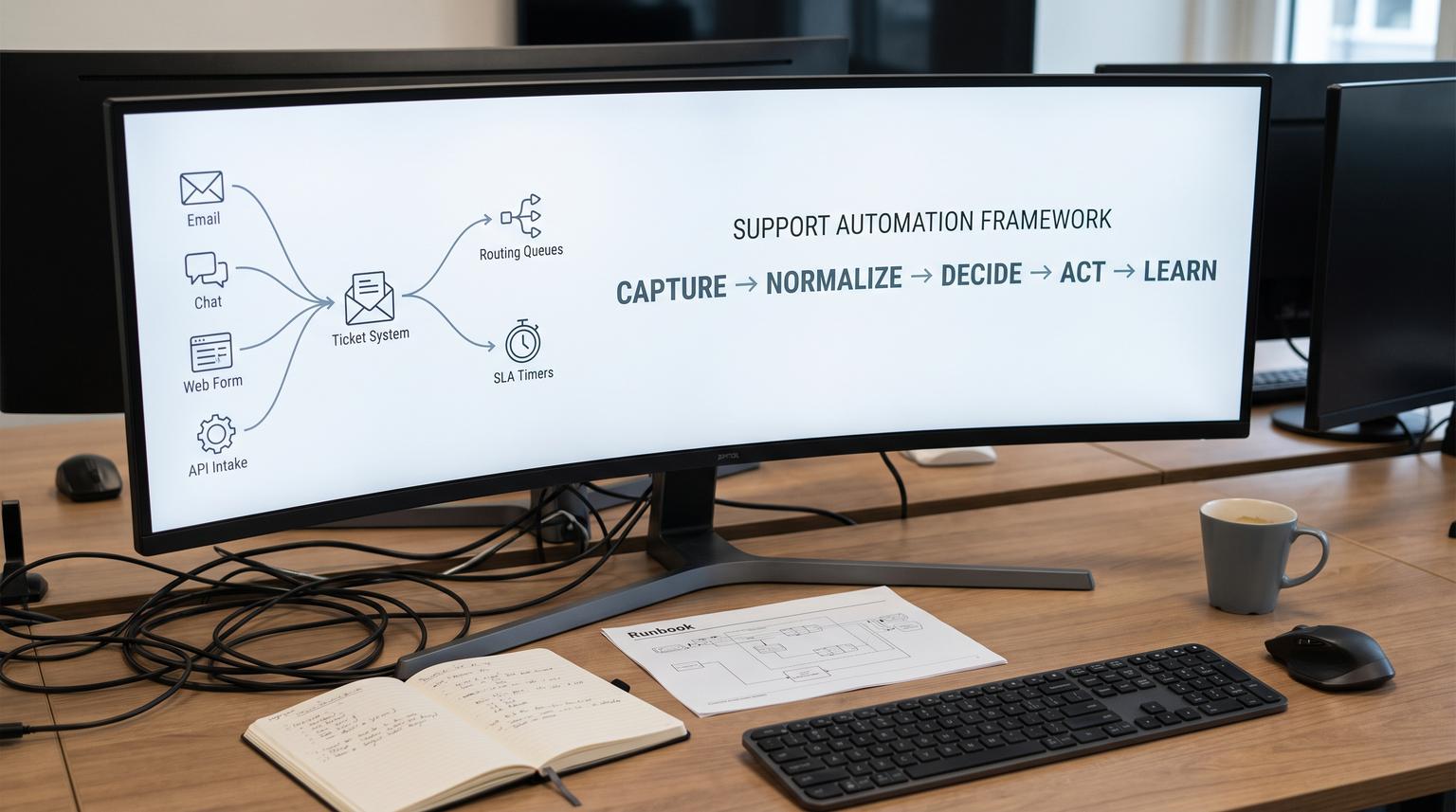
Customer support gets messy fast: tickets arrive in different formats, urgency is unclear, routing is inconsistent, and SLAs get missed because nobody sees risk early enough. This playbook gives you a support automation framework you can apply across email, chat, web forms and API-driven intake so you can scale throughput while keeping accountability, quality and a clear human owner.
It is written for ops leaders, support managers and automation-minded teams who want an end-to-end approach: normalize intake, automate triage and routing, enforce SLAs and escalations, power self-serve and agent assist with knowledge workflows, add QA feedback loops, and design safe human handoffs for edge cases.
At a glance:
- Standardize intake first so every channel produces clean, decision-ready ticket data.
- Automate triage with confidence gating so only high-certainty decisions run unattended.
- Route by intent, urgency, customer context and capacity, with explicit fallbacks to avoid stuck queues.
- Turn SLAs into timers that trigger prevention, escalation and audit events.
- Build knowledge workflows into case resolution so self-service and agent assist stay current.
- Continuously improve with QA rubrics, sampling, simulations and change control.
Quick start
- Inventory all support entry points (email addresses, chat widgets, forms, phone transcripts, API sources) and pick one system of record for tickets.
- Define a minimal ticket schema for first-touch intake: requester identity, issue statement, product, urgency signal, and channel metadata.
- Implement normalization per channel (email header retention, chat transcript summarization, form validation) before adding AI classification.
- Add automated triage that writes structured fields (intent/topic, language, sentiment, entities) and gates actions by confidence.
- Deploy routing rules that combine skills, capacity and timeouts, plus an overflow queue and on-call path.
- Configure SLA timers with "before breach" and "on breach" workflows, then add escalation gates for high-impact transitions.
- Introduce knowledge capture as part of resolution and add a weekly content health review loop.
- Launch QA with a simple rubric, monitor misroutes and unsafe responses, then iterate with simulation before each major automation change.
A customer support automation playbook works when you treat support like an operational system: normalize request data, classify and route based on explicit rules and confidence, attach SLA timers that trigger early warnings and escalations, and design human-in-the-loop handoffs for sensitive or uncertain cases. Then keep it reliable by logging decisions, monitoring queue health, maintaining knowledge workflows and running QA feedback loops that continuously improve accuracy without shipping regressions.
Table of contents
- The end-to-end framework: capture -> normalize -> decide -> act -> learn
- Capture and normalize requests across channels
- Ticket data model: the minimum fields that actually drive decisions
- Automated triage: intent, urgency and enrichment with confidence gates
- Routing and workload management: skills, capacity, timeouts and rebalancing
- SLA and escalation automation patterns
- Human handoff design for edge cases and high-risk conversations
- Knowledge workflows that power self-serve and agent assist
- QA and continuous improvement loops for humans and AI
- Production readiness: reliability, security, monitoring, and rollback
- Workflow templates and integration patterns
- How ThinkBot Agency implements this in the real world
- FAQ
The end-to-end framework: capture -> normalize -> decide -> act -> learn
Most teams start support automation by adding a chatbot or an AI classifier. That often makes things worse because the underlying inputs are inconsistent and ownership is unclear. A better approach is to design a closed-loop system with five stages:
- Capture: reliably ingest every request and preserve raw evidence (headers, transcripts, attachments).
- Normalize: produce consistent ticket fields that downstream logic can trust.
- Decide: classify intent, urgency and risk, then choose a route, SLA target and next action based on rules and confidence.
- Act: create tickets, assign owners, send customer updates, trigger internal tasks, and log every decision.
- Learn: run QA, fix knowledge gaps, improve prompts and routing rules, and manage changes safely.
If you are using n8n, Zapier, Make, Zendesk, Intercom, Freshdesk, HubSpot or a custom helpdesk, the framework stays the same. Tooling changes, the control plane does not. For a concrete n8n example that combines AI triage, CRM sync and follow-ups, see our guide on AI triage.
Support automation maturity check (8 questions)
Use this checklist to avoid automating chaos. It is adapted from a support strategy maturity model where automation is most effective after roles, SLAs and feedback loops are defined (source).

- Do we have a named owner for support operations (not just a shared inbox)?
- Are ticket states and definitions of done documented (triaged, assigned, waiting, resolved, closed)?
- Do we have SLAs that are documented and understood by stakeholders?
- Do we have a clear escalation path with manager acknowledgment timing?
- Do we log the reason for routing, priority and escalation decisions?
- Do we review misroutes, SLA breaches and reopened tickets weekly?
- Do we have a knowledge workflow tied to real tickets (not a separate documentation silo)?
- Can we roll back automation changes (routing rules, prompts, macros) quickly?
Capture and normalize requests across channels
Support automation depends on reliable intake. Your job is to turn "stuff that arrives" into "events with structure". Start by mapping channels to a single ingestion layer that preserves raw data, then transform into normalized ticket JSON.
Email intake: preserve threading and headers
Email is the most common source of duplicates and fragmented conversations. If you drop headers while parsing, you break threading and create multiple tickets for the same issue. Zendesk threads based on email headers (References and In-Reply-To), plus encoded IDs in the body and in plus-addressing formats (source). Even if you are not on Zendesk, the lesson holds: store Message-ID, In-Reply-To and References, and keep them through your pipeline.
A practical architecture is a layered email ingestion flow: segmented inbound addresses, MIME parsing into structured JSON, webhooks with retries and a polling fallback, and signature verification for inbound events (source). This is especially important when you connect multiple systems into one helpdesk.
Chat and messaging intake: summarize without losing evidence
Chat transcripts are noisy. Normalize by extracting the customer problem statement, key identifiers and attempted steps, then store the full transcript as evidence. If you run AI classification later, ensure the first public comment (or equivalent) contains the actual issue, not boilerplate, because some classifiers only use the subject and first comment for their analysis (source). If you are implementing chat-to-ticket workflows, we showed a dedupe and normalization pattern in chat cleanup.
Web forms and API intake: validate early, enrich later
Forms are where you can reduce back-and-forth the most, but only if fields match what is actually knowable at intake. The principle is responder-first: every required field must be available at that stage, have a clear owner and change a decision (routing, severity, comms or escalation) (source). Require less at intake, then add required fields later in the workflow when ownership shifts to triage or resolver teams.
Ticket data model: the minimum fields that actually drive decisions
Normalization is not "more fields". It is "better decisions". A clean ticket schema should make these decisions deterministic:
- Is this a new case or an update to an existing one?
- What is the likely intent/topic and product area?
- How urgent is it and what is the business impact?
- Who owns it next and what SLA applies?
- Does it require a human handoff or approval?
Stage-based required fields policy (template)
Use this policy to prevent bad data at intake and to avoid forcing guesswork. It follows the stage-and-owner rule: a field should be required only when it is available, owned and decision-relevant (source).
Field: intent/topic
- Stage required: triage
- Owner: bot + triage agent
- Decision impacted: routing, SLA
- Source of truth: classifier output + agent confirmation
Field: account_id
- Stage required: intake
- Owner: bot
- Decision impacted: entitlement, priority, routing
- Source of truth: CRM lookup by email/domain
Field: severity
- Stage required: triage
- Owner: triage agent
- Decision impacted: escalation, comms cadence
- Source of truth: agent assessment + customer impact rubric
Field: root_cause_category
- Stage required: closure
- Owner: resolver
- Decision impacted: reporting, prevention work
- Source of truth: investigation outcome
When you implement AI-driven triage, enforce that the automation writes to structured fields, but require humans to confirm high-impact fields when confidence is below your threshold. For an approval-and-audit approach, see human approval.
Automated triage: intent, urgency and enrichment with confidence gates
Triage automation should classify and enrich, not immediately take irreversible actions. A strong pattern is to generate structured fields then route and escalate based on rules. In Zendesk intelligent triage, typical outputs include topic/intent, sentiment, language and extracted entities, with confidence signals that you can use for gating (source).
Confidence gating rules you can copy
Do not treat classification as "true". Treat it as a recommendation with a score. A simple controller looks like this:

- High confidence: auto-apply tags/fields and route to the owning queue.
- Medium confidence: route to a triage-review queue with an AI note and suggested intent.
- Low confidence: route to a general queue, do not run irreversible automations.
This matches a practical governance approach described for intelligent triage: field naming and availability can vary by account configuration, so build your rules against the actual field names in your instance and validate in staging before production changes (source). If you want a safer routing architecture with deterministic fallbacks, compare native vs custom LLM approaches in this comparison.
Enrichment patterns that improve routing accuracy
- Identity and entitlement: lookup CRM contact and account tier, contract status, region and language preference.
- Duplicate detection: thread email updates correctly, hash normalized subject + account + product, and detect repeated chat escalations.
- Urgency signals: sentiment, keywords, customer tier, payment failure signals, production outage flags, or "operations halted" markers.
- Entity extraction: product name, plan, feature, invoice number, order ID, environment name.
In practice, AI triage should write fields, but the escalation state machine should be deterministic. We outlined an SLA-safe approach in SLA-safe triage.
Routing and workload management: skills, capacity, timeouts and rebalancing
Routing is where customer experience meets internal throughput. Good routing reduces reassignment, improves first response and prevents expert burnout. The right model usually combines:
- Skills: match by product, language, billing vs technical and regulatory topics.
- Capacity: do not overload top performers and do not starve newer agents of practice.
- Time: timeouts that relax constraints when specialists are unavailable.
- Business rules: VIP queues, renewal-risk accounts, security incidents, refunds, chargebacks.
Skills-based routing needs an explicit timeout plan
Skills-based routing works when skills are treated as a control plane. In Zendesk, skills can route across channels and must include timeout settings so tickets do not wait forever for an exact match (source). In Microsoft unified routing, an exact match can intentionally leave work unassigned if no agent meets the requirements, so you must configure overflow behavior (source).
Exact match vs closest match (routing decision table)
| Decision | Exact match | Closest match |
|---|---|---|
| Primary goal | Correctness and specialization | Speed and throughput |
| Risk if misconfigured | Tickets stuck unassigned | Mismatched agent and reassignments |
| Best for | Sensitive topics, regulated workflows, deep technical queues | High-volume general inquiries, peak periods |
| Needed guardrail | Overflow queue and timeouts | Coaching loop and QA on misroutes |
This tradeoff is described in routing algorithm documentation and is a practical way to decide where to be strict vs flexible (source).
SLA and escalation automation patterns
SLAs should not be a report you read after failure. They should be timers that create prevention and escalation actions before customers feel neglect. Modern platforms let you trigger workflows before a breach and at the moment of breach, tied to targets like first response time, next response time and resolution time (source).
Build two workflows per SLA target
- T-minus (before breach): warn, rebalance, ask for help, or send a proactive customer update.
- On breach: create an escalation task, alert a manager, and log an audit event.
One operational nuance is that lead time must be shorter than the SLA duration, and SLA checks may run about once per minute, so design your automation to be near-real-time not exact-to-the-second (source).
Escalation gates to prevent abuse
If customers can escalate at any time, you will get escalations that are really just anxiety. A strong pattern is to use an eligibility flag that becomes true only after a defined timeframe or condition. Jira Service Management illustrates this: use an SLA event to set "Allow Escalation = Yes" then block the escalation transition unless the flag is set (source).
We use the same gating concept for high-impact actions like refunds and cancellations. If you want a concrete refunds example with verification, approvals and audit logs, see refund safeguards.
Human handoff design for edge cases and high-risk conversations
Automation is not an alternative to ownership. It is a way to move routine decisions earlier so humans can focus on judgment-heavy work. Human handoff should be designed as a first-class journey with clear triggers, context transfer and acceptance confirmation, not as a failure mode (source).
Handoff triggers you should implement on day one
- Customer asks for a person.
- Low or ambiguous confidence for intent, priority or policy.
- Sensitive or high-impact topics (security, legal, finance, safety, account access).
- Policy exceptions or commitments required (refund approval, SLA credits, contractual terms).
- Action failed (API error, payment action uncertain, identity verification incomplete).
- Customer distress signals or abusive language that requires special handling.
When escalation is appropriate, treat it as criteria-based and time-bound. A real-world escalation process highlights common triggers like first-response SLA breach, operations halted and stalled progress, plus a manager acknowledgment window and explicit roles (source).
Guardrails: common failure modes and mitigations
Use these pairs as design constraints. They prevent "automated support" from becoming "unaccountable support".
- Failure: AI routes to the wrong team and the customer waits. Mitigation: confidence gating plus an overflow queue and a timeout re-route.
- Failure: duplicate tickets from email replies and forwards. Mitigation: preserve headers and implement threading rules (Message-ID, In-Reply-To, References).
- Failure: SLA timers fire too late to matter. Mitigation: add T-minus triggers and rebalance rules before breach.
- Failure: chat handoff drops the conversation silently. Mitigation: require acceptance confirmation and send a customer-visible handoff message with timeframe.
- Failure: automation takes an irreversible action (refund, cancel, delete) incorrectly. Mitigation: approvals, idempotency keys, audit logs and eligibility flags.
- Failure: agents ignore AI suggestions because they are inconsistent. Mitigation: publish field definitions, measure misroutes and retrain rules based on QA findings.
For a practical approach to human review, risk tiers and audit trails, see agent assist.
Knowledge workflows that power self-serve and agent assist
Knowledge is where support automation compounds. If your help center is stale, deflection fails, agent assist drafts hallucinate and QA becomes a constant firefight. KCS (Knowledge-Centered Service) is an established methodology that treats knowledge as a by-product of solving, not as a separate documentation project (source).
Operationalize KCS: capture -> reuse -> improve
- Search early, search often during case handling.
- Reuse the best existing article or snippet.
- Improve in the moment when content is unclear or missing context.
- Flag gaps when no article exists, with tags that feed a backlog.
For non-specialists, a strategic overview of embedding knowledge into support workflows can help align stakeholders (source), but the key is to make knowledge capture part of the definition of done.
If you want an automation-first loop that turns solved tickets into governed help center updates, we outlined that approach in knowledge loop.
QA and continuous improvement loops for humans and AI
Automation does not remove QA. It changes what you QA. Instead of only reviewing agent performance, you also review classifier accuracy, routing correctness, policy adherence and handoff quality.
Start with a fair scorecard and coaching loop
A useful QA program defines observable expectations, uses representative sampling and requires reviewers to justify decisions. It also gives agents a voice so the rubric improves over time (source). Those principles apply equally when the "agent" is an AI draft or a bot.
Add simulation before shipping changes
Traditional QA catches issues after customers experience them. A stronger model is to simulate proposed changes on realistic tickets, score outcomes against a rubric, fix gaps, then deploy. This creates a regression suite for prompts, routing rules, macros and KB updates (source).
In practice, simulation lets you answer: "If we change the intent taxonomy, what breaks?" and "If we tighten handoff triggers, do we overload humans?" This is also where you validate that confidence thresholds are set correctly and that edge cases do not slip through.
Production readiness: reliability, security, monitoring, and rollback
Support automation is production software. Treat it that way. The most common failures are not model quality, they are missing retries, missing logs and unclear ownership.
Reliability patterns
- Idempotency: if the same event arrives twice, your workflow should not create two tickets or two refunds.
- Retries with backoff: for API calls to helpdesks, CRMs, Slack and email.
- Dead-letter handling: route failed events to a manual queue with context.
- Thread-safe email processing: preserve headers, store raw MIME, and test across clients.
Security and governance patterns
- Signature verification on inbound webhooks to prevent spoofing (source).
- PII handling: redact sensitive fields before sending text to LLMs, and restrict logs by role.
- Least privilege: separate credentials for read vs write actions, especially for billing and account actions.
- Audit trails: log who/what changed priority, routed the ticket, escalated and approved actions.
Monitoring and rollback
- Dashboards: queue length by intent, SLA at risk, breach counts, reopens, misroutes, handoff rate.
- Alerting: spikes in duplicates, spikes in breach risk, classifier confidence drift.
- Versioning: prompts, routing maps, taxonomy definitions, and field mappings should be stored like code.
- Rollback: a single switch to route to general queues and disable risky automations while keeping intake running.
Workflow templates and integration patterns
Below are common patterns we implement when connecting ticketing, chat, CRM and internal tools into a reliable support system. If you are selecting between native bots and custom LLM plus automation, our decision guide on chatbot integration can help clarify the tradeoffs.
Pattern 1: Unified intake controller
- Inputs: email webhook, chat webhook, form submit, API events.
- Actions: normalize to ticket JSON, dedupe, attach identity and entitlement from CRM.
- Outputs: create or update ticket, store raw evidence, emit an internal event for triage.
Pattern 2: Triage and routing controller
- Inputs: normalized ticket.
- Actions: intent/topic, sentiment, language, entity extraction, plus a rules engine for priority and risk tier.
- Outputs: skills/tags applied, queue assignment, on-call paging for critical categories, and a triage-review queue for uncertain classifications.
Pattern 3: SLA guardrail automation
- Before breach: notify owner, rebalance to available capacity, send a customer update.
- On breach: manager alert, escalation record, audit log entry, and a required follow-up cadence.
Pattern 4: Knowledge capture loop
- When resolved: prompt agent to link or improve an article, or flag a gap.
- Weekly: review top gaps and top reused content, assign owners and update metadata.
- Monthly: retire duplicates and validate deflection outcomes.
How ThinkBot Agency implements this in the real world
ThinkBot Agency builds support automation systems that behave like dependable operations, not brittle chains of triggers. We typically implement:
- Channel-safe intake normalization (email threading, chat transcripts, attachments, identity resolution).
- Confidence-gated AI triage with safe fallbacks and human review lanes.
- Skills and capacity-aware routing with timeouts and overflow.
- SLA timers that trigger prevention and escalation, plus deterministic eligibility flags for high-impact transitions.
- Knowledge workflows that keep self-service accurate and keep agent assist grounded in current policy.
- QA loops, simulation-based change testing and rollback plans.
If you want help designing or implementing this end-to-end, book a working session here: book a consultation.
If you prefer to vet delivery history first, you can also review our Upwork profile.
FAQ
What is a support automation framework?
A support automation framework is an end-to-end operating model for handling customer requests consistently: unified intake, normalized ticket data, automated triage, routing and SLA enforcement, plus designed human handoff and continuous improvement loops.
How do we avoid AI misrouting tickets?
Use confidence gating, a triage-review queue for medium certainty, and a general fallback for low certainty. Add timeouts and overflow routing so nothing gets stuck. Track misroutes as a QA metric and update your intent taxonomy and routing map based on evidence.
Which channels should we automate first: email, chat, or forms?
Start with the channel that creates the most volume and the most SLA risk. Email is often the best first win if duplicates and threading are hurting you. Forms can reduce back-and-forth if you validate only what is knowable at intake. Chat is powerful once you can summarize and log cleanly to your helpdesk and CRM.
How do we design SLAs that actually trigger action?
Attach two workflows to each SLA target: one that triggers before breach to rebalance and notify, and one that triggers on breach to escalate and log an audit event. Keep lead times shorter than the SLA duration and design for near-real-time timers.
How do we keep knowledge articles from going stale once we automate?
Make knowledge capture part of case resolution. Require agents to link, reuse, or improve knowledge as part of done. Review top gaps and top reused articles weekly, assign content health owners and keep metadata consistent so both self-service and agent assist can retrieve the right content.
Can ThinkBot connect our helpdesk, chat, CRM and internal tools into one support system?
Yes. ThinkBot Agency designs and implements custom workflows that connect ticketing tools, chat, CRMs and internal systems via APIs, automation platforms and AI components, with audit trails, monitoring and rollback so your support operation stays reliable as you scale.
