
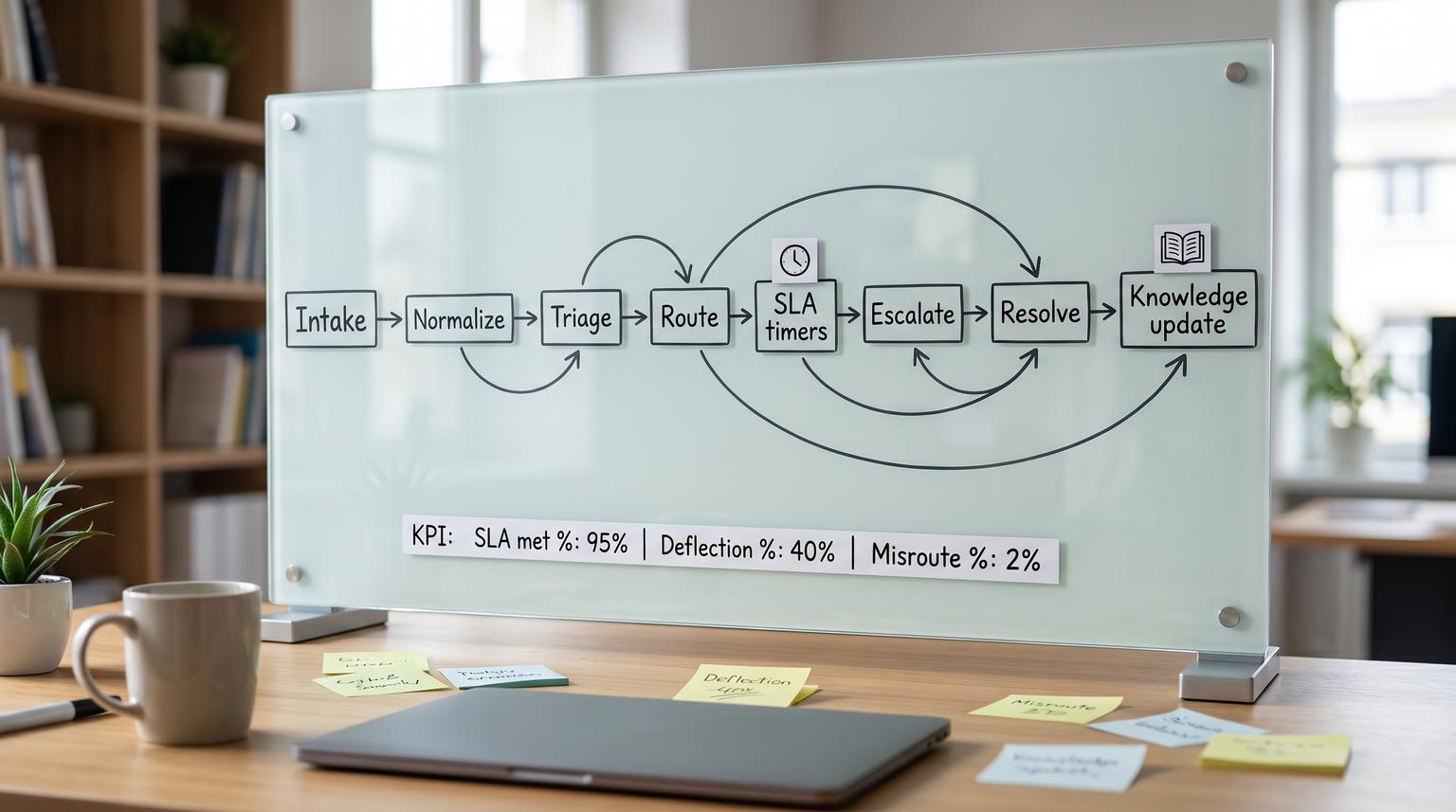
Support teams in 2026 are juggling more channels, more products and higher customer expectations with the same headcount. A support automation playbook is how you make that complexity operable: one coherent system for intake, triage, routing, resolution and learning that increases speed without breaking trust. This pillar is for operators, CX leaders and technical teams who want practical workflow designs that work across chat, email and tickets and that include safe human handoff, SLAs and knowledge workflows.
At a glance:
- Design one end-to-end workflow that spans chat, tickets and knowledge, not separate automations per tool.
- Map customer intents and define routing rules with explicit ownership and clear definition of done.
- Enforce response and resolution SLAs with escalation timeouts and on-call targets.
- Use knowledge workflows (create, review, publish, retire) to reduce repeat contacts across channels.
- Continuously improve with QA calibration, tagging audits and feedback loops.
Quick start
- Run a 60 minute mapping session: current-state swimlanes from intake -> closure, including handoffs and waiting states.
- Define your intent taxonomy: 10-30 intents that map to queues, skills, SLAs and knowledge topics.
- Set triage signals: language, sentiment, suspected intent, spam flags, duplication checks and customer tier.
- Write routing rules in layers: hard constraints (region, tier, compliance) -> skills -> load balancing -> fallback review queue.
- Define SLA timers and escalation: separate response vs resolution, plus timeouts and on-call schedule targets.
- Implement safe human handoff: confidence thresholds, sensitive topic triggers and context carryover to agents.
- Add quality loops: weekly tagging spot checks, monthly QA calibration and a knowledge gap workflow from unresolved intents.
An end-to-end support automation system combines standardized ticket lifecycle stages, AI-assisted triage, deterministic routing rules and a governed knowledge workflow so customers get faster answers without losing human accountability. The key is designing explicit ownership and handoffs: bots and automations can classify, collect context and propose next steps but humans own exceptions, approvals and final resolution. When SLAs, escalation paths and QA feedback loops are built in, the automation stays reliable as volume and products change.
Table of contents
- Start with the lifecycle: define stages, ownership and done
- Map your workflows with swimlanes before you automate
- Intake architecture across chat, email, forms and API
- Triage that scales: intent, sentiment, language and risk signals
- Routing and load balancing rules that do not rot
- SLAs and escalation policies: response, resolution and on-call paths
- Knowledge workflows that reduce repeat contacts
- Safe human handoff patterns for chat and tickets
- Quality assurance loops that continuously improve automation
- Reliability, security and governance for production automation
- Implementation checklist for an end-to-end rollout
- FAQ
Start with the lifecycle: define stages, ownership and done
Automation fails when the underlying support process is ambiguous. Before you add bots, AI classification or routing logic, standardize the ticket lifecycle so every case has a predictable path and clear accountability.
A practical lifecycle you can map into any helpdesk is: creation -> triage/prioritization -> assignment -> in progress/investigation -> pending/on hold -> resolution -> closure. The critical detail is that ownership never disappears, even when a ticket is waiting on the customer. Otherwise tickets drift into limbo and your SLA reporting becomes meaningless. This stage model and the common pitfalls to avoid are outlined in this guide.
Definition of done (DoD) for support tickets
In a modern operation, done is not just sending a reply. Done means the customer was informed, the correct status was applied and the record is complete enough to learn from later. Use this checklist when you design your automation rules and agent macros because missing fields are the root cause of bad routing, unreliable analytics and repeat contacts.
Support ticket DoD checklist
- Resolution or next-best outcome is communicated clearly (what changed, what to do next).
- Correct final status is set (Resolved, Closed or On Hold with reason).
- An accountable owner exists for the final state (person or queue), even if waiting.
- If not fully resolved, next action is documented with a due date or follow-up rule.
- Intent tag and root cause category are applied for reporting and routing improvements.
- Duplicate or related tickets are linked or merged to reduce parallel work.
- Impact and severity are recorded when relevant (especially for incident thresholds).
- Knowledge action is recorded: article linked, created or flagged for update.
- Reopen policy is applied consistently (window, handling and ownership).
- Internal notes are sufficient for continuity if the ticket is reassigned.
If you are building these workflows in n8n or a similar orchestration tool, this is where you decide which checklist items become required fields at transitions vs which become coaching expectations. For deeper implementation patterns on triage and CRM logging, see our n8n triage guide.
Map your workflows with swimlanes before you automate
Support automation is a cross-functional workflow. Tickets touch customer service, billing, engineering, product and sometimes legal or security. Swimlane diagrams force the clarity you need: who owns each step, where work waits and what event triggers the next state.
A reliable approach is to map the current state first, then design the future state. Start by listing roles as lanes (Customer, Chatbot, L1, L2, Billing, Engineering, On-call, QA) and explicitly define start and end triggers so the mapping session stays bounded. This step-by-step facilitation method is covered in this workflow guide.
What to capture in the map (so automation is easy later)
- All intake channels and the normalization step (how messages become one case record).
- Decision points: what data is required to route, escalate or close.
- Waiting states: customer replies, third-party vendors, engineering fixes, refunds.
- Handoffs: L1 -> L2, support -> billing, support -> engineering, bot -> human.
- SLA checkpoints: response timer start, pause rules, escalation timeouts.
If your team is still deciding between native helpdesk bots, custom LLM agents or an orchestration-first approach, our integration comparison can help you pick a path that keeps routing, logging and handoff sane.
Intake architecture across chat, email, forms and API
End-to-end automation starts with one principle: every channel must produce a standardized case record with consistent fields. Chat conversations, emails, forms and API events differ in format but your downstream workflow should not.
Normalize intake into a common schema
At minimum, normalize these fields:
- Customer identity (account id, email, domain) and customer tier.
- Channel (chat, email, web form, API, follow-up on closed ticket).
- Product area, environment and version when applicable.
- Free-text problem statement plus any attachments or logs.
- Consent and privacy markers (PII present, redaction required).
- Initial timestamps for SLA measurement (created_at, first_seen_at).
Design intake to reduce back-and-forth
Use the channel to collect what it is good at. Chat is best for guided questions and validation. Email is best for long-form context. Forms can collect structured fields but customers often choose incorrect categories, which degrades downstream routing and analytics. That warning is a recurring theme in AI triage discussions such as this overview. A practical compromise is to keep forms short, then let automation classify intent from the actual message text and account context.
When you do add chat automation, avoid designing it as an isolated bot. Treat it as an intake assistant that creates or updates cases, enriches context and hands off safely. We go deeper on implementation pitfalls in our chatbot best practices.
Triage that scales: intent, sentiment, language and risk signals
Triage is where automation delivers the most leverage, if you treat it as structured signal generation, not a black box. The output of triage should be fields your routing and SLA logic can use, plus explanations agents can trust.
What triage should produce
- Predicted intent (and a confidence score).
- Language detection for correct queue assignment and macros.
- Sentiment signal as a prioritization input, not a severity replacement.
- Spam and abuse detection flags.
- Duplication hints (possible duplicate of an existing open case).
- Entity extraction: order id, invoice id, workspace id, error codes.
Many helpdesks now support intent, sentiment and language detection as configurable signals that flow into views and routing. For example, Zendesk describes how these predictions can be enabled per channel and then used to build filtered views and workflows, with special considerations like excluding agent-created tickets from sentiment scoring. See the documentation for the configuration concepts and channel coverage details.
Make AI classification operational, not magical
A repeatable triage step is: classify -> verify -> route. Verification can be lightweight: spot checks per intent each week, or requiring human confirmation for high-risk categories. This is aligned with the recommendation to treat AI tagging as a foundation but still include checks to prevent silent misroutes as discussed in this triage overview.
If you want agent-assist rather than customer-facing automation, focus on summarization, suggested replies and structured field extraction with human approval. Our agent assist article covers patterns that speed handling time without forcing full self-serve.
Routing and load balancing rules that do not rot
Routing is where customer experience meets workforce management. The goal is not only to send work to the right place, it is to keep the system fair, maintainable and measurable.
Routing methods you can combine
Most routing systems boil down to three approaches: next-available distribution, skills-based routing and more advanced predictive routing that uses additional signals. Each has tradeoffs and prerequisites, especially the need to maintain accurate skills profiles for skills-based assignment. This taxonomy is described in this overview and applies cleanly to ticket and chat routing.
Keep skills-based routing from exploding in complexity
Skills-based routing tends to rot when skills proliferate and no one maintains them. A practical design is to treat region and time zone as explicit dimensions, consolidate low-usage skills and use QA evidence to decide which agents should receive high-risk flows. These tactics are emphasized in this guide.
Layered routing rules (a pattern that stays debuggable)

- Layer 1: hard constraints (language, region, customer tier, compliance topics).
- Layer 2: intent -> skill group mapping (billing, technical, onboarding, integrations).
- Layer 3: load balancing (round-robin within eligible agents, caps per agent, cooldowns).
- Layer 4: exception handling (low confidence, missing data, conflicting signals -> review queue).
- Layer 5: escalation triggers (VIP, severe impact, negative sentiment + certain intents).
When you implement this with automation tools, prefer deterministic rules you can explain. For custom AI helpdesk builds that include safe fallbacks and escalation to Slack or Teams, see our custom helpdesk blueprint.
SLAs and escalation policies: response, resolution and on-call paths
SLAs only work when they are defined as enforceable timers with clear ownership. Separate response SLAs (time to first meaningful reply) from resolution SLAs (time to outcome). Also decide when the clock pauses, for example when waiting on customer input, and who owns the ticket during that waiting state.
Define escalation like incident management
For high-severity customer impact issues, treat escalation like incident response: explicit roles, time-based triggers and a clear escalation matrix. Atlassian describes escalation policies as rules for when escalation happens and who handles each level, often including an incident lead role to coordinate response. See this overview for the conceptual model.
A portable escalation policy spec
Use this as a template for P1 support tickets, incidents or any case class where you cannot afford stalls. The key elements are timeouts and targets, with targets pointing to schedules rather than named individuals so your policy survives rotation changes. PagerDuty defines the concept of an escalation timeout and schedule targets in this guide.

Policy name: support_p1
Level 1 target: on_call_primary_schedule
Level 1 timeout: 10m (ack)
Level 2 target: on_call_secondary_schedule
Level 2 timeout: 10m (ack)
Level 3 target: support_lead_or_incident_manager
Level 3 timeout: 10m (ack)
Stop condition: acknowledged OR resolved
Audit fields: created_by, last_changed_by, change_reason
In ticketing terms, define what counts as acknowledgement (assigned to on-call queue, human reply posted, incident channel opened) and make it machine-detectable so escalations trigger automatically.
Knowledge workflows that reduce repeat contacts
Automation is fragile if knowledge is stale. If your bot suggests outdated steps or agents use old macros, you will increase repeat contacts. The fix is to manage knowledge like a workflow with states, owners and traceability to cases.
Use KCS principles to connect cases to knowledge
Knowledge-Centered Service (KCS) treats knowledge as a byproduct of solving real issues: agents search, reuse and improve content while working cases. That approach is valuable because it creates a tight learning loop between incoming demand and what your organization documents. Atlassian provides a clear overview of KCS mechanics in this article.
Adopt an article lifecycle with guardrails
A simple lifecycle is: draft -> review -> publish -> pending retirement -> retired. The key operational guardrails are: only published content is eligible for customer-facing recommendations and every article should reference the source ticket or task so you can audit why it exists and when it needs updating. ServiceNow outlines these lifecycle stages and the importance of source task linkage in this process guide.
How to automate knowledge reuse across channels
- During triage, suggest 1-3 relevant published articles to the agent based on intent and extracted entities.
- In chat, recommend only published content and log which article was shown and whether it solved the issue.
- When a ticket closes without an article link for certain intents, create a knowledge gap task for review.
- When an article is marked pending retirement, automatically remove it from bot suggestions and macros.
Safe human handoff patterns for chat and tickets
Human handoff is not a failure state. It is a control. The goal is to transfer at the right moment with the right context so customers do not repeat themselves and agents can act quickly.
Handoff triggers you should formalize
Design handoff rules using measurable triggers: low confidence, repeated customer turns, negative sentiment spikes and compliance-sensitive topics. A safety-oriented framing of these trigger categories is described in this playbook.
Context carryover: what must be transferred
- Conversation transcript or summary.
- Collected entities (order id, workspace id, error codes).
- Predicted intent and confidence.
- What the bot already tried or suggested.
- Customer tier and SLA class.
- Any authentication status and what is still required.
On the agent side, a reliable script is: introduce yourself -> summarize what you understand -> ask the customer to confirm -> proceed. This reduces repetition and builds trust, a best practice called out in this overview.
Edge cases to design explicitly
- Customer asks for a manager: immediate handoff, keep transcript, tag as escalation request.
- Payment disputes and refunds: route to billing-skilled queue, require approval for credits above a threshold.
- Security and account access: force verified flow, no bot actions beyond guidance.
- Outage indicators: multiple similar intents in short window -> trigger incident workflow.
- After-hours coverage: route to on-call only for defined severities, otherwise acknowledge and schedule.
Quality assurance loops that continuously improve automation
Automation quality is not set-and-forget. Classification drifts, product changes introduce new intents and agent behavior changes the data your systems rely on. Build feedback loops that improve both your rules and your people.
QA calibration for consistent scoring and coaching
QA review data is only useful if reviewers score consistently. Calibration sessions align reviewers on what good looks like and prevent biased metrics that frustrate agents. Zendesk describes calibration as aligning rating techniques so feedback is consistent regardless of reviewer in this guide.
A practical cadence that works
- Weekly: tagging accuracy spot checks for top intents and top escalations.
- Biweekly: automation exception review (misroutes, low confidence cases, escalations that stalled).
- Monthly: QA calibration session on 1-2 interactions that represent current edge cases.
- Quarterly: taxonomy review, skill inventory consolidation and SLA policy review.
To make calibration less subjective, define what good and poor look like for each scorecard item and attach examples. This operational approach is recommended in this overview.
Reliability, security and governance for production automation
Once automation touches customer communication, ticket states and escalations, it becomes operational infrastructure. Treat it like you would any production system: controlled changes, monitoring, audit trails and rollback.
Governance principles that keep workflows enforceable
Strong governance is about embedding policies into workflow controls: required fields, approval gates and exception routing. Freshworks frames governance as making policies enforceable through controls rather than documentation alone in this overview.
Risk and guardrails (failure modes and mitigations)
- Failure: intent misclassification routes a technical issue to billing -> Mitigation: confidence threshold and fallback to a human review queue for low confidence or conflicting signals.
- Failure: sentiment signal causes over-prioritization of low-impact complaints -> Mitigation: combine sentiment with impact or tier rules, use sentiment only as a modifier.
- Failure: pending status becomes a parking lot -> Mitigation: require a next action field and due date when entering pending, enforce ownership as described in ticket lifecycle best practices.
- Failure: skill model rots and overworks top performers -> Mitigation: caps per agent, quarterly skill consolidation and evidence-based skill updates from QA outcomes.
- Failure: bot suggests outdated or draft knowledge -> Mitigation: only surface published articles and auto-remove pending retirement content from suggestions.
- Failure: escalation rules page the wrong person after rotation changes -> Mitigation: target schedules, not named individuals, with explicit escalation timeouts.
- Failure: automation edits tickets without traceability -> Mitigation: write audit fields (rule version, actor, reason) and log every state change.
Change control for automation rules
Support automations change frequently because products, pricing and policies change. Treat workflow changes like releases: propose -> document -> approve -> deploy -> monitor -> rollback. A scalable approach that emphasizes enforceable controls, stable KPIs and process-owner approval is described in this guide.
Operationally, this means keeping an ownership registry for: intent taxonomy, routing rules, SLA timers, escalation policies, knowledge lifecycle and bot prompts. It also means having a default safe mode: if automation fails, route to a manual review queue rather than letting work disappear.
Implementation checklist for an end-to-end rollout
Use this checklist when you move from design to build. It is written for teams implementing workflows with orchestration tools (n8n, Make, Zapier) plus a helpdesk and CRM. If you want examples of real builds ThinkBot has delivered, see our portfolio.
- Define the ticket lifecycle states and what triggers each transition.
- Define required fields at each transition (intent, priority, owner, next action, due date).
- Create an intent taxonomy that maps to queues, skills and knowledge topics.
- Implement triage signals (intent, language, sentiment, spam, entities) with confidence thresholds.
- Build layered routing rules with a fallback review queue and clear exception tags.
- Set response and resolution SLAs, including pause rules and breach prevention escalations.
- Implement escalation policies with timeouts and schedule-based targets.
- Design human handoff: context carryover, agent confirmation script and sensitive-topic triggers.
- Stand up knowledge workflow states (draft, review, published, pending retirement, retired) and enforce source-ticket linkage.
- Add monitoring: misroute rate, SLA breach rate, reopen rate, handoff rate and deflection outcomes.
- Version your rules and prompts and define rollback steps for each automation component.
- Set a QA cadence: tagging audits, calibration sessions and monthly exception reviews.
If you want help implementing a full end-to-end system with reliable handoffs, audit trails and CRM logging, ThinkBot Agency builds and maintains these workflows as production automation. You can book a consultation to review your current-state map and leave with a prioritized rollout plan.
Prefer to evaluate us through marketplace delivery history first? See our Upwork profile for recent automation projects and client feedback.
FAQ
What is a support automation playbook?
It is a documented and enforceable method for designing customer support workflows end to end, including intake, triage, routing, SLAs, escalation and knowledge management. Unlike one-off automations, a playbook defines ownership, required fields, handoffs and quality loops so the system keeps working as volume and products change.
How do we prevent automation from routing tickets incorrectly?
Use layered routing with confidence thresholds and a safe fallback queue. For high-risk intents, require human verification before routing or action. Track misroutes as a metric, review exceptions weekly and update taxonomy definitions and examples so classifiers and humans stay aligned.
What is the safest way to hand off from a chatbot to a human agent?
Trigger handoff on low confidence, repeated user turns, negative sentiment or sensitive topics. Transfer context: transcript or summary, extracted entities, what the bot attempted and the predicted intent. Train agents to summarize and confirm the issue before acting so customers do not repeat themselves.
How should SLAs and escalations be structured for support?
Separate response SLA from resolution SLA and define when timers pause. Implement escalation policies with explicit timeouts and schedule-based targets so on-call coverage remains accurate. For severe issues, use incident-style escalation with a clear lead role and multi-level escalation paths.
How do knowledge workflows reduce repeat contacts?
When knowledge is created and improved as part of case resolution, agents reuse proven answers and bots can safely recommend published content. Track which tickets had no good article match, then create a knowledge gap task. Retire outdated content automatically so it stops being suggested in chat and macros.
