
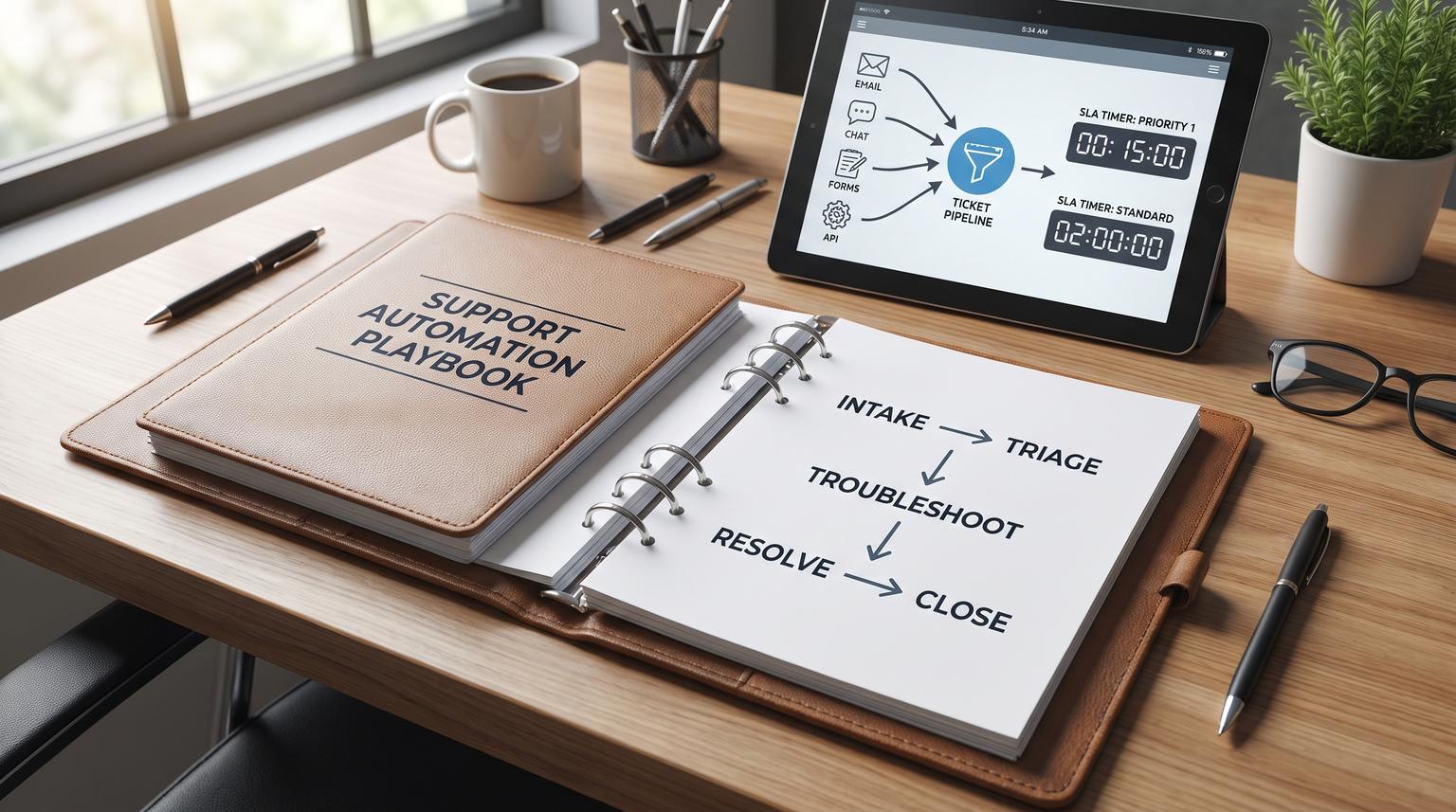
Customer support automation fails when it is treated like a chatbot project instead of an operating system for intake, decisioning, and accountability. This support automation playbook is for ops leaders and tech-savvy teams who want faster first response, cleaner routing, and better knowledge outcomes without losing control. You will get a reusable framework for building an end-to-end system across email, chat, forms, and API, including triage taxonomy, SLA timers, knowledge feedback loops, and safe human handoff.
Quick summary:
- Design support automation as a staged workflow: intake -> triage -> troubleshoot -> resolve -> close.
- Normalize every channel into one ticket schema so routing, SLAs, and reporting work consistently.
- Use multi-axis triage (intent, severity, sentiment risk, entities, language, skills) to drive deterministic actions.
- Make SLAs executable with timer events, breach warnings, and escalation paths that ensure update cadence.
- Connect knowledge to real demand by measuring deflection, assisted resolution, and article gaps from solved tickets.
- Ship like production software: audit trails, QA sampling, monitoring, retries, and rollback.
Quick start
- Inventory channels and define one system of record for conversations and ticket fields.
- Create a minimal normalized ticket schema (customer identity, product/workspace, intent, severity, skills, SLA policy, required entities).
- Implement an intake workflow that dedupes, enriches context from CRM/billing/product, and starts SLA clocks.
- Add automated triage that outputs structured fields plus a confidence score and explanation.
- Build routing rules (skills + ownership + workload) with deterministic overrides for high risk intents and low confidence.
- Encode SLAs as timer events and escalation actions, including proactive update cadence.
- Deploy knowledge loops: suggest articles during intake, auto-suggest macros, and file KB update tasks from solved threads.
- Operationalize governance: audit logs, QA sampling, alerting on workflow failures, versioned prompts/rules, and rollback.
An end-to-end customer support automation system standardizes intake across channels, normalizes messages into tickets, classifies each request into structured fields, and then uses rules plus AI to route, escalate, and keep SLA timers accurate. The system should also feed a knowledge workflow that deflects repetitive questions and updates articles based on solved outcomes. Humans stay in control through confidence gates, approval queues, and clear handoff triggers that preserve context.
Table of contents
- What an end-to-end support automation system includes
- The workflow blueprint: intake -> triage -> troubleshoot -> resolve -> close
- Normalize intake across channels into an actionable ticket
- How to design a triage taxonomy that drives safe automation
- Prioritization and risk detection that do not break trust
- Routing patterns: skills, ownership, workload, and on-call
- SLA design you can actually automate
- Human handoff and supervision patterns for AI-assisted support
- Knowledge workflows: deflection, suggested replies, and article updates
- Reliability, auditability, and QA: shipping support automation like production software
- Implementation playbook: roles, monitoring, and rollback
- Examples: proven workflow patterns you can reuse
- FAQ
What an end-to-end support automation system includes
Support automation is not a single bot. It is a set of coordinated workflows that move a request from first contact to a measurable outcome. A practical architecture separates four layers: (1) a system of record for tickets and conversations, (2) orchestration for routing and updates, (3) a knowledge layer for retrieval and article management, and (4) a human control layer for approvals and escalation. This separation reduces risk and makes it easier to iterate workflow by workflow, not as one monolith, as described in this guide.
In practice, most teams also need an integration layer that can safely enrich tickets with CRM tier, entitlement, billing status, product workspace identifiers, and recent incidents. The goal is not to sync everything, it is to fetch or subscribe to the minimum fields that make routing and resolution faster.
If you are building on n8n or similar tooling, ThinkBot has several deep dives that expand parts of this pillar, for example how to implement auto-triage that also keeps CRM data clean and how to structure agent assist without turning the bot loose on sensitive workflows.
The workflow blueprint: intake -> triage -> troubleshoot -> resolve -> close
A reliable way to design the full lifecycle is to explicitly model stages and require each stage to produce artifacts that the next stage needs. A canonical staging model is Intake -> Triage -> Troubleshoot -> Resolve -> Close, with the reminder that closure includes outcomes, summaries, and follow-up, not just flipping a status field. This lifecycle framing is common in enterprise playbooks, including this reference.
Use stages to reduce ambiguity. When automation fails, it is often because the workflow has hidden assumptions, like expecting an order ID or repro steps to exist, or expecting a specific team to own a ticket. Stages make entry criteria explicit.
Stage outputs to make measurable
- Intake: customer identity, channel, product/workspace, raw message, attachments, and a conversation ID.
- Triage: intent/topic, severity, sentiment risk, required skills, and required entities extracted into fields.
- Troubleshoot: diagnostics collected, runbook steps attempted, logs captured, and open questions.
- Resolve: resolution action, confirmation, internal summary, and tags for reporting.
- Close: closure code, root cause category, CSAT request, and knowledge impact flag.
Intake-to-close checklist for production builds
Use this checklist when you are scoping an automation rollout or evaluating whether a workflow is truly end-to-end.
- Capture channel, identity, account/workspace, product area, and the original customer text at intake.
- Normalize each inbound message into a standard ticket schema, even if it started as chat or email.
- Run triage early and write structured fields (intent, severity, risk, skills, language, key entities).
- Enrich tickets with CRM tier/entitlements and relevant billing or product telemetry.
- Route using auditable rules, including skills matching and workload constraints.
- Start SLA timers on defined events and pause/resume on defined statuses.
- Provide guided troubleshooting tasks and enforce required data collection for common issues.
- Require a resolution summary and closure codes so reporting and knowledge loops work.
- Trigger follow-up actions: CSAT, reopen monitoring, and knowledge updates when applicable.
- Log decision events (triage, routing changes, approvals, escalations) for audit and QA.
Normalize intake across channels into an actionable ticket
Normalization is the hidden multiplier. If email becomes one shape, chat becomes another, and web forms become a third, automation rules will fragment and metrics will lie. Normalization means: every interaction becomes a single work item with consistent fields and a consistent timeline.
Intake pattern: one schema, many adapters
Build channel adapters (email parser, chat webhook, form submission handler, API endpoint) that map raw inbound data into your standard schema. The orchestration layer then runs the same downstream steps regardless of channel: dedupe, enrichment, triage, routing, and SLA timers.
For integrations, favor event-driven updates when you need freshness and do targeted field filtering to avoid over-synchronizing sensitive fields, aligned with these patterns. When your SaaS context is distributed across CRM, billing, and product systems, apply governance so enrichment does not become brittle point-to-point automation, similar to this approach.
Example: normalized ticket payload (minimal)
This is a vendor-agnostic shape you can store in your helpdesk fields and also pass through n8n, Zapier, or Make.
{
"ticket_id": "TCK-12345",
"channel": "chat",
"created_at_utc": "2026-07-22T14:25:03Z",
"customer": {
"contact_id": "C-9911",
"email": "[email protected]",
"account_id": "A-2201",
"tier": "pro"
},
"context": {
"product_area": "integrations",
"workspace_id": "ws_abc123",
"plan": "Pro",
"entitlement": "standard_support"
},
"message": {
"subject": "Webhook failing",
"body": "We are getting error 401 when sending events...",
"attachments": []
},
"triage": {
"intent_topic": "bug",
"severity": "sev2",
"sentiment_risk": "frustrated",
"language": "en",
"entities": {"error_code": "401"},
"required_skills": ["integrations"],
"confidence": 0.82,
"explanation": "Mentions 401 errors and webhooks in integrations context"
},
"sla_policy": "pro_standard",
"routing": {
"queue": "L2-integrations",
"owner": null,
"escalation_level": 0
}
}
If you want a concrete n8n implementation, our guide on dedupe and clean ticketing shows how to normalize chats into consistent helpdesk objects and prevent duplicate tickets that distort SLA clocks and agent workload.

How to design a triage taxonomy that drives safe automation
Triage is the conversion of unstructured language into structured fields that automation can safely act on. AI-driven triage is specifically about analyzing inbound tickets to classify them quickly so teams do not spend their best time sorting. Useful dimensions include topic, entities, sentiment, and language, as outlined in this overview.
Start minimal, but multi-axis
Many teams start with one label like "billing" vs "tech". That is not enough for routing, SLA policy, and risk. A practical starter set:
- Intent/topic: billing, login, bug, outage, cancellation, how-to, feature request, account.
- Severity: sev1-sev4 with explicit impact definitions.
- Sentiment and risk: calm, frustrated, angry, compliance risk.
- Entities: order_id, invoice_id, workspace_id, error_code, plan_name.
- Language: for correct routing and templates.
- Required skills: billing ops, integrations, onboarding, technical support.
- Confidence: a numeric score used for gating and handoff.
Write taxonomy definitions like SOPs
Define severity levels in operational terms, not vibes. For example, sev1 might mean "service down for multiple customers" or "account access blocked for all admins". Keep definitions trainable so both humans and models can apply them consistently. This prevents automation from amplifying inconsistency.
If you are comparing approaches, ThinkBot also breaks down tradeoffs between native helpdesk AI and custom LLM routing in this comparison, including how to keep triage fields auditable and safe for routing.
Prioritization and risk detection that do not break trust
Priority is where customer trust is won or lost. A solid rule: urgency and impact should drive priority, not account size. Customer tier is best used as a tie-breaker when urgency is equal or as a boundary for service commitment, consistent with this guidance.
Build a simple, explainable priority model
- Severity first: sev1 and sev2 should preempt normal work regardless of tier.
- Tier second: tier can affect SLA targets and escalation paths, not reality.
- Risk overlays: compliance risk, account takeover language, chargeback threats, and refund demands should trigger deterministic gates.
Risk signals to detect early
In addition to severity, detect risk using entity extraction and sentiment. Examples: "chargeback" or "lawsuit" -> compliance risk; "hacked" or "2FA disabled" -> account security; "refund" with high sentiment risk -> escalation. Use deterministic "must escalate" rules for these categories so you are not depending on a model score alone.
For a deeper pattern library on confidence thresholds, routing-safe prompts, and fallbacks, see our guide on SLA-safe triage.
Routing patterns: skills, ownership, workload, and on-call
Routing is a stack, not a rule. Skills-based assignment should be an explicit input, and it can work across channels. Skills can be used alone or combined with other omnichannel constraints, per this overview.
A routing stack that holds up under load
- Deterministic overrides: security, billing changes, refunds, legal threats, and outages route to predefined queues or human approval.
- Skills match: based on triage required_skills with a fallback if no match exists.
- Ownership rules: if the ticket is a reopen, a named account, or a prior owner exists, prefer continuity.
- Workload balancing: cap WIP per agent and move overflow to a buffer queue.
- On-call schedules: after hours, route by on-call rotation for sev1/sev2.
- Backlog protection: when queue age exceeds thresholds, shift more issues to deflection, macros, or triage tightening.
Escalation matrices should be data-producing
When a ticket escalates, treat it as a measurable event. Log time to first response, time from escalation to resolution, whether the escalation followed the matrix, and a root cause category, aligned with this template. Those data points become your improvement backlog for routing rules, runbooks, and product fixes.
SLA design you can actually automate
SLAs are only enforceable when they are reducible to timers and state transitions. In B2B SaaS, practical SLA components include first response time (FRT), resolution time, and proactive update cadence, as described in this breakdown. Most teams should commit to FRT first because it is immediately visible to customers, then layer resolution and update cadence.
Encode SLAs as timer events
Do not bury SLA logic in tribal knowledge. Encode it as events in your orchestration layer so automation can warn, escalate, and keep customers informed.
- Start timers: on ticket creation or after triage completion, choose one and standardize.
- Pause timers: when waiting on customer or a third party.
- Resume timers: when the customer replies or dependency is cleared.
- Warn early: breach warnings at 50%, 75%, and 90% of budget.
- Escalate: change owner/queue and increase communication cadence before breach.
Update cadence is often overlooked. It is not enough to be "working on it" internally. Automation can enforce an update schedule by creating tasks or sending reminders that a proactive message is due.

Human handoff and supervision patterns for AI-assisted support
Human handoff should be a first-class node in your workflow graph, not a failure state. When automation cannot progress because of capability limits, policy boundaries, or risk, it should transfer the conversation with context and an explicit "what was tried" record. This aligns with the "handoff orchestration" pattern where specialized agents transfer work based on requirements and preserve state, described in this overview.
Two supervision controls you can combine
There are two independent controls that work well for staged rollouts: (1) human approval of every AI reply, and (2) a confidence threshold that triggers handoff when the model is unsure. These patterns are described in this guide, and they are composable. Many teams start with approval-required for learning, then move to confidence-gated autonomy for low-risk intents.
Guardrails that keep humans in control
- Approval queues: draft -> review -> approve -> send, with edits logged.
- Confidence gates: auto-send only above threshold and for allowed intents.
- Must-escalate categories: refunds, account security, legal, data deletion, and anything financial.
- Context bundles: attach summary, extracted entities, SLA status, and links to relevant account context so the agent starts midstream.
ThinkBot covers this in more implementation detail in our human-in-the-loop guide, including brand guardrails, redaction considerations, and audit trails that make approvals practical at scale.
Knowledge workflows: deflection, suggested replies, and article updates
Knowledge is the demand-reduction engine. Your automation should not just answer questions, it should learn what customers actually ask and ensure the help center stays trustworthy. A strong pattern is to suggest articles during request creation and measure "requests deflected" and "resolved with an article" based on ticket outcomes, as described in this overview.
Deflection funnel instrumentation
Instrument the journey: search terms -> suggested article -> helpful vote or validation -> still need help -> ticket creation with context prefilled. Under backlog pressure, focus on the top 10 high-leverage topics and define deflection targets, as recommended in this playbook.
Keep knowledge versioned and governed
Treat KB content as a versioned system. This matters when AI uses it for retrieval and suggested replies. If a bad article update increases contacts, you need rollback. A practical approach is to generate KB update tasks from solved threads, route them to human approval, and then publish, measure, and iterate. ThinkBot shows this end-to-end loop in our KB workflow.
For teams evaluating whether to add a bot, remember that knowledge workflows and handoff mechanics matter more than the widget. Our guide on integration choices explains how to avoid breaking your helpdesk and CRM when you introduce self-serve chat.
Reliability, auditability, and QA: shipping support automation like production software
Once routing, SLAs, and handoffs run through automation, you are operating a production system. You need observability, retries, and audit trails. Weekly operational metrics only become meaningful when the underlying data model is consistent, and you should track volume, FRT, resolution time, backlog age, SLA attainment, and reopen rate as a baseline, consistent with this framework.
Audit trail requirements (minimum viable)
If your workflows touch billing, PII, or security actions, adopt PCI-like log discipline even if you are not fully in PCI scope. A practical minimum is to log who did what, when, and with what outcome, and secure logs so they cannot be altered. PCI guidance specifies logging user identification, event type, date/time, success/failure, origination, and affected resource, and it emphasizes protecting audit trails from tampering, per this reference.
QA sampling that feeds automation improvements
Quality assurance works best when reviewers can see the whole thread timeline, including decisions and handoffs, then score against clear criteria. As your maturity grows, emit a completion webhook for each resolved thread to send metadata into a QA system for sampling and scoring, as described in this guide. The output should not just be a score, it should produce coaching tasks and automation backlog items.
Failure modes and guardrails
Use the following as a risk register when you move from prototypes to always-on workflows.
- Failure mode: misclassification routes to the wrong team.
Mitigation: confidence gates, deterministic overrides for high risk intents, and "triage needs review" queues. - Failure mode: duplicate tickets start multiple SLA clocks.
Mitigation: dedupe keys (email + order/workspace + time window) and idempotent create/update logic. - Failure mode: SLA pauses incorrectly when waiting on customer.
Mitigation: explicit status transitions and timer event mapping that is tested like code. - Failure mode: AI suggests incorrect policy or billing action.
Mitigation: approval-required for billing/security categories and restricted tool permissions. - Failure mode: PII leaks into logs or downstream systems.
Mitigation: field filtering, redaction before storage, and least-privilege scopes for integrations. - Failure mode: enrichment API failures block routing.
Mitigation: timeouts, retries with backoff, and fallback routing with a visible "enrichment failed" flag.
Implementation playbook: roles, monitoring, and rollback
The difference between "we automated some steps" and "we run automated support" is ownership. Use this lightweight operating model to ship safely.
Owners and responsibilities
- Support Ops owner: taxonomy definitions, routing policy, SLA policy, escalation matrix.
- Automation owner (RevOps or Engineering): workflow implementation, integrations, retries, secrets management, access control.
- Knowledge owner: article lifecycle, review cadence, deflection metrics, approval workflow.
- QA lead: sampling rules, scoring rubric, coaching follow-ups, trend reporting.
Monitoring checklist (minimum)
- Workflow run success rate, error rate, and retry count by integration (CRM, billing, product).
- Unassigned ticket count and time unassigned by queue.
- SLA breach warnings sent vs acknowledged vs escalated.
- Handoff rate (AI -> human) by intent and by confidence band.
- Deflection rate and "resolved with article" counts for top topics.
- Audit log completeness for sensitive actions (refunds, account changes, data export).
Versioning and rollback
- Version triage prompts and routing rules: store in source control or a configuration registry.
- Ship with feature flags: enable by channel, by intent, or by customer tier.
- Rollback triggers: spike in reopens, increased time-to-resolution for a class, SLA breaches, or QA failures.
- Rollback action: revert to last known-good ruleset, force human approval, and disable autonomous replies for affected intents.
If you want help designing and implementing this in n8n with clean CRM logging and safe human controls, you can book a consultation and we will map your current support process into a staged workflow with governance, monitoring, and rollback baked in.
Examples: proven workflow patterns you can reuse
Below are implementation patterns that repeatedly work across B2B SaaS, ecommerce, and service businesses. Treat them as modular building blocks.
Pattern 1: Omni-channel intake with deterministic dedupe
- All inbound events -> normalize to ticket schema.
- Dedupe key -> if match, append message to existing thread and do not restart SLA clocks.
- Start FRT timer on first contact, not on follow-up messages.
Pattern 2: AI triage to structured fields, rules decide actions
- AI writes intent, severity, risk, entities, skills, and confidence.
- Rules engine decides route, SLA policy, and whether approval is needed.
- Store triage explanation for auditability and QA coaching.
Pattern 3: SLA-driven escalations that enforce update cadence
- Breach warnings -> notify owner and queue lead.
- At 75% budget -> create escalation task and require a customer update.
- At 90% budget -> reassign to on-call or senior queue, increase update frequency.
Pattern 4: Knowledge loop from solved tickets to approved updates
- On ticket close, classify whether knowledge helped, was missing, or was wrong.
- Cluster repetitive intents weekly and draft article updates.
- Route drafts to human approval, publish, then measure deflection and contact-again rates.
Routing and handoff control comparison
| Approach | Best for | Main risk | Recommended guardrail |
|---|---|---|---|
| Fully manual triage + assignment | Low volume, early-stage teams | Inconsistency and slow FRT | Standard schema and required fields |
| AI-assisted triage, human decides route | Medium volume, building taxonomy | Agent ignores suggestions | QA sampling and clear triage definitions |
| Rules-based auto-routing from triage fields | High volume, stable categories | Bad routes during edge cases | Confidence gates and deterministic overrides |
| Autonomous replies for low-risk intents | Repetitive how-to questions | Wrong answer harms trust | Approval queue for rollout, tight allowlist |
When you do introduce automated chat, ensure it escalates cleanly and still logs consistent CRM and ticket data. Our implementation notes in this article cover handoff, dedupe, and logging patterns that keep reporting trustworthy.
FAQ
What is the difference between triage automation and a support chatbot?
Triaging automates classification, prioritization, and routing by converting messages into structured fields that drive workflows. A chatbot focuses on conversation and replies. The most effective systems use triage automation even when they also offer chat, because routing, SLAs, auditability, and knowledge loops depend on consistent ticket fields.
How do I choose confidence thresholds for AI triage and replies?
Start by logging confidence scores and comparing them to human labels for a few weeks. Set a conservative threshold for any action that changes routing, priority, or customer-facing messaging. Use lower thresholds only for low-risk intents like basic how-to, and keep deterministic must-escalate rules for billing, security, and legal topics.
Which SLAs should I automate first?
Automate first response time first because it is easiest to define and customers feel it immediately. Then add update cadence so customers get proactive communication during long investigations. Finally automate resolution time with clear pause/resume states so you do not punish teams when you are waiting on the customer or a third party.
How do we keep knowledge base content accurate when AI suggests articles?
Use versioned articles, require human approval for updates, and measure both deflection and assisted resolution (tickets resolved with article links). Add an agent feedback field that flags missing steps or outdated UI, then prioritize updates for the top repetitive topics. If metrics worsen after an update, roll back the article version.
Can ThinkBot implement this with our existing helpdesk and CRM?
Yes. ThinkBot typically integrates helpdesk, chat, CRM, billing, and product systems using workflow orchestration (often n8n) so tickets are normalized, triaged, routed, and logged consistently. We design safe human handoff, audit trails, monitoring, and rollback so automation behaves like production software rather than a fragile set of zaps.
