
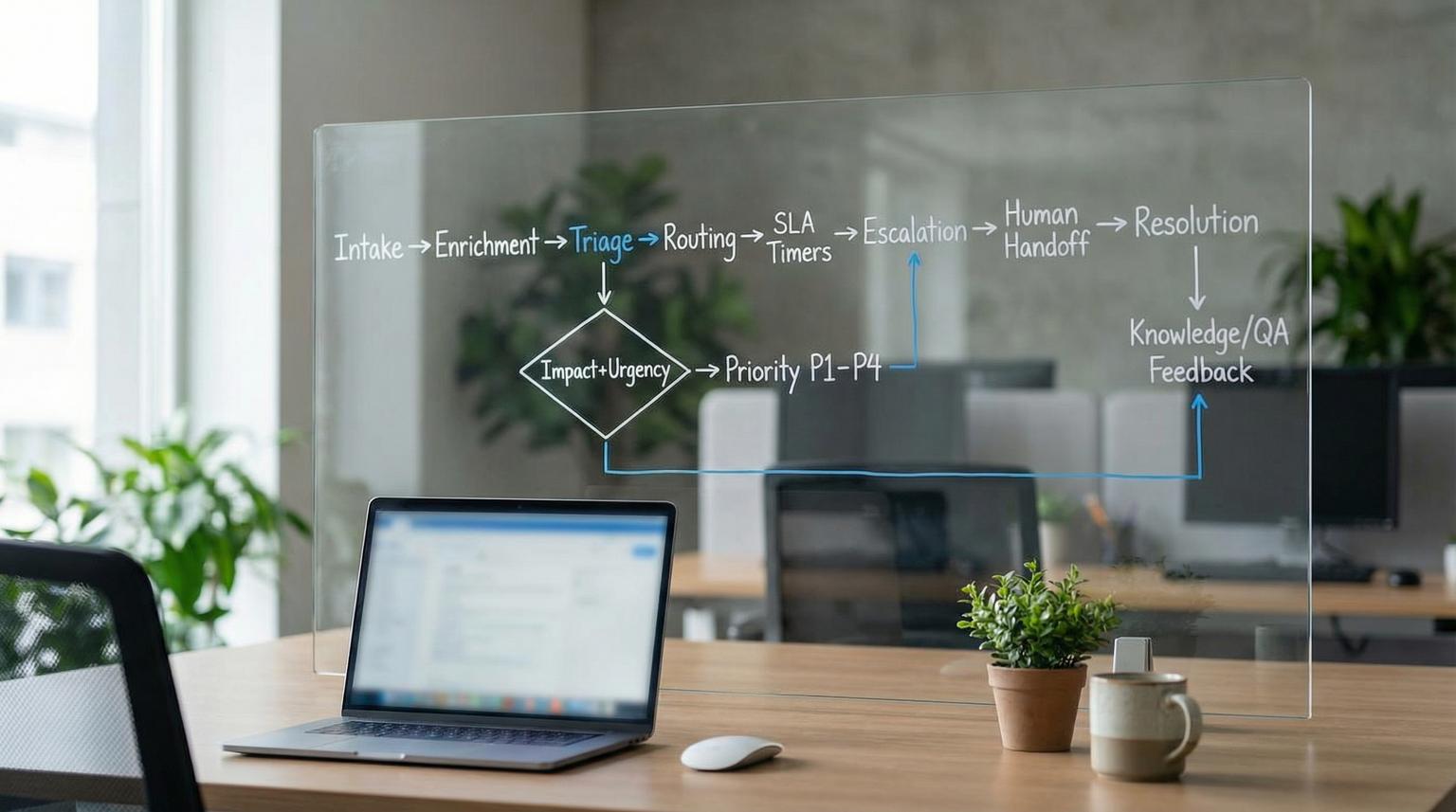
Customer support breaks when automation is added as disconnected patches: a classifier here, a bot there, a few SLA alerts somewhere else. What scales is support ticket automation designed as one system, where intake, triage, routing, SLA timers, escalation and human handoff all share the same data model, the same ownership rules and the same audit trail.
This playbook is for ops leaders, support managers and technical teams who want faster responses and lower effort per ticket without losing accountability, compliance or customer trust. You will get a repeatable methodology you can apply across email, chat, web forms and in-app messaging and you will see how to keep knowledge, QA and continuous improvement tightly coupled to real ticket behavior in 2026.
At a glance:
- Design intake, triage, routing, SLAs, escalation and handoff around one shared ticket schema and one system of record.
- Use impact + urgency as the backbone of priority and pair it with sentiment, entitlement and risk signals (not as a replacement).
- Make routing deterministic with ownership models (product area, skills, time zone) and explicit exceptions.
- Manage SLAs as timers plus events (breach predicted vs breached) with clear escalation stop conditions.
- Close the loop: tickets -> knowledge updates -> QA audits -> rule/model changes with monitoring and rollback.
Quick start
- Pick your system of record for tickets, then standardize all channels to create or update tickets there (email, chat, forms, in-app).
- Define a minimal ticket taxonomy: product_area, category, subcategory, plus impact and urgency definitions.
- Implement a priority matrix (P1-P4) and map each priority to response, resolution and update-frequency targets.
- Create routing rules that use: required skills + product ownership + time zone coverage + load limits.
- Add SLA events: start/stop rules, breach predicted alerts, functional escalation paths and an acknowledgement-based stop condition.
- Instrument overrides (priority changes, reroutes, bot-to-human handoffs) with reason codes so you can improve the system weekly.
- Connect knowledge workflows to closure: link the KB article used, or trigger a missing-knowledge task when none exists.
A practical customer support automation system starts with one consistent intake and ticket data model, then layers triage signals (impact, urgency, sentiment, entitlement) to set priority and route work. SLAs are enforced with timers and escalation events that always preserve a single accountable owner. Knowledge and QA are not separate programs; they are feedback loops attached to ticket outcomes, overrides and failure modes, so rules and AI stay accurate as products and policies change.
Table of contents
- Why support automation fails when it is not a system
- The end-to-end support journey (and the data it must carry)
- Build the ticket schema first (example spec)
- Ticket taxonomy and priority logic that scale
- Routing models that preserve ownership
- SLA management and escalation as event-driven operations
- Human handoff and approvals for high-risk intents
- Knowledge workflows that stay synced with real tickets
- QA, auditing and calibration for automation and humans
- Monitoring drift, versioning rules and safe rollback
- Common use-case patterns you can implement
- Implementing with ThinkBot Agency
Why support automation fails when it is not a system
Most teams automate the visible pain first: auto-tags, canned replies, a chatbot, an SLA warning. The result is often faster handling for easy requests and worse handling for everything else. The common failure is missing shared context: the bot does not know the priority policy, the router does not know the customer tier, the SLA clock ignores channel delays and agents cannot see why something was classified.
Instead, treat support like an operational lifecycle: log -> categorize -> prioritize -> diagnose -> escalate -> resolve -> close -> review. That sequence is a solid baseline for workflow states and transition criteria, and it also makes it obvious what must be captured early so later stages are deterministic and auditable, as described in ITIL guidance.
If you are already building with n8n, it helps to think in terms of one orchestration layer that moves structured ticket objects through steps, rather than many one-off automations. We show a concrete n8n approach to AI classification, confidence thresholds and fallbacks in our n8n guide.
The end-to-end support journey (and the data it must carry)
An end-to-end support journey is the map your automations should follow: omnichannel logging -> enrichment -> triage -> assignment -> SLA management -> escalation -> resolution -> verification/closure -> follow-up and review. This is a clean fit for support automation architecture because each stage has a purpose, required inputs and measurable outputs, as laid out in an incident lifecycle overview here.
The key is continuity of context. A ticket created in chat must carry the same fields and policy meaning as one created by email or an in-app widget. Otherwise you get parallel processes, inconsistent outcomes and reporting you cannot trust.
Design principle: one ticket, one owner, many collaborators
Automation should increase collaboration without blurring accountability. Even if multiple teams contribute, each ticket must have a single accountable owner_team and a single assignee at any moment. Escalation changes who is accountable, and handoff changes who is accountable, but nothing should be ownerless.
Design principle: decisions must be explainable
If a ticket is P1, routed to On-Call and escalated, you should be able to answer: which signals drove that, which policy version was applied and who overrode it if it changed. This is foundational for QA, compliance and continuous improvement.
Build the ticket schema first (example spec)
Before you automate, define the ticket object that all steps will read and write. This keeps routing, SLA timers, escalations and analytics aligned. An incident management schema typically includes requester info, technical details and business context, which is essential for downstream prioritization and assignment per this overview.
Example: minimal schema for automation-ready tickets
Use this as a starting point, then prune or extend it based on your products and risks. Keep names stable because downstream rules will depend on them.

TicketCore:
id, created_at, channel, requester_id
subject, description
product_area, category, subcategory
impact, urgency, priority
sentiment, language
affected_service_or_CI
owner_team, assignee
sla_first_response_due, sla_resolution_due
status, next_action_at
escalation_level, major_incident_flag
resolution_code, root_cause_required
kb_article_linked, csat_sent
Implementation note: store both raw signals and derived decisions. For example, keep impact and urgency separate even if you also store priority. When an agent overrides priority, keep an override reason and the previous value. Those deltas become your improvement backlog.
Ticket taxonomy and priority logic that scale
Taxonomy is not bureaucracy, it is the control surface for routing, reporting and knowledge. Start small: product_area -> category -> subcategory. Then define impact and urgency in plain language. A published priority matrix is useful because it forces shared definitions: impact is the effect on organizational processes or number of users affected, and urgency is how soon significant impact will occur per this matrix.
How to define impact and urgency without endless debates
- Impact should be observable: number of customers affected, revenue at risk, core workflow blocked, compliance exposure.
- Urgency should be time-bound: impact already happening vs impact likely in 72 hours because of a deadline.
- Write examples for each combination, then train both humans and automation on those examples.
Where sentiment fits, and where it does not
Sentiment is valuable as a triage signal, especially for detecting frustration beyond normal support context, but it should not be the sole driver of priority. Use it as one feature alongside impact, urgency, entitlement and security risk, and always allow agent override with feedback capture per this guide.
Checklist: make taxonomy automation-ready
Use this checklist when you are about to implement classifiers, routing rules or SLA policies. If you cannot answer these, automation will amplify inconsistency.
- Each ticket has exactly one product_area value from a controlled list.
- Each category/subcategory pair has an owner_team and a backup owner.
- Impact and urgency definitions are written with examples, not just labels.
- Priority is computed from impact + urgency using a documented matrix.
- Every automation can be overridden by an agent, and overrides require a reason code.
- You track re-categorization and re-prioritization events for review.
- Major incident criteria are explicit (for example, P1 plus multi-customer impact).
- Close codes map to knowledge and product feedback (not just "fixed").
- Taxonomy changes are versioned and communicated to agents.
Routing models that preserve ownership
Routing is where many teams lose accountability. Your goal is not just to get tickets to someone, it is to get them to the right owner with a predictable handoff path when the first stop cannot resolve it.
Core routing models (and when to use them)
- Product-area ownership: best default for B2B SaaS and platforms. Each product_area maps to a team queue.
- Skills-based routing: best when ticket types require specialized training (billing, compliance, technical tiers). Skills-based routing assigns contacts to the most suitable agent, not merely the next available agent per this definition.
- Follow-the-sun coverage: best for global support where response time matters across time zones. Requires structured handoffs and overlap windows per this model.
- Load balancing: necessary guardrail to prevent specialists from becoming bottlenecks. Apply caps per assignee and spillover to a trained backup queue.
Routing must consider duplicates during incidents
During outages, many customers report the same underlying issue. Duplicate aggregation is not a convenience feature, it is an incident scaling mechanism. A more robust approach combines ticket text with incident or failure context to detect semantically different reports of the same event per this research. Practically, that means enriching tickets with incident fingerprints (service, region, error codes, time window) and clustering new tickets to a canonical incident thread.
For chatbot-heavy programs, routing is also where you decide whether the bot answers, drafts or escalates. We outline common bot routing pitfalls and integration patterns in our chatbot implementation guide.
SLA management and escalation as event-driven operations
SLAs are not just numbers on a dashboard. They are timers with start/stop rules, update-frequency obligations and escalation policies. Tiered SLAs by priority are standard because a P1 outage and a P4 how-to question should not share the same response contract as described here.

Define three SLA clocks, not one
- First response due: initial human acknowledgement or a verified automated acknowledgement, depending on your policy.
- Next update due: especially important for P1/P2 incidents so customers are not left guessing.
- Resolution due: final outcome clock, with pause rules for pending customer or third-party dependency.
Escalation design: predicted vs breached
A strong pattern is to separate "SLA breach predicted" from "SLA breached" so the first triggers containment actions and the second triggers management escalation. This reduces fire drills and creates earlier interventions, as recommended in an escalation and exception handling guide here.
Stop conditions: acknowledgement and ownership
Escalation should continue until someone acknowledges and becomes accountable. That acknowledgement-based stop condition is a proven mechanism in incident escalation policies, where notifications proceed level by level until accepted per this overview. Even if you are not using a dedicated on-call tool, you can implement the same logic inside your ticket workflow and notification system.
Human handoff and approvals for high-risk intents
Automation should have off-ramps. The question is not whether you will hand off to humans, it is whether you will do it with full context and the right safety gates.
Synchronous approvals vs asynchronous audits
For high-risk actions, use a synchronous approval gate: the automation pauses, serializes context and waits for a human to approve or deny. For low-risk actions, execute immediately but log decisions for later review. These two oversight patterns are a practical way to balance speed and safety as outlined here.
Define what is high-risk in your environment
- Refunds, credits or chargebacks above a threshold.
- Account ownership or permission changes.
- Data deletion or export requests.
- Legal, compliance or regulated advice.
- Security incidents and suspected abuse.
When a handoff occurs, capture the reason (missing info, missing knowledge, policy uncertainty, customer escalation). If you treat handoffs as labeled failure modes, you can turn them into a continuous improvement flywheel for AI and rules as discussed here.
Knowledge workflows that stay synced with real tickets
Knowledge cannot be a separate documentation project. It must be created and improved as a byproduct of resolving tickets. That is the foundation of Knowledge-Centered Service, where support work and knowledge work are one system per KCS v6.
Operational pattern: link the article used, or create a missing-knowledge task
A practical mechanism is to require agents to link or pin the knowledge article that actually helped resolve the ticket. This creates measurable ticket-to-knowledge linkage, which you can mine to promote content for self-service and to spot gaps when no article can be linked as described here.
How to keep self-serve and agent guidance from drifting apart
- Use one governed knowledge source of truth for both bot answers and agent-assist snippets.
- Standardize article structure (problem, environment, cause, resolution, prevention) so retrieval is reliable.
- Attach knowledge updates to closure for common categories and to post-incident review for major issues.
QA, auditing and calibration for automation and humans
QA is the control system that keeps your support operation consistent as volume grows. When automations and AI are part of the workflow, QA must audit both the human conversation and the automation outputs: classification, routing, SLA actions, suggested replies and knowledge retrieval choices.
Build a QA program that can detect automation regressions
Effective QA programs define what quality means, use repeatable sampling and include calibration sessions so reviewers score consistently, which is critical for reliable trend detection as explained here.
Use a weighted scorecard to reflect risk
A scorecard with weighted categories makes quality measurable and trendable. It also lets you gate releases of new rules or prompts based on outcomes, especially for compliance-heavy intents per this guide.
Comparison table: what to measure to find where the system is breaking
| Metric | What it detects | How to use it operationally |
|---|---|---|
| Priority override rate | Bad triage logic or missing intake context | Review top reasons weekly, update definitions and intake requirements |
| Misroute rate | Broken routing rules or outdated skills map | Fix ownership mapping, adjust skills profiles and add guardrails |
| SLA breach predicted events | Rising demand, wrong SLAs or stalled workflows | Trigger proactive escalation, staffing changes or timer rules review |
| Reopen rate | Low resolution quality or weak handoffs | Improve KB, tighten closure checks and coach based on QA findings |
These metrics also support governance: if overrides spike after a product launch, you likely need taxonomy updates, new macros or new knowledge, not more tickets assigned to the same overwhelmed specialist.
Monitoring drift, versioning rules and safe rollback
Support operations change constantly: new features, new policies, seasonality and staffing. Your automations will drift unless you monitor and manage them like production systems.
Detect drift with control limits and alert payloads
A practical approach is trend monitoring with control limits, plus alert payloads that include context, time range, violated rules and the version of the limit or policy that fired. This converts "something feels off" into a repeatable signal -> containment -> recovery workflow as described here.
Risk and guardrails for support automations
Use these failure modes and mitigations when you deploy new routing logic, AI triage or knowledge-driven replies. They are designed to prevent silent harm at scale.
- Failure: Wrong priority set by automation -> Mitigation: require impact and urgency fields, allow override with reason, monitor override rate by category.
- Failure: Misrouting to a specialist bottleneck -> Mitigation: add workload caps, backup queues and time-based reroute when no acknowledgement occurs.
- Failure: False merge of unrelated duplicate tickets -> Mitigation: require shared incident fingerprint (service + region + time window) before auto-merge.
- Failure: Missed duplicates during an outage -> Mitigation: create temporary incident clusters keyed by incident ID and auto-suggest linkage.
- Failure: Bot provides incorrect policy guidance -> Mitigation: restrict high-risk intents to draft-only, require approvals, and log citations to the knowledge source.
- Failure: SLA alert fatigue from repeated warnings -> Mitigation: deduplicate alerts, use "predicted" events once per ticket per window and escalate only on acknowledgement failure.
Versioning and rollback
- Version your taxonomy, routing rules and AI prompts, store the version on every ticket decision event.
- Deploy changes behind a staged rollout: one queue, one region or a percentage of traffic.
- Define rollback triggers in advance (for example, misroute rate exceeds a threshold for 2 hours).
- Keep a last-known-good configuration that can be restored quickly.
Common use-case patterns you can implement
The same system-level design can support many practical workflows. Below are patterns we implement frequently for growing teams.
Pattern 1: Omnichannel intake normalization
- Email -> parse subject/body, extract account identifiers, create ticket with required fields.
- Chat/in-app -> capture intent, language, sentiment and product context, then create or update the same ticket record.
- Web forms -> enforce mandatory impact/urgency questions for categories where it matters.
Pattern 2: Duplicate-aware incident funnel
- Enrich tickets with incident fingerprints (service, region, error code).
- Cluster to an active incident queue if matched.
- Route canonical incident tickets to an incident owner, route duplicates to a comms-follow queue that sends consistent updates.
Pattern 3: Follow-the-sun handoffs with structured fields
- Routing uses business hours and time zone coverage to assign the active region.
- At shift end, the assignee must fill handoff fields (status, hypothesis, next action, customer questions).
- Use a short overlap window for critical transitions, supported by standardized handoff protocols per this model.
Pattern 4: Knowledge-linked closure and missing-knowledge backlog
- Closure requires: resolution_code and kb_article_linked for top categories.
- If no knowledge exists, auto-create a KB draft task assigned to a knowledge owner with a due date.
- Measure reuse and pin rates to decide what to promote for deflection as suggested here.
Implementing with ThinkBot Agency
ThinkBot Agency helps teams design and implement end-to-end support operations that connect ticketing, CRM, email platforms and AI safely. We build custom workflows, API integrations and n8n-based orchestration so intake, triage, routing, SLAs, escalation and knowledge all run from the same rules and the same data.
If you want a system-level design review of your current support flow and a concrete implementation plan, you can book a consultation.
For examples of the types of automations and integrations we deliver, you can also review our recent work.
FAQ
What is support ticket automation?
It is the use of workflows, rules and AI to standardize how tickets are created, enriched, prioritized, routed, tracked against SLAs, escalated and closed. Done well, it reduces manual coordination while keeping one accountable owner and a clear audit trail.
How do you choose fields for triage without overwhelming customers or agents?
Start with a minimal schema, then add required fields only where they change decisions. For example, impact and urgency may be mandatory for outage-like categories, while simple how-to questions can default to lower priority. Use progressive enrichment: capture basics at intake, then auto-enrich from CRM and product telemetry.
Should we route tickets using sentiment analysis?
Use sentiment as a supporting signal, not the main router. Pair it with intent, customer tier, impact and urgency, then let agents override. Track override reasons so you can tune rules and models safely over time.
What is the safest way to automate refunds or account changes?
Use an approval gate. The automation can prepare the action, gather evidence and draft the customer message but a human must approve execution above a defined threshold or for sensitive intents like permissions, data export or deletion.
How do we prevent automations from getting stale after product changes?
Version your taxonomy, routing rules and prompts, monitor drift metrics like misroutes and priority overrides and run a weekly QA and calibration cadence. When drift spikes, roll back to the last-known-good configuration and fix the root cause before re-enabling.
