
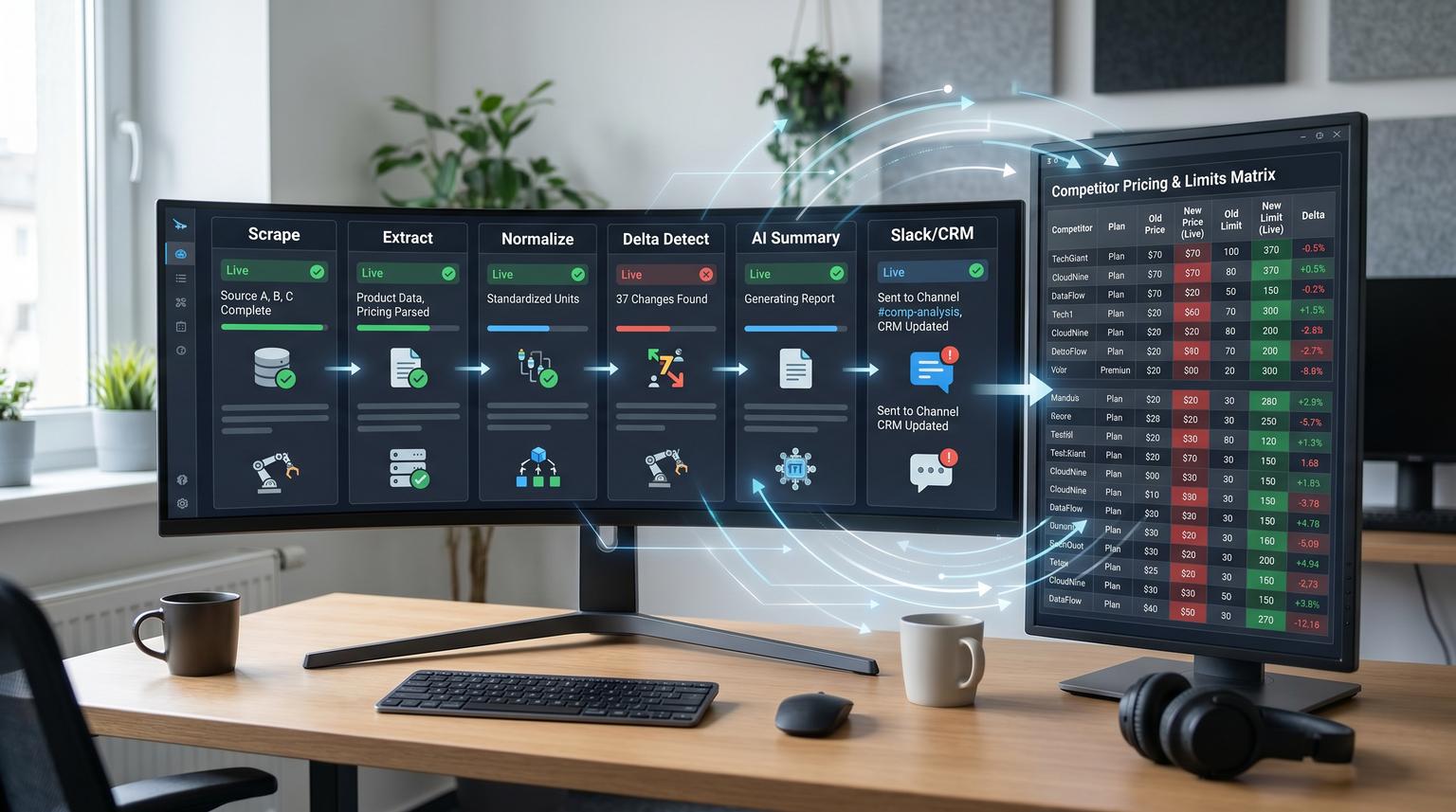
Competitors change pricing pages, plan limits and positioning copy more often than most teams realize. If you are relying on manual checks, you will miss updates or burn hours watching the same URLs. This implementation-focused article shows how to build web scraping for competitor analysis as an always-on loop: scrape targeted pages on a schedule, normalize messy content into a schema, detect meaningful deltas, generate an AI summary and push weekly alerts into Slack plus structured logs into a CRM-ready system of record.
At a glance:
- Track pricing, packaging and messaging changes with a schema-first pipeline that produces clean diffs instead of noisy page snapshots.
- Alert only on meaningful deltas using thresholds and rules so Slack stays useful for marketing and sales.
- Generate a concise AI summary that includes both what changed and why it matters for positioning and sales conversations.
- Log every change to a single source of truth and attach insights to accounts or deals in your CRM.
- Keep it production-safe with batching, retries, rate limits, block handling and an error workflow that self-reports failures.
Quick start
- Create a competitor registry table (Airtable or Sheets) with URLs, page type and extraction rules.
- Run a scheduled workflow (n8n is a strong fit) that scrapes each URL and stores a raw snapshot plus extracted fields.
- Normalize fields into a consistent schema and dedupe against the last known snapshot per page.
- Compute meaningful deltas (thresholds for price and limits plus keyword change rules for positioning).
- Use an LLM to produce a short summary and route it to Slack plus write the structured change record into your log and CRM.
- Add reliability controls: batching, backoff on 429s, retries for transient scrape failures and an error workflow that alerts on broken extraction or blocks.
An ops-safe competitor monitor works by separating scraping from extraction, extraction from change detection and change detection from alerting. You scrape on a schedule, normalize the result into a stable schema, compare the new schema values to the last known values to decide if a change matters, then have an LLM write a short what changed and so what summary. Finally you deliver it to Slack and log it to your CRM or a CRM-ready system of record with retries and failure alerts. If you want a broader pattern for designing and operating these kinds of reliable AI steps inside automation, see our pillar guide: AI workflow automation playbook (design, evaluate, operate AI steps).
Why most competitor monitoring fails in production
Most teams start with a simple page diff or a quick scrape that sends an alert any time HTML changes. That creates two predictable problems:
- Alert fatigue: minor DOM changes, tracking parameters and reordered elements trigger constant noise so stakeholders stop reading.
- No operationalization: even when a real change happens, it never makes it into sales enablement, battlecards or CRM context where it can influence deals.
The fix is to define a system boundary and treat it like an internal product: schema-first (what you track), delta-first (what counts as meaningful) and ops-first (what happens when a scrape fails at 2am).
Define the system boundary and ownership before you automate
This loop touches marketing, sales and ops so you need a small amount of upfront governance. A practical setup we implement for clients looks like this:
- Owner: RevOps or Marketing Ops owns the competitor registry and alert rules.
- Contributors: Product marketing maintains positioning keywords and the list of key pages per competitor.
- Consumers: Sales and CS receive summaries in Slack and the relevant CRM objects get notes or fields updated.
- Cadence: scrape daily or every 6-12 hours for pricing pages, summarize weekly for broad visibility and send immediate alerts only for critical deltas.
Decision rule: if a change would alter how you price, package, position, qualify, or negotiate, it deserves an immediate alert. Everything else goes into the weekly digest.
Build schema-first tracking for pricing, packaging and positioning
Start by defining what you want to extract. You will get better change detection and better AI summaries if you give the pipeline a stable schema to target. Here is a schema that works well for SaaS competitor pages and also maps cleanly into CRM notes and battlecards.
| Field group | Field | Example | Notes |
|---|---|---|---|
| Identity | competitor_name, product_name, page_type, page_url, canonical_url | "Acme", "Acme CRM", "pricing" | Canonical URL helps when tracking parameters change. |
| Pricing | plan_name, price_amount, price_currency, billing_period | "Pro", 49, "USD", "mo" | Normalize currency and period so deltas are meaningful. |
| Packaging | seat_limit, usage_limit, feature_gates | "5 seats", "10k emails", "SSO only on Enterprise" | Store limits as typed values where possible. |
| Positioning | headline, subheadline, key_messages, target_persona | "AI-first helpdesk" | These are often the highest leverage changes for sales talk tracks. |
| Evidence | captured_at, raw_snapshot_ref, extraction_confidence | "2026-06-10T09:00:00Z" | Keep a pointer to raw content for audit and replay. |

Common mistake: trying to extract everything into one free-text blob. That makes dedupe, diffing and CRM syncing much harder. Instead store structured fields for pricing and limits then store a cleaned text section for messaging.
Implement the core workflow scrape to clean to dedupe to change detect to AI summary to Slack and CRM
A proven approach is the same end-to-end pattern used in the n8n community competitor monitor workflow end-to-end competitor monitoring loop: scheduled run, fetch URL list, scrape, extract, dedupe, prioritize then alert and log. Below is the concrete workflow you can implement in n8n, Zapier, Make or a custom stack. We will describe it in n8n terms because it is very explicit about batching and error handling.
1) Scrape on a schedule with controlled throughput
- Trigger: Cron schedule (example: every 6 hours for pricing pages and daily for home and feature pages).
- Source of truth: pull competitor URLs from a table (Airtable, Sheets or a database). This is the registry your team maintains.
- Throughput control: process with a batch loop so you do not spike requests. In n8n this is typically SplitInBatches.
Practical ops insight: set different cadences per page type. Pricing pages change more than security pages, while blog pages can be excluded entirely unless you have a specific reason.
2) Clean extraction as a separate stage you can test
Do not send raw HTML straight into an LLM. First convert the messy page into clean, comparable text and metadata. Tools like Trafilatura are useful here because they produce consistent main-content extraction from diverse layouts. The quickstart shows how you can extract content and metadata in a reproducible way Trafilatura extraction quickstart.
If you are using Python in a microservice for this stage, keep the interface simple:
input: { url, html }
output: {
main_text,
full_text,
title,
canonical_url,
extracted_at,
extraction_mode
}
Tradeoff to decide early: use a fast extraction mode for the majority of URLs then fall back to a slower more accurate mode only when the page is high value or when extraction confidence drops. This keeps costs and runtimes stable while still catching the changes that matter.
3) Normalize and dedupe against the last known snapshot
Now map extracted content into your schema. For pricing and limits, do structured extraction either with rules (CSS selectors for known tables) or with an LLM that outputs JSON and is validated. Then dedupe by comparing the normalized schema values to the last stored snapshot for that URL.
- Snapshot store: update the latest fields per URL (current state).
- History log: append an immutable row per meaningful change (audit log).
This separation is important: the snapshot powers quick comparisons and the audit log supports trends, rollbacks and month-over-month analysis.
4) Detect meaningful changes instead of noisy diffs
Define delta rules per field group. Here is a practical set that reduces noise without missing real moves:
- Price delta: alert if price_amount changes by more than X% or crosses a key threshold (example: moves below a common pricing anchor like $49 or $99).
- Billing model shift: alert immediately when billing_period changes (monthly to annual only, usage-based added, free plan removed).
- Plan limits: alert when seat_limit or usage_limit changes by more than X% or changes from unlimited to capped.
- Feature gates: alert when a strategic feature moves tiers (SSO, audit logs, API access, HIPAA, SOC 2 reporting).
- Positioning keywords: alert when the headline changes or when key message terms are added or removed (example: adding "AI agent" or removing "free" language).
Implementation detail that saves a lot of time: compare cleaned values, not raw strings. For example, parse "$49/user/month" into {49, USD, user, mo}. That makes both thresholds and CRM reporting accurate.

5) Generate an AI summary that is short and action-oriented
Once a meaningful delta is detected, ask the model for two outputs: a factual list of what changed and an interpretation of why it matters for go-to-market execution. The prompt should include the old and new schema values, page type and any account context if you will attach it to a CRM record.
A solid summary format looks like this:
- What changed: 2-5 bullets grounded in extracted fields.
- So what: 1-3 bullets translating the change into messaging, objection handling, qualification, or pricing guidance.
- Suggested internal action: optional one-liner like "update battlecard" or "notify sales team targeting mid-market".
6) Route to Slack and log into CRM-ready storage
For Slack delivery, incoming webhooks are a reliable boundary: post JSON to a webhook URL with a required text field. Slack documents the basic mechanics and payload requirements Slack incoming webhooks.
{
"text": "Competitor change detected: Acme CRM pricing page\n\nWhat changed:\n- Pro plan: $49/mo -> $59/mo\n- Seat limit: 5 -> 3\n\nSo what:\n- Stronger price umbrella for our $49 tier\n- Expect more pushback from small teams, emphasize our seats-per-dollar advantage\n\nLinks:\n- Source: https://competitor.example/pricing\n- Log record: https://your-log.example/record/123"
}
Then log the structured delta to your system of record and push a subset into your CRM. If you want a deeper blueprint for governed CRM write-backs (validation, dedupe, safe upserts, and routing), adapt patterns from ChatGPT for business productivity in n8n (structured workflows and approvals):
- System of record: Airtable, Sheets or a database table that stores snapshot and history.
- CRM logging: create a note on an account or deal, update a competitor field on opportunities, or attach a battlecard link. Keep the CRM payload compact and link back to the full log record.
Capacity note if you use Airtable: design for rate limits by batching and skipping unchanged writes. Airtable documents a 5 requests per second per base limit and HTTP 429 behavior that requires waiting before retrying Airtable API call limits. In practice this is exactly why dedupe and change-driven writes are non-negotiable.
Reliability guardrails that keep the pipeline running without babysitting
Competitor monitoring only works if it runs for months. Reliability is not just retries, it is observability and correct failure handling when the world changes. For a more complete view of failure modes at the CRM/API boundary (and the guardrails that prevent silent data corruption), see a failure map for AI automation in business workflows that touch CRMs and APIs.
Retries, backoff, batching and idempotency
- Retries: retry transient network failures and 5xx responses with exponential backoff.
- Backoff on 429: when your logger hits a 429, pause at least 30 seconds then retry with backoff. Do not spin.
- Batch writes: update multiple change records in one request where supported. This is especially important when logging to Airtable.
- Idempotency keys: compute a change_id hash from {url, captured_at_day, normalized_delta} so reruns do not create duplicates.
Block handling and extraction breakage detection
Two things break scrapers in real life: blocking and page redesign. You can detect both without guessing:
- Blocking signals: repeated 403, 429, CAPTCHA pages, or HTML that suddenly becomes very short and generic.
- Redesign signals: extraction returns empty plan tables, price parsing becomes non-numeric, or headline becomes missing for multiple runs.
When those signals occur, do not quietly skip. Fail loudly and route the incident to the right place with evidence (URL, last successful extraction, raw snapshot reference).
Error workflow and alerting in n8n
n8n supports a dedicated error workflow so failures automatically generate alerts and logs. The docs show how to set it up with an Error Trigger node and how the error payload includes execution id, lastNodeExecuted and error message n8n error handling. This lets you centralize incident notifications across all your automation workflows.
One operational pattern we like: intentionally fail on schema violations. If your extractor cannot produce a numeric price twice in a row, use a Stop And Error style guardrail so the pipeline forces visibility. Silent bad data is worse than a failed run because it creates false confidence.
Operational rollout and monitoring cadence
To get this into production without surprises, roll it out in layers:
- Week 1: run in shadow mode. Scrape, extract and log but do not notify Slack. Validate schema completeness and delta rules.
- Week 2: enable Medium and High alerts to a private ops channel. Tune thresholds and keyword rules until noise is low.
- Week 3: enable critical alerts to the go-to-market channel and enable the weekly digest for broader awareness.
- Ongoing: review a monthly report of false positives, missed changes and extraction failures then update rules.
When this approach is not the best fit: if your competitors have aggressive anti-bot measures and your legal or compliance posture cannot support scraping, you may be better served by first-party sources (pricing emails, public changelogs, partner portals) or a manual but disciplined weekly review process. Automation should reduce risk, not increase it.
A simple checklist to keep alerts actionable for sales and marketing
- Each alert includes competitor, page type and captured timestamp.
- Each alert contains both the old value and the new value for key fields.
- Each alert includes one link to the source URL and one link to the internal log record.
- Only meaningful changes create alerts, not every HTML diff.
- Weekly digest aggregates Info and Medium changes, while Critical changes alert immediately.
- CRM notes are short and reference the full log record rather than copying full page text.
How ThinkBot Agency implements this in real client stacks
At ThinkBot Agency we usually implement this loop with n8n as the orchestration layer plus a clean system of record (often Airtable or a database) and CRM push to HubSpot or Salesforce depending on your stack. The differentiator is not the scrape, it is the end-to-end operational design: schema validation, delta thresholds, batching around rate limits, and an error workflow that keeps the system reliable.
Book a consultation if you want us to map your competitor set, define the schema and deliver a production-ready pipeline with Slack alerts and CRM logging.
If you want to see the kind of automation work we ship, review our portfolio.
FAQ
Common implementation questions that come up when teams move from a prototype to a production loop.
How often should we scrape competitor pricing pages?
For most B2B SaaS teams, every 6 to 12 hours for pricing and plans is enough to catch changes quickly without creating unnecessary load. For homepage positioning and feature pages, daily is usually fine. Use different cadences per page type and alert immediately only for critical deltas.
What counts as a meaningful change vs noise?
Meaningful changes are those that affect pricing, packaging, qualification or competitive positioning: price moves above a threshold, billing model shifts, plan limits change materially, feature gates move tiers, or the headline and core message changes. Noise includes DOM refactors, re-ordered sections and tracking query parameters which should be filtered out by normalization and canonical URLs.
How do we handle CAPTCHAs, blocks and redesigns?
Detect them by monitoring status codes, repeated extraction empties and schema validation failures. When a block or redesign signal appears, stop the run for that URL, log the raw snapshot reference and send an incident alert to Slack with the error details so someone can update extraction rules or adjust scraping settings.
Where should we store the data so sales and marketing can use it?
Use a dual-store approach: a current snapshot table for the latest values per competitor page and an append-only history log for every meaningful change. Then push a concise summary into Slack and attach a short note or structured fields to the right CRM objects, linking back to the full log record.
Can we do this without an LLM?
Yes. You can implement deterministic extraction and threshold-based alerts without AI. The LLM adds value when you want consistent summaries across many competitors and when you need the so what interpretation to help sales and marketing act. If you do use an LLM, keep it downstream of normalization and validate its structured output.
