
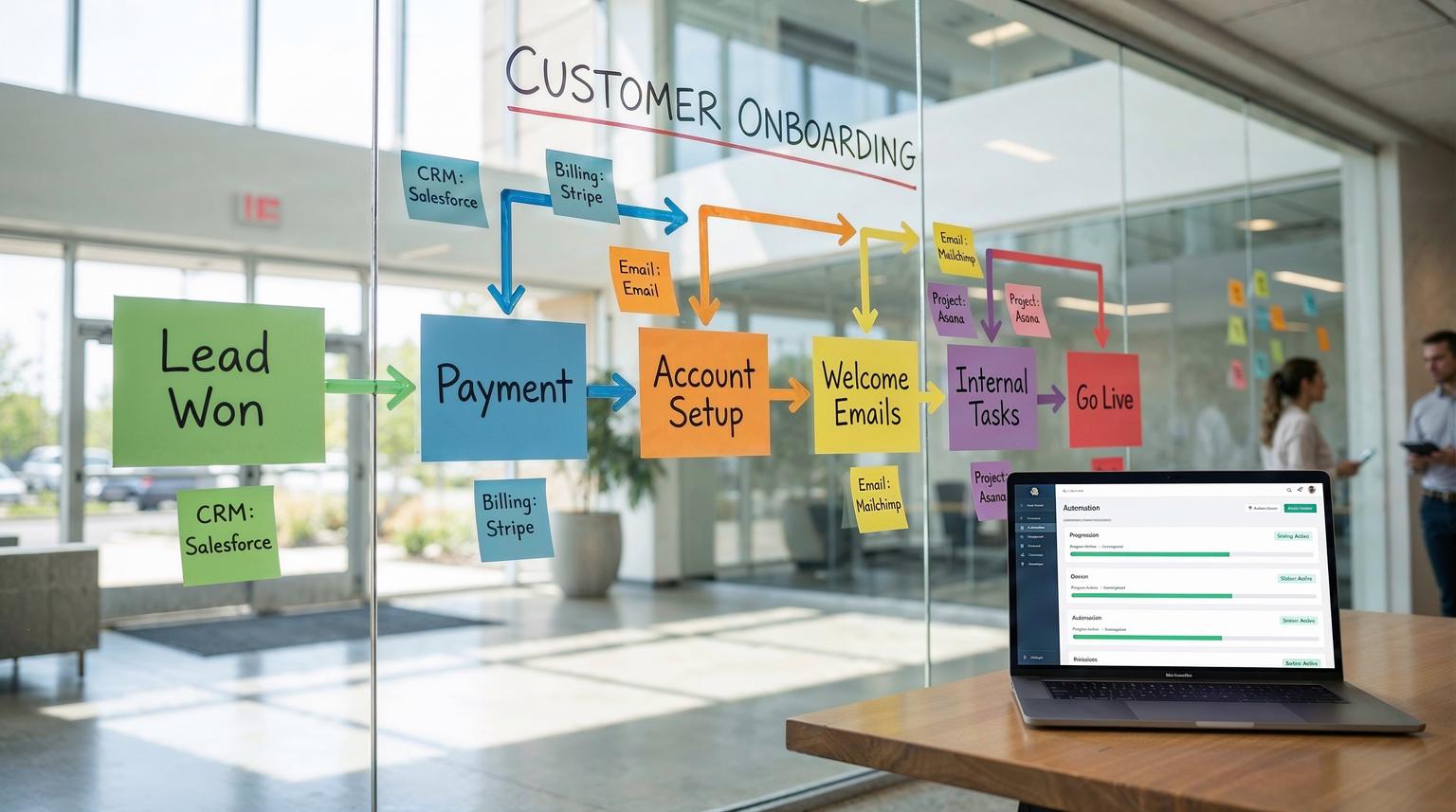
For growing businesses, customer onboarding is often where great sales momentum slows down. Data is copied between tools, emails are written from scratch, and internal teams chase missing details. Workflow automation solutions turn this messy process into a consistent, trackable journey that runs largely on its own.
This guide is for founders, operations leaders, and CRM or marketing teams who want to standardize onboarding across CRM, email, and internal tools using platforms like n8n, Make, or Zapier, backed by AI and smart integrations.
When you use workflow automation solutions for customer onboarding, you connect your CRM, billing, email, and internal tools so that a single trigger, such as a new customer or payment, automatically creates the account, sends a tailored welcome sequence, enriches data, and assigns tasks to your team. The result is faster time-to-value, fewer errors, and a consistent experience for every new client.
The real onboarding problem growing businesses face
Most scaling teams do not have a product problem. They have a handoff problem. Leads become customers, then get stuck in email threads, spreadsheets, and Slack messages while everyone tries to figure out what to do next.
Typical symptoms include:
- Sales closing deals faster than delivery can onboard them
- Customer details scattered across forms, emails, and ad hoc documents
- Inconsistent welcome experiences that depend on who is on shift
- Slow internal coordination between sales, customer success, and operations
- Leads or new clients slipping through the cracks entirely
Research on workflow automation shows that organizations using automation cut setup and assignment times significantly and free people to focus on higher value work instead of repetitive admin. For onboarding, this translates directly into faster activation and happier customers.
What a modern automated customer onboarding journey looks like
A well designed onboarding journey connects your marketing forms, CRM, billing, email, and internal project tools into one seamless flow. At ThinkBot, we typically design journeys around these core stages:
- Capture: collect clean customer data from forms, checkout, or CRM
- Qualify: score and segment the customer based on profile and intent
- Create: set up CRM records, workspaces, and project boards
- Communicate: send welcome sequences and next step instructions
- Coordinate: assign internal tasks, SLAs, and deadlines
- Check-in: schedule feedback or NPS surveys after onboarding

In a Make success story, Mawer Capital used Typeform plus automation to connect long onboarding forms to Monday.com, Keap, Slack, and Google Docs, cutting admin time by up to 80 percent and speeding lead response by 70 percent while keeping data consistent across systems. That type of outcome is exactly what we aim to replicate and adapt for our clients using n8n, Make, or Zapier, with their own tools and logic. To go deeper into how we connect CRM, email, and support tools across a full journey, see our guide on business process automation with n8n.
Core building blocks of workflow automation solutions for onboarding
Regardless of your stack, effective onboarding automation usually relies on the same building blocks.
1. Clear trigger events
Every automated journey needs a starting point. Common triggers include:
- New deal marked as "Closed Won" in HubSpot, Pipedrive, or Salesforce
- First payment received in Stripe or PayPal
- Signup form submitted in Typeform, Tally, or Webflow
- Trial activated or product account created
In platforms like n8n or Make, this is simply a trigger node that listens for a CRM event or form submission and passes the payload into the rest of the flow.
2. Data mapping and enrichment
Once the trigger fires, the next job is to normalize and enrich the data. This is where many manual onboarding processes fall apart because each team uses different spreadsheets and naming conventions.
In a typical ThinkBot implementation, we:
- Define a canonical customer schema (company name, contact, plan, region, IDs)
- Map incoming fields from the trigger app to that schema using the visual mapper
- Call enrichment APIs such as Clearbit or custom data sources to add firmographics
- Use AI to clean up names, addresses, and free text notes where needed
Automation platforms make this mapping step explicit, which reduces human error and ensures every downstream system receives the right fields in the right format. In the Mawer Capital example, Make handled mapping from a 25+ question Typeform into structured Monday.com items and CRM records without anyone touching a spreadsheet.
3. CRM and email automation integration
Your CRM should be the source of truth for customer state. A robust onboarding workflow will:
- Create or update the customer record in your CRM
- Attach key metadata such as onboarding tier, use case, and owner
- Add the customer to the correct lifecycle stage and segment
- Trigger a welcome email sequence in tools like HubSpot, ActiveCampaign, or Klaviyo
Instead of manually adding new customers to lists, your automation can instantly start a tailored welcome journey based on plan, region, or product type. This is the same principle used to automate employee onboarding with a central record and stage field, as shown in an employee onboarding example, and it transfers perfectly to customer onboarding.
4. Internal task and project creation
Customer onboarding is not just emails. Your team needs to configure environments, schedule calls, and deliver assets. Workflow automation solutions shine here by creating and assigning internal tasks automatically.
Typical actions include:
- Create a project or ticket in tools like Monday.com, ClickUp, Asana, or Jira
- Assign the onboarding owner based on routing rules (territory, product, capacity)
- Generate a checklist of onboarding steps with due dates
- Post a summary in Slack or Microsoft Teams with a link to the project
This pattern, where a central record and status drive downstream actions, is the same pattern used to automate HR onboarding stages with Airtable and chat tools. It provides a clear state machine for customer progress and a single view of what needs to happen next. If you are choosing between platforms for these workflows, our Zapier vs. n8n comparison explains tradeoffs for CRM and onboarding use cases.
5. Provisioning and environment setup
For SaaS or technical products, a key part of onboarding is provisioning environments, workspaces, or integrations. Instead of engineers manually creating tenants, you can drive provisioning directly from your CRM using automation and infrastructure APIs.
In an AWS case study for Kiteworks, Salesforce data triggered infrastructure templates that spun up secure, isolated environments in minutes instead of hours. The same idea can be applied in a simpler way for most growing businesses. For example, an n8n workflow can:
- Listen for a "Customer Activated" event in your CRM
- Call your product API to create an account and workspace
- Apply plan-specific settings and limits
- Log the environment details back into the CRM and project tool
This closes the loop between sales, operations, and engineering and makes environment creation a predictable, auditable step in the onboarding journey.
Step-by-step: building an automated onboarding journey in n8n
To make this concrete, here is a simplified, practical walkthrough of how ThinkBot would design an automated onboarding journey using n8n. The same logic applies if you prefer Make or Zapier.
Step 1: Audit your current onboarding process
Start with an honest audit. Map out your current steps on a whiteboard or diagram:
- Where does the customer first appear as "won" or "signed"
- Which tools hold customer data today (CRM, billing, forms, spreadsheets)
- What emails and documents you send during onboarding
- Which teams are involved and what tasks they perform
- Where errors, delays, or confusion usually occur
We often structure this as a simple framework: Audit -> Map -> Integrate -> Test -> Optimize. The audit gives us the raw material for the rest.
Step 2: Design your ideal automated flow
Next, design your target flow independent of tools. For each stage, decide:
- Trigger: what event starts this stage (e.g. payment received, form submitted)
- Owner: which team or role is responsible for this stage
- Data: what information is required and where it should be stored
- Actions: what needs to happen automatically, what needs human review
For example, your "Day 0" flow might be:
- Deal marked Closed Won in HubSpot
- Automation creates product account and project in ClickUp
- Owner assigned based on region and workload
- Welcome email with next steps sent to the customer
- Internal Slack notification with key details and links
Step 3: Implement the flow in n8n
In n8n, you would then translate that design into a workflow:
- Trigger node: HubSpot "Deal property changed" or "New Deal in Stage"
- Filter/IF nodes: Ensure this is a customer you want to onboard (e.g. paid, not internal test)
- HTTP or app nodes: Call your product API to create the account; create a project in ClickUp or Monday.com
- Set and mapping nodes: Normalize and map fields such as plan, region, and owner
- Email node: Trigger a welcome email via SendGrid, Mailgun, or your marketing platform
- Slack node: Post a summary with links to the CRM and project
We add error handling at each step, including retries for transient API failures and fallback notifications to an internal channel if something breaks. This kind of resilience is important when you depend on third party tools and APIs, as noted in workflow automation case studies.

Step 4: Add AI for smarter routing and personalization
Once the core flow is stable, AI can make onboarding more intelligent without making it opaque. Practical use cases include:
- Summarizing long form responses into a short brief for your onboarding team
- Classifying customers by use case and complexity based on free text answers
- Generating personalized welcome messages or setup checklists
- Normalizing messy data such as addresses, job titles, or custom fields
In the Mawer Capital example, OpenAI was used inside Make to clean up fulfillment data before sending it to vendors, with a validation step to catch issues. Similarly, we often combine AI steps in n8n or Make with deterministic rules and validation so AI augments your flow instead of silently changing critical data. For more patterns on combining AI with deterministic flows, see our article on AI-powered workflow automation.
Step 5: Test, monitor, and iterate
No onboarding automation should go straight to 100 percent of your customers on day one. We recommend:
- Running the flow in a sandbox or test pipeline first
- Onboarding a few low risk customers while monitoring every step
- Logging all key events and storing an audit trail in your data warehouse or logging tool
- Adding alerts for failures or anomalies
As you refine the flow, you can gradually increase coverage and add advanced branches such as VIP onboarding paths, international compliance checks, or multi product setups.
Where AI fits into customer onboarding automation
AI is not a replacement for clear processes. It is a powerful layer on top of good workflow design. In onboarding, AI is especially useful for:
- Understanding unstructured data from discovery or intake forms
- Prioritizing onboarding tasks based on complexity or risk
- Creating tailored onboarding plans per segment or persona
- Summarizing calls or chat transcripts into CRM notes
- Flagging unusual patterns or potential churn risks early
We often implement a hybrid pattern similar to AI powered document workflows, where AI extracts or classifies information, a rules engine validates it, and low confidence cases are routed to humans. This keeps automation safe while still delivering big time savings.
Common mistakes when automating onboarding (and how to avoid them)
Over the years, we have seen the same pitfalls repeatedly. Here are a few to watch for.
Automating a broken process
If your current onboarding is inconsistent or unclear, automation will just make the chaos faster. Always clarify ownership, stages, and success criteria before building workflows.
Ignoring data quality and governance
Messy data leads to wrong provisioning, incorrect invoices, and awkward emails. Use mapping, validation, and enrichment steps to standardize data. Implement checks such as required fields, format validation, and duplicate detection before you create accounts or send emails.
Underestimating exceptions
There will always be special cases. Instead of trying to automate every edge case, design clear escape hatches. For example:
- If a key field is missing, create a task for a human to review instead of guessing
- If an API call fails repeatedly, open an incident ticket and pause the flow for that customer
Lack of observability
Without logs, dashboards, and alerts, you will not know when onboarding breaks. Use your automation platform and logging stack to track:
- Number of customers entering each stage
- Success and failure rates per action
- Average time in each onboarding stage
These metrics also help you quantify ROI and justify further investment in automation. If you want to extend these practices beyond onboarding into your wider stack, our overview of business process automation solutions outlines a broader framework.
How ThinkBot designs tailored workflow automation solutions
Every business has different tools, products, and edge cases, so copy pasting a template rarely works. At ThinkBot, we treat onboarding automation as a design problem first and a tooling problem second.
Our typical engagement approach
- Discovery and audit: We interview sales, CS, and operations to understand your current process, tools, and bottlenecks.
- Journey and architecture design: We map the ideal onboarding journey, define states and triggers, and choose the right mix of platforms such as n8n, Make, Zapier, HubSpot, or custom APIs.
- Implementation: We build and test workflows, set up error handling, and connect your CRM, email platform, billing, and internal tools.
- AI augmentation: Where valuable, we add AI for classification, summarization, and personalization with clear guardrails.
- Handover and optimization: We document the flows, train your team, and help you iterate based on real world metrics.
If you want expert help designing or implementing your onboarding automation, you can view our track record as a top performing automation partner on Upwork.
Is your onboarding ready for workflow automation?
If you recognize any of these signs, you are likely ready to invest in automation:
- Your team spends hours each week copying customer data between tools
- New clients wait days between signing and first contact
- Onboarding steps live in someone's head or a static document
- Different customers receive very different experiences for the same product
- You cannot easily answer where each customer is in onboarding right now
Workflow automation solutions will not remove the need for human relationships, but they will remove the repetitive, error prone work that slows those relationships down. For growing businesses, that can be the difference between a leaky pipeline and a scalable, reliable onboarding engine.
FAQ
How do workflow automation solutions improve customer onboarding?
They connect your CRM, billing, email, and internal tools so that a single trigger, such as a new deal or payment, automatically creates accounts, sends welcome emails, assigns internal tasks, and tracks progress. This reduces manual work, eliminates duplicate data entry, and gives customers a faster, more consistent experience.
Which tools are best for automating onboarding workflows?
For most growing businesses, low code integration platforms like n8n, Make, or Zapier work well alongside CRMs such as HubSpot, Pipedrive, or Salesforce and email tools like HubSpot, ActiveCampaign, or Klaviyo. The right mix depends on your stack, data volume, and need for self hosting or advanced customization.
Can AI safely be used in customer onboarding workflows?
Yes, when used with guardrails. AI is ideal for summarizing long answers, classifying use cases, and cleaning up messy data. Combine AI steps with clear validation rules and human review for low confidence cases so that critical actions, such as provisioning or billing, are still governed by deterministic logic.
How long does it take to implement automated onboarding?
Simple onboarding workflows can often be designed and deployed in a few weeks, especially if your tools are already in place and your process is well defined. More complex setups with multiple products, regions, or compliance requirements may take several phases to fully automate, starting with the highest impact steps first.
What does ThinkBot need from us to start automating onboarding?
We typically need access to your current process documentation or a walkthrough, admin access or sandbox accounts for your CRM, email, and project tools, and clarity on your onboarding goals and constraints. From there, we can propose an architecture and phased roadmap tailored to your business.
